
Machine-to-Machine (M2M) Authorization
Machine-to-machine (M2M) authorization—typically implemented using the Client Credentials grant type defined in RFC 6749: The OAuth 2.0 Authorization Framework—enables secure communication between applications without human intervention. Instead of authenticating individual users, LoginRadius verifies and authorizes trusted devices or applications using predefined credentials and permissions. This ensures systems can exchange data and execute tasks automatically while maintaining strict security measures. By leveraging M2M authorization, businesses can facilitate seamless and secure interactions across their connected systems.
Key Features of M2M:
- Secure Communication: All interactions, including token exchange and data access, are encrypted to ensure security.
- Automation: The process is fully automated, eliminating the need for human intervention.
- Strict Authorization: Only devices or applications with valid credentials and permissions can access the resources.
Common Use Cases
M2M authorization is essential for scenarios that require secure, automated authentication, including:
- Service–to–service authentication– Allows applications to communicate securely, such as a web application connecting to a cloud database for data retrieval or updates.
- IoT Device Authorization – Allows smart devices to access cloud services automatically without manual authentication.
- Third-Party API Integrations – Ensures external services can securely connect to an application’s backend for seamless data exchange.
- CLI Clients to Internal Services: This feature enables command-line tools to interact securely with internal APIs, ensuring efficient and protected operations.
M2M Authorization Workflow
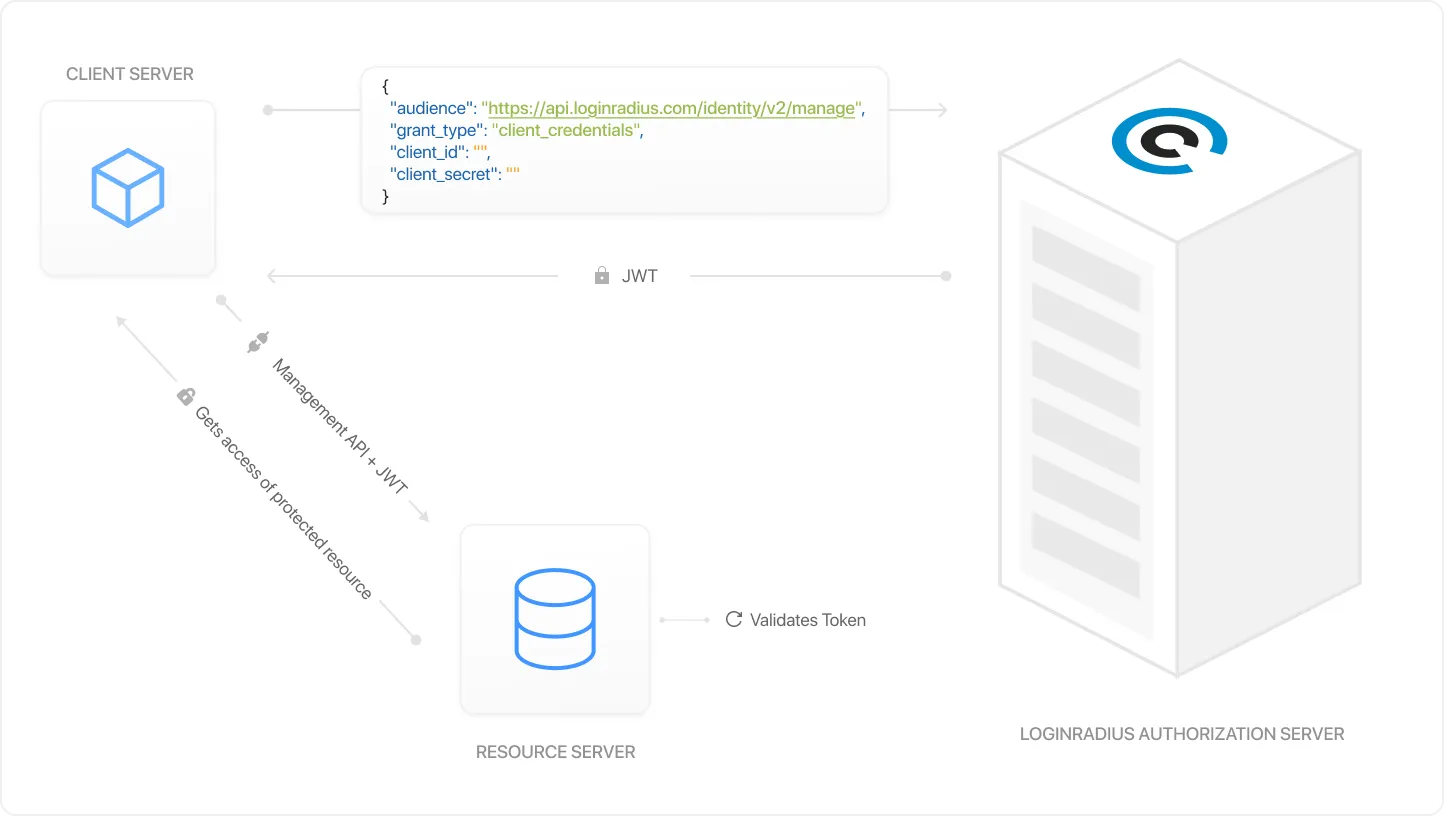
The workflow shown in the image illustrates how machine-to-machine (M2M) authorization securely facilitates automated communication between a client-server, a resource server, and the LoginRadius Authorization Server:
- Request for Access Token:
The client-server (partner application or device) initiates the process by requesting the LoginRadius Authorization Server with valid credentials. - Token Generation:
The LoginRadius Authorization Server checks the credentials. If valid, it issues a JSON Web Token (JWT) that serves as proof of authorization and includes the permissions needed for access. - Trigger Management APIs:
The client-server uses the JWT to request access to the resource (e.g., profile information via LoginRadius Management APIs). The resource server verifies the JWT with the LoginRadius Authorization Server to ensure it is valid and authorized. - Access to Protected Resources:
If the JWT is valid, the resource server allows the client-server to access the requested data or resource. This ensures that only trusted devices or applications can interact securely.
Configurations
To manage secure API access with defined permissions, set up and configure a machine-to-machine (M2M) app in LoginRadius. Follow these steps to create an app and configure its authentication settings.
Create the App
Configure the App
- Navigate to Applications in the Console.
- Click Add Application.
- Enter a unique Application Name and click Create Application.
Your app is now created and you will be taken to the app's configuration page.
General
Tokens
Endpoints
APIs
MCP Clients
Connections
1. Credentials & Security
- Name : The display name for your service.
- Client ID : Auto-generated unique identifier. Used in token requests.
- Client Secret : Auto-generated secret. Authenticates your service with the Authorization Server. Store securely, never expose in code or repositories.
- Token Endpoint Auth Method : For M2M apps, typically
client_secret_postorclient_secret_basic. - Default Workflow : Set the default interaction pattern for this application.
2. Grant Settings
-
Grant Type : M2M apps use Client Credentials exclusively:
- Client Credentials : The service authenticates using its own Client ID and Client Secret to obtain an access token directly, with no user interaction.
-
Scopes : For M2M flows, scopes represent API-level or resource-level permissions, not user profile data. Define custom scopes under the APIs tab that correspond to the specific resources your service needs to access.
User profile scopes such as Email address, Phone, and Profile are not applicable for M2M flows.
3. MCP Registration (Optional)
- CIMD (Client ID Metadata Document) : Allows your service to use a URL as its identity for automatic server-side verification.
- DCR (Dynamic Client Registration) : Enables services to register and obtain credentials automatically at runtime. Useful for dynamic microservice environments.
1. Token & Session Settings
- Access Token Lifetime (secs) : How long the access token remains valid before the service must re-authenticate. (Default: 3600)
Refresh Tokens and ID Tokens are not applicable for M2M (Client Credentials) flows. Only Access Token lifetime is relevant.
Tokens are signed using the RS256 algorithm.
2. Authorization Requests (Optional)
- RAR (Rich Authorization Request) : Can be configured if your service requires fine-grained authorization details in its token requests.
PAR is not typically used in M2M flows since there is no user-facing authorization step.
3. Data Mapping & Metadata (Optional)
- Audiences : Define the resource servers this service's tokens are intended for. This is critical in M2M flows to scope tokens to the correct resource server.
- Data Mapping : Attach custom fields or properties to the token data response.
- Metadata : Add static non-profile values to the data response.
M2M apps interact primarily with the Token URL to obtain access tokens directly:
- Token URL : Your service posts its Client ID and Client Secret here to receive an access token.
- JWKS URL : Public keys for verifying token signatures on the resource server.
- OAuth Authorization Server Metadata : Auto-discovery document for server configuration.
Authorization URL, User Info URL, Device Authorization URL, OpenID Discovery Endpoint, and Back-Channel Logout are not applicable for M2M flows.
Cross-Origin Authentication
CORS Origin is not typically required for M2M flows since service-to-service communication does not originate from a browser.
This is the most critical section for M2M apps. Define:
- Audience : The resource server(s) this app's tokens are valid for.
- Scopes : The specific API permissions this service is granted. These scopes are included in the access token and validated by the resource server.
Unlike user-facing apps, M2M scopes are resource permissions, not user profile claims. Follow the principle of least privilege when assigning scopes.
MCP clients connected to this application will be listed here. Use the search bar to find clients by name or client ID.
Enable Set authentication configuration for this app to configure authentication-level settings specific to this application.
Key Terms and Options
This section outlines essential terms and authentication methods required for implementing M2M authorization. Understanding these concepts ensures secure and efficient communication between systems.
Authentication Method
Allowed Scopes
LoginRadius supports three methods for authenticating at the token endpoint:
- Client Secret Post: Sends the
client_idandclient_secretin the request body. Ideal for systems that cannot include credentials in headers. - Basic Authentication: Sends the
client_idandclient_secretas a Base64-encoded string in the Authorization header. Standard and secure when using HTTPS. - Auto: Automatically selects the best authentication method based on the request for easier integration.
The following scopes define the specific actions that can be performed by applications or devices using M2M authorization. These scopes ensure fine-grained control over resource access and permissions:
- User Management:
update:users– Update user details.delete:users– Delete user accounts.
- Tokens and Verification:
create:email_verification_token– Generate email verification tokens.create:forgot_password_token– Generate tokens for password recovery.create:sott– Generate Secure One-Time Tokens (SOTT).revoke:tokens– Revoke active tokens for users or applications.
- Privacy Policy and Compliance:
read:users_privacy_policy_history– Access the history of users’ privacy policy agreements.
- Role Management:
create:roles– Create new roles for users or applications.update:roles– Modify existing roles.delete:roles– Remove roles.
- Custom Objects:
create:custom_objects– Create custom data objects.read:custom_objects– Access custom objects.update:custom_objects– Modify custom objects.delete:custom_objects– Delete custom objects.
These scopes allow applications to interact securely with resources while maintaining strict access controls. To minimize security risks, always assign only the necessary scopes.
Integrations Guide
This guide walks through the implementation of M2M for secure server-to-server authentication without user interaction. The client application can request an access token from LoginRadius using a Client ID and Secret, allowing secure API interactions based on assigned scopes.
Client Credentials Flow
Generate M2M token
Retrieve M2M token info
Access Resource
The client application requests an M2M token by sending a POST request to the LoginRadius token endpoint.
API implementations
Generate Access Token API: This API is used to generate an Access Token using Client Credential Flow.
Request Body
{
  "audience": "https://api.loginradius.com/v2/manage",
  "grant_type": "client_credentials",
  "client_id": "<CLIENT_ID>",
  "client_secret": "<CLIENT_SECRET>"
}
Response
{
  "access_token": "eyJz93a...k4laUWw",
  "token_type": "Bearer",
  "expires_in": 86400
}
The access token is returned and will be used for future API calls.
Before using the JWT token in API requests, ensure its validity by checking its issuer, audience, expiration, and signature.
API implementations
Validate Access Token API: This API validates Access Token in Client Credential Flow.
Request Body
{
  "token": "string",
  "token_type_hint": "string",
  "client_id": "string",
  "client_secret": "string"
}
Response
{
  "active": true,
  "iss": "<Issuer URL>",
  "aud": "<Audience URL>",
  "sub": "<Subject Identifier>"
}
Once the Access Token(JWT) token is validated, authenticate and interact with LoginRadius APIs.
Example API Request
curl --request GET \
  --url https://api.loginradius.com/identity/v2/manage/account/{uid} \
  --header 'authorization: Bearer <ACCESS_TOKEN>' \
  --header 'X-LoginRadius-ApiKey: {API_KEY}'
APIs will function based on assigned permissions (scopes) without requiring the secret.
Authenticate Custom APIs
The Client Credentials Flow can also be applied to custom APIs. A token tailored to the specific API can be obtained by specifying a custom audience during the token request, ensuring secure access and communication between systems.
Register the Custom API Resource
Before requesting tokens for a custom API, register it as an API Resource in LoginRadius under Authorization → APIs in the Admin Console. The registration defines the audience identifier, the scopes it exposes, the token TTL, and any token exchange settings.
See API Resources for the full configuration guide — including identifier rules, per-API scopes, token settings, and validation behavior. The same registration powers audience-restricted tokens across Client Credentials, Authorization Code, PKCE, and OIDC flows.
Once your API Resource is registered, use the Identifier URI as the audience value in the token request below.
Custom API Token
Use the Access Token(JWT)
Send a POST request to generate the Access Token (JWT) with a custom API.
API implementations
Generate Access Token API:This API is used to generate an Access Token
Request Body
{
  "audience": "<CUSTOM_API_ENDPOINT>",
  "grant_type": "client_credentials",
  "client_id": "<CLIENT_ID>",
  "client_secret": "<CLIENT_SECRET>"
}
curl --request GET \
  --url <CUSTOM_API_ENDPOINT> \
  --header 'authorization: Bearer <ACCESS_TOKEN>'
Revoke Access Token
If an access token needs to be invalidated, revoke it to terminate its validity. Revoking an access token is a security measure that prevents unauthorized access if it is compromised or no longer required.
This process ensures that access to the protected resource is effectively blocked, reinforcing security and minimizing risk.
API implementations
Revoke Access Token API: This API revokes the generated access token(JWT).
📌 Note:
- The siteurl should be LoginRadius Auth Studio/Custom Domain URL (e.g., companyname.hub.loginradius.com).
- If using a custom domain, replace siteurl with the custom domain name.
Request Response Structure
Here is a structured table for all request body parameters and responses used in the Client Credentials Flow, along with their descriptions:
Request Body Parameters
| Parameter | Description |
|---|---|
| audience | The target resource or API the client wants to access (e.g., https://api.loginradius.com/v2/manage). For custom APIs, use the custom endpoint. |
| grant_type | Specifies the OAuth 2.0 grant type. Always set as "client_credentials" for M2M authentication. |
| client_id | LoginRadius provides a unique identifier for the m2m application. |
| client_secret | The secret key is associated with the M2M application. Do not share or expose this value. |
| scope (optional) | This field defines the permissions granted by the token. The default scopes assigned to the application will be used if not provided. |
Response
| Field | Type | Description |
|---|---|---|
| active | boolean | true if the token is valid and active. |
| iss | string | The token issuer (usually the authentication server). |
| AUD | string | The intended audience for this token. |
| sub | string | The subject identifier (the entity associated with this token). |