
Deployment
The LoginRadius platform is designed with a high degree of flexibility, offering a range of implementation methodologies. This empowers businesses to tailor user authentication and identity management workflows to their needs. With solutions like auth studio, Identity Orchestration, SDKs, and JavaScript Libraries, companies can choose the features that best suit their requirements or even combine them to create seamless user authentication experiences.
Common Business Use Cases
LoginRadius provides flexible authentication and identity management solutions that are secure and scalable, ensuring that businesses can confidently handle user experiences as they grow.
- Unified Authentication for Multiple Platforms: Deploy centralized login pages and Single Sign-On (SSO) for seamless authentication across web and mobile applications.
- Customizable User Journeys: Implement fully customizable login and registration flows using API integration, SDKs, JavaScript Libraries, and IO.
- Scalable Multi-Tenant Deployments: Manage authentication for multiple brands, business units, or customer segments within a LoginRadius instance.
- Rapid Deployment with Auth Studio: Use LoginRadius’ IDX framework to launch authentication pages quickly without extensive development.
- Flexible Branding and Theming: Adapt authentication UI across platforms with multi-branding support and self-hosted frameworks.
Implementation Methodologies
LoginRadius offers multiple deployment options designed to accommodate different business needs, providing flexibility, security, and ease of integration. Whether organizations require a fully managed hosted authentication experience, a self-hosted solution, or complete control through APIs, LoginRadius provides robust implementation methodologies that ensure a smooth and seamless integration process.
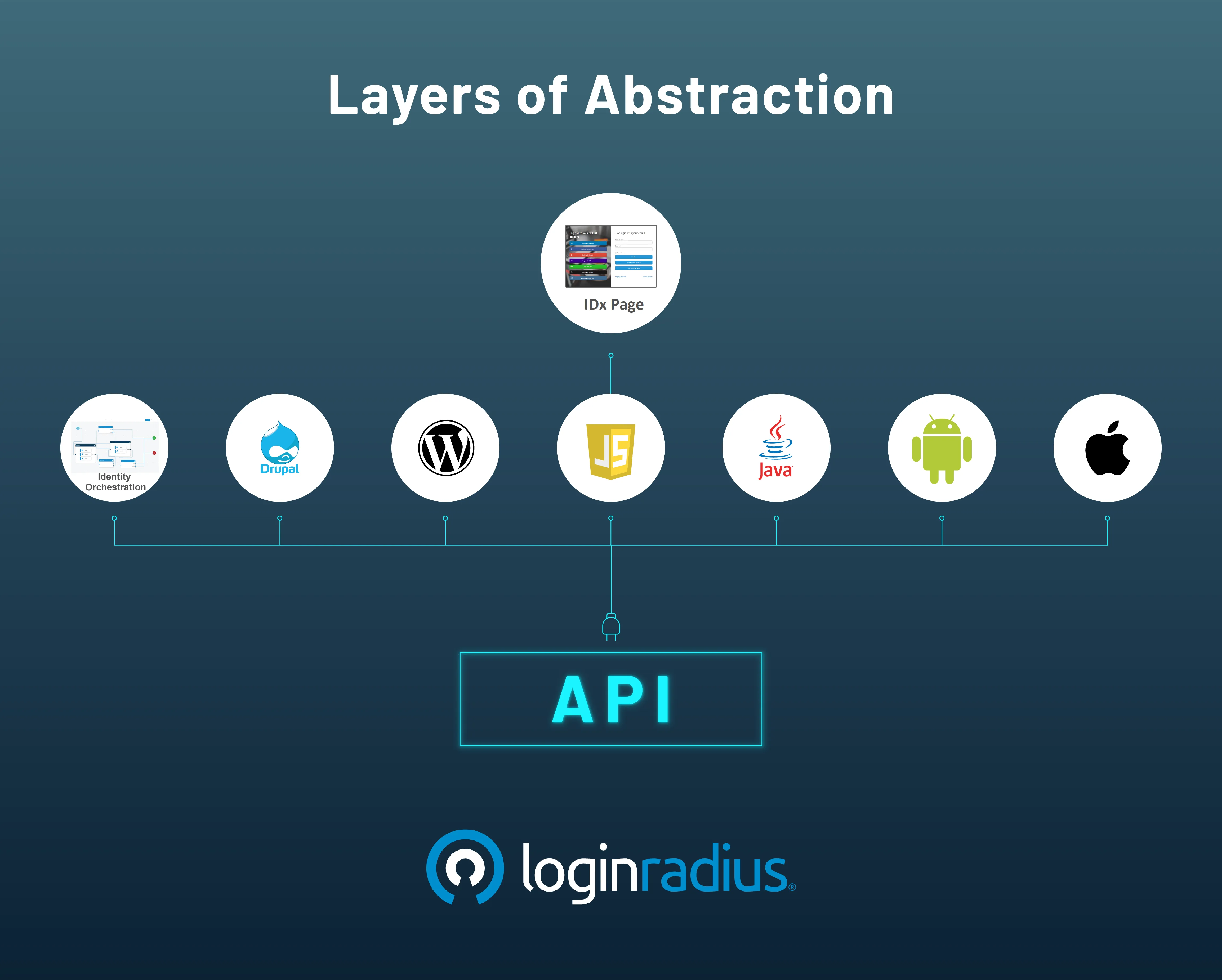
Auth Studio
The Auth Studio enables businesses to establish a centralized authentication page hosted on LoginRadius. It provides predefined layouts that can be customized using the LoginRadius Admin Console, allowing modifications to CSS, HTML, and JavaScript elements. This ensures a consistent user experience across multiple applications.
Key Benefits:
- Centralized Authentication: Manage multiple sites and authentication flows from one location.
- Customizable UI: Modify styles, branding, and scripts via the Admin Console.
- Quick Deployment: Implement authentication with minimal coding effort.
Basic Configuration Steps:
- Navigate to Auth Studio in the Admin Console.
- Customize CSS, HTML, and JavaScript as per branding needs.
- Define the authentication workflows and redirect URLs.
- Save the configurations and deploy the Auth Studio.
Refer to this document for more detailed information on auth studio and their customization.
-
Multi-branding
The Auth Studio framework supports multi-branding, enabling businesses to tailor authentication pages based on customer access points. This ensures that different branding elements (logos, colors, and messaging) are dynamically displayed depending on user entry points.
Methods for Multi-Branding:
- Query Parameter Detection: Append a brand parameter to the IDX URL (e.g., ?brand=Brand_A) and dynamically load different styles.
- Domain-Based Detection: Detect the domain from which the IDX page is accessed and apply corresponding branding elements.
- Custom JavaScript and CSS: Use separate JavaScript files or dynamically load CSS to modify branding.
Please refer to this document for detailed information on Multibranding customization and configuration.
Identity Orchestration
Identity Orchestration (IO) empowers businesses to design and manage customized identity workflows that align with their unique customer journeys. Whether it's registration, authentication, or password recovery, IO provides the flexibility to configure workflows using pre-built templates or create tailored experiences with the intuitive Workflow Builder. This ensures seamless identity processes for different brands, customer segments, or use cases, optimizing security and user experience while improving operational efficiency.
Key Features of Identity Orchestration
- No-Code Workflow Builder: Design and modify authentication workflows using drag-and-drop tools.
- Pre-Built & Custom Workflows: Utilize ready-made templates or create tailored identity processes.
- Brand Customization: Apply AI-generated themes or configure branding for multiple customer segments.
- Advanced Automation: Implement validation checks and system integrations with custom scripts.
- Seamless Deployment: Test, edit, and launch workflows instantly for continuous improvements.
Basic Configuration Steps
- Access Workflow Builder – Navigate to Identity Orchestration in the Admin Console.
- Customize Branding – Modify themes, colors, and layouts using AI or manual tools.
- Design Workflows – Drag and drop nodes to create registration, login, and recovery processes.
- Implement Scripts – Add validation and automation logic as needed.
- Test & Deploy – Preview, refine and publish workflows with a single click.
This ensures businesses can create scalable, secure, and flexible identity journeys with minimal effort. More details can be found in this document.
Frontend SDK
LoginRadius ships two generations of frontend libraries. New integrations should adopt V3 — a lightweight, hook-driven SDK shared by both JavaScript and React. V2 remains supported for existing deployments and continues to receive maintenance updates.
V3 (Recommended)
V3 is a ground-up rewrite with a modular architecture, promise-based APIs, default styles, and built-in localization. A single engine powers both distribution packages, so JavaScript and React applications share the same flow registry, session, and customization surface.
- V3 JS SDK (
@loginradius/loginradius-js) — all-in-one JavaScript SDK that ships pre-built UI components rendered into any DOM container. Works with any framework or plain HTML via CDN. Best for Vue, Angular, Svelte, and vanilla HTML. - V3 React SDK (
@loginradius/loginradius-react) — React-first SDK with context providers, hooks, and pre-built flow components that manage auth state through React's component model. Best for React and Next.js applications.
Migrating from V2? Follow the V2 → V3 Migration Guide.
V2 (Legacy)
The V2 JS library remains the right choice for existing customers who depend on its hook system, form library, and context-based customization. It is not recommended for new builds.
- JS Hooks — trigger actions before, during, or after form events to drive UI updates, validation, error handling, and API interactions.
- Advanced JS Customizations — extend behavior with custom scripts, event listeners, and API integrations for tailored UI/UX, security, and validation.
- JS Form Library — a pre-built framework for login, registration, password reset, and MFA forms with flexible design and validation.
- Customization by Context — adapt the authentication interface based on user location, device, and language using customizable labels, messages, templates, and UI themes.
Backend SDK
The Backend SDKs simplify integration into server-side applications, providing authentication, user management, and social login functionality. All SDKs are open-source and can be modified to fit specific requirements.
Supported languages and runtimes:
- HTML5 Library
- ASP.NET Library
- Java Library
- PHP Library
- Coldfusion Library
- Node.js Library
- Python Library
- Ruby Library
- Golang Library
- Elixir Library
Mobile SDK
The Mobile SDKs implement native authentication for Android, iOS, and hybrid frameworks. They are optimized for mobile app development and follow best practices in security, session management, and user authentication.
Supported platforms:
- Android SDK
- iOS SDK
- Ionic SDK
- Ionic 2 SDK
- PhoneGap SDK
- Xamarin SDK
- React Native SDK
Turnkey Plugins
Turnkey Plugins are pre-built CMS and eCommerce integrations that let businesses adopt LoginRadius authentication with minimal development effort.
Supported plugins:
- Drupal Plugin
- Joomla Plugin
- Magento Plugin (Magento 1.x & 2.x)
- WordPress Plugin
- BigCommerce Plugin
- Shopify Plugin
- Salesforce Commerce Cloud Plugin
- Adobe Experience Manager Plugin
- SAP Hybris Plugin
API Integration Overview
API Integration provides a flexible and customizable approach to managing authentication, registration, and user management. With LoginRadius APIs, developers can create interfaces and interact with authentication flows, offering greater control over user experience and data handling.
Key API Integration Benefits
- Full Customization: Build your authentication UI and directly interact with LoginRadius APIs.
- Scalability & Security: Handle login, registration, password recovery, and social login while ensuring data security.
- Seamless API Calls: Utilize RESTful APIs with JSON responses for smooth data exchange.
- Control Over User Flows: Implement business-specific login mechanisms and manage user identities.
Common API Endpoints
- Create User: Register a user with custom attributes.
- Login User: Authenticate users and retrieve an access token.
- Forgot Password: Trigger password reset emails.
- Reset Password: Validate reset tokens and update passwords.
- Verify Email: Confirm user email during registration.
- Social Login: Enable authentication via third-party providers.
Developers can fully control UI/UX and enhance authentication workflows by integrating LoginRadius APIs into their applications.
For more details, refer to the API documentation.
Best Practices
- Select the Right Deployment Approach: Depending on your business needs, you can use IDX for quick setup or API integration for complete control.
- Enhance Security: Implement MFA, secure tokens (SOTT), and input validation to prevent attacks.
- Optimize Performance: Use asynchronous API calls, caching, and monitoring to ensure scalability.
- Improve User Experience: Customize authentication flows with multi-branding, localization, and seamless UI.
- Monitor and update Regularly: Track authentication patterns, detect anomalies, and keep SDKs/APIs updated for security enhancements.