Security Feature
Threat Prevention
A major component of our CIAM solution is ensuring a robust security layer to prevent or block threatening activities in user authentication flows. LoginRadius offers a number of fully configurable and customizable options, built directly into the platform, that detect and block irregular activities during registration and login processes.
These threat prevention mechanisms are designed to safeguard online applications across diverse environments, including websites, mobile applications, gaming consoles, and smart TVs.
Threat Prevention Matrix
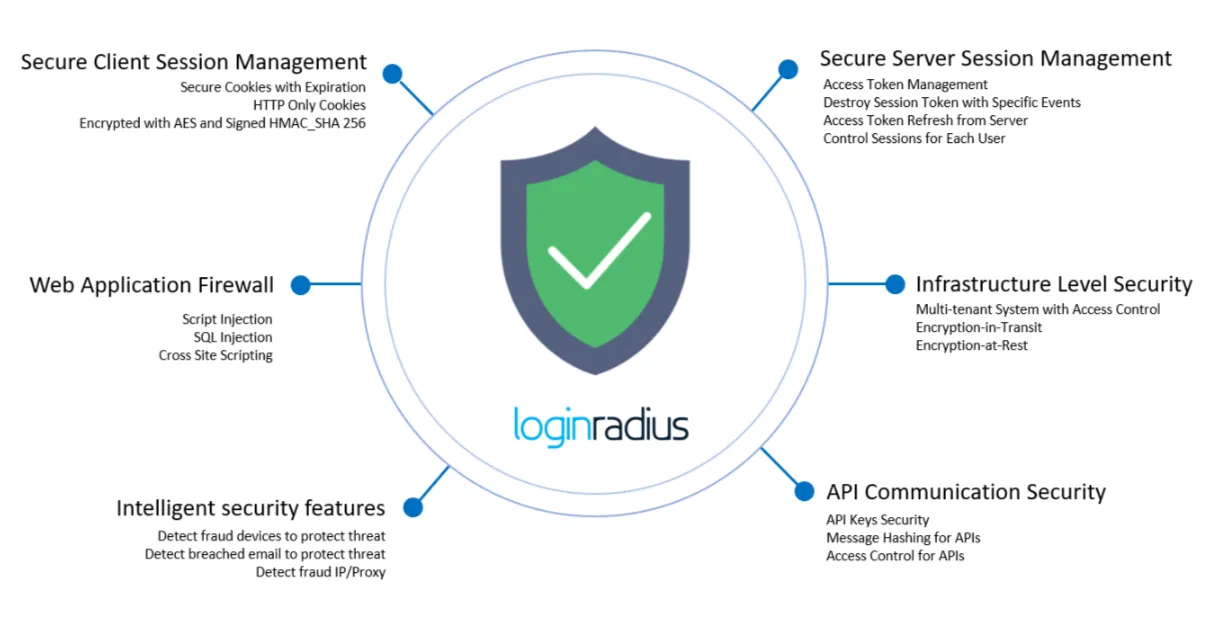
Secure Client Session Management
LoginRadius uses secure technology and best practices to protect both client and server sessions.
- Secured Cookies: Our system, by default, creates secured cookies that are only accessible via the HTTPS protocol.
- HTTP Only: We set some critical cookies to HTTP only to ensure they cannot be accessed through client-side JavaScript.
- Encrypted with AES and signed HMAC_SHA 256: Although our cookies are secure, we encrypt them using the AES algorithm and make them tamper-proof using HMAC_SHA 256 hashing.
- Cookie Expiration: We provide an option for our customers to customize the expiration times on cookies, including session cookies.
Secure Server Session Management
LoginRadius uses secure technology and best practices for server session management. We use OpenID Connect protocol standards with timed access tokens to ensure server sessions are secure and private for each user.
- Access Token Expiration: Our customers can set a custom expiration period for the access token, making the session no longer valid after the token expires.
- Invalidate Access Token: This feature allows for the explicit expiration of access tokens from the server.
- Invalidate Current Sessions: Users can fully manage their existing sessions and manually invalidate any currently active sessions.
- Invalidate Sessions on Event: Based on predefined events, the system can invalidate any currently active sessions for a user.
- Remember Me: This option allows the user’s session to be preserved within the browser, even after the browser has been closed and reopened.
- Refresh Access Token: This option gives you control to refresh the user’s access token and extend the user’s session for a given period of time.
- Enforce All Users to Logout: Account administrators have the ability to invalidate all currently active sessions for their users. This forces all users to re-authenticate and provides an opportunity to request extended data or display updated terms and conditions.
- Control Session for Each User: Account administrators have granular control of their users’ sessions and can invalidate a specific user’s individual session.
Web Application Firewall (WAF)
The LoginRadius platform has a built-in web application firewall to prevent web application programming attacks.
- Script Injection: Our APIs are fully secured against script injection attacks.
- SQL Injection: Our APIs are fully secured against SQL injection attacks.
Infrastructure-Level Security
The LoginRadius infrastructure is based on a secure multi-tenant architecture design, with full end-to-end in-transit encryption from the end user’s browser to the LoginRadius cloud application, as well as internal data server encryption. The LoginRadius data storage also offers the highest level of security by using data encryption at rest.
- Multi-Tenant System: All customer data is separated by a physical file boundary. We also create a private database for each customer.
- Isolated Application Server: We have isolated servers for each infrastructure level, including databases, application servers, cache servers, load balancers, etc.
- Static IPs: We have static IPs for all public-facing applications.
- Firewall Protected: All servers are firewall-protected, ensuring that only the required ports are open.
- Encryption in Transit (End-to-End): All LoginRadius API calls and the associated data are encrypted in transit from the end user to the LoginRadius cloud application and also in transit within our data center.
- Encryption at Rest: Our data storage, logs, cache, and persistence storage are fully encrypted.
- Database-Level Access Control: Our databases are fully protected via access control and a restricted firewall within our private network, ensuring that only our data application layer can access the databases. The data cannot be accessed by any other system.
Intelligent Security Features
The LoginRadius platform has built-in intelligent security features as part of our application design and framework.
- Detect Suspicious Devices to Protect Against Threats: Our system detects fraudulent devices and blocks any action from them.
- Detect Suspicious IPs/Proxies: Our system detects suspicious IPs (client IP or proxy server’s IP) and blocks any action from them.
- Detect Breached Emails to Protect Against Threats: Our system is integrated with data breach detection services and can detect if your user’s data has been breached anywhere and enforce various mitigation actions.
API Communication Security
As REST APIs are a critical part of the LoginRadius platform, we have built them using industry-standard best practices for maximum security.
-
API Keys Security: All access management APIs, i.e., APIs that provide access to authentication, registration, data management, etc., are protected by API Keys.
-
Primary API Secret: There is only one Primary API Secret, which is needed to call the access management APIs. It has full API access and can be used in any capacity with the LoginRadius platform. Customers can request to reset it as per their requirement.
-
Additional API Secrets: These API Secrets can be generated to take the place of the Primary Secret for specific actions based on their permissions.
- Role: These Secrets can be set for a specific role.
- Revoke: These Secrets can be revoked at any time.
- Expiration: These Secrets can have a predefined expiration and will be automatically revoked after the specified time period.
-
-
CAPTCHA: For registration APIs, we provide CAPTCHA options that force users to verify that they are not a bot or a malicious user.
-
SOTT: For mobile devices, we provide an alternative to CAPTCHA in the form of a secure one-time token (SOTT), which can be long-term and also revocable.
-
Message Hashing: If a customer does not want to directly use the API Secret, they can provide a hashed signature or body hash using the API Secret, which our system will validate and allow the API call to pass through if matched.
-
Access Control: Our API calls are secured using API secrets, but for systems that may require higher security, we can enable Access Control over the APIs.
- IP Access Control: We provide the ability to whitelist IP addresses for access management APIs, which restricts API calls to only the whitelisted IPs.
- Read-Only API Access: Through our additional API Secrets feature, additional API Secrets can be set to read-only.
Identity Data Compliance
LoginRadius is the leading cloud-based provider of Customer Identity and Access Management (CIAM). We are committed to providing the highest level of security for user data delivery, storage, and management through our platform. Our system is built on a modern cloud infrastructure to ensure best-in-class uptime, availability, and overall performance.
In addition, our platform provides robust data security both in transit and at rest. This document provides an overview of the security measures and compliance levels that have been developed over the past five years and are currently in place.
End-User Security and Privacy Controls
An important aspect of our security features is the emphasis on the end-user security to prevent any harmful and malicious activity and to ensure that the user profiles and data are protected from fraudulent activity. We have security measures in place for both the website end-users, as well as for the safety of your LoginRadius account and access.
Brute Force Prevention (and Dictionary Attack Prevention)
LoginRadius has multiple built-in features that can help to mitigate automated form submissions that attempt to brute force their way into an account:
- Built-in ReCaptcha Support- Google ReCaptcha can be enabled on your forms to prevent automated submissions. This supports all of the standard Google ReCaptcha customizations, such as localization and the Invisible ReCaptcha.
- Automated Lockout- Your LoginRadius forms can be configured to lockout or prompt users to go through additional verification (login disable, security question, ReCaptcha, etc.) if the system identifies multiple duplicate requests on a given form.
- Security Question: If a user enters an invalid answer to the security question a specific number of times, they will be blocked from the account.
- Input validation: LoginRadius supports, from both client-side as well as server-side, strong validation on all inputs to ensure the consistency of the data being entered. For example, LoginRadius makes sure that email addresses provided are RFC compliant and prevents insecure inputs, such as script injection.
Password Management
There are multiple ways in which LoginRadius can improve the security of your users through the following supported password management settings:
- Password Expiration- Your LoginRadius account can be configured to periodically request an updated password from your users. The time period for this is fully customizable and it would trigger a password update request once the configured increment has elapsed.
- Password History- You can restrict the usage of previously used passwords and can customize how many previous passwords would be remembered and disallowed.
- Password Complexity- You can set both client-side and server-side complexity requirements that would force your users to comply with the configured complexity requirements.
- Security Question during Password Reset- LoginRadius allow you to configure security questions for resetting passwords in case a user forgets their password. These security questions are highly secure because the stored answers are hashed. As well, if a user fails to enter the correct answer after a specific number of attempts, the user is blocked and only the site admin can unblock the user.See the following document for more details on LoginRadius Password Management.
Multi-Factor Authentication (MFA)
LoginRadius supports configuring a second layer of security for your user accounts. This requires users to verify their access either through SMS messaging or through an authenticator app. We also support the Backup codes to provide access in case the user loses their device that is configured for MFA. The triggers for this feature can be controlled to provide users with the option to enable this feature for themselves, or you can choose for this feature to be a mandatory requirement for your user base.
For more details on how MFA works see this document.
Access Restrictions
LoginRadius provides the ability to configure domain or individual level access restrictions. The LoginRadius platform can be configured to either allow or prevent users to register with specified domains. This enables you to prevent authentication or registration for specific domains or for a given email address. Users who have the domain as part of their email address or whose emails are included in the restricted list will not be able to authenticate via LoginRadius.
Session Management
The LoginRadius Platform maintains secure session management for both server and client-side. We utilize the OAuth 2.0 protocol standard for server-side session management, handling it with timed access tokens. For client-side sessions, we utilize the local browser storage and browser cookies. Our services do not store critical information in cookies as we only store the reference IDs that are non-identifiable. These IDs are also encrypted, so they are tamper-proof with the hashing of the encrypted values.
API Level Authentication
- API Key and Secret: To perform operations with admin-related APIs, LoginRadius supports the API key and secret combination authentication for securing the API so that only the site owner or authorized users of the LoginRadius site can access the APIs. We also provide the ability to generate additional secrets with specific permissions. Therefore, in the case if multiple people need access to the site, each team member can have their own respective secrets. You will then be able to revoke this if required. See this section to get access to your API key and Secret.
- API Key and Access Token: To perform operations for the user's session related API, LoginRadius supports API key and Access Token (limited lifetime) authentication combination to secure APIs. See this document for more details on the tokens that are used in the platform.
Privacy Policy Acceptance
Additional opt-ins can be displayed to your end-users and LoginRadius supports both built-in privacy policy and email subscription opt-ins. You can also configure your own custom opt-in requirements or fields to be displayed to your users if the default opt-in fields do not suit your requirements.
Self-Managed Account APIs
LoginRadius provides a full suite of account management APIs that allow your admins to facilitate any requests. These APIs can also be integrated into a self-service management flow and displayed directly on your user's profile page. LoginRadius also offers a pre-built management suite that can be accessed by your customer success or administrators via the LoginRadius Admin Console interface. This suite of tools allows you to handle everything from user creation, user updates, to user deletion.
User Management by Administrator
LoginRadius provides more than a simple for your data; we provide powerful tools with which you can use to manage and decide what you would like to do with the data. Essentially, now that we have captured the required data, we can help you with managing the existing users, retrieving and exporting their information, and more.
Administration User Data
LoginRadius streamlines your Administrator/Customer Support interactions. We offer a complete out-of-the-box user management console via our LoginRadius Admin Console, as well as a direct API console via our documentation. All of the user management features can also be directly integrated into your existing Admin Console via our APIs.
Export User Data
You can export your data, and LoginRadius provides you with multiple methods to access and export this data. You can request a CSV or JSON formatted dump of your user data on demand or scheduled basis from the LoginRadius Admin Console, or you can directly access the data via API to generate your own exports. All exports are password protected and with an expiration period.
Real-time User Activity
Keeping your systems in sync when using multiple platforms can often be a tedious process. LoginRadius simplifies this by giving you multiple means of feeding the data to your platforms in real time. You can register a service with LoginRadius and get receive real-time user data via LoginRadius webhooks or you can directly capture and pass your user data around as it is utilized in your application by using our APIs.
Block/Lock and Delete User
Managing your users is not just about the user data and often involves moderating your users. LoginRadius supports a flexible moderation platform that allows you to control and restrict access for users. You have full control of the criteria and actions taken against the users and can block or delete users as per your requirements.
Internal Employee Administration
LoginRadius uses Single Sign-On (SSO) federation for employee login, so all of the security features we provide for your end-users are also available for employees who are managing the LoginRadius account.
Single Sign-on with Internal IAM
LoginRadius supports all major industry standard federation providers, allowing you to make sure you have a seamless authentication flow regardless of the platform that is providing the Identity. Quickly get your admins or customer support team on track in using the LoginRadius management suite by tying it directly to an active directory or any platform that you are currently using to maintain internal users.
Roles and Permissions
Control access to your LoginRadius account and Admin Console by setting up your admins with specific access permissions so your team has access to the sections that are relevant to them.
Multi-Factor Authentication (MFA)
LoginRadius supports the same extended access permission that we allow you to assign to your users with our LoginRadius Admin Console. This allows you to add additional security to your critical systems and forces the users to go through the second factor via SMS, authenticator app, or backup codes.
Audit Logs
You can monitor your team’s usage of the LoginRadius account and any configurations changes or actions that are being made in real time. Track all changes in real time and quickly revert mistakes.
User Registration Compliance
COPPA Compliance
COPPA (Children's Online Privacy Protection Act) is the US act that applies to websites and online services operated for commercial purposes that are either directed towards children under 13 or have actual knowledge that children under 13 are providing information online. LoginRadius supports full COPPA client workflows, which allows you to provide age requests/verification, block non-compliant users, and manage family-based user accounts where the parents/guardians can authorize access for minors.
Please see more information about COPPA here
WCAG Compliance
WCAG (Web Content Accessibility Guidelines) are part of a series of web accessibility guidelines that specify how to make content accessible, primarily for people with disabilities - but this also for all user agents, including highly limited devices, such as mobile phones.
LoginRadius Platform supports WCAG 2.0 and allows customers to customize all aspects of the user interface and the user experience of their web applications. We provide simple solutions to both style and customization of both the UI and UX in all aspects of your LoginRadius interfaces. LoginRadius provides interface boilerplate templates that you can extend and modify to suit your brand and user experience requirements.
Please see more about WCAG here.