What is Multi-Factor Authentication (MFA)?
Passwords have been the foundation of online security for decades. From email accounts and banking applications to cloud platforms and e-commerce websites, a simple username-and-password combination has traditionally been used to verify user identity.
The problem is that passwords are no longer enough.
Data breaches expose billions of credentials every year. Attackers use phishing campaigns, credential stuffing attacks, password spraying, and social engineering techniques to gain unauthorized access to user accounts. Even strong passwords can be compromised if they are reused across multiple services or entered into a fraudulent login page.
This growing threat landscape has made identity security one of the most important priorities for organizations worldwide. As a result, businesses are increasingly adopting Multi-Factor Authentication (MFA) to strengthen account security and reduce the risk of unauthorized access.
Multi-Factor Authentication (MFA) is a security framework that requires users to verify their identity using two or more authentication factors before accessing an account, application, or system. Traditional password-based authentication relies on a single factor something the user knows. MFA creates a layered, defense-in-depth security model by requiring additional verification factors, making it significantly more difficult for attackers to compromise accounts even if passwords are stolen.
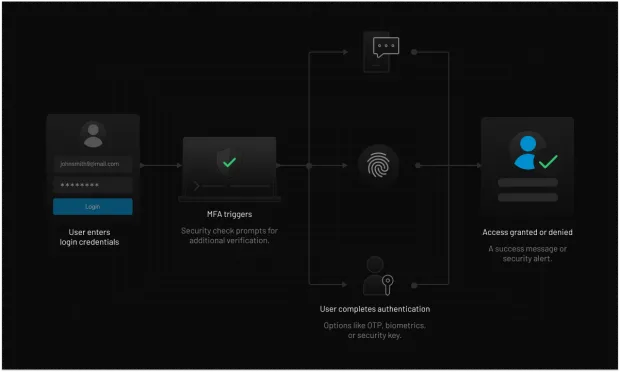
Behavioral authentication is an emerging MFA technology that continuously analyzes user behavior to detect anomalies and identify suspicious activity. By combining multiple authentication factors such as a password (knowledge factor) and a biometric scan (inherence factor) organizations can significantly reduce the risk of credential theft, account takeover, and identity-based attacks.
Today, MFA is widely used across industries including e-commerce, financial services, healthcare, government, media and communications, and SaaS platforms. Whether protecting customer identities, employee accounts, or privileged administrators, MFA has become one of the most effective security controls available for preventing unauthorized access in modern digital environments.
Best Practice: No single authentication factor is perfect. Organizations often combine multiple authentication methods, such as authenticator apps, biometrics, or adaptive MFA, to balance security and user experience.
What Authentication Factors Does MFA Use?
Multi-factor authentication verifies identity using more than one type of authentication factor. Instead of relying only on a password, MFA combines independent forms of verification to make unauthorized access significantly more difficult.
The most common authentication factors include:
-
Something you know: Passwords or PINs
-
Something you have: Smartphones, authenticator apps, hardware security keys, or OTP devices
-
Something you are: Fingerprints, facial recognition, or other biometrics
-
Something you do: Behavioral signals such as typing patterns or device interactions, often used in adaptive MFA
The strength of MFA comes from combining factors from different categories. For example, even if an attacker steals a password, they would still need access to the user's trusted device or biometric verification to complete authentication successfully.
The strength of MFA comes from combining factors from different categories. For example, even if an attacker steals a password, they would still need access to the user's trusted device or biometric verification to complete authentication successfully. This layered approach makes MFA one of the most effective defenses against credential theft, account takeover, phishing, and other identity-based attacks.
Want to learn more? Our guide to Authentication Methods explains authentication factors in detail and how they fit into modern authentication strategies.
Why is MFA Important?
Cybercriminals are getting increasingly sophisticated and even using AI to power brute force attacks, credential stuffing and phishing to exploit weak or stolen passwords. According to Microsoft Digital Defense Report, Identity is the most frequently attacked perimeter with a surge in password-based attacks, and MFA acts as a critical “circuit breaker” to secure your perimeter:
-
Enhanced Security: Even if a password is leaked in a data breach, unauthorized access is blocked by requiring an additional authentication factor.
-
Prevention of Phishing Attacks: Since MFA requires multiple authentication factors that involve physical possession of your device, it significantly reduces the success of social engineering attacks.
-
Ensured Regulatory Compliance: MFA is no longer just a "best practice"-it is a legal requirement. Implementing robust authentication is essential for compliance with GDPR, HIPAA, PCI DSS, and the recently mandated NIS2 Directive (2026).
-
Reduced Risk of Account Takeover: By adding layers of friction for attackers but not legitimate users, MFA protects your accounts from getting hijacked.
-
Improved Business Continuity: Companies using MFA can prevent operational disruptions caused by unauthorized access and cyber threats.
-
Cost Savings and Avoiding Liability Issues: Implementing MFA reduces the financial impact of security breaches, reduces the risk of regulatory fines, recovery costs, and legal liabilities related to data breaches.
MFA by the Numbers
-
MFA blocks 99.9% of automated attacks (Microsoft)
-
Over 80% of breaches involve stolen credentials (Verizon DBIR)
-
The average cost of a data breach is $4.88 million (IBM 2024)
-
90% of cyberattacks start with phishing (Google / Mandiant)
These numbers make one thing clear: MFA is no longer optional for modern security.
Why Passwords Alone Are No Longer Enough
For decades, passwords served as the primary method of verifying user identities. While convenient, passwords rely on a single secret that can be stolen, guessed, reused, or exposed through phishing attacks and data breaches.
The challenge is growing. Microsoft reports that MFA can block more than 99% of automated account compromise attempts, while the Verizon Data Breach Investigations Report (DBIR) continues to identify credential abuse as one of the most common attack vectors. Identity-based attacks such as credential stuffing, account takeover, and phishing remain among the fastest-growing cybersecurity threats facing organizations today.
Attackers now use automated tools to perform credential stuffing, password spraying, and brute-force attacks at scale. Even strong passwords can be compromised if users unknowingly enter them into fake login pages or reuse credentials across multiple services.
As organizations adopt cloud applications, remote work environments, and customer-facing digital platforms, relying solely on passwords creates unnecessary risk.
Multi-factor authentication addresses this weakness by requiring additional forms of verification beyond a password. Even if an attacker obtains valid credentials, they must still successfully complete another authentication factor such as a mobile device, authenticator app, security key, or biometric verification.
This layered approach significantly reduces the likelihood of unauthorized access, account takeover, and identity-based attacks, making MFA one of the most effective security controls available today.
How Does MFA Work?
Since we’ve learned what MFA is and why it’s important, let’s understand how it works. The MFA process is straightforward yet highly effective. Here’s how it works:
-
Identification & Initial Request: The process begins when a user initiates a login by providing a primary identifier typically a username or email address alongside a password (the "Knowledge" factor). A secure stateless system that receives an API request does not log the user in yet. Instead, the backend validates the password and responds with a short-lived, highly scoped intermediate token—such as the LoginRadius SecondFactorAuthenticationToken which isolates the user in a temporary "pre-authentication" state until the next factor is cleared.
-
The Challenge: In usual MFA setups, once the identity claim is evaluated and confirmed, the system requests the additional authenticator factor. Alternatively in an adaptive MFA environment, the context of the request is evaluated and the system checks for anomalies (e.g., an unrecognized IP address or unusual time of day). Based on this risk score, the system triggers a "challenge" for the secondary factor (such as SMS OTP, TOTP, or WebAuthn/Passkeys) only if it thinks that the user is not who they claim to be.
-
Verification (The Cryptographic Handshake): The user provides the second factor, such as a biometric scan (Inherent) or a hardware key (Possession). The server then validates this against encrypted records using asymmetric cryptography (public and private keys). In modern standards like FIDO2, this is done via a secure handshake that ensures sensitive data like your actual fingerprint or voice never leaves your device. If the user is using a standard 6-digit code from Google Authenticator (TOTP), there is no asymmetric cryptography involved. It uses a shared symmetric secret key.
-
Authorization & Access: Once the secondary validation passes, the system destroys the temporary pre-auth token and successfully completes the Authentication phase (confirming who the user is). The identity provider then issues fully privileged session assets, typically a secure Access Token (JWT) and a Refresh Token. With these final session tokens securely stored on the client side, the API Gateway can downstream the traffic to handle Authorization—inspecting the token's embedded claims to enforce Role-Based Access Control (RBAC) across protected business endpoints.
Implementation Note: For a complete deep dive into mapping these states across production endpoints, you can review the comprehensive LoginRadius Multi-Factor Authentication API Overview Docs.
Understanding how MFA works is crucial for organizations implementing strong security policies. MFA can be implemented in various ways, and organizations can choose the most suitable method based on their security needs and user convenience.
Types of Multi-Factor Authentication
Different MFA methods provide varying levels of security and convenience. Here are the most commonly used types of multi-factor authentication:
Time-Based One-Time Password (TOTP)
A TOTP is a temporary passcode generated by an authentication app (e.g., Google Authenticator or Microsoft Authenticator). The code expires shortly, reducing the risk of unauthorized access.
SMS-Based Verification
An SMS-based MFA solution sends a one-time passcode (OTP) to a user’s mobile phone via text message. The user must enter the OTP to complete authentication.
Push Notifications
Push notification MFA is one of the convenient MFA factors that allows seamless authentication. It involves sending a push notification to a registered mobile device and asking the user to approve or deny the login attempt.
Hardware Token
A hardware token is a physical device that generates OTPs or connects via USB/NFC to authenticate the user.
Email Magic Links
Instead of an OTP or passcode, the user receives a unique, time-sensitive URL via email. Clicking the link satisfies the "Possession" factor (proving you have access to the email account) and authenticates the user instantly.
Email-Based OTP
Similar to SMS, a one-time passcode is sent to the user's inbox. While highly convenient, it is increasingly being replaced by Magic Links to reduce the manual friction of "copy-pasting" codes.
Biometric Authentication
This method uses inherent factors like fingerprint scans, facial recognition, or iris scans for verification. Biometric authentication is gaining popularity because of its ease of use and strong security. Many modern devices, including smartphones and laptops, integrate biometric authentication as an additional layer of security.
How MFA Works in Real Systems (API, Tokens, and Authentication Flow Explained)
Most explanations of Multi-Factor Authentication stop after saying, "Enter your password, then verify with a second factor." While that's accurate from a user's perspective, modern identity platforms perform much more work behind the scenes before granting access.
In production environments, MFA is part of a broader authentication architecture that validates identity, evaluates risk, issues secure tokens, and enforces authorization across applications and APIs.
Step 1: The User Requests Authentication
The authentication journey begins when a user attempts to sign in using a primary authentication method, such as:
-
Username and password
-
Passkey
-
Social login
-
Single Sign-On (SSO)
Instead of validating credentials directly within the application, the request is typically forwarded to an Identity Provider (IdP). Centralizing authentication allows multiple applications to rely on a consistent identity service while enforcing common security policies.
Step 2: The Identity Platform Evaluates Risk
Before deciding whether MFA is required, modern identity platforms analyze contextual signals such as:
-
Device reputation
-
IP address
-
Geolocation
-
Login history
-
Time of access
-
User behavior
-
Threat intelligence
This risk evaluation helps distinguish routine logins from potentially suspicious activity.
Step 3: MFA Policies Determine the Next Action
Based on the evaluated risk, the authentication service applies predefined MFA policies.
Examples include:
-
Allow trusted users to continue without an additional challenge.
-
Require MFA for logins from new devices or unfamiliar locations.
-
Trigger step-up authentication before sensitive actions, such as changing security settings or exporting data.
Many organizations implement these policies through adaptive MFA to improve security without creating unnecessary friction.
Step 4: The User Completes the MFA Challenge
If additional verification is required, the user completes one or more authentication factors, such as:
-
Authenticator app (TOTP)
-
Push notification approval
-
Hardware security key
-
Biometric verification
-
SMS or email one-time passcode (OTP)
Only after successful verification is authentication considered complete.
Step 5: Tokens Are Issued and a Secure Session Begins
After successful authentication, the Identity Provider establishes the user's authenticated session.
Depending on the application architecture, this may include issuing:
-
An access token for accessing protected APIs
-
A refresh token for obtaining new access tokens without requiring another login
-
Secure session cookies for browser-based applications
Some identity platforms also use a temporary pre-authentication token between the initial credential check and MFA verification to ensure users cannot access protected resources until all required authentication steps have been completed.
Step 6: Authorization Controls Access
Authentication confirms who the user is. Authorization determines what the user is allowed to do.
Applications validate the issued token and inspect embedded identity claims, roles, or permissions before granting access to protected resources. Depending on the system, this may involve Role-Based Access Control (RBAC), Attribute-Based Access Control (ABAC), or other authorization models enforced by the application or an API Gateway.
Why This Matters
Modern MFA is much more than a second login prompt. It integrates identity verification, contextual risk analysis, secure token issuance, and authorization into a single authentication workflow. By combining these capabilities, organizations can reduce account takeover risks, protect sensitive resources, and deliver secure login experiences without introducing unnecessary friction for legitimate users.
Multi-Factor Authentication vs. Two-Factor Authentication
Many people confuse both terms and are unable to decide between 2FA and MFA. When it comes to 2FA vs MFA, the difference is quite simple:
-
Two-factor authentication (2FA) requires exactly two authentication factors.
-
Multi-factor authentication (MFA) requires two or more authentication factors.
MFA is more secure than 2FA since it provides additional layers of protection. Organizations handling sensitive data or focusing on enterprise security often prefer MFA over 2FA to ensure stronger security.
| Feature | Two-Factor (2FA) | Multi-Factor (MFA) |
|---|---|---|
| Number of Factors | Exactly Two | Two or More |
| Security Logic | Static (Always asks) | Adaptive (Risk-based) |
| Common Examples | Password + SMS | Password + Biometrics + Behavior |
| Phishing Resistance | Low to Moderate | High (with FIDO2/WebAuthn) |
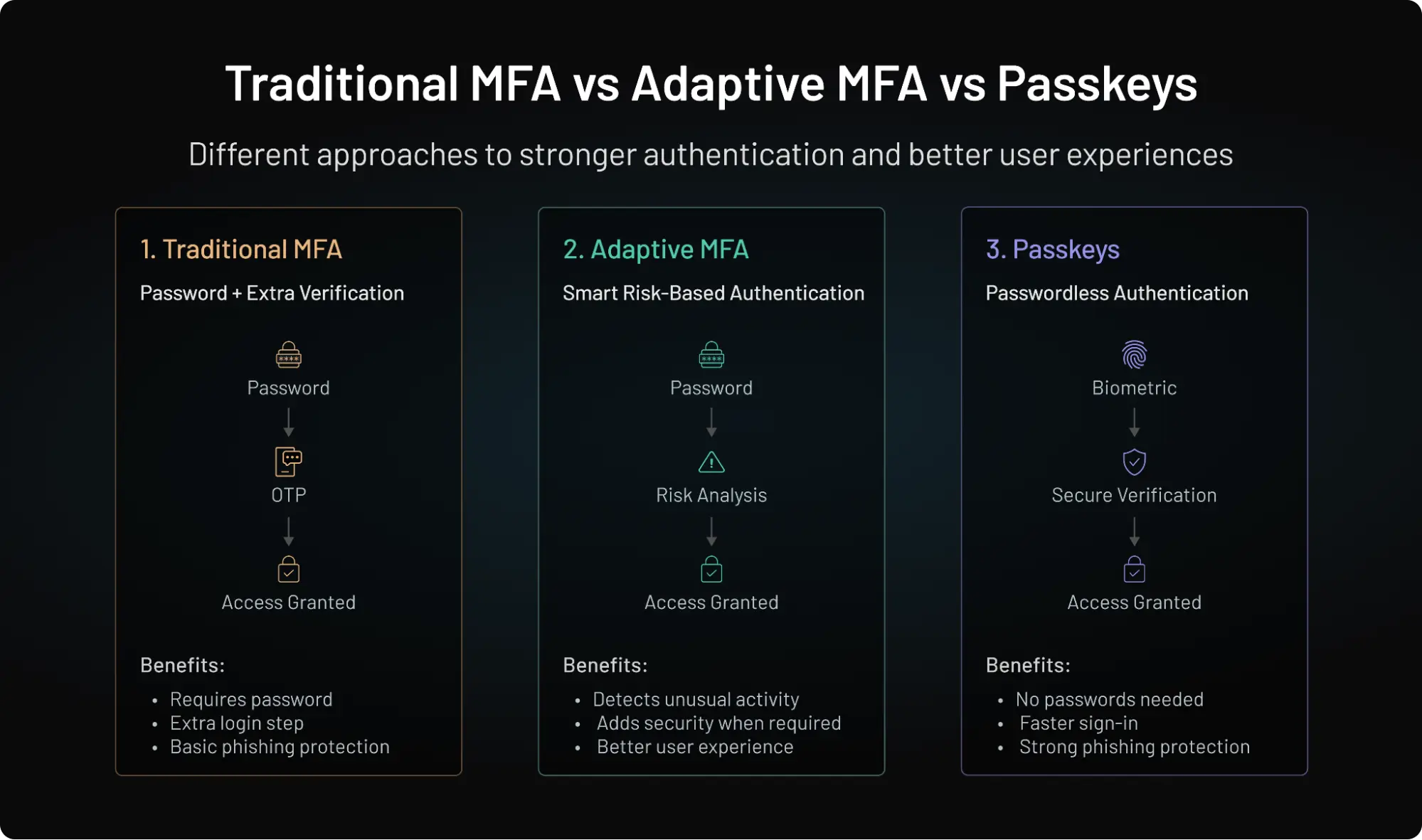
What is Adaptive Multi-Factor Authentication?
When we talk about an advanced security measure, Adaptive MFA is undoubtedly a game-changer that analyzes user behavior and risk levels to determine when to prompt for authentication.
If a login attempt appears risky (e.g., new device, unusual location), the system triggers additional authentication steps.
Adaptive Multi-Factor Authentication evaluates contextual signals such as device reputation, IP address, geolocation, login behavior, and risk level before deciding whether additional verification is required. Low-risk users can authenticate with minimal friction, while higher-risk login attempts trigger extra verification. This approach strengthens security without forcing every user through the same authentication process.
Want to understand how adaptive MFA compares with passkeys and other authentication approaches? Read our complete guide to Top Authentication Methods for a detailed comparison and recommendations on choosing the right authentication strategy.
Examples of Multi-Factor Authentication Methods
Here are some MFA examples used by businesses and individuals:
-
Online Banking: Banks use MFA to confirm high-value transactions using OTP or Biometric Authentication on their devices.
-
Cloud Applications: Google, Microsoft, and AWS require hardware security keys (FIDO2) to secure user accounts.
-
Corporate Networks: Businesses implement smartcards or authenticator apps for employees accessing sensitive data.
-
Healthcare Systems: Medical organizations verify identity using biometrics or other personal security questions to protect patient records and comply with regulations.
-
E-commerce Platforms: Online retailers offer passwordless logins via social login or magic links and even leverage adaptive authentication to prevent fraudulent transactions.
-
Entertainment Portals: Online gaming portals and media platforms use SMS-based MFA to prevent hacking.
Why is MFA Good for Security?
First, let’s understand why MFA is good for security. The answer lies in its ability to stop unauthorized access in its tracks. Even if a hacker manages to steal your password, they would still need the second (or third) authentication factor to gain access.
MFA significantly reduces the risk of cyber attacks such as phishing, credential stuffing, and brute-force attacks. It’s particularly valuable for businesses with remote employees, as it ensures that only verified users can access company systems, reducing the risk of a data breach. These are key MFA benefits that improve cybersecurity measures.
Hardening the Security Perimeter
1. Enhanced Security
Hackers love weak passwords. MFA ensures that even if your password gets leaked, cybercriminals still can’t access your account without additional verification. This is a core reason why MFA is important in securing online accounts. MFA significantly improves account security by requiring multiple forms of verification.
According to Microsoft, MFA can block over 99.9% of automated attacks, making it one of the most effective defenses against credential-based threats.
2. Reduced Risk of Unauthorized Access
Think of MFA as an extra lock on your door. Even if someone picks the first lock (password), they still need a second key (a fingerprint, OTP, or hardware token) to break in.
The Verizon Data Breach Investigations Report states that over 80% of breaches involve stolen or weak credentials. MFA directly addresses this risk by requiring a second factor beyond the password.
For example, in credential stuffing attacks where attackers reuse leaked passwords across multiple accounts, MFA blocks access unless the attacker also has access to the second factor.
Passwords alone fail. MFA closes the gap.
3. Protection Against Phishing Attacks
Phishing emails trick users into entering their passwords on fake websites and remains the most common entry point for cyberattacks. But MFA significantly reduces its effectiveness. According to Google and Mandiant, over 90% of targeted attacks begin with phishing attempts. MFA ensures that stolen credentials alone are not enough to gain access.
However, it’s important to note that not all MFA methods are equally secure. Phishing-resistant methods like passkeys and hardware security keys offer stronger protection compared to SMS-based OTPs.
| MFA Method | Security | UX | Phishing Resistant |
|---|---|---|---|
| SMS OTP | Medium | High | No |
| Email OTP | Medium | High | No |
| TOTP Authenticator Apps | High | Medium | Partial |
| Push Authentication | High | High | Partial |
| Magic Links | High | Very High | Partial |
| Biometrics | High | Very High | Yes (device-dependent) |
| Hardware Security Keys | Very High | Medium | Yes |
| FIDO2/WebAuthn (Passkey-Based MFA) | Very High | Very High | Yes |
Note: While passkeys are primarily a passwordless authentication method, they can also be deployed within phishing-resistant MFA workflows.
4. Future-Proof Security Architecture
MFA is a foundational component of modern identity and access management strategies, including Zero Trust security models.
As organizations move toward passwordless authentication, adaptive security, and decentralized identity, MFA acts as a bridge between traditional and next-generation authentication systems.
Implementing MFA today ensures that your authentication infrastructure is ready to evolve with future security standards and technologies.
User Experience & Trust
1. Improved User Trust and Confidence
Users are more likely to trust platforms that prioritize security and protect their accounts from unauthorized access.
When users see MFA options such as biometric login or push notifications, it signals that the platform takes security seriously.
This increased trust can lead to higher user retention, better brand reputation, and stronger customer relationships especially in industries like finance, healthcare, and eCommerce.
2. Better User Experience with Modern Methods
Modern MFA methods have evolved to reduce friction while maintaining strong security.
Technologies like push notifications, biometrics (Face ID, fingerprint), and passkeys provide seamless authentication experiences without requiring users to remember complex passwords.
According to FIDO Alliance data, passkey-based logins show significantly higher success rates compared to traditional password-based logins, improving both usability and security.
3. Reduced Password Fatigue
Users often struggle with managing multiple complex passwords, leading to reuse and weak password practices.
MFA reduces reliance on passwords by introducing additional authentication methods, allowing users to adopt simpler and more secure login experiences.
With the rise of passwordless authentication and passkeys, MFA is helping eliminate password fatigue altogether while improving security outcomes.
Business Operations & Compliance
1. Customizable Security Policies (Adaptive MFA)
MFA enables organizations to implement flexible, risk-based authentication policies tailored to different users and scenarios.
Adaptive MFA evaluates contextual signals such as location, device, IP address, and user behavior to determine whether additional verification is required.
For example, a login attempt from a trusted device may require only a password, while a login from a new country may trigger step-up authentication. This approach improves both security and user experience.
You can quickly configure adaptive authentication with LoginRadius.
2. Cost Savings from Preventing Breaches
Implementing MFA can significantly reduce the financial impact of cyberattacks.
The IBM Cost of a Data Breach Report (2024) estimates the average breach cost at $4.88 million globally. Preventing even a single breach can save organizations substantial financial losses.
Additionally, MFA reduces costs associated with account recovery, fraud, legal penalties, and reputational damage.
3. Compliance with Security Regulations
MFA helps organizations meet regulatory and compliance requirements across multiple industries.
Frameworks such as PCI DSS 4.0, HIPAA, GDPR, and NIST 800-63B require or strongly recommend multi-factor authentication for protecting sensitive data.
By implementing MFA, organizations not only improve security but also reduce audit risks and ensure compliance with industry standards.
MFA enables businesses to track login attempts, enforce role-based access controls, and mitigate insider threats by ensuring that only authorized personnel can access critical systems.
MFA Compliance Requirements
Multi-factor authentication has become a key security control across many regulatory frameworks and security standards. While requirements vary by industry and jurisdiction, MFA is widely recognized as an effective way to reduce unauthorized access risks and strengthen identity security.
| Framework | MFA Relevance |
|---|---|
| PCI DSS | Required for access to cardholder data environments and administrative systems |
| HIPAA | Supports access controls for protecting electronic health information (ePHI) |
| SOC 2 | Common control for identity and access management programs |
| ISO 27001 | Recommended as part of risk-based access management controls |
| NIS2 | Encourages strong identity protection and cybersecurity measures |
Implementing MFA not only helps organizations strengthen security but also supports compliance initiatives by reducing identity-based risks, protecting sensitive information, and demonstrating adherence to recognized security best practices.
MFA Solutions and Authentication Tools
Organizations typically implement MFA using a combination of identity platforms, authenticator applications, and hardware-based security devices.
| Category | Examples |
|---|---|
| MFA Platforms | LoginRadius, Okta, Microsoft Entra ID |
| Authenticator Apps | Google Authenticator, Microsoft Authenticator |
| Hardware Security Keys | YubiKey |
LoginRadius MFA
LoginRadius Multi-Factor Authentication helps organizations secure customer and workforce identities using OTPs, authenticator apps, biometrics, passkeys, and adaptive MFA. With developer-friendly APIs, flexible authentication workflows, and risk-based authentication controls, organizations can strengthen security without sacrificing user experience.
Whether you're securing a customer-facing application, a B2B SaaS platform, or an enterprise workforce environment, LoginRadius provides the tools needed to reduce account takeover risk and modernize authentication.
MFA Is No Longer Optional, It's a Security Requirement
Passwords alone can no longer protect modern applications, customer accounts, or enterprise systems. As phishing attacks, credential stuffing campaigns, account takeovers, and identity-based threats continue to increase, organizations need stronger ways to verify user identities without creating unnecessary friction.
Multi-factor authentication provides that additional layer of trust. Whether you're securing customer accounts, protecting privileged administrators, enabling remote work, or safeguarding sensitive business data, MFA significantly reduces the risk of unauthorized access by requiring attackers to overcome multiple verification barriers.
But modern authentication is evolving beyond static verification. Today's leading organizations combine MFA with adaptive authentication, risk analysis, passkeys, and phishing-resistant security controls to create login experiences that are both secure and seamless.
The question is no longer whether your organization should implement MFA. The question is whether your current authentication strategy is strong enough to defend against today's identity threats.
How to Choose the Best MFA Methods
Selecting the appropriate MFA authentication method for your business needs depends on various factors:
-
Security Level Needed – High-risk industries (banking, healthcare) may require biometric authentication or hardware tokens.
-
User Convenience – Organizations should balance security with ease of use (e.g., authenticator apps are more user-friendly than smartcards).
-
Compliance Requirements – Regulations like GDPR, HIPAA, and SOC 2 may mandate certain MFA implementations.
-
Integration Capabilities – Businesses should opt for multi factor authentication options that integrate seamlessly with existing IT infrastructure.
-
Scalability – Companies with a large workforce should implement adaptive authentication to streamline security without adding friction.
If you want a detailed guide on MFA best practices, download this insightful guide:
Secure Every Login with LoginRadius MFA
LoginRadius helps organizations implement enterprise-grade multi-factor authentication without sacrificing user experience. Support for OTPs, authenticator apps, biometrics, passkeys, adaptive MFA, and risk-based authentication allows you to secure customer and workforce identities while maintaining a frictionless login journey.
Whether you're building a customer-facing application, scaling a B2B SaaS platform, or modernizing your identity infrastructure, LoginRadius provides the tools you need to strengthen authentication and reduce account takeover risk.
Conclusion
Passwords alone can no longer protect modern applications, customer accounts, or enterprise systems. As phishing, credential theft, and account takeover attacks continue to evolve, Multi-Factor Authentication remains one of the most effective ways to verify user identity and prevent unauthorized access.
Modern MFA has evolved beyond one-time passcodes. Organizations increasingly strengthen MFA with adaptive policies and phishing-resistant verification to improve security while minimizing friction for legitimate users.
Whether you're securing customer identities, workforce accounts, or privileged administrators, implementing the right MFA strategy helps reduce identity-based risk, support compliance requirements, and build greater trust in your digital services.
Ready to modernize your authentication strategy?
Explore LoginRadius Multi-Factor Authentication solutions, schedule a personalized demo, or start building with our developer-friendly identity platform today.
FAQs
Q: Why is MFA important to security?
A: MFA is important because it acts as a 'circuit breaker' for identity theft. According to Microsoft (2025), identity is the most attacked perimeter, and MFA blocks 99% of bulk phishing and credential stuffing attacks.
Q: What are the factors of Multi Factor Authentication?
A: MFA uses four factors now-a-days (from three before): Something you know (passwords, PINs, security questions), something you have (hardware security keys, phone, etc.), something you are (biometrics like fingerprints, facial recognition), and something you do (keystroke dynamics, geo-velocity signals, or mouse movement patterns).
Q: What are the benefits of having an MFA?
A: Having MFA provides improved security, reduced vulnerability to password-related attacks, increased trust with consumers, and compliance with security standards.
Q: Is MFA required for compliance?
A: Many regulatory frameworks and security standards either require or strongly recommend MFA. Organizations subject to PCI DSS, HIPAA, SOC 2, ISO 27001, NIS2, and various government cybersecurity regulations often implement MFA to protect sensitive systems and user accounts.
Q: Does MFA stop phishing?
A: Traditional MFA reduces phishing risks but does not eliminate them completely. Attackers can sometimes intercept one-time codes or use adversary-in-the-middle phishing kits. Phishing-resistant MFA methods such as passkeys and FIDO2 security keys provide much stronger protection against phishing attacks.
Q: Does MFA prevent credential stuffing?
A: MFA is one of the most effective defenses against credential stuffing attacks. Even if attackers obtain valid usernames and passwords from previous data breaches, they cannot access accounts without successfully completing the additional authentication factor.
Q: Can MFA be bypassed?
A: While MFA significantly improves security, no authentication method is completely immune to attack. Sophisticated techniques such as phishing proxies, SIM-swapping, session hijacking, and MFA fatigue attacks may bypass weaker MFA implementations. Organizations should combine MFA with adaptive authentication, risk analysis, and phishing-resistant factors whenever possible.
Q: What is phishing-resistant MFA?
A: Phishing-resistant MFA refers to authentication methods that cannot be easily intercepted, replayed, or stolen through phishing attacks. Examples include FIDO2 security keys, WebAuthn authentication, and passkeys that use asymmetric cryptography instead of shared secrets.
Q: Can passkeys be used as part of MFA?
A: Yes. While passkeys are primarily a passwordless authentication method, they can also be used as a phishing-resistant authentication factor in MFA workflows. Many organizations combine passkeys with adaptive authentication or step-up verification for high-risk access scenarios.
Q: How does adaptive MFA work?
A: Adaptive MFA evaluates contextual signals such as device reputation, IP address, geolocation, login behavior, and risk scores before deciding whether additional authentication is required. Low-risk users may be granted access immediately, while higher-risk login attempts trigger extra verification steps.
Q: Is SMS MFA secure?
A: SMS MFA is more secure than relying solely on passwords, but it is generally considered one of the weaker MFA methods. SMS-based authentication can be vulnerable to SIM-swapping, phone number porting attacks, and message interception. Many organizations now prefer authenticator apps, passkeys, or hardware security keys.
Q: What authentication factors are most secure?
A: Possession factors based on cryptographic devices, such as FIDO2 security keys and passkeys, are generally considered the most secure authentication factors. When combined with biometric verification and adaptive risk analysis, they provide strong protection against modern identity-based attacks.
Q: Which MFA method is the most secure?
A: Phishing-resistant methods such as FIDO2/WebAuthn security keys and passkey-based authentication provide the strongest protection against credential theft and phishing attacks. For most organizations, authenticator apps and hardware security keys offer a strong balance of security and usability.
Q: Should every user have MFA enabled?
A: Yes. MFA should be enabled for all users whenever possible, especially for administrators, employees, and accounts with access to sensitive data. Many organizations use adaptive MFA to reduce friction by requesting additional verification only when risk levels increase.
Q: Can MFA prevent account takeover?
A: MFA significantly reduces the risk of account takeover by requiring additional verification beyond a password. While no security control is foolproof, combining MFA with phishing-resistant factors and adaptive authentication provides much stronger protection against modern identity attacks.
Q: What is the best MFA method for businesses?
A: The best MFA method depends on your security requirements and user experience goals. Authenticator apps, hardware security keys, and phishing-resistant FIDO2/WebAuthn authentication generally provide stronger protection than SMS-based verification while remaining practical for most organizations.
Q: Does MFA stop phishing attacks?
A: MFA reduces phishing risks, but only phishing-resistant methods like passkeys provide full protection.
Q: Which MFA method is most secure?
A: Hardware keys and passkeys offer the highest level of security.
Q: Is MFA required for compliance?
A: Yes, many frameworks like PCI DSS and HIPAA require MFA.