Quick Summary
-
Single sign-on (SSO) allows users to access multiple applications with one set of credentials, reducing friction and improving overall authentication efficiency.
-
The core benefits of single sign-on include stronger security, higher productivity, reduced password fatigue, and a more seamless user experience across digital touchpoints.
-
SSO enhances secure authentication by centralizing identity verification, reducing login endpoints, and enabling stronger controls such as MFA and risk-based authentication.
-
Organizations use SSO to streamline access management, enforce consistent security policies, and reduce the operational load on IT teams.
-
The advantages of SSO extend to multiple industries, like retail, SaaS, and government, by improving onboarding, lowering abandonment rates, and supporting compliance.
-
Modern SSO relies on standard identity protocols like SAML, OAuth, OpenID Connect, and JWT to enable secure, interoperable authentication across web, mobile, and third-party systems.
-
Implementing SSO delivers measurable ROI, including cost savings from fewer password resets, increased user satisfaction, and stronger protection against credential-based attacks.
-
Combining SSO with federated identity, centralized governance, and multi-platform session management provides consistent and secure access across enterprise environments.
Introduction
Respecting your users’ time is one of the most effective ways to improve their engagement. When authentication becomes simpler and faster, customers are far more likely to stay active on your platform. The benefits of single sign-on (SSO) stem from this same principle.
Single sign-on is an authentication method that lets users access multiple independent applications using just one set of credentials. Instead of repeatedly entering usernames and passwords for different systems, users authenticate once and seamlessly move across web, mobile, and third-party properties.
This matters because both end users and IT teams are overwhelmed by the number of accounts, passwords, and identity workflows they must manage. Credential fatigue increases friction, while decentralized login mechanisms create security risks and operational complexity.
SSO solves these challenges by centralizing authentication, reducing password overload, and enabling organizations to provide a more secure and consistent login experience.
In this blog, we’ll explore the key advantages of single sign-on, including stronger security, higher productivity, reduced support costs, and better digital experiences across all channels.
Single sign-on (SSO) is an authentication method that allows users to access multiple applications or systems using a single set of credentials. Instead of creating and managing separate passwords for each service, users log in once through a centralized identity provider (IdP), and that authenticated session grants them secure access to all connected applications.
This approach is widely used in enterprise, SaaS, retail, and public-sector environments because it simplifies identity management while improving user experience and security.
Why Single Sign-On is Important
Organizations today operate dozens, often hundreds of applications. Without SSO, each login becomes a separate authentication event, increasing friction for users and expanding the security footprint for IT teams. SSO solves this by:
- Centralizing authentication under one secure authority
- Reducing the number of passwords users must remember
- Ensuring consistent authentication policies across all applications
- Strengthening control over identity access, compliance, and governance
In other words, the benefits of single sign-on extend beyond convenience. SSO enhances secure authentication, reduces risk, and streamlines how organizations manage digital access.
Moreso, SSO uses standardized identity protocols to facilitate secure communication between the identity provider and the applications requesting access. The most common protocols include:
- SAML
- OAuth 2.0
- OpenID Connect (OIDC)
- JWT
- Multipass
These protocols allow applications to trust the authentication performed by the IdP without handling passwords directly, which significantly reduces security exposure.
If you're exploring SSO in relation to social identity providers, you can review this comparison.
How Does SSO Work?
Although SSO can be implemented with different identity standards, the underlying process is consistent across most enterprise and consumer applications. The goal is simple: authenticate once, access everything securely.
Below is a clear, step-by-step view of how single sign-on authentication works.
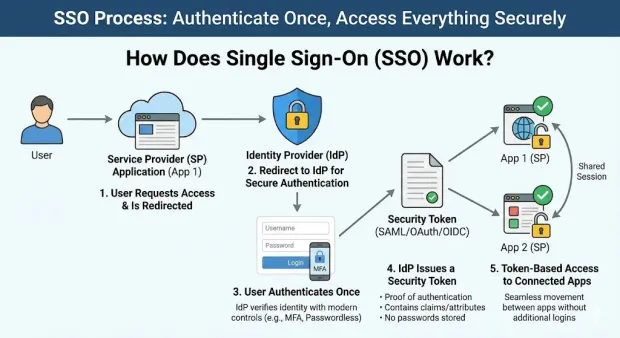
Step 1: The User Requests Access
The user attempts to access an SSO-enabled application (known as a service provider or SP).
Since no active session exists yet, the application redirects the user to a centralized identity provider (IdP).
Step 2: Redirect to the Identity Provider (IdP)
The IdP is responsible for verifying the user's identity. This redirect ensures that authentication happens in one secure location rather than across multiple applications. This is one of the key benefits of single sign-on from a security perspective.
Step 3: The User Authenticates Once
Users provide their credentials (and, if enabled, complete MFA). This single authentication event becomes the trusted source of identity for all connected applications.
This step is where SSO significantly enhances secure authentication, because the IdP can implement stronger controls such as:
-
Mandatory MFA
-
Passwordless methods
-
Device and behavior analysis
By centralizing authentication, organizations can enforce consistent, modern security policies without disrupting the user journey.
Step 4: The IdP Issues a Security Token
Once authenticated, the IdP generates a secure token, such as a SAML assertion, OAuth access token, or OIDC ID token. This token acts as proof of authentication and contains information the application can trust, such as:
-
User identity
-
Session validity
-
Claims or attributes
-
Authorization context
Applications never see or store passwords, only cryptographically signed tokens.
Step 5: Token-Based Access to All Connected Applications
Each application verifies the token and grants access automatically, without additional logins.
The user can now move seamlessly between applications until the shared SSO session expires or is terminated.
Where SSO Fits in a CIAM Architecture
In a customer identity and access management (CIAM) platform like LoginRadius, SSO is part of a broader identity layer that includes:
-
Centralized identity stores
-
Authentication workflows
-
Session and token management
-
Federation with third-party applications
-
Unified security policies
This ensures consistent login experiences across web, mobile, and partner applications.
7 Key Benefits of Single Sign-On
Most users dislike managing multiple passwords, and most IT teams spend too much time supporting them. The benefits of single sign-on are rooted in solving this exact problem. SSO centralizes authentication, reduces friction, and strengthens identity security, all while improving productivity and customer experience.
Below are the primary advantages of single sign-on, expanded for modern enterprise needs.
1. It Increases Employee and IT Productivity
One of the most immediate SSO benefits is the reduction in lost productivity caused by password issues. Each forgotten password or locked account represents lost time and operational cost.
How SSO improves productivity:
-
Fewer support calls: With one password to access all applications, users need far less assistance.
-
Faster logins: Eliminates jumping between multiple URLs or performing repeat logins.
-
Consistent access: A unified session means users stay authenticated across all systems.
This is particularly impactful for:
-
SaaS organizations that rely on rapid onboarding and continuous product usage
-
Retail teams that switch between POS, inventory, and operational systems
-
Government workforce portals where friction significantly slows service delivery
The ability to maximize both IT and end-user productivity remains one of the most meaningful advantages of SSO.
2. It Improves Security Capabilities
A common misconception is that SSO weakens security by creating a “single password risk.” In practice, SSO actually enhances secure authentication by reducing the likelihood of weak passwords and minimizing the number of entry points attackers can target.
Why single sign-on strengthens security:
-
Users can commit to one strong, memorable passphrase, rather than many weak ones.
-
Password reuse across systems is dramatically reduced.
-
Authentication happens at a single, hardened identity provider rather than scattered endpoints.
-
SSO enables organizations to enforce uniform policies such as MFA, passwordless login, or token-based authorization.
SSO also simplifies revocation: disabling one account instantly removes access to all connected systems, reducing lateral movement risk.
3. It Combines Effectively with Risk-Based Authentication (RBA)
SSO becomes even more powerful when paired with risk-based authentication, which continuously analyzes user behavior and environmental context.
RBA monitors:
-
Device fingerprint changes
-
Unusual IP addresses
-
Impossible travel
-
Abnormal login patterns
-
Repeated failures
If a login attempt appears riskier than normal, the system can require additional verification or block access completely.
This approach provides a balanced blend of convenience and security. Users get frictionless authentication when behavior is normal, and stronger checks only when necessary.
4. It Reduces Password Fatigue
With dozens of applications in daily use, users naturally struggle to remember unique passwords. This contributes to “password fatigue,” a top driver of login abandonment.
SSO reduces this risk by:
-
Replacing many passwords with a single credential
-
Minimizing lockouts
-
Eliminating unnecessary resets
-
Providing a smoother re-entry path during checkout or account access
For retail and e-commerce, reducing login friction directly increases conversion and repeat purchases.
5. It Streamlines the User Experience
One of the most impactful advantages of single sign-on is the ability to provide a seamless user experience across all digital touchpoints.
With SSO:
-
Users authenticate once
-
Move across web, mobile, and third-party systems without interruption
-
Maintain a consistent, unified session
-
Avoid repeated MFA prompts or password entry
This modern, frictionless experience boosts customer satisfaction and engagement, which are the key drivers of digital transformation across industries.
6. It Prevents Shadow IT
Shadow IT often emerges when employees bypass official systems because access is slow or cumbersome. SSO helps eliminate this by making approved applications significantly easier to use.
Benefits for preventing Shadow IT:
-
Employees naturally default to authorized tools
-
IT gains visibility into app usage patterns
-
Access remains compliant with internal and external regulations
This is especially critical for government, finance, and other regulated sectors, where ungoverned access introduces significant security and compliance risks.
7. It Increases Software Adoption Rates
Whether your business is launching a new customer portal or providing employees with new internal tools, SSO reduces friction at the moment of first use.
SSO improves adoption by:
-
Simplifying onboarding
-
Removing barriers to sign-up and re-entry
-
Streamlining access across environments
-
Reducing early login abandonment
For SaaS businesses, this directly influences trial activation, long-term usage, and customer retention.
Business and Technical Advantages of SSO
Modern enterprises also rely on SSO for several strategic and technical reasons. These additional advantages of SSO strengthen identity governance, reduce attack surfaces, and improve operational efficiency across complex digital ecosystems.
1. Centralized Access Governance
Without SSO, authentication policies are often scattered across individual applications, leading to inconsistent security controls and higher operational overhead. SSO centralizes identity governance within a single identity provider (IdP), allowing organizations to enforce uniform authentication rules across all connected systems.
Key governance advantages:
-
A single control point for access and authentication policies
-
Consistent enforcement of MFA, passwordless, and RBA logic
-
Simplified user lifecycle management (provisioning, deprovisioning, role changes)
-
Easier audit trails for compliance frameworks like GDPR, CCPA, FedRAMP, and PCI-DSS
This centralized governance is particularly valuable for government agencies and highly regulated industries, where compliance reporting and auditability are critical.
2. Reduced Attack Surface Through Fewer Login Endpoints
Every login form across web, mobile, or legacy systems is an attack vector. By consolidating authentication through an IdP, organizations reduce the number of exposed login endpoints, which significantly decreases opportunities for:
-
Credential stuffing
-
Phishing
-
Brute-force attacks
-
Password spraying
-
Token theft
With SSO, authentication happens in one strengthened, monitored location. This is one of the most important security SSO benefits for enterprises with large application portfolios.
3. Better Collaboration with Partners with Standard Identity Protocols
Modern digital ecosystems require interoperability across internal, partner, and third-party applications. SSO leverages standardized identity protocols to make secure integration easier:
-
SAML for enterprise authentication
-
OAuth 2.0 for delegated authorization
-
OpenID Connect (OIDC) for identity tokens
-
JWT for claims-based authentication
-
Multipass for multi-application session propagation
Using these standards allows organizations to shorten integration timelines and ensure that applications follow security best practices.
Learn more about LoginRadius Partner IAM.
4. Multi-Platform Consistency (Web, Mobile, IoT)
Digital interactions are no longer limited to web applications. Users move easily across platforms, including:
-
Native mobile apps
-
IoT devices
-
Partner portals
-
Kiosks and POS systems
-
B2B and supplier networks
SSO maintains consistent authentication and session logic across all of these channels. Users authenticate once and carry that identity through every experience, ensuring frictionless continuity.
This is especially important for:
-
Retail, where users move between mobile apps, in-store systems, and customer portals
-
SaaS companies with both web and mobile experiences
-
Public services offering multi-device access to citizen portals
5. Improved Insight into Identity Analytics
Centralizing authentication means organizations gain deeper visibility into identity behavior, such as:
-
Login patterns
-
Session anomalies
-
Device usage
-
Peak authentication periods
-
Repeated failure events
This data is critical for fraud detection, access governance, and optimizing user experience.
6. More Efficient Deprovisioning and Risk Control
When a user leaves an organization or a customer account is compromised, disabling access across multiple systems can be complex and error-prone. SSO simplifies this through a single action that instantly removes access everywhere the identity is federated.
This reduces the risk of:
-
Orphaned accounts
-
Unauthorized residual access
-
Lateral movement attacks
What Are the Different Types of Single Sign-On?
Single sign-on isn’t a one-size-fits-all solution. Modern organizations operate across browsers, mobile devices, partner ecosystems, and multi-application environments and SSO must adapt to each of them. Understanding the different types of SSO is the first step toward choosing the right architecture for your user journeys.
Below are the three core models that power today’s SSO deployments, along with what makes each valuable for enterprise-grade authentication.
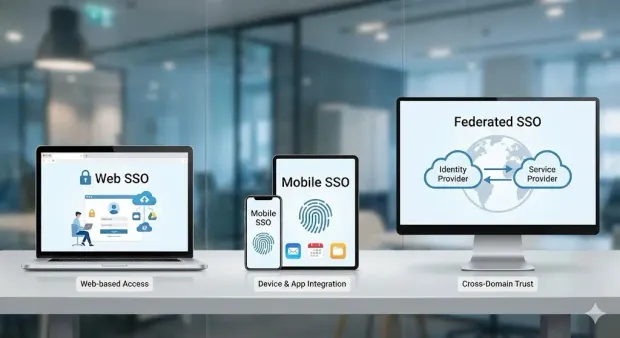
Web SSO: The Foundation of Modern Login Experiences
Web SSO is the classic form of single sign-on authentication and still the most widely used. It enables users to authenticate once in their browser and access any connected web application without logging in again.
Why Web SSO matters
-
Users move seamlessly across multiple sites or internal portals
-
One secure session replaces dozens of browser-based logins
-
IT teams maintain centralized policies instead of managing scattered login pages
-
Legacy and modern apps can coexist under a unified identity layer
This model is especially powerful for:
-
Retail organizations with multiple brand sites or loyalty portals
-
SaaS companies offering interconnected dashboards
-
Enterprises standardizing authentication across internal tools
Web SSO sets the stage for frictionless digital experiences, which is a key benefit of single sign-on in any digital ecosystem.
Mobile SSO: Unified Access Across Native Apps
Users expect mobile apps to “just work.” That includes authentication. Mobile SSO extends the web SSO concept to iOS and Android apps, allowing users to authenticate once and stay logged in across any related mobile applications.
What makes Mobile SSO engaging for users
-
No repeated logins when switching between apps
-
Fewer MFA prompts
-
Persistent sessions that maintain security without disrupting usage
-
Streamlined onboarding for new or returning users
This is crucial when organizations deliver multiple mobile experiences, such as:
-
Retailers with separate apps for shopping, loyalty, and in-store features
-
SaaS companies offering companion or admin apps
-
Government agencies enabling secure access to multiple citizen services
For mobile-first industries, Mobile SSO is often the difference between an abandoned app and an engaged user.
Federated SSO: Extending Identity Beyond Your Boundaries
Federated SSO is where authentication becomes truly interconnected. Instead of managing credentials in each individual app, identity is shared securely across organizational or partner boundaries using trusted identity standards.
This means a user from one domain can access systems in another domain without creating a new account or password.
Why Federated SSO is so important
-
It eliminates duplicate user accounts across organizations
-
Users authenticate with a trusted provider — not each application
-
Partners, vendors, and employees gain secure cross-platform access
-
IT teams reduce credential storage risks by delegating authentication
Federated SSO is built on widely adopted identity protocols such as:
-
SAML
-
OpenID Connect (OIDC)
-
OAuth 2.0
-
JWT
-
Multipass
These protocols make it possible for:
-
SaaS companies to integrate with enterprise clients
-
Supply chain networks to share access securely
-
Public sector agencies to federate citizen identities
-
Education systems to provide cross-campus access
Security Considerations and Best Practices for Single Sign-On (SSO)
While the benefits of single sign-on are extensive, organizations must implement SSO with the right security controls. Centralizing authentication dramatically improves visibility and protection, but it also means the identity provider (IdP) becomes a critical security layer.
When SSO is deployed properly, it strengthens your authentication posture; when deployed without safeguards, it can create unintended risk.
Below are the essential security considerations and best practices enterprises should follow to ensure a safe, resilient, and compliant SSO environment.
1. Protecting the Centralized Access Point
Because SSO consolidates login activity into a single, trusted identity provider, the IdP becomes the most sensitive authentication surface in your environment.
Here are some best practices to include:
-
Use multi-factor authentication (MFA) for all user types
-
Implement risk-based authentication (RBA) to evaluate device, IP, and behavior
-
Enforce strong password or passwordless policies for primary authentication
-
Enable rate limiting and bot protection around the SSO login endpoint
These measures ensure SSO enhances secure authentication rather than weakening it.
2. Strong Credential and Token Management
One core security advantage of SSO is that applications no longer handle passwords. But tokens (the mechanism that enables access) must be managed carefully.
Here are some best practices to include:
-
Use short-lived tokens with secure, cryptographic signing
-
Refresh tokens only through controlled channels
-
Rotate signing keys on a defined schedule
-
Store tokens securely in the browser or mobile environment (avoid localStorage for sensitive contexts)
When implemented properly, token-based authentication dramatically reduces the risk associated with password theft.
3. Robust Session Management
Proper session management is at the heart of secure SSO. A single authenticated session can span multiple applications, so its security must be tightly controlled.
Here are some best practices to include:
-
Apply idle and absolute session timeouts
-
Use session revocation when a breach is suspected
-
Maintain global logout capabilities across all applications
-
Encrypt session cookies and enforce SameSite, Secure, and HttpOnly attributes
These practices prevent unauthorized users from hijacking or prolonging SSO sessions.
4. Data Privacy and Regulatory Compliance
SSO centralizes user identity data, making compliance easier but also requiring careful handling.
Here are some best practices to include:
-
Enforce principle of least privilege in identity access
-
Use encryption in transit and at rest for all identity data
-
Maintain comprehensive audit logs for login attempts and session events
-
Regularly review access permissions to ensure compliance with GDPR, CCPA, HIPAA, and other frameworks
Centralized identity makes compliance more manageable, but it also concentrates responsibility. Ongoing audits are essential.
5. Vendor and Infrastructure Security
Your SSO provider becomes a critical part of your security architecture. Evaluating the vendor’s reliability and infrastructure safeguards is non-negotiable.
What to evaluate
-
Independent security certifications (SOC2, ISO 27001, etc.)
-
High-availability architecture and regional failover
-
Secure development lifecycle and penetration testing practices
-
Encryption standards and protocol support
-
Incident response and breach notification processes
Organizations should verify that their CIAM or SSO provider has the controls necessary to protect authentication at scale.
6. Continuous Monitoring and Threat Detection
Centralized authentication creates a clear vantage point for detecting anomalous behavior. With the right monitoring capabilities, organizations can spot threats early and act quickly.
Here are some best practices to include:
-
Enable real-time anomaly detection for suspicious access patterns
-
Monitor login velocity, device changes, and geographic inconsistencies
-
Integrate SSO logs with SIEM tools
-
Automate alerts for failed or high-risk authentication attempts
Continuous monitoring transforms SSO from an efficiency feature into a strategic security control.
7. Regular Reviews, Testing, and Hardening
SSO implementations evolve over time as new applications, user journeys, and threat vectors emerge. Periodic hardening ensures SSO continues to meet modern security expectations.
Recommended actions
-
Conduct recurring penetration tests on SSO endpoints
-
Reassess MFA policies annually
-
Update protocol configurations to recommended standards
-
Validate federation trust relationships and signing certificates
-
Conduct red team exercises focused on authentication
These proactive steps keep SSO resilient against increasingly sophisticated threats.
When implemented with these best practices, SSO significantly enhances secure authentication, simplifies governance, and reduces identity-related risk. Rather than weakening security, a properly managed SSO environment becomes one of the strongest defenses your organization can deploy.
What is the ROI of Single Sign-On? Understanding Business Impact and Cost Savings
While the technical benefits of single sign-on are compelling, SSO also delivers a measurable financial impact. Password resets, inconsistent authentication flows, and fragmented access management create hidden costs across IT, security, and customer experience teams.
SSO centralizes these operations, reduces overhead, and improves efficiency — all of which translate directly into ROI.
Below is a breakdown of the core business outcomes organizations achieve when implementing single sign-on.
1. Cost Savings from Fewer Password Resets
Password-related support is one of the biggest hidden expenses in enterprise IT. Gartner has estimated that each password reset can cost organizations between $50 and $70 in labor and productivity loss.
How SSO cuts these costs:
-
Users manage just one password
-
Fewer lockouts and reset requests
-
IT helpdesks spend less time on routine authentication issues
Across large user populations, especially in SaaS, retail, and government these savings scale rapidly.
2. Productivity Gains for Both Users and IT Teams
When users switch between multiple applications, even small authentication delays compound into significant time loss. SSO eliminates repeated logins, enabling uninterrupted workflows.
Productivity improvements include:
-
Faster access to tools and services
-
Reduced cognitive load from managing numerous credentials
-
Less downtime due to lockouts
-
IT staff freed to focus on higher-value security and development work
Higher productivity becomes especially impactful in organizations with modern, multi-application environments.
3. Enhanced Security Reduces Breach Risk
Security incidents are expensive, from forensic investigations to system recovery, legal fees, regulatory penalties, and brand damage.
SSO reduces breach-related risk by:
-
Eliminating multiple vulnerable login endpoints
-
Reducing password reuse and weak credential practices
-
Enforcing MFA and risk-based authentication across all applications
-
Centralizing access revocation and governance
By strengthening secure authentication, SSO lowers both the probability and the potential impact of credential-based attacks.
4. Better User Experience Drives Revenue and Retention
Friction in the login process is one of the biggest drivers of abandonment, particularly in consumer-facing industries.
SSO improves user experience by:
-
Removing repeated login barriers
-
Streamlining sign-up, sign-in, and re-entry
-
Enabling consistent access across web and mobile
-
Reducing password fatigue and login frustration
For retail and e-commerce, frictionless authentication can reduce cart abandonment and increase conversions.
For SaaS companies, it boosts activation and long-term product engagement, and for public-sector services, it increases the adoption of digital-first portals.
5. Simplified Compliance and Audit Readiness
Complex authentication systems lead to fragmented logs and inconsistent access controls. SSO simplifies compliance by consolidating identity governance into one platform.
Compliance advantages include:
-
Centralized access logs for auditing
-
Uniform MFA and passwordless policies
-
Clear deprovisioning paths
-
Easier validation for frameworks like GDPR, CCPA, HIPAA, and FedRAMP
Centralized oversight reduces compliance costs and minimizes the risk of regulatory penalties.
6. Faster Integration and Lower Development Costs
Because SSO relies on standardized identity protocols (SAML, OAuth, OIDC, JWT), organizations spend less time building and maintaining custom authentication logic.
Financial benefits:
-
Reduced development time
-
Lower long-term maintenance
-
Faster onboarding of new applications
-
More efficient partner integration
This is especially valuable for SaaS businesses expanding their application ecosystem.
7. Formula for Calculating SSO ROI
Organizations often estimate SSO ROI using four measurable variables:
SSO ROI = (IT support savings + productivity gains + reduced breach risk + revenue uplift) – SSO implementation costs
Even conservative models show strong ROI within the first 12–18 months, especially for large user populations.
8. Real-World ROI Examples by Industry
Retail & E-commerce
-
Lower cart abandonment
-
Higher repeat purchases
-
Faster loyalty program adoption
SaaS
-
Higher activation and trial conversion
-
Reduced churn
-
Stronger usage continuity across devices
Government & Public Sector
-
Higher portal adoption
-
Reduced call center load
-
Improved compliance efficiency
When all applications rely on a unified authentication layer, organizations spend less time troubleshooting identity issues and more time delivering value.
The long-term business impact is clear: SSO is both a cost-saving strategy and a growth enabler.
How Does LoginRadius Support Single Sign-On?
LoginRadius provides a customer identity and access management (CIAM) platform that includes a full-featured single sign-on solution for web, mobile, and federated use cases. The platform is designed to centralize authentication, unify identities across channels, and make it easier for enterprises to implement standards-based SSO without building everything from scratch.
At a high level, LoginRadius acts as a centralized Identity Provider (IdP) that issues and validates tokens for all your connected applications, enabling secure, seamless SSO across your ecosystem.
You can explore the LoginRadius SSO offering here.
1. Unified Identity Layer Across All Digital Properties
Most organizations have multiple brands, apps, and touchpoints. LoginRadius provides a unified identity layer where all customer identities are stored and managed centrally, then reused across any connected application.
Key capabilities include:
-
A single customer identity that can be used across web, mobile, and third-party applications
-
Centralized profiles and attributes that travel with the user wherever they log in
-
Reduced duplication of identity data and login logic across apps
This unified approach is what makes the benefits of single sign-on possible at scale.
2. Web and Mobile SSO Out of the Box
LoginRadius supports both Web SSO and Mobile SSO natively:
-
Web SSO uses browser storage (cookies, sessionStorage, localStorage) and a centralized LoginRadius domain to maintain a shared session across multiple web applications.
-
Mobile SSO uses secure shared storage (such as Android shared preferences or iOS keychain) to share LoginRadius access tokens between related apps in your mobile ecosystem.
This lets customers authenticate once and move between your sites and apps without repeated logins, supporting the UX and productivity benefits you’ve already outlined earlier in the article.
3. Federated SSO with Industry-Standard Protocols
For organizations that need to integrate with partners, enterprises, or external IdPs, LoginRadius offers federated SSO capabilities. In this model, LoginRadius can act as either:
-
The Identity Provider (IdP) for your ecosystem, issuing tokens to third-party applications
-
The Service Provider (SP) that trusts external IdPs (e.g., enterprise identity systems, government IdPs, or B2B partners)
Supported protocols include:
-
SAML
-
OAuth 2.0
-
OpenID Connect (OIDC)
-
JWT
This is what enables LoginRadius to support a wide range of B2B, SaaS, retail, and government federation scenarios.
For a deeper explanation, see LoginRadius’ guide to federated SSO.
4. Cross-Device SSO and SSO Connectors
Beyond standard web and mobile sessions, LoginRadius also supports:
-
Cross-Device SSO: Enables a user logged in on one device (like a mobile app) to transfer or share that session securely to another device (like a desktop browser) using mechanisms such as QR codes.
-
SSO Connectors: For third-party applications that don’t support standard SSO protocols, LoginRadius provides connector solutions to still create a unified SSO experience, typically using mechanisms like password delegation or vendor-specific flows.
These features help extend SSO to legacy or non-standard applications, which is often where enterprises struggle.
5. Inbound and Outbound Federation for Complex Ecosystems
The Authentication and Federation platform capabilities are designed for more advanced identity topologies:
-
Inbound federation: Connect existing enterprise or custom IdPs to LoginRadius, so your customers or workforce can use their existing identity to access your applications.
-
Outbound federation: Use LoginRadius as the central IdP that issues tokens to partner or third-party applications in your ecosystem.
This is particularly valuable for B2B SaaS vendors, multi-tenant platforms, and organizations that must integrate with external identity systems (e.g., Microsoft Entra ID / Azure AD, partner IdPs).
6. Fine-Grained Authorization and Centralized Access Control
LoginRadius doesn’t just authenticate users; it helps control what they can access. Using centralized policies and fine-grained authorization, organizations can:
-
Map identity attributes (roles, groups, orgs) to access rights
-
Apply consistent access policies across all SSO-connected apps
-
Enforce least-privilege access and simplify compliance reporting
This ties directly back to earlier sections where we discussed centralized access governance and the security benefits of SSO.
7. Developer-Friendly APIs and Documentation
From an implementation perspective, LoginRadius exposes SSO capabilities via RESTful APIs and SDKs, with dedicated docs for:
-
Web & Mobile SSO
-
Federated SSO
-
Cross-device SSO
-
SSO connectors
This allows engineering teams to integrate SSO into existing applications, frontends, and microservices architectures without rebuilding core authentication logic.
For full architectural details, you can refer to the LoginRadius documentation.
Conclusion
Single sign-on has become a foundational capability for organizations that want to deliver secure, seamless, and modern digital experiences. By allowing users to authenticate once and access everything they need, SSO removes one of the biggest sources of friction in today’s multi-application world.
As enterprises scale, fragmented authentication models become inefficient, difficult to manage, and increasingly risky. SSO centralizes this layer, giving organizations consistent governance, unified identity intelligence, and a more resilient security posture. At the same time, users enjoy a frictionless journey that improves conversion, retention, and engagement.
In summary, single sign-on protects users, reduces operational complexity, and helps organizations build secure, unified, and future-ready identity experiences.
FAQs
1. What is Single Sign-On?
Single Sign-On (SSO) is an authentication method that allows users to access multiple applications with one set of credentials. Instead of logging into each system separately, a user authenticates once through a centralized identity provider (IdP), and that session grants access everywhere they’re authorized.
2. How Does SSO Work?
SSO works by redirecting the user to a trusted identity provider for authentication. Once the user logs in, the IdP issues a secure token, such as a SAML assertion or OpenID Connect ID token, that connected applications can verify. The user is then granted access without needing to authenticate again. This token-based approach enhances secure authentication and reduces the number of exposed login endpoints.
3. What Are the Key Benefits of Single Sign-On?
The benefits of single sign-on include:
-
Fewer passwords to remember
-
Lower IT support costs from reduced resets
-
Stronger authentication security
-
Less password fatigue
-
A smoother, more consistent user experience
-
Reduced Shadow IT
-
Higher software adoption and engagement
4. What Are the Business and Technical Advantages of SSO?
Beyond user convenience, SSO provides strategic advantages such as:
-
Centralized authentication governance
-
Reduced attack surfaces
-
Faster integration through identity standards (SAML, OIDC, OAuth)
-
Consistent sessions across web, mobile, and IoT
-
Better identity analytics and auditability
-
Simplified deprovisioning and access control
These advantages make SSO critical for enterprise-scale security and operational efficiency.
5. What Are the Different Types of Single Sign-On?
The three primary types of SSO are:
-
Web SSO: Seamless authentication across browser-based applications
-
Mobile SSO: Unified access across iOS and Android apps
-
Federated SSO: Identity shared across organizations using standards like SAML and OIDC
Each model supports different environments but shares the same goal: secure, frictionless multi-application access.
6. What Security Considerations Apply to SSO?
Effective SSO security requires protecting the centralized authentication layer through:
-
Multi-factor authentication (MFA)
-
Risk-based authentication (RBA)
-
Strong token and session management
-
Encrypted data handling
-
Vendor security reviews
-
Continuous monitoring and logging
When implemented with these controls, SSO enhances secure authentication and reduces identity-related risk.
7. What Is the ROI of Single Sign-On?
SSO delivers ROI by reducing IT helpdesk costs, improving user productivity, minimizing breach risk, and increasing conversion and retention through a better login experience. Organizations also gain faster application integration and simplified compliance. These operational and security savings typically offset implementation costs within the first year.
8. How Does LoginRadius Support Single Sign-On?
LoginRadius supports SSO through a centralized CIAM platform that provides:
-
Unified Web and Mobile SSO
-
Federated SSO with SAML, OAuth, OIDC, and JWT
-
Cross-device authentication and SSO connectors
-
Centralized identity governance and session management
-
Inbound and outbound federation for partner ecosystems
-
Developer-friendly APIs and documentation
This allows enterprises to deploy secure, scalable SSO across all digital properties.