
What is Deno?
Deno is a JavaScript/TypeScript runtime with secure defaults and great developer experience. It's built on V8, Rust, and Tokio.
I suggest you watch these talks by Ryan: He talks about his mistakes with Nodejs https://www.youtube.com/watch?v=M3BM9TB-8yA&vl=en and a more in-depth look into deno.
Features
- Secure by default. No file, network, or environment access (unless explicitly enabled).
- Supports TypeScript out of the box.
- Ships a single executable (deno).
- Has built-in utilities like a dependency inspector (deno info) and a code formatter (deno fmt).
- Has a set of reviewed (audited) standard modules that are guaranteed to work with Deno. Scripts can be bundled into a single JavaScript file.
Let's Build Something!!!
In this article, we're going to build a simple cli tool to demonstrate some of the features of deno. Our cli will be interacting with a COVID API to fetch live data.
Requirement: make sure you have deno installed. If you don't, refer to
https://www.loginradius.com/hello-world-deno/. It's pretty straightforward.
Deno has the entry file mod.ts so we will follow the same in this article if you are following this article along with the coding you can create a folder named covid-cli, inside that folder you can create a file called mod.ts and copy the below code there.
1const { args } = Deno;
2import { parse } from "https://deno.land/std/flags/mod.ts";
3console.dir(parse(args));
Here the parse(args, options = {}); contains two parameters where args is an Array and options is an object, let try to run the above code using this cmd.
1deno run mod.ts arg1 -f hello --flag World --booleanFlagAfter running the above code you will see the output as
1{ _: [ "arg1" ], f: "hello", flag: "World", booleanFlag: true }The first property in the object is always an array containing all arguments that did not have an option associated with them(i.e it doesn't match -f or --flag). If you do not pass a corresponding value to a flag, it defaults to true.
I will be using this - https://documenter.getpostman.com/view/10808728/SzS8rjbc?version=latest postman doc for all the COVID related API and we will perform the below to action through our CLI.
- A summary of new and total cases globally updated daily.
- A summary of new and total cases per country updated daily.
Let's write out the function for our first command, so our mod.ts file will look like this.
1const { args } = Deno;
2import { parse } from "https://deno.land/std/flags/mod.ts";
3// flags:
4// -h, --help: display help message
5// -g, --global: display global stats
6// -c, --country: get data of mentioned country
7const BASE_URL: string = "https://api.covid19api.com/"
8const parsedArgs = parse(args)
9async function getGlobalStats() {
10const res = await fetch(${BASE_URL}summary)
11const data = await res.json();
12console.log(data["Global"])
13}
Here, we have an async function that returns the data from our API call. We're making a fetch request (yes, deno has browser functionality in-built) to the API endpoint to get the global stat of covid19.
The function for the second command looks very similar, just we need to filter our data only for a particular country which is provided.
1async function getCountryStats(country: string) {
2  if (country) {
3    const res = await fetch(`${BASE_URL}summary`);
4    const data = await res.json();
5    const index = data["Countries"].findIndex((c: any) => c.Country.toLowerCase() === country.toLowerCase())
6    if (index !== -1) {
7        console.log(data["Countries"][index])
8    } else {
9        console.log("Country Not Found")
10    }
11  } else {
12    console.log("Country Name is needed")
13  }
14}
We will now write our main() function. We have a switch statement to check the first flag that was passed and calls the appropriate function. The default case simply displays a welcome message. Let add the below code in our mod.ts file
1async function main() {
2  switch (Object.keys(parsedArgs)[1]) {
3    case "help":
4    case "h":
5      console.log(displayHelpMsg());
6      break;
7    case "global":
8    case "g":
9      await getGlobalStats();
10      break;
11    case "country":
12    case "c":
13       let country = parsedArgs.c || parsedArgs.country || ""
14       await getCountryStats(country)
15       break;
16    default:
17       console.log(displayHelpMsg());
18  }
19}
20main()
And our displayHelpMsg() will look something like this
1function displayHelpMsg() {
2  return "flags:\n-h, --help: display help message\n-g, --global: display global stats\n-c, --country: get data of mentioned country ";
3}
Testing Time!!!
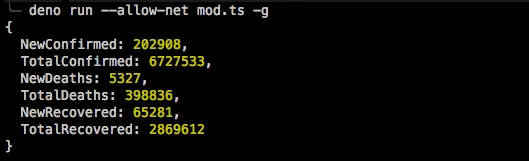
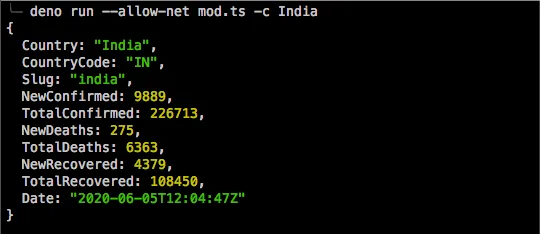
To test our program, we're going to run $ deno run --allow-net mod.ts -g. We should get the following result:
- For Global Records
- For Country Wise Record
- For Help

That's all there is for our cli tool. If you'd like to see the full code, the repository is https://github.com/LoginRadius/engineering-blog-samples/tree/master/Deno/covid-cli. In conclusion, Deno is a very exciting project especially because you get all the benefits of typescript out of the box without the need to compile your files to js.
You can build a lot with it, ranging from cli Programs to HTTP servers. Do have a look at one of my blog where I have built a basic calculator app using the abc module.


