
Build a Twitter Bot with NodeJs
Hey there! In this blog post, we will build a twitter bot that let us tweet using the command line directly.
Let's Start 🎉
We will use twitter - a client library for the Twitter REST and Streaming APIs. This npm package will make the whole process of building the bot a whole lot easier and faster.
1. Apply for a Twitter Developer Account
To be able to access Twitter API, you need a Twitter Developer Account. Apply for it https://developer.twitter.com/en/apply-for-access. Click on Apply for a Developer Account.
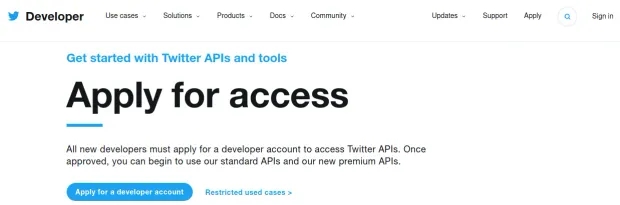
It will ask you to log in. Select appropriate settings after logging in. It will also generate keys and secret tokens like Consumer Key, Consumer Secret, Access Token Key, Access Token Secret. Copy and save them somewhere for future use.
2. Setup Project
Make a project folder with any name of your choice. Run npm init to initialize the project. This will generate a package.json file in your directory. Alternatively, you can run npm init -y to setup your project with default settings.
package.json holds all the dependencies of a project.
Since our project will be dependent on twitter client library, it's time we install this dependency in our project. Run npm install twitter to include this in your package.json .
3. Setup Files
Now we will start with the actual coding part. At the moment, your project folder will have a node_modules folder, a package.json file, and a package-lock.json file. If you have gone with the default options while running npm init, then index.js is the file we will be working upon.
Open index.js. To be able to use the twitter library, which we have installed, you need to include it in index.js.
var Twitter = require('twitter');
Also, remember the keys and tokens you got from Twitter Developer Portal? It's time we use them.
1var client = new Twitter({
2	consumer_key: process.env.CONSUMER_KEY,
3	consumer_secret: process.env.CONSUMER_SECRET,
4	access_token_key: process.env.ACCESS_TOKEN_KEY,
5	access_token_secret: process.env.ACCESS_TOKEN_SECRET
6});
Do not add your Consumer or Access Token keys or secrets directly in the index.js. These should be managed accordingly using environment variables.
We will use
dotenvlibrary to manage our environment variables in NodeJS. Runnpm install dotenvand follow these instructions. Your.envwill look something like this.
1CONSUMER_KEY=........................................
2CONSUMER_SECRET=.....................................
3ACCESS_TOKEN_KEY=....................................
4ACCESS_TOKEN_SECRET=.................................
4. Start Coding 🎯
I will use Official Joke API to automatically fetch content for my tweet. You can visit the repository and learn more about the endpoints. But the only endpoint we will work with is random_joke. Click on this, and you will receive a JSON response with fields id, type, setup, and punchline. The fields we are concerned with are setup and punchline.
We will use axios for calling the API endpoint. Run npm install axios and add var axios = require('axios'); in index.js.
Now everything has been laid out. We need to connect the dots. The Official Joke API will return a JSON response. We will grab the required data, i.e., the setup and the punchline from it. And then make use of client.post functionality of twitter package.
1axios("https://official-joke-api.appspot.com/random_joke").then(Response => {
2	return [Response.data.setup, Response.data.punchline];
3}).then(([setup, punch]) => {
4	client.post('statuses/update', {status: `${setup}\n${punch}`}, function(error, tweet, response){
5		if(!error){
6			console.log(tweet);
7		}
8	})
9});
Now run node index.js on the terminal and see the output.
If everything went well, you would see a tweet response, otherwise an error message. The successful message would look something like this.
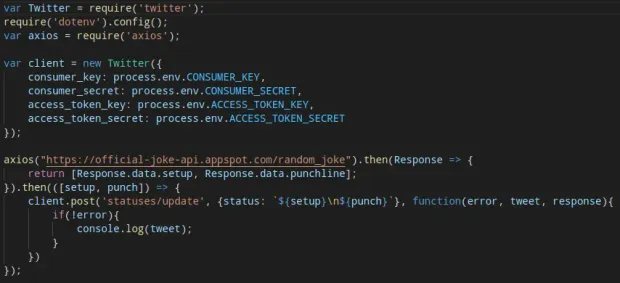
At this point, your index.js should look like this.
Congratulations! 🎊
That's it! You have created your first Twitter Bot, which tweets content after directly calling it from an API. You might take a look at the repository if you encountered any errors. Here, I have used different APIs to fetch content and tweet. Moreover, I have added a script that will search posts with a particular hashtag and like them.
While pushing your code to GitHub, make sure to add
.gitignorefile and includenode_modulesand.envin it.
Further Reading
The world is yours to explore.
And the dev world is based entirely on exploring technologies and frameworks. Play with this twitter library and see what interesting stuff can be built with it. Maybe, search tweets with a particular hashtag and like them? Or maybe, retweet tweets of any particular user? You are free to use your imagination and coding skills to explore more and more. If axios and dotenv are new to you, then go ahead and read their documentation. Get hold of the concepts of environment variables. And come up with your own cool Twitter Bot.
Keep in mind Twitter's Developer Policy & Terms and Twitter Terms & Conditions. These should not be violated in whatever project you are building.


