
Social login is the need for simplifying your registration process and increasing the conversion rates. Here we will be implementing Facebook Login using NodeJS and Passport.
Passport is authentication middleware for Node, which authenticates requests and delegates all other functionality to the application. Considering the unique application requirements, passport has stuck to authentication mechanisms known as strategies. In the blog, we will be implementing a similar strategy for Login with Facebook.
Pre -Requisites:
- Basic Knowledge of NodeJS
- Node JS should be installed on your system.
Steps to configure
- Creating Facebook
APP_IDandAPP_SECRET
- Go to Facebook and login with your Facebook account.
- Once you have registered, click on the
create applink and you will need to enter the details in the following pop-up
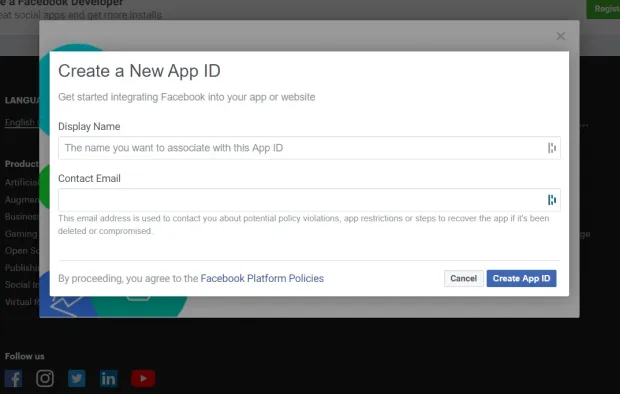
- After creating an app you need to add the product of Facebook, here we are going to use Facebook Login
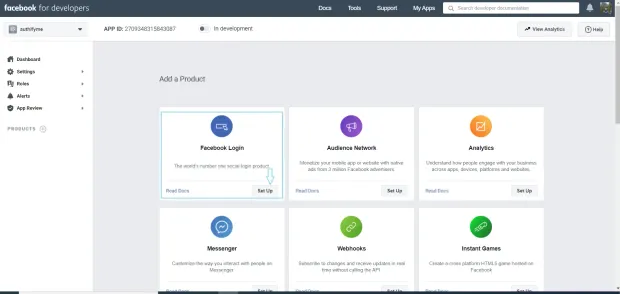
- After adding up the product you can now choose to have 'web' and while setting up the URL, you can simply write
http://localhost:3000 - After this go to tab 'MyApps' and select the App name. Select the 'Basic` from settings options in the sidebar as shown below. You can now copy your secret and ID from here
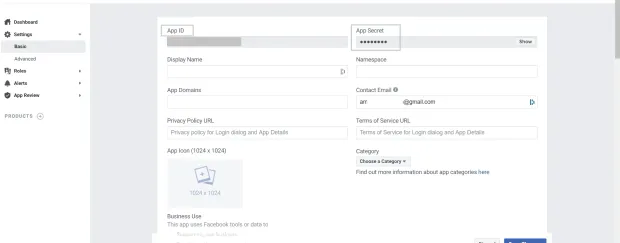
- Now enough, let's move to code, First of all, create a directory named
facebook-node-authentication
1mkdir facebook-node-authentication- Move to the directory
facebook-node-authentication/
1cd facebook-node-authentication- In the root create a file
package.jsonand copy the following code
The dependencies, we are going to use in the projects are
express: Node web frameworkexpress-sessionSession managment of expresspassportAuthentication middleware for NodeJSpassport-facebookFacebook Plugin for passportejs- Templating engine
1{
2  "name": "facebook_login_node",
3  "version": "1.0.0",
4  "description": "\"Basic application for setting up Facebook logij using node and passport\"",
5  "main": "index.js",
6  "scripts": {
7    "test": "echo \"Error: no test specified\" && exit 1",
8    "start": "node server.js"
9  },
10  "author": "",
11  "license": "ISC",
12  "dependencies": {
13    "ejs": "^3.1.2",
14    "express": "^4.17.1",
15    "express-session": "^1.17.1",
16    "passport": "^0.4.1",
17    "passport-facebook": "^3.0.0"
18  }
19}- After this run the following command in the terminal
1npm install- Now create a file named
server.jsand paste the following code
1const express = require('express');
2const app = express();
3const session = require('express-session');
4const passport = require('passport');
5const FacebookStrategy = require('passport-facebook').Strategy;
6const routes = require('./routes.js');
7const config = require('./config')
8app.set('view engine', 'ejs');
9app.use(session({
10resave: false,
11saveUninitialized: true,
12secret: 'SECRET'
13}));
14app.use(passport.initialize());
15app.use(passport.session());
16passport.serializeUser(function (user, cb) {
17cb(null, user);
18});
19passport.deserializeUser(function (obj, cb) {
20cb(null, obj);
21});
22passport.use(new FacebookStrategy({
23clientID: config.facebookAuth.clientID,
24clientSecret: config.facebookAuth.clientSecret,
25callbackURL: config.facebookAuth.callbackURL
26}, function (accessToken, refreshToken, profile, done) {
27return done(null, profile);
28}
29));
30app.use('/', routes);
31const port = 3000;
32app.listen(port, () => {
33console.log('App listening on port ' + port);
34});- Now create a file named
route.jsin the root directory and paste the following code
1const passport = require('passport');
2const express = require('express');
3var router = express.Router();
4router.get('/', function (req, res) {
5res.render('pages/index.ejs'); // load the index.ejs file
6});
7router.get('/profile', isLoggedIn, function (req, res) {
8res.render('pages/profile.ejs', {
9user: req.user // get the user out of session and pass to template
10});
11});
12router.get('/error', isLoggedIn, function (req, res) {
13res.render('pages/error.ejs');
14});
15router.get('/auth/facebook', passport.authenticate('facebook', {
16scope: ['public_profile', 'email']
17}));
18router.get('/auth/facebook/callback',
19passport.authenticate('facebook', {
20successRedirect: '/profile',
21failureRedirect: '/error'
22}));
23router.get('/logout', function (req, res) {
24req.logout();
25res.redirect('/');
26});
27function isLoggedIn(req, res, next) {
28if (req.isAuthenticated())
29return next();
30res.redirect('/');
31}
32module.exports = router;- Create a directory
viewsand under this create a directory namedpages. Under this folder create two pages namedprofile.ejsandindex.ejs
1// index.ejs
2<!doctype html>
3<html>
4<head>
5<title>Facebook Node Authentication</title>
6<link href="https://fonts.googleapis.com/icon?family=Material+Icons" rel="stylesheet">
7<link rel="stylesheet" href="https://maxcdn.bootstrapcdn.com/font-awesome/4.7.0/css/font-awesome.min.css">
8<link rel="stylesheet" type="text/css"
9href="https://cdnjs.cloudflare.com/ajax/libs/materialize/0.97.5/css/materialize.min.css">
10<style>
11.facebook {
12background-color: #3b5998 !important;
13color: #fff !important;
14}
15.fa-facebook-f:before,
16.fa-facebook:before {
17content: "\f09a";
18}
19</style>
20</head>
21<body>
22<nav class="light-blue lighten-1" role="navigation">
23<div class="nav-wrapper container">
24<a id="logo-container" href="#" class="brand-logo">Node Authentication</a>
25</div>
26</nav>
27<div class="section no-pad-bot" id="index-banner">
28<div class="container">
29<br><br>
30<div class="row center">
31<div class="col s6 offset-s3">
32<div class="card">
33<div class="card-content">
34<span class="card-title">Facebook Login using Node and passport</span>
35</div>
36<div class="card-action">
37<a href="/auth/facebook" class="waves-effect waves-light btn social facebook">
38<i class="fa fa-facebook"></i> Sign in with facebook
39</a>
40</div>
41</div>
42</div>
43</div>
44</div>
45</div>
46</body>
47</html>1<!- profile.ejs->
2<!doctype html>
3<html>
4
5<head>
6 <title>Facebook Node Authentication</title>
7 <link href="https://fonts.googleapis.com/icon?family=Material+Icons" rel="stylesheet">
8 <link rel="stylesheet" type="text/css"
9 href="https://cdnjs.cloudflare.com/ajax/libs/materialize/0.97.5/css/materialize.min.css">
10 <style>
11 .card:hover {
12 box-shadow: 0 10px 20px rgba(0, 0, 0, 0.19), 0 6px 6px rgba(0, 0, 0, 0.23);
13 margin-bottom: 54px;
14 }
15 </style>
16</head>
17
18<body>
19 <nav class="light-blue lighten-1" role="navigation">
20 <div class="nav-wrapper container">
21 <a id="logo-container" href="#" class="brand-logo">Node Authentication</a>
22 <a href="/logout" class="right">Logout</a>
23 </div>
24 </nav>
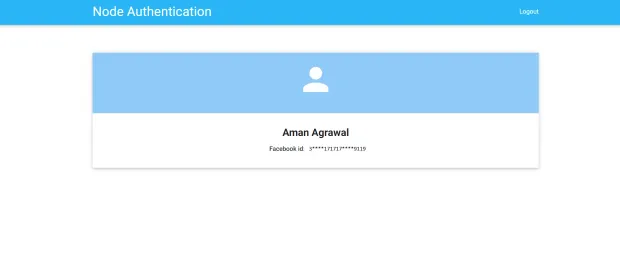
25 <div class="section no-pad-bot" id="index-banner">
26 <div class="container">
27 <br><br>
28 <div class="row center">
29 <div class="col s12">
30 <div class="card">
31 <div class="card-content blue lighten-3">
32 <span class="card-title white-text"><strong><i class="large material-icons">person</i>
33 </strong></span>
34 </div>
35 <div class="card-action">
36 <h5><b><%= user.displayName %></b></h5>
37 <p><strong>Facebook id</strong>: <%= user.id %></p>
38 </div>
39 </div>
40 </div>
41 </div>
42 </div>
43 </div>
44</body>
45
46</html>- Finally, when you are done with the above code you can now write all your app details gathered in step 1 to
config.jsfile created in the root directory
1module.exports = {
2	'facebookAuth': {
3		'clientID':  '<APP_ID>', // your App ID
4		'clientSecret':  '<APP_SECRET>', // your App Secret
5		'callbackURL':  'http://localhost:3000/auth/facebook/callback'
6	}
7}- Let's have a final check with the repository, aftre follwoing all the steps in the same pordr the directory structure of your code will look like below:
1// Final directory structure
2facebook-node-authentication/
3  --|node_modules
4  --|views/
5    |--|pages/
6    |----|error.ejs
7    |----|profile.ejs
8    |----|index.ejs
9  --|config.js
10  --|package.json
11  --|package-lock.json
12  --|routes.js
13 --|server.js- Now run the server by executing below command in the directory
facebook-node-authentication/
1npm start- Visit the browser with the URL
http://localhost:3000
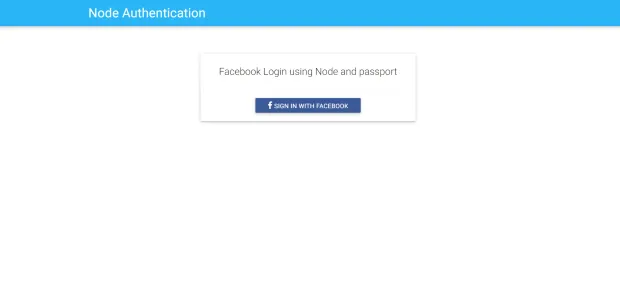
You can found the complete code used in this tutorial on our Github Repo


