

Summary
-
OAuth 2.0 is an authorization framework that allows applications to request limited, scoped access to protected APIs using short-lived access tokens instead of user passwords.
-
It defines standard roles (resource owner, client, authorization server, resource server) and grant types such as Authorization Code with PKCE, Client Credentials, Device Authorization, and Refresh Token flows.
-
OAuth 1.0 introduced token-based access but was harder to implement and scale. OAuth 2.0 is more flexible, developer-friendly, and designed for mobile, SPA, and API-first environments.
-
Older grant types like Implicit and Resource Owner Password Credentials (ROPC) are now discouraged due to security risks. Modern best practices recommend Authorization Code with PKCE for browser-based and native apps.
-
OAuth 2.0 often works alongside OpenID Connect (OIDC) for authentication and JWT for token representation, especially in CIAM, API security, and customer identity platforms.
-
With LoginRadius, you can implement OAuth 2.0 securely across web, SPA, mobile, and machine-to-machine (M2M) applications with guided configuration, standard flows, and SDK support (including Golang).
-
A strong OAuth 2.0 design is essential for API security, regulatory compliance, privacy controls, and consistent user experiences across digital channels.
Introduction
OAuth 2.0 (pronounced “oh-auth”) is an open-standard authorization framework that enables an application to request secure, delegated access to a protected resource on behalf of a user or, in some cases, on behalf of a machine identity. Instead of sharing passwords, the user authorizes the application to receive access tokens that represent specific permissions for a limited time.
In practical terms, OAuth 2.0 allows users to grant websites, APIs, mobile apps, or devices access to their information stored on another service without exposing their credentials. This is the mechanism behind everyday experiences like “Sign in with Google,” or when a web application requests permission to access your calendar, contacts, or cloud storage.
OAuth 2.0 operates as a controlled mediator in this process. The framework defines how a client application requests authorization, how an authorization server issues secure tokens, and how a resource server evaluates those tokens before allowing access to protected data. Because OAuth 2.0 relies on scoped, temporary tokens rather than passwords, it supports a safer, more granular form of delegated access across distributed systems.
In this blog, we break down how OAuth 2.0 works, its core components, the major authorization flows, security best practices, and how it differs from OAuth 1.0, along with practical implementation guidance for real-world applications.
What is OAuth 2.0?
OAuth 2.0 is an open-standard authorization framework that enables a client application to obtain limited access to a protected resource on behalf of a resource owner. Instead of using or storing a user’s password, the application receives access tokens issued by a trusted authorization server. These tokens define what the application can access and for how long.
At its core, OAuth 2.0 solves a simple but critical problem:
How can a user allow one application to securely access data held by another service, without handing over their credentials?
To do this, OAuth 2.0 defines a set of standardized roles (resource owner, client, authorization server, and resource server) and a series of authorization flows that govern how tokens are requested, issued, and validated. Each flow supports a different use case, ranging from web apps and single-page applications to mobile apps, IoT devices, and machine-to-machine systems.
OAuth 2.0 uses bearer tokens, meaning possession of the token grants access to the associated resources. These tokens may be opaque strings or structured formats like JWTs, depending on how the authorization server is implemented. Access tokens are typically short-lived for security, and may be paired with refresh tokens to maintain longer sessions without requiring users to re-authenticate.
By separating authorization from authentication, OAuth 2.0 provides a flexible foundation for modern identity and API security architectures. When combined with OpenID Connect (OIDC), it also supports standardized user authentication on top of its authorization capabilities.
OAuth 2.0 has become the de facto standard across web, mobile, and API-driven platforms because it offers secure delegated access, granular permissions, and a consistent model that scales across diverse applications and devices.
Why OAuth 2.0 is Needed
OAuth 2.0 is needed to replace insecure password sharing with a safe, standardized way to grant limited access to user data.
Before OAuth 2.0 became the industry standard for secure delegated access, applications often relied on a risky pattern known as password sharing. If a third-party application needed access to a user’s data, such as emails, contacts, or files, the user had to provide their actual account credentials. This created several serious security and operational problems:
1. Password Sharing Exposes Accounts to Full Access
Handing over a username and password gives an application complete control of an account, far beyond what it truly needs. The user has no way to grant partial access or limit what the application can do.
2. No Granular Permissions or Scopes
Legacy patterns lacked the concept of scopes, meaning every application automatically gained full privileges, even if it only needed read-only access to a single dataset.
3. No Safe Way to Revoke Access
If a user wanted to stop a third-party application from accessing their data, the only option was to change the password. This immediately broke access for all other connected apps and devices.
4. Credentials Became Permanently Exposed
Storing or transmitting passwords through multiple systems expanded the attack surface. Any compromise along the chain put the user’s entire account at risk.
5. Not Designed for Modern Multi-App, API-Driven Ecosystems
Mobile apps, SPAs, IoT devices, and distributed APIs all need a standardized way to request and validate authorization. Password-based access is incompatible with
-
zero-trust architectures
-
API gateways
-
microservices
-
consent-driven data policies
6. No Separation Between Authentication and Authorization
Older approaches mixed “who the user is” with “what the application can do.” OAuth 2.0 fixes this by separating:
-
authentication (handled by an identity provider or OIDC)
-
authorization (handled by OAuth 2.0 using access tokens)
OAuth 2.0 Solves These Problems
OAuth 2.0 introduced a secure, standardized way for applications to request limited, scoped, revocable access using short-lived access tokens instead of passwords. Users maintain control, applications get the minimum permissions required, and systems can enforce strong policies across APIs, apps, and devices.
This shift fundamentally changed how modern digital platforms manage authorization. Today, OAuth 2.0 is essential for:
-
web and mobile authentication flows
-
API security
-
microservices and M2M communication
-
third-party integrations
-
customer identity (CIAM) platforms
-
privacy and consent management
OAuth 2.0 provides the foundation for secure, scalable authorization throughout modern application ecosystems, something older approaches simply couldn’t support.
Core OAuth 2.0 Roles and Concepts
OAuth 2.0 defines a small set of standardized roles and components that work together to provide secure, delegated access using access tokens. Understanding these roles is essential before diving into flows or grant types.
1. Resource Owner (User)
The resource owner is typically the end user who controls the data the application wants to access. They grant or deny permission when an authorization request is initiated.
2. Client (Application)
The client is the application requesting access on behalf of the user—such as a web app, SPA, mobile app, or backend service.
OAuth 2.0 distinguishes between two client types:
-
Confidential clients : Can securely store secrets (e.g., server-side web apps, backend services)
-
Public clients : Cannot securely store secrets (e.g., browser-based SPAs, native mobile apps)
This distinction determines which OAuth 2.0 flows are safe to use and whether PKCE is required.
3. Authorization Server
The authorization server authenticates the user, handles consent, and issues access tokens (and refresh tokens when applicable).
It enforces security policies, validates redirect URIs, and determines which scopes the client may request.
4. Resource Server
The resource server hosts the protected resources like APIs, user data, or services the client wants to access.
It receives the access token from the client and validates it before granting access.
5. Scopes
Scopes define the specific level of access the client is requesting. For example:
-
email.read -
calendar.readonly -
profile.basic
Scopes support least-privilege authorization by ensuring apps only receive the permissions they truly need.
6. Access Tokens
An access token is a short-lived credential issued by the authorization server that the client presents to the resource server.
Tokens may be:
-
opaque (validated via introspection), or
-
JWT-based (validated locally by verifying the signature and claims)
Access tokens define what the client can access and expire quickly to reduce security risk.
7. Refresh Tokens
A refresh token is a longer-lived credential used to obtain new access tokens without requiring the user to authenticate again.
They are issued only for certain flows and must be stored securely. Modern best practices recommend refresh token rotation to detect theft or misuse.
8. Consent
During the authorization flow, the user reviews and approves the permissions (scopes) the client is requesting. This consent step is a foundational part of OAuth’s delegated access model.
What is OAuth and OAuth2?
OAuth 1.0 and OAuth 2.0 were both created to solve the same fundamental problem: allowing applications to access user data on other systems without exposing passwords. However, they take very different approaches, and only OAuth 2.0 is widely used in modern web, mobile, and API-driven architectures.
How OAuth 1.0 Worked
OAuth 1.0 introduced the idea of delegated access without password sharing. It relied heavily on:
-
Cryptographic request signing for every API call
-
Shared secrets between the client and service
-
A more complex flow for obtaining and using tokens
This design improved security over raw password sharing, but it made OAuth 1.0 hard to implement and harder to scale, especially as new platforms like mobile apps and SPAs emerged.
How OAuth 2.0 Improved on OAuth 1.0
OAuth 2.0 rethought the model to make authorization more flexible and developer-friendly. Instead of signing each request, it uses bearer access tokens over HTTPS, with different grant types optimized for:
-
Server-side web apps
-
Single-page applications (SPAs)
-
Native and mobile apps (with PKCE)
-
Machine-to-machine (M2M) communication
This shift simplified integration, opened the door for broader adoption, and made OAuth a better fit for modern API security and CIAM platforms.
OAuth 1.0 vs OAuth 2.0: Key Differences
| Aspect | OAuth 1.0 | OAuth 2.0 |
|---|---|---|
| Design Goal | Delegated access without password sharing | Flexible, scalable authorization framework for web, mobile, and APIs |
| Request Model | Every request must be cryptographically signed | Uses bearer access tokens over HTTPS |
| Token Usage | Request and access tokens tightly bound to signed requests | Access tokens (and optional refresh tokens) used across multiple requests |
| Complexity | High – complex signing rules and error-prone implementations | Lower – simpler HTTP-based flows and broader library support |
| Client Types | Less explicit distinction between public and confidential apps | Clear distinction; supports web, SPAs, native apps, and M2M with appropriate grant types |
| Mobile / SPA Support | Not designed with modern mobile and browser apps in mind | Designed to support native apps, SPAs, and devices (with flows like PKCE and device codes) |
| Extensibility | Difficult to extend to new use cases | Highly extensible; many additional specs and best practices built on top |
| Current Status | Legacy / superseded in most systems | Current industry standard for authorization and API access |
| Relationship to OIDC / JWT | Pre-dates common use of OIDC and JWT | Often combined with OpenID Connect and JWT for authentication and token representation |
Why Modern Systems Choose OAuth 2.0
In practice, most organizations have moved to OAuth 2.0 because it:
-
Fits better with API-first, microservice, and cloud-native environments
-
Supports multiple client types and device categories
-
Integrates cleanly with OpenID Connect, JWT, and CIAM platforms
-
Is backed by updated security best practices and ongoing work like OAuth 2.1
If you’re designing or modernizing your authorization architecture today, OAuth 2.0 is the framework you build around, often with a CIAM platform like LoginRadius acting as your authorization server and OpenID Provider.
OAuth 2.0 Flows (Grant Types) Explained
OAuth 2.0 uses different authorization flows, called grant types, to issue access tokens based on the type of application and the level of security required. Each flow defines how the client requests authorization and how the authorization server issues tokens.
Choosing the right flow is essential for secure, predictable access across web apps, mobile apps, SPAs, APIs, and machine-to-machine environments.
Below are the core OAuth 2.0 grant types used today.
1. Authorization Code Flow (for Web Apps)
The Authorization Code flow is the most widely used OAuth 2.0 grant type. It is designed for confidential clients, which are applications that can securely store a client secret, such as server-side web apps.
How it works:
-
The user is redirected to the authorization server.
-
They authenticate and approve requested scopes.
-
The authorization server returns an authorization code to the client’s redirect URI.
-
The client exchanges the code (plus its client secret) for access and refresh tokens.
Because the code exchange happens on the server, tokens are kept away from the browser, reducing exposure.
Ideal for:
-
Traditional web apps
-
Applications with secure backend components
-
Environments where client secrets can be fully protected
2. Authorization Code Flow with PKCE (for SPAs & Mobile Apps)
PKCE (Proof Key for Code Exchange) is a security extension added to the Authorization Code flow, specifically designed for public clients, which are applications that cannot safely store a client secret, including:
-
Single-page applications (SPAs)
-
Native iOS and Android apps
-
Desktop applications
PKCE protects against authorization code interception by binding the code to a per-request secret known only to the client.
Why PKCE is important:
-
Public clients cannot use traditional client secrets
-
PKCE prevents attackers from exchanging stolen authorization codes
-
Required for native apps (RFC 8252)
-
Recommended for all browser-based apps (OAuth 2.1 guidance)
Ideal for:
-
SPAs running in the browser
-
Native/mobile apps using the system browser
-
Any public client accessing OAuth 2.0
3. Client Credentials Flow (Machine-to-Machine / M2M)
The Client Credentials grant is used when an application needs to access its own resources or perform machine-to-machine operations without involving a user. In this flow:
-
No user is present.
-
The client authenticates directly with its client ID and client secret.
-
The authorization server returns an access token scoped to the application's permissions.
Some common use cases:
-
Microservices calling internal APIs
-
Backend jobs or cron processes
-
API-to-API communication
-
Secure M2M workflows
Not ideal for:
-
User login
-
User-initiated flows
4. Device Authorization Flow (Device Code Flow)
The Device Authorization flow is used for devices with limited input capabilities, such as:
-
Smart TVs
-
Consoles
-
IoT devices
-
Appliances without keyboards or browsers
How it works:
-
The device displays a short code and a verification URL.
-
The user visits the URL on their phone or computer, logs in, and enters the code.
-
Once approved, the device receives access tokens by polling the authorization server.
Ideal for:
-
Devices without full browsers
-
Applications with remote authorization requirements
5. Refresh Token Flow
A refresh token allows a client to obtain new access tokens without requiring the user to authenticate again. Refresh tokens:
-
Are typically long-lived
-
Must be stored securely
-
Are issued only for certain flows
-
Support refresh token rotation for added security
Used with:
-
Authorization Code + PKCE
-
Authorization Code (confidential clients)
-
Device Authorization flow
Not used with:
- Client Credentials flow (no user session)
6. Deprecated or Discouraged Grant Types
Certain OAuth authentication grant types are now considered insecure and are discouraged in modern implementations:
Implicit Grant (Discouraged)
Historically used for SPAs, the Implicit flow exposes tokens in the browser URL, making them vulnerable to leakage. Modern guidance recommends Authorization Code + PKCE instead.
Resource Owner Password Credentials (ROPC) (Deprecated)
This flow requires users to share their username and password directly with the client. It violates OAuth’s core principle of not exposing passwords to third-party applications and should not be used except in tightly controlled legacy systems.
How to Choose the Right Grant Type
| Application Type | Recommended Flow | Notes |
|---|---|---|
| Server-side Web App | Authorization Code | Uses client secret; tokens handled on backend |
| SPA (Browser-based) | Authorization Code + PKCE | Prevents token exposure; no client secret |
| Native Mobile App | Authorization Code + PKCE | Must use system browser per RFC 8252 |
| Machine-to-Machine | Client Credentials | No user; uses client ID + secret |
| Smart Devices / IoT | Device Authorization Flow | User approves on separate device |
| Legacy Systems | ROPC (avoid) | Should be phased out |
Why These Flows Matter
Each flow was designed with a specific trust model and architecture in mind, ensuring OAuth 2.0 can be safely used across diverse applications, devices, and ecosystems.
Selecting the correct OAuth 2.0 grant type directly affects:
-
Token security
-
User experience
-
API access consistency
-
Compliance with modern best practices
-
Protection against interception attacks
-
Long-term maintainability of your identity architecture
TL;DR: OAuth 2.0 Grant Types
-
OAuth 2.0 defines multiple flows to issue access tokens based on the client’s capabilities and security requirements.
-
Authorization Code is used for web apps; Authorization Code with PKCE is required for public clients like SPAs and mobile apps.
-
Client Credentials supports machine-to-machine access; Device Authorization supports devices with limited input.
-
Refresh Tokens extend sessions without re-authentication.
-
Implicit and Resource Owner Password Credentials (ROPC) are deprecated and should be avoided.
How Does OAuth 2.0 Work (Step-by-Step)
At the most basic level, an application must be registered with the authorization server before it can use OAuth 2.0. During this registration, the client receives a client ID and, for confidential clients, a client secret. These credentials identify the application and are used during the token request process.
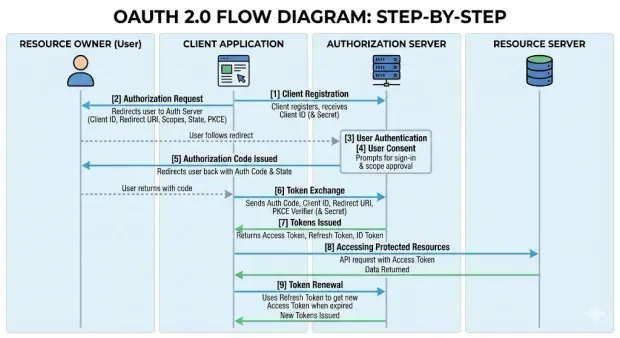
Once registered, the standard OAuth 2.0 sequence generally follows these steps:
1. The Client Prepares the Authorization Request
The client determines which permissions (scopes) it needs and generates a unique state value to protect the request.
Public clients, such as SPAs and native apps, also generate a PKCE code verifier and a corresponding code challenge.
2. The User is Redirected to the Authorization Server
The client redirects the user’s browser to the authorization server with parameters such as the client ID, redirect URI, scopes, state, and, if applicable to the PKCE code challenge.
This begins the authorization process.
3. The User Authenticates
The authorization server prompts the user to sign in using the available authentication methods. Once authenticated, the server continues to the consent step.
4. The User Grants or Denies Consent
The authorization server presents the permissions the client is requesting.
If the user approves, the authorization server proceeds; if not, the flow ends and an error is returned to the client.
5. The Authorization Server Issues an Authorization Code
If the user grants consent, the authorization server sends the user back to the client’s registered redirect URI with:
-
a short-lived authorization code
-
the state value for verification
The client checks that the returned state matches the one it generated.
6. The Client Exchanges the Code for Tokens
The client makes a direct call to the authorization server’s token endpoint to exchange the code for tokens.
This request includes the authorization code, client ID, redirect URI, and when using PKCE, the code verifier.
Confidential clients also use their client secret.
7. The Authorization Server Issues Tokens
If the request is valid, the authorization server returns:
-
an access token
-
optionally a refresh token
-
optionally an ID token when OpenID Connect is used
These tokens represent the authorization granted to the client.
8. The Client Accesses Protected Resources
The client calls the resource server (API) and includes the access token in the request. The resource server validates the token and returns the requested data if the token is valid and the scopes allow it.
9. Token Expiration and Renewal
Access tokens expire after a short period.
If the client has a refresh token, it sends the refresh token to the authorization server to obtain a new access token; otherwise, the user must repeat the authorization process.
Step-by-Step OAuth 2.0 Flow Diagram
1[1] Client Registration
2    ↓
3The client registers with the authorization server
4and receives a client ID (and client secret for
5confidential clients).
6[2] Authorization Request
7↓
8The client redirects the user to the authorization server
9with its client ID, redirect URI, requested scopes,
10state value, and (for public clients) a PKCE code challenge.
11[3] User Authentication
12↓
13The authorization server prompts the user to sign in
14using the configured authentication method.
15[4] User Consent
16↓
17The authorization server displays the requested scopes.
18The user approves or denies the request.
19[5] Authorization Code Issued
20↓
21If approved, the authorization server redirects the user
22back to the client with a short-lived authorization code
23and the original state value.
24[6] Token Exchange
25↓
26The client sends the authorization code to the token endpoint
27along with its client ID, redirect URI, and PKCE code verifier.
28Confidential clients also include their client secret.
29[7] Tokens Issued
30↓
31The authorization server validates the request and returns:
32• Access token
33• Optional refresh token
34• Optional ID token (if using OpenID Connect)
35[8] Accessing Protected Resources
36↓
37The client includes the access token in API requests.
38The resource server validates the token and returns data
39if the token and scopes are valid.
40[9] Token Renewal
41↓
42When the access token expires, the client uses the refresh token
43to request a new access token without requiring the user
44to authenticate again.
Tokens, JWT, and Bearer Token Usage
After the authorization flow completes and the authorization code is exchanged, the authorization server returns the tokens the client will use to call protected APIs. These tokens act as the client’s credentials and define what the application can access, for how long, and under what conditions. The way these tokens are issued, stored, and validated directly affects how authorization is enforced across clients and resource servers.
Access Tokens (Opaque and JWT)
The access token is the core credential a client presents when calling an API. OAuth 2.0 does not prescribe a specific format, so implementations generally choose one of two models:
-
Opaque tokens - Random values with no readable content. The resource server verifies them by calling the authorization server’s introspection endpoint.
-
JWT access tokens - Signed tokens that include structured claims, allowing the resource server to validate them locally without an introspection call.
Both options represent the scopes granted and the lifetime of the authorization. The decision between opaque and JWT usually depends on how your services are structured and how you plan to validate tokens.
Refresh Tokens and Rotation
A refresh token provides a way to request new access tokens without forcing the user through the authorization process again. Because refresh tokens last longer, they must be handled more carefully.
Many modern OAuth 2.0 implementations use refresh token rotation—each time a refresh token is used, the authorization server issues a new one and invalidates the previous token. This prevents silent reuse and helps detect compromised tokens immediately.
Bearer Token Risks and Mitigations
OAuth 2.0 commonly uses bearer tokens, which means that any party in possession of the token can use it. There is no additional proof of possession required. Because of this, protecting bearer tokens is critical. Key safeguards include:
-
sending all tokens over HTTPS only
-
keeping access tokens short-lived
-
securing how tokens are stored on the client
-
validating all token claims (issuer, audience, expiry, scope) on every request
These controls reduce the risk that a leaked or intercepted token can be replayed or used outside its intended context.
Understanding how tokens behave forms the foundation for building secure integrations. The next section examines how OAuth 2.0 aligns with OpenID Connect and JWT to support identity, session handling, and API access across distributed systems.
OAuth 2.0, OpenID Connect, and JWT: How They Fit Together
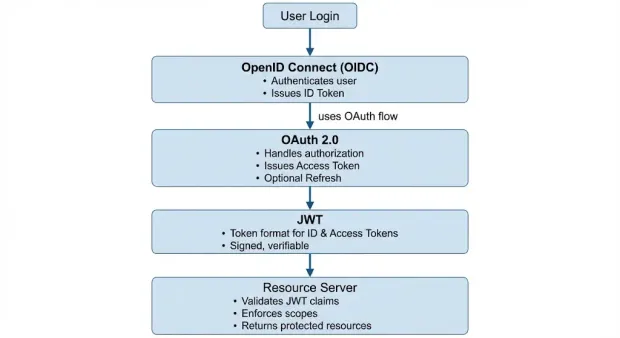
OAuth 2.0 handles authorization, OpenID Connect adds authentication on top of it, and JWT provides the token format used to represent identity and access information across clients and APIs.
OAuth 2.0 provides a framework for delegated authorization, but it does not define how a client should authenticate a user or how identity information should be represented. This is where OpenID Connect (OIDC) and JSON Web Tokens (JWT) complement OAuth 2.0. Together, they create a complete model for secure user authentication and API authorization across modern applications.
OAuth 2.0: Authorization Framework
OAuth 2.0 focuses on authorization. It defines how a client obtains access tokens to interact with protected APIs on behalf of a user. OAuth 2.0 does not define how the user is identified or how user profile data is communicated.
OpenID Connect: Authentication Layer on Top of OAuth 2.0
OpenID Connect (OIDC) is an identity layer built directly on the OAuth 2.0 authorization framework. OIDC uses OAuth 2.0’s underlying flows, but adds standardized components that enable authentication:
-
an ID token representing the authenticated user
-
a UserInfo endpoint for retrieving profile data
-
a consistent set of claims for identity attributes
OIDC lets the client verify *who *the user is while OAuth 2.0 controls what the client is allowed to do.
This division of roles—authorization from OAuth 2.0, authentication from OIDC—is the basis of most modern login implementations.
JWT: Format for Access and ID Tokens
JSON Web Tokens (JWTs) are a compact, signed token format widely used in OAuth 2.0 and OIDC deployments. A JWT contains claims such as:
-
Issuer
-
subject (user identifier)
-
audience (intended recipient)
-
expiration time
-
scopes or permissions
JWTs allow resource servers to validate tokens locally using cryptographic signatures, removing the need for introspection calls in distributed systems.
In practice, JWTs often appear in two contexts:
-
ID Tokens (from OIDC): always JWTs, used for authentication
-
Access Tokens (from OAuth 2.0): may be JWTs or opaque tokens, depending on implementation
Learn more in detail about JWT Login.
How They Work Together in Real Deployments
A typical modern setup combines all three standards:
-
OAuth 2.0 handles authorization, issuing access tokens that allow the client to call APIs.
-
OpenID Connect handles authentication, issuing an ID token that identifies the user.
-
JWT provides the token format, enabling efficient, stateless validation by resource servers.
This combination supports secure login flows, scalable API access, and consistent identity information across distributed applications, mobile clients, and microservices.
This relationship between OAuth 2.0, OpenID Connect, and JWT can be visualized as a layered model, where each component addresses a distinct part of the authentication and authorization process.
Security Pitfalls and 9 Best Practices of OAuth 2.0
Though OAuth 2.0 provides a flexible framework for delegated authorization, its security depends heavily on how each component is implemented. The following practices address common pitfalls and align with current OAuth 2.0 and OAuth 2.1 security recommendations.
1. Use PKCE for All Public Clients
Applications that cannot securely store a client secret, such as SPAs, native mobile apps, or desktop applications, must use Proof Key for Code Exchange (PKCE). PKCE protects the authorization code from interception attacks by binding it to a one-time code verifier generated by the client. It is required for native apps and recommended for all browser-based clients.
2. Validate Redirect URIs Strictly
The authorization server must enforce exact redirect URI matching to prevent open redirect attacks. Wildcards, dynamic URLs, and unregistered redirect URIs should be rejected. This ensures that authorization codes and tokens are returned only to trusted endpoints.
3. Use the State Parameter to Prevent CSRF
The state parameter links the authorization request to the client’s current session and protects against cross-site request forgery (CSRF). The client should generate a cryptographically random state value, store it securely, and validate it when the authorization server returns the user to the redirect URI.
4. Protect Token Storage
Access tokens and refresh tokens must be stored in a way that prevents unauthorized access:
-
Web applications should avoid exposing tokens to JavaScript when possible.
-
SPAs should prefer secure cookies or follow a backend-for-frontend (BFF) approach.
-
Native apps should use secure OS-level storage.
Tokens should never be stored in localStorage due to susceptibility to XSS attacks.
5. Use Short-Lived Access Tokens and Refresh Token Rotation
Access tokens should expire quickly to limit the impact of token leakage. When refresh tokens are issued, refresh token rotation should be enabled so that each refresh request invalidates the previous token. Reuse detection provides an early signal of compromise.
6. Enforce HTTPS for All OAuth 2.0 Endpoints
OAuth 2.0 relies on TLS (HTTPS) to protect authorization codes, access tokens, and client credentials in transit. All calls to the authorization server, token endpoint, and resource server must use HTTPS without exception.
7. Validate All Token Claims on the Resource Server
Resource servers must validate the access token’s critical claims, including:
-
issuer (iss)
-
audience (aud)
-
expiration (exp)
-
scope
-
signature (for JWT access tokens)
Improper or missing validation can lead to unauthorized access.
8. Use the Appropriate Grant Type for the Client
Selecting the correct grant type is essential:
-
Authorization Code with PKCE for SPAs and native apps
-
Authorization Code for confidential clients
-
Client Credentials for machine-to-machine access
-
Device Authorization for limited-input devices
Avoid legacy flows like Implicit and ROPC, which do not meet current security expectations.
9. Implement Token Revocation and Introspection Where Needed
Authorization servers should support token revocation and introspection, allowing clients and resource servers to verify token status and invalidate compromised tokens as necessary. These capabilities strengthen access control across distributed API environments.
Business Benefits of OAuth 2.0
OAuth 2.0 provides a standardized way for applications, APIs, and services to manage delegated access without exposing user credentials. Beyond its technical advantages, OAuth 2.0 delivers several operational and strategic benefits that are important for organizations building modern digital platforms, customer-facing products, or API ecosystems.
1. Reduced Risk Through Limited and Scoped Access
OAuth 2.0 removes the need for applications to handle or store passwords, significantly lowering the risk of credential theft. Scopes allow access to be granted in a controlled and granular manner, which helps limit the blast radius of compromised clients and aligns with least-privilege security models.
2. Improved User Experience Across Web, Mobile, and APIs
By enabling users to approve specific permissions rather than entering credentials repeatedly, OAuth 2.0 simplifies cross-application experiences. It supports seamless handoffs between web apps, mobile apps, and backend APIs, allowing businesses to deliver consistent user journeys across channels.
3. Stronger Compliance and Governance Controls
Centralized authorization servers allow organizations to enforce uniform policies for token lifetime, consent, and access revocation. This helps align with regulatory requirements related to privacy, auditability, and secure data access—including frameworks such as GDPR, SOC 2, and industry-specific mandates.
4. Scalable Access for API-Driven Architectures
OAuth authentication was designed for distributed systems and fits cleanly into API-first and microservices environments. Access tokens provide a standardized mechanism for service-to-service and user-to-service authorization, enabling teams to scale APIs independently while maintaining consistent security controls.
5. Support for Third-Party Integrations and Partner Ecosystems
Because OAuth 2.0 is widely adopted, it enables secure integrations with partners, vendors, and external applications without exposing internal authentication systems. Organizations can safely extend API access to external developers, create partner programs, or support marketplace models.
6. Future-Proof Foundation for Identity Standards
OAuth 2.0 is the basis for modern identity technologies such as OpenID Connect, JWT-based authorization, and emerging profiles like OAuth 2.1. By adopting OAuth 2.0, organizations establish a foundation that supports both current and future authentication and authorization requirements.
7. Operational Efficiency Through Centralized Authorization
Centralizing authorization logic reduces the need for custom access controls in each application. This lowers development overhead, improves maintainability, and provides unified visibility into token usage, access patterns, and session behavior across the platform.
For teams implementing OAuth 2.0 across multiple client types, LoginRadius provides a consistent authorization layer and reduces the complexity of managing flows, tokens, and identity integrations.
Getting Started with OAuth 2.0 Using LoginRadius
LoginRadius provides a centralized authorization server that supports the core OAuth 2.0 flows used across web, mobile, API, and machine-to-machine applications. The platform handles token issuance, PKCE enforcement, redirect validation, and scope management, allowing developers to implement OAuth 2.0 without building these components from scratch.
Here is how to configure a OAuth-enabled application in a few steps:
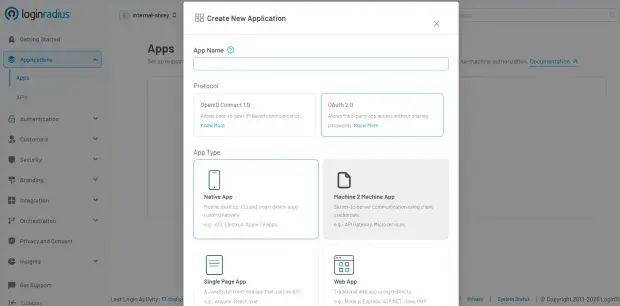
1. Set Up Your Application
Log in to the LoginRadius Admin Console and navigate to Applications > Apps.
Select Add Apps, name your application, choose OAuth 2.0 as the protocol, and select the correct application type (Web, SPA, Native, or M2M).
Click Create to generate the initial configuration, including the client credentials.
2. Configure OAuth Settings
Specify the core OAuth parameters for your application, including:
-
Client ID and Client Secret – the credentials assigned to your app
-
Grant Types – choose the OAuth 2.0 flows you want to support (Authorization Code, PKCE, etc.)
-
Redirect URLs and CORS Origins – define allowed callback endpoints and permitted origins
-
Token Expiry and Reauthentication – configure token lifetimes and user re-login behavior
Click Save once the configuration is complete.
3. Enable Identity Providers
Enable the identity providers (social or custom) that your application should support. This determines how users authenticate before the authorization process continues.
4. Refresh Tokens When Needed
If refresh tokens are issued, use the LoginRadius Refresh Token API to request new access tokens without requiring the user to authenticate again.
Send a POST request including:
-
client_id -
grant_type=refresh_token -
the
refresh_token
This extends the session while maintaining OAuth 2.0 security requirements.
LoginRadius supports all major OAuth 2.0 flows, allowing you to build secure and scalable login and authorization across applications, APIs, and devices.
Refer to the LoginRadius technical documentation for full details including flow-specific parameters, endpoints, and examples.
Google OAuth with Golang
Many Go applications require secure authentication with external identity providers such as Google. Using OAuth 2.0, developers can delegate authentication to Google while relying on standard authorization flows and token handling, without ever exposing user credentials to the application.
The LoginRadius Golang SDK provides a direct way to integrate Google as an identity provider within an OAuth 2.0 or OpenID Connect workflow. By enabling Google in the LoginRadius Admin Console and using the SDK to handle redirects, token exchange, and JWT validation, Go applications can authenticate users through Google with minimal custom logic.
The SDK supports initiating the authorization request, exchanging authorization codes for tokens, and validating ID tokens or access tokens as required by your implementation. This allows Go-based APIs, services, and web applications to adopt secure, standards-aligned login flows while centralizing identity management through LoginRadius.
For detailed instructions, example code, and step-by-step integration guidance, refer to the LoginRadius Golang Library for OAuth 2.0.
Looking Ahead: OAuth 2.1 and the Future of Authorization
OAuth 2.0 continues to be the standard today, but the ecosystem has evolved. Looking forward, OAuth 2.1 will represent the next evolution of the OAuth framework. This version is being developed to simplify the authentication protocols by removing older, less-used features and tightening the security model. Its goal is to make the standard easier to implement while ensuring that modern security practices are followed by default.
OAuth 2.1 will discontinue the Implicit and Resource Owner Password Credentials grant types, require PKCE for all public clients, and formalize stricter requirements around redirect handling and secure transport. By consolidating what has already become common practice, OAuth 2.1 will provide a clearer, more secure baseline for future authorization workflows.
FAQs
1. What is OAuth 2.0 and what problem does it solve?
OAuth 2.0 is an authorization framework that lets applications request limited access to protected resources without needing user passwords. It solves the problem of unsafe credential sharing by using scoped, time-bound access tokens issued by a trusted authorization server.
2. Why is OAuth 2.0 needed in modern applications?
OAuth 2.0 is needed to replace insecure password sharing with a standardized way to grant limited, revocable access using tokens. It prevents full account exposure, enables granular permissions, supports multi-device access, and aligns with zero-trust and API-first architectures.
3. What are the core roles defined in OAuth 2.0?
OAuth 2.0 defines four core roles: the resource owner, client application, authorization server, and resource server. These components work together to request consent, issue access tokens, and enforce access to protected APIs.
4. What is the difference between OAuth and OAuth 2.0?
OAuth 1.0 required cryptographic signatures for every request, whereas OAuth 2.0 uses simpler bearer tokens and supports modern clients like SPAs, mobile apps, and APIs. OAuth 2.0 is more flexible, scalable, and widely adopted across modern architectures.
5. How is OAuth 2.0 different from OAuth 1.0?
OAuth 2.0 removes complex signing requirements, introduces multiple grant types, and adds support for mobile, SPA, and machine-to-machine flows. OAuth 1.0 is now considered legacy due to implementation complexity and poor fit for modern systems.
6. Why do modern systems choose OAuth 2.0?
Modern systems choose OAuth 2.0 because it aligns with API-first design, microservices, cloud-native environments, and integrates cleanly with OIDC and JWT. It provides flexible authorization across browsers, mobile apps, IoT, and backend services.
7. What are the main OAuth 2.0 grant types and when are they used?
OAuth 2.0 includes several grant types, like Authorization Code, Authorization Code with PKCE, Client Credentials, Device Authorization, and Refresh Token flow, each designed for specific client types. PKCE is required for SPAs and mobile apps, Client Credentials serves M2M access, and Device Authorization supports limited-input devices.
8. How does OAuth 2.0 work step-by-step?
OAuth 2.0 works by redirecting the user to an authorization server for authentication and consent, issuing an authorization code, and then exchanging that code for access tokens. The client uses the access token to call protected APIs, renewing it with a refresh token if needed.
9. What is the role of JWTs and bearer tokens in OAuth 2.0?
OAuth 2.0 uses bearer access tokens, often in JWT format to represent the permissions granted by the user. JWTs provide signed claims that APIs can validate locally, while opaque tokens require introspection.
10. How do OAuth 2.0, OpenID Connect, and JWT work together?
OAuth 2.0 handles authorization, OpenID Connect adds authentication using ID tokens, and JWT provides the token format used across both. Together, they support secure login, identity verification, and API access in distributed systems.
11. What are common OAuth 2.0 security pitfalls and best practices?
Common OAuth 2.0 pitfalls include token exposure, weak redirect validation, missing PKCE, and improper storage. Best practices require PKCE for public clients, strict redirect URI matching, HTTPS everywhere, short-lived tokens, refresh token rotation, and full claim validation.
12. What are the business benefits of using OAuth 2.0?
OAuth 2.0 improves security, user experience, governance, partner integrations, and scalability across API-driven architectures. It reduces password risks and provides consistent, standards-based authorization across applications.
13. How do you implement OAuth 2.0 using LoginRadius?
LoginRadius provides a centralized authorization server supporting OAuth 2.0 and OIDC, allowing developers to configure apps, enable providers, define grant types, and manage tokens with minimal custom code. You set up an app, configure redirect URIs and grant types, enable identity providers, and use the token endpoints for login and refresh.

