Introduction
In today’s digital world, securing online accounts is more critical than ever. With cyber threats on the rise, understanding authentication methods can help you protect sensitive data from unauthorized access.
This guide will walk you through Single-factor Authentication (SFA), Two-factor Authentication (2FA), and Multi-factor Authentication (MFA)—their differences, security levels, and why MFA is the best defense against cyber threats.
What is Single-factor Authentication (SFA)?
Single-factor authentication (SFA), also known as one-factor authentication (1FA), is the most basic security method. It requires just one credential out of the four authentication factors:
-
Knowledge Factor (Something You Know): Information that the user must memorize. This includes traditional passwords, PIN codes, or answers to secret security questions.
-
Possession Factor (Something You Have): A physical object that only the legitimate user owns. This has evolved from ID badges all the way to a smartphone receiving a push notification or an authenticator app generating a rotating token, and now to dedicated hardware security keys like a YubiKey.
-
Inherence Factor (Something You Are): Unique biological traits inherent to the user. This is commonly used in modern biometrics like Touch ID (fingerprint scans), Face ID (facial recognition), or retina scans.
-
Behavioral Factor (Something You Do): Implicit habits analyzed by the system in the background, such as your specific typing speed, touchscreen pressure, or keystroke dynamics.
While single factor authentication alone isn’t potent to safeguard against emerging identity thefts, combining it with other authentication methods exponentially increases its effectiveness.
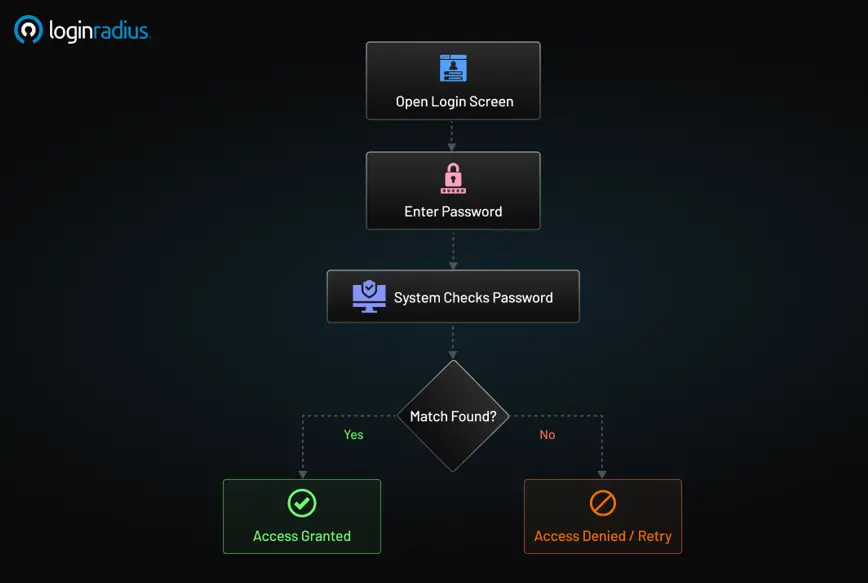
Example of Single-factor Authentication:
-
Logging into an email account using only a password.
-
Unlocking a smartphone with a PIN code.
-
Swiping an access card to enter a building.
What Are the Risks of Single-factor Authentication?
While one-factor authentication is easy to use, it has significant security drawbacks, including but not limited to:
-
Weak passwords can be easily guessed or hacked.
-
Phishing attacks can trick users into revealing their credentials.
-
Credential stuffing exploits reused, breached passwords across multiple sites.
-
Brute-force attacks allow attackers to crack weak passwords quickly.
Because of these risks, businesses and individuals are encouraged to adopt stronger authentication methods.
What is Two-factor Authentication (2FA)?
Two-factor authentication (2FA) is a security method that requires two different authentication factors out of the four mentioned above to verify a user’s identity. Unlike SFA, 2FA authentication makes it harder for attackers to gain access because it combines at least two of the factors.
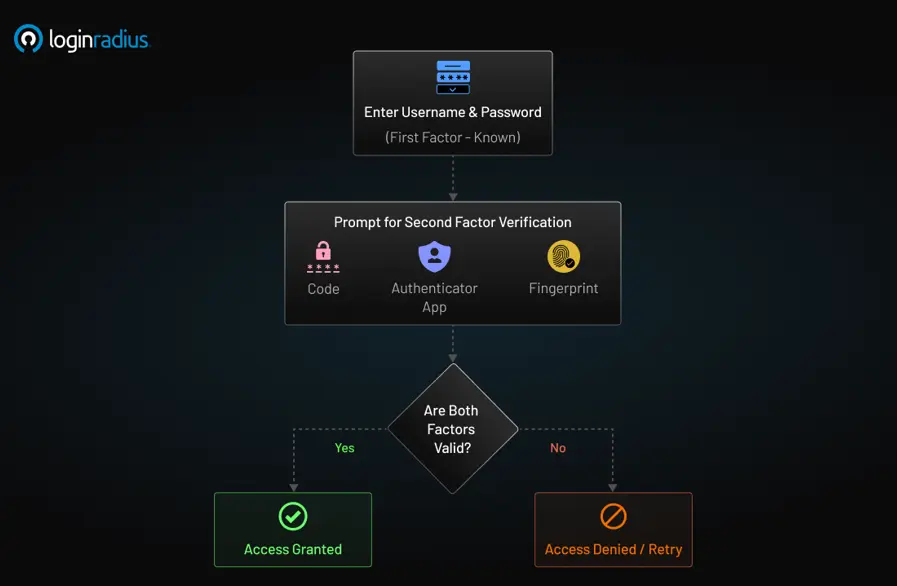
Two-factor Authentication Methods
Two-factor authentication (2FA) has evolved significantly over the years, with various methods emerging to enhance security. Below is an exhaustive list of 2FA methods arranged in chronological order of their prominence:
SMS-Based 2FA
Early 2000s - Present
Mechanism: One-time passwords (OTPs) are sent via SMS when logging in.
Though widely used, SMS-based 2FA has security vulnerabilities, such as SIM swapping. It became prominent in the early 2000s as online banking and financial institutions started adopting it to reduce fraud and unauthorized access.
Email OTP
Late 2000s - Present
Mechanism: A unique code / OTP sent to the user’s registered email for verification.
Email-based authentication became widely used with the rise of cloud-based services, offering an additional layer of security for account access and password resets.
Time-based One-time Password (TOTP)
2005 - Present
Mechanism: Uses the open OATH framework to generate time-sensitive codes (RFC 6238) using apps like Google Authenticator and Microsoft Authenticator.
With its numerous benefits, TOTP gained widespread adoption after the launch of the Google Authenticator app in 2010, quickly becoming a preferred choice for developers and enterprises looking for stronger authentication.
Biometric Authentication
2010s - Present
Mechanism: Includes fingerprint scans, facial recognition, and retina scans.
Apple introduced Touch ID in 2013, followed by Face ID in 2017, making biometric 2FA mainstream. Biometric authentication started gaining traction after mobile device manufacturers integrated fingerprint and facial recognition, providing a convenient and secure authentication method.
Push Notification Authentication
2013 - Present
Mechanism: Sends a real-time push notification prompting users to approve or deny login attempts.
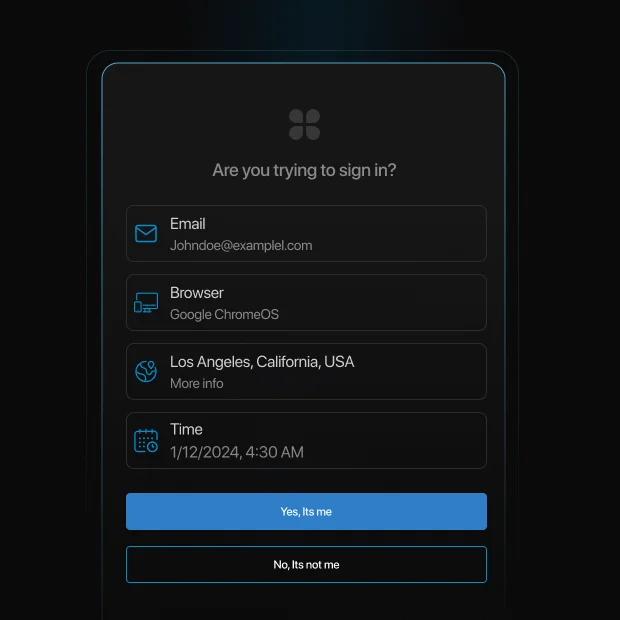
Push notification authentication method gained popularity as smartphones became ubiquitous, offering a seamless and user-friendly alternative to traditional OTP-based authentication.
Hardware Security Key-based 2FA
2014 - Present
Mechanism: Physical security keys like YubiKey and Google's Titan Security Key offer phishing-resistant authentication.
Security keys gained prominence in 2018 when Google enforced their use internally, reducing phishing attacks to zero among its employees.
QR Code-based 2FA
2015 - Present
Mechanism: Users scan a QR code using an authenticator app to verify identity.
This is commonly used in enterprise login systems. The use of QR code-based authentication expanded with the increasing demand for contactless security measures, particularly in corporate environments.
Passkeys
2022 - Present
Mechanism: Passwordless, asymmetric cryptographic key pairs tied to device hardware.
Developed by FIDO Alliance, passkeys are gaining traction for their resistance to phishing and credential theft. Passkeys became mainstream in 2022 when major tech companies like Apple, Google, and Microsoft adopted them to eliminate phishing vectors and shared secret data leaks.
2FA continues to evolve, incorporating new technologies to provide more secure and seamless authentication experiences.
How Effective Is Two-Factor Authentication?
Security Insight: According to Microsoft, accounts using two-factor authentication (2FA) block over 99.9% of automated attacks. Even if your password is leaked in a breach or guessed through brute force, 2FA acts as a second layer of protection, stopping intruders in their tracks.
Of course, no security measure is 100% bulletproof. SMS-based 2FA remains vulnerable to SIM-swapping and phishing, which is why many enterprises now prefer app-based TOTP or hardware-based MFA solutions.
Single-factor vs Multi-factor Authentication
| Authentication Class | Required Factors | Baseline Security Tier | Key Business Value | Primary Vulnerabilities |
|---|---|---|---|---|
| Single-Factor (1FA) | Exactly 1 | Low | Zero sign-in friction; simple to build. | Exposed to brute-force scripts, credential stuffing, and basic phishing landing pages. |
| Two-Factor (2FA) | Exactly 2 | Medium | Neutralizes bulk automated script attacks. | Static logic; evaluates a secure corporate terminal the same as an untrusted public connection. |
| Multi-Factor (MFA) | 2 or More | Very High | Strong data protection; essential for enterprise regulatory compliance. | Can cause user friction if implemented globally without dynamic step-up rules. |
While single-factor authentication is the weakest, multi-factor authentication (MFA) offers the highest level of security. In fact, the Cybersecurity and Infrastructure Security Agency (CISA) has officially recognized single-factor authentication as a bad practice due to its vulnerability to cyber threats. CISA warns that relying solely on a single authentication factor leaves systems exposed to phishing, credential stuffing, and brute-force attacks.
What is Multi-factor Authentication (MFA)?
Multi-factor authentication (MFA) is a security framework that requires two or more authentication factors. It provides stronger security than 2FA by adding additional layers of protection.
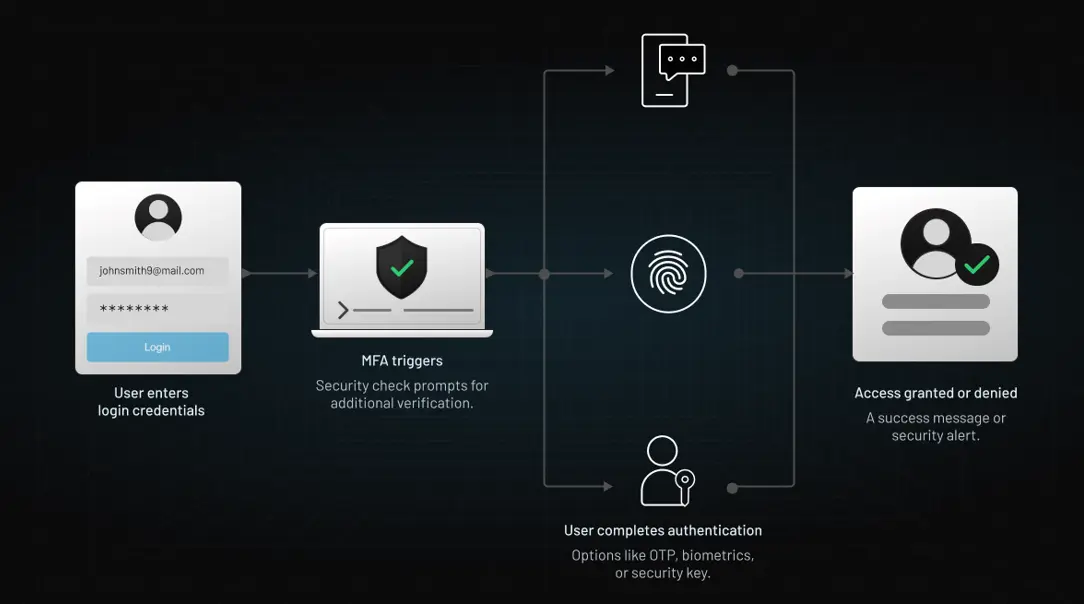
What is the Difference Between Two-factor vs Multi-factor Authentication?
| Feature | 2FA | MFA |
|---|---|---|
| Number of Factors | 2 | 2 or more |
| Security Level | High | Very High |
| Example | Password + OTP | Password + OTP + Biometric |
Think of the operational difference between the two like securing a house:
-
2FA is like adding a biometric fingerprint scanner to your front door alongside your standard physical key. It is a significant security upgrade and an excellent baseline for any application.
-
MFA is like keeping that key and fingerprint scanner, but adding background intelligence: an AI powered smart doorbell that evaluates visitor behavior or flags unusual arrival times.
While two-factor authentication (2FA) is a subset of multi-factor authentication (MFA), MFA provides stronger protection by using more than two authentication layers.
The Strategic Benefits of an MFA Architecture
While 2FA is a great starting baseline, migrating to a true Multi-Factor Authentication ecosystem unlocks key capabilities for modern applications:
- Scalability Across Use Cases: With standard 2FA, every user is forced down the exact same login path. MFA allows you to build different access flows based on user types or risk levels. For instance, you can require simple verification for a user checking their profile picture, but trigger strict, multi-layered verification if an IT administrator attempts to alter billing configurations.
- Contextual Awareness: Unlike traditional 2FA, modern MFA systems can actively evaluate contextual markers like login location, device fingerprinting, and the time of day, dynamically prompting for extra factors only when something looks out of place.
- Regulatory Compliance and Risk Mitigation: Highly regulated sectors—like healthcare and fintech—legally require authentication layers that extend past a basic password-and-SMS setup. MFA allows you to cross these compliance hurdles seamlessly out of the box.
- Future-Proof Security Hygiene: As digital threats grow more sophisticated, an MFA framework lets you add cutting-edge verification layers (like biometrics or behavioral signals) over time without having to rip out and rebuild your entire identity infrastructure.
MFA in the Real World
Multi-factor authentication isn’t just a security concept on paper; it’s a practice that businesses across various industries use daily to protect their users, platforms, and data.
Here are a few real-world examples of MFA in action:
-
Financial Services: A customer logs in to their banking app using a password and then confirms their identity with a biometric scan or one-time password (OTP). Transactions above a certain threshold might trigger step-up authentication with additional verification.
-
Developer Portals and SaaS Dashboards: Dev teams use SSO credentials, followed by hardware security keys or authenticator app approval, especially when accessing admin-level controls or sensitive APIs.
-
Healthcare Platforms: Doctors and staff access patient records using smartcards and facial recognition, ensuring compliance with privacy regulations like HIPAA.
-
Insurance and Risk Intelligence: Take C-Quence, a modern UK-based insurance provider, for example. They needed a robust authentication solution that could secure their digital platform without compromising user experience.
With LoginRadius, they implemented multi-factor authentication to protect their broker portal, providing users with secure, role-based access and seamless logins. The platform now combines email-based login with one-time passwords (OTPs) and contextual security rules, reducing fraud risks while keeping user workflows friction-free.
These examples prove that MFA is more than just an IT checklist item—it’s a practical and powerful security layer that organizations can tailor to their unique risk profile, user base, and compliance needs.
Compliance Matrix: Choosing 2FA vs. MFA for Business
Deploy 2FA: If you are building consumer-facing platforms, low-risk community forums, or media portals. It is an excellent choice when smooth user onboarding is your primary goal and security compliance audits are not an operational requirement.
Deploy MFA: If you handle sensitive corporate information, financial records, or medical history. MFA is mandatory to pass strict enterprise audits like SOC 2 Type II, ISO 27001, HIPAA, or PCI-DSS 4.0. It is also critical for protecting high-privilege administrative accounts prone to spear-phishing.
Is MFA More Secure Than 2FA?
Yes, MFA is more secure than 2FA because it includes multiple authentication layers. 2FA relies on just two factors, whereas MFA can combine various authentication methods to enhance security, making it harder for attackers to breach accounts.
For instance, if an attacker gains access to an OTP code through a phishing attack, an MFA system requiring biometric authentication would still prevent unauthorized access.
The Importance of 2FA and MFA
With increasing cyber threats, choosing between deploying 2FA or MFA is crucial for modern enterprise security. Benefits include:
-
Stronger security: Reduces risks of unauthorized access.
-
Compliance requirements: Meets regulatory standards like GDPR, HIPAA.
-
Protection against phishing and credential theft.
-
Reduced account takeover risk: Even if one factor is compromised, others remain secure.
To learn more about choosing between 2FA and MFA, here’s a quick guide.
Beyond Static Rules: Countering Modern Identity Vulnerabilities
Traditional static authentication frameworks are falling behind modern attack strategies. In an MFA Fatigue Attack, threat actors run automated scripts to flood an employee's smartphone with push notifications until they tap "Approve" out of sheer annoyance.
Modern Customer Identity and Access Management (CIAM) systems counter this by using Contextual Risk Scoring. By evaluating signals like geographical velocity, device reputation, and IP blacklists in real time, the infrastructure can trigger step-up verification only when an anomaly is detected—safeguarding data while keeping trusted user logins smooth.
Quick Checklist: Which Authentication Method Should You Use?
| Ask Yourself This… | If Yes → Consider This Method |
|---|---|
| Are your systems low-risk and internal-only? | ✅ 1FA may be sufficient |
| Do you manage customer data or support remote logins? | ✅ 2FA is a strong starting point |
| Are you in a regulated industry (e.g., finance, health)? | ✅ Go for MFA with adaptive policies |
| Do users need flexible login flows with low friction? | ✅ Choose MFA with step-up capability |
| Do you support vendors, partners, or privileged access? | ✅ MFA with contextual enforcement |
How LoginRadius Revolutionized MFA with Risk-Based Authentication
LoginRadius takes multi-factor authentication (MFA) a step further with risk-based MFA, adding an extra layer of intelligence to security. Unlike traditional MFA, which requires authentication factors regardless of context, risk-based MFA dynamically adapts based on user location, IP, device, and other risk signals.
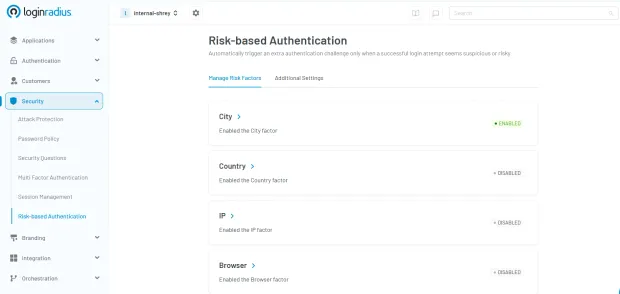
If a login attempt appears suspicious—such as an unusual location or an unrecognized device—the system automatically enforces additional authentication steps. Conversely, if the activity seems low-risk, users can log in with minimal friction.
This approach not only strengthens security but also enhances user experience by reducing unnecessary authentication prompts, making LoginRadius' MFA solution more secure, adaptive, and user-friendly.
Final Thoughts
While single-factor authentication leaves modern systems exposed, deploying 2FA or MFA provides a vital line of defense against identity theft. For robust enterprise security, implementing adaptive multi-factor authentication ensures your digital assets remain protected without compromising the end-user login experience.
FAQs
Q. What are the different categories of authentication factors?
Authentication factors include Knowledge (password, security question), Possession (OTP, security key), Inherence (biometrics), and Behavior (typing patterns, keystroke dynamics).
Q. What is multi-factor authentication, and how do I set it up?
MFA requires multiple authentication factors for login. Set it up by creating an account on the LoginRadius platform, going to account settings, enabling MFA, choosing factors (OTP, biometrics, security keys), and verifying your setup.
Q. Is multifactor authentication secure?
Yes, MFA is highly secure as it requires multiple factors, reducing the chances of unauthorized access.
Q. Do two-factor authentication codes expire?
Yes, 2FA codes typically expire within 30–60 seconds, ensuring they can’t be reused by attackers.