Introduction
Passwords are easy to steal, reuse, guess, or expose in a data breach. Two-factor authentication adds another identity check, so a stolen password alone is no longer enough to access an account.
Two-factor authentication, commonly called 2FA, is a login method that requires users to verify their identity using two different authentication factors. A user might enter a password first, then confirm the login with a code from an authenticator app, a security key, or biometric verification.
The word “different” matters here. A password followed by a security question may involve two steps, but both rely on the same factor: something the user knows.True 2FA combines independent factor categories, such as something you know (password), something you have (security key), something you are (biometric verification), or in some modern systems, something you do (behavioral signals).
Teams usually treat every additional login prompt as equally secure. It isn’t. SMS codes, authenticator apps, push notifications, biometrics, hardware security keys, and passkeys offer different levels of protection against phishing, SIM swapping, prompt fatigue, and account takeover.
In this guide, you’ll learn what 2FA is, how two-factor authentication works, which authentication factors and 2FA methods are available, where each method fits, and how businesses can implement stronger authentication without creating unnecessary friction for customers.
What Is Two-Factor Authentication (2FA)?
Two-factor authentication (2FA) is an authentication method that requires users to verify their identity using two different authentication factors before they can access an account, application, or system. Instead of relying on a password alone, 2FA combines two independent forms of verification, making it significantly more difficult for attackers to gain unauthorized access with stolen credentials. Here are the list of authentication factors:
| Factors | Description | Examples | Downsides? |
|---|---|---|---|
| Knowledge Factor or Something You Know | Knowledge factors are easy to deploy and are familiar to users, which explains why passwords still remain the most widely used authentication method. | - Passwords- Passphrases- PINs- Security questions | Passwords can be guessed, reused across multiple websites, stolen through phishing attacks, exposed in data breaches, or captured by malware. |
| Possession Factor or Something You Have | A possession factor verifies that the user controls a trusted physical device or security credential. | - Authenticator apps with time-based one-time passwords (TOTP)- SMS verification codes- Email verification codes- Push notifications sent to a trusted device- Hardware security keys- Smart cards | SMS codes can be vulnerable to SIM swapping and real-time phishing attacks. |
| Inherence Factor or Something You Are | Biometric factors rely on unique, verifiable physical characteristics. | - Fingerprint recognition- Facial recognition- Iris or retina scans- Voice recognition | Biometrics cannot easily be changed if compromised or if the device is lost. |
| Behavioral Factor or Something You Do | How users interact with their devices and applications. | - Typing rhythm- Mouse movements- Gestures- Navigation behavior | Used as a supporting signal rather than a standalone authentication factor. |
The goal of 2FA is straightforward: even if one authentication factor is compromised, the second factor provides an additional layer of protection. That extra verification step is one of the simplest and most effective ways to reduce the risk of account takeover, credential stuffing, and password-based attacks.
A common example looks like this:
-
You enter your email address and password.
-
The application asks for a six-digit code from your authenticator app or requests approval through a trusted device.
-
Access is granted only after both factors are successfully verified.
Although people often use the terms 2FA, two-step verification, and multi-factor authentication (MFA) interchangeably, they do not always mean the same thing.
Two-factor authentication specifically requires two different categories of authentication factors. That's different from two-step verification, which may use two steps from the same factor category. We'll compare 2FA, MFA, and two-step verification in more detail below.
Logging in with a password and then answering a security question isn't true 2FA because both checks rely on something you know. On the other hand, entering a password followed by a one-time code from an authenticator app combines something you know with something you have, making it genuine two-factor authentication.
This distinction matters because attackers rarely stop after stealing a password. Modern phishing campaigns, credential stuffing attacks, and malware are designed to compromise login credentials at scale. Requiring a second, independent authentication factor forces attackers to overcome another security barrier, making unauthorized access considerably more difficult.
That's why two-factor authentication is no longer limited to banking or enterprise systems. Today, it's widely used across customer applications, SaaS platforms, ecommerce websites, healthcare portals, government services, and virtually any digital experience that needs to protect user accounts without creating excessive login friction.
How Does Two-Factor Authentication Verify Your Identity?
Every authentication method answers the same question: How can a system be confident that the person trying to log in is really who they claim to be?
Two-factor authentication answers that question by asking users to prove their identity in two different ways. Each proof comes from a separate category known as an authentication factor.
An authentication factor is simply a type of evidence used to verify identity. Instead of trusting a single password, which can be guessed, reused, or stolen, 2FA combines independent factors that are much harder for attackers to compromise at the same time.
Here's where it gets interesting. The strength of two-factor authentication doesn't come from asking users to complete two login steps. It comes from requiring two different categories of identity verification.
For example, entering a password and then another password doesn't make an account more secure. Even answering a security question after typing a password still relies on information the user knows.
A much stronger approach combines different types of evidence. A password can be paired with an authenticator app, a trusted device, a hardware security key, or biometric verification. Because these factors are independent, compromising one doesn't automatically compromise the other.
Three traditional authentication factor categories are widely used in 2FA, while modern identity systems may also evaluate behavioral signals to support risk-based authentication decisions.
Which Authentication Factors Can Be Combined?
Two-factor authentication works best when it combines independent authentication factors.
| First Factor | Second Factor | True 2FA? |
|---|---|---|
| Password | SMS OTP | ✅ Yes |
| Password | Authenticator App | ✅ Yes |
| Password | Hardware Security Key | ✅ Yes |
| Password | Fingerprint | ✅ Yes |
| Password | Password Hint | ❌ No |
| Password | Security Question | ❌ No |
| Password | PIN | ❌ No |
The important takeaway isn't simply using two login steps; it's combining two different categories of identity verification. That distinction is what makes two-factor authentication significantly more resistant to password theft and many common account takeover techniques.
Here's how 2FA actually works.
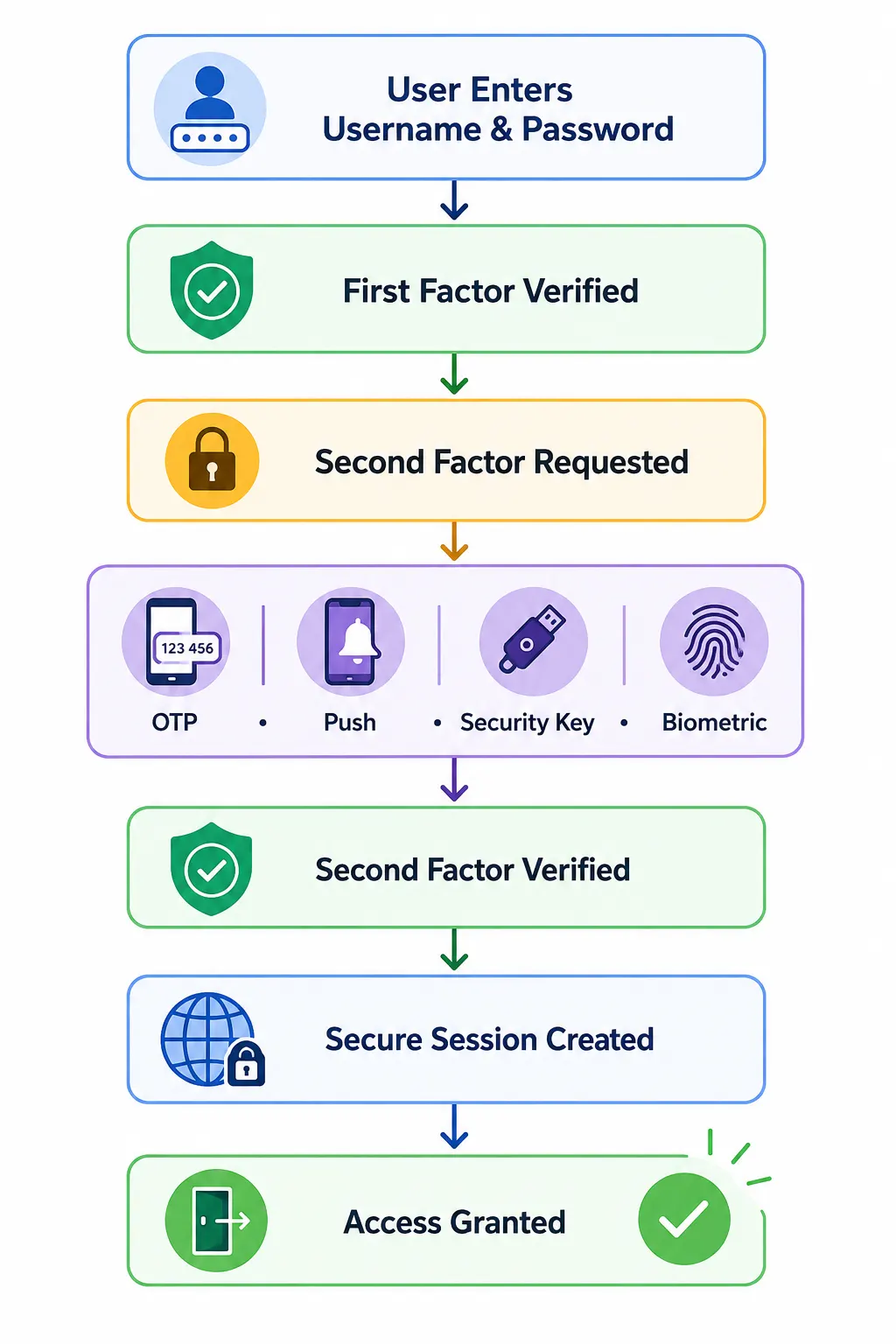
Step 1: The User Provides the First Authentication Factor
Every 2FA login begins with an initial identity check.
For most applications, this is a username or email address paired with a password. Some passwordless experiences may use a passkey or another primary authentication method instead, but the objective remains the same: establish the user's claimed identity.
The authentication service compares the submitted credentials against securely stored records. If the first factor can't be verified, the login attempt ends immediately, and no additional verification is requested.
This approach prevents unnecessary authentication prompts while reducing opportunities for attackers to abuse the login process.
Step 2: The System Requests a Second Authentication Factor
Once the first factor is verified, the authentication system determines which second factor should be used.
Depending on the application's security policy, users may be asked to:
-
Enter a one-time password (OTP) from an authenticator app
-
Approve a push notification on a trusted device
-
Insert and tap a hardware security key
-
Complete biometric verification on their device
-
Enter a verification code delivered through SMS or email
Some organizations always require the same second factor. Others use adaptive authentication to evaluate signals such as device reputation, login location, IP address, or unusual user behavior before deciding whether additional verification is necessary.
This risk-based approach helps reduce unnecessary authentication challenges while strengthening protection for higher-risk login attempts.
Step 3: Both Authentication Factors Are Verified
After the second factor is submitted, the authentication service validates both identity checks before granting access.
The verification process depends on the authentication method being used.
For example:
-
An authenticator app generates a time-based one-time password that's checked against the expected value.
-
A push notification confirms approval from a trusted device.
-
A hardware security key signs a cryptographic challenge that's verified using public-key cryptography.
-
A biometric prompt confirms the legitimate user is present before securely completing the authentication process on the device.
Only after every required verification succeeds does the authentication request move forward.
Step 4: Access Is Granted, and the User Session Begins
Once both authentication factors have been successfully verified, the identity provider or authentication service creates a secure authenticated session.
From that point onward, the application recognizes the user as authenticated and grants access according to their permissions.
Most modern identity platforms continue protecting the session after login by monitoring for suspicious activity such as impossible travel, device changes, unusual behavior, or high-risk transactions. If the risk level changes, the system can require another authentication challenge before allowing sensitive actions like changing account settings or updating payment information.
In other words, authentication doesn't always end after the initial login. Modern identity systems can continuously evaluate trust throughout the user's session to balance security with a seamless customer experience.
2FA vs MFA vs Two-Step Verification: What's the Difference?
2FA, MFA, and two-step verification are often used interchangeably. They're related, but they don't always mean the same thing.
The distinction comes down to factors versus steps.
Two-factor authentication requires exactly two different authentication factors. Multi-factor authentication is the broader category and requires two or more independent factors. Two-step verification simply means completing two verification steps—and those steps don't necessarily have to come from different factor categories.
Here's a quick comparison:
| Authentication Approach | What It Means | Factors Required | Example |
|---|---|---|---|
| Two-Factor Authentication (2FA) | Uses two different authentication factors | Exactly 2 | Password + authenticator app |
| Multi-Factor Authentication (MFA) | Uses two or more independent authentication factors | 2 or more | Password + security key + biometric |
| Two-Step Verification | Uses two verification steps that may or may not represent different factors | Varies | Password + another knowledge-based verification step |
| Passwordless Authentication | Authenticates without requiring a traditional password | Varies | Magic link, passkey |
| Passkey | Uses public-key cryptography instead of a shared password | Implementation dependent | Device credential unlocked with biometric or PIN |
Entering a password and then answering a security question involves two steps, but both rely on something you know. That makes it two-step verification, but not true 2FA.
A password followed by a code generated on a registered authenticator device combines something you know with something you have. That's two-factor authentication.
And MFA? 2FA sits inside that larger category. Every 2FA implementation is a form of MFA, but MFA isn't limited to exactly two factors. Read this other article for a more detailed comparison between 2FA and MFA.
Common Types of Two-Factor Authentication
Not all two-factor authentication methods provide the same level of security or user experience.
Some are designed for convenience and broad accessibility. Others prioritize stronger protection against phishing, credential theft, and account takeover. The right choice depends on your users, the sensitivity of the application, and the risks you're trying to reduce.
The comparison below highlights the most widely used 2FA methods and where each fits best.
| 2FA Method | How It Works | Security Level | Best For |
|---|---|---|---|
| SMS OTP | A one-time code is sent to the user's mobile phone. | Basic | Consumer accounts, transitional deployments, account recovery |
| Email OTP | A verification code is sent to the user's email address. | Basic | Low-risk accounts, backup verification |
| Authenticator App (TOTP) | An app generates a time-based code on the user's device. | Strong | Consumer and workforce authentication |
| Push Notification | The user approves a login request from a trusted mobile device. | Strong | Fast, low-friction authentication |
| Hardware Security Key | A physical security key verifies identity using cryptographic authentication. | Very Strong | Administrators, privileged users, regulated industries |
| Biometric Verification | A fingerprint or facial recognition confirms the user's identity on a trusted device. | Very Strong* | Mobile applications, passwordless experiences, device authentication |
Note: Biometrics are typically used to verify the user on a trusted device and are often combined with another authentication factor.
Choosing a stronger authentication method doesn't always mean adding more friction. Modern authentication is about selecting the right balance between security, usability, and risk.
SMS One-Time Password (OTP)
SMS-based authentication remains one of the most widely deployed forms of 2FA because almost every customer has access to a mobile phone. After the user successfully enters their password, the application sends a one-time verification code through a text message. Access is granted only after the correct code is entered.
The biggest advantage of SMS OTP is accessibility. Users don't need to install additional software or carry dedicated hardware, making it a practical option for consumer applications with diverse user bases.
The trade-off is security. SMS messages can be exposed to SIM-swapping attacks, social engineering, and real-time phishing campaigns that intercept verification codes before they reach the legitimate user.
Although SMS is still widely used, many organizations now treat SMS as a baseline authentication method rather than the strongest available option.
Email One-Time Password (OTP)
Email verification codes work much like SMS OTPs. After the first authentication factor is verified, the application sends a temporary code to the user's registered email address.
Because email accounts are already familiar to most users, this method is easy to deploy and doesn't require additional devices or authenticator apps.
However, its security depends heavily on the email account itself. If an attacker has already compromised the user's inbox, they may also be able to access the verification code. For that reason, email OTP is generally better suited for lower-risk authentication scenarios or as a backup verification method rather than the primary second factor for sensitive accounts.
Authenticator Apps (TOTP)
Authenticator apps generate Time-Based One-Time Passwords (TOTP) directly on a trusted device. Instead of receiving a verification code through SMS or email, users open the app and enter the rotating code displayed on the screen.
TOTP is standardized in RFC 6238 and generates short-lived codes using a shared secret together with the current time. Because codes are generated locally, users don't need SMS, email, or even an active cellular connection during authentication.
Popular options include Google Authenticator, Microsoft Authenticator, Duo Mobile, and Authy. TOTP provides a practical balance between security, accessibility, and ease of deployment, which explains its widespread use across customer and enterprise applications.
It isn't completely phishing-resistant, though. Sophisticated real-time phishing attacks can trick users into submitting valid TOTP codes to fraudulent websites. Organizations protecting higher-risk accounts may therefore prefer phishing-resistant methods such as hardware security keys or passkeys.
Push Notification Authentication
Push authentication replaces manual code entry with a simple approval request sent to a trusted device. Instead of typing a one-time password, users review the login request and either approve or deny it with a single tap.
This approach reduces login friction and creates a faster authentication experience, particularly on mobile devices.
Here’s where it gets interesting. Convenience alone isn't enough. Attackers have learned to exploit repeated push requests in what's known as MFA fatigue or prompt bombing attacks, hoping users eventually approve a fraudulent request.
To address this risk, many identity platforms now support number matching, device details, login location, and other contextual information that help users confirm they're approving the correct authentication request.
Hardware Security Keys
Hardware security keys use public-key cryptography rather than asking users to enter a reusable password or temporary verification code.
Many modern security keys support FIDO2, an open authentication standard built around the WebAuthn and CTAP protocols. WebAuthn enables browsers and applications to authenticate users with public-key credentials, while CTAP allows external authenticators such as USB, NFC, or Bluetooth security keys to communicate with the user's device.
Here's why that matters. The authentication credential is bound to the legitimate website or service. A fake login page can't simply capture a code and replay it somewhere else.
That makes FIDO2 security keys highly resistant to phishing and a particularly strong choice for administrators, privileged users, developers, and accounts containing highly sensitive information.
Biometric Authentication
Biometric authentication verifies a user's identity using unique physical characteristics such as a fingerprint or facial recognition.
On most modern smartphones and laptops, the biometric data never leaves the device. Instead, the device confirms that the legitimate user is present and unlocks a secure authentication credential, allowing the application to complete the login without transmitting the user's fingerprint or facial image.
Biometrics make authentication both fast and convenient, which explains their growing adoption across banking applications, healthcare portals, ecommerce platforms, and passwordless authentication experiences.
As with other authentication methods, biometrics are strongest when combined with secure device protection and well-designed account recovery processes.
Where Do Passkeys Fit?
Passkeys are often discussed alongside two-factor authentication because they provide a significantly stronger alternative to traditional password-based logins.
Unlike conventional 2FA methods, passkeys don't simply add another verification code after a password. Instead, they replace shared secrets with cryptographic credentials that are resistant to phishing and credential theft.
Depending on how they're implemented, passkeys can satisfy both user verification and device possession requirements while delivering a simpler sign-in experience.
As support for passkeys continues to grow across browsers, operating systems, and identity platforms, many organizations are adopting them as part of their long-term authentication strategy rather than relying exclusively on password-and-OTP workflows.
If you'd like to learn more, explore our complete guide to Passkeys and Passwordless Authentication.
Why Is Two-Factor Authentication Important?
Passwords remain the most common way people sign in to digital services—and one of the most common ways attackers gain unauthorized access. Two-factor authentication reduces that dependency by requiring another independent form of identity verification.
For businesses, that means stronger protection against account takeover while adding another security barrier between compromised credentials and customer accounts.
Reduce Account Takeover From Compromised Passwords
Account takeover often begins with a compromised password. Attackers may obtain credentials through phishing, malware, password reuse, or previous data breaches, then use automated credential stuffing attacks to test those credentials across other services.
With password-only authentication, a valid credential may be enough to access the account. Two-factor authentication changes that. Even when an attacker has the correct password, they must still get past an independent factor such as an authenticator app, trusted device, security key, or biometric verification.
This doesn't make accounts impossible to compromise, but it significantly reduces the value of stolen passwords and makes many password-based account takeover attempts harder to complete. For businesses, that means stronger protection for customer accounts without requiring a complete redesign of the authentication experience.
It Protects High-Risk Actions, Not Just Logins
Two-factor authentication isn't only useful during sign-in. Many organizations also require an additional verification step before allowing users to perform sensitive actions such as:
-
Resetting a password
-
Changing an email address or phone number
-
Updating payment information
-
Accessing administrative features
-
Transferring funds
-
Viewing regulated or sensitive records
This practice, often called step-up authentication, adds another layer of protection only when the level of risk increases. As a result, users enjoy a smoother everyday login experience while critical account changes receive stronger security.
It Strengthens Customer Trust
Customers expect businesses to protect their accounts without making every login frustrating.
Well-designed two-factor authentication helps achieve both goals.
Modern authentication methods such as authenticator apps, push approvals, biometrics, and security keys make it possible to verify identity quickly while reducing the likelihood of unauthorized access.
When customers know their accounts are protected—even if a password is compromised—they're more likely to trust the services they use to manage personal information, financial transactions, and sensitive data.
It Supports Security and Compliance Objectives
Many organizations use two-factor authentication as part of a broader identity and access management strategy.
Depending on the industry and regulatory environment, stronger authentication can help support security controls associated with standards and frameworks such as PCI DSS, HIPAA, ISO/IEC 27001, SOC 2, and NIST guidance.
The exact authentication requirements vary by framework and use case. Rather than prescribing a single method, most emphasize protecting access to sensitive systems through risk-based security controls and appropriate identity verification.
For organizations handling customer identities, 2FA often serves as one of the foundational controls for reducing unauthorized access while supporting broader governance and compliance initiatives.
Why Businesses Are Moving Toward Stronger Authentication
Two-factor authentication remains one of the most effective ways to strengthen account security, but the authentication landscape continues to evolve.
Organizations are increasingly adopting phishing-resistant authentication methods such as FIDO2 security keys and passkeys, along with adaptive authentication that evaluates contextual signals before requesting additional verification.
Traditional 2FA remains a critical security layer for millions of customer and workforce accounts worldwide.
The bigger shift is how businesses deploy it. Instead of presenting the same challenge to every user during every login, modern identity platforms apply authentication intelligently—requesting stronger verification only when the level of risk justifies it.
Quick Comparison: How 2FA Improves Security
| Without 2FA | With 2FA |
|---|---|
| Password alone grants access if stolen. | A second authentication factor is required before access is granted. |
| Credential stuffing attacks have a higher success rate. | Stolen passwords are far less useful on their own. |
| High-risk account changes may rely only on passwords. | Sensitive actions can require step-up authentication. |
| A single compromised credential can expose the account. | Attackers must bypass multiple independent verification factors. |
| Customer confidence can be affected after credential theft. | Stronger authentication helps protect customer accounts and build trust. |
Can Two-Factor Authentication Be Hacked or Bypassed?
Two-factor authentication makes unauthorized access significantly more difficult, but it doesn't make accounts impossible to compromise.
Like any security control, its effectiveness depends on how it's implemented and which authentication methods are used.
For example, a password combined with an SMS verification code provides much stronger protection than a password alone. However, it doesn't offer the same level of security as a hardware security key or a passkey that's resistant to phishing attacks.
The important takeaway is this: all 2FA methods are not equally secure.
Attackers rarely try to break the authentication technology itself. Instead, they look for weaker authentication methods, vulnerable recovery processes, or opportunities to trick users into approving fraudulent login requests.
Understanding these attack techniques helps organizations choose stronger authentication methods and build more resilient identity experiences.
Common Ways Attackers Try to Bypass 2FA
| Attack Technique | What the Attacker Does | Authentication Methods Most at Risk | Stronger Protection |
|---|---|---|---|
| Phishing | Tricks users into revealing credentials and verification codes through fake websites or emails. | SMS OTP, Email OTP, TOTP | FIDO2 security keys, Passkeys |
| SIM Swapping | Takes control of a victim's mobile number to receive SMS verification codes. | SMS OTP | Authenticator apps, Hardware security keys |
| MFA Fatigue (Prompt Bombing) | Sends repeated push notifications until the user accidentally approves one. | Push authentication | Number matching, Adaptive authentication |
| Session Hijacking | Steals an authenticated session after login instead of bypassing 2FA directly. | Any completed login | Secure session management, Risk monitoring |
| Account Recovery Abuse | Exploits weak password reset or recovery processes to avoid normal authentication. | Any 2FA method | Strong identity verification during recovery |
Phishing Attacks
Phishing remains one of the most effective ways to compromise online accounts.
Rather than attacking the authentication system itself, criminals create convincing login pages that encourage users to enter their credentials and verification codes. Some sophisticated phishing kits can even relay one-time passwords in real time before they expire.
Authentication methods based on shared secrets such as SMS verification codes and time-based one-time passwords can be vulnerable to these attacks if users unknowingly submit the code to a fraudulent website.
Authentication methods built on standards such as FIDO2 and WebAuthn are designed differently. They verify the legitimate website before completing authentication, making them highly resistant to phishing-based credential theft.
SIM Swapping
SMS one-time passwords rely on a mobile phone number to deliver verification codes.
In a SIM-swapping attack, criminals convince a mobile carrier to transfer the victim's phone number to a SIM card under their control. Once the transfer is complete, SMS verification messages are delivered to the attacker instead of the legitimate user.
Although mobile providers continue strengthening protections against SIM swapping, organizations securing high-value accounts often prefer authenticator apps, hardware security keys, or passkeys because they don't depend on telephone networks to verify identity.
MFA Fatigue and Push Notification Abuse
Push notifications make authentication fast and convenient, but they also introduce a different risk.
Instead of stealing verification codes, attackers repeatedly send authentication requests hoping users eventually approve one out of confusion or frustration. This technique is commonly known as MFA fatigue or prompt bombing.
Modern identity platforms help reduce this risk by limiting repeated prompts, displaying contextual information about the login request, and requiring number matching, where users must enter or confirm a number displayed on both devices before authentication succeeds.
Session Hijacking
Sometimes attackers don't bypass two-factor authentication at all.
Instead, they target the authenticated session that exists after a successful login. If an attacker steals a valid session cookie or authentication token, they may be able to impersonate the user without repeating the login process.
That's why secure identity systems protect more than the initial authentication event. They also monitor active sessions, detect unusual behavior, and require additional verification when the level of risk changes.
Account Recovery Can Become the Weakest Link
Even the strongest authentication methods can be undermined by a weak account recovery process.
Imagine an application that requires a hardware security key during login but allows anyone to reset the account after answering a few easily discovered security questions. In that case, attackers won't try to defeat the authentication system; they'll simply bypass it through recovery.
Recovery should provide protection comparable to the login process itself. Identity verification, backup authentication methods, trusted recovery contacts, and carefully designed recovery workflows all help prevent attackers from exploiting this path.
| Method | Phishing Resistant | SIM Swap Resistant | MFA Fatigue Resistant | Security Level |
|---|---|---|---|---|
| SMS OTP | ❌ | ❌ | ✅ | 2 out of 5 |
| Email OTP | ❌ | ✅ | ✅ | 2 out of 5 |
| Authenticator App | ⚠️ | ✅ | ✅ | 4 out of 5 |
| Push Authentication | ⚠️ | ✅ | ❌ | 4 out of 5 |
| Hardware Security Key | ✅ | ✅ | ✅ | 5 out of 5 |
| Passkey | ✅ | ✅ | ✅ | 5 out of 5 |
How to Reduce the Risk of 2FA Bypass Attacks
No authentication method can eliminate every security risk, but organizations can make attacks significantly more difficult by following proven identity security practices.
Some of the most effective improvements include:
-
Prefer authenticator apps or hardware security keys over SMS when stronger protection is required.
-
Use phishing-resistant authentication methods such as FIDO2 security keys or passkeys for privileged accounts.
-
Enable number matching for push notifications to reduce MFA fatigue attacks.
-
Protect account recovery with identity verification that's as strong as the login process.
-
Monitor authentication activity continuously to detect unusual login behavior and trigger additional verification when appropriate.
Security isn't about relying on a single authentication method. It's about combining strong authentication, secure recovery, continuous monitoring, and intelligent risk assessment to protect customer identities throughout the entire authentication journey.
Key Takeaways
| Myth | Reality |
|---|---|
| 2FA cannot be hacked. | 2FA greatly improves security, but weaker authentication methods can still be targeted. |
| Every 2FA method provides the same protection. | SMS, TOTP, push notifications, security keys, and passkeys offer different levels of security. |
| Attackers only target passwords. | They also target recovery flows, authentication prompts, sessions, and verification codes. |
| Adding another login step is enough. | Strong authentication depends on choosing the right factors and protecting the entire identity lifecycle. |
How to Choose the Right Two-Factor Authentication Method
There isn't a single two-factor authentication method that's right for every organization.
The best choice depends on the sensitivity of the account, the types of users you're protecting, the devices they use, regulatory requirements, and the level of security your business needs to achieve.
A banking application protecting financial transactions has different authentication requirements than a retail website. Likewise, an administrator managing production systems faces different risks than a customer signing in to check an order status.
Instead of asking, "Which 2FA method is the most secure?", a better question is, "Which method provides the right balance of security, usability, and operational complexity for this use case?"
Compare Authentication Methods Before You Decide
| Authentication Method | User Experience | Security | Phishing Resistance | Typical Use Cases |
|---|---|---|---|---|
| SMS OTP | ★★★★★ | ★★☆☆☆ | Low | Consumer logins, transitional deployments, recovery |
| Email OTP | ★★★★★ | ★★☆☆☆ | Low | Low-risk applications, backup verification |
| Authenticator App (TOTP) | ★★★★☆ | ★★★★☆ | Moderate | SaaS, ecommerce, customer accounts |
| Push Notification | ★★★★★ | ★★★★☆ | Moderate | Mobile-first applications, workforce authentication |
| Hardware Security Key | ★★★☆☆ | ★★★★★ | Very High | Administrators, developers, regulated industries |
| Passkeys | ★★★★★ | ★★★★★ | Very High | Consumer applications, passwordless authentication |
Tip: Stronger security doesn't always mean a more complicated login experience. In many cases, passkeys and biometrics are both easier for users and more resistant to phishing than traditional password-and-OTP workflows.
Consider Your Risk Profile
Every application faces a different level of risk.
For example, protecting an online banking platform requires stronger authentication than protecting a newsletter subscription. Similarly, privileged administrators responsible for cloud infrastructure should use stronger authentication than customers accessing general account information.
Understanding the value of the assets you're protecting helps determine whether SMS verification is sufficient or whether phishing-resistant authentication methods such as security keys or passkeys are more appropriate.
Think About Your Users
Security only works when people can use it consistently.
Some customers prefer the simplicity of SMS verification because it doesn't require installing another application. Others are comfortable using authenticator apps or biometric authentication every day.
Accessibility, device availability, regional connectivity, and technical experience all influence which authentication methods users are most likely to adopt successfully.
Offering multiple supported authentication options often leads to higher enrollment and a better customer experience than forcing every user into the same workflow.
Plan for Account Recovery
Authentication is only part of the identity journey.
Eventually, users lose devices, replace phones, forget passwords, or purchase new laptops. When that happens, the recovery process becomes just as important as the authentication method itself.
Recovery should never become an easier path into an account than the normal login process. Backup authentication factors, verified recovery contacts, recovery codes, and identity verification all help maintain security without leaving legitimate users locked out.
Match Authentication Strength to the Risk
Not every login requires the same level of verification.
Many organizations use step-up authentication, where additional verification is requested only when the level of risk increases.
For example, a customer signing in from a familiar device may only need their usual authentication method. However, logging in from an unfamiliar country, changing payment details, or accessing administrative functions may trigger another authentication challenge.
This risk-based approach improves security while reducing unnecessary friction during routine sign-ins.
Recommended Authentication Strategy
| Scenario | Recommended Authentication |
|---|---|
| General customer accounts | Password + Authenticator App or Push Notification |
| Ecommerce checkout or profile management | Authenticator App or Push Authentication |
| Banking and financial services | Authenticator App, Hardware Security Key, or Passkey |
| Healthcare portals | Strong 2FA with secure recovery controls |
| Administrator and privileged accounts | Hardware Security Keys or Passkeys |
| High-risk or regulated environments | Phishing-resistant authentication with risk-based step-up verification |
What Most Organizations Choose Today
A surprising pattern we've seen is that organizations rarely rely on a single authentication method anymore.
Instead, they build authentication strategies that support multiple verification options while encouraging users to adopt stronger methods over time.
For example, a customer might initially enroll using SMS verification, later switch to an authenticator app, and eventually move to a passkey as device support becomes available.
This gradual approach improves adoption, reduces support requests, and allows security programs to evolve without disrupting existing users.
Two-Factor Authentication Best Practices
Implementing two-factor authentication isn't simply about adding another login prompt.
A successful deployment protects customer accounts without creating unnecessary friction during registration, sign-in, account recovery, or day-to-day use.
Organizations that see the best adoption rates usually treat 2FA as part of the entire identity lifecycle rather than a single authentication feature.
The practices below help balance security, usability, and long-term maintainability.
Start with the Right Authentication Methods
Not every authentication method offers the same level of protection.
While SMS and email verification remain practical for many customer applications, authenticator apps, hardware security keys, and passkeys provide stronger protection against modern phishing attacks.
Rather than forcing every user into the strongest method immediately, many organizations support multiple authentication options while encouraging users to adopt stronger methods over time.
This approach improves both security and user adoption.
Make Enrollment Simple
Even the strongest authentication method provides little value if users abandon the setup process.
Keep enrollment straightforward by explaining why two-factor authentication is being enabled, providing clear setup instructions, and guiding users through each step without unnecessary technical language.
Simple QR code enrollment for authenticator apps, clear success messages, and immediate verification help users complete registration with confidence.
Test 2FA Across Authentication Flows
A successful enrollment doesn't necessarily mean the implementation is ready for production. Test two-factor authentication across the places customers actually sign in, including web, mobile, new-device logins, account recovery, and any federated authentication flows you support.
Check what happens when verification succeeds, fails, expires, or becomes unavailable. Testing these edge cases early helps uncover broken redirects, repeated challenges, inaccessible recovery paths, and other friction that might otherwise appear after rollout.
Protect Registered Authentication Devices and Factor Changes
A phone, authenticator app, or hardware security key becomes part of the user's authentication chain, so changes to those factors deserve additional protection. Users should secure registered devices with screen locks, device encryption, or biometric verification where available.
Treat factor replacement carefully too. Registering a new phone, removing a security key, changing a trusted number, or adding another authentication method can affect account security. Require appropriate identity verification before allowing sensitive factor changes, and keep a record of those events so suspicious changes can be investigated.
Educate Users About 2FA Phishing and Fraudulent Prompts
Technology can block many attacks, but users still need to recognize when an authentication request doesn't belong to them. Make it clear that verification codes should never be shared through email, chat, or phone calls, and that unexpected push requests should be denied rather than approved automatically.
For push authentication, showing details such as the requesting device, location, or number matching can make suspicious requests easier to identify. Short, contextual guidance during enrollment is usually more useful than relying on users to remember a separate security policy.
Set Up Secure Backup and Account Recovery Methods
Phones get lost, devices are replaced, and authenticator apps can become inaccessible. Users need a secure way to regain access without turning recovery into an easier path around 2FA.
Depending on the application, recovery may use one-time recovery codes, a previously registered backup factor, another trusted device, or stronger identity verification. Recovery codes should be securely generated, safely stored, and invalidated after use.
Apply the same principle to factor replacement. If an attacker can reset a strong second factor through a weak recovery process, the protection provided by 2FA quickly disappears. Recovery events and authentication-factor changes should therefore use appropriate identity verification and maintain clear audit records.
Use Step-Up Authentication for Sensitive Actions
Not every action requires the same level of verification.
Many organizations request additional authentication only when users perform higher-risk activities, such as changing account credentials, updating payment information, accessing administrative features, or initiating high-value transactions.
This approach, often called step-up authentication, helps reduce unnecessary authentication prompts while providing stronger protection where it matters most.
Monitor Authentication Activity Continuously
Authentication shouldn't end the moment a user signs in.
Modern identity platforms monitor authentication events for unusual behavior such as repeated failed login attempts, impossible travel, unfamiliar devices, abnormal session activity, or unexpected changes in user behavior.
When risk increases, organizations can request another authentication challenge, notify the user, or temporarily restrict access until identity is verified again.
Measure Adoption and Authentication Success
Deploying two-factor authentication is only the beginning.
Regularly measuring enrollment rates, authentication success, recovery requests, login abandonment, failed verification attempts, and support tickets helps identify where users encounter friction.
These insights allow security and product teams to refine authentication policies while improving both customer experience and account protection over time.
Keep Authentication Flexible
Authentication technologies continue to evolve. Many organizations that initially deployed SMS verification now support authenticator apps, push authentication, hardware security keys, or passkeys as stronger alternatives.
Building authentication around open standards and flexible identity platforms makes it easier to introduce new authentication methods without redesigning the entire customer login experience.
Two-Factor Authentication Implementation Checklist
| Best Practice | Why It Matters |
|---|---|
| Support multiple authentication methods | Improves adoption across different users and devices. |
| Encourage stronger methods over time | Helps reduce reliance on weaker authentication factors such as SMS. |
| Simplify enrollment | Increases activation and reduces setup abandonment. |
| Protect account recovery | Prevents attackers from bypassing authentication. |
| Use step-up authentication | Applies stronger verification only when risk increases. |
| Monitor authentication activity | Helps detect suspicious login behavior early. |
| Review authentication metrics regularly | Identifies friction and optimization opportunities. |
| Test authentication flows before rollout | Identifies broken or high-friction 2FA experiences before they affect customers. |
| Protect factor registration and replacement | Prevents attackers from replacing a legitimate user's trusted authentication method. |
| Educate users about fraudulent prompts | Reduces phishing, OTP-sharing, and push-approval attacks. |
Common Mistakes to Avoid
| Mistake | Better Approach |
|---|---|
| Offering only one authentication method | Support multiple methods based on user needs. |
| Treating every login the same | Apply risk-based or step-up authentication where appropriate. |
| Ignoring account recovery | Protect recovery with strong identity verification. |
| Using SMS for every high-risk account | Consider authenticator apps, hardware security keys, or passkeys. |
| Never reviewing authentication metrics | Continuously improve policies using real authentication data. |
How LoginRadius Helps You Implement Secure Two-Factor Authentication
Choosing the right two-factor authentication method is only one part of the equation. Organizations also need a secure way to enroll users, enforce authentication policies, protect account recovery, and deliver a consistent login experience across web, mobile, and customer applications.
That's where a Customer Identity and Access Management (CIAM) platform can make a significant difference.
LoginRadius enables organizations to implement modern two-factor authentication without building and maintaining complex authentication infrastructure from scratch. Instead of relying on a single verification method, businesses can offer multiple authentication options that align with different user needs and security requirements.
With LoginRadius, organizations can:
-
Support multiple authentication methods, including SMS OTP, email OTP, authenticator apps, push authentication, hardware security keys, and passkeys.
-
Configure authentication policies based on application requirements, user roles, or risk levels.
-
Strengthen account security with adaptive authentication and step-up verification for high-risk login attempts and sensitive account actions.
-
Simplify user enrollment and account recovery while maintaining strong identity verification throughout the authentication lifecycle.
-
Protect customer identities across web, mobile, and API-driven applications through a unified CIAM platform.
Authentication doesn't stop after a successful login. LoginRadius continuously evaluates authentication events and contextual signals to help organizations respond to suspicious activity, reduce account takeover risk, and deliver secure customer experiences without introducing unnecessary friction.
Whether you're modernizing an existing authentication system or building a new customer identity platform, LoginRadius provides the flexibility to support today's authentication methods while preparing for emerging standards such as passwordless authentication and passkeys.
Why Organizations Choose LoginRadius for Customer Authentication
| Capability | Business Benefit |
|---|---|
| Multiple authentication methods | Give customers the flexibility to choose the authentication method that works best for them. |
| Adaptive authentication | Apply additional verification only when login risk increases. |
| Step-up authentication | Protect sensitive transactions and account changes without affecting every login. |
| Passkey support | Move toward phishing-resistant, passwordless authentication experiences. |
| Unified CIAM platform | Manage authentication, authorization, user profiles, and identity security from one platform. |
| Developer-friendly APIs & SDKs | Accelerate implementation across web, mobile, and customer applications. |
| Scalable cloud infrastructure | Support millions of customer identities while maintaining a consistent authentication experience. |
Conclusion
Passwords continue to play an important role in digital authentication, but relying on them alone is no longer enough to protect customer accounts from today's threats.
Two-factor authentication adds an independent layer of identity verification, making it significantly more difficult for attackers to succeed with stolen credentials, phishing campaigns, credential stuffing, and other password-based attacks. Whether you use authenticator apps, push notifications, hardware security keys, or biometrics—or move toward passkeys—the goal remains the same: verify identity with confidence while keeping the login experience as simple as possible for legitimate users.
As authentication technologies continue to evolve, organizations are moving beyond one-size-fits-all security. Modern identity platforms combine multiple authentication methods, risk-based policies, and step-up verification to deliver stronger protection without creating unnecessary friction for customers.
If you're building secure customer authentication, the challenge isn't simply enabling two-factor authentication; it's choosing the right authentication strategy, supporting multiple user needs, and preparing for what's next.
LoginRadius helps organizations implement scalable, secure customer authentication with flexible two-factor authentication, adaptive authentication, passkeys, and a comprehensive CIAM platform designed for modern applications.
Ready to strengthen your customer authentication strategy? Book a demo with LoginRadius to see how you can protect customer identities while delivering secure, seamless login experiences across every digital touchpoint.
FAQs
Q: What is two-factor authentication (2FA)?
A: Two-factor authentication (2FA) is an authentication method that requires users to verify their identity using two different authentication factors before accessing an account. It adds an extra layer of security beyond a password alone.
Q: How does two-factor authentication work?
A: 2FA first verifies the user's primary credential, such as a password, and then requests a second authentication factor like an authenticator app code, security key, or biometric verification. Access is granted only after both factors are successfully verified.
Q: What are the main authentication factors used in 2FA?
A: Two-factor authentication combines two independent factor categories, such as something you know (password), something you have (authenticator app or security key), or something you are (fingerprint or facial recognition). Some modern identity systems also use behavioral signals to support authentication decisions.
Q: What is the difference between 2FA and MFA?
A: Two-factor authentication requires exactly two independent authentication factors. Multi-factor authentication (MFA) is the broader approach that uses two or more authentication factors depending on an organization's security requirements.
Q: Is two-factor authentication more secure than using only a password?
A: Yes. Even if an attacker steals or guesses a password, they must still bypass a second authentication factor before accessing the account. This significantly reduces the risk of unauthorized access.
Q: What are the most common types of two-factor authentication?
A: Common 2FA methods include SMS verification codes, email OTPs, authenticator apps, push notifications, hardware security keys, and biometric verification. Each method offers a different balance of security and user experience.
Q: Which two-factor authentication method is the most secure?
A: Hardware security keys are among the strongest options for traditional 2FA because FIDO2-based authentication is designed to resist phishing. Organizations may also move toward passkeys as a phishing-resistant alternative to traditional password-and-second-factor authentication.
Q: Can two-factor authentication be hacked?
A: 2FA significantly improves security, but no authentication method is completely immune to attack. Weaker methods like SMS OTPs can be targeted through SIM swapping or phishing, while phishing-resistant methods such as security keys and passkeys offer stronger protection.
Q: Is SMS authentication still safe to use?
A: SMS-based 2FA is more secure than relying on a password alone, but it is vulnerable to threats such as SIM swapping and phishing. For higher-risk accounts, authenticator apps, security keys, or passkeys are generally recommended.
Q: Are passkeys the same as two-factor authentication?
A: Not exactly. Passkeys use public-key cryptography to authenticate users and can replace traditional password-and-OTP workflows. Depending on the implementation, they may satisfy multiple authentication requirements while providing a simpler, phishing-resistant sign-in experience.
Q: What happens if I lose my 2FA device?
A: Most services provide secure recovery options such as backup codes, secondary authentication methods, trusted recovery contacts, or identity verification. It's a good practice to configure recovery options when enabling two-factor authentication.
Q: Should every business implement two-factor authentication?
A: Organizations that manage customer accounts, employee identities, or sensitive data should strongly consider implementing 2FA. It helps reduce the risk of account takeover, strengthens identity security, and supports modern access control strategies.