Introduction
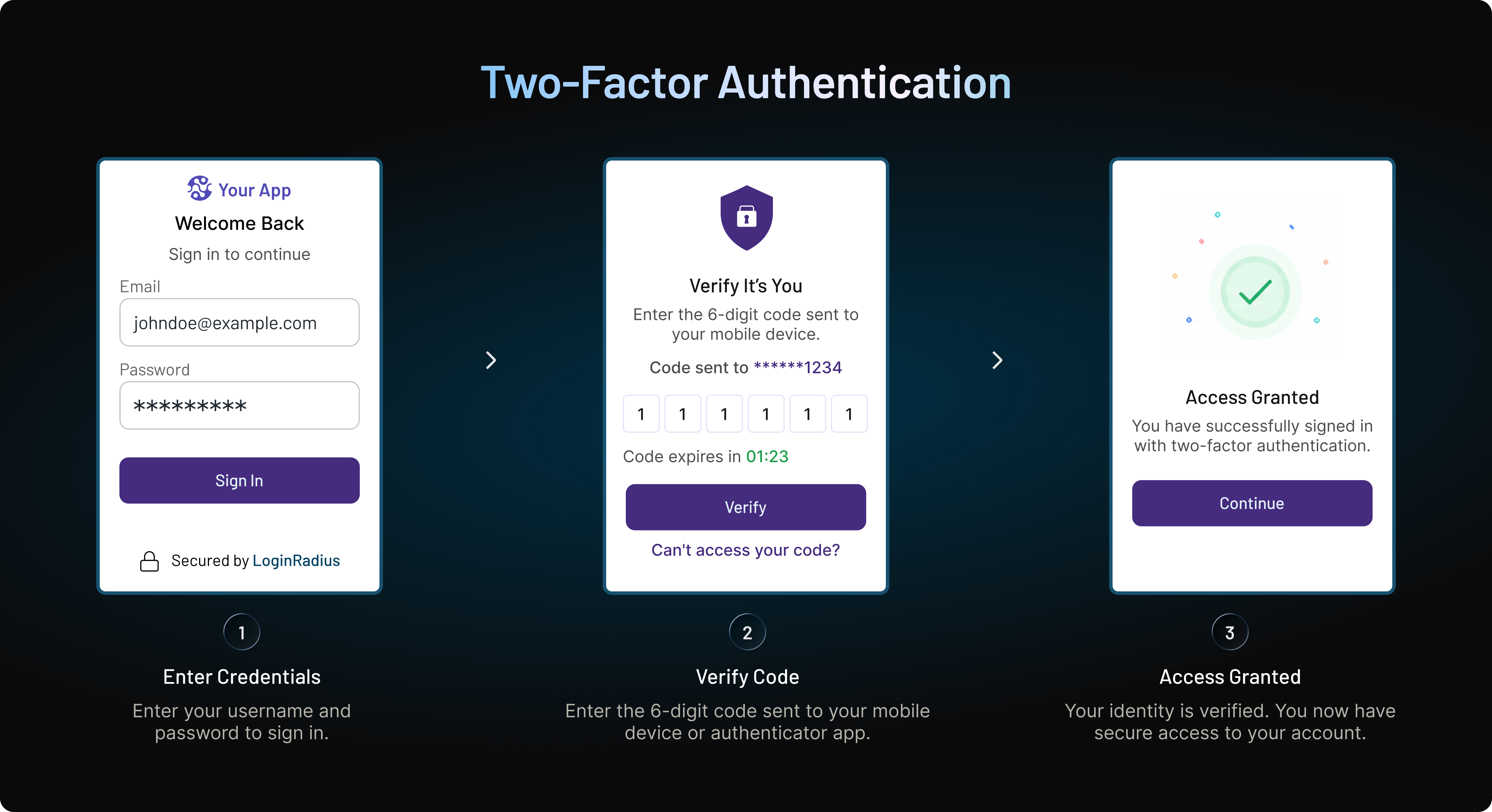
Adding two-factor authentication to an application sounds straightforward. Choose a second authentication method, ask users to enroll, and require it when they sign in.
The harder parts are:
-
Which users should be required to use 2FA?
-
Should customers and administrators follow the same authentication policy?
-
What happens when someone loses their phone, can't receive an OTP, or gets locked out of their account?
-
And how do you strengthen security without turning every login into another reason for customers to leave?
These are implementation problems, not authentication-factor problems.
Two-factor authentication (2FA) adds an additional layer of account protection by requiring two independent factors of identity verification. Applying one rigid 2FA experience across all users may look consistent on paper. But in practice, it can create unnecessary friction in some places while leaving risky access underprotected in others. Consider these real-world examples:
-
A retail customer checking on a previously placed order
-
an administrator changing authentication settings for thousands of B2B users
-
A banking customer approving a large transaction
When you apply 2FA across all of these users, you might create unnecessary friction for the retail customer, but leaving the other two underserved.
A strong two-factor authentication strategy considers enrollment, user adoption, accessibility, backup authentication methods, lost devices, account recovery, authentication fatigue, support volume, and ongoing measurement from the beginning. It also recognizes that different industries, applications, and user groups may need different approaches.
This guide focuses on that practical side of 2FA: who should use it, when businesses should require it, why organizations deploy it, the challenges that appear after rollout, and the 2FA best practices that help make authentication both secure and usable at scale.
Who Should Use Two-Factor Authentication?
Two-factor authentication isn't only for security teams, administrators, or people accessing highly sensitive systems. Any user account that could expose personal information, financial data, business resources, or valuable account privileges after a password compromise can benefit from a second authentication factor. But that doesn't mean every user carries the same risk.
That distinction should shape how organizations plan their deployment.
Customers With Online Accounts
Customer accounts often contain more than a username and password. Depending on the service, they may hold personal information, saved payment methods, purchase history, loyalty points, healthcare information, financial records, or other data attackers can exploit.
Two-factor authentication gives businesses another barrier when passwords are stolen through phishing, credential stuffing, password reuse, or data breaches. The experience matters, though. Consumer-facing applications serve people with different devices, technical abilities, accessibility needs, and authentication preferences. Forcing everyone to use one method can quickly create adoption and support problems. Giving customers practical choices such as authenticator apps, push authentication, or other supported factors can make stronger authentication easier to adopt.
B2B Administrators and Privileged Users
If there's one group where 2FA should rarely be an afterthought, it's users with elevated privileges.
Administrators may be able to create or remove users, modify security policies, access customer information, change authentication settings, or manage critical applications. Compromising one privileged account can therefore have consequences well beyond that individual user.
For these accounts, stronger authentication methods should take priority. Organizations may choose phishing-resistant options such as hardware security keys or passkeys rather than relying exclusively on SMS or other OTP-based methods. Simply put, the greater the privilege, the greater the need for stronger authentication.
Developers and Technical Teams
Developer accounts deserve particular attention because the systems they access can carry substantial privileges.
Source code repositories, cloud consoles, deployment tools, development environments, and infrastructure platforms may provide access to credentials, application configurations, APIs, or production resources. A compromised developer account can therefore become much more than an isolated login incident.
Strong 2FA helps protect these environments when passwords or developer credentials are exposed. For higher-privilege technical accounts, security keys and other phishing-resistant authentication methods are worth prioritizing.
Partners, Contractors, and Third-Party Users
External users are easy to overlook.
Partners, vendors, contractors, and other third parties may need legitimate access to business applications without being managed exactly like internal employees. Their devices, password practices, and security controls may also sit outside the organization's direct control.
Requiring 2FA provides an additional layer of assurance before external users access shared applications, portals, or sensitive business information.
Here's where teams usually go wrong: they protect employees carefully but treat third-party access as an exception. Attackers don't make that distinction. If an external account provides a route to valuable systems or data, it deserves appropriate authentication controls too.
Users Performing Sensitive Transactions
Sometimes the account itself isn't unusually privileged. The action is.
A customer may sign in simply to view their profile, then later attempt to change a password, replace a registered phone number, update payment details, transfer money, or modify recovery information.
Those actions carry more risk than routine account activity.
Organizations can require additional verification around sensitive transactions rather than treating authentication as something that happens only once at login. This gives businesses another opportunity to verify identity before an important change is completed.
Who Should Get 2FA First?
If an organization can't roll out two-factor authentication to everyone immediately, start where a compromised account would cause the greatest damage.
| User Group | Why 2FA Matters | Priority |
|---|---|---|
| Administrators and privileged users | Can access sensitive data or change critical security settings | Critical |
| Financial and high-value account holders | Accounts may enable payments, transfers, or access to financial information | Critical |
| Developers and technical teams | May access source code, infrastructure, APIs, and production environments | High |
| Customers with personal or stored payment data | Reduces exposure from compromised passwords and account takeover | High |
| Partners and contractors | Adds protection to externally managed access | High |
| Low-risk customer accounts | Improves account protection where the impact of compromise is lower | Based on use case |
The practical answer, then, isn't simply that "everyone needs 2FA." Organizations should understand who they're protecting, what those users can access, and what would happen if an account were compromised.
Those answers also help determine whether 2FA should be optional, encouraged, or mandatory which brings us to the next question: when should businesses actually require two-factor authentication?
When Should Businesses Require Two-Factor Authentication?
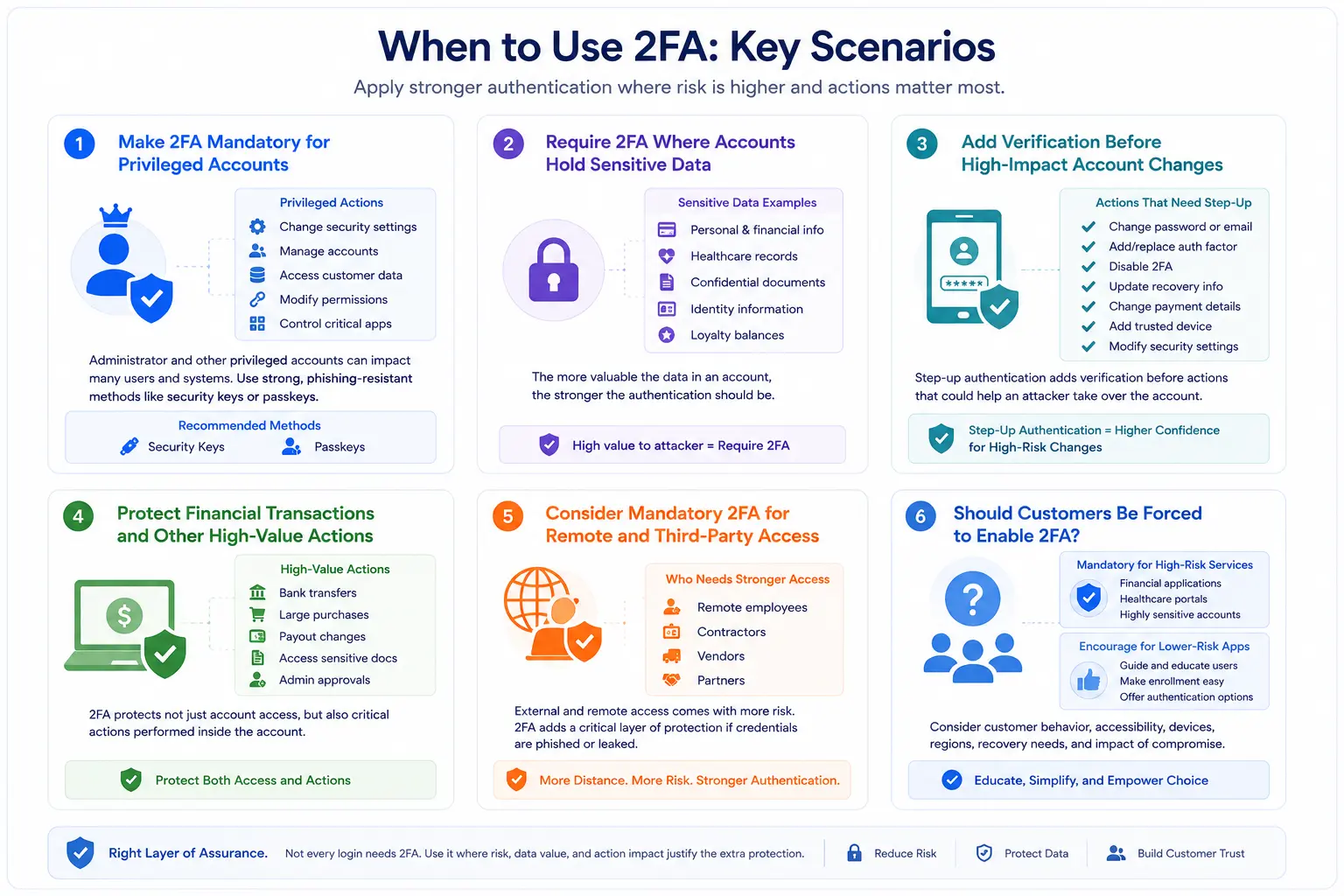
Knowing who benefits from two-factor authentication is only half the decision. Businesses also need to decide when 2FA should be mandatory, when it can remain optional, and when additional verification should be required for a sensitive action. There isn't one policy that works for every application.
Making 2FA optional everywhere can leave valuable accounts exposed because many users simply won't enroll. Requiring it everywhere without considering the customer journey can create a different problem: unnecessary login friction, more recovery requests, and frustrated users.
The better approach is to start with the potential impact of account compromise.
A Practical 2FA Policy
| Scenario | Recommended Approach | Why |
|---|---|---|
| Administrator or privileged access | Require 2FA | Compromise can expose critical systems and data |
| Accounts containing highly sensitive data | Require 2FA | Reduces reliance on passwords for valuable accounts |
| Financial transactions | Require or step up verification | Adds protection before high-value activity |
| Password, email, or recovery changes | Step up verification | Helps prevent attackers from taking permanent control |
| Adding or removing authentication factors | Step up verification | Protects the account's security configuration |
| Remote employee access | Require 2FA | Reduces risk from compromised credentials |
| Partners and contractors accessing sensitive systems | Require 2FA | Strengthens externally managed access |
| General consumer accounts | Require or strongly encourage based on risk | Balances account protection with customer experience |
| Very low-risk or temporary interactions | Evaluate based on need | Mandatory 2FA may create more friction than value |
Here's where teams sometimes overcomplicate the decision. You don't need to begin with dozens of authentication rules.
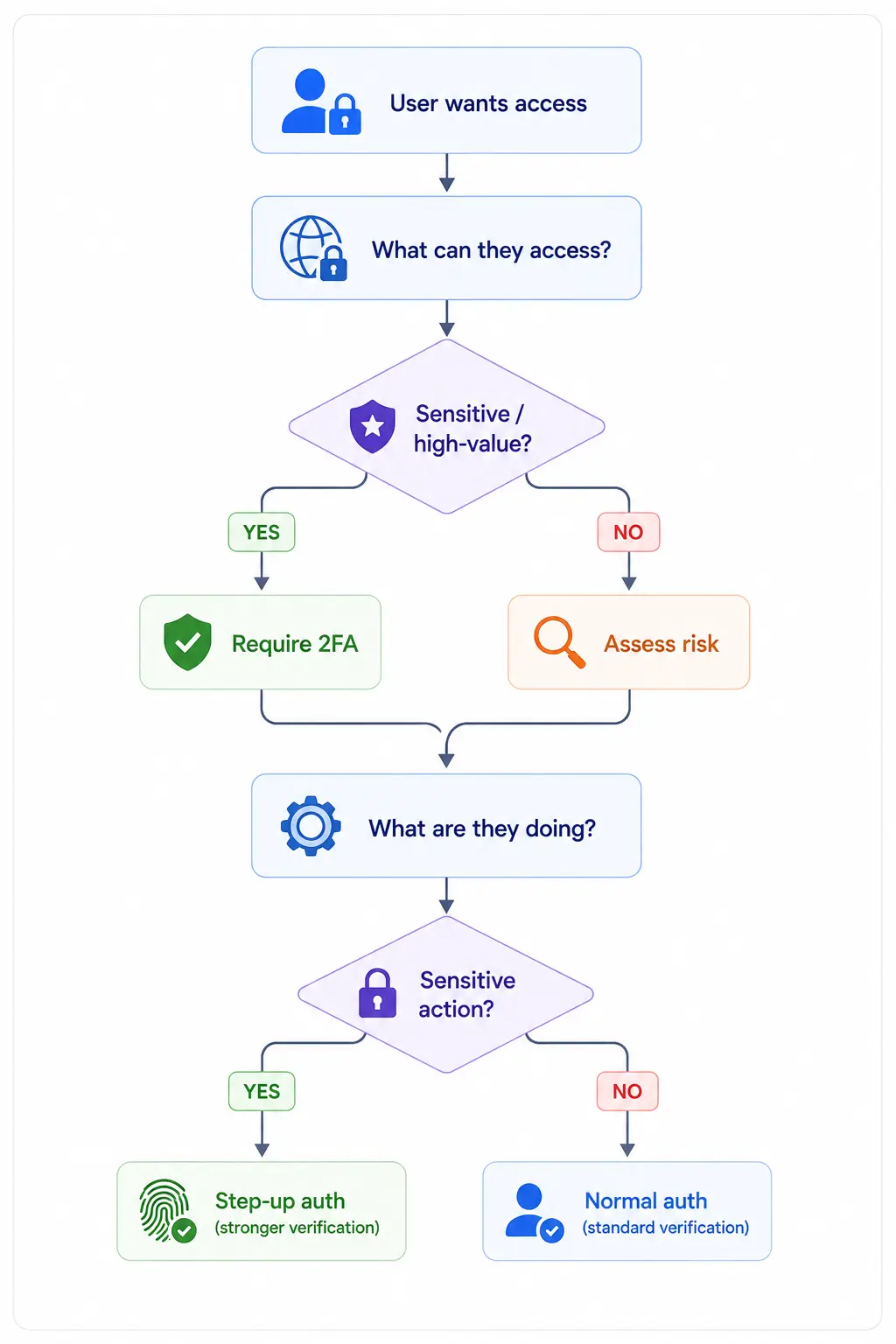
Start with three questions: What can this user access? What can they change? What happens if their account is compromised?
If the answer involves sensitive data, privileged access, money, security settings, or meaningful customer harm, requiring stronger authentication becomes much easier to justify.
Why Should Businesses Use Two-Factor Authentication?
For most businesses, the case for two-factor authentication starts with a simple problem: passwords fail in ways organizations can't fully control.
A customer may reuse the same password across several websites. An employee might enter credentials into a convincing phishing page. Credentials exposed in an unrelated breach can later be tested against your application. Even a strong password offers limited protection once an attacker has obtained it.
Two-factor authentication gives businesses another line of defense. A stolen password may still be valid, but it is no longer enough on its own. The benefits go beyond the login screen.
Reduce the Risk of Account Takeover
Account takeover is one of the clearest reasons to implement 2FA.
Attackers frequently obtain legitimate credentials through phishing, credential stuffing, malware, social engineering, or passwords exposed in previous breaches. If an application relies only on a username and password, valid credentials can give the attacker exactly what they need.
2FA changes the requirement. The attacker now needs access to another independent factor, such as the user's authenticator app, trusted device, biometric verification, or security key.
It doesn't make account takeover impossible. No authentication control does. But it removes one of the biggest weaknesses of password-only authentication: a single compromised secret granting access to the entire account.
Protect Customer Data and Valuable Accounts
What would an attacker gain from compromising one of your customer accounts?
For an ecommerce company, it might be saved payment information, loyalty points, addresses, or order history. A healthcare portal could expose medical information. A financial account may provide access to balances and transactions. SaaS applications can contain business documents, customer records, or administrative capabilities.
The consequences vary, but the underlying problem is the same. The more valuable the account, the less sensible it becomes to protect it with a password alone.
2FA adds another identity check before that information becomes accessible.
Limit the Damage From Password Reuse
Businesses can enforce password requirements. They can't completely control what users do with those passwords elsewhere.
Password reuse remains a particularly difficult problem because a credential exposed on one service can be tested automatically against many others. The targeted business doesn't need to suffer a data breach for its customer accounts to become vulnerable.
Here's where 2FA provides practical value. Even when the reused password is correct, the attacker still needs the second authentication factor.
That gives organizations another opportunity to stop unauthorized access without depending entirely on better password behavior from every user.
Add Protection Against Automated Credential Attacks
Credential stuffing works at scale. Attackers take lists of previously compromised username and password combinations and automatically test them against other applications, looking for accounts where credentials have been reused.
Password-only accounts are particularly attractive because a successful credential match can lead directly to access.
With 2FA enabled, a correct password becomes only part of the authentication process. Automated credential testing may identify a valid credential, but another independent verification is still required before the account can be accessed.
Rate limiting, bot detection, breached-password protection, and other controls still matter. 2FA works alongside them rather than replacing them.
Protect Privileged Access
One compromised administrator account can create a much larger security problem than hundreds of ordinary failed login attempts.
Privileged users may have permission to access customer records, change application configurations, manage identities, modify security settings, or create additional administrator accounts. That makes them particularly valuable targets.
Requiring 2FA for privileged access reduces reliance on administrator passwords alone. For accounts with extensive permissions, businesses can go further and use phishing-resistant authentication methods such as hardware security keys or passkeys.
The potential impact should drive the strength of the authentication.
Reduce Fraud Around Sensitive Account Actions
Attackers don't always want to steal information. Sometimes the account itself has value.
An ecommerce account may contain stored cards or loyalty rewards. A marketplace account could allow payout details to be changed. A financial application may enable money transfers. Other services allow users to change contact information or reset security settings.
Additional authentication before these actions can make it harder for someone with temporary account access to turn that access into fraud or permanent account control.
This is why businesses increasingly consider authentication throughout the customer journey rather than only at the initial sign-in.
Support Customer Confidence Without Adding Security Everywhere
Customers want their accounts protected. They also don't want every interaction interrupted by security prompts. That tension is real.
Good 2FA implementation isn't about proving how much security an application has by showing users more challenges. It's about protecting the moments where additional identity assurance provides meaningful value.
Clear enrollment, convenient authentication options, sensible recovery, and stronger protection around important actions can help businesses improve account security without making authentication feel like a constant obstacle.
Support Broader Security and Compliance Requirements
Two-factor authentication can also support an organization's wider access-control and security program.
Depending on the industry and systems involved, stronger authentication may help organizations address requirements or security objectives associated with frameworks such as PCI DSS, HIPAA, SOC 2, ISO/IEC 27001, and NIST guidance.
2FA alone doesn't make an organization compliant. Nor does every framework require exactly the same authentication method in every situation.
Its value is more practical: it provides stronger evidence that the person accessing a protected account is more than someone who happens to know the password.
Business Value of 2FA at a Glance
| Business Need | How 2FA Helps |
|---|---|
| Reduce account takeover | Requires another factor even when a password is compromised |
| Protect customer information | Adds stronger verification before sensitive account access |
| Address password reuse | Makes reused credentials less useful on their own |
| Reduce credential stuffing success | Prevents a valid password from automatically granting access |
| Protect administrators | Adds stronger authentication to privileged accounts |
| Reduce account-based fraud | Adds verification before sensitive transactions and changes |
| Strengthen customer security | Provides additional protection without eliminating familiar login options |
| Support security programs | Reinforces identity and access controls used across broader security frameworks |
The strongest reason to adopt 2FA isn't that it's considered a security best practice. It's that businesses can't guarantee passwords will remain secret.
Planning for that reality gives organizations a stronger starting point than assuming every credential reaching the login page can be trusted.
Common 2FA Implementation Challenges
Two-factor authentication can strengthen account security considerably. That doesn't mean users will automatically enroll, verification codes will always arrive, or recovery will work smoothly when someone loses a device.
Deployment is usually where the complications appear.
A 2FA strategy that looks straightforward during planning can create unexpected friction once thousands or millions of customers begin using it across different devices, countries, networks, and accessibility needs. Security teams see stronger authentication. Customers simply see another step between them and their account. Both perspectives matter.
Low User Adoption
One of the first challenges businesses encounter is getting users to enable 2FA, particularly when enrollment is optional.
Customers may skip setup because they don't understand the benefit, expect authentication to take longer, or simply want to finish registration as quickly as possible. Burying 2FA inside account settings makes adoption even harder.
Communication can make a noticeable difference. Explain what 2FA protects, keep enrollment short, and introduce the option at a point where the benefit makes sense to the user.
The wording matters too. “Secure your account” is easier to understand than a screen filled with authentication terminology.
Lost, Replaced, or Unavailable Devices
Phones get lost. Laptops are replaced. Employees upgrade devices. Customers travel without access to their usual mobile number.
These aren't edge cases. They're normal parts of managing digital identities.
If a user's only second factor is tied to an unavailable device, strong authentication can quickly become an account lockout problem. Support teams then become part of the authentication process, often under pressure to restore access quickly.
Backup factors, securely stored recovery codes, and carefully designed device replacement processes give legitimate users another route back into their accounts without weakening security.
Account Recovery Can Undermine Strong 2FA
Here's where teams usually go wrong: they spend months strengthening authentication and then make recovery dramatically easier than login.
Attackers notice.
If a user normally needs a password and hardware security key but can recover the account using easily obtained personal information, the recovery process effectively becomes the weaker authentication method.
Businesses need to design recovery alongside 2FA rather than after it. The level of verification should reflect the sensitivity of the account, especially when users are replacing factors, changing recovery information, or disabling two-factor authentication entirely.
OTP Delivery Isn't Always Reliable
SMS and email OTPs are convenient because users already understand them. Delivery, however, introduces dependencies businesses don't completely control.
Mobile network delays, poor connectivity, spam filtering, expired codes, incorrect phone numbers, international delivery restrictions, and carrier issues can prevent legitimate users from completing authentication.
Repeatedly requesting another code can make matters worse by creating multiple active or expired OTPs and confusing the user about which one is valid.
If SMS or email OTP plays a major role in your 2FA strategy, monitor delivery and completion rates. And give users a sensible alternative when their usual channel isn't available.
Authentication Fatigue
More authentication doesn't automatically mean better authentication.
Users who are challenged constantly can begin treating verification as routine rather than a security decision. Push authentication makes this particularly visible. Someone receiving repeated approval requests may eventually tap “approve” without carefully checking whether they initiated the login.
Attackers exploit exactly that behavior through MFA fatigue or prompt bombing attacks.
Number matching, clear login context, sensible retry limits, and fewer unnecessary prompts can make approval requests more meaningful. The objective is to keep users attentive when verification genuinely matters.
Supporting Different Users and Devices
A single authentication method rarely works equally well for everyone. Some customers may not own smartphones. Others change mobile numbers frequently, use shared devices, have limited connectivity, or need accessible authentication experiences. International businesses also need to account for regional differences in mobile networks, device usage, and authentication availability.
This becomes especially important in customer identity. An authentication experience designed around the devices used by an internal security team may perform very differently when exposed to a broad consumer audience.
Offering carefully selected alternatives can prevent stronger security from becoming an accessibility or availability barrier.
Balancing Security With Login Friction
Every additional action in a customer journey creates an opportunity for abandonment.
That doesn't mean businesses should weaken authentication simply to make login faster. It means the security value of each challenge should justify the interruption it creates.
A customer accessing sensitive financial information may accept additional verification without hesitation. Someone trying to check the shipping status of a low-value order may have very different expectations.
A surprising pattern we've seen is that authentication problems are often treated as security problems even when they're actually experiencing problems. If users repeatedly fail enrollment, abandon verification, or contact support because they don't understand what to do next, changing the authentication method alone may not fix the issue.
Clear instructions, good error messages, appropriate factor choices, and straightforward recovery can be just as important as the authentication technology itself.
Rising Support and Operational Costs
Poorly implemented 2FA eventually reaches the support desk. Customers contact support because codes don't arrive, devices are lost, authenticator apps were deleted, recovery codes are unavailable, or enrollment wasn't completed correctly. At scale, even a small failure rate can create substantial operational overhead.
Tracking why users need authentication support helps uncover problems that login-success metrics alone may miss.
If thousands of customers are requesting help for the same reason, that's not simply a support issue. It's a signal that part of the authentication journey needs improvement.
2FA Challenges and How to Address Them
| Challenge | What Users Experience | What Businesses Should Focus On |
|---|---|---|
| Low 2FA adoption | Users skip or abandon enrollment | Clear benefits, simpler setup, better enrollment timing |
| Lost or replaced devices | Users can't access their second factor | Backup factors and secure device replacement |
| Weak account recovery | Recovery becomes easier to attack than login | Strong identity verification and protected factor resets |
| OTP delivery failures | Codes arrive late or not at all | Delivery monitoring and alternative methods |
| Authentication fatigue | Users approve prompts without enough attention | Number matching, context, retry limits |
| Device and accessibility differences | Some users can't complete the expected method | Multiple practical authentication options |
| Login friction | Users abandon authentication | Clear UX, appropriate challenges, better error handling |
| High support volume | More lockouts and recovery tickets | Analyze recurring issues and improve the underlying journey |
The difficult part of 2FA isn't proving that a second factor improves password-only security. It's making that protection work reliably for real users when phones disappear, networks fail, customers forget recovery codes, and authentication doesn't go according to plan. Those realities should shape the implementation from day one.
2FA Best Practices for Secure, User-Friendly Authentication
A strong 2FA deployment shouldn't be judged by how many authentication prompts it generates. A better measure is whether legitimate users can verify themselves easily while stolen credentials become significantly less useful to attackers.
That takes more than selecting an OTP provider and adding another screen to the login journey.
The best 2FA implementations account for how users enroll, which authentication methods they can realistically use, what happens when those methods become unavailable, and how the experience changes as the business grows.
1. Choose Authentication Methods Based on Your Users
There isn't one “best” second factor for every application.
SMS OTP remains widely used because it's familiar and accessible, but it carries risks such as SIM swapping and phishing. Authenticator apps remove dependence on the mobile network, although users need to install and maintain an app. Hardware security keys offer strong phishing resistance but may be impractical as the only option for a large consumer audience.
Start with the people who will actually use the authentication system.
A consumer application may need several accessible choices. Administrator accounts may justify hardware security keys or passkeys. A mobile-first service might lean more heavily on device-based authentication. The strongest method on paper isn't necessarily the strongest deployment if users can't or won't use it correctly.
2. Offer More Than One 2FA Option
Forcing every user into a single authentication method creates an unnecessary point of failure.
Someone may lose access to their phone number. Another customer may not be able to use a particular authenticator app. A security key can be misplaced. Email access can become unavailable.
Supporting a carefully chosen set of authentication options gives users flexibility without forcing the organization to lower its security baseline.
That doesn't mean offering every method available. Too many choices can make enrollment confusing and increase operational complexity. Provide enough options to cover meaningful differences in user needs, devices, and account risk.
3. Make 2FA Enrollment Easy to Complete
Enrollment is where users form their first impression of 2FA. Long instructions, unclear QR-code setup, confusing terminology, or unexplained security prompts can turn a simple security feature into an abandonment point.
Keep the experience short. Tell users why they're being asked to enable 2FA, show exactly what they need to do, and confirm clearly when enrollment is complete.
For authenticator apps, for example, users should be able to scan a QR code, verify the generated code, save any required recovery information, and move on without needing to understand how TOTP works behind the scenes.
Good security doesn't require making customers learn security terminology.
4. Verify Users Before Registering or Replacing a Factor
Adding a new authentication factor is a security-sensitive action. If an attacker gains temporary access to an account and can immediately register their own phone, authenticator app, or security key, 2FA can work against the legitimate account owner.
Require appropriate verification before a user adds, removes, or replaces an authentication factor. The same care should apply when changing a registered phone number, modifying recovery information, or disabling 2FA.
These moments deserve more protection than an ordinary profile update.
5. Provide Secure Backup Authentication
People lose access to authentication factors. Plan for it before launch. Users should have a secure way to regain access if their primary factor becomes unavailable. Depending on the application, that might include a secondary enrolled factor, one-time recovery codes, another trusted device, or a carefully controlled recovery process.
Backup methods shouldn't become shortcuts around the primary authentication policy.
For example, requiring a strong security key during normal login but allowing recovery through easily guessed personal questions creates an obvious weakness. The recovery path needs protection appropriate to the value of the account.
6. Treat Account Recovery as Part of 2FA
Recovery isn't a separate customer-support problem. It's part of authentication.
Here's where teams usually go wrong. They optimize the happy path the customer has their password, phone, and authenticator available while treating every other situation as an exception. At scale, those exceptions aren't rare.
Design recovery for lost phones, replaced devices, unavailable email addresses, forgotten recovery codes, and users who no longer have access to their original authentication method. Make the process difficult for an attacker to exploit but understandable for a legitimate customer to complete.
And test it. A recovery process that exists only in documentation may behave very differently when a locked-out customer actually needs it.
7. Roll Out 2FA in Phases
A company with an established user base doesn't necessarily need to switch every account to mandatory 2FA overnight.
Start with users where compromise creates the greatest exposure administrators, privileged users, high-value accounts, or applications containing sensitive information. Then expand deployment as enrollment, recovery, and support processes mature.
A phased rollout gives teams time to see where customers struggle.
Are users abandoning QR-code enrollment? Are OTPs failing in certain regions? Are recovery tickets increasing? Those findings are much easier to address with a controlled group than after millions of accounts have been migrated.
8. Explain Why You're Asking for 2FA
Don't assume users understand the benefit.
A customer who suddenly encounters an extra verification screen may see inconvenience rather than protection, particularly if they weren't told the change was coming.
Explain what 2FA does in plain language. Tell users when it will be required, which authentication methods they can choose, what they'll need during enrollment, and how they can recover access if something goes wrong.
Communication is especially important when moving an existing customer base from optional to mandatory 2FA. Short, useful guidance beats a lengthy security lecture.
9. Design for Accessibility and Different Devices
Authentication shouldn't exclude users because they interact with technology differently.
Consider customers who use assistive technologies, don't own smartphones, have unreliable mobile service, share devices, travel frequently, or can't use a particular biometric method.
The same issue appears geographically. An authentication method that works reliably in one country may perform poorly in another because of carrier coverage, message delivery, device availability, or local user behavior.
Test 2FA with the actual audience you're serving—not only with the devices used by the team building it.
10. Protect Against Repeated OTP and Push Abuse
Verification mechanisms need their own safeguards. Limit OTP retries and resend requests. Set sensible expiration periods. Prevent unlimited push notifications. Alert users when suspicious authentication activity occurs.
Push authentication deserves particular care because repeated approval requests can condition users to respond automatically. Number matching and clear information about the device or login attempt can help users make a more deliberate decision.
The second factor shouldn't become another channel attackers can spam.
11. Don't Treat SMS as Your Only Long-Term Option
SMS 2FA still has practical value, particularly for broad consumer audiences where ease of enrollment matters. It provides substantially more protection than relying on a password alone.
But it shouldn't automatically become the permanent answer for every account.
Businesses protecting higher-risk users should provide a path toward stronger authentication methods such as authenticator apps, hardware security keys, or passkeys where appropriate. This can happen gradually rather than forcing an immediate migration across the entire customer base.
Authentication strategies should be able to get stronger without requiring the customer journey to be rebuilt every few years.
12. Measure What Happens After Deployment
Enrollment numbers tell you how many users enabled 2FA. They don't tell you whether the experience is working well.
Track authentication completion, failed verification attempts, enrollment abandonment, recovery requests, OTP delivery issues, account lockouts, and authentication-related support tickets.
Look at the patterns. A sudden increase in recovery requests after a policy change may indicate a usability problem. High OTP failure rates in one region may point to delivery issues. Low enrollment completion could mean the setup process needs work.
Authentication data should influence the next version of the experience.
13. Review Your 2FA Strategy Regularly
A 2FA deployment shouldn't remain unchanged simply because it worked when it launched.
Users adopt new devices. Authentication technologies improve. Attack techniques change. The business enters new markets. New customer journeys appear.
Periodically review which authentication methods you support, where 2FA is mandatory, how recovery works, why users contact support, and whether stronger authentication should be introduced for particular accounts.
Small improvements made regularly are usually easier on customers than waiting several years and replacing the entire authentication experience at once.
Quick 2FA Best Practices Checklist
| Best Practice | What to Check |
|---|---|
| Choose factors for your audience | Do users have reliable access to the authentication method? |
| Provide practical alternatives | Can users authenticate if their primary method is unavailable? |
| Simplify enrollment | Can customers complete setup without technical help? |
| Protect factor registration | Is identity verified before a factor is added or replaced? |
| Prepare backup methods | Can legitimate users recover without weakening account security? |
| Secure recovery | Is recovery protected as carefully as normal authentication? |
| Roll out gradually | Have high-risk users and applications been prioritized? |
| Communicate clearly | Do users understand why 2FA is required and what they need to do? |
| Design for accessibility | Can different users, devices, and regions complete authentication? |
| Limit OTP and push abuse | Are retries, resends, and repeated prompts controlled? |
| Support stronger methods | Is there a path beyond SMS for higher-risk accounts? |
| Measure performance | Are adoption, failures, recovery, and support trends visible? |
| Review regularly | Does the current strategy still match users, threats, and business needs? |
The best 2FA strategy isn't necessarily the one with the most authentication controls. It's the one users can adopt successfully, attackers find it difficult to bypass, and the business can operate without turning every lost phone or failed OTP into a support escalation.
Common 2FA Mistakes to Avoid
Two-factor authentication can be enabled correctly from a technical perspective and still perform poorly in practice.
Sometimes the second factor is too weak for the account being protected. Sometimes customers enroll successfully but have no usable recovery option. In other cases, businesses make 2FA so inconvenient that users avoid enabling it altogether.
Most of these problems aren't caused by 2FA itself. They come from decisions made around it.
Treating Every 2FA Method as Equally Secure
A password plus an SMS OTP and a password plus a FIDO2 security key both add another authentication factor. They don't provide the same protection.
SMS can be exposed to SIM swapping and phishing. TOTP authenticator codes avoid some SMS-related risks but can still be captured by real-time phishing. FIDO2 security keys provide stronger phishing resistance because authentication is cryptographically bound to the legitimate service.
The mistake is assuming that simply having “2FA enabled” means every account has reached the same security level. Match the authentication method to what you're protecting.
Making 2FA Optional and Expecting Users to Find It
Optional 2FA can make sense for some customer applications. Hiding it deep inside account settings does not.
Many users won't search for security features they don't know exist. If enrollment matters, introduce 2FA at relevant moments, explain the benefit in plain language, and make setup easy to complete.
For higher-risk accounts, optional enrollment may not provide enough protection at all. Administrators and other privileged users are obvious examples where mandatory 2FA deserves serious consideration.
Relying on a Single Authentication Method
One method may be convenient to operate, but it can leave users with nowhere to go when that method becomes unavailable.
A customer changes their phone number. An authenticator app is lost with an old device. A security key disappears. An SMS code won't arrive while someone is travelling.
If the only solution is “contact support,” authentication problems quickly become operational problems.
Supporting carefully selected alternatives and backup methods makes 2FA more resilient without turning recovery into a security shortcut.
Treating Recovery as an Afterthought
This is one of the easiest ways to weaken a strong 2FA deployment.
Attackers don't need to defeat your strongest authentication method if they can convince support to remove it or exploit a weak recovery workflow.
Factor resets, lost-device recovery, phone-number changes, backup-code replacement, and requests to disable 2FA should all receive appropriate verification. Recovery is part of authentication security. Design it that way.
Forcing the Same Experience on Every User
Uniformity can look attractive from an implementation perspective. Real users are less uniform.
Customers, employees, administrators, partners, and developers have different access patterns and consequences if their accounts are compromised. They may also use different devices and have very different tolerance for authentication friction.
A consumer account doesn't automatically need the same 2FA experience as a privileged administrator.
The goal isn't to make every authentication journey identical. It's to provide appropriate protection for the users and accounts involved.
Ignoring the Enrollment Experience
Teams sometimes spend considerable time securing authentication and surprisingly little time examining how users get there.
If enrollment instructions are confusing, users may abandon setup before 2FA ever protects the account. Mandatory enrollment can create another problem: customers become locked out or contact support because they don't understand what they're being asked to configure.
Test enrollment with people who didn't build the system. That often reveals problems technical teams stop noticing because the process has become familiar to them.
Over-Challenging Users
More prompts can create the appearance of tighter security while making users less attentive to authentication.
If customers repeatedly enter OTPs or approve push notifications during ordinary activity, verification can become mechanical. Users stop asking, “Did I initiate this?” and start trying to get past the prompt.
That's particularly dangerous with push authentication, where attackers may deliberately generate repeated requests.
Use authentication where it adds meaningful protection rather than measuring security by challenge frequency.
Measuring Enrollment but Nothing Else
A business announces 80% 2FA enrollment. Great.
But what percentage of authentication attempts succeed? How many users abandon enrollment? How often are devices being reset? Are recovery requests increasing? Which methods generate the most support tickets?
Enrollment is only one piece of the picture.
Measure what happens before, during, and after authentication. Otherwise, a high adoption number can hide a frustrating or unreliable experience.
2FA Mistakes at a Glance
| Common Mistake | Better Approach |
|---|---|
| Assuming every 2FA method is equally secure | Match authentication strength to the account and use case |
| Hiding optional 2FA in settings | Introduce it clearly and encourage enrollment at relevant moments |
| Supporting only one factor | Provide practical backup or alternative methods |
| Weak recovery and factor resets | Apply strong verification to recovery workflows |
| Giving every user the same experience | Design authentication around user and account requirements |
| Complicated enrollment | Keep setup short, clear, and easy to complete |
| Challenging users too frequently | Use additional verification where it provides meaningful value |
| Tracking only enrollment | Measure success, failures, recovery, abandonment, and support impact |
Here's the bigger issue: **2FA shouldn't be treated as a checkbox that becomes “done” once users enroll. **Its effectiveness depends on what happens when normal authentication breaks down when a device is lost, a code doesn't arrive, a user needs help, or an attacker deliberately targets the weakest part of the journey.
Those moments often reveal more about the quality of a 2FA implementation than the login screen itself.
2FA Use Cases Across Industries
Two-factor authentication solves the same basic problem across industries: a password alone shouldn't be enough to access an account when compromise could have meaningful consequences.
What changes is what needs protecting.
A bank may be concerned about fraudulent transfers. An ecommerce company has customer accounts, stored payment information, and loyalty rewards to protect. Healthcare organizations handle sensitive patient information, while SaaS businesses may need to secure both ordinary customer accounts and highly privileged administrators.
That difference matters when deciding where 2FA should be required and how strong the authentication method should be.
| Industry | What 2FA Helps Protect | Common 2FA Use Cases |
|---|---|---|
| Banking & Financial Services | Financial data, accounts, transactions | Customer login, transfers, payment changes, account recovery |
| Ecommerce & Retail | Customer profiles, payment details, loyalty value | Login, profile changes, stored payment access, loyalty redemption |
| Healthcare | Patient information and healthcare portals | Patient login, staff access, sensitive record access |
| SaaS & B2B Platforms | Business data, customer environments, privileged access | Customer login, admin accounts, configuration changes |
| Government | Citizen accounts and digital public services | Portal access, sensitive applications, account changes |
| Education | Student, faculty, and institutional accounts | Student portals, staff systems, administrative access |
| Travel & Hospitality | Customer profiles, bookings, loyalty accounts | Account login, booking changes, loyalty redemption |
| Marketplaces & Digital Platforms | Seller accounts, payouts, customer information | Seller login, payout changes, account recovery |
Banking and Financial Services
Financial accounts are obvious targets because successful account takeover can lead directly to monetary loss.
2FA can protect more than the initial banking login. Financial institutions may require additional verification before transfers, changes to payment details, adding new beneficiaries, modifying contact information, or other sensitive account actions.
For higher-value access, the strength of the authentication method becomes especially important. Simply having 2FA enabled doesn't mean every method offers equal resistance to phishing or social engineering.
Ecommerce and Retail
Retail accounts may look less sensitive than banking accounts, but attackers can still find plenty of value inside them.
Saved payment methods, gift-card balances, loyalty points, personal information, order histories, and stored addresses can all make customer accounts attractive targets. Fraudsters may also take over established accounts because legitimate purchase history can make fraudulent activity less obvious.
The challenge for retailers is friction. Customers expect checkout and account access to be quick.
That makes enrollment design, authentication choice, and recovery particularly important. Stronger security shouldn't turn checking an order status into a five-minute process.
Healthcare
Healthcare portals can contain highly sensitive personal and medical information. Staff accounts may provide access to even larger amounts of patient data.
2FA adds another verification layer when passwords are stolen or exposed, helping organizations strengthen access to patient portals, clinical applications, and administrative systems.
Usability deserves special attention here. Patients may represent a broad range of ages, abilities, devices, and levels of technical confidence. An authentication strategy that is secure but difficult for a significant portion of patients to complete can create access and support problems very quickly.
SaaS and B2B Applications
SaaS providers often have more than one type of user to protect.
An ordinary user might access their own workspace. A customer administrator may be able to invite users, modify permissions, connect integrations, or change organization-wide security settings. Internal support and administrative accounts can carry even greater privileges.
Applying exactly the same 2FA policy to all of them may not make sense.
SaaS businesses should pay particular attention to privileged accounts while still giving customers practical authentication options that work across organizations, devices, and deployment environments.
Government and Education
Government and education platforms often serve unusually diverse user populations.
Citizen portals may contain tax information, identity records, benefits, or other sensitive services. Universities need to protect student accounts, faculty systems, research resources, and administrative applications.
Here, accessibility and account recovery become especially important. Users may not have the latest devices or reliable access to one particular authentication channel.
Requiring stronger authentication is only useful if legitimate users can complete it.
Travel, Loyalty, and Marketplace Accounts
Not every valuable digital account contains a bank balance.
Airline miles, hotel points, marketplace seller balances, gift cards, and other forms of stored value can make accounts attractive to attackers. Marketplace sellers may also have payout details that can be changed after account takeover.
2FA can help protect both account access and the actions that carry the greatest financial impact, such as changing payout information, transferring rewards, or modifying recovery credentials.
Here's where the broader lesson becomes useful: industry alone shouldn't determine your 2FA strategy.
Look at what users can access, what they can change, and what an attacker could gain. Those answers reveal where stronger authentication provides the most value—and where a poorly designed challenge would simply add friction without meaningfully improving security.
How to Measure Whether Your 2FA Strategy Is Working
Launching two-factor authentication is easy to measure. You can count how many users enrolled.
That number alone doesn't tell you whether the implementation is working.
A business could reach a high 2FA enrollment rate while customers struggle to authenticate, verification codes fail to arrive, recovery requests increase, and support teams spend more time unlocking accounts. From a security dashboard, adoption looks healthy. The customer experience tells a different story.
A useful 2FA measurement strategy looks at security, adoption, reliability, and user friction together.
Track 2FA Enrollment and Adoption
Start with how many eligible users actually enable 2FA.
Look beyond the overall percentage. Compare adoption across customer segments, applications, authentication methods, and user types where that information is useful. If administrators reach near-complete enrollment while customers rarely opt in, the difference may reveal more about how 2FA is presented than about users' willingness to improve security.
For optional 2FA, also look at where enrollment begins and where people abandon it.
If users regularly start setup but fail to finish, something in the enrollment experience deserves attention.
Measure Authentication Success and Failure
How often do legitimate users successfully complete 2FA?
Authentication success rate provides a basic health check for the experience. Repeated failures can point to expired OTPs, confusing instructions, synchronization problems, unavailable devices, or other implementation issues.
Don't treat every failed authentication as an attack.
Patterns matter. A spike in failures across many customers could indicate a technical problem. Repeated failures against one account may deserve a very different response.
Watch Authentication Abandonment
Some users don't fail authentication. They simply leave.
That distinction is particularly important for customer-facing applications.
If customers regularly reach a 2FA challenge and abandon the login, the problem may be excessive friction, unclear instructions, an unavailable authentication method, or an experience that doesn't work well on their device.
Measure where abandonment happens rather than looking only at successful and failed logins. Otherwise, users who quietly give up can disappear from the data.
Monitor Recovery and Account Lockouts
Recovery volume tells you a lot about how 2FA behaves outside the ideal login journey.
Track how often customers lose access to their authentication method, request factor resets, use backup codes, replace trusted devices, or contact support because they're locked out.
An occasional recovery request is normal. A sharp increase after a rollout or authentication change isn't something to dismiss.
It may indicate that customers weren't prepared for the change, backup methods are inadequate, or the recovery experience needs work.
Track Authentication-Related Support Requests
Support tickets provide context that authentication logs often can't.
A dashboard may tell you that an OTP failed. A customer can tell you that they requested it four times, received all four codes ten minutes later, and had no idea which one to use.
Look for recurring themes in support conversations: missing codes, device replacement, enrollment confusion, inaccessible methods, factor resets, and recovery problems.
A surprising pattern we've seen is that support data can expose authentication friction long before it becomes obvious in top-level adoption metrics.
Measure Security Outcomes
2FA ultimately exists to make unauthorized access more difficult, so security outcomes still matter.
Monitor trends in suspicious authentication attempts, credential-based attacks, account takeover incidents, unauthorized factor changes, recovery abuse, and other account-security events relevant to your application.
Be careful with interpretation, though. A reduction in account takeover may have several causes, including bot protection, stronger password controls, fraud detection, and changes elsewhere in the identity stack.
2FA should be evaluated as part of the broader account-security picture rather than credited with every improvement.
Core 2FA Metrics to Monitor
| Metric | What It Can Tell You |
|---|---|
| 2FA enrollment rate | How many eligible users have adopted 2FA |
| Enrollment completion rate | Whether users can successfully finish setup |
| Authentication success rate | How reliably users complete 2FA |
| Authentication failure rate | Where verification problems or suspicious attempts may exist |
| Login abandonment | Whether authentication friction is causing users to leave |
| Recovery requests | How often users lose access to their enrolled factors |
| Account lockouts | Whether policies or recovery options are creating access problems |
| OTP delivery/completion | Whether code-based authentication is performing reliably |
| Authentication support tickets | Where customers repeatedly need human assistance |
| Account takeover trends | Whether account-security outcomes are improving over time |
The goal isn't to maximize one metric.
Pushing enrollment higher while authentication abandonment and recovery tickets climb isn't necessarily progress. Neither is reducing login friction if the changes make valuable accounts easier to compromise.
A healthy 2FA program should move toward both outcomes: more difficult unauthorized access and fewer unnecessary problems for legitimate users.
That's the balance worth measuring.
How 2FA Fits Into a Modern Identity Strategy
Two-factor authentication doesn't operate in isolation.
Businesses increasingly manage authentication as part of a broader identity strategy that includes account recovery, session security, fraud prevention, access policies, passwordless authentication, and stronger protection for sensitive actions.
2FA still remains an important part of that strategy. What's changing is how and where businesses use it.
Instead of assuming that every account needs the same password-and-OTP experience forever, organizations can support different authentication methods and strengthen verification as their users, applications, and security requirements evolve.
2FA and Adaptive Authentication
Traditional 2FA policies commonly require a second factor at predetermined points, such as every login or when a user accesses a particular application.
Adaptive authentication adds another layer of decision-making. It can evaluate contextual signals surrounding an authentication attempt such as device information, location, IP reputation, or unusual login behavior and use that context when determining whether additional verification is appropriate.
For example, a routine login may follow the application's normal authentication policy, while unusual activity could trigger stronger verification or additional security controls.
The distinction matters. 2FA provides the authentication factors; adaptive authentication helps determine when stronger verification should be applied.
Businesses don't need to turn every 2FA implementation into a complex risk engine. For many teams, the immediate priority is simpler: deploy reliable 2FA first, protect high-value accounts, secure recovery, and improve authentication policies as requirements mature.
2FA and Zero Trust
Zero Trust operates on the principle that access shouldn't be trusted simply because a user has previously authenticated or is connecting from a familiar environment.
2FA supports that approach by providing stronger identity verification than a password alone. It is particularly useful for privileged access, sensitive applications, and situations where greater confidence in the user's identity is required.
But 2FA by itself doesn't create a Zero Trust architecture.
Zero Trust also involves areas such as authorization, least-privilege access, device security, session controls, and ongoing evaluation of access. Two-factor authentication is one identity control within that larger security model.
Keeping that distinction clear prevents businesses from treating “2FA enabled” as the finish line.
2FA and Compliance
Authentication also appears within many regulatory, security, and assurance programs.
Depending on the industry, system, and type of access involved, organizations may use 2FA or MFA to support access-control requirements associated with standards and frameworks such as PCI DSS, NIST guidance, HIPAA, SOC 2, and ISO/IEC 27001.
Requirements aren't identical across these frameworks, and simply enabling 2FA doesn't make an organization compliant.
The practical approach is to identify which accounts, systems, and actions fall within the applicable requirements, then choose authentication controls that provide the necessary level of assurance. That may mean conventional 2FA in one environment and stronger phishing-resistant authentication in another.
Moving Toward Phishing-Resistant Authentication
One of the biggest changes in authentication is the move away from verification methods that users can accidentally hand to an attacker.
SMS and TOTP codes improve security compared with passwords alone, but both can be captured through phishing. Push authentication can also be abused when users are pressured into approving fraudulent requests.
FIDO2 security keys and passkeys take a different approach. They use public-key cryptography and are designed to resist phishing by binding authentication to the legitimate service rather than asking users to manually transfer a reusable secret or temporary code.
That doesn't mean every business needs to abandon existing 2FA overnight.
For organizations with large customer populations, migration is likely to be gradual. Existing methods can remain available while stronger options are introduced for administrators, high-value accounts, security-conscious customers, or new authentication journeys.
Where Passkeys Fit
Passkeys are especially relevant because they challenge the assumption that stronger authentication must mean more login steps.
Instead of asking a user for a password and then a separate OTP, a passkey can authenticate through a cryptographic credential protected by the user's device and its local unlock mechanism, such as a PIN or biometric.
For businesses, that creates an opportunity to improve both phishing resistance and login usability.
Still, passkeys shouldn't simply be added to a 2FA strategy because they're newer. Device support, account recovery, cross-device experiences, user education, and migration from existing authentication methods all need consideration.
The direction is clear, though: authentication is moving toward methods that rely less on passwords and manually entered codes.
Don't Rebuild Authentication Every Time the Technology Changes
A 2FA strategy should solve today's security problems without locking the organization into today's authentication methods.
That means giving teams room to introduce stronger factors, change authentication policies, support new devices, and eventually adopt passwordless or phishing-resistant authentication without rebuilding the customer identity experience from the ground up.
Start with what users need now. Protect the accounts that matter most. Make enrollment and recovery work properly. Then leave room to evolve.
The strongest authentication strategy isn't the one chasing every new method as soon as it appears. It's the one that can adopt better methods when they provide a meaningful improvement in security or customer experience.
How LoginRadius Helps Businesses Implement 2FA at Scale
Implementing two-factor authentication for a few internal accounts is one thing. Supporting it across thousands or millions of customer identities is different.
Customers use different devices. They lose phones, change numbers, travel, forget recovery codes, and expect authentication to work across web and mobile without needing help every time something changes. At the same time, businesses need control over enrollment, authentication policies, account recovery, and the security of sensitive customer actions.
This is where Customer Identity and Access Management (CIAM) becomes particularly useful.
LoginRadius gives businesses a centralized way to manage customer authentication rather than building separate 2FA workflows for every application or digital property. Organizations can introduce stronger authentication while keeping the experience consistent across customer-facing applications.
| Business Challenge | LoginRadius Capability | How It Helps | Business Benefit |
|---|---|---|---|
| Different users require different authentication methods and security levels. | Support Different Authentication Methods (SMS OTP, Email OTP, etc.) | Offer methods that fit customer preferences and risk profiles. | Greater flexibility, improved user adoption, and the ability to evolve authentication without major rework. |
| Different users require different authentication methods and security levels. | Apply 2FA Where It Provides the Most Value | Businesses can require stronger authentication for privileged access, sensitive actions, or high-risk user groups. | Better security with less unnecessary friction for low-risk interactions. |
| Users may abandon 2FA if enrollment feels disconnected or complicated. | Progressive Profiling and 2FA as a part of it. | Integrates authentication into registration, login, and account management flows with consistent branding and user experience. | Higher enrollment completion rates and a smoother customer experience. |
| Users lose devices, change phone numbers, or need to update authentication methods. | Prepare for Recovery and Changing Devices | Connects enrollment, authentication, account management, and recovery workflows within one CIAM platform. | Reduced account lockouts and a more resilient authentication experience. |
| Teams often lack insight into authentication performance and user friction. | Give Teams Visibility Into Authentication | Provides authentication and operational data to monitor failures, enrollment issues, support trends, and suspicious activity. | Better decision-making for security, product, and customer experience teams. |
| Authentication technologies and user expectations continue to evolve. | Build for What Comes After Traditional 2FA | Supports a flexible CIAM foundation that can accommodate passkeys, passwordless authentication, and phishing-resistant methods over time. | Future-ready identity infrastructure that can adapt without requiring major platform changes. |
Conclusion: Make 2FA Work for Your Users, Not Against Them
Two-factor authentication can make stolen passwords considerably less useful to attackers. But enabling a second factor is only the beginning. The bigger decisions come afterward.
Who should be required to use 2FA? Which authentication methods make sense for your customers? How will someone regain access after losing a device? What happens when an OTP doesn't arrive? And can your authentication strategy become stronger without making legitimate users fight their way into their own accounts?
A successful 2FA program answers those questions before they become support tickets or security gaps.
Start with the accounts where compromise would cause the greatest harm. Give users authentication options they can realistically use. Keep enrollment clear. Protect factor changes and account recovery just as carefully as login. Then watch what happens after deployment—failed authentication, abandonment, recovery requests, support volume, and account security outcomes all tell you where the experience needs work.
Authentication will continue to change. Passkeys and phishing-resistant methods are already giving businesses alternatives to traditional password-and-OTP experiences. Your 2FA strategy should be able to evolve with them rather than requiring another identity overhaul every few years.
For businesses managing customer identities at scale, that flexibility matters.
LoginRadius helps organizations build secure customer authentication experiences across applications while giving teams the flexibility to strengthen authentication as customer needs and security requirements change.
Ready to improve your 2FA strategy? Book a LoginRadius demo and see how you can protect customer accounts with stronger authentication without making security another barrier in the customer journey.
FAQs
Q: What are the best practices for implementing 2FA?
A: Choose authentication methods that fit your users and account risk, simplify enrollment, provide secure backup options, protect recovery, limit OTP abuse, and continuously measure authentication performance.
Q: Who should use two-factor authentication?
A: 2FA is especially important for administrators, employees, developers, partners, and customers with access to sensitive data or valuable accounts. The greater the impact of account compromise, the stronger the authentication should be.
Q: When should businesses require 2FA?
A: Businesses should prioritize mandatory 2FA for privileged accounts, sensitive data access, remote access, financial accounts, and other high-impact scenarios. Additional verification can also protect sensitive account changes and transactions.
Q: Should 2FA be mandatory for all users?
A: Not necessarily. Mandatory 2FA makes sense for high-risk accounts, while some lower-risk consumer applications may encourage optional enrollment. The policy should reflect account sensitivity, user needs, and potential impact of compromise.
Q: What is the biggest challenge when implementing 2FA?
A: Common challenges include low adoption, lost devices, OTP delivery failures, account lockouts, authentication fatigue, accessibility, and increased recovery requests. Planning for these scenarios before rollout reduces friction later.
Q: Which 2FA method should businesses use?
A: There is no single method for every use case. SMS offers broad accessibility, authenticator apps provide stronger protection, while security keys and passkeys are better suited to accounts requiring phishing-resistant authentication.
Q: Is SMS suitable for two-factor authentication?
A: SMS 2FA provides better protection than passwords alone and remains useful for many consumer applications. However, higher-risk accounts should consider stronger methods because SMS can be vulnerable to SIM swapping and phishing.
Q: How can businesses improve 2FA adoption?
A: Keep enrollment short, explain the security benefit in plain language, offer practical authentication choices, and introduce 2FA at relevant points in the customer journey. Avoid hiding optional 2FA deep inside account settings.
Q: How should businesses handle 2FA account recovery?
A: Recovery should be designed alongside authentication, using secure backup factors, recovery codes, or appropriate identity verification. It should never provide an easier route into the account than normal authentication.
Q: How can businesses reduce 2FA login friction?
A: Choose authentication methods that match user needs, avoid unnecessary challenges, provide clear instructions, and make recovery straightforward. Strong security doesn't require interrupting every routine customer interaction.
Q: How do you measure the success of a 2FA implementation?
A: Track more than enrollment. Useful metrics include authentication success, enrollment completion, login abandonment, recovery requests, account lockouts, OTP performance, support tickets, and account takeover trends.
Q: How often should a 2FA strategy be reviewed?
A: Review 2FA regularly as user behavior, supported devices, threats, applications, and authentication technologies change. Pay particular attention when support issues rise or new authentication methods become available.
Q: What are the most common 2FA implementation mistakes?
A: Common mistakes include relying on one authentication method, weak account recovery, complicated enrollment, over-challenging users, ignoring accessibility, and assuming every 2FA method provides the same security.
Q: How do passkeys fit into a 2FA strategy?
A: Passkeys provide a phishing-resistant alternative to traditional password-and-OTP authentication. Businesses can introduce them gradually while continuing to support existing 2FA methods during the transition.