Introduction
A Continue with Facebook button looks simple from the user's side. They click, approve access, and return to your application signed in. For developers, there is quite a bit happening behind that button.
A production-ready Facebook Login integration requires you to configure an app with Meta, set the correct OAuth redirect URI, manage your App ID and App Secret securely, request only the permissions your application needs, handle the authorization response, and connect the Facebook identity to the right customer account. Miss one configuration value and the login can fail before the user ever gets back to your application.
There is another distinction worth making early. Your application does not receive or verify the user's Facebook password. Facebook handles that authentication. Your application receives the result of the authorization flow and must securely process it before establishing its own authenticated session.
Teams usually focus on getting the Facebook redirect to work and treat everything after the callback as finished. It isn't. Token validation, identity matching, duplicate-account handling, session creation, permission management, and failure scenarios are just as important as getting the login button onto the page.
And those details become harder to manage once Facebook is only one of several identity providers your application supports.
This guide focuses specifically on how to implement Facebook Login for a web or mobile application—from Meta app configuration and OAuth redirects to permissions, identity handling, security, and troubleshooting. We'll also cover how LoginRadius can simplify Facebook authentication when you need to manage social login as part of a broader customer identity architecture.
How Facebook Login Works From Authorization to an Authenticated Application Session
Here is a summary of what we have already seen:
-
Facebook Login sits between your application and Facebook's identity system. Facebook handles authentication and asks the user to approve the permissions your app has requested.
-
After the authentication step succeeds, the user is returned to the configured callback or redirect location, where your application continues the authorization process.
-
Your application never needs the user's Facebook password, and that stays with Facebook.
-
What your application does need is a reliable way to determine which Facebook identity successfully authenticated, validate the authentication result, retrieve only the permitted identity information it requires, and connect that identity to the correct account in your own system.
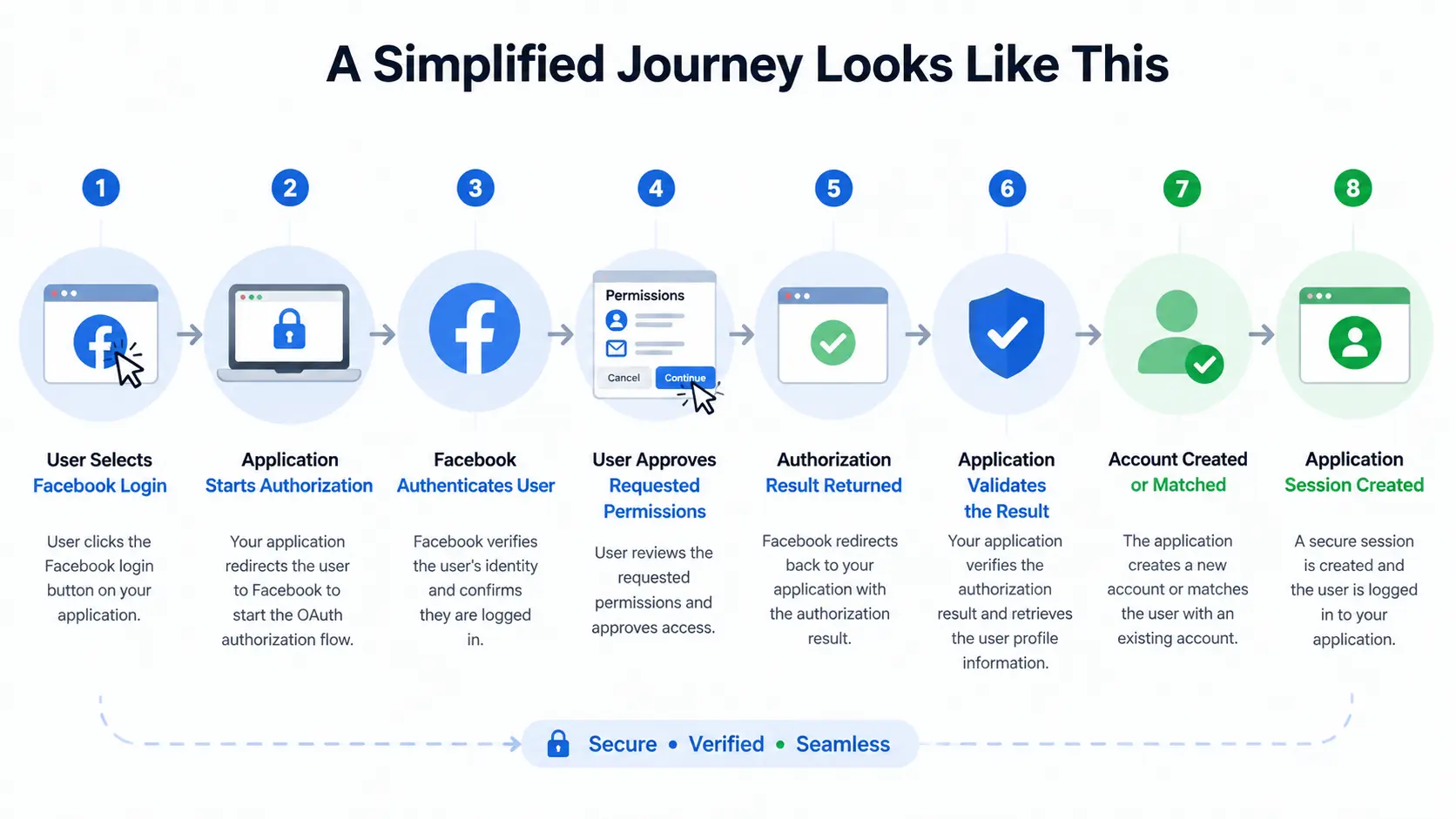
That Account Created or Matched step deserves attention. A first-time Facebook user may need a new customer account. A returning user should normally be connected to the identity your application already knows. And someone who originally registered with another method may need an appropriate account-linking flow rather than a second profile.
LoginRadius, for example, distinguishes the overall customer account from individual provider profiles and supports linking social identities such as Facebook to a unified account.
Don’t treat successful Facebook authentication as equivalent to a completed application login. They are not quite the same thing.
Facebook can establish that the user successfully authenticated with Facebook, but your application still has work to do. It needs to process the returned authentication result securely, identify or provision the customer, apply its own authorization and account policies, and establish the application's authenticated session.
If Facebook authentication succeeds but your account-matching logic sends the user to the wrong profile, the technical login worked while the customer experience did not.
Permissions are another part of this relationship. The profile information available to an application depends on the provider, permissions granted, and user consent; applications should therefore avoid designing the login flow around the assumption that every desired profile attribute will always be returned.
This separation makes the architecture easier to reason about: Facebook authenticates the Facebook identity. Your application decides what that authenticated identity is allowed to become or access inside your application.
Once that distinction is clear, configuring the Meta app, redirect URIs, permissions, account matching, and application session becomes much easier to approach as separate parts of the same Facebook Login flow.
How to Create and Configure a Facebook Login App in Meta for Developers
Prerequisites
Facebook Login becomes much easier to configure when the application details are settled before you open the Meta developer console. A surprising number of integration problems start with configuration rather than code: the wrong callback URL, credentials used in the wrong environment, or an application requesting information it never actually needed.
A little preparation avoids most of that.
-
Set up access to Meta’s developer platform.
-
Know each app environment that you want to configure.
-
Identify your callback or redirect URL before configuration.
-
Use https:// addresses for production authentication
-
Decide what customer information you actually want vs need
-
Plan how Facebook identities get mapped to existing customer accounts
-
Prepare to store the app secret securely
Once your application URLs, redirect strategy, and identity requirements are clear, you can configure the provider side of the integration.
Meta changes the layout and terminology of its developer console periodically, so avoid treating button names or menu positions as permanent. The important part is the configuration itself: your Meta app must represent the correct application, Facebook Login must be enabled for the intended use case, the right domains and redirect URIs must be registered, and sensitive credentials must stay protected.
Create Your App in Meta for Developers
Start by creating an app in the Meta developer environment and associating it with the appropriate business or organizational setup where required.
During creation, Meta may ask about your application's use case or the capabilities you intend to add. Select the option appropriate for authenticating users with Facebook rather than choosing an unrelated app configuration simply because it appears first.
Give the app a recognizable name as well. This isn't just housekeeping. Once an organization maintains development, staging, and production integrations—or several digital properties—vague names such as Test App become surprisingly difficult to manage.
After creation, the app becomes the configuration boundary for your Facebook integration. This is where you'll manage identifiers, login settings, permissions, platform information, authorized URLs, and access for developers or administrators.
Add and Configure Facebook Login for Your Application
Creating a Meta app does not, by itself, finish the login configuration.
The app needs the appropriate Facebook Login capability or use case configured for the platform you're building. A website and a native mobile application may require different platform-specific settings even though both ultimately allow customers to authenticate with Facebook.
Configure only the platforms you actually support. If you're starting with a web application, get that flow working reliably before adding unrelated platform settings. It makes troubleshooting much easier because you know which environment and redirect path you're testing.
The same principle applies when LoginRadius sits between your application and Facebook. In that architecture, Facebook is the upstream identity provider, while LoginRadius manages the social authentication experience and customer identity flow for your application. The provider configuration should therefore follow the callback and credential requirements of that integration rather than an unrelated custom flow.
Configure the Correct App Domain and Application URLs
Facebook needs to know which application and domains are associated with the integration.
Use the real domains from the environment you're configuring rather than placeholders that will eventually be replaced. Production settings should correspond to production applications, while development and testing should be handled deliberately instead of being mixed into one configuration without a clear reason.
Pay attention to consistency. A surprisingly common pattern is for a developer to configure: example.com while the application actually authenticates through: app.example.com or to update a production hostname without updating the authentication configuration. Those differences can matter.
This is also where you should ensure any required application information such as privacy-policy or other provider-required URLs—is accurate and publicly accessible before moving the app toward production use.
Add the Valid OAuth Redirect URL
The redirect URL is one of the most common places Facebook Login implementations break.
After Facebook completes the provider-side authorization process, the user needs to return to an approved location where the authentication flow can continue. That location must be configured correctly for the application.
For example, your callback might look conceptually like: https://example.com/auth/facebook/callback
If your application sends one redirect URL while the provider configuration expects another, authentication can be rejected.
Tiny differences can matter. A different subdomain, path, protocol, port, or environment can point to a different endpoint.
Here's where teams usually go wrong: they solve a redirect mismatch by adding more and more callback URLs until one works.
That may get a test moving, but it is not a good configuration strategy.
Keep approved redirect locations as narrow and intentional as possible. Know which callback belongs to development, staging, and production, and remove obsolete entries when they are no longer required.
If you're implementing Facebook Login through LoginRadius, use the LoginRadius callback/redirect URL specified for your social-provider configuration. Don't replace it with your application's final post-login destination. Those URLs can serve different purposes in the authentication journey.
Retrieve Your Facebook App ID and App Secret
Once the app is configured, you'll have application credentials used by the integration.
The App ID identifies your Meta application. It is not treated the same way as a confidential password and may appear where the application needs to identify itself during the login flow.
The App Secret is different. It is a sensitive credential and should be protected accordingly. Don't put it in frontend JavaScript, expose it in browser-delivered configuration, commit it to a public Git repository, paste it into documentation, or otherwise make it available to users.
For server-side integrations, keep secrets in an appropriate environment-variable or secret-management system and restrict access to the services and people that actually need them.
If you suspect an App Secret has been exposed, don't simply delete it from the latest source-code commit and assume the problem is solved. Repository history, logs, build artifacts, and deployed applications may still contain it. Rotate the affected credential and update the integration securely.
Separate Development and Production Configuration
An authentication integration that works for the development team is not automatically ready for real customers.
Before production, verify that the application is using the intended production domains, callback URLs, credentials, permissions, and provider configuration. Also confirm that access isn't limited to developers, testers, or other roles used while the Meta app was being configured.
This is an easy problem to miss.
Everything appears fine during development because everyone testing the integration already has access to the Meta app. Then the feature ships and ordinary customers cannot authenticate.
Treat production readiness as its own checkpoint rather than the final click in development.
Verify the Complete Redirect Before Moving On
Don't stop testing when Facebook accepts the initial authorization request.
Run the complete journey: Application → Facebook Login → Authorization → Approved Redirect → Application → Correct Customer Account
Confirm that the user returns to the expected endpoint, the application receives what it needs to continue authentication, and errors do not leave the customer stranded on an unexplained page.
At this stage, you are not trying to perfect account linking or session management yet. You are verifying that the provider configuration and application configuration agree with each other.
Once they do, the next question becomes more interesting: what should your application actually ask Facebook for?
That is where permissions and scopes enter the implementation.
How to Configure Facebook Login Permissions Without Requesting Unnecessary User Data
Facebook Login permissions determine what information your application can access after a user authenticates. For a login flow, the safest approach is also the simplest: request only the information your application actually needs.
Adding permissions because the data might be useful later creates unnecessary complexity and can introduce additional consent or Meta review requirements. Keep authentication focused on establishing the customer's identity, then collect other information separately when there is a legitimate need.
Start With the Minimum Permissions Required
Begin with the permissions necessary for the immediate login and account-creation experience.
Facebook Login provides basic profile access through public_profile. If your application also requires an email address, the appropriate email permission can be requested.
Avoid requesting additional permissions simply to build a richer customer profile during registration. Some permissions can require additional review or approval from Meta, and those requirements may change over time.
For anything beyond basic authentication, check Meta's current permission requirements before implementation.
Don't Assume Every User Will Return an Email Address
Even when your application requests access to an email address, your account logic should not assume that a usable email will always be returned.
Design a fallback for cases where required profile information is unavailable. If an email or another attribute is genuinely necessary to finish account setup, ask the customer for it after authentication rather than treating the entire Facebook Login as failed.
This keeps provider authentication separate from application-specific profile requirements.
Use the Facebook Identity to Recognize Returning Users
Profile attributes such as names and email addresses should not become the sole basis for identifying a returning Facebook user.
Use the appropriate provider-issued Facebook identity identifier to maintain the relationship between the social identity and the customer account. Profile information can support the customer experience, but mutable attributes are not a replacement for a stable provider identity.
This also helps reduce duplicate-account problems when the same customer returns later.
Expect Additional Permissions to Require More Work
Basic Facebook authentication and access to additional Facebook data should not be treated as the same implementation problem.
Depending on what your application requests, Meta may require additional review, verification, or compliance with permission-specific requirements before those capabilities are available to production users.
So keep the initial Facebook Login scope narrow.
Request what authentication needs. Add broader permissions only when the product actually needs them.
That keeps the login experience simpler for users and reduces unnecessary provider dependencies for your engineering team.
How to Implement the Facebook Login Flow From Authentication to Account Access
Once your Meta app, redirect URI, and permissions are configured, the actual Facebook Login flow is fairly straightforward. The important part is making sure each stage leads securely to the correct customer account.
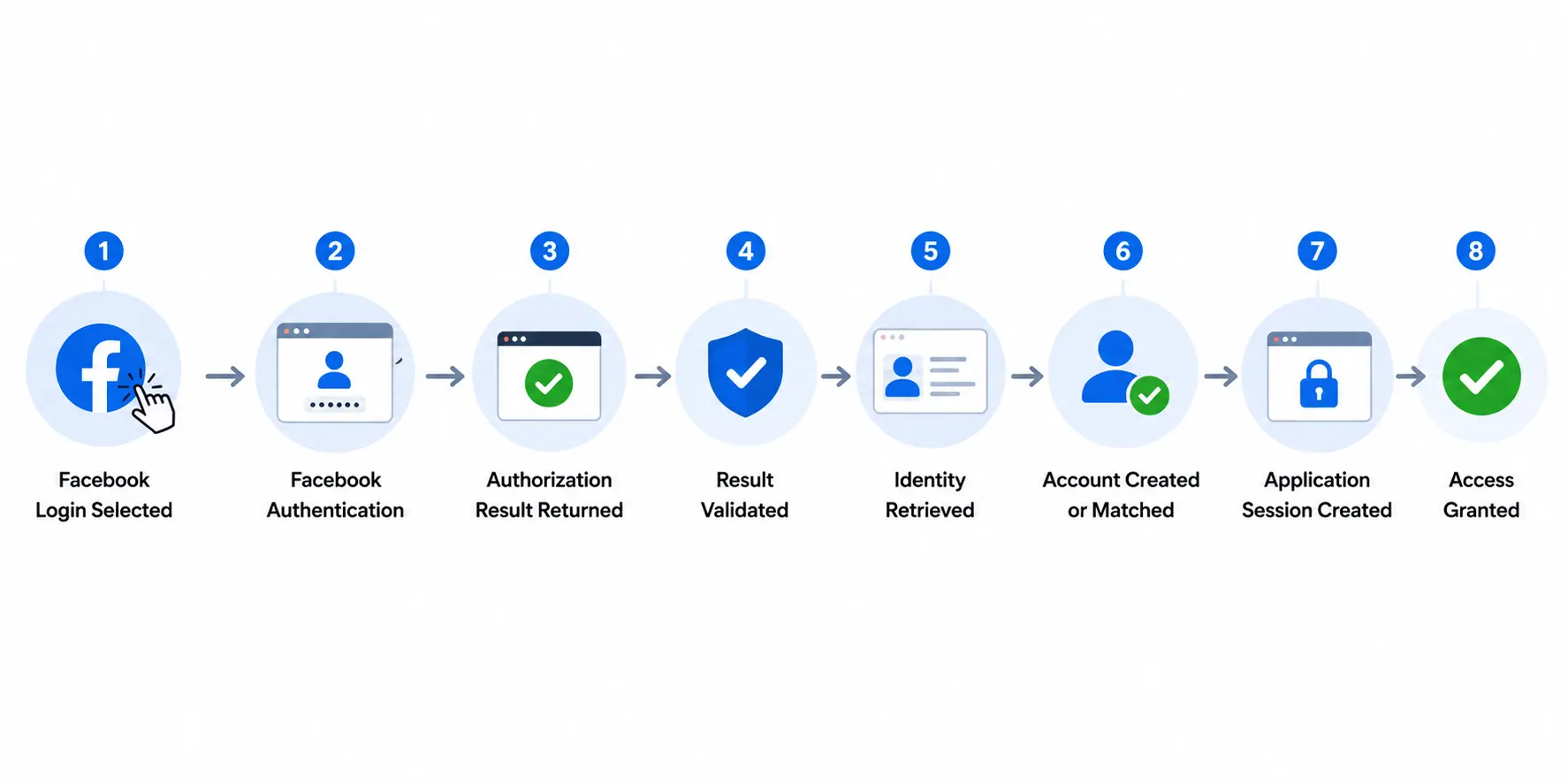
The exact implementation varies by framework and SDK, but the core flow remains the same: process the Facebook authorization response, validate the authenticated identity, associate that identity with the correct customer account, and create the application's authenticated session. Example Facebook Login:
1. Start Facebook Login
The flow begins when the user selects Continue with Facebook. Your application sends an authorization request containing the required configuration, including the application identifier, registered redirect URI, and requested permissions.
Keep the login experience focused. If Facebook Login is intended to simplify registration, avoid placing unnecessary form fields before users can authenticate.
2. Let Facebook Authenticate the User
Facebook handles the user's Facebook authentication and presents any permissions your application requests.
Your application should never collect or process the user's Facebook password. Its responsibility begins with securely handling the authorization result Facebook returns.
Users can also cancel the flow or decline optional permissions. Plan for those outcomes rather than treating every incomplete authorization as an unexpected error.
3. Process the Facebook Login Callback
After authorization, Facebook returns the user to your registered redirect URI.
For an authorization-code-based flow, your backend processes the returned authorization code through the appropriate provider endpoint. The application should also validate the request context, including the state value used to associate the response with the login request that initiated it.
Don't treat arrival at the callback URL as proof that authentication succeeded.
4. Validate the Authentication Result
Before trusting the Facebook identity, validate the returned authentication result through the appropriate server-side process.
Avoid relying solely on profile information, identifiers, or success messages received from frontend code. Authentication needs a trusted validation path before your application creates a session or grants access.
A useful rule here is simple: Validate first. Create the session second.
5. Retrieve the Required Facebook Identity Data
Once authentication is validated, retrieve only the permitted identity information your application actually needs.
Use the provider identity as the basis for recognizing returning Facebook users rather than relying on mutable attributes such as display names. If an expected attribute such as email is unavailable, handle that separately instead of automatically failing authentication.
6. Create, Match, or Securely Link the Customer Account
Next, determine where the authenticated Facebook identity belongs.
A new user may require a new account. A returning Facebook user should be matched with their existing customer profile. If the customer already uses another authentication method, an appropriate account-linking process may be required.
Avoid automatically creating duplicate profiles or linking accounts based only on a weak attribute match.
7. Create the Application Session
After the Facebook identity has been validated and associated with the correct customer account, establish your application's authenticated session.
Facebook authentication and application session management are separate responsibilities. Your application still needs appropriate session expiration, logout, revocation, and authorization controls.
The complete journey can be summarized as:
How to Implement Facebook Login With LoginRadius Without Managing the Entire Provider Flow Yourself
A direct Facebook Login integration is manageable when Facebook is the only external identity provider in your application. The maintenance picture changes once you add Google, Apple, Microsoft, LinkedIn, or other providers.
Each integration brings its own credentials, configuration, provider behavior, profile data, and ongoing changes. LoginRadius provides a centralized social authentication layer so developers can configure Facebook alongside other identity providers without building a separate identity architecture for each one.
Enable Facebook as a Social Identity Provider
Start in the LoginRadius Admin Console by enabling Facebook as one of the social providers available for your application.
You'll need the credentials from the Meta app you configured earlier, including the relevant Facebook App ID and App Secret. These allow LoginRadius to communicate with Facebook as part of the authentication flow.
Keep the App Secret protected. It should be entered only where required for the provider configuration and should never be exposed through frontend code.
Configure the Correct LoginRadius Redirect URL in Meta
Redirect configuration is particularly important when LoginRadius is handling the social authentication flow.
In this setup, the callback used during Facebook authentication needs to match the redirect URL specified for your LoginRadius integration. Add that URL to the appropriate Facebook Login configuration in your Meta app.
Don't confuse this with the page where you eventually want the customer to land after login.
The provider callback and your application's final post-login destination can serve different purposes. Using the wrong one is a common reason an otherwise correct Facebook integration fails during the redirect.
Configure Only the Facebook Permissions You Need
Apply the same least-access approach discussed earlier.
Request the Facebook permissions required for your registration or login experience rather than collecting additional profile information by default. If your application needs more provider data later, evaluate those permissions separately along with any Meta review requirements.
This keeps the Facebook configuration easier to maintain and avoids adding unnecessary consent friction.
Add Facebook Login to Your Customer Authentication Experience
Once Facebook is configured as a provider, you can make it available through the LoginRadius authentication experience used by your application.
The exact integration path depends on your architecture. Teams may use LoginRadius-hosted authentication experiences, SDKs, APIs, or a custom interface depending on how much control they need over the login UX.
This is where LoginRadius becomes useful beyond a single Facebook integration. Your application can support multiple social providers through the broader CIAM layer rather than creating completely separate customer identity logic for each provider.
Keep Social Identities Connected to the Customer Account
Successful Facebook authentication still needs to resolve to the correct customer.
LoginRadius can normalize provider information into the customer identity layer and support account-linking scenarios when customers use more than one authentication method. That helps avoid treating Facebook, Google, email, or another provider as entirely unrelated customer identities when they legitimately belong to the same account.
The result is a cleaner architecture:
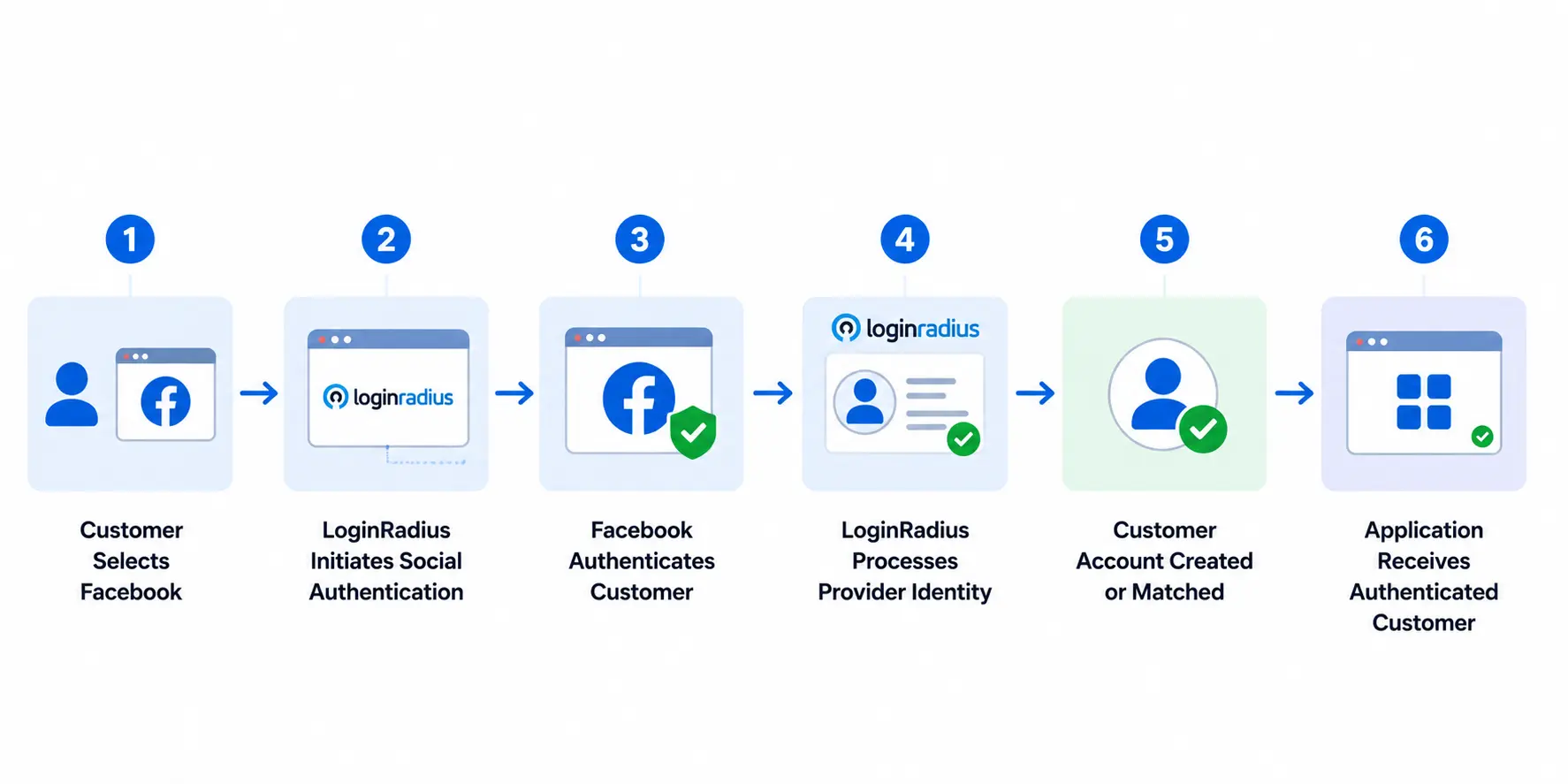
For developers, the advantage isn't simply adding a Facebook button faster. It's reducing the amount of provider-specific authentication and identity management logic the application team needs to build and maintain.
And that becomes increasingly valuable once Facebook is no longer the only social provider in the stack.
Facebook Login Security Best Practices for Protecting Tokens, Accounts, and User Sessions
A Facebook Login flow can work perfectly and still be insecure.
The redirect succeeds. Facebook returns the user. The correct profile appears. Done? Not quite. Authentication integrations sit directly on the path to customer accounts, so small implementation shortcuts can have much larger consequences.
The goal isn't to add security checks everywhere. It's to protect the few places where the Facebook identity becomes trusted by your application.
Never Expose Your Facebook App Secret
Treat the Facebook App Secret as a server-side credential.
Don't embed it in frontend JavaScript, mobile application code, public repositories, or client-visible configuration. If it is accidentally exposed, remove it from the application, rotate the affected secret, and update the integration rather than assuming deleting the latest copy is enough.
This is one of those controls that is much easier to enforce before launch than clean up afterward.
Keep Redirect URIs Strict and Predictable
OAuth redirect URIs determine where Facebook can return users during the authentication flow. Keep the approved list limited to endpoints your application genuinely uses.
Avoid adding broad or temporary redirect locations just to get around configuration errors. Development, staging, and production environments should each have intentional callback handling.
If a redirect mismatch appears, fix the configuration rather than loosening it until the error disappears.
Protect the Authorization Flow Against Login CSRF
Your application needs to know that the authorization response arriving at the callback belongs to the login flow it originally started.
For OAuth authorization flows, the state parameter is commonly used for this purpose. Generate it securely, associate it with the initiating browser session, and validate it when the authorization response returns.
Don't accept a missing, unexpected, or mismatched value and continue authentication anyway.
Validate Authentication Results Before Granting Access
Never treat client-side Facebook profile information or a frontend “login successful” event as sufficient proof of identity.
Process and validate the authentication result through the appropriate trusted flow before creating an application session. Only after validation should your application use the Facebook identity to find, create, or securely link a customer account.
The order matters: Authenticate → Validate → Identify Customer → Create Session
Not the other way around.
Protect Account Linking as Carefully as Login
Account linking deserves the same attention as authentication because adding Facebook to an existing account creates another way to sign in as that customer.
Don't automatically link identities simply because an email address or another profile attribute appears to match. Require appropriate proof that the user controls the existing account before attaching a new Facebook identity.
A convenient account-linking flow should never become an easier route around your normal authentication controls.
Request the Least Access Necessary
Keep Facebook permissions limited to what the application genuinely needs.
This reduces unnecessary exposure if credentials or tokens are compromised, simplifies provider configuration, and avoids making the login experience dependent on Facebook data that isn't essential to authentication.
If the product later needs additional Facebook capabilities, evaluate those permissions when the requirement actually exists.
Handle Expiration, Revocation, and Logout Gracefully
Provider access should never be assumed to remain valid forever.
Users can revoke permissions, tokens can expire or become invalid, and provider-side access can change. Your application should recognize those states and provide a sensible path forward rather than leaving customers trapped in repeated login failures.
Your own application session also needs appropriate expiration, logout, and revocation controls. Facebook authentication establishes the upstream identity; your application remains responsible for protecting access after that point.
Facebook Login security doesn't require making the customer journey complicated. In fact, most of these controls should be invisible to the user. The important part is making sure a smooth login is also a trusted login.
Common Facebook Login Errors and How to Troubleshoot Them
Even a correctly designed Facebook Login integration can fail because of a small configuration mismatch. A redirect URL differs by one path segment. The app works for developers but not real users. Authentication succeeds, yet the expected email never arrives.
These problems are easier to solve when you identify which stage of the login flow failed instead of repeatedly changing the configuration.
| Facebook Login Problem | Likely Cause | What to Check |
|---|---|---|
| Redirect URL mismatch | Callback URL does not match the configured value | Valid OAuth redirect URI, protocol, domain, path, and environment |
| Login works for developers but not customers | App is still restricted to development/test access or production requirements are incomplete | App status, roles, review, and production configuration |
| Email is missing | Email is unavailable, not returned, or the required permission is not available/granted | Requested permissions and fallback profile flow |
| Invalid App ID or configuration error | Wrong credentials or environment configuration | App ID and development/production settings |
| Invalid or expired token | Token has expired, been revoked, or is otherwise invalid | Token validation and reauthentication handling |
| User reaches the wrong/new account | Identity matching or linking is incorrect | Provider identity mapping and account-linking logic |
| Login repeatedly redirects | Callback, session, or state handling is incorrect | Redirect configuration, session state, and callback processing |
| Permission-related failure | Application requests access it has not been approved to use | Current Meta permission and App Review requirements |
Fix Redirect URL Mismatch Errors First
Redirect URL errors are among the easiest Facebook Login problems to introduce.
Compare the URL sent during authentication with the URL configured for the Meta app. Check the complete value—not just the domain. Differences in http versus https, subdomains, ports, paths, or environment-specific callbacks can prevent the flow from completing.
If LoginRadius handles the provider authentication, verify that Meta contains the LoginRadius callback URL required by the integration, rather than assuming your application's final destination URL is the correct callback.
Avoid solving the problem by adding several speculative redirect URIs. Find the URL the authentication flow actually uses and configure that intentionally.
Check App Access When Login Works Only for Your Team
This one can be confusing because nothing appears broken during development.
Developers and testers associated with the Meta app may be able to authenticate while ordinary customers cannot. If that happens, check whether the app is ready for its intended production audience and whether any required Meta review, business verification, or permission requirements remain incomplete.
Test with an account that does not have a development or administrative role before declaring the integration production-ready.
Handle Missing Email Without Failing Authentication
Facebook authentication can succeed even when your application does not receive the email value it expected.
Don't turn that into an unexplained login failure.
If email is genuinely required to finish account creation, ask the customer to provide it through an appropriate follow-up step. Keep the authenticated Facebook identity separate from optional or application-specific profile attributes.
Investigate Duplicate Accounts as an Identity-Matching Problem
If returning Facebook users occasionally end up with new profiles, the provider login itself may be working correctly. Look at what happens after authentication.
Verify that your application consistently uses the appropriate Facebook provider identity to recognize returning users. If customers can authenticate through several methods, review the account-linking process as well.
Don't “fix” duplicates by automatically merging accounts based solely on similar names or email addresses. Account linking changes who can authenticate into an account and needs appropriate verification.
Treat Token and Permission Errors as Expected States
Tokens can expire or become invalid. Users can revoke access. Permissions and provider requirements can change.
Your application should recognize these states and provide a clear route to reauthenticate or continue through another supported method where appropriate.
The same applies to permission errors. If a feature depends on access beyond basic Facebook Login, confirm that the permission is currently available to the app and that any required Meta review has been completed.
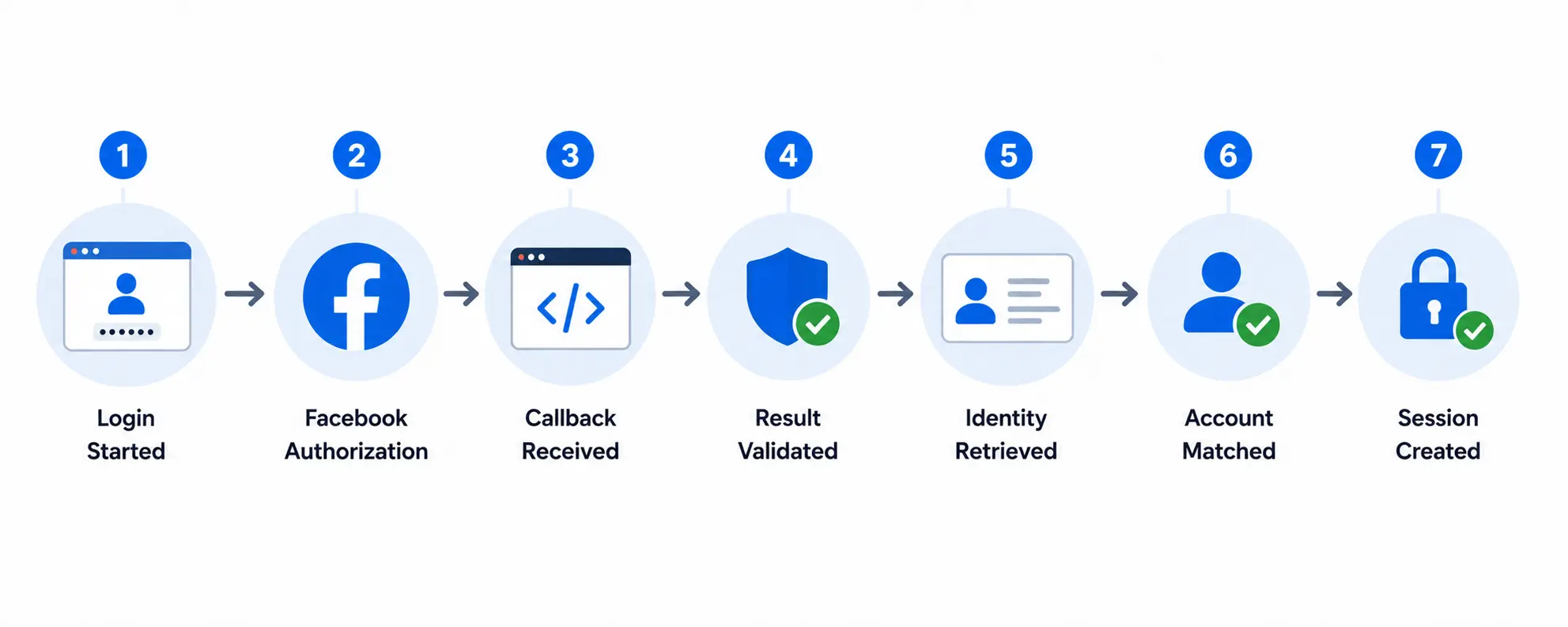
Here’s where debugging becomes much faster: trace the journey instead of treating “Facebook Login failed” as one error.
Facebook Login for Web and Mobile Apps: What Changes Across Platforms
The identity goal stays the same whether Facebook Login runs on a website or inside a mobile app: authenticate the Facebook identity, validate the result, connect it to the correct customer account, and establish an application session.
The implementation around that flow can differ.
Facebook Login for Web Applications
Web applications typically rely on browser-based authorization. The user selects Continue with Facebook, moves through Facebook's authorization experience, and returns to the application's registered callback URI.
That makes redirect configuration particularly important. Your production domain, callback URI, application session, and Meta configuration need to agree on where the authentication journey begins and where it returns.
Web applications also need to account for users who block pop-ups, interrupt the flow, use different browsers, or return without completing authorization. Don't assume every Facebook Login attempt follows the happy path from button click to authenticated session.
Facebook Login for Mobile Applications
Native mobile apps introduce platform-specific considerations.
Instead of treating mobile as a smaller version of the web flow, developers need to consider the appropriate Meta-supported mobile integration approach, application identifiers, redirect or app-return behavior, and secure communication between the provider authentication experience and the mobile application.
Android and iOS configuration can also differ. Follow Meta's current platform-specific requirements rather than copying web configuration directly into a native application.
One rule remains unchanged: don't embed confidential server-side credentials such as your Facebook App Secret in a mobile application and assume they are protected. Mobile binaries run on devices outside your control and can be inspected.
Keep the Backend Identity Model Consistent
The frontend authentication experience may vary across web, Android, and iOS. The customer identity behind it should not become fragmented because of that.
If the same customer signs in with Facebook on a website today and the mobile app tomorrow, both experiences should resolve to the appropriate underlying customer account.
This becomes particularly important for businesses operating across several digital properties. Customers expect their subscriptions, preferences, purchase history, and account information to follow them—not restart because they changed devices.
With a CIAM platform such as LoginRadius, businesses can manage social authentication across web and mobile experiences while maintaining a centralized customer identity layer.
The practical takeaway is straightforward: share the identity strategy, not necessarily every implementation detail.
Build the Facebook Login experience according to the requirements of each platform, while keeping identity matching, account security, and customer continuity consistent across them.
Facebook Login Implementation Checklist for a Secure Production Launch
A Facebook Login integration can work perfectly during development and still fail when real users arrive. Before launch, check the entire authentication journey—not just whether the Continue with Facebook button returns a successful response.
Use this checklist as a final implementation review.
| Check | What to Verify |
|---|---|
| Meta app configuration | The correct Meta app and intended platform are configured for production |
| App domains and URLs | Production domains and required application URLs are accurate |
| OAuth redirect URI | The callback exactly matches the URL used by the production authentication flow |
| App credentials | The correct App ID and App Secret are being used for the intended environment |
| Secret protection | The App Secret is never exposed in frontend code, mobile binaries, public repositories, or client-visible configuration |
| Facebook permissions | Only permissions genuinely required by the application are requested |
| Meta requirements | Any required App Review, verification, or production-access requirements have been completed |
| Authentication validation | Provider results are validated before the Facebook identity is trusted |
| Request state | OAuth state or equivalent request-context protection is generated and validated correctly |
| Identity matching | Returning Facebook users consistently reach the correct customer account |
| Account linking | Existing accounts are linked only after appropriate ownership verification |
| Missing profile data | The application can continue appropriately when expected attributes such as email are unavailable |
| Application session | A secure application session is established after successful identity validation |
| Error handling | Cancelled login, invalid responses, revoked access, and provider failures have clear recovery paths |
| Cross-platform testing | Supported browsers, devices, and mobile environments have been tested independently |
Test With More Than Developer Accounts
One final test deserves special attention.
Don't validate the production experience using only Facebook accounts associated with your Meta app as developers, administrators, or testers. Those accounts may have access that ordinary users do not.
Run the complete flow with representative production users and supported environments:
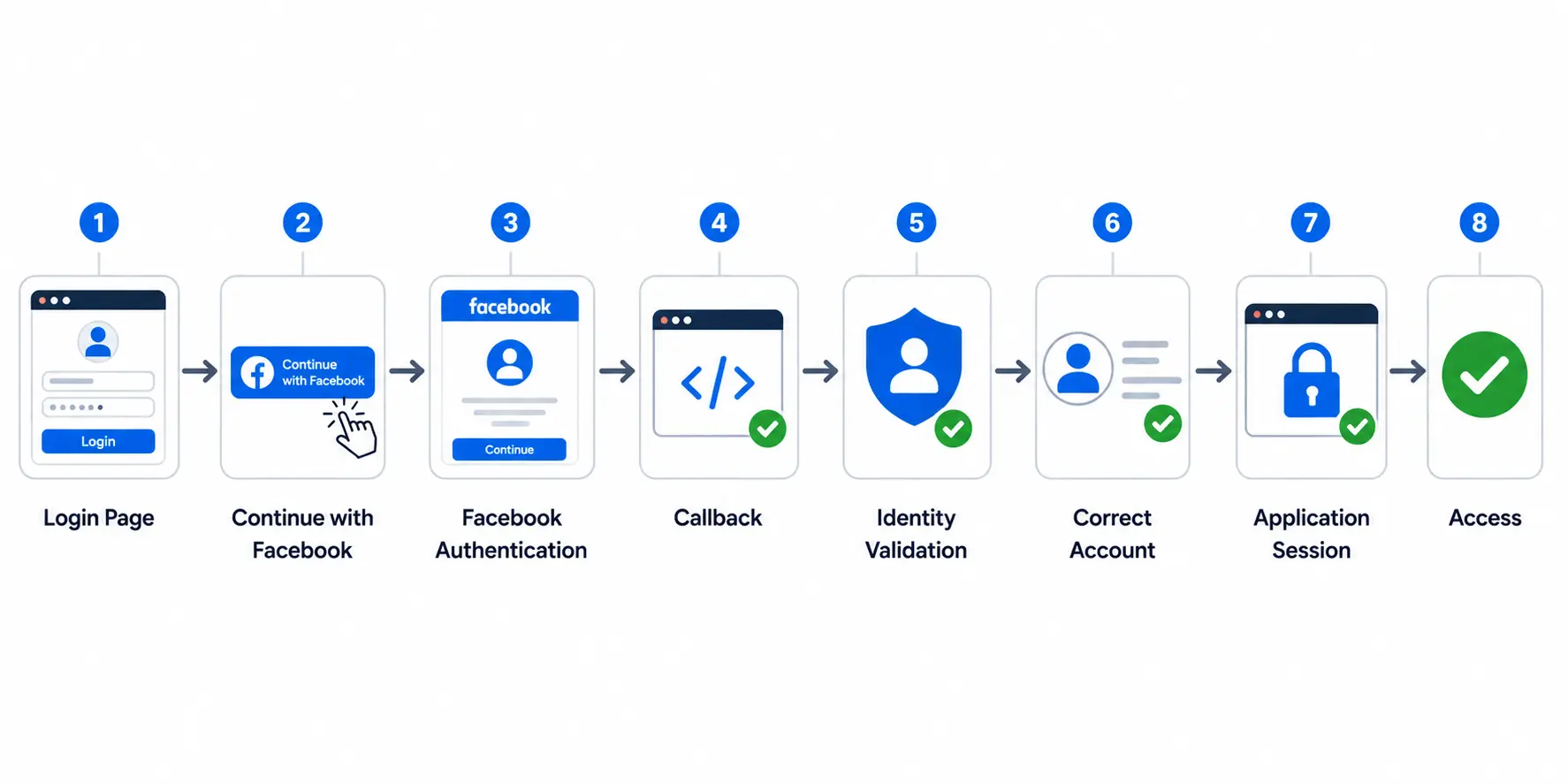
Then test the less convenient scenarios too.
What happens when the user cancels? What if an expected profile attribute is missing? What if a returning customer already has an account? What if Facebook access has been revoked? What happens when the same customer moves from web to mobile?
Those cases often reveal more than another successful happy-path test.
Recheck the Integration When Meta Changes
Facebook Login isn't a configure-once dependency.
Meta can update its APIs, SDKs, permissions, platform requirements, App Review processes, and developer configuration. An implementation that worked when it launched still needs maintenance as those dependencies change.
Keep the integration documented, monitor authentication failures, and review provider requirements when upgrading APIs or changing the login experience.
The launch checklist therefore has one final item that doesn't really end: Keep testing the Facebook Login journey after it reaches production.
A successful launch means customers can authenticate today. A reliable implementation makes sure they can still do it after the provider, application, and customer journey evolve.
Implement Facebook Login Faster With LoginRadius
Building Facebook Login directly is reasonable when you have one application and one social provider. The engineering burden changes when Facebook becomes one option among Google, Apple, Microsoft, LinkedIn, and other identity providers.
Now your team is maintaining multiple provider configurations, callbacks, credentials, profile formats, authentication flows, and provider-specific changes. The login buttons are still the easy part.
LoginRadius provides a centralized Customer Identity and Access Management (CIAM) layer for managing social authentication across applications. Instead of building separate customer identity logic around every provider, developers can connect supported social providers through a common identity infrastructure.
Reduce Provider-Specific Integration Work
Each social provider has its own configuration and ongoing maintenance requirements. Building those integrations individually means engineering teams also become responsible for keeping them working as provider APIs, SDKs, permissions, and policies evolve.
With LoginRadius, Facebook can be configured alongside other supported social providers through the same CIAM environment.
That becomes particularly useful as the authentication stack grows. Adding another provider should not require redesigning how your application creates customer accounts, manages profiles, or handles the authenticated customer.
Maintain a Unified Customer Identity
Customers don't necessarily stick to one authentication method forever.
Someone may register through Facebook, later add another login method, and access the same account from different applications or devices. Without a centralized identity model, those interactions can create fragmented customer profiles.
LoginRadius helps businesses manage social identities within a unified customer profile and supports account-linking scenarios where appropriate. This allows applications to separate how the customer authenticates from which customer account they belong to.
That distinction matters once your authentication environment becomes more complex than a single Facebook integration.
Build Social Login Into a Broader Authentication Strategy
Facebook Login also doesn't need to be the only path into an account.
Businesses may need social login alongside passkeys, passwordless authentication, traditional credentials, MFA, or other authentication methods depending on their customer experience and security requirements.
A CIAM platform gives teams a common layer for managing those experiences rather than treating every authentication method as a standalone integration.
For developers, that means less provider-specific identity plumbing and more control over the application experience built on top of it. Facebook Login is one integration. Customer identity rarely stays that simple.
Conclusion: Build Facebook Login as Part of a Customer Identity Strategy That Can Scale
A working Facebook Login integration is more than a button that successfully sends users to Facebook and brings them back.
The complete journey has to hold together: Meta app configuration, redirect handling, minimal permissions, secure validation, identity matching, account creation, and application session management. And when something fails, users need a sensible way to recover rather than ending up trapped between Facebook and your application.
That becomes more important as your authentication environment grows.
Facebook may be the first social provider you implement. Soon, customers may expect Google, Apple, Microsoft, or other options. Different applications may need different authentication methods. Returning users may switch providers or devices while still expecting to reach the same account.
Building each of those paths independently creates more provider-specific code to maintain and more places for customer identities to become fragmented.
LoginRadius gives developers a centralized CIAM layer for managing Facebook Login and other social identity providers while connecting authentication to a unified customer identity. Teams can spend less time maintaining separate provider integrations and more time building the application experiences customers actually use.
Facebook Login gets the customer through one door. Your identity architecture determines what happens after that and whether adding the next door means starting over.
Ready to move beyond one-off social authentication integrations? Explore the LoginRadius Social Login documentation to start implementing Facebook Login, or Book a LoginRadius demo to see how you can manage social authentication and customer identity across your applications from one CIAM platform.
FAQs
Q: How do I implement Facebook Login on my website?
A: Create and configure an app in Meta for Developers, enable Facebook Login, register the correct OAuth redirect URI, and configure the required permissions. Your application then needs to process the authorization response, validate the identity, and create or match the customer account.
Q: Does Facebook Login use OAuth 2.0?
A: Yes. Facebook Login uses OAuth 2.0-based authorization flows to allow applications to authenticate users and request permitted access without collecting the user's Facebook password.
Q: Do I need a Facebook App ID and App Secret for Facebook Login?
A: Yes, a Facebook App ID identifies your application, while the App Secret is used where confidential application authentication is required. The App Secret must be protected and should never be exposed in frontend code or public repositories.
Q: What redirect URL should I use for Facebook Login?
A: Use the callback URL where your application processes the Facebook authorization response, and register it correctly in your Meta app. If you're using LoginRadius, use the LoginRadius callback URL required by the social provider configuration.
Q: What user data can Facebook Login return?
A: The data available depends on Facebook's current APIs, the permissions your application requests, and what the user authorizes. Request only the profile information genuinely required for your authentication and customer experience.
Q: Does Facebook Login always return an email address?
A: No. Your application should not assume that a usable email address will always be returned. Design a fallback that can request required information after authentication when necessary.
Q: Is Facebook Login free to implement?
A: Facebook Login itself can be integrated without a per-login Facebook fee, but development, infrastructure, maintenance, and any identity platform you use may have associated costs. Always check Meta's current platform terms for your use case.
Q: How do I fix a Facebook redirect URL mismatch?
A: Compare the redirect URL sent during authentication with the URL registered in your Meta app. Check the entire value, including HTTPS, subdomain, port, path, and environment-specific differences.
Q: Is it safe to store the Facebook App Secret in frontend code?
A: No. Treat the Facebook App Secret as a confidential server-side credential. Never expose it in frontend JavaScript, mobile binaries, client-visible configuration, or public source-code repositories.
Q: How do I implement Facebook Login with LoginRadius?
A: Configure Facebook as a social provider in LoginRadius, add your Meta app credentials, and register the required LoginRadius callback URL with Meta. You can then integrate the authentication experience using the appropriate LoginRadius SDK, API, or hosted option.
Q: Can Facebook Login be used in mobile apps?
A: Yes. Facebook Login can be implemented for supported mobile platforms, although Android and iOS have platform-specific configuration requirements. Follow Meta's current mobile integration guidance rather than copying a web implementation directly.
Q: How should I handle users who already have an account?
A: Match returning Facebook identities to the appropriate existing customer account or use a secure account-linking flow when another authentication method already exists. Avoid creating duplicates or automatically linking accounts based only on weak attribute matches.