Introduction
Multi-factor authentication was supposed to close the door on account takeovers. For years, organizations believed that adding other steps such as an OTP, a push notification, or a verification prompt, was enough to keep attackers out. But today’s threat landscape has changed faster than traditional MFA has evolved, and a new attack has emerged from an unexpected angle: MFA fatigue attacks.
Instead of breaking cryptography or bypassing authentication systems, attackers now target something else: human behavior. They exploit distraction, stress, or urgency by flooding users with constant push notifications until someone finally clicks “Approve.” And when a user is tired, busy, or confused, the attacker wins.
This shift has made push-based MFA one of the easiest authentication factors to exploit. And as more consumer apps, enterprises, and SaaS platforms adopt MFA, the frequency of “push bombing” and “MFA fatigue” attacks continues to grow.
For example:
MFA fatigue attacks are also commonly referred to as MFA bombing, prompt bombing, push bombing, or multi-factor authentication fatigue. While the terminology varies, they all describe attacks that overwhelm users with repeated authentication requests until one is mistakenly approved.
This guide breaks down the psychology, the attack lifecycle, and the exact engineering strategies needed to prevent MFA fatigue. By the end, you’ll understand not only why these attacks succeed but also how risk-based, adaptive, and phishing-resistant MFA can eliminate them completely.
What Are MFA Fatigue Attacks
MFA fatigue attacks usually happen because the attacker already has the victim’s username and password (often from phishing or credential leaks). The only barrier left is an MFA approval. By spamming notifications nonstop, they exploit a simple truth: people sometimes approve things just to make them stop. An MFA fatigue attack happens in a few different scenarios:
-
When an attacker repeatedly sends push-based MFA prompts to a user, often dozens or even hundreds of times, until the user becomes frustrated, confused, or overwhelmed enough to approve one. This “push bombing” technique doesn’t rely on sophisticated hacking; it relies on human exhaustion.This attack is also known as MFA bombing, and you’ll often see the broader category described as multi factor authentication fatigue.
-
Instead of a sudden flood like the previous one, the attacker sends solitary MFA prompts spaced out over long intervals. Ex: one prompt every 20 or 30 minutes throughout an entire business day.
-
Sometimes messages like “Critical Security Upgrade Required” or “Account Lockout Imminent: Confirm Identity within 5 minutes to prevent termination of access.” are used to get the MFA from the user.
-
The attacker initiates the prompts during off-hours typically between 2:00 AM and 4:00 AM in the victim's local time zone.
Unlike many authentication attacks, MFA fatigue attacks typically begin after attackers have already obtained a user's valid username and password through phishing, credential stuffing, malware, password reuse, or previous data breaches. Rather than trying to bypass MFA directly, attackers exploit repeated authentication requests to pressure users into approving a fraudulent login.
MFA Fatigue vs MFA Bombing vs Prompt Bombing
If you research MFA fatigue attacks, you will often encounter related terms such as MFA bombing, prompt bombing, push fatigue, and MFA spamming. These terms are closely related and are sometimes used interchangeably, but there are subtle differences in how they describe the attack.
In most cases, the underlying objective remains the same: overwhelm a user with authentication requests until they eventually approve one, giving the attacker access to the account.
| Term | Meaning |
|---|---|
| MFA Fatigue | The overall attack technique that exploits user frustration, confusion, or exhaustion caused by repeated MFA requests. |
| MFA Bombing | A high-volume attack in which an attacker repeatedly triggers MFA prompts in rapid succession to pressure the user into approving one. |
| Prompt Bombing | A variation of MFA bombing that specifically focuses on overwhelming users with push notifications or authentication prompts. |
| Push Fatigue | The psychological effect experienced by users who receive excessive authentication requests and become more likely to approve one. |
| MFA Spamming | A broad term used to describe repeated or automated MFA requests sent to a target account. |
The difference is primarily one of emphasis:
-
MFA fatigue focuses on the user's response to repeated prompts.
-
MFA bombing focuses on the attacker's tactic of generating those prompts.
-
Prompt bombing emphasizes the use of push notifications as the delivery mechanism.
Although push notifications are the most common target, similar approval-based attacks can also occur in authentication workflows that repeatedly generate verification requests through other channels. Push-based MFA, however, remains by far the most frequently exploited implementation.
Regardless of the terminology, the most effective defenses remain the same: number matching, adaptive authentication, device trust, risk-based access controls, rate limiting, and phishing-resistant authentication methods such as passkeys.
Although these attacks target authentication systems, MFA prompt bombing is fundamentally a social engineering technique. Instead of bypassing MFA through technical vulnerabilities, attackers rely on repeated authentication requests, user fatigue, confusion, and psychological pressure to obtain approval. The goal is not to break authentication controls but to manipulate users into granting access on the attacker's behalf.
How Attackers Execute MFA Fatigue Attacks
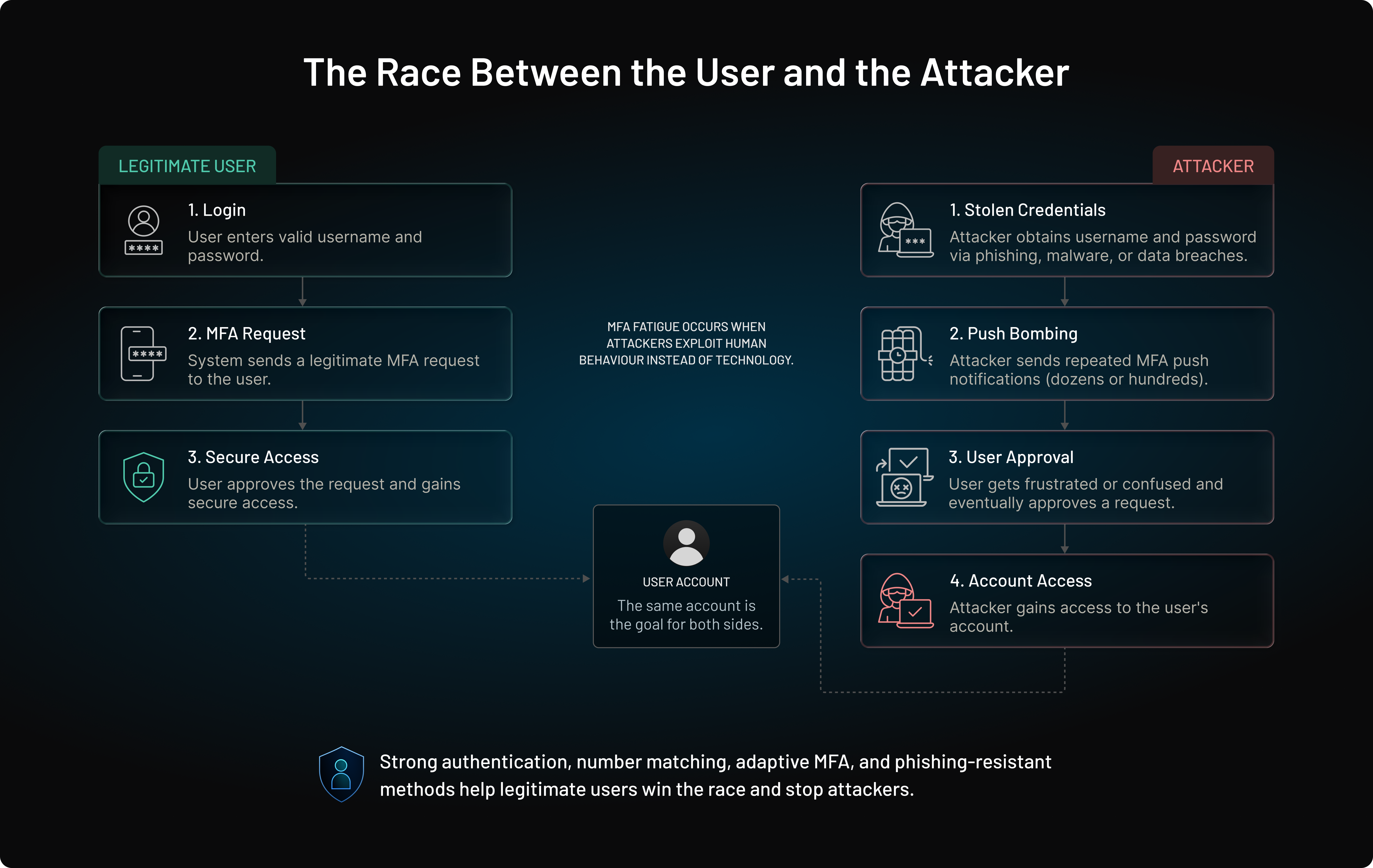
MFA fatigue attacks look chaotic on the user side, but from the attacker’s perspective, they follow a predictable sequence. The entire process can take minutes, even seconds once the attacker has the right information.
1. Credential Theft
Attackers first obtain the victim’s username and password. Common sources include:
-
Phishing emails or fake login pages
-
Credential stuffing using leaked password databases
-
Malware that captures keystrokes
-
Reused passwords across services
Once they have valid credentials, they move directly to MFA.
Also read: Credential Stuffing Defense: How to Stop Bot Login Attacks
2. Continuous Push Notification Bombing
The attacker initiates multiple login attempts, sometimes automated, triggering a flood of MFA push prompts on the victim’s device. The goal: overwhelm, confuse, or annoy the user into tapping “Approve.”
3. Social Engineering Reinforcement
To speed up the attack, many attackers follow up with a push notification or a voice call or text pretending to be IT support.
Typical script: “Approve the MFA so we can stop the notifications.” This adds urgency and falsely assures the victim that approving the request is the right thing to do.
4. Accidental Authorization Leading to Account Takeover
The moment the victim approves any one of the prompts, the attacker gains full account access. For admin accounts, IAM consoles, or financial systems, this can lead to catastrophic consequences within minutes.
This attack path requires no malware, no advanced tools, and no technical bypass, just persistence and human psychology.
The Uber MFA Fatigue Attack: A Turning Point
One of the most well-known examples of an MFA fatigue attack occurred during Uber's 2022 security breach. The incident demonstrated how attackers could bypass traditional push-based MFA without exploiting software vulnerabilities or breaking encryption.
According to Uber's public disclosure, the attacker first obtained a contractor's corporate credentials, reportedly through credential theft. Because the account was protected by push-based multi-factor authentication, the attacker repeatedly initiated login attempts, generating a continuous stream of MFA approval requests on the employee's mobile device.
After overwhelming the user with repeated notifications, the attacker escalated the social engineering effort by posing as a member of Uber's IT team through a messaging platform. The attacker claimed the repeated MFA prompts were part of a technical issue and instructed the employee to approve one of the requests to restore normal access.
Once the user approved the authentication request, the attacker gained access to Uber's internal environment and was able to move laterally across multiple systems. Although the breach involved additional actions after the initial compromise, the incident highlighted how repeated MFA prompts combined with social engineering could defeat traditional push-based authentication.
The Uber breach became a turning point for the industry. It accelerated the adoption of controls such as number matching, adaptive authentication, and phishing-resistant authentication methods including passkeys and FIDO2 security keys.
The attack demonstrated that strong passwords and traditional MFA alone are no longer sufficient when authentication depends on repeated user approval.
Why Attackers Prefer MFA Fatigue Attacks
Attackers increasingly favor MFA fatigue attacks because they target people rather than technology. Instead of searching for software vulnerabilities or breaking cryptographic protections, they rely on legitimate authentication workflows and human decision-making.
Several factors make this technique attractive:
-
No malware required: Attackers don't need to infect a device or install malicious software.
-
No technical exploit needed: The authentication system functions as designed the user unknowingly approves the request.
-
Low cost and easy to launch: Once valid credentials are obtained, automated login attempts can generate repeated MFA prompts with minimal effort.
-
Highly scalable: The same approach can be used against thousands of accounts using credential databases and automated tools.
-
Exploits human psychology: Frustration, distraction, urgency, and trust are often easier to manipulate than modern authentication technologies.
This combination of simplicity, scalability, and social engineering has made MFA fatigue one of the most effective techniques for bypassing traditional approval-based MFA.
Over time, repeated authentication requests can condition users to approve prompts automatically instead of carefully verifying whether they initiated the login. Security researchers often describe this behavioral effect as approval fatigue or habituation, making repeated authentication requests increasingly effective as a social engineering tactic.
MFA Fatigue Attacks by the Numbers
MFA fatigue attacks succeed because they combine stolen credentials, repeated authentication requests, and social engineering. Recent industry reports show why organizations are increasingly moving toward phishing-resistant authentication methods and stronger MFA controls.
| Statistic | Why It Matters |
|---|---|
| Verizon's 2025 Data Breach Investigations Report found that 22% of breaches involved credential abuse as the initial access vector. Specifically, prompt bombing was present in 14% of incidents. | MFA fatigue attacks typically begin after attackers obtain valid credentials through phishing, credential stuffing, or password reuse. |
| Verizon also reported that 88% of attacks against basic web applications involved stolen credentials. | Stolen credentials remain one of the most effective ways for attackers to gain a foothold in an environment. |
| Microsoft identifies number matching as a critical security control as MFA fatigue attacks continue to rise. | Organizations are increasingly replacing simple approve/deny push notifications with more secure verification methods. |
| CISA describes phishing-resistant MFA as the gold standard for multi-factor authentication. | Security leaders are moving beyond traditional push-based MFA to stronger authentication methods such as passkeys and FIDO2 security keys. |
| Microsoft reports that enabling MFA can block more than 99.2% of account compromise attacks, but modern adversaries increasingly attempt to bypass traditional push-based MFA through techniques such as MFA fatigue and adversary-in-the-middle (AiTM) phishing. | Demonstrates why MFA remains essential while highlighting the need to strengthen push-based implementations with number matching, adaptive MFA, and phishing-resistant authentication. |
What These Trends Mean for Organizations
The data highlights a clear pattern: attackers continue to rely on stolen credentials and social engineering because they work. Traditional MFA remains significantly better than passwords alone, but approval-based authentication methods can still be abused through MFA fatigue and prompt bombing attacks.
As a result, many organizations are strengthening authentication security through number matching, adaptive MFA, device trust, passkeys, FIDO2 security keys, and other phishing-resistant authentication methods that reduce reliance on repeated push notifications.
Example SIEM Detection Workflow
Modern identity platforms rarely detect MFA fatigue attacks by evaluating a single authentication request. Instead, they correlate multiple authentication events and contextual risk signals over a short period to identify suspicious behavior before an account is compromised.
A typical detection workflow looks like this:
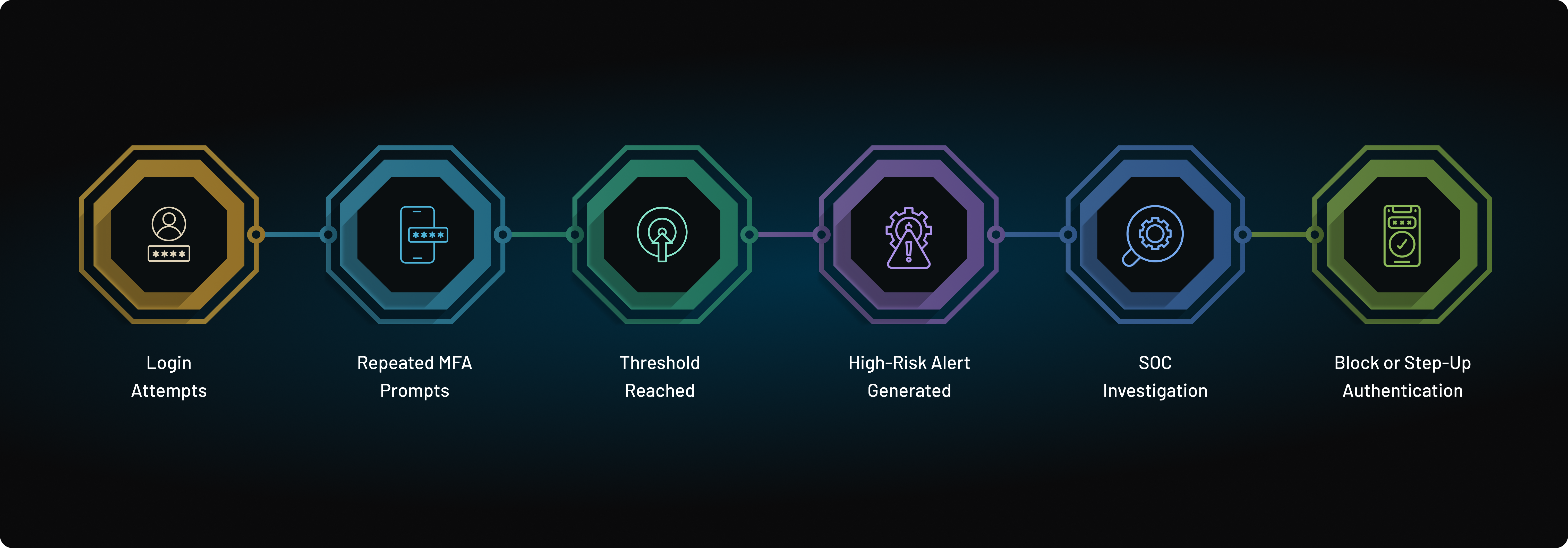
Rather than evaluating authentication events individually, SIEM platforms and identity security solutions correlate authentication velocity, repeated MFA challenges, approval patterns, device intelligence, geolocation anomalies, and user behavior.
When multiple high-risk indicators occur together, organizations can automatically generate alerts, block suspicious login attempts, or require phishing-resistant authentication before granting access.
This layered detection strategy enables security teams to identify MFA fatigue attacks earlier, reduce false positives, and respond to suspicious authentication activity before attackers gain unauthorized access.
How to Detect MFA Fatigue Attacks
Preventing MFA fatigue attacks is important, but organizations also need the ability to identify attacks before an account is compromised. Attackers rarely succeed on the first MFA prompt. Instead, they often generate a pattern of suspicious authentication activity that security teams can detect and investigate.
Monitoring authentication logs, user behavior, device intelligence, and MFA challenge patterns can help identify potential MFA fatigue attacks in progress.
| Detection Signal | What It May Indicate |
|---|---|
| Multiple MFA prompts within a short period | Possible MFA bombing or push notification abuse |
| Repeated MFA denials followed by a single approval | User may have approved a request under pressure or confusion |
| Login attempts from unfamiliar devices | Potential credential compromise |
| Authentication requests from unusual locations | Suspicious access activity requiring investigation |
| MFA prompts occurring outside normal working hours | Possible attacker attempting to avoid user scrutiny |
| MFA requests without an active user login attempt | High-risk indicator of unauthorized authentication activity |
| Impossible travel events | Potential account takeover using stolen credentials |
| Multiple accounts receiving prompts from the same IP address | Coordinated attack campaign targeting the organization |
Common Indicators of an Active MFA Fatigue Attack
| Detection Source | Example Indicator |
|---|---|
| Authentication Velocity | 15 or more MFA prompts sent to the same user within a 3-minute window. |
| Approval Pattern | Multiple MFA denials immediately followed by a single approval from the same account. |
| Device Trust | Authentication requests originating from an unmanaged or previously unseen device. |
| Geolocation | Impossible travel events or login attempts from unexpected countries, high-risk VPNs, or proxy networks. |
Rather than evaluating these events individually, organizations should correlate multiple authentication signals within their identity platform or SIEM. When several high-risk indicators occur together, security teams can investigate suspicious activity more quickly and automatically trigger actions such as blocking the login or requiring step-up authentication.
Building Detection into Your Identity Security Strategy
Modern identity platforms can help detect MFA fatigue attacks by combining authentication telemetry with risk analysis. Signals such as device reputation, IP intelligence, geolocation anomalies, login velocity, and user behavior can be evaluated in real time to identify suspicious authentication attempts before access is granted.
Organizations that rely solely on push-based MFA without monitoring these signals may detect attacks only after an attacker successfully gains access. Combining MFA with adaptive authentication, risk-based access controls, and phishing-resistant authentication provides significantly stronger protection against MFA fatigue attacks.
Real-World Risks of MFA Fatigue Attacks
MFA fatigue attacks may appear simple, but their impact can be severe. Once a user approves a fraudulent authentication request, attackers can gain access to systems, applications, and sensitive data within seconds. Because these attacks exploit legitimate authentication workflows, they can be difficult to detect until damage has already occurred.
| Risk | Impact |
|---|---|
| Account Takeover | Unauthorized access to user accounts, sensitive data, and business applications. |
| Privileged Account Compromise | Attackers gain elevated permissions that can be used to modify systems, users, or security settings. |
| MFA Bypass | The organization's primary authentication safeguard becomes ineffective when users approve malicious requests. |
| Reputation Damage | Security incidents can reduce customer trust, increase churn, and create compliance concerns. |
The risk becomes even greater when attackers target administrators, helpdesk personnel, or other privileged users. A single approved MFA prompt can provide access to identity systems, cloud infrastructure, customer data, and critical business applications.
Because MFA fatigue attacks rely on social engineering rather than technical vulnerabilities, organizations must move beyond traditional push-based authentication. Combining number matching, adaptive MFA, device trust, and phishing-resistant authentication methods such as passkeys helps reduce the likelihood of accidental approvals and strengthens protection against account takeover attempts.
Who Is Most at Risk of MFA Fatigue Attacks?
Although MFA fatigue attacks can target any user, attackers rarely choose victims at random. They typically focus on accounts that provide privileged access, sensitive business data, or a path to broader organizational compromise. A single approved authentication request from the right employee can be far more valuable than dozens of compromised standard user accounts.
The following roles are among the most attractive targets for MFA fatigue attacks:
| Role | Why They're Targeted | Potential Business Impact |
|---|---|---|
| Enterprise Administrators | Manage identity platforms, user accounts, and security policies. | Organization-wide account takeover, privilege escalation, security policy changes. |
| Cloud IAM Teams | Control access to cloud infrastructure and identity services. | Unauthorized access to cloud resources, identities, and administrative consoles. |
| SaaS Administrators | Administer business-critical SaaS applications such as CRM, HR, ERP, and collaboration platforms. | Exposure of customer data, operational disruption, and unauthorized configuration changes. |
| Helpdesk and IT Support | Frequently approve authentication requests and assist with account recovery. | Social engineering can lead to credential resets or unauthorized account access. |
| Finance and Payroll Teams | Access payment systems, banking platforms, and financial records. | Financial fraud, wire transfer scams, payroll manipulation, and data theft. |
| DevOps and Platform Engineers | Manage production infrastructure, deployment pipelines, and privileged credentials. | Compromise of production environments, secrets, source code, or cloud workloads. |
| Customer Support Teams | Access customer accounts and perform identity verification or account recovery. | Unauthorized customer account access, data exposure, and account takeover. |
Attackers increasingly target privileged users because compromising a single administrator or high-value employee often provides access to multiple systems, sensitive information, and critical business operations.
For this reason, organizations should prioritize phishing-resistant authentication, adaptive MFA, device trust, and continuous risk analysis for accounts with elevated privileges rather than applying identical authentication policies to every user.
A risk-based authentication strategy helps ensure that stronger protections are automatically enforced for the users who present the greatest business risk if their accounts are compromised.
Authentication Attacks Compared: What They Exploit and How to Stop Them
Not every authentication attack targets the same weakness. Some focus on stolen passwords, others exploit session tokens or social engineering, while MFA fatigue attacks rely on overwhelming users with repeated approval requests. Understanding the differences helps organizations choose the right defenses instead of relying on a single security control.
| Attack | Primary Target | What It Exploits | Most Effective Defense |
|---|---|---|---|
| Credential Stuffing | Password-based accounts | Reused or leaked credentials | Multi-factor authentication (MFA), passwordless authentication, credential breach detection |
| Phishing | User credentials | Fake login pages and social engineering | Passkeys, FIDO2/WebAuthn, phishing-resistant authentication |
| MFA Fatigue (Prompt Bombing) | Push-based MFA | User frustration, repeated approval requests, social engineering | Number matching, adaptive MFA, MFA rate limiting, passkeys |
| Adversary-in-the-Middle (AiTM) | Authentication sessions | Session cookie theft through proxy phishing | Passkeys, FIDO2 security keys, origin-bound authentication |
| SIM Swap | SMS-based MFA | Mobile carrier account takeover and intercepted OTPs | FIDO2 security keys, passkeys, authenticator apps instead of SMS |
Although these attacks use different techniques, they share one objective: gaining unauthorized access to legitimate user accounts. Modern identity security requires layered defenses that combine adaptive authentication, phishing-resistant MFA, device trust, and continuous risk analysis rather than relying on passwords or traditional MFA alone.
Why Traditional MFA Is Vulnerable to Fatigue Attacks
Traditional MFA significantly improves security compared to passwords alone, but many implementations still rely on one factor that attackers can manipulate: human decision-making.
Push MFA Depends on User Decisions
Push notifications were designed for convenience. Users receive a login request and simply tap "Approve" to continue. While this creates a seamless experience, it also introduces a weakness. Attackers can repeatedly trigger authentication requests and rely on distraction, frustration, or confusion to convince users to approve a request they did not initiate.
The security of the authentication process ultimately depends on the user's ability to recognize and reject suspicious prompts.
Attackers Can Generate Unlimited Prompts
Many traditional MFA systems allow repeated authentication attempts with few restrictions. Once attackers obtain valid credentials, they can continuously trigger push notifications until the user becomes overwhelmed and eventually approves one.
Without controls such as number matching, rate limiting, or lockout protections, attackers can effectively turn MFA into a tool for social engineering rather than a barrier to unauthorized access.
Traditional MFA Lacks Risk Intelligence
Traditional MFA treats most login attempts the same way, regardless of context. It often cannot distinguish between a legitimate user signing in from a trusted device and an attacker attempting access from a suspicious location.
Without risk-based analysis, signals such as device reputation, impossible travel, login behavior, session history, and authentication anomalies are ignored. As a result, users receive MFA prompts even when the login attempt is clearly suspicious.
Modern authentication systems address this weakness through adaptive MFA, device trust, behavioral analysis, and phishing-resistant authentication methods such as passkeys and FIDO2 security keys.
The challenge is no longer adding more authentication steps. It is ensuring the right authentication decision is made before a prompt is ever sent to the user.
MFA Fatigue Attack Response Checklist
| Step | Recommended Action |
|---|---|
| 1 | Pause or temporarily disable MFA prompts for the affected account to stop additional approval requests. |
| 2 | Revoke all active sessions and authentication tokens associated with the account. |
| 3 | Reset the user's password or invalidate potentially compromised credentials. |
| 4 | Review login details, including IP address, device fingerprint, location, timestamp, and authentication method. |
| 5 | Examine MFA approval and denial logs for suspicious patterns. |
| 6 | Block malicious IP addresses, VPN endpoints, or suspicious ASN ranges when appropriate. |
| 7 | Require phishing-resistant authentication, such as passkeys or FIDO2 security keys, before restoring account access. |
| 8 | Notify the affected user and internal security team about the incident and required next steps. |
| 9 | Investigate nearby accounts for similar authentication activity to determine whether the attack is part of a broader campaign. |
Common Myths About MFA Fatigue Attacks
As organizations strengthen authentication security, several misconceptions about MFA fatigue attacks continue to persist. Understanding what modern MFA can and cannot do helps security teams make better architectural decisions.
| Myth | Reality |
|---|---|
| MFA prevents all account takeover attacks. | MFA significantly reduces the risk of account compromise, but approval-based MFA can still be exploited through social engineering techniques such as MFA fatigue attacks. |
| More MFA prompts improve security. | Excessive authentication requests increase user fatigue and make accidental approvals more likely. Effective authentication minimizes unnecessary prompts rather than increasing them. |
| Push MFA is automatically phishing-resistant. | Standard approve-or-deny push notifications remain vulnerable to prompt bombing and social engineering. Controls such as number matching improve security, while passkeys and FIDO2 security keys provide much stronger phishing resistance. |
| Only large enterprises are targeted by MFA fatigue attacks. | Organizations of all sizes can be targeted. Attackers often focus on any account with valuable data or administrative access, regardless of company size. |
| User training alone is enough to stop MFA fatigue attacks. | Security awareness is important, but it should complement technical safeguards such as adaptive MFA, device trust, rate limiting, and phishing-resistant authentication—not replace them. |
Modern authentication strategies combine user awareness with intelligent security controls. Rather than relying on users to identify fraudulent authentication requests, organizations increasingly adopt adaptive MFA, continuous risk analysis, and phishing-resistant authentication methods that prevent suspicious login attempts before an approval request ever reaches the user.
How to Stop MFA Fatigue Attacks
Stopping MFA fatigue attacks requires more than “stronger MFA.” It requires redesigning the authentication flow so users cannot be tricked, overwhelmed, or socially engineered into approving an attacker’s request. Below are the most effective, modern mitigation strategies used by top security-first organizations.
1. Enforce Number Matching for All Push Notifications
Number matching adds a small step but eliminates blind approvals. Instead of “Approve,” the user must enter a code displayed on the login screen.
Why it works:
-
Users cannot approve an attacker's request.
-
Prevents one-tap approvals
-
Blocks automated push spam attacks.
This is now mandatory for Microsoft Entra, Okta, and Duo, and should be for every organization.
2. Rate-Limit and Throttle MFA Requests
Set limits like:
-
Only 3 push prompts allowed in a short window
-
Automatic block if limits exceeded
-
Alerts sent to security teams for abnormal activity
Why it works: Rate limiting makes “push bombing” impossible, forcing attackers to give up long before a user loses patience.
3. Adopt Phishing-Resistant MFA: FIDO2 Security Keys & Passkeys
The strongest defense is removing the weakest link: human approval.
Security keys + passkeys stop MFA fatigue because:
-
There are no push prompts to spam
-
Authentication is device-bound
-
Only the legitimate user’s device can generate a signature
-
Attackers cannot request or trigger MFA remotely
This is the future of secure, frictionless login.
4. Use Adaptive MFA Instead of Static MFA
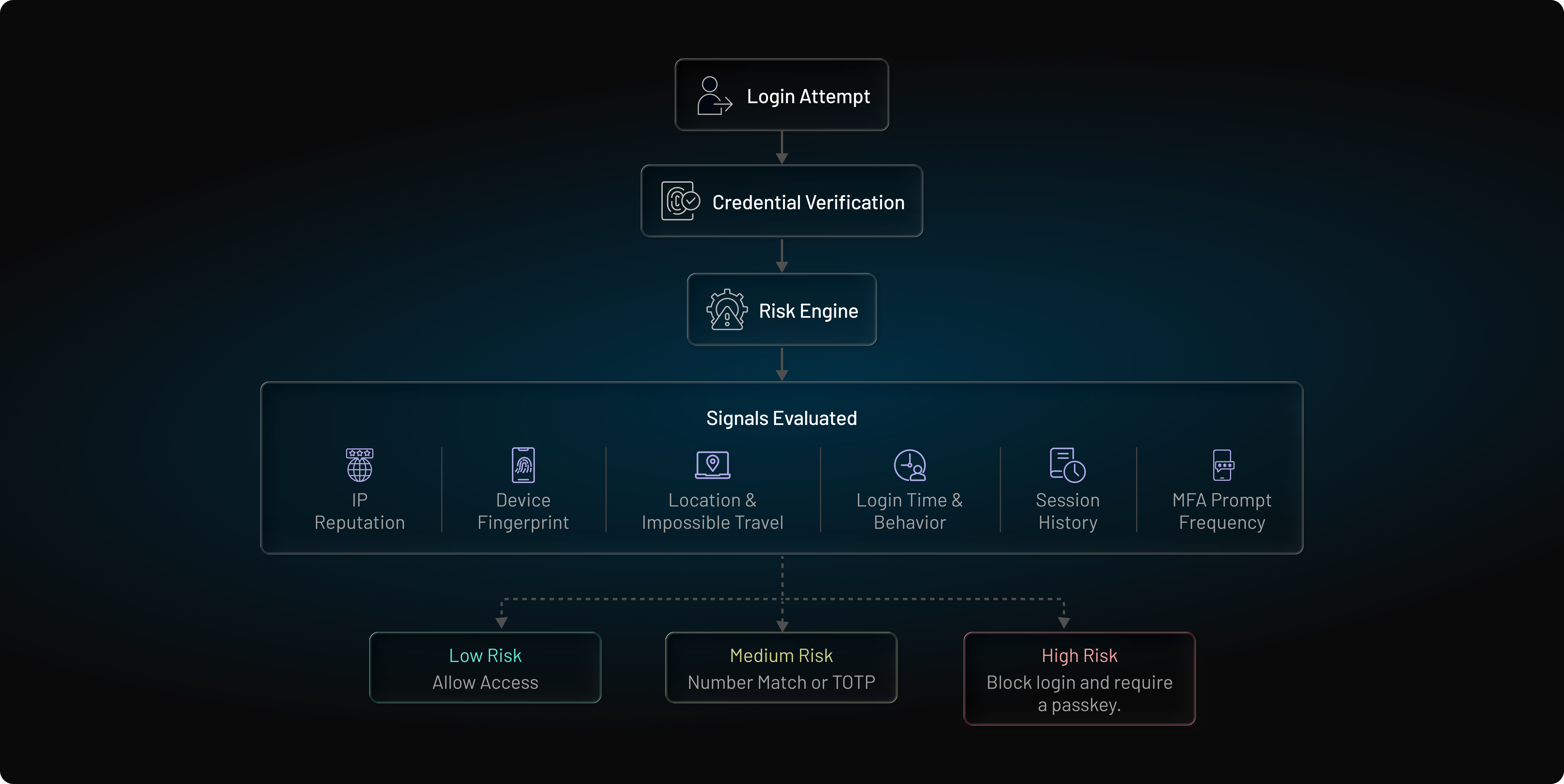
Adaptive MFA analyzes context device, location, IP, behavior, and decides:
-
Low-risk logins: No MFA required
-
Medium risk: Silent checks (device binding, session validation)
-
High risk: Step-up MFA (security key, passkey, TOTP)
Adaptive MFA uses risk-based authentication (RBA) principles to evaluate IP reputation, device trust, location, login behavior, session history, and authentication anomalies before determining whether additional verification is required. By analyzing contextual risk signals in real time, organizations can reduce unnecessary MFA prompts while identifying suspicious login attempts before they reach the user.
By evaluating authentication risk before generating a challenge, risk-based authentication helps eliminate the excessive MFA prompts that prompt bombing attacks depend on.
Why it works: Adaptive MFA reduces the number of push prompts, which removes the opportunity for attackers to exploit fatigue.
Learn more about Intelligent MFA that Adapts to Real-Time Threats
5. Add Behavioral Biometrics & Continuous Risk Scoring
This includes:
-
Keystroke patterns
-
Mouse dynamics
-
Touch pressure
-
Usage behavior
-
Travel anomalies
Why it works: If the system already knows it’s “not the real user,” it never triggers MFA—and alerts security teams instead.
6. Implement “MFA Lockout” After Repeated Denials
If a user denies MFA multiple times, the system should:
-
Pause MFA requests
-
Lock the session
-
Notify the user
-
Trigger risk analysis
Why it works: It stops attackers from brute-forcing fatigue, and keeps the user aware of suspicious activity.
7. Educate Users on MFA Fatigue & Social Engineering
User education doesn’t solve everything—but it solves enough to matter.
Training should include:
-
“Never approve a prompt you didn’t initiate.”
-
How MFA fatigue attacks work
-
What to do if unexpected prompts appear
People can only avoid mistakes if they understand the risk.
8. Implement Device Binding and Trusted Devices
Trusted devices reduce unnecessary MFA prompts, meaning fewer opportunities for attackers to exploit.
Why it works: If users receive fewer prompts, they treat each one more seriously.
Modern authentication isn’t just about adding layers; it’s about making the right decisions automatically so the user never becomes the weakest link.
MFA Fatigue Prevention Controls by Priority
Not all MFA fatigue defenses provide the same level of protection. Organizations should prioritize controls that directly prevent attackers from overwhelming users with authentication requests or tricking them into approving unauthorized login attempts.
| Priority | Control | Security Impact |
|---|---|---|
| Must-Have | Number Matching | Prevents users from blindly approving push notifications by requiring verification of a displayed number. |
| Must-Have | MFA Prompt Rate Limiting | Limits the number of MFA requests that can be generated within a specific time period, reducing the effectiveness of prompt bombing attacks. |
| Must-Have | Account Lockout After Repeated MFA Denials | Prevents attackers from continuously targeting users with authentication requests. |
| High | Device Trust and Device Recognition | Blocks or challenges authentication attempts from unfamiliar devices. |
| High | Adaptive MFA | Uses risk signals such as device reputation, location, and behavior to trigger additional verification only when necessary. |
| High | Passkeys or FIDO2 Security Keys | Eliminates reliance on push approvals and provides phishing-resistant authentication. |
| Medium | User Security Awareness Training | Helps users recognize suspicious MFA requests and social engineering attempts. |
| Medium | SIEM Monitoring and Alerting | Improves visibility into abnormal authentication activity and accelerates incident response. |
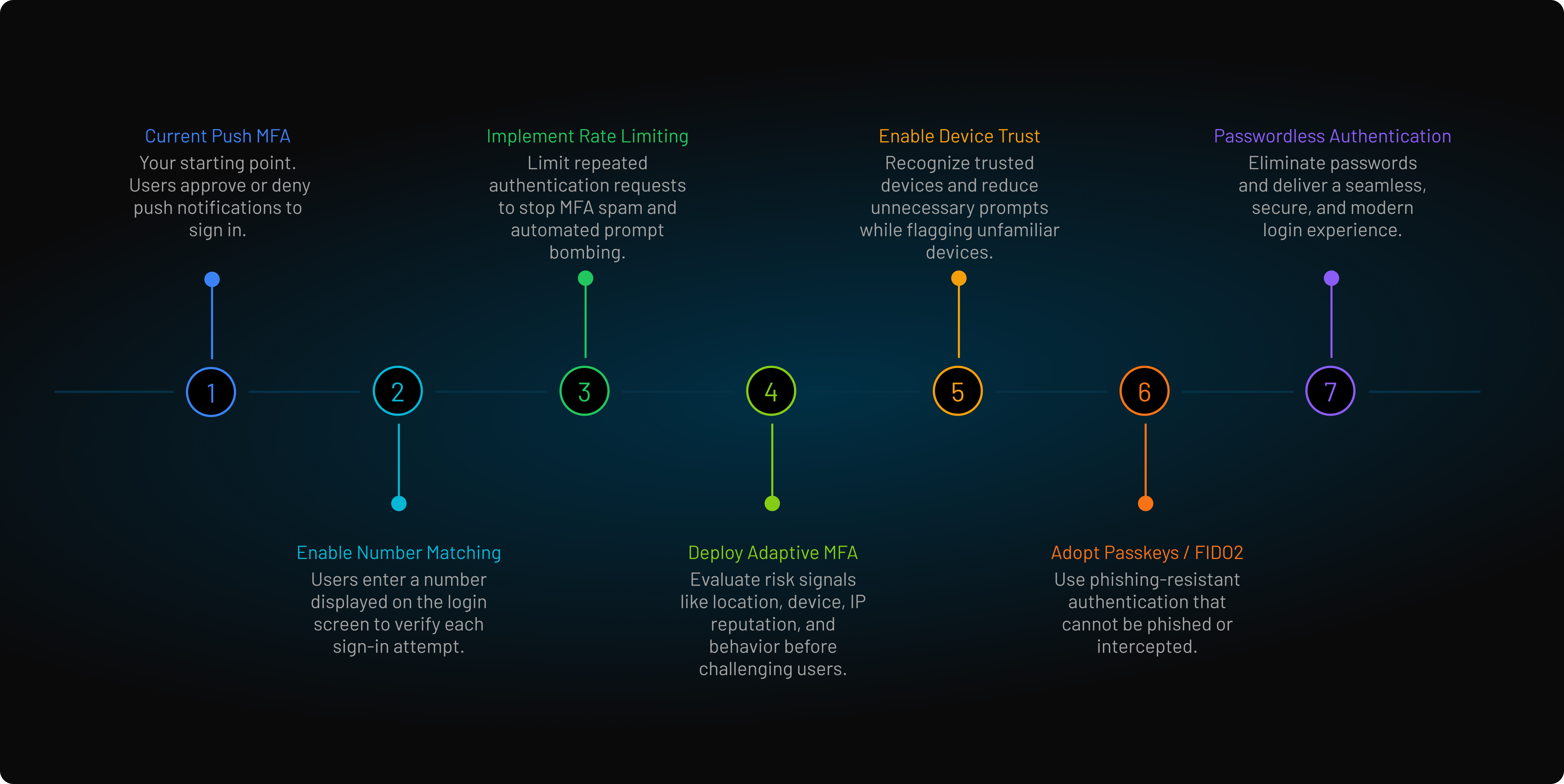
MFA Fatigue Defense Roadmap: Where to Start
Most organizations don't replace their authentication infrastructure overnight. The most effective approach is to strengthen existing MFA deployments step by step, reducing the attack surface while improving both security and user experience.
A practical implementation roadmap looks like this:
| Phase | Recommended Improvement | Security Benefit |
|---|---|---|
| Phase 1 | Existing Push-Based MFA | Establish a baseline for current authentication workflows. |
| Phase 2 | Enable Number Matching | Prevent blind approval of push notifications and reduce successful prompt bombing attacks. |
| Phase 3 | Implement MFA Rate Limiting | Block excessive authentication requests and limit MFA spam campaigns. |
| Phase 4 | Deploy Adaptive MFA | Evaluate device trust, IP reputation, location, and user behavior before challenging users. |
| Phase 5 | Enable Device Trust | Recognize trusted devices to reduce unnecessary MFA prompts while identifying unfamiliar endpoints. |
| Phase 6 | Adopt Passkeys or FIDO2 Security Keys | Eliminate approval-based authentication and provide phishing-resistant login. |
| Phase 7 | Expand Passwordless Authentication | Remove password-related attack vectors and deliver a secure, low-friction authentication experience. |
Organizations typically begin by strengthening existing push MFA with number matching and rate limiting before introducing adaptive authentication and phishing-resistant authentication. This phased approach improves security while allowing organizations to modernize their authentication infrastructure without a disruptive migration.
Traditional MFA vs Push MFA vs Phishing-Resistant MFA
Not all MFA methods offer the same level of protection. Some are convenient but weak. Others are powerful but require hardware. And a few like passkeys and security keys combine both security and usability.
Below is a clear, CIAM-grade comparison of each MFA method and how it stands up against today’s attack landscape, including MFA fatigue attacks.
Comparison Table: Strengths, Weaknesses & Attack Resistance
| MFA Method | Security Strength | Resistance to MFA Fatigue | Phishing Resistance | User Experience | Best for |
|---|---|---|---|---|---|
| SMS OTP | Low | Weak (SMS spam possible) | Very Low (SIM-swap, SS7 attacks) | Moderate | Legacy systems, fallback only |
| TOTP (Authenticator Apps) | Moderate | Stronger than push | Moderate (still phishable) | Medium friction | Consumer apps, basic security |
| Email OTP | Low–Moderate | Moderate | Low (email compromise risk) | High friction | Low-risk use cases |
| Push MFA (Approve/Deny) | Moderate | Very Weak (prone to fatigue attacks) | Low–Moderate | Easy UX | Enterprise workforce, SaaS |
| Push MFA + Number Matching | High | Strong | Moderate | Good UX | Workforce, admin accounts |
| Security Keys (FIDO2/WebAuthn) | Very High | Immune | Very High (phishing-resistant) | Fast & seamless | High-risk accounts, CIAM |
| Passkeys | Very High | Immune | Very High | Best UX | Customer login, passwordless flows |
How LoginRadius Prevents MFA Fatigue Attacks
MFA fatigue attacks succeed when authentication systems rely on users to identify and reject suspicious login requests. LoginRadius helps reduce this risk by combining adaptive authentication, phishing-resistant MFA, device intelligence, and abuse prevention controls.
Adaptive MFA
LoginRadius evaluates contextual risk signals including device trust, IP intelligence, location, login behavior, and impossible travel to challenge only high-risk authentication attempts while minimizing unnecessary MFA prompts for legitimate users.
Rather than increasing authentication challenges for every user, Adaptive MFA reduces unnecessary prompts for legitimate users while applying stronger verification only when contextual risk justifies it.
Passkeys and FIDO2 Authentication
LoginRadius supports passkeys, WebAuthn, and FIDO2 security keys, eliminating the approval-based workflow that MFA fatigue attacks depend on. Because authentication is cryptographically tied to a trusted device, attackers cannot overwhelm users with push notifications.
MFA Prompt Throttling and Abuse Protection
Built-in rate limiting, lockout controls, and abnormal authentication monitoring help prevent attackers from repeatedly triggering MFA requests. This reduces the effectiveness of MFA bombing and prompt fatigue attacks.
Device Intelligence and Risk Signals
LoginRadius continuously evaluates device trust, session history, authentication patterns, and behavioral signals to identify suspicious activity before access is granted. This allows organizations to stop high-risk login attempts without increasing friction for legitimate users.
By combining these controls, LoginRadius helps organizations strengthen account security while delivering a seamless customer authentication experience.
Regulatory Compliance and Framework Alignment
Beyond reducing account takeover risk, strengthening authentication helps organizations meet identity and access management expectations across modern security and compliance frameworks. Many regulations and industry standards now encourage or require stronger authentication controls, continuous risk assessment, and phishing-resistant authentication for protecting sensitive systems and customer data.
As organizations adopt adaptive MFA, phishing-resistant authentication, and stronger identity risk controls, they not only reduce exposure to MFA fatigue attacks but also improve alignment with evolving regulatory and industry security expectations.
-
NIST SP 800-63B (Digital Identity Guidelines): Explicitly states that authentication models relying on simple push validations without an out-of-band context validation step (like number matching) fail the criteria for Authenticator Assurance Level 3 (AAL3).
-
PCI DSS 4.0 (Requirement 8.4): Mandates continuous Multi-Factor Authentication architectures for all access environments holding system components. Traditional, vulnerable push channels invite non-compliance findings during external control reviews.
-
SOC 2 Type II (Trust Services Criteria - CC6.1): Auditors evaluate whether systems use risk-aware parameter sets to intercept malicious perimeter events. Leaving loops unthrottled exposes critical systemic vulnerabilities.
Conclusion
MFA fatigue attacks succeed because traditional MFA still relies on the one thing attackers can manipulate: human behavior. Push notifications were designed for convenience, not resilience. As attackers continue to weaponize repetition, urgency, and social engineering, organizations can no longer depend on users to distinguish legitimate authentication requests from malicious ones.
The answer isn't simply adding more authentication prompts. It's building authentication systems that make smarter decisions before a challenge is ever presented. Adaptive MFA, number matching, device trust, behavioral risk analysis, and phishing-resistant authentication methods such as passkeys and FIDO2 security keys work together to reduce both attack opportunities and user friction.
The future of authentication is not about asking users to approve more requests. It is about making authentication decisions intelligently before users are ever interrupted. Organizations that combine adaptive MFA, phishing-resistant authentication, and passkeys are moving beyond reactive security toward identity systems that are resilient by design.
Protect Customers Without Adding Authentication Friction
MFA fatigue attacks exploit user behavior, not technical vulnerabilities. As attackers increasingly rely on prompt bombing, social engineering, and stolen credentials, organizations need stronger defenses than simple approve-or-deny push notifications.
LoginRadius Adaptive MFA combines risk-based authentication, device intelligence, passkeys, number matching, and phishing-resistant authentication to stop suspicious login attempts before attackers can overwhelm users with repeated MFA requests.
See how LoginRadius helps organizations reduce account takeover risk while delivering a seamless customer authentication experience. Book a Demo today.
FAQs
Q: What is an MFA fatigue attack?
A: An MFA fatigue attack is when an attacker floods a user with repeated push MFA prompts until the user approves one out of annoyance, confusion, or pressure. It’s also known as push bombing, push fatigue, or MFA bombing.
Q: Why do MFA fatigue attacks work?
A: They work because attackers exploit human behavior users get overwhelmed, distracted, or stressed and accidentally approve a fraudulent request. Traditional push MFA relies too heavily on manual user judgment.
Q: How can organizations stop MFA fatigue attacks?
A: Use number matching, rate-limit MFA prompts, adopt phishing-resistant MFA (like security keys or passkeys), and enable adaptive MFA with risk signals to block suspicious login attempts before a prompt is ever sent.
Q: Is push MFA still safe to use?
A: Push MFA is safe only when enhanced with number matching and abuse detection. For high-risk accounts, organizations should move to phishing-resistant MFA methods such as FIDO2 security keys or passkeys.
Q: What is the best defense against MFA fatigue attacks?
A: The strongest defense is phishing-resistant MFA security keys or passkeys combined with adaptive risk-based authentication and strict push prompt throttling.
Q: Does number matching stop MFA fatigue attacks?
A: Number matching significantly reduces the effectiveness of MFA fatigue attacks by preventing users from blindly approving authentication requests. Instead of simply tapping “Approve,” users must enter or verify a number displayed on the login screen. While not completely immune to social engineering, number matching is one of the most effective defenses for push-based MFA.
Q: Are passkeys immune to MFA fatigue attacks?
A: Passkeys are effectively immune to MFA fatigue attacks because they do not rely on push notifications or approval requests. Authentication is performed using cryptographic credentials stored on a trusted device and verified through biometrics, a device PIN, or a platform authenticator. Without a push approval workflow, attackers cannot overwhelm users with repeated authentication requests.
Q: What is the difference between MFA fatigue and prompt bombing?
A: The terms are closely related and are often used interchangeably. MFA fatigue refers to the user's exhaustion or frustration caused by repeated authentication requests, while prompt bombing describes the attacker's tactic of generating those requests. Both ultimately aim to convince a user to approve a fraudulent login attempt.
Q: Can adaptive MFA prevent MFA fatigue attacks?
A: Adaptive MFA can significantly reduce the risk of MFA fatigue attacks by evaluating contextual signals such as device reputation, location, login behavior, and IP risk before triggering MFA. By reducing unnecessary authentication prompts and challenging only high-risk login attempts, adaptive MFA limits opportunities for attackers to exploit user fatigue.
Q: Are security keys better than push MFA?
A: For high-risk accounts, security keys provide stronger protection than push MFA. FIDO2 security keys are phishing-resistant, immune to MFA fatigue attacks, and cannot be spammed with repeated approval requests. While push MFA remains useful when combined with number matching and abuse controls, security keys offer a higher level of authentication security.