Modern digital businesses rarely operate as a single, unified brand anymore.
Instead, they manage a growing portfolio. That portfolio often includes multiple products, regions, and subsidiaries - each with its own business and user needs.
And with that comes a new expectation - every brand needs a distinct authentication experience, customized branding, and fully white-labeled communication.
But delivering this at scale often becomes tricky.
Teams often find themselves replicating IAM setups and implementing additional logic, increasing system complexity with every new brand.
The Multi-brand Reality - And Where it Breaks
Take a media company for example.
They may operate 20+ news brands across finance, politics, entertainment, and more. Each brand has its own:
-
Look and feel
-
Authentication journeys
-
Email communication
From a user’s perspective, every brand feels (and should feel) independent.
From an engineering perspective? It’s not at all that simple!
Most identity platforms aren’t designed for multi-brand architectures. They push teams toward creating separate IAM setups for each brand.
It essentially means each new brand launch will include:
-
Creating a new login UI from scratch that matches the brand
-
Setting up signup flows
-
Configuring MFA or SSO
-
Duplicating email templates
-
Writing logic to detect which domain the user is coming from
-
Making sure everything looks and behaves differently for this brand
And the worst part? You’ve done all of this before, and you do it every time a new brand is launched. You are forced to repeat the entire process again because your identity platform does not make it easy for you.
The Hidden Cost No One Talks About
At first, duplicating things feels frustrating, but manageable.
You would probably think - “Let’s just copy the existing setup and tweak it.”
But a few months later:
-
You’re maintaining 5 versions of the same login page
-
Fixing a bug means fixing it everywhere
-
Launching a new brand takes weeks instead of days
-
Developers start avoiding touching auth altogether
What started as a shortcut became long-term technical debt.
How LoginRadius Multi-Brand Auth Solves Multi-Branding
Instead of forcing you to build and manage everything yourself, LoginRadius gives you a system where multi-brand authentication is built in from the start.
Here’s what it means:
Auth Studio: Domain-to-Template Mapping
Instead of managing static codebases per brand, LoginRadius offers a dynamic mapping engine within Auth Studio - so that you can easily map all your domains with their respective UI design templates and styles.
Map Specific Brand to Specific UI Template
You can map specific UI templates to each of your brand domains directly from the Auth Studio templates dashboard without writing any code.
Dynamic UI rendering
You can assign specific styles, assets to each domain. When a user lands on login.brand-a.com, the platform automatically renders the correct HTML/CSS/JS bundle.
Flexible development approach
As everything is within Auth Studio, you can use the AI Builder for quick template generation, use the pre-built templates and customize them using no-code editor, or switch to the advanced editor for full code-level control with custom scripts and styling.
Available in All Versions
Domain mapping feature is available both on V2 as well as V3 templates. Hence our existing customers can run their legacy brands on V2 templates while rolling out new brands on V3 - all within a single tenant.
The result? Fully branded experiences - without rebuilding or duplicating setups.
Workflows Adapt As Per Brand Needs
This is where the system really stands out.
Instead of writing conditional logic in your application code, LoginRadius handles orchestration workflows at the platform level.
Domain-driven experience
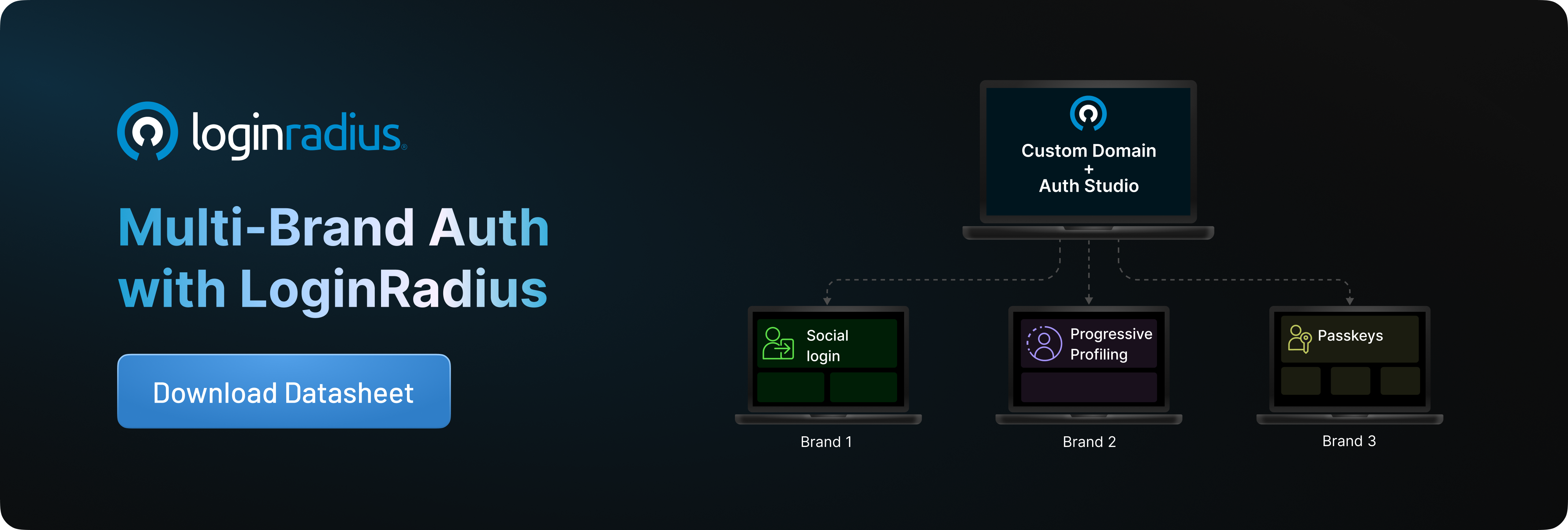
Each custom domain is mapped to a specific authentication journey - whether that’s social login, passwordless, or MFA. In fact, if you want, you can deliver different journeys to different brands. For example, if you want, you can design social login workflow for brand A, passkeys for Brand B, and so on.
Independent security per brand
Apply different security policies across brands. For example, enforce biometric MFA for a premium brand while keeping a simpler OTP flow for another.
Unified user directory
Even though experiences differ, all user data stays centralized - making cross-brand analytics and identity management seamless.
Even Your Emails Stay in Sync
The branding doesn’t stop at login - it extends to every communication touchpoint.
Dynamic template rendering
Use an email template with dynamic variables like brand name, logo, and colors. The system automatically adapts based on the user’s domain and your Auth Studio template for that domain.
Domain-level email delivery
Configure SMTP per domain so emails are sent from the correct brand and stays true to the specific brand - improving trust, deliverability, and compliance.
Built-in localization
Serve the right language and brand combination automatically - no manual intervention required.
Steps to Set Up Multi-Brand Authentication with LoginRadius
Setting up multi-brand authentication with LoginRadius is straightforward. Here’s how to do it:
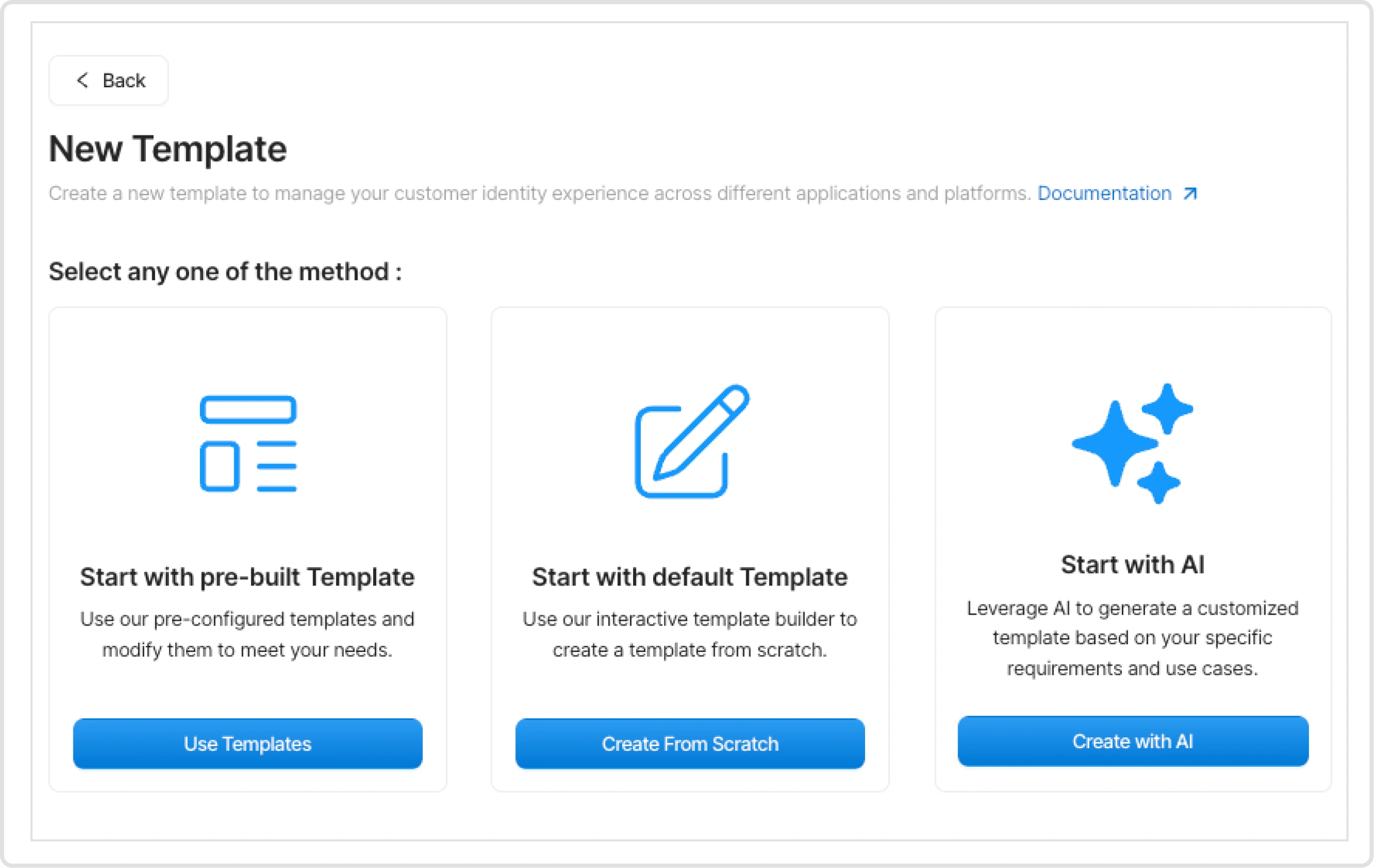
Step 1: Create Your Auth Studio Templates
Start by designing your authentication experiences in Auth Studio.
You can:
-
Use AI Builder to generate templates instantly, or
-
Start with pre-built templates, and
-
Customize them using no-code or advanced code editor
Each template represents a brand-specific login and signup experience—with its own styling, layout, and behavior.
Step 2: Configure Multiple Custom Domains
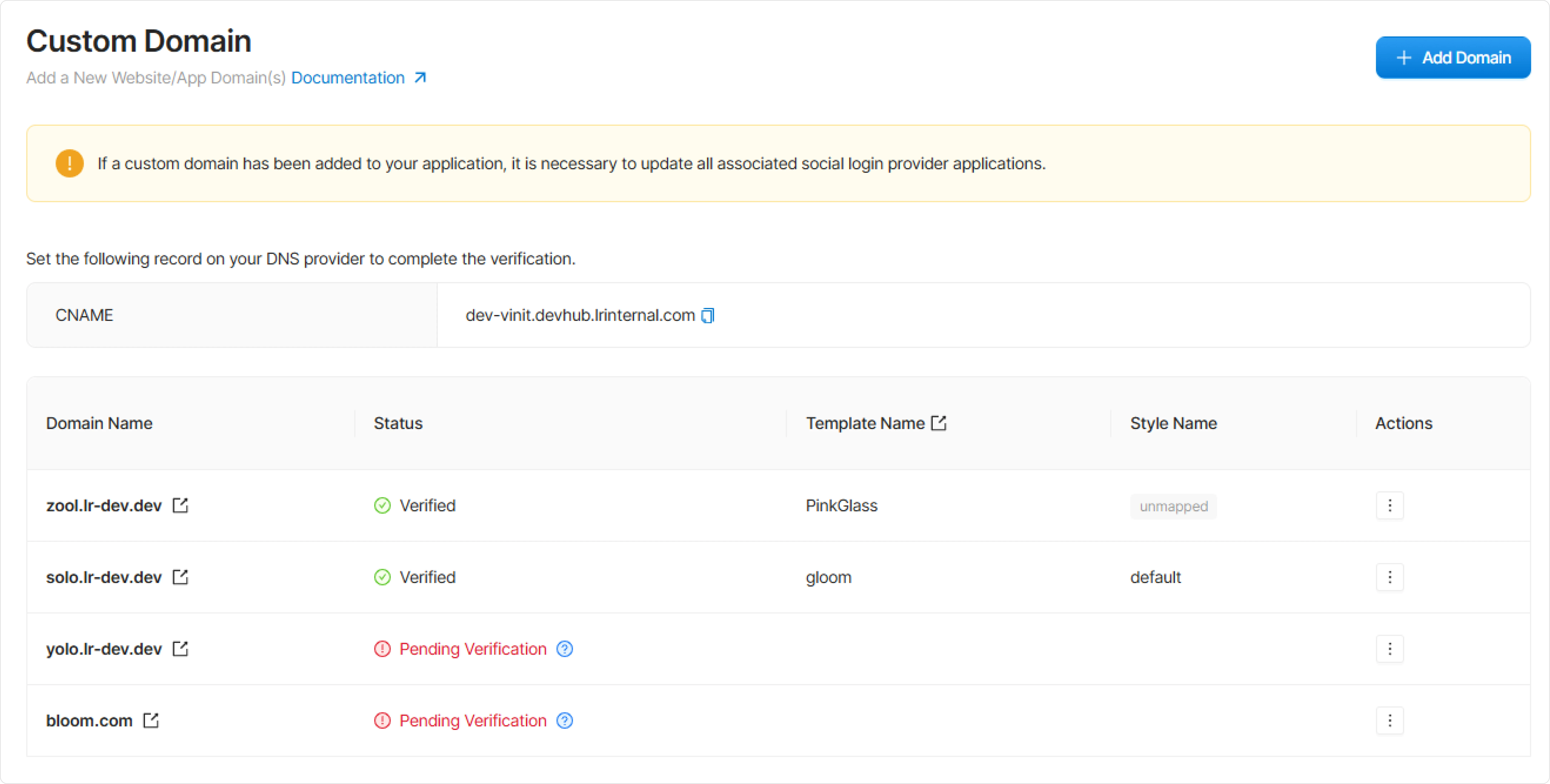
Next, add and manage your brand-specific domains directly from the LoginRadius Admin Console.
Within the Custom Domains section, you can:
-
Add a new domain for each brand (e.g.,
login.brand-a.com,accounts.brand-b.com) -
Configure DNS settings (CNAME) to point the domain to LoginRadius
-
Enable SSL for secure authentication flows
-
Verify and activate the domain within the console
Each configured domain becomes a dedicated entry point for a specific brand—ready to be mapped to its corresponding authentication experience.
Step 3: Map Domains to Templates
This is where the magic happens.
You map each domain to a specific Auth Studio template:
-
Brand A domain → Brand A template
-
Brand B domain → Brand B template
This mapping is independent per domain, so changes to one brand don’t affect others.
Step 4: Configure Brand-Specific Authentication Journeys and Policies
Once domains are mapped to templates, you can define how authentication behaves for each brand—directly from the LoginRadius platform.
Using orchestration workflows, you can:
-
Configure brand-specific login and signup journeys (e.g., passwordless for one brand, SSO or MFA for another)
-
Control authentication steps like social login, OTP verification, passkeys, or progressive profiling
-
Apply conditional logic based on brand, user type, or region—without writing custom code
You can also enforce brand-level security policies, such as:
-
Different MFA requirements per brand
-
Custom password policies
-
Session and risk-based authentication rules
All of this is managed centrally, while still delivering completely independent experiences per domain.
Step 5: Test Each Brand Experience End-to-End
Before going live, validate that every domain is correctly mapped and deliver the intended experience.
From the LoginRadius console and your configured domains, you can:
-
Access each domain directly (e.g.,
login.brand-a.com) to verify the correct template is rendered -
Test authentication flows for each brand—login, signup, password reset, MFA, or passwordless journeys
-
Validate domain-to-template mapping to ensure the right UI and branding load consistently
-
Check email flows (OTPs, verification, password reset) to confirm correct branding, sender domain, and formatting
-
Verify redirects and session handling across different brands and applications
What to Watch For
During testing, teams typically validate:
-
Branding consistency across UI and emails.
-
Correct authentication journey per domain.
-
Security policies working as expected (e.g., MFA triggers).
-
No cross-brand leakage in templates or flows.
Step 6: Go Live with Confidence
Once validated, you can roll out new brands instantly—without additional development or reconfiguration.
What This Actually Means for Your Team
Instead of rebuilding authentication every time a new brand is launched, your workflow fundamentally changes.
-
You don’t start from scratch.
-
You don’t duplicate setups.
-
You don’t write brand-specific logic again and again.
Instead:
-
You build your authentication foundation once
-
Create reusable templates for login, signup, and communication
-
Map each new brand to its own domain and experience
-
Assign the right workflows and security policies
-
And go live—without additional engineering effort.
Ready to Launch Your Next Brand Without Complexity?
If you're looking to simplify multi-brand authentication and go live faster without adding engineering complexity, LoginRadius gives you everything you need in one platform.
👉 Take Free Trial and explore how it works.
👉 Or book a demo to see it in action.