Managing identities in a B2B environment is not at all simple. You are not just authenticating users. You are managing access to partner organizations, vendors or B2B users, and each with its own groups of users, security requirements, and access policies.
As your business grows, these requirements become difficult to manage manually. Creating accounts one by one, assigning permissions, and handling access requests through support tickets can slow onboarding and offboarding, increasing security risks. This is where LoginRadius Partner IAM helps. It enables businesses to manage access to external organizations from a centralized identity platform.
LoginRadius Partner IAM gives each of your partner organizations control over its own users, authentication settings, and access policies. The platform supports enterprise SSO, automated user provisioning, role-based access control (RBAC), and organization-level security policies.
But technically speaking, deploying B2B identity management requires more than just enabling login functionality. You need a clear plan for onboarding users, connecting identity providers, assigning permissions, enforcing security controls, and managing user lifecycles.
In this guide, we'll walk through the complete implementation process using LoginRadius Partner IAM.
You'll learn how to:
-
Design your B2B identity architecture
-
Configure organizations and access controls
-
Integrate enterprise identity providers
-
Enable B2B authentication and SSO
-
Automate user onboarding and provisioning
-
Secure external access with MFA
-
Prepare your deployment for production scale
Whether you're building a B2B SaaS application, partner portal, supplier network, or serving B2B customers, this guide will help you create a secure and scalable B2B identity foundation.
New to Partner IAM? Read our guide on What Is Partner IAM to understand the fundamentals before diving into implementation.
Planning Your B2B Identity Management Implementation
A successful B2B Identity Management deployment starts long before you configure authentication or connect an identity provider. The decisions you make during the planning stage will influence onboarding, security, scalability, and day-to-day administration.
Before implementing LoginRadius Partner IAM, define how external organizations will be structured, how users will access your platform, and how permissions will be managed across different business entities. LoginRadius Partner IAM is built around organizations, allowing each business entity to maintain its own authentication settings, access controls, and security policies.
Define Your Organization Model
The first step is deciding how external entities will be represented in your identity architecture. In LoginRadius Partner IAM, an organization represents a business entity that requires controlled access to your application. Each organization operates independently while remaining part of a centralized identity platform.
Depending on your business model, an organization could represent:
-
A customer account in a B2B SaaS platform
-
A supplier in a procurement portal
-
A reseller in a partner ecosystem
-
A franchise location
-
A consulting firm working with clients
For example, if you're building a project management platform, each customer company can be created as a separate organization. This ensures users from one company cannot access data belonging to another company.
Defining this structure early helps simplify access control, user management, and future scaling efforts.
Choose Authentication Methods
Not every organization has the same authentication requirements.
Some customers may prefer traditional email and password authentication. Others may require employees to log in using their existing corporate credentials through Single Sign-On (SSO). Larger enterprises might expect support for federation standards such as SAML or OpenID Connect.
When planning authentication, ask:
-
Will users authenticate locally or through an external identity provider?
-
Do enterprise customers require SSO?
-
Will passwordless authentication be offered?
-
Which authentication methods should be available by default?
LoginRadius Partner IAM supports enterprise federation and organization-level authentication controls, making it possible to support different requirements across organizations.
Design Your Authorization Model
Authentication verifies who a user is, whereas authorization determines what they can do. Before implementation, identify the roles required within each organization.
A typical B2B application may include roles such as:
| Role | Responsibility |
|---|---|
| Organization Admin | Manages users, roles, and settings |
| Partner Manager | Oversees partner activities |
| Billing Admin | Manages subscription and billing data |
| Auditor | Reviews reports and activity logs |
| Standard User | Performs day-to-day tasks |
LoginRadius supports Role-Based Access Control (RBAC), allowing organizations to assign permissions based on business responsibilities.
The goal is to give users access only to the resources they need while preventing unnecessary privileges.
Select a User Provisioning Strategy
User onboarding can quickly become a bottleneck if managed manually. Most B2B applications use one or more of the following provisioning methods:
| Provisioning Method | Best For |
|---|---|
| Invitations | Small and mid-sized organizations |
| JIT Provisioning | Enterprise SSO deployments |
| Directory Synchronization | Large enterprise customers |
LoginRadius Partner IAM supports automated onboarding and user provisioning to help reduce administrative effort and accelerate access management.
Your provisioning strategy should align with the size and maturity of the organizations you serve.
Establish Security Requirements Early
Security requirements often vary between organizations.
Some customers may require MFA for all users. Others may have industry-specific compliance obligations that influence authentication and access policies.
Before implementation, define:
-
MFA requirements
-
Password policies
-
Session management rules
-
Audit logging requirements
-
Compliance obligations
LoginRadius Partner IAM allows organizations to enforce authentication and security settings based on their specific business needs.
By addressing these requirements upfront, you can avoid costly changes later and build a more scalable identity architecture from day one.
Reference Architecture for a Modern B2B Identity Platform
Before configuring organizations, authentication flows, or access policies, it's important to understand how the different components of a B2B identity ecosystem work together.
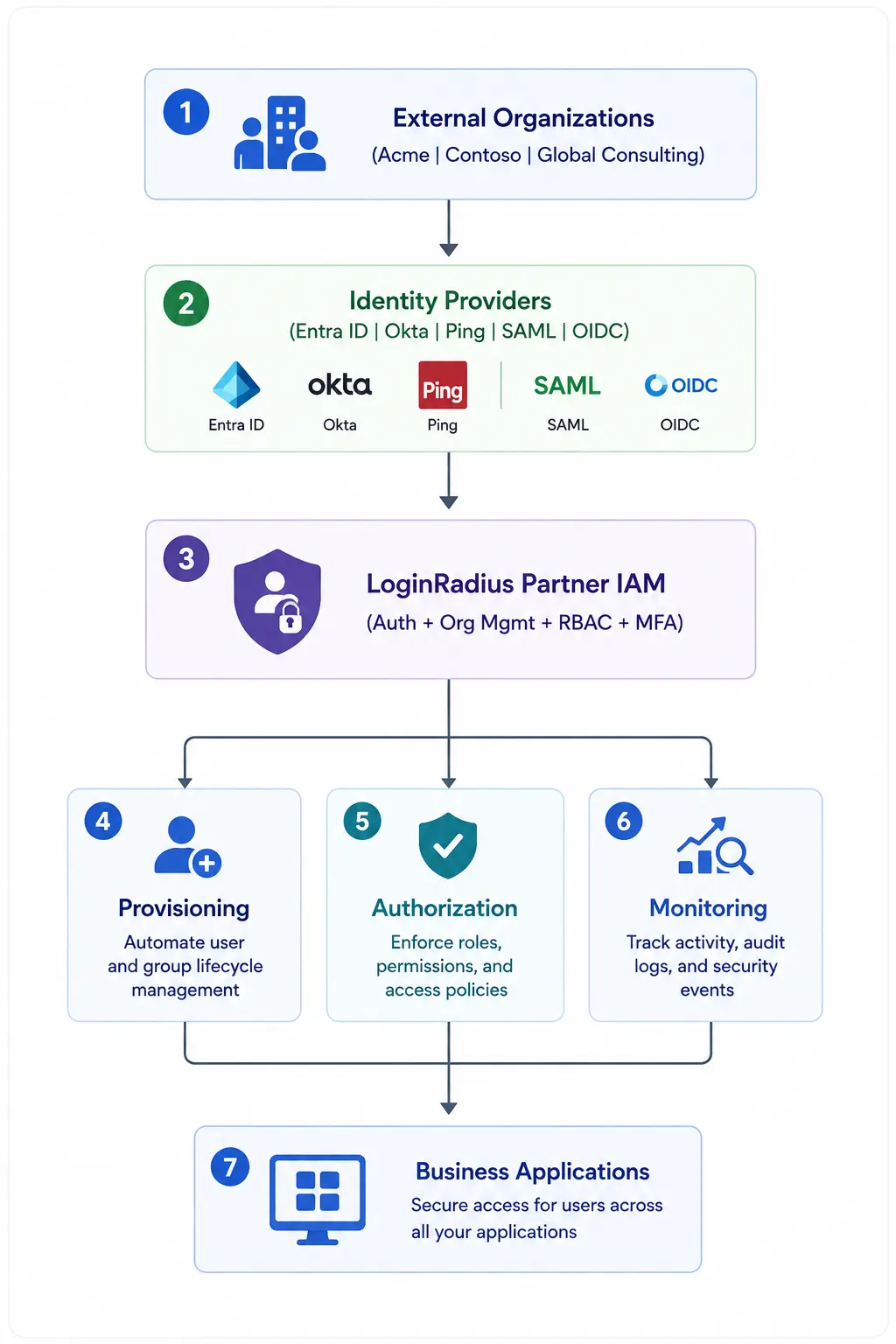
Unlike traditional IAM deployments, B2B identity management must support multiple external organizations, enterprise identity providers, organization-specific security policies, and delegated user management. LoginRadius Partner IAM serves as the central identity layer that connects these components while maintaining security, scalability, and tenant isolation.
The Core Components
A typical B2B identity architecture includes five key layers:
-
Organizations
-
Identity Providers (IdPs)
-
Authentication Services
-
Authorization Controls
-
Monitoring and Compliance
At the center of this architecture sits LoginRadius Partner IAM, which manages organizations, user identities, authentication policies, and access controls across all external business entities.
Common B2B IAM Architecture Patterns
While every organization has unique security, compliance, and operational requirements, most B2B identity implementations tend to follow a few common architecture patterns.
The appropriate model often depends on the number of organizations being onboarded, the level of identity federation required, and the degree of administrative autonomy each customer expects.
Pattern 1: Centralized Identity Management
In this model, all external organizations are managed directly within the Partner IAM platform.
Users authenticate using credentials managed by the application itself, while administrators control user onboarding, authentication policies, and authorization settings from a central location.
This approach is often used when:
-
Customers do not have their own enterprise identity provider.
-
Centralized administration is preferred.
-
Faster onboarding is a priority.
-
Organizations require a simple self-service experience.
Pattern 2: Federated Enterprise Access
Many enterprise customers prefer to maintain control of employee identities through their existing identity providers.
In this model, LoginRadius Partner IAM acts as the trust layer between applications and external identity systems.
Authentication occurs through federation protocols such as SAML or OpenID Connect, while authorization remains centrally managed within Partner IAM.
This pattern is commonly used when:
-
Enterprise Single Sign-On is required.
-
Customers have existing IAM investments.
-
Password management needs to remain within the customer organization.
-
Regulatory policies require identity ownership to remain internal.
Pattern 3: Hybrid Identity Architecture
Many B2B platforms serve organizations with varying levels of identity maturity. Some customers may require enterprise federation, while others rely on local credentials. A hybrid architecture supports both approaches simultaneously.
This model allows organizations to choose the authentication approach that best fits their requirements without impacting the overall access management framework.
Common benefits include:
-
Greater onboarding flexibility
-
Support for organizations of all sizes
-
Reduced implementation friction
-
Consistent authorization and user management
Pattern 4: Multi-Organization SaaS Platform
Modern B2B SaaS applications often support hundreds or thousands of organizations from the same platform.
Each organization requires isolated users, security policies, roles, and administrative controls while sharing the same underlying application infrastructure.
Partner IAM provides the organizational boundaries that ensure identities, permissions, and access policies remain isolated across tenants.
This pattern is common among:
-
SaaS providers
-
Partner ecosystems
-
Vendor marketplaces
-
Supplier portals
-
Franchise management platforms
Putting It All Together
When a user attempts to access your application, LoginRadius Partner IAM acts as the control layer between the organization, its identity provider, and the application itself. Authentication is handled through the organization's preferred method, access is evaluated through RBAC policies, and user activity can be monitored through audit and compliance controls.
With the architecture in place, the next step is to configure your LoginRadius Partner IAM environment and create the organizational structure that will support your external users.
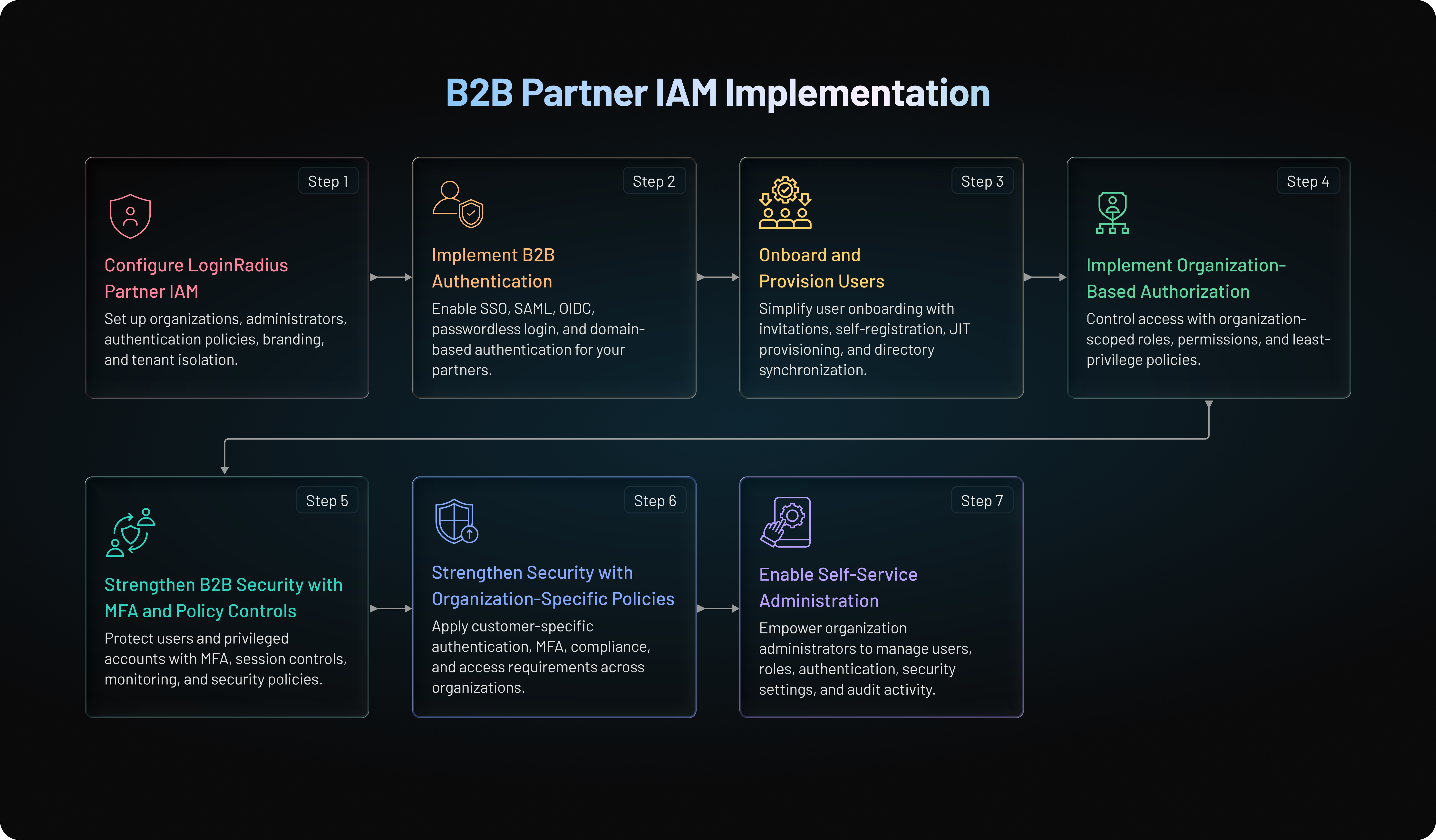
The implementation process mostly include the following:
-
Set up organizations for your customers and partners
-
Set up roles and permissions for the organization’s users
-
Set up organization users and assign them roles
-
Set up authentication methods for organizations and their users.
Along with some additional steps that make the setup more secured and easier to operate with.
Step 1: Configure LoginRadius Partner IAM
With your architecture and implementation plan in place, the next step is to configure LoginRadius Partner IAM and establish the organizational framework that will support your external users.
At the heart of Partner IAM is the concept of an Organization. Each organization represents a business entity that requires secure access to your application. Organizations operate independently and can maintain their own authentication methods, security policies, identity providers, and access controls.
Create Your LoginRadius Environment
Before onboarding customers or partners, ensure your LoginRadius environment is configured to support Partner IAM. At a high level, your implementation should allow you to:
-
Create and manage organizations
-
Configure authentication methods
-
Connect enterprise identity providers
-
Define roles and permissions
-
Enforce security policies
-
Monitor user activity
This becomes the foundation for managing external identities at scale.
Configure Organization Management
Once your environment is ready, define how organizations will be created and managed.
In LoginRadius Partner IAM, organizations are more than customer records. They serve as isolated identity containers where users, authentication settings, and access policies can be managed independently.
For example, your application may serve three enterprise customers:
-
Acme Manufacturing
-
Contoso Logistics
-
Global Consulting Group
Instead of storing all users in a single directory, each company can operate as its own organization.
This approach provides several benefits:
-
Better tenant isolation
-
Simpler user management
-
Organization-specific security controls
-
Cleaner permission boundaries
-
Improved scalability
As your customer base grows, this structure becomes much easier to manage than a flat user directory.
Reference APIs
You can create and manage these Organizations using the following APIs:
Create Your First Organization
After defining your organization model, create your first organization.
Typical organization information includes:
| Information | Example |
|---|---|
| Organization name | Acme Manufacturing |
| Organization identifier | Acme001 |
| Authentication settings | Enterprise SSO |
| Administrative users | admin@acme.com |
| Access policies | MFA Required |
| User Roles | Organization Admin, Manager, Standard User |
Assign Organization Administrators
Every organization should have at least one designated administrator.
Organization administrators typically handle:
-
User invitations
-
Role assignments
-
Access reviews
-
Authentication settings
-
Organization-level security controls
This delegated administration model is one of the biggest advantages of Partner IAM.
Instead of routing every request through your support or IT team, organizations can manage much of their own identity lifecycle directly.
Configure Organization-Level Authentication Policies
Different organizations often have different security requirements.
For example:
| Organization | Authentication Requirement |
|---|---|
| Acme Manufacturing | SAML SSO + MFA |
| Contoso Logistics | OIDC SSO |
| Global Consulting | Email and Password + MFA |
Partner IAM allows organizations to maintain their own authentication policies while operating within a centralized identity platform.
This flexibility is important when serving customers across different industries and security maturity levels.
Configure Branding and User Experience
A consistent login experience can improve trust and reduce onboarding friction.
Depending on your implementation, organizations may require:
-
Company branding
-
Custom login experiences
-
Domain-based sign-in
-
Custom email templates
-
Branded invitation flows
Partner IAM supports branded authentication experiences and organization-specific login configurations.
This helps create a more seamless experience for external users while maintaining a centralized identity infrastructure.
Verify Organization Isolation
Before moving forward, validate that organization boundaries are working as expected.
Key checks include:
-
Users only see resources assigned to their organization
-
Administrative permissions remain scoped correctly
-
Authentication rules apply to the intended organization
-
User data remains isolated from other organizations
Testing these scenarios early helps prevent authorization issues later in the deployment process.
Step 2: Implement B2B Authentication
Once your organizations are configured, the next step is to enable authentication. This is how users prove their identity before accessing your application.
In B2B environments, authentication requirements often vary from one organization to another. A startup customer may be comfortable with email and password login, while an enterprise customer may require Single Sign-On (SSO) through its corporate identity provider. LoginRadius Partner IAM supports multiple authentication methods, allowing organizations to choose the approach that best fits their security requirements.
Understand Your Authentication Options
Before configuring authentication, identify how external users will access your application. Here is a quick reference guide on top authentication methods that businesses can use.
| Authentication Method | User Experience | Deployment Complexity | Best Use Case |
|---|---|---|---|
| Passkeys | Excellent | Medium | Modern passwordless systems |
| Adaptive MFA | High | High | Enterprise security |
| Hardware Security Keys | Moderate | High | Admin and privileged access |
| Authenticator Apps (TOTP) | Moderate | Low | Consumer and workforce MFA |
| Push MFA | High | Medium | Enterprise login flows |
| Biometrics | Excellent | Medium | Mobile authentication |
| Social Login | Excellent | Low | Consumer onboarding |
| SMS OTP | High | Low | Legacy and fallback systems |
| Passwords Only | Moderate | Low | Avoid when possible |
Many organizations support more than one option. For example, enterprise customers may use SSO for employees, while external contractors authenticate using passwordless login.
The right approach depends on your users, security requirements, and customer expectations.
Implement Single Sign-On (SSO)
SSO is one of the most requested features in enterprise software.
Rather than creating another set of credentials, employees can use their existing corporate accounts to access your application. This improves the user experience and reduces password-related support issues.
LoginRadius Partner IAM supports federated authentication and SSO for external organizations.
The typical flow looks like this:
-
A user attempts to access your application.
-
The user is redirected to their company's identity provider.
-
Authentication occurs within the organization's identity system.
-
Upon successful verification, the user is returned to the application.
-
LoginRadius establishes the user session and applies the appropriate access controls.
This allows organizations to maintain ownership of employee identities while simplifying access to your platform.
Connect an Enterprise Identity Provider
Most B2B organizations already manage identities through an Identity Provider (IdP). Instead of storing and managing employee passwords yourself, you can federate authentication to the customer's existing identity system.
Benefits include:
-
Reduced password management
-
Stronger security controls
-
Faster onboarding
-
Simplified user lifecycle management
-
Better enterprise adoption
This is especially important when selling to larger organizations that require centralized identity governance.
Configure SAML Authentication
SAML remains one of the most widely used federation protocols in enterprise environments.
When implementing a SAML integration, you typically exchange configuration details between your application and the customer's identity provider.
The process generally involves:
-
Creating a SAML connection
-
Configuring assertion settings
-
Sharing metadata
-
Mapping user attributes
-
Testing authentication flows
Once configured, employees can access your application using their existing corporate credentials.
SAML is particularly common in enterprise deployments where security and compliance requirements are a top priority.
Configure OpenID Connect (OIDC)
Many organizations are now adopting OpenID Connect (OIDC) for modern authentication use cases.
OIDC provides a lightweight authentication layer built on OAuth 2.0 and is commonly used in cloud-native applications.
An OIDC implementation typically includes:
-
Authorization endpoints
-
Client credentials
-
Redirect URIs
-
User information claims
-
Token validation
OIDC can simplify integration while delivering a seamless login experience across web and mobile applications.
Note: We have a different article that provides a detailed analysis on how organizations should choose SAML vs OIDC.
Enable Domain-Based Login Routing
As your customer base grows, presenting users with a long list of identity providers becomes impractical.
Domain-based routing creates a smoother experience.
For example:
-
jane@acme.com→ Acme SSO -
mark@contoso.com→ Contoso SSO -
sara@globalconsulting.com→ Global Consulting SSO
The process is simple:
-
The user enters a work email address.
-
The system identifies the email domain.
-
The domain is matched to the correct organization.
-
The user is redirected to the appropriate identity provider.
This eliminates confusion and reduces authentication friction for end users.
Support Passwordless Authentication
Passwords continue to be a common source of security incidents and support tickets.
For organizations that do not require enterprise SSO, passwordless authentication can offer a more user-friendly experience.
Typical passwordless methods include:
-
Magic links
-
One-time passcodes (OTP)
-
Email verification codes
Benefits include:
-
Faster login experiences
-
Reduced password resets
-
Lower credential theft risk
-
Improved user satisfaction
Passwordless authentication is particularly useful for partner portals and external collaboration platforms where users may log in infrequently.
Validate Authentication Flows
Before moving into user provisioning and authorization, thoroughly test every authentication path.
Verify:
-
Successful login experiences
-
Failed login handling
-
Attribute mapping
-
SSO redirection logic
-
MFA triggers
-
Session creation and termination
You should also test scenarios across multiple organizations to ensure authentication settings remain isolated and function as expected.
Step 3: Onboard and Provision Users
After authentication is in place, the next challenge is getting users into the system quickly and securely.
In many B2B applications, onboarding is where friction begins. IT teams create accounts manually, users wait for approvals, and administrators spend hours managing access requests. As the number of organizations grows, this approach becomes difficult to scale.
LoginRadius Partner IAM helps streamline user onboarding through flexible provisioning models, automated account creation, and organization-based user management. It supports automated provisioning capabilities, including Just-in-Time (JIT) provisioning, helping organizations reduce administrative overhead and improve the user experience.
Why User Provisioning Matters
Authentication answers the question, "Who is this user?"
Provisioning answers the question, "What happens after they authenticate?"
A well-designed provisioning process should:
-
Minimize onboarding friction
-
Reduce manual administration
-
Accelerate time-to-access
-
Support enterprise identity workflows
-
Maintain security and compliance
Without a provisioning strategy, even the best authentication system can create operational bottlenecks.
Choose the Right Provisioning Approach
Most B2B applications use one of three common onboarding models.
| Provisioning Method | Best For | Administrative Effort |
|---|---|---|
| Invitation-Based Access | Small and mid-sized organizations | Low |
| JIT Provisioning | Enterprise SSO deployments | Very Low |
| Directory Synchronization | Large enterprise customers | Minimal |
Many organizations use a combination of these approaches depending on customer requirements.
Invitation-Based User Onboarding
Invitation-based onboarding is often the simplest way to grant access to external users.
In this model, an organization administrator sends an invitation to a new user. The user receives an email, completes registration, and joins the organization.
A typical flow looks like this:
-
Organization admin creates an invitation.
-
The user receives an email invitation.
-
The user completes registration.
-
The account is associated with the correct organization.
-
Default roles and permissions are assigned.
This approach works well for:
-
Vendor portals
-
Partner ecosystems
-
Customer onboarding
-
Small enterprise deployments
It also provides administrators with greater control over who can access the platform.
Enable Self-Service Registration
Some organizations prefer a more flexible onboarding experience.
Instead of inviting every user manually, administrators can allow approved users to register themselves.
Common scenarios include:
-
Partner communities
-
Developer portals
-
Franchise networks
-
Supplier ecosystems
When implementing self-service registration, consider adding safeguards such as:
-
Email domain verification
-
Approval workflows
-
MFA requirements
-
Role assignment controls
These measures help prevent unauthorized access while reducing onboarding effort.
Implement Just-in-Time (JIT) Provisioning
JIT provisioning is one of the most effective ways to support enterprise customers.
Instead of creating accounts before users log in, accounts are created automatically during the first successful authentication event.
The process typically works like this:
-
The user authenticates through the organization's identity provider.
-
Identity attributes are passed to LoginRadius.
-
A user profile is created automatically.
-
The user is assigned to the correct organization.
-
Default roles and permissions are applied.
The result is a faster onboarding experience with fewer administrative tasks.
JIT provisioning is particularly valuable for organizations using SSO because it eliminates the need to pre-create user accounts while still maintaining organizational control. LoginRadius Partner IAM supports Just-in-Time provisioning as part of its automated onboarding capabilities.
Synchronize Users with Enterprise Directories
Large enterprise customers often want identities to stay synchronized with their existing directory systems.
Rather than managing users in multiple locations, user data can be synchronized directly from the organization's identity source.
Benefits include:
-
Reduced manual account management
-
Improved lifecycle automation
-
Faster onboarding and offboarding
-
Consistent user attributes
-
Better governance
This approach is especially useful when organizations have hundreds or thousands of users accessing your platform.
Manage User Lifecycle Events
Provisioning is only part of the identity lifecycle.
A complete B2B IAM implementation should address:
-
User onboarding
-
Role changes
-
Team transfers
-
Permission updates
-
Account suspension
-
Offboarding
For example, if an employee leaves a customer organization, access should be removed as quickly as possible. Delayed offboarding can create unnecessary security risks and compliance concerns.
Automating lifecycle management helps ensure user access remains aligned with current business needs.
Map User Attributes During Provisioning
User provisioning becomes more powerful when identity attributes are mapped automatically.
Common attributes include:
-
First name
-
Last name
-
Email address
-
Department
-
Job title
-
Organization membership
These attributes can be used to:
-
Populate user profiles
-
Assign roles
-
Route workflows
-
Apply access policies
Accurate attribute mapping reduces manual administration and improves consistency across organizations.
Validate Your Provisioning Workflow
Before moving into authorization, test your onboarding process thoroughly.
Verify that:
-
Users are assigned to the correct organization
-
Roles are applied properly
-
Identity attributes map correctly
-
Invitations function as expected
-
Duplicate account creation is prevented
-
Offboarding processes remove access appropriately
Testing these scenarios early helps avoid operational issues as the deployment scales.
Step 4: Implement Organization-Based Authorization
Authentication determines who a user is. Authorization determines what they can access after they sign in.
This distinction becomes especially important in B2B applications. Users from different organizations may access the same platform, but they should only see the data, resources, and functionality assigned to them. LoginRadius Partner IAM supports Role-Based Access Control (RBAC) at the organization level, helping businesses manage permissions across external organizations without compromising security.
Why Authorization Matters in B2B Applications
Authorization is often more complex in B2B environments than in consumer applications.
Consider a project management platform with three customers:
-
Acme Manufacturing
-
Contoso Logistics
-
Global Consulting
All three organizations use the same application, but their users must remain isolated from one another. An administrator from Acme should never be able to view projects, reports, or users belonging to Contoso.
This is why authorization should always be designed with organizational boundaries in mind.
Implement Role-Based Access Control (RBAC)
RBAC is one of the most effective ways to manage permissions at scale.
Instead of assigning permissions individually to each user, permissions are grouped into roles. Users inherit access rights based on the roles they receive. LoginRadius Partner IAM supports role-based access control to simplify permission management across organizations.
For example:
| Role | Typical Permissions |
|---|---|
| Organization Admin | Manage users, roles, authentication settings, and security policies |
| Partner Manager | Manage partners, projects, and operational data |
| Billing Administrator | View invoices and manage subscriptions |
| Auditor | Access reports and logs with read-only privileges |
| Standard User | Access day-to-day business functions |
As the number of users grows, RBAC makes administration much easier and more consistent.
Design Roles Around Business Functions
One of the biggest mistakes organizations make is creating too many roles.
Start with business responsibilities rather than individual permissions.
Ask questions such as:
-
Who manages users?
-
Who approves access requests?
-
Who needs reporting access?
-
Who manages subscriptions or billing?
-
Who only needs read-only access?
A simple role model is usually easier to maintain than a highly granular one.
You can always introduce additional roles as your platform evolves.
Scope Permissions to the Organization
In B2B identity management, a role alone is not enough. Permissions must also be scoped to the organization.
For example:
Sarah
-
Role: Organization Admin
-
Organization: Acme Manufacturing
Sarah should have administrative privileges within Acme but should not automatically receive access to Contoso Logistics or Global Consulting.
By combining organizational membership with RBAC, businesses can maintain strict tenant isolation while supporting thousands of users across multiple organizations.
Apply the Principle of Least Privilege
Users should only receive access that is necessary for their job.
This security practice is known as the Principle of Least Privilege (PoLP).
For example:
✅ Finance teams can access billing information.
✅ Auditors can view reports.
✅ Support users can access customer records relevant to their responsibilities.
❌ Standard users should not receive administrative privileges.
❌ External contractors should not inherit broad organizational permissions.
Granting fewer permissions reduces risk and limits the potential impact of compromised accounts.
Manage Organizational Administration
As customers grow, your internal team should not be responsible for every user change.
Instead, delegate administrative responsibilities to organization administrators.
Typical administrator capabilities include:
-
Inviting users
-
Removing users
-
Assigning roles
-
Updating permissions
-
Reviewing user activity
-
Managing access requests
This approach reduces support overhead while giving organizations more control over their own users.
Handle Role Changes Efficiently
User responsibilities rarely stay the same.
Employees get promoted, change departments, or move to new projects.
Your authorization model should support:
-
Role assignments
-
Role changes
-
Permission updates
-
Temporary access grants
-
Access revocation
A flexible authorization framework ensures access remains aligned with business needs throughout the user lifecycle.
Test Authorization Scenarios
Before moving into production, validate that your authorization model behaves as expected.
Test scenarios such as:
-
Users accessing resources within their own organization
-
Users attempting to access resources belonging to another organization
-
Administrators assigning roles
-
Permission inheritance
-
Access revocation
-
User offboarding
Pay special attention to cross-organization access controls. Any failure in tenant isolation can create significant security and compliance risks.
Common Authorization Mistakes to Avoid
Keep an eye out for these common issues:
-
Overly broad permissions: Giving users more access than necessary increases risk.
-
Too many custom roles: Complex role structures become difficult to manage over time.
-
Poor separation of duties: Avoid assigning conflicting responsibilities to the same role.
-
Missing access reviews: Permissions should be reviewed regularly to ensure they remain appropriate.
Step 5: Strengthen B2B Security with MFA and Policy Controls
Authentication and authorization are only part of a secure B2B identity strategy. As the number of external users grows, the risk of compromised credentials, unauthorized access, and account misuse also increases.
A strong security framework should protect both your application and the organizations that rely on it. LoginRadius Partner IAM enables organizations to enforce authentication policies, implement Multi-Factor Authentication (MFA), and apply organization-specific security controls to reduce risk without creating unnecessary friction.
Understand the Security Risks in B2B Environments
External identities introduce challenges that are not always present in workforce IAM deployments.
Common risks include:
-
Compromised passwords
-
Shared accounts
-
Excessive user privileges
-
Delayed offboarding
-
Third-party access abuse
-
Unauthorized access to sensitive data
Unlike internal users, external users often belong to organizations that your team does not directly manage. This makes strong authentication and access controls even more important.
Implement Multi-Factor Authentication (MFA)
Passwords alone are no longer enough to protect business applications.
Multi-Factor Authentication adds a second verification step before granting access. Even if a password is compromised, attackers still need the additional authentication factor.
Common MFA methods include:
-
Authenticator apps
-
Email verification codes
-
SMS verification codes
-
Push notifications
-
Hardware security keys
Many enterprise customers now require MFA as a baseline security control, especially when accessing sensitive business data.
Apply MFA Based on Organizational Requirements
One advantage of organization-based identity management is flexibility.
Not every customer has the same security requirements.
For example:
| Organization | Security Policy |
|---|---|
| Acme Manufacturing | MFA required for all users |
| Contoso Logistics | MFA required for administrators only |
| Global Consulting | MFA required for privileged operations |
This approach allows organizations to maintain security standards that align with their own compliance and risk requirements while operating within the same platform.
Protect Privileged Accounts
Administrative accounts present a higher security risk because they can modify users, permissions, and authentication settings.
At a minimum, MFA should be enforced for:
-
Organization administrators
-
Billing administrators
-
Security administrators
-
Users with elevated permissions
These accounts represent high-value targets and should receive additional protection.
Enforce Strong Session Controls
Authentication security extends beyond the login process.
Session management policies help reduce the risk of unauthorized access after authentication.
Consider implementing:
-
Session expiration policies
-
Automatic inactivity timeouts
-
Re-authentication for sensitive actions
-
Device-based session monitoring
-
Concurrent session controls
These controls can limit the impact of stolen sessions or unattended devices.
Monitor Identity Activity
Visibility is critical for detecting suspicious behavior.
Organizations should be able to review:
-
Login activity
-
Failed authentication attempts
-
User invitations
-
Permission changes
-
Administrative actions
-
User lifecycle events
LoginRadius Partner IAM supports monitoring and audit capabilities that help organizations track identity-related activity across their environments.
This visibility becomes particularly valuable during security investigations and compliance audits.
Step 6: Strengthen Security with Organization-Specific Policies
As your customer base grows, a one-size-fits-all security model becomes difficult to maintain.
Different organizations may require:
-
Different authentication methods
-
Different password requirements
-
Different MFA policies
-
Different access controls
Partner IAM allows organizations to maintain independent authentication and security settings while remaining part of a centralized identity platform.
This flexibility is especially important when serving customers in regulated industries.
Prepare for Compliance Requirements
Many B2B organizations must meet industry and regulatory requirements related to identity and access management.
Depending on your market, customers may require support for:
-
GDPR
-
SOC 2
-
HIPAA
-
Internal governance policies
Identity controls such as MFA, audit logging, role-based access management, and user lifecycle governance play an important role in supporting compliance initiatives. LoginRadius Partner IAM includes monitoring and compliance-oriented capabilities designed to help organizations strengthen their security posture.
Security Best Practices for B2B IAM Deployments
As a best practice:
✅ Enforce MFA for administrative accounts
✅ Follow the principle of least privilege
✅ Review user access regularly
✅ Remove inactive accounts promptly
✅ Monitor authentication activity continuously
✅ Audit role assignments periodically
✅ Establish a formal offboarding process
These measures can significantly reduce the likelihood of unauthorized access and privilege abuse.
Read our full blog on B2B IAM Best Practices.
Step 7: Enable Self-Service Administration
As your B2B ecosystem grows, managing every user request through your internal IT or support team becomes unsustainable. New users need access, employees change roles, contractors leave projects, and organizations update security settings regularly.
This is where self-service administration becomes critical.
LoginRadius Partner IAM allows organizations to manage many identity-related tasks on their own, reducing operational overhead while maintaining centralized governance. Organizations can manage users, authentication settings, access controls, and security policies within their own organizational boundaries.
Why Self-Service Administration Matters
In traditional IAM deployments, every identity request flows through a central team.
This often results in:
-
Slow onboarding
-
High support volumes
-
Delayed access approvals
-
Administrative bottlenecks
-
Increased operational costs
As the number of customer organizations grows, this model becomes difficult to scale.
A self-service approach allows organizations to handle routine identity management tasks themselves while your team maintains platform oversight.
Enable Delegated Administration
Delegated administration allows selected users within an organization to perform administrative actions on behalf of their company.
Typical delegated administrators include:
-
Organization Administrators
-
Security Managers
-
Partner Managers
-
IT Administrators
These users can manage identities within their organization without affecting other organizations on the platform.
This model improves operational efficiency while preserving tenant isolation and security controls.
Allow Organizations to Manage Their Users
User management is one of the most common administrative activities.
Organization administrators should be able to:
-
Invite new users
-
View existing users
-
Remove users
-
Suspend accounts
-
Reset access when needed
-
Review account status
For example, if a new employee joins Acme Manufacturing, the organization's administrator can onboard them immediately instead of contacting your support team.
This speeds up user onboarding and reduces administrative overhead.
Simplify Role Assignment and Access Management
Permissions frequently change as users move between teams and responsibilities.
A self-service model enables authorized administrators to:
-
Assign roles
-
Modify permissions
-
Grant temporary access
-
Remove unnecessary access
-
Review privileged accounts
For example:
-
A finance manager can be promoted to Billing Administrator.
-
A consultant's access can be restricted at the end of a project.
-
A departing employee can be removed immediately.
These updates can happen without requiring intervention from your internal team.
Manage Authentication Settings
Enterprise customers often want control over how their users authenticate.
Depending on your deployment, organization administrators may need the ability to manage:
-
SSO configurations
-
Identity provider settings
-
Domain mappings
-
Login preferences
-
MFA requirements
Because LoginRadius Partner IAM supports organization-level authentication controls, different organizations can maintain different authentication requirements while operating within the same platform.
This flexibility is especially important when serving enterprises with unique security policies.
Empower Organizations to Manage Security Policies
Security requirements are rarely identical across customers.
Some organizations may require:
-
MFA for all users
-
MFA for administrators only
-
Specific password policies
-
Session timeout requirements
-
Restricted authentication methods
Allowing organizations to manage these settings themselves makes it easier to meet customer-specific security expectations while reducing the workload on your administrative teams.
Provide Visibility Through Audit Logs
Identity governance is more effective when organizations can see what is happening within their environment.
Administrators should have visibility into activities such as:
-
User logins
-
Failed authentication attempts
-
Role assignments
-
User invitations
-
Permission changes
-
Administrative actions
Access to audit data helps organizations investigate security events, support compliance reviews, and maintain accountability.
LoginRadius Partner IAM includes monitoring and audit capabilities that help organizations track identity activity across their environments.
Establish Governance Boundaries
While self-service administration improves efficiency, governance remains important.
A good approach is to define clear boundaries between platform administrators and organization administrators.
Platform Administrators
-
Manage the overall Partner IAM environment
-
Configure platform-wide policies
-
Monitor system health
-
Support compliance initiatives
Organization Administrators
-
Manage users within their organization
-
Configure organization-level settings
-
Assign roles and permissions
-
Review organization activity
This balance enables autonomy for customers without sacrificing centralized control.
Self-Service Administration Best Practices
To maintain security and consistency:
✅ Limit administrative privileges to trusted users
✅ Enforce MFA for administrative accounts
✅ Review administrator access regularly
✅ Log all administrative actions
✅ Remove inactive administrators promptly
✅ Conduct periodic access reviews
These practices help reduce risk while preserving the benefits of delegated administration.
Why Should B2B Companies Implement Identity Management?
B2B companies need to manage identity differently to meet customer needs and deliver value efficiently while ensuring secure and seamless access. Read more to learn how your company can implement B2B identity management.
B2B applications require connecting customers and partners with their existing identity system or directory. Customers often want their employees or end-users to access your product and service with hierarchical access rights and their existing identity.
Managing these requirements in-house can be tricky and time-consuming. However, the LoginRadius B2B Identity solution can bridge this gap for your business and help you eliminate friction. Above all, it serves a faster go-to-market with an industry-leading deployment time of 3-4 weeks while ensuring the following:
-
Easy Onboarding and Administration Delegation
-
Maintenance-free SSO Protocols Integration
-
Secure and Unified Access
-
Reduced IT Support Overhead
-
Data and Privacy Protection
-
Audit Logs and Intelligence
How LoginRadius Compares with Competitors for B2B/Partner IAM
From workforce-first platforms like Auth0 (now part of Okta) to newer entrants like Frontegg and Descope, many IAM solutions can be configured to support B2B use cases.
But configuration isn't always the same as intent.
These platforms were designed for managing employees inside a single organization-not for the complexity of onboarding and securing dozens, hundreds, or thousands of external ones. As a result, they rely on extensions, custom logic, and shared infrastructure to make partner access work.
LoginRadius Partner IAM doesn’t extend into B2B-it’s engineered for it.
From day one, we built a platform to natively support multi-tenant identity, partner-specific SSO, isolated policies, and fully branded experiences-at scale.
That foundational difference shows up in every login flow, every integration, and every administrator's experience.
Here’s how our purpose-built translates into real-world advantages over our competitors.
| Capability | LoginRadius | Auth0 by Okta | Frontegg | Descope |
|---|---|---|---|---|
| Multi-Tenant Org Management | ✅ Native per-org isolation (auth, roles, branding) | 🔶 Workspace-based | ✅ Supported | 🔶 Limited |
| Org-Specific RBAC | ✅ Granular, per-org roles and policies | 🔶 Global scopes only | ✅ Moderate | 🔶 Basic |
| Inbound Federation per Org | ✅ SAML, OIDC, OAuth per partner | 🔶 Manual setup | 🔶 Partial | 🔶 Limited |
| Custom Branding per Org | ✅ AI-powered theming & white-labeling | 🔶 Dev-dependent | ✅ UI-first | 🔶 Basic |
| Org-Level MFA Policies | ✅ Adaptive MFA + step-up, per org | 🔶 Global config | 🔶 Basic | ✅ Configurable |
| Real-Time Audit Logs | ✅ Org-specific logging & compliance export | 🔶 Enterprise plan | 🔶 Basic | 🔶 Partial |
| API + SDK Coverage | ✅ Full REST APIs + SDKs for auth, org, RBAC | 🔶 Tiered access | ✅ Good | ✅ Moderate |
| Prebuilt Enterprise Connectors | ✅ Salesforce, MS365, Slack, HR tools | 🔶 Mostly via add-ons | 🔶 Some | 🔶 Minimal |
Conclusion
Implementing B2B identity management requires much more than adding authentication to an application. Organizations must create a framework that can securely manage external users, support enterprise identity providers, automate onboarding, enforce access controls, and scale across multiple business entities.
In this guide, we've covered the core stages of a successful implementation, from planning your identity architecture and configuring organizations to enabling authentication, automating provisioning, implementing RBAC, strengthening security, and preparing your deployment for production.
LoginRadius Partner IAM provides the building blocks to support these requirements through organization-based identity management, enterprise federation, automated provisioning, role-based access control, and organization-level security controls.
As B2B ecosystems continue to expand, businesses need identity platforms that can balance security, scalability, and user experience. By following the implementation approach outlined in this guide, you can build a strong foundation for managing customer, partner, vendor, and external workforce identities at scale.
Ready to implement Partner IAM? Explore LoginRadius Partner IAM or schedule a demo to see how it can support your B2B identity strategy.