Authentication is the most attack-prone surface of any modern application. Yet for a long time, it has remained as a part that is often the hardest to gain visibility into. While engineering teams have spent years perfecting observability for APIs, databases, and infrastructure, the actual moment a non-user tries to enter through the front door, the visibility dips to bare minimum.
And when something goes wrong - whether it’s a spike in login failures or a drop in MFA completions - the response is almost always reactive.
And that reaction also takes a lot of time and effort. Developers find themselves sifting through raw logs, while IT admins wait on engineering tickets just to find out if a user was blocked by a policy or a bot.
Security Analytics changes the paradigm from reactive log-digging to proactive, journey-level intelligence. It is a built-in analytics dashboard that works from day one without any integration, and offers complete visibility into every login event, MFA adoption trends, and threat signal at the exact moment it happens.
We will dig deeper into this feature, but first let’s understand why it is needed in the first place.
The Visibility Gap: Why Raw Logs Are No Longer Enough
For years, the industry standard for "security visibility" was a raw stream of event logs. But in a modern identity landscape - one that includes passwordless logins, passkeys, multi-factor authentication (MFA) across multiple devices, and automated bot probes - a simple "Success" or "Failure" status is functionally useless.
Consider the day-to-day frustrations of a Platform Developer. When login failure rates climb, "logins are down" is not a diagnosis; it’s a symptom. Without granular data, that developer is forced into a "dead-end grep," trying to determine if the surge is due to wrong passwords, locked accounts, or a client-side bug.
On the other side of the house, IT Admins manage the human fallout of these technical gaps. When a user calls saying they can’t log in, an admin without a dedicated dashboard cannot see if that user is hitting a lockout, an IP block, or a policy issue without escalating to engineering.
This "Engineering Dependency" creates a bottleneck that slows down security responses and inflates operational costs.
Introducing Security Analytics: Visualise, Filter, Act
Security Analytics is a centralized dashboard built directly into the LoginRadius platform. It requires zero setup and works from day one to surface authentication events as structured, interactive intelligence.
Instead of generic error counts, Security Analytics breaks the authentication lifecycle into focused views:
-
Total Login Activity: Real-time trends of success and failure.
-
Named Failure Reasons: Human-readable categories that tell you exactly why a journey stopped.
-
Threat Intelligence: Direct visibility into offending IPs, bot patterns, and breached credentials.
-
MFA Adoption: Granular tracking of which factors (SMS, Push, Passkey) users prefer and where they drop off.
The goal is simple: Can you answer the most critical questions about your identity security in under two minutes? If the answer is "no," you don't just need logs - you need security analytics.
Moving Beyond "What" to "Why" With Named Failure Reasons
In a standard logging environment, a failed login is often just a 401 Unauthorized or a generic LoginFailed event. For a developer, this is a dead end. Does the failure stem from a typo in a password, or is a legacy system attempting to use an expired token?
Security Analytics replaces these generic markers with Named Failure Reasons. By categorizing failures into human-readable data points, the dashboard allows teams to distinguish between architectural bugs, user friction, and active attacks
1. Decoding the Login Journey
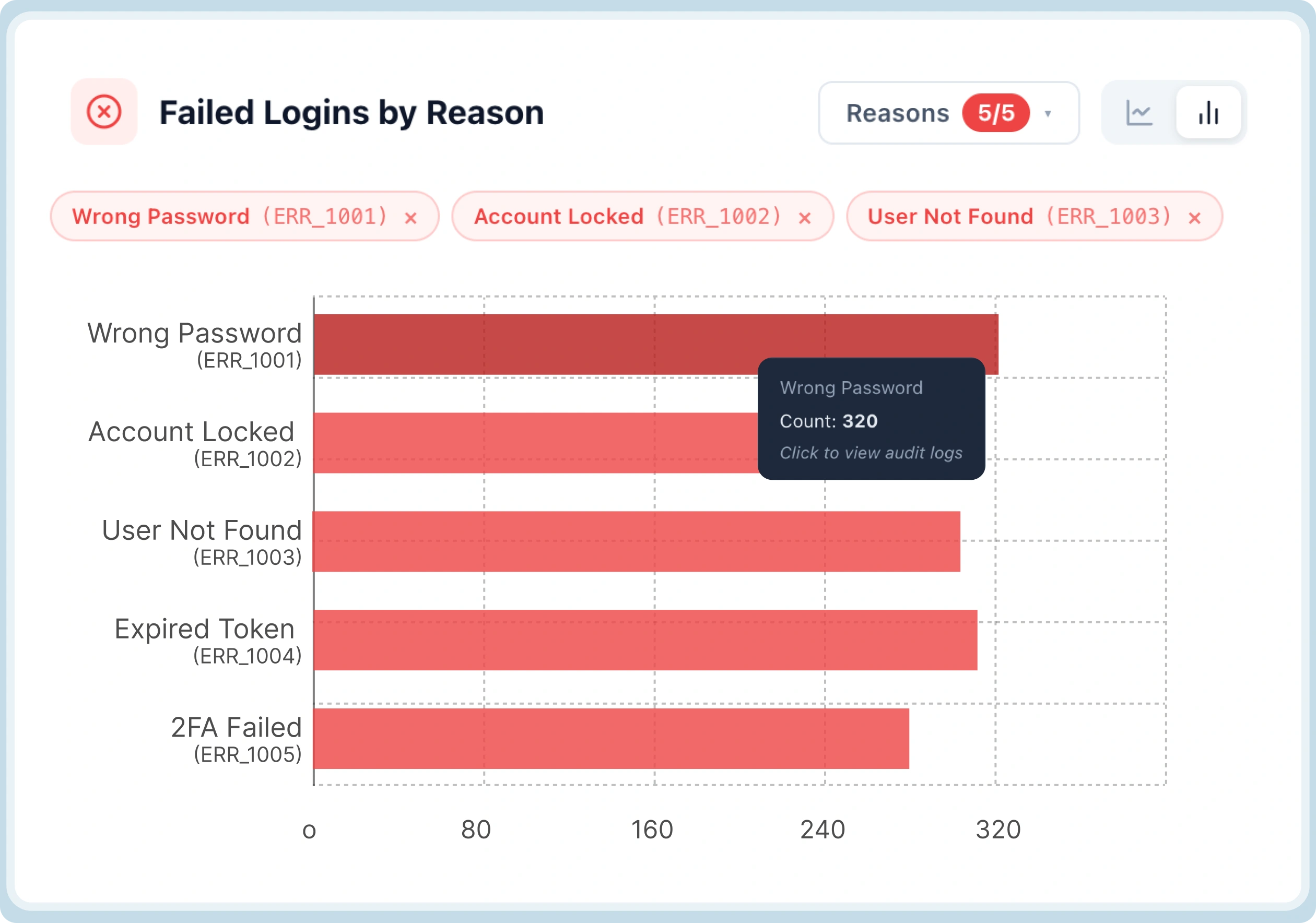
The Login Activity panel provides a real-time pulse of your platform’s health. However, the real value lies in the breakdown of failed logins:
-
Wrong Password vs. Account Locked: A surge in "Wrong Password" events across multiple accounts typically signals a credential stuffing attack. Conversely, a spike in "Account Locked" events might suggest an overly aggressive security policy that is frustrating legitimate users.
-
Token Expiration & Reuse: Security Analytics identifies failures due to expired or reused tokens. This allows developers to quickly identify if a recent deployment introduced a client-side bug in session management without having to parse thousands of lines of raw JSON.
2. The MFA Completion Gap
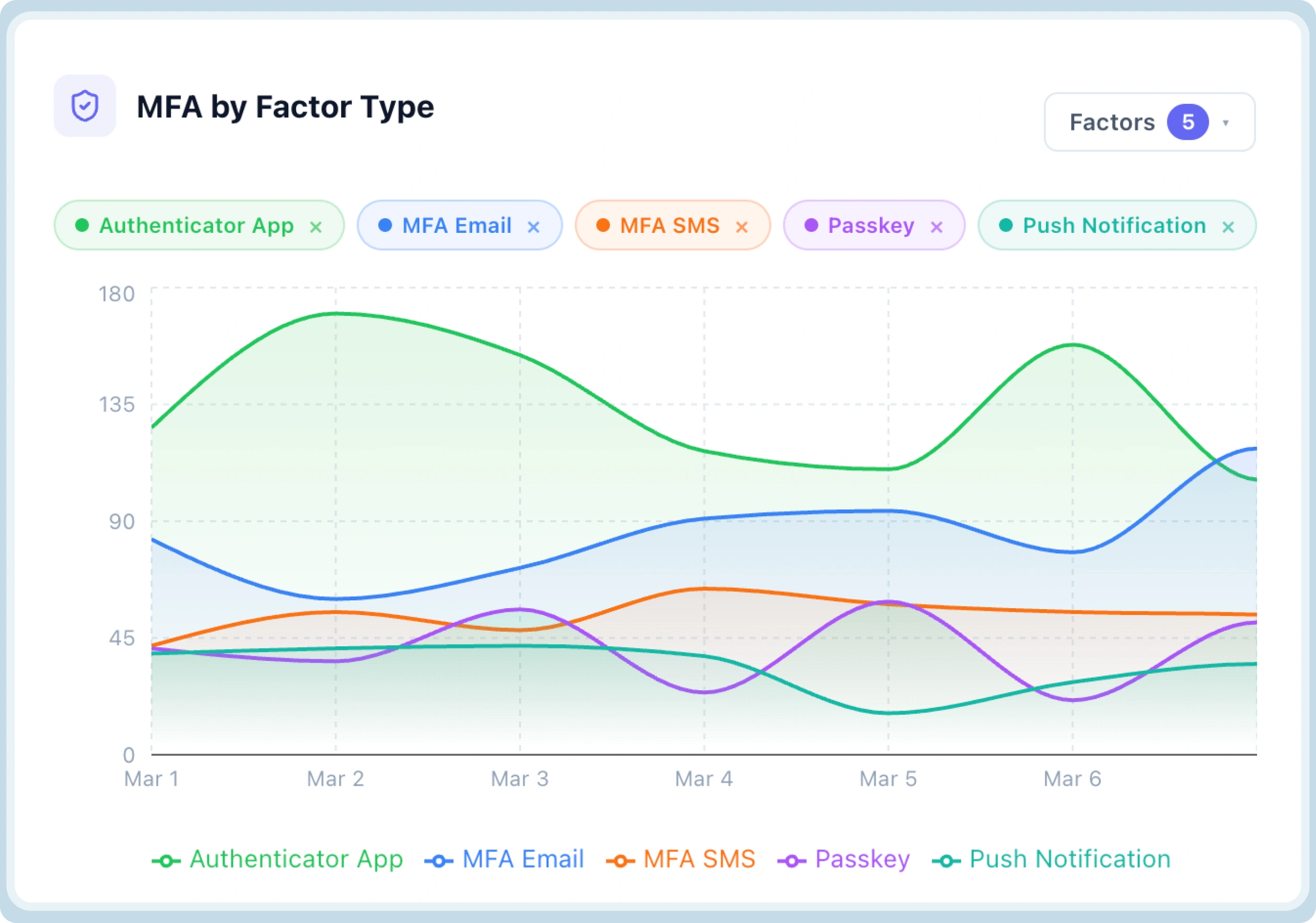
Multi-Factor Authentication is a critical security layer, but it is also a major source of user drop-off. When completion rates dip, you need to know if the problem is technical or behavioral. Security Analytics breaks down MFA failures by factor type—Authenticator Apps, Email, SMS, Passkeys, and Push Notifications.
Specific failure reasons provide the roadmap for optimization:
-
Push Declined: If "Push Declined" is your top failure reason, users are likely seeing prompts they don't recognize or understand, signaling a need for better in-app guidance.
-
Expired vs. Wrong Code: "Expired Code" errors often point to latency in SMS or Email delivery, whereas "Wrong Code" suggests a UX issue where users are confused by the interface.
-
Device & App Mismatches: These technical errors highlight configuration gaps or device compatibility issues that would otherwise stay hidden in support tickets.
3. Closing the Loop on Password Resets
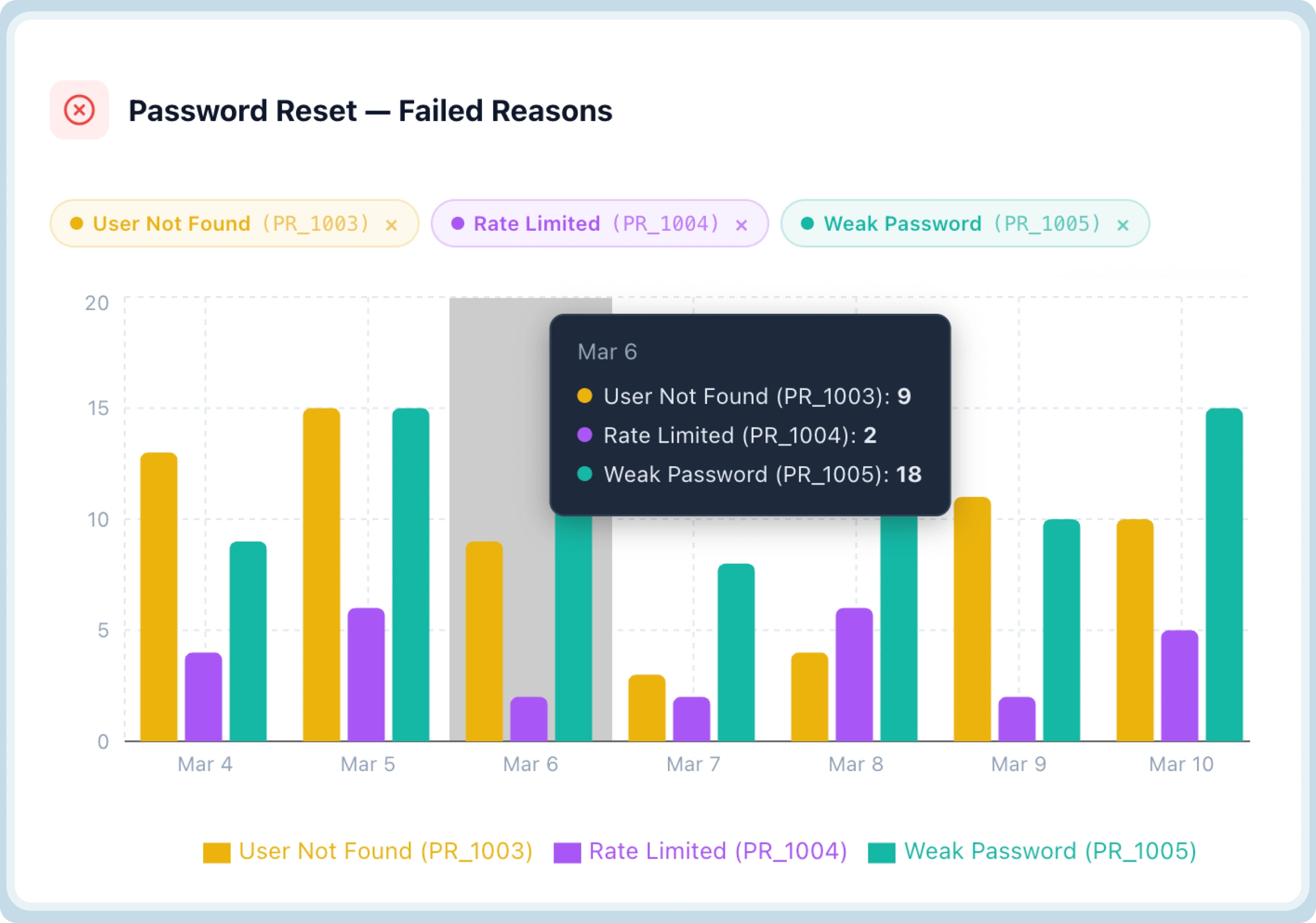
The "Forgot Password" flow is a frequent target for account takeover (ATO) attempts and a common friction point for users. Security Analytics tracks every failure point in the reset journey:
-
Link & Token Issues: Distinguishing between "Token Expired," "Link Already Used," and "Invalid Token" helps developers fix TTL (Time-to-Live) misconfigurations.
-
User Not Found: High volumes of "User Not Found" errors in the reset flow can indicate a reconnaissance attack where bots are attempting to enumerate your user base.
Built-in Threat Response: Seeing and Blocking in One Motion
The traditional workflow for an IT Admin involves seeing a threat in one tool, verifying it with an engineer in a second tool, and finally blocking it in a third. Security Analytics collapses this timeline.
Proactive Breached Password Detection
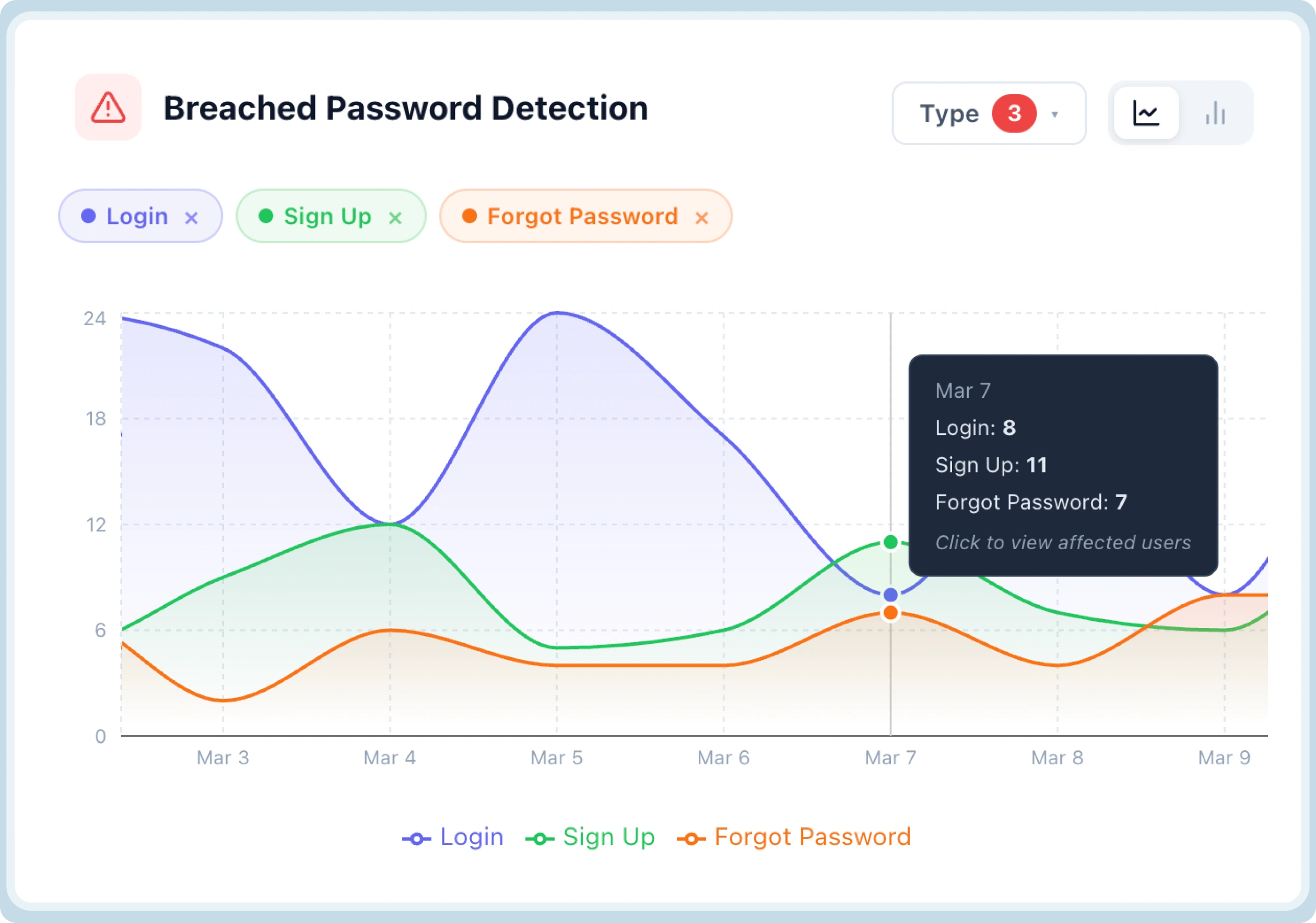
The Breached Password Detection panel monitors for users attempting to log in with credentials known to be compromised in third-party leaks.
-
Visibility: You can see the exposure volume across Login, Sign Up, and Forgot Password flows.
-
Immediate Action: Clicking any data point opens a list of affected UIDs and emails. IT Admins can immediately initiate forced resets or security notifications directly from the dashboard—no engineering request required.
Identifying and Neutralizing Bots
Bot activity often looks like background noise until it’s too late. Security Analytics surfaces the top offending IPs, domains, and user agents driving suspicious activity.
When an IT Admin identifies a cluster of IPs driving a brute-force attack, they can use the Block action directly within the panel. This empowers the operations team to contain threats the moment they are identified.
From Data to Decision-Making - Strategic Use Cases of Security Analytics
It is one thing to have a dashboard; it is another to use it as a strategic lever for the business. Based on the core responsibilities of modern technical teams, let's look at how Security Analytics handles the most common identity-related scenarios.
Use Case 1: Monitoring Platform Health in Under Two Minutes
For an IT Admin or Platform Developer, the "morning ritual" often involves checking various logs to ensure nothing broke overnight. Security Analytics simplifies this by providing an immediate, high-level pulse of the authentication ecosystem.
-
Real-Time Trends: Users can see total, successful, and failed login trends across any date range with a single click.
-
Method Distribution: Beyond just failures, the dashboard shows Login by Factor Type. This allows teams to see what users are actually choosing—for instance, observing a growth in Passwordless adoption while legacy Email + Password usage declines.
-
The Outcome: A complete health check is finished in minutes without writing a single query or pulling a report from a database.
Use Case 2: Tracking MFA Rollout and Driving Adoption
Mandating Multi-Factor Authentication (MFA) is often a friction-heavy process. When a security team makes MFA mandatory, they need to know if the rollout is landing or if it’s creating a support nightmare.
-
Pinpointing Drop-offs: If failed MFA counts climb alongside success rates, teams can toggle the view by factor type to see if the issue is isolated to SMS, Passkeys, or Push Notifications.
-
Identifying Behavioral Friction: By surfacing reasons like Push Declined, teams can identify that users are seeing prompts but dismissing them out of confusion.
-
The Outcome: Instead of rolling back the security policy, the team can add a simple tooltip to the onboarding flow, helping push completion rates recover and ensuring the rollout continues successfully.
Use Case 3: Incident Investigation from Detection to Action
When a spike in failures occurs, time is the most expensive resource. Traditionally, investigations involve context-switching between monitoring tools, log aggregators, and WAF configurations.
-
Instant Pattern Recognition: If Wrong Password and Account Locked reasons spike together, the dashboard instantly confirms a pattern consistent with automated probing.
-
Source Identification: The dashboard surfaces the top offending IPs and User Agent strings driving the attack.
-
Direct Mitigation: IT Admins can block these IPs directly from the same screen, while simultaneously verifying that CAPTCHA and Brute Force Protection layers are holding the line.
-
The Outcome: An incident is scoped, the source is neutralized, and protection layers are verified in a single, unbroken workflow without an engineering ticket ever being raised.
Why is Security Analytics Different From Other Analytics Dashboards?
Most organizations attempt to solve identity visibility by funneling logs into a SIEM (Security Information and Event Management) or a generic log aggregator. While these tools are powerful for cross-stack correlation, they often fall short in the specific context of the identity journey.
-
Journey-Level Context vs. Raw Events: Unlike generic tools that require complex query writing, Security Analytics is built specifically for the authentication lifecycle—covering everything from login and MFA to password resets and bot activity in a single, journey-level view.
-
Zero Integration Overhead: Because it is built directly into LoginRadius, it requires no pipeline setup, no data exports, and works from day one.
-
Operational Autonomy: Most security tools are "read-only." Security Analytics is "read-and-act," allowing IT admins to identify a threat and block the offending IP or force a user reset from the exact same screen.
-
Granular Failure Intelligence: Where a SIEM might show a "401 error," Security Analytics shows a "Push Declined" or "Device Mismatch," providing the specific "why" that generic tools miss.
Why Does This Matter for Businesses?
The "Why" behind Security Analytics extends beyond just technical convenience. It impacts the bottom line by addressing two major organizational drains: Engineering Fatigue and User Abandonment.
1. Freeing Developers from "Reactive Support"
One of the hidden costs of identity management is the "sprint-interrupt." When the security or support team can't answer a question about login failures, they file a ticket with engineering. This forces developers to stop building features and start digging through raw logs to answer basic questions. By giving IT and Security teams the "Actionable View," these ad-hoc requests disappear from the backlog, allowing developers to stay focused on high-value work.
2. Reducing Risk Before It Becomes a Headline
Waiting for a user to report that their account was taken over is a dangerous strategy. By proactively surfacing Breached Password Detection across Login, Sign-up, and Forgot Password flows, teams can act on compromised credentials the moment they appear. Accessing the list of affected UIDs for a forced reset prevents a security incident from escalating into a public breach.
3. Solving the "Named Failure" ROI
Named failure reasons allow for a level of surgical precision that generic error codes lack. If a "Forgot Password" link is frequently showing as Link Already Used or Token Expired, it's likely a TTL configuration gap that is frustrating users. Fixing these small friction points directly improves user retention and reduces the volume of support tickets coming into the helpdesk.
To Sum Up
Security Analytics fills a critical gap that generic logging tools and SIEMs cannot. It is deep enough to surface the specific authentication failure reasons that developers need to debug effectively, yet operational enough for IT admins to respond to threats without an engineering ticket.
By moving from raw logs to journey-level intelligence, you turn your authentication flow from a black box into a transparent, actionable asset.
-
For Developers: Start troubleshooting with the answer, not a grep through logs.
-
For IT Admins: Identify, investigate, and block threats directly from a single dashboard.
-
For the Business: Reduce engineering overhead and stop account takeovers before they escalate.
Security Analytics is the first place a team should look when something goes wrong - and the only dashboard they’ll need to check to ensure everything is going right.
Download the datasheet to know more.
Want to see it first hand? Book a Demo.