Introduction
Passwords have been the default way to authenticate customers for decades, but they come with a built-in weakness: the customer and the application depend on a shared secret. That secret can be phished, reused across services, exposed in a breach, or targeted through credential stuffing. Adding MFA reduces some of that risk, but it can also add another step and cause friction.
Passkey authentication changes that model. Instead of asking customers to remember and submit a password, passkeys use public-key cryptography. The service registers a public key, while the corresponding private-key credential is protected by the customer's authenticator or passkey provider.
When authentication is required, the customer can typically approve it using the same mechanism they already use to unlock a device, such as a fingerprint, face recognition, or PIN. The biometric itself is not sent to the application.
There is another important difference. Passkeys are bound to the service they were created for, making them resistant to conventional phishing attacks and removing the reusable password that fuels credential stuffing.
The cryptography, however, is only part of the story. Businesses still have to decide how customers enroll passkeys, use them across devices, recover access, manage registered credentials, and move from existing password-based authentication without creating a weaker fallback path.
That is where a successful passkey authentication strategy is really tested: not just at login, but across the entire customer identity lifecycle.
What Are Passkeys and How Does Passkey Authentication Work?
A passkey is a FIDO credential that uses public-key cryptography to authenticate a customer without requiring a password. Instead of proving identity by sending a shared secret to an application, the customer proves possession of the corresponding private-key credential through a cryptographic challenge.
Passkeys are built on FIDO standards, including WebAuthn and CTAP. WebAuthn provides the browser and application-facing interface for creating and using public-key credentials, while CTAP enables communication with external or cross-device authenticators where applicable.
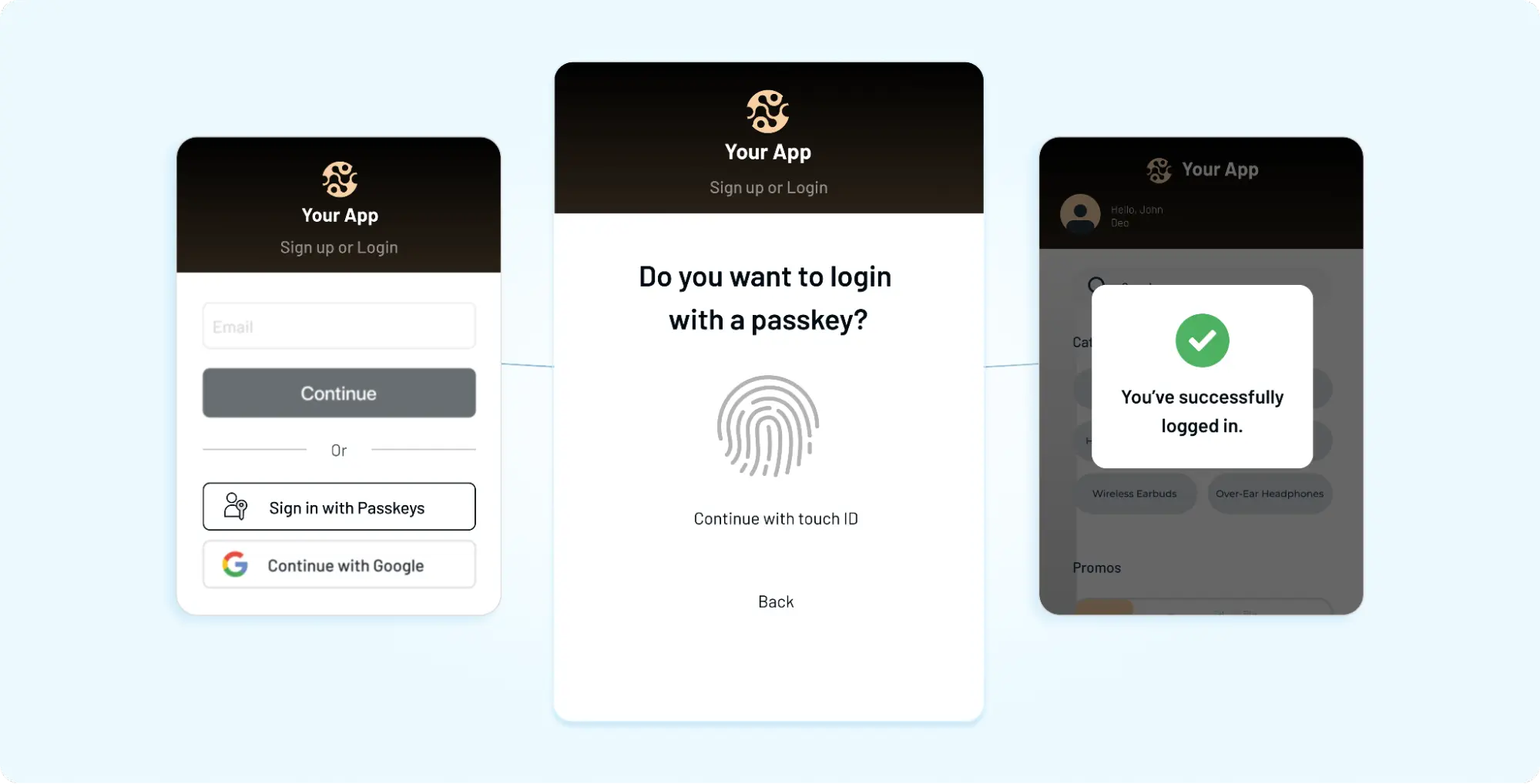
For customers, most of that complexity stays invisible. They may simply choose Sign in with a passkey and confirm the request using a fingerprint, face recognition, device PIN, or another supported local verification method.
Behind that simple interaction is a very different authentication model from a password.
Passkeys Replace Shared Password Secrets With Cryptographic Credentials
With password authentication, the customer knows a secret and the service stores information that allows it to verify that secret. Even when passwords are securely salted and hashed, attackers can still target the password itself through phishing, credential stuffing, password spraying, or offline guessing after a credential database is compromised.
Passkeys remove that shared-password model.
When a passkey is created, a cryptographic key pair is associated with the account and relying party. The service receives the public key. The corresponding private-key credential remains protected by the customer's authenticator or passkey provider and is not sent to the service during authentication.
Conceptually, the difference looks like this: Password Authentication: Customer Enters Password → Service Verifies Password Credential → Authentication Result
Passkey Authentication: Service Issues Challenge → Authenticator Uses Private-Key Credential → Signed Response Returned → Service Verifies With Public Key → Authentication Result
There is no reusable password for the customer to type into a login form.
The Public and Private Keys Have Different Jobs
The two keys work together, but they are not interchangeable.
The public key is registered with the service and can be stored there without needing to remain secret. During login, it is used to verify a cryptographic signature produced for the authentication challenge.
The private-key credential is protected by the authenticator or passkey provider. Depending on the type of passkey, the credential may be device-bound or securely synchronized across supported devices by a passkey provider. In either case, the relying party does not receive the private key as part of the authentication process.
That distinction matters. Saying that a passkey's private key “never leaves the device” is too broad because synced passkeys can be made available across devices through a passkey provider. The security property that matters to the application is that the private key is not disclosed to the relying party during login.
Biometrics and Device PINs Are Not the Passkey
This is an easy detail to get wrong.
A fingerprint or face scan is not the passkey itself. Biometrics, a device PIN, or another supported mechanism may be used locally to verify the customer and authorize use of the passkey.
The biometric data does not need to be sent to the website for the website to authenticate the customer. The application receives the cryptographic authentication result it needs to verify—not the customer's fingerprint or facial data.
This separation gives customers a familiar experience while allowing the underlying authentication to rely on public-key cryptography rather than a reusable password.
Passkeys can therefore make login feel simpler while changing what actually proves access. To understand why that matters for security, it helps to look more closely at what happens when a passkey is first registered and then used for authentication.
How Passkey Registration and Login Work With WebAuthn and FIDO2
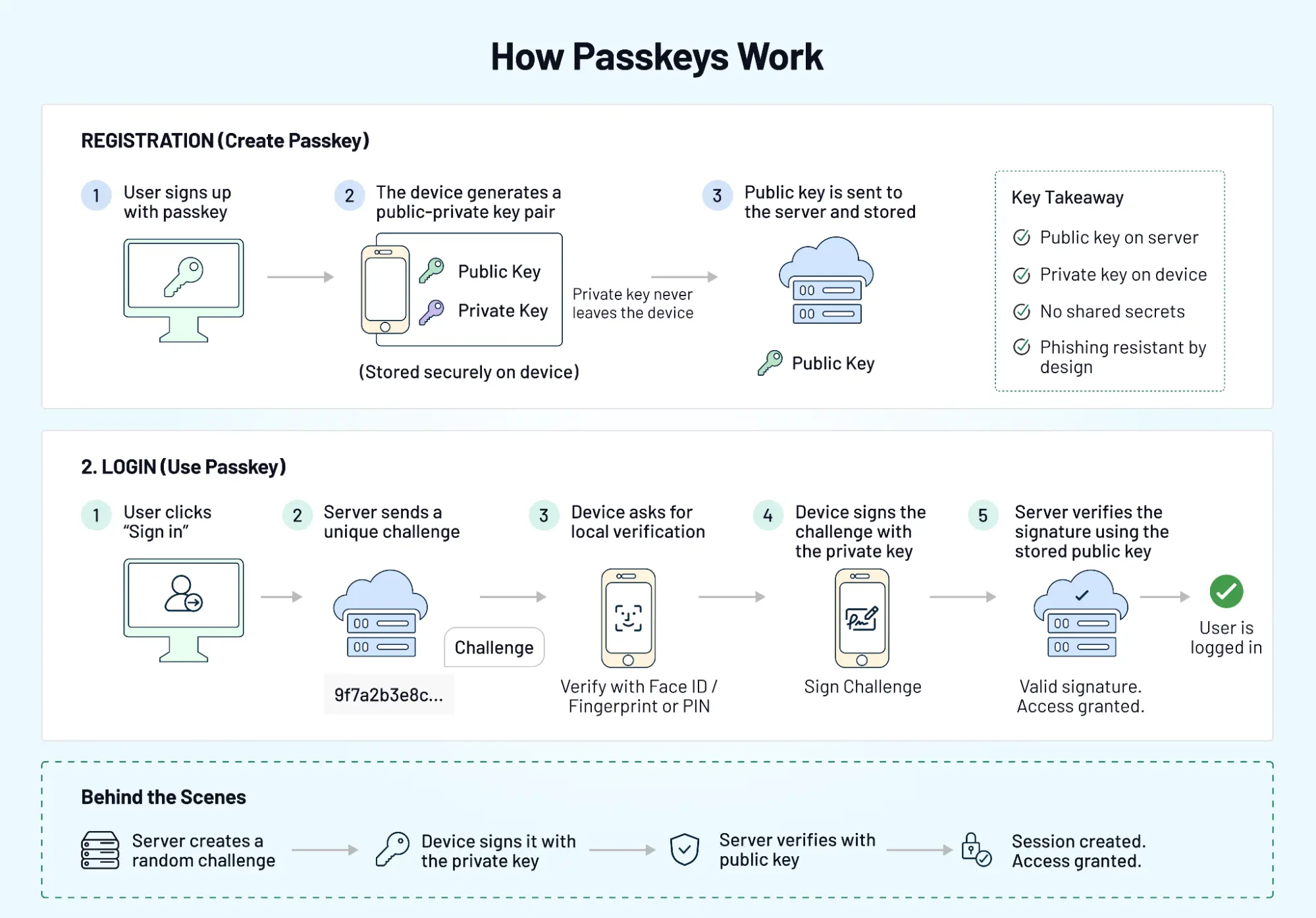
Passkey authentication has two distinct stages: registration, when the credential is created and associated with the customer's account, and authentication, when that credential is later used to sign in.
Both rely on public-key cryptography and server-generated challenges. But what happens in each stage is different.
How a Passkey Is Created During Registration
Passkey registration usually begins after the application has established enough context to associate a new credential with the correct customer account. The server generates registration options that include a fresh challenge and information about the relying party—the service requesting the credential.
The browser or application passes that request to a compatible authenticator. This could be a platform authenticator built into a phone or computer, an external security key, or another supported authenticator accessed through the customer's passkey ecosystem.
The authenticator creates a new public-key credential for the relying party. The public-key information and registration response are returned to the service, where they are validated and associated with the customer's account. The corresponding private-key credential remains protected by the authenticator or passkey provider.
A simplified registration journey looks like this: Customer Starts Enrollment → Server Creates Registration Challenge → Authenticator Creates Credential → Customer Verifies Locally → Public Key Registered With Service → Passkey Ready
The server should also validate the registration response before accepting the credential. Passkey enrollment is a security-sensitive account change, not simply another profile preference.
How a Passkey Authenticates the Customer
When the customer returns, the service does not ask them to reproduce a secret. Instead, it creates a new authentication challenge.
The authenticator identifies an appropriate passkey for that relying party. Depending on the experience, the customer may select the passkey explicitly or it may appear through browser autofill or a credential-selection interface. Local user verification can then be performed using a fingerprint, face recognition, device PIN, or another supported mechanism.
Once authorized, the authenticator uses the private-key credential to sign data associated with the authentication request. The service receives the response and verifies it using the public key registered for that credential.
If the cryptographic verification and other required WebAuthn checks succeed, the application can establish the authenticated session.
The login journey can be summarized as: Customer Starts Login → Server Issues Challenge → Passkey Selected → Customer Verifies Locally → Authenticator Signs Challenge → Server Verifies Response → Application Session Created
A fresh challenge is important because it prevents an old authentication response from simply being captured and replayed as a new login.
WebAuthn Connects the Application to the Authenticator
Web Authentication (WebAuthn) is the W3C web API used by relying parties to create and use public-key credentials. It defines how a website interacts with the browser or platform during credential registration and authentication.
The relying party (RP) is the service requesting authentication. Its identity—including the RP ID—is important because passkey credentials are scoped to the relying party. The browser and authenticator enforce this relationship rather than allowing a credential created for one service to be freely presented to another.
This origin- and relying-party-aware design is one reason passkeys are resistant to conventional phishing. A lookalike phishing site cannot simply collect a passkey the way it can collect a password typed into a fake form.
CTAP Extends FIDO Authentication to External and Cross-Device Authenticators
WebAuthn is only one part of the FIDO2 architecture. CTAP (Client to Authenticator Protocol) defines communication between a client platform and compatible authenticators.
That becomes relevant when authentication involves hardware security keys or certain cross-device experiences. Developers do not normally need to expose CTAP mechanics to customers, but understanding its role helps explain why passkeys can work across different authenticator types rather than being tied to a single browser interface.
So the pieces have distinct responsibilities: WebAuthn connects the relying party's web experience with public-key credential operations, while CTAP supports communication between the client and compatible authenticators.
For the customer, the result may still be a fingerprint, face scan, PIN, or security key interaction followed by access. Underneath, however, the application is verifying a fresh cryptographic proof instead of receiving a reusable password.
Why Passkeys Resist Phishing, Credential Stuffing, and Password-Based Attacks
The security advantage of passkeys comes from changing what the customer and the service rely on for authentication. With passwords, a reusable secret has to be protected. With passkeys, the service verifies cryptographic proof created with the private-key credential associated with that account.
That difference removes several attack paths that exist specifically because passwords can be copied, reused, guessed, or entered into the wrong website.
There Is No Reusable Password for an Attacker to Steal
A password can be captured through phishing, exposed by malware, reused from another breach, or guessed. Once an attacker learns it, the same value can often be submitted from another device.
Passkey authentication does not require the customer to type or transmit a password. The authenticator instead signs data for a fresh authentication challenge, and the service verifies the response using the registered public key.
Capturing that response does not give an attacker a reusable password that can simply be entered during the next login.
Passkeys Are Bound to the Legitimate Service
Phishing resistance is one of the most important properties of FIDO-based authentication.
A convincing phishing page can trick someone into entering a password because the customer is responsible for deciding where to type that secret. Passkeys change that relationship. WebAuthn credentials are scoped to the relying party, and the browser and authenticator participate in enforcing where a credential can be used.
If an attacker creates a lookalike domain, the legitimate service's passkey is not simply made available to that phishing site.
That does not mean customers can never be socially engineered. It means the attacker cannot use the conventional technique of presenting a fake login page and collecting the legitimate site's passkey as though it were a password.
Credential Stuffing Loses the Password It Depends On
Credential stuffing works because people frequently reuse passwords across services. An attacker obtains a valid username-password combination from one source and automatically tests it against other applications.
A passkey is created for a particular relying party rather than reused as the same shared secret across unrelated services. There is no common password value that an attacker can take from Service A and submit to Service B.
For accounts using passkeys instead of passwords for primary authentication, this removes the reused-password mechanism that credential stuffing depends on.
A Server-Side Credential Breach Does Not Reveal a Password Equivalent
Password systems must retain a verifier that allows the service to check future password submissions. Strong password hashing makes stolen verifiers harder to attack, but weak or reused passwords may still be guessed offline if a credential database is compromised.
Passkeys work differently. The service stores the public-key credential information required for verification. The corresponding private-key credential is not stored by the relying party.
A stolen public key cannot be used to generate the private key or create valid authentication signatures. This substantially changes the value of a breached authentication database compared with one containing password hashes.
It does not make a database breach harmless. Customer data, sessions, recovery information, and other sensitive records may still be valuable to an attacker.
Local User Verification Does Not Expose Biometrics to the Application
When customers use a fingerprint or face recognition to approve passkey authentication, the application does not need to receive that biometric information.
The authenticator performs supported user verification locally and then uses the credential to complete the cryptographic authentication operation. The service verifies the resulting WebAuthn response.
This distinction matters for both security and privacy: the application can benefit from strong local user verification without building a database of customer fingerprints or facial templates.
Passkeys Do Not Secure Every Part of the Account Lifecycle
Here’s where teams can go wrong: replacing the password while leaving weaker account-management paths untouched.
An attacker might target account recovery, exploit an already authenticated session, abuse an insecure passkey-enrollment flow, or convince support staff to change account access. Malware on a compromised endpoint introduces another set of risks. Passkeys do not automatically fix any of these problems.
Fallback authentication deserves particular attention. If a customer can bypass passkey authentication through a much weaker recovery method, attackers will naturally target the weaker route.
Passkeys remove major password-specific attack paths. A secure deployment still has to protect enrollment, recovery, credential management, sessions, fallback authentication, and other sensitive account changes with the same level of care.
Synced vs Device-Bound Passkeys: What Businesses Need to Know
Not every passkey is managed in the same way. One of the most important distinctions for businesses is whether a passkey is synced across supported devices or bound to a particular authenticator.
Both approaches use FIDO credentials and public-key cryptography. The difference is largely about how the credential is managed, where it can be used, and what that means for convenience, recovery, and assurance.
Synced Passkeys Make Credentials Available Across Supported Devices
A synced passkey can be securely synchronized through a passkey provider and made available across supported devices within that ecosystem. This reduces the need for customers to create a completely new credential every time they replace a phone, add a tablet, or start using another compatible device.
For consumer authentication, that portability can remove considerable friction. A customer may create a passkey on one device and later use it from another supported device after meeting the passkey provider's security requirements.
This is also why saying that a passkey's private key “never leaves the device” is not precise enough. With synced passkeys, credential material may be securely synchronized by the passkey provider. What matters to the relying party is that the private key is not disclosed to the service during authentication.
Device-Bound Passkeys Remain Associated With a Particular Authenticator
A device-bound passkey is not synchronized through a passkey provider to other authenticators. The credential remains associated with the authenticator on which it was created.
Hardware security keys are a familiar example of an authenticator that can hold device-bound FIDO credentials. Device-bound credentials may also be relevant where an organization needs stronger control over the authenticator used for access or has higher-assurance authentication requirements.
The trade-off is portability. If access depends on a specific authenticator and that authenticator becomes unavailable, the business needs another secure credential or recovery process that does not undermine the original security model.
Synced and Device-Bound Passkeys Solve Different Deployment Problems
For many customer-facing applications, convenience across devices matters. In other environments, control over the authenticator may carry more weight.
The distinction is better understood through deployment characteristics than through a simple “more secure” ranking.
| Consideration | Synced Passkeys | Device-Bound Passkeys |
|---|---|---|
| Credential availability | Can be synchronized across supported devices | Associated with a particular authenticator |
| Cross-device convenience | Generally easier within supported ecosystems | May require the specific authenticator |
| Device replacement | Passkey provider may help maintain credential availability | Another credential or recovery path may be required |
| Hardware binding | Not necessarily bound to one physical authenticator | Can be bound to a specific hardware authenticator |
| Common consideration | Customer convenience and multi-device access | Authenticator control and higher-assurance use cases |
Neither model removes the need for secure account recovery and credential management.
Passkey Providers Play an Important Role in the Customer Experience
A passkey provider manages the creation, storage, and availability of passkeys for the customer. Depending on the platform and customer choice, this may be an operating-system credential manager or another compatible credential-management service.
That layer matters because customers increasingly expect authentication to work across the devices they already use. Businesses therefore need to test more than whether a WebAuthn ceremony succeeds in one browser. They should understand how their passkey experience behaves across supported operating systems, browsers, devices, authenticators, and credential providers.
There is no reason every application has to force the same passkey model. A consumer service prioritizing low-friction multi-device access may make different choices from an application with tightly controlled authenticator requirements.
The better question is whether the passkey model matches the application's customer experience, recovery strategy, device landscape, and required authentication assurance.
Passkeys vs Passwords, OTPs, Magic Links, and Traditional MFA
Passkeys are often grouped with passwords, OTPs, magic links, and MFA because all of them can appear somewhere in an authentication journey. Technically, though, they prove access in different ways and do not provide the same resistance to phishing or credential reuse.
The biggest distinction is the credential itself. Passwords rely on a reusable secret. OTPs rely on short-lived codes delivered or generated through another channel or authenticator. Magic links depend on access to an email account. Passkeys use public-key cryptography and bind the credential to the legitimate relying party.
| Authentication Method | Shared or Reusable Secret? | Phishing-Resistant? | Main Customer Dependency | Typical Role |
|---|---|---|---|---|
| Password | Yes | No | Remembering or managing a password | Primary authentication |
| SMS or Email OTP | Short-lived code | No | Access to phone or email channel | Authentication, verification, MFA, or recovery |
| Magic Link | Short-lived link/token | No | Access to email account | Passwordless authentication |
| Passkey | No shared secret | Yes | Compatible authenticator/passkey provider | Passwordless primary authentication |
| FIDO Hardware Security Key | No shared secret | Yes | Physical authenticator | FIDO authentication and higher-assurance scenarios |
Passkeys vs Passwords: Removing the Shared Secret
Passwords have to be created, remembered or stored, submitted during authentication, and protected by both the customer and the service. Even when the server follows strong password-storage practices, customers can still reuse or disclose passwords elsewhere.
Passkeys remove that reusable password from the login process. The customer proves access through a cryptographic operation rather than submitting a secret that the server must verify.
This does not mean every business can immediately remove passwords. Existing accounts, unsupported environments, migration, and recovery may require a transition period. But passkeys create a path toward reducing—and eventually removing, where appropriate—the application's dependence on passwords.
Passkeys vs OTPs: Cryptographic Proof Instead of a Transferable Code
An OTP is temporary, but it is still something a customer can read and provide elsewhere.
A convincing phishing site can ask for an SMS, email, or authenticator-generated OTP and relay that code to the legitimate service while it is still valid. Passkeys avoid this pattern because the authentication credential is bound to the relying party rather than presented as a transferable code.
OTPs can still have valid roles in verification, authentication, recovery, or step-up flows. They simply should not be described as providing the same phishing resistance as FIDO passkeys.
Passkeys vs Magic Links: Passwordless Does Not Always Mean Phishing-Resistant
Magic links and passkeys can both create a passwordless customer experience, but passwordless describes the absence of a password—not the underlying security mechanism.
A magic link typically depends on control of an email inbox and possession of a valid link or token. Its security therefore depends partly on the email account and how the link is handled.
Passkeys instead use a cryptographic credential associated with the relying party. That makes them fundamentally different from authentication methods that remove the password but still rely on transferable links or codes.
Passkeys and MFA Are Not Mutually Exclusive
The relationship between passkeys and MFA needs more nuance than saying one simply replaces the other.
A passkey authentication ceremony can combine possession of an authenticator with local user verification, such as a device PIN or biometric. Depending on the authenticator, deployment, and assurance requirements, passkeys can therefore replace some traditional password-plus-OTP experiences.
Passkeys can also participate in authentication architectures where additional verification or step-up controls are required for sensitive actions.
So the decision is not necessarily passkeys or MFA. Businesses need to determine what authentication assurance a particular customer journey requires and whether the passkey implementation satisfies it.
That question becomes practical very quickly. Once a business decides where passkeys belong in its authentication model, the next challenge is implementing registration, login, credential management, and sensitive account changes without creating new weak points.
How to Implement Passkey Authentication Without Creating New Security Gaps
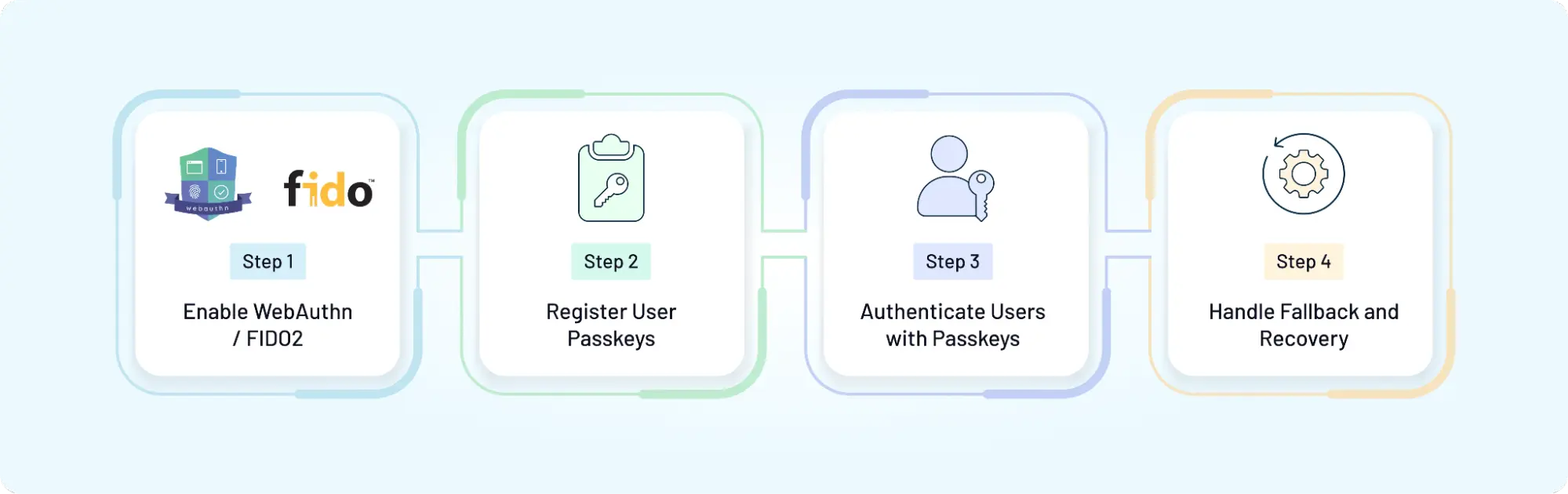
Implementing passkeys involves more than adding a WebAuthn call to the login page. The application has to decide when customers can create credentials, how those credentials map to accounts, what happens when multiple passkeys exist, and which controls protect enrollment, removal, and recovery.
Start with the authentication model. Passkeys might be offered alongside passwords, introduced progressively to existing customers, used as the primary authentication method, or incorporated into higher-assurance authentication flows. That decision affects almost everything that follows.
Define Where Passkeys Fit in the Authentication Journey
For an application with an existing password user base, forcing an immediate switch can create unnecessary recovery and support problems. Progressive enrollment is usually easier to introduce because customers can establish a passkey after successfully authenticating through an existing trusted flow.
New applications have more flexibility. They may be able to design around passkeys from the beginning, provided their supported customers, browsers, devices, and recovery requirements make that practical.
Whichever model you choose, define the fallback path at the same time. Authentication architecture is only as strong as the easiest legitimate route an attacker can abuse.
Configure the Relying Party and WebAuthn Requirements Carefully
WebAuthn credentials are created in the context of a relying party. That means values such as the RP ID, expected origin, challenge, and user-verification requirements are security controls, not incidental configuration.
Registration and authentication responses should be validated against the values expected by the server. Challenges should be generated securely, be sufficiently unpredictable, expire appropriately, and not be reusable as valid authentication proofs.
Production WebAuthn deployments also require a secure context, with HTTPS being the normal requirement for web applications outside development exceptions.
Here’s where custom implementations can become risky: a successful browser API call does not by itself mean the server has correctly validated the WebAuthn ceremony.
Build Passkey Registration as a Protected Account Operation
During registration, the server creates credential-creation options and sends them to the client. The authenticator creates the credential, and the resulting registration response returns to the server for validation.
Once validated, the public-key credential information can be associated with the correct customer account.
The sequence looks like this: Authenticated or Verified Customer → Registration Options Created → Authenticator Creates Passkey → Customer Verifies Locally → Registration Response Validated → Credential Associated With Customer Account
Do not treat the final step casually. Registering a passkey gives that credential future authentication capability.
If an attacker hijacks an authenticated session and can silently add their own passkey, they may turn temporary session access into persistent account access. Sensitive passkey enrollment may therefore require recent authentication, step-up verification, customer notification, or other controls appropriate to the application's risk model.
Validate the Complete Authentication Ceremony on the Server
During login, the server generates authentication options containing a fresh challenge. The authenticator uses an appropriate credential, performs any required local user verification, and signs the authentication data.
The server then validates the returned WebAuthn response against the registered credential and expected authentication context before establishing the application session.
That validation needs to cover more than whether a signature exists. The application or identity platform should correctly validate the challenge, relying-party context, origin, signature, credential, and required authenticator/user-verification information according to the WebAuthn flow.
Only after those checks succeed should authentication be considered complete.
Allow Customers to Register More Than One Passkey
A customer may use multiple devices or authenticators over the lifetime of an account. Supporting multiple registered passkeys can reduce dependence on a single credential and make device changes easier to handle.
Each credential should be tracked independently rather than treating “passkey enabled” as one account-level switch. Customers should be able to understand which credentials are associated with their account and distinguish them well enough to manage obsolete ones.
Avoid unnecessary assumptions about the device itself. WebAuthn credential metadata and authenticator capabilities do not always give the application a perfect human-readable description of the physical device holding a credential.
Give Customers a Secure Way to Manage Registered Passkeys
Passkey management is part of authentication security.
Customers should have a clear account experience for viewing and removing registered passkeys. Depending on the application's risk profile, adding or deleting credentials may warrant recent authentication, step-up verification, notifications, or additional confirmation.
Removal needs particular care. A customer deleting an old credential is normal. An attacker removing every legitimate passkey after gaining temporary account access is not.
Audit relevant credential lifecycle events so security and support teams can investigate unexpected enrollment or removal activity when necessary.
Plan Recovery Before Removing Passwords
A passkey implementation can work perfectly and still leave a customer unable to sign in if the only available authenticator is lost, replaced, or inaccessible.
Recovery therefore needs to be designed before passwords are removed—not after customers begin getting locked out.
Possible approaches include synced passkeys, multiple registered authenticators, another appropriately secured authentication method, or a controlled account-recovery process. The right combination depends on the customer population and required assurance.
The important part is avoiding a security downgrade. If passkey authentication is phishing-resistant but account recovery requires only easily obtained personal information or a weak channel, attackers have a reason to ignore the passkey entirely.
A production-ready passkey implementation should therefore be tested as a complete lifecycle: Enrollment → Passkey Login → Additional Passkey Registration → Device Change → Credential Removal → Recovery → Reauthentication
The login ceremony may be the most visible part. The surrounding credential lifecycle is what determines whether passkeys remain secure and usable after deployment.
How to Design a Passkey Experience That Works Across Devices and Browsers
Passkeys can remove the need to remember and type passwords, but customers still need to understand what to do when a login screen appears. A technically correct implementation can become confusing if passkeys are hidden behind unfamiliar terminology, work differently across devices, or leave customers without a clear path when their expected credential is unavailable.
The goal is not to teach customers how WebAuthn works. It is to make the next authentication action obvious.
Choose How Customers Discover Passkey Login
A dedicated Sign in with a passkey button is explicit. Customers can see that passkeys are available and intentionally start the authentication flow.
Passkey autofill, also known as conditional UI in WebAuthn contexts, can make the experience more integrated. Available passkeys can appear through the browser's credential interface when the customer interacts with the login form, reducing the need for a separate authentication path.
Some applications may benefit from supporting both approaches. A visible passkey option helps with discoverability, while autofill can make repeat authentication faster for customers who already have a credential.
The right choice depends on the rest of the login experience. If passwords remain available during migration, for example, the interface should make both methods understandable without presenting customers with a wall of authentication choices.
Explain the Customer Action, Not the Cryptography
Terms such as public-key credential, authenticator assertion, and relying party matter to developers. They rarely help someone trying to access an account.
Customer-facing language should describe the action they need to take. Depending on the platform, that may be using a fingerprint, face recognition, device PIN, or another supported screen-unlock method to continue.
Be careful with wording such as “Sign in with your fingerprint.” The fingerprint is not the credential, and a customer may use a PIN or another verification method instead. Language such as “Sign in with a passkey” followed by platform-native prompts is more accurate and adaptable.
Account for Cross-Device Passkey Authentication
Customers will not always sign in on the same device where they first created or commonly use a passkey.
A person might open an application on a laptop while an appropriate credential is available through another device or authenticator. Supported cross-device authentication can allow the customer to use that credential without falling immediately back to a password.
This experience deserves explicit testing. Switching devices can introduce QR codes, proximity checks, Bluetooth requirements, authenticator-selection prompts, or other platform-controlled interactions depending on the environment.
Don't assume customers will understand why their phone is suddenly involved in a desktop login. A small amount of contextual guidance can prevent a secure flow from looking like an error.
Make Registered Passkeys Easy to Recognize and Manage
Passkeys should not disappear into the account after enrollment.
Give customers a place to review registered credentials, add another passkey, and remove credentials they no longer want associated with the account. Where useful information is available, display details that help distinguish credentials without implying that the application knows more about the underlying physical device than it actually does.
Credential removal also needs a clear consequence. Customers should understand that deleting a passkey from the account means it can no longer be used to authenticate to that account, even if related credential information still appears elsewhere in their device or provider ecosystem.
Design for Missing Passkeys and Failed Authentication
Happy-path authentication is usually the easy part.
What happens when no passkey appears? What if the customer cancels the platform prompt, uses an unsupported browser, cannot access the expected device, or fails local user verification?
Generic messages such as “Authentication failed” do little to help.
The interface should distinguish situations where the customer can simply retry from those where they need another registered credential, another supported authentication method, or account recovery. At the same time, error messages should avoid revealing unnecessary account information that could help an attacker enumerate users or credentials.
Test the Experience Beyond a Single Device and Browser
Passkey behavior involves the application, browser, operating system, authenticator, and potentially a passkey provider. Testing only the developer's preferred laptop and phone is not enough.
Cover the device and browser combinations that matter to your actual customer base. Test registration and repeat login, but also cross-device authentication, multiple passkeys, credential removal, canceled prompts, device replacement, unavailable authenticators, and recovery.
A useful end-to-end test looks more like this: Passkey Offered → Credential Created → Customer Returns → Passkey Discovered → Local Verification → Login Completed → Customer Changes Device → Access Restored → Old Credential Managed
Passkeys can make authentication feel almost invisible when these transitions work well. When they do not, customers quickly end up back at fallback authentication—which is exactly where both security and user experience can start to unravel.
Passkey Recovery and Device Loss Need the Same Security Attention as Login
Passkeys remove the password from authentication, but they do not remove the possibility of losing access. Customers replace phones, lose hardware authenticators, move between device ecosystems, delete credentials, or simply reach a device where their expected passkey is unavailable.
That makes recovery part of the authentication architecture—not a support process to design later.
A strong passkey login paired with weak account recovery creates an obvious target. If an attacker cannot defeat the passkey but can reset account access through an easier channel, the recovery flow becomes the preferred route into the account.
Synced Passkeys Can Reduce Device-Replacement Friction
Synced passkeys can make device changes easier because an eligible credential may become available on another supported device through the customer's passkey provider.
This can reduce dependence on the original phone or computer. It does not mean the application should assume that synchronization will solve every recovery scenario. Customers may lose access to the provider account, switch ecosystems, disable synchronization, or encounter a device where the expected credential is unavailable.
Applications still need a defined path for customers who cannot use an existing passkey.
Multiple Passkeys Can Reduce Dependence on One Authenticator
Allowing customers to register more than one passkey can provide another route to authentication without immediately falling back to a weaker recovery mechanism.
For example, a customer might have a synced passkey available through their usual device ecosystem and another credential associated with a separate authenticator. The appropriate setup depends on the application's audience and risk requirements; requiring every customer to maintain a specific number or type of passkey is not universally necessary.
What matters is avoiding an architecture where loss of one authenticator automatically means loss of the account.
Lost Devices Should Trigger Credential Management, Not Panic
Losing a device does not automatically mean an attacker can use every passkey associated with it. Passkey use commonly requires the authenticator's local security controls, such as device unlock or user verification.
Still, customers need a way to review and remove credentials they no longer trust.
Once access is restored through another legitimate method, the account should make it possible to identify and revoke the relevant passkey. For higher-risk applications, unexpected credential changes may also justify customer notifications, audit events, or additional verification.
Device loss should therefore connect directly to the credential lifecycle: Device Lost → Customer Uses Another Trusted Access Path → Account Access Verified → Registered Credentials Reviewed → Untrusted Passkey Removed → New Passkey Added if Needed
Recovery Should Not Become a Back Door Around Passkeys
Here’s where teams usually go wrong: they strengthen primary authentication but leave recovery dependent on information or channels that are much easier to compromise.
Security questions based on discoverable personal information are an obvious example. Email or SMS recovery can also inherit the security limitations of those channels. Support-assisted recovery introduces another risk if an attacker can socially engineer an account change.
There is no single recovery method that fits every application. The required controls should reflect the value of the account, customer population, available authenticators, and consequences of unauthorized recovery.
For sensitive accounts or actions, recovery may require stronger identity verification, multiple signals, additional review, delayed high-risk changes, or step-up authentication once access has been restored.
The important principle is simple: recovery should provide a legitimate way back into the account without making the passkey irrelevant to an attacker.
Passkey Removal and Replacement Are Security-Sensitive Events
Credential management can change who is able to authenticate in the future.
Adding a new passkey, deleting an existing one, or resetting passkey access should therefore receive more protection than an ordinary profile edit. Depending on risk, that could mean requiring recent authentication, step-up verification, notifying the customer, or recording the change for audit and investigation.
Consider what happens after a session is compromised. If that session can add an attacker-controlled passkey and remove every legitimate credential without additional checks, the attacker may convert temporary access into a persistent authentication method.
The same concern applies to support tooling. Administrative passkey resets or credential changes should be appropriately authorized and auditable.
Recovery Should Cover the Entire Customer Account Lifecycle
Passkey planning needs to account for more than the moment a device goes missing. Customers will enroll new devices, replace old credentials, change authentication methods, recover accounts, and eventually remove credentials they no longer use.
A complete lifecycle might look like this: Passkey Enrollment → Regular Authentication → Additional Device or Credential → Device Loss or Change → Secure Recovery → Credential Review → Passkey Replacement or Revocation → Continued Authentication
The strongest recovery experience is not necessarily the one with the fewest steps. It is the one that restores legitimate access without quietly reintroducing the password-era weaknesses passkeys were meant to reduce.
How to Migrate From Passwords to Passkeys Without Disrupting Existing Customers
For an established application, implementing passkeys is rarely a clean switch from one authentication method to another. Millions of existing customers may already have passwords, active sessions, saved credentials, MFA settings, and familiar recovery paths.
Trying to remove all of that at once can create unnecessary lockouts and support demand. A more practical approach is to make passkey adoption progressive: introduce the stronger authentication method while customers still have a trusted way to establish and recover access.
Start With Progressive Passkey Enrollment
Existing customers already authenticate through an established login flow. That creates a natural opportunity to offer passkey enrollment after successful authentication.
Instead of asking everyone to create a passkey through a separate campaign or forcing enrollment before they can continue, the application can introduce it when the customer is already signed in and account context has been established.
A typical journey looks like this: Existing Login → Customer Authenticated → Passkey Enrollment Offered → Customer Creates Passkey → Credential Registered → Passkey Available for Future Login
The enrollment prompt should explain the benefit in customer terms. Faster sign-in and no password to type are easier to understand than WebAuthn credentials or asymmetric cryptography.
Frequency matters too. Repeatedly interrupting customers who decline passkey enrollment can turn a security improvement into authentication fatigue.
Introduce Passkeys During New Customer Registration
New customers provide another opportunity because there is no established login habit to change.
Where the supported environment and account model allow it, businesses can offer passkey creation during onboarding or shortly after the account has been verified. This can reduce the number of new customers who become dependent on passwords in the first place.
But onboarding still needs a plan for unsupported environments, interrupted enrollment, account verification, and recovery. Removing the password field does not remove those lifecycle requirements.
Run Password and Passkey Authentication in Parallel During the Transition
A migration period may require both authentication methods.
Customers who have enrolled a passkey can be encouraged to use it on future visits, while customers who have not can continue through the existing authentication path. Over time, the business can increase passkey adoption without treating every customer as though they use the same devices or are ready to migrate on the same day.
This coexistence should be deliberate rather than permanent by default. If passwords remain indefinitely as an equally easy fallback for every passkey-enabled account, some of the security benefit of moving away from passwords can be diluted.
The long-term goal should be clear: determine when and for which customer journeys password dependence can safely be reduced.
Keep Fallback Authentication Appropriate to the Risk
Migration creates an awkward period. The new authentication method may be phishing-resistant while the older fallback remains vulnerable to phishing or credential reuse.
That does not automatically mean the fallback must disappear immediately. It means the application should understand the security difference and protect higher-risk operations accordingly.
For example, an account authenticated through a weaker fallback may require additional verification before registering a new passkey, changing recovery information, or performing a sensitive transaction.
A fallback should help legitimate customers complete the migration—not provide attackers with a permanent shortcut around passkey authentication.
Measure More Than Passkey Enrollment
A high enrollment rate looks good on a dashboard, but it does not tell you whether the authentication experience is working.
Track whether customers can successfully use their passkeys after enrollment. Look at authentication success and failure, repeated fallback usage, recovery initiation, credential removal, device-change problems, abandonment, and support demand.
These signals can reveal very different problems. Customers may create passkeys but continue choosing passwords. They may authenticate successfully on mobile but struggle on desktop. Or a recovery flow may be sending too many people back to the legacy method.
Migration decisions should respond to that behavior rather than an arbitrary deadline.
Reduce Password Dependence as Passkey Adoption Matures
There is no universal number of days after which an application should remove passwords. The decision depends on customer adoption, supported environments, recovery readiness, risk requirements, and the application's ability to handle customers who cannot use an existing passkey.
A mature migration can move through stages: Password-Based Customer → Passkey Offered → Passkey Enrolled → Passkey Becomes Preferred Login → Secure Recovery Established → Password Dependence Reduced or Removed Where Appropriate
Some customer segments may reach the final stage earlier than others.
That is fine. Passkey migration does not have to be a single cutover event. What matters is that each stage moves the authentication architecture toward fewer reusable secrets without creating lockouts—or leaving an easier password-based route open indefinitely.
Passkey Deployment Checklist for Security, Product, and Identity Teams
Before passkeys reach production, teams need to test more than whether registration and login work on a supported device. A production deployment crosses security, identity, product, UX, recovery, and support workflows. A weakness in any one of them can affect the entire authentication experience.
Use the following areas as a final implementation review.
Validate the WebAuthn and Relying-Party Configuration
Confirm that the relying-party configuration, allowed origins, HTTPS deployment, challenge generation, user-verification requirements, and server-side WebAuthn validation match the intended security model.
Registration and authentication should reject responses that do not satisfy the expected challenge, origin, relying-party, credential, signature, and verification requirements.
Protect Passkey Enrollment and Credential Changes
Adding a passkey gives a credential future authentication capability. Removing one changes how legitimate customers can regain access.
Treat enrollment, replacement, reset, and removal as security-sensitive account operations. Depending on risk, require recent authentication or step-up verification, generate appropriate audit events, and notify customers about important credential changes.
Test the Customer Experience Across Supported Environments
Test the combinations your customers actually use: browsers, operating systems, mobile devices, desktops, platform authenticators, external authenticators, and supported passkey providers.
Do not stop at successful login. Include autofill or button-based discovery, canceled prompts, missing credentials, cross-device authentication, multiple registered passkeys, and unsupported environments.
Decide How Multiple Passkeys Will Be Managed
Define whether customers can register multiple credentials and how they can review and remove them.
The account experience should make credential management understandable without exposing unnecessary technical details or pretending the application can always identify the exact physical device behind a credential.
Test Device Loss and Account Recovery Before Launch
Ask a simple question during testing: What happens when the customer's expected passkey is unavailable?
Run that scenario end to end. Test device replacement, lost authenticators, unavailable synced credentials, recovery, restored access, credential revocation, and new passkey enrollment.
If the recovery path is substantially weaker than normal authentication, revisit it before rollout.
Define the Password-to-Passkey Migration Strategy
For an existing customer base, decide when passkeys will be offered, how enrollment will be encouraged, and which authentication methods remain available during the transition.
Also define what happens after adoption increases. A migration plan that never addresses long-term password dependence can leave the weaker credential available long after customers have enrolled stronger authentication.
Review Fallback and Step-Up Authentication
Document every route that can grant or restore account access.
Passwords, OTPs, recovery links, support-assisted processes, active sessions, and other fallback methods should be reviewed against the assurance expected from passkey authentication. Sensitive actions may require additional controls when the customer entered through a weaker route.
Protect the Session After Authentication
Successful passkey verification establishes identity at a point in time. The application still needs secure session creation, expiration, renewal, revocation, and protection against session theft.
Strong authentication cannot compensate for poorly protected application sessions.
Log Important Passkey Lifecycle Events
Security and support teams should have enough visibility to investigate suspicious credential activity.
Relevant events may include passkey registration, authentication, failed authentication, credential removal, reset, recovery, and other sensitive account changes. Logs should provide useful security context without exposing private-key material or unnecessary sensitive data.
Measure Whether Passkeys Work in Production
Enrollment rate is only the beginning.
Monitor passkey usage, successful authentication, failures, fallback frequency, recovery activity, abandonment, credential-management events, and support issues. These signals help determine whether customers are actually moving away from passwords or simply registering passkeys they rarely use.
A useful final review can be summarized as: Configure → Protect Enrollment → Test Authentication → Validate Cross-Device UX → Test Recovery → Secure Fallbacks → Protect Sessions → Monitor Credential Lifecycle → Measure Adoption
Passkey deployment is ready when the complete customer journey holds up—not simply when the first successful WebAuthn login appears in a test environment.
How LoginRadius Supports Passkey Authentication Across the Customer Lifecycle
Building passkey authentication directly with WebAuthn gives development teams control, but it also means owning registration, authentication, credential management, recovery, migration, and the surrounding customer identity workflows. Those requirements become more difficult to maintain when authentication has to work consistently across multiple applications and a large customer base.
LoginRadius brings passkeys into the broader CIAM authentication lifecycle, so businesses can introduce passwordless authentication without treating passkeys as an isolated login feature.
Support Passkey Registration and Passwordless Login
LoginRadius supports passkey registration and authentication, allowing customers to create a passkey and later use it to access their account without entering a password.
The customer-facing experience stays familiar: select or discover an available passkey, complete the verification requested by the authenticator, and continue into the application. Behind that interaction, passkey authentication relies on WebAuthn and public-key cryptography rather than a reusable password.
For development teams, this means passkey flows can be integrated into the same customer identity infrastructure responsible for authentication and account management.
Offer Passkeys Through Autofill, a Login Button, or Both
Passkey discoverability affects whether customers actually use the credentials they create.
LoginRadius supports different passkey selection experiences, including Autofill, Button, or Both. This gives businesses flexibility in how passkeys appear within the login journey rather than forcing every application into the same interface.
Autofill can make passkey authentication feel like a natural extension of the existing login form. A dedicated button makes the option explicit. Supporting both can be useful during migration, when customers may still see passwords and other authentication methods alongside passkeys.
Introduce Passkeys Progressively to Existing Customers
A large existing customer base rarely moves to a new authentication method overnight.
LoginRadius supports Progressive Enrollment, allowing businesses to introduce passkey creation within an existing authentication journey. A customer can authenticate through the established method and then be prompted to register a passkey for future use.
The transition can look like this: Existing Customer Login → Authentication Completed → Passkey Enrollment Offered → Passkey Registered → Future Passkey Authentication Available
This lets teams increase passkey adoption without requiring an immediate password-to-passkey cutover for every customer.
Manage Passkeys After Enrollment
Credential lifecycle management continues after the first successful registration.
LoginRadius provides passkey management capabilities so registered credentials can be handled as part of the customer's account lifecycle. It also supports passkey reset and forgot-passkey scenarios, giving businesses a structured way to address situations where normal passkey authentication is unavailable.
These workflows matter because passkey deployment is not complete when a credential is created. Customers will eventually replace devices, change authenticators, lose access, or need credentials removed and re-established.
Use Passkeys as Primary Authentication or Within MFA Flows
Passkeys do not have to play the same role in every authentication architecture.
LoginRadius supports passkeys for primary authentication and also provides passkey support within MFA scenarios. This gives businesses room to align passkey use with different customer journeys and authentication requirements.
When passkeys are configured as primary authentication, LoginRadius can treat successful passkey verification as satisfying the required authentication factors within its configured flow. That is a LoginRadius implementation behavior rather than a reason to assume that every passkey deployment universally qualifies as MFA.
The required assurance should still be evaluated against the application's security requirements, authenticator characteristics, and overall authentication design.
Integrate Passkey Authentication Through APIs
Teams that need more control over their application experience can use LoginRadius passkey APIs for workflows such as registration, login, autofill, reset, management, and forgot-passkey scenarios.
This is particularly useful when passkeys need to fit into an existing application architecture rather than operate as a separate authentication experience.
The broader advantage is lifecycle consistency. Instead of solving passkey registration today, recovery later, migration somewhere else, and credential management through custom logic, businesses can manage those pieces within the same CIAM layer used for customer authentication.
Passkeys may remove the password from the login screen. Making them work reliably across enrollment, authentication, migration, recovery, and credential management is what turns that passwordless moment into a sustainable customer authentication strategy.
Conclusion: Build a Passkey Strategy That Works Beyond the First Login
Passkey authentication addresses a fundamental weakness of password-based login: the reusable secret. By replacing passwords with public-key cryptography and credentials bound to the legitimate service, passkeys can provide a simpler customer experience while reducing exposure to phishing, credential stuffing, and password reuse.
The cryptography is standardized. The harder part for businesses is everything around it.
Customers need a clear way to enroll passkeys, use them across supported devices, manage registered credentials, recover access, and move away from passwords without being pushed toward a weaker fallback. Security teams also need confidence that passkey enrollment, removal, sessions, recovery, and sensitive account changes receive the same attention as the login itself.
That is why passkeys should be treated as an authentication lifecycle strategy rather than another button on the sign-in page.
LoginRadius helps businesses bring passkey registration, authentication, progressive enrollment, credential management, recovery, and broader customer identity workflows into a unified CIAM approach—without forcing development teams to build every part of the passkey lifecycle from scratch.
Ready to reduce password dependence and build a passkey experience that works across the customer lifecycle? Book a Demo with LoginRadius to see how you can introduce secure, scalable passkey authentication across your applications.
FAQs
Q: What Is Passkey Authentication?
A: Passkey authentication is a passwordless method that uses public-key cryptography to authenticate customers. The service stores a public key, while the corresponding private-key credential is protected by the customer's authenticator or passkey provider.
Q: How Do Passkeys Work?
A: During login, the service sends a unique challenge that the authenticator signs using the passkey's private-key credential. The service verifies the response with the registered public key before granting access.
Q: Are Passkeys Phishing-Resistant?
A: Yes. Passkeys are bound to the legitimate relying party, so they cannot simply be entered into a lookalike phishing site like a password or OTP. This makes FIDO passkeys resistant to conventional credential-phishing attacks.
Q: What Is the Difference Between Passkeys and Passwords?
A: Passwords rely on reusable shared secrets that can be phished, reused, or guessed. Passkeys use public-key cryptography and do not require customers to create, remember, or transmit a reusable password during authentication.
Q: What Is the Difference Between Synced and Device-Bound Passkeys?
A: Synced passkeys can be securely synchronized across supported devices through a passkey provider. Device-bound passkeys remain associated with a particular authenticator and are not synchronized to other authenticators.
Q: Can Passkeys Replace Passwords and MFA?
A: Passkeys can replace passwords and some traditional password-plus-OTP authentication flows, depending on the implementation and required assurance. They can also be used within authentication architectures that require additional step-up controls.
Q: What Happens if a Customer Loses a Device Containing a Passkey?
A: A synced passkey may remain available through another supported device, while customers may also use another registered authenticator or a secure recovery process. Recovery should not provide an easier attack path than normal authentication.
Q: How Do You Implement Passkey Authentication With WebAuthn?
A: Applications use WebAuthn to register public-key credentials and later verify signed authentication challenges. A secure implementation must also handle RP configuration, server-side validation, credential management, recovery, and fallback authentication.