Introduction
In today’s ever-evolving digital landscape, the way we verify identity is transforming fast. From facial recognition to fingerprint scanning, voice biometrics, and even passwordless magic links, businesses are racing toward cutting-edge authentication. But amidst all this innovation, one method continues to quietly power billions of secure logins every day: the humble PIN.
Yes, PIN authentication, a simple sequence of numbers, still plays a pivotal role in user security across the globe. It’s what you use when you unlock your phone first thing in the morning. It’s what stands between a stranger and your banking app.
It’s what your team uses to access a shared device at the office. And it’s even the fallback method when newer tech fails. Despite its simplicity, the security pin remains a trusted pillar in the authentication ecosystem.
So, what’s the secret behind its staying power? Part of it lies in the balance it strikes between security and convenience. It doesn’t require complex characters or long phrases. It can work offline.
When stored and handled correctly, such as through on-device validation or with proper encryption, a secure PIN can be just as strong as many modern alternatives.
In this blog, you will learn what PIN authentication is, how it compares with passwords and other authentication methods, and where it fits into modern multi-factor strategies. Also, terms like social security pin, security pin lock, and how organizations can apply risk-based access control strategies using PINs.
If you’re a developer, product manager, or security architect, this blog will walk you through how to implement PIN authentication securely, when to use it (and when not to), and why it still matters in 2025 and beyond. So if you’ve ever wondered why PIN vs password is still a debate, or how a few digits can play such a crucial role in identity security, this blog is for you.
What is PIN Authentication?
At its core, PIN authentication refers to the process of verifying a user’s identity using a Personal Identification Number—a short numeric code, usually between 4 and 8 digits. It’s a method that feels almost second nature to us. You enter your code, hit submit, and if that number matches the one the system has on record, access is granted.
But behind this simplicity is a smart and resilient mechanism that’s stood the test of time. PINs are often local to the device or application. Unlike passwords, which are stored and validated in the cloud, PINs are typically validated on the device itself, which makes them harder to intercept, phish, or exploit remotely.
And while it may seem basic, PIN authentication can be surprisingly robust. When layered with device-level encryption, secure storage, and intelligent lockout policies, a short numeric code becomes a powerful access control tool, especially in high-trust or high-frequency login scenarios.
In modern identity systems, PINs aren't just used alone, but they’re frequently part of multi-factor authentication (MFA) flows, combined with biometrics, OTPs, or device recognition. So when we talk about PIN authentication, we’re not just referring to a code you punch into an ATM; we are talking about a versatile, device-bound identity verification method that continues to evolve with our tech landscape.
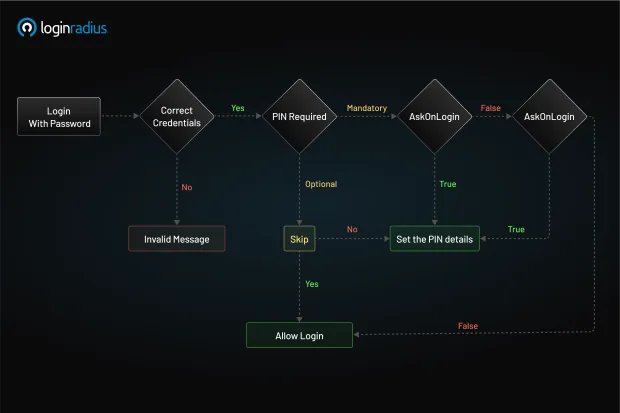
PIN Authentication is a security feature that adds an extra layer of protection by requiring users to set and use a Personal Identification Number (PIN) alongside their primary authentication method. It works with existing authentication flows like password-based or social logins, rather than as a standalone authentication method.
Key features include:
-
Multi-layered security combining PIN with primary authentication
-
Session management using separate tokens for password (Access Token) and PIN (Session Token)
-
Configurable setup that can be optional or mandatory
-
Flexible deployment supporting various implementation methods
The basic flow works as follows:
-
User logs in with primary credentials and receives Access and Session Tokens
-
User sets up a PIN during registration, first login, or subsequent logins (depending on configuration)
-
For subsequent access:
- With a valid Session Token, authenticate with just the PIN
- With expired Session Token but valid Access Token: PIN required
- With both tokens expired, must re-authenticate with primary credentials and PIN
How is That Different from a Password?
While both PINs and passwords are meant to prove that the person requesting access is indeed who they claim to be, they’re fundamentally different in design, intent, and security scope.
Here’s how they differ:
-
PINs are generally numeric and shorter, commonly between 4 to 8 digits. They’re tied to the device, meaning even if someone steals your PIN, it’s useless without physical access to your specific device.
-
Passwords are typically alphanumeric and longer, often containing uppercase letters, numbers, and symbols. They're tied to the account and verified remotely, which means they travel across the internet during login, making them more vulnerable to phishing, man-in-the-middle attacks, or database leaks.
Take your smartphone as an example. The 6-digit code you use to unlock your iPhone is a secure PIN; it doesn’t go to Apple’s servers for validation. It stays on your device, encrypted and protected by your phone’s secure enclave. Even Apple can’t access it.
Now, consider your Gmail password. It’s stored in the cloud and checked against Google’s servers whenever you log in—whether from your laptop, a friend’s computer, or a public terminal. That makes it convenient, but also exposes it to more attack vectors.
This distinction is why PIN authentication is often used in tandem with device encryption and biometrics to create secure, localized login systems, without the risks that come from syncing sensitive credentials across the internet.
So, in the debate of PIN vs password, the right question to ask isn’t “which is better?” It’s “Which is better for a specific use case?”
Examples You Know and Probably Use
Let’s ground this in reality. You’re probably already using PIN authentication every day without realizing just how deeply integrated it is into your digital life.
Mobile Device Unlock
Both iOS and Android use PINs as the fallback method for unlocking your device if biometrics fail or haven’t been set up. It’s also the go-to method after a reboot or system update. And it’s not just about convenience—the PIN is stored locally in the device’s secure enclave or hardware-backed keystore, ensuring tight security.
Bank ATMs
The classic use case. You insert your debit card, and the ATM prompts for a security PIN, often 4 digits. Only after this PIN is verified do you gain access to your account. It’s simple, familiar, and still very effective at scale.
Enterprise Laptops
Windows Hello is Microsoft’s biometric and PIN-based authentication system. It allows users to set a PIN that’s stored in the TPM (Trusted Platform Module) chip on the device. This method doesn’t transmit the PIN and resists phishing and replay attacks—something even strong passwords struggle with.
Customer Apps
An excellent example of real-world PIN usage comes from Safebridge, a digital platform used by thousands of maritime professionals for e-learning and credentialing. With users accessing the system from different devices and often in low-bandwidth environments, Safebridge needed a fast and secure way to authenticate logins without relying solely on passwords.
They integrated LoginRadius' PIN-based authentication to allow returning users to log in quickly using a short numeric code. This not only streamlined the user experience but also supported compliance needs and secure data access in a high-regulation industry.

Regulated Environments
In countries like the U.S., filing taxes online or accessing government benefits sometimes involves entering a Social Security PIN, which works as a secondary verification layer to prevent identity fraud. These are examples of PINs used for high-assurance identity workflows in compliance-heavy sectors.
So while the PIN may look simple on the surface, it’s quietly powering secure access in banking, enterprise, government, and everyday user flows, proving that it’s more relevant than ever.
E-commerce and Fintech Apps
Banking, payment, or retail apps often offer a 4–6 digit secure PIN for fast login. Unlike passwords, which can be clunky to type on mobile devices, PINs enable smooth, low-friction sessions, especially when paired with token-based session management or OTP-based MFA.
How to Implement PIN Authentication?
Now that we know what PIN authentication is and why it’s widely adopted, let’s roll up our sleeves and look at how to build it into your own application or platform. Whether you're working on a mobile app, a smart device, or a web service, PINs can be implemented securely with a few core steps.
1. Prompt and Collect the PIN
Start by designing a PIN entry screen that appears after user identification (e.g., after the user enters their email or phone number). Consider the following best practices:
-
Use placeholder dots or masking to hide the actual PIN as it's entered, to prevent shoulder-surfing.
-
Limit input length to a reasonable number (4–8 digits) and validate it client-side before submission.
-
Allow visibility toggles for accessibility, especially for visually impaired users or seniors.
-
Support device-specific fallbacks—for example, allow biometric override but still request the PIN under specific conditions (e.g., failed biometric scan, restart, risk-based trigger).
-
PIN strength tip: For sensitive flows (e.g., banking, admin access), follow NIST guidelines and aim for 6-digit minimum PINs with enforced retry limits.
2. PIN Storage and Validation
This is the most crucial part of the implementation. A poorly secured PIN is just as vulnerable as a bad password. Never store PINs in plaintext.
Here’s what you should do instead:
-
Use bcrypt, scrypt, or Argon2 for hashing the PINs before storing them.
-
Add a unique salt per user to prevent hash collisions and rainbow table attacks.
-
Store the hashed PIN in a secure backend database—preferably inside a hardened vault or encrypted identity store.
-
When validating the PIN, compare the hashed input PIN with the stored hash server-side.
Also, define a lockout strategy:
-
Retry threshold: e.g., lock the account or device after 5 failed attempts.
-
Cooldown period: Implement time-based throttling (e.g., exponential backoff).
-
CAPTCHA integration: Use CAPTCHA after 3–5 attempts in web flows to prevent automated brute-force attacks.
-
Audit logs and alerts: Flag repeated PIN failures for review or notify the user via email or push.
3. Optional: Use Temporary PINs
A growing trend in passwordless authentication is the use of temporary PINs - essentially one-time numeric codes that expire quickly.
Here’s how it works:
-
A user enters their email address or phone number.
-
Your system sends a 6-digit temporary PIN to that address or number.
-
The user enters it within a time-limited window (typically 5–10 minutes).
-
Upon successful match, access is granted, and the PIN is invalidated.
Tip: Ensure that temporary PINs are:
-
Short-lived (e.g., 5 minutes)
-
Single-use
-
Sent over a secure channel (email with DKIM/SPF, SMS with delivery monitoring)
4. Add Rate Limiting and Monitoring
A PIN, by design, is easier to brute-force than a password because of its shorter length. That’s why you need smart protections built in:
-
Limit attempts: Lock the PIN input for a cooldown period after too many failed attempts (e.g., 5 tries = 15-minute lockout).
-
Log suspicious behavior: Multiple failed attempts, login from a new IP, or sudden location changes should raise a red flag.
-
Trigger step-up authentication: If a login attempt seems risky, request an additional factor like an OTP or email verification.
-
Audit and alert: Keep a log of all PIN-related login attempts for review, and alert users to unauthorized activity in real time.
5. Token Handling Best Practices
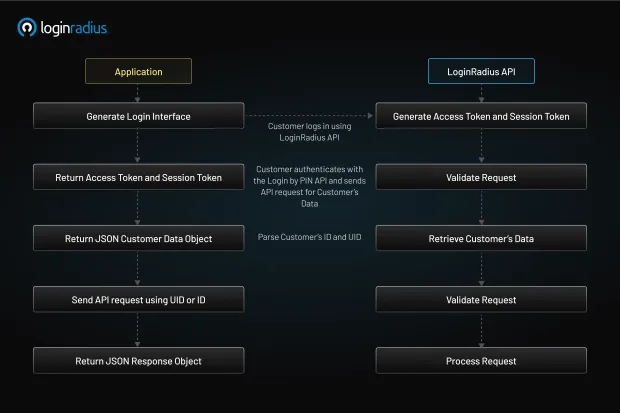
Once a user logs in with their PIN, you typically issue access tokens and session tokens to maintain authentication.
Here’s how to handle them securely:
-
Use short-lived access tokens (e.g., 15 minutes) and support refresh tokens for re-authentication.
-
Store tokens securely:
-
On web apps: Use HttpOnly cookies with secure and same-site flags.
-
On mobile apps: Store tokens in secure storage mechanisms (e.g., iOS Keychain, Android Keystore).
-
-
Rotate tokens on suspicious behavior or log out.
-
Implement token revocation support using blacklists or session invalidation APIs.
6. Integrate with a CIAM Platform (Optional, but Smart)
If you're building customer-facing applications at scale, it's worth considering an identity platform like LoginRadius to handle the complexity.
LoginRadius provides:
-
Visual login workflows that let you plug in PIN authentication with minimal coding.
-
API-based PIN flows with support for hashing, validation, rate-limiting, and token management.
-
Integration with OTP, biometrics, and MFA for layered authentication.
-
Analytics and risk scoring to help fine-tune when PIN prompts should be used.
Instead of reinventing the wheel, this lets you build secure PIN authentication flows quickly, reliably, and in compliance with global data security standards.
Advantages of PIN Authentication
So why would a user or an entire business opt for PIN authentication over newer, shinier methods like biometrics or passkeys?
The answer lies in a unique combination of speed, simplicity, and contextual security. PINs may seem basic, but they address a range of usability and infrastructure challenges that other methods don’t always solve as gracefully.
Here’s a closer look at the benefits:
1. Fast and Frictionless
Typing a short 4–6 digit security pin is much faster than entering a complex password, especially on mobile devices. There’s no need for special characters, password managers, or browser autofill.
This makes PINs ideal for repeat access—apps that people open multiple times a day, like banking, retail, ride-sharing, or healthcare.
Fewer steps mean less friction, which means higher conversion and retention rates, especially for apps where every second of delay risks user drop-off.
2. Localized Security
Unlike passwords, which are stored in centralized databases and transmitted over the internet, PINs can be stored and validated locally on the device. This significantly reduces the attack surface.
There’s no network transmission, no cloud storage vulnerabilities, and no risk of phishing attacks where a user is tricked into revealing their PIN, because the PIN never leaves the device.
This model of on-device authentication (used by systems like Windows Hello and Android’s keystore) makes PINs a smart choice for high-assurance environments.
3. Easy to Reset
Users forget complex passwords. They reuse them. They write them down. With a secure PIN, it’s different.
Short numeric codes are easier to remember, and when users do forget, reset flows are typically smoother. Most systems can offer self-service PIN reset options using email verification, SMS codes, or in-app prompts. This reduces helpdesk tickets and improves user satisfaction.
4. Offline-Friendly
One of the major advantages of PINs is that they don’t require an internet connection. Whether you're using an ATM in a remote village or unlocking your phone on a flight, the system works.
This offline capability makes PINs a must-have fallback method in emergency situations, low-bandwidth environments, or disaster recovery scenarios where online authentication isn’t viable.
5. Combinable with Other Factors
PINs work exceptionally well as part of a multi-factor authentication (MFA) or step-up authentication strategy. For example:
-
Face ID fails → Prompt for PIN.
-
High-risk login detected → Request a temporary PIN sent to your email.
-
OTP expired or device change → Ask for user-defined security pin.
This layered approach gives users flexibility without compromising on security, and gives developers the tools to craft dynamic authentication journeys.
6. Low Barrier to Entry
For applications targeting non-technical users, elderly users, or children, or users in low-literacy or low-connectivity environments, PINs provide an easy and intuitive login option. No password rules, no biometric calibration, just numbers.
They’re also friendly to shared or multi-user environments, where complex credential setups might be overkill or confusing.
7. Cost-Effective and Easy to Maintain
From an engineering and DevOps perspective, implementing PIN authentication doesn’t require deep biometric integrations or cryptographic keys. It’s a lightweight method that scales well, has minimal infrastructure overhead, and is easy to support across platforms.
PIN Authentication vs Password or Other Authentication Methods
When it comes to PIN vs password, or PIN vs passkey, the answer isn’t always clear-cut. Each method has its place. But for teams designing secure systems or optimizing UX, it helps to understand how they differ.
Here’s a detailed comparison:
| Feature | PIN Authentication | Password Authentication |
|---|---|---|
| Length | Short (4–8 digits) | Longer (8–20+ characters) |
| Format | Numeric only (usually) | Alphanumeric + symbols |
| Storage | Local (device-bound) | Cloud-based, centralized |
| Transmission | No network transmission | Requires secure transmission |
| Use Cases | Device unlocks, quick access, and offline access | Account login across devices and services |
| Security | Strong when local + encrypted | Variable, depends on complexity and reuse |
| MFA Compatibility | Yes (as a factor or fallback) | Yes |
| Resistance to Phishing | High | Low (if reused or entered on fake pages) |
| User Experience | Fast, mobile-friendly | Slower, especially on mobile |
-
PIN authentication is ideal for quick, local, and secure access. It thrives on mobile, works offline, and plays well with MFA.
-
Passwords offer broader cross-device usability but require stricter policies (e.g., minimum complexity, rotation, breach detection).
And here’s the kicker: You don’t have to choose one or the other.
Modern authentication flows often combine PIN and password or let users choose their preferred method, based on risk, context, or device.
By building progressive authentication journeys using tools like LoginRadius, you can use a password for initial login, then switch to a PIN or biometric for return visits. Or offer PIN-only login on trusted devices and step-up verification when risk levels rise.
That’s where the magic happens: adaptive security without friction.
Why Should Businesses Use PIN Authentication?
With so many new technologies entering the authentication space, from WebAuthn and passkeys to voice authentication and hardware tokens, it’s fair to ask: why bother with PINs? The answer: PINs solve real-world problems for real-world users.
Here’s why businesses from banks to SaaS startups should seriously consider PIN authentication:
1. Mobile-First Experiences
We live in a mobile-dominant world. For apps where users log in multiple times per day, a short, familiar, secure pin is a better experience than typing a password every time.
Whether it’s a ride-sharing app, mobile wallet, or healthcare portal, PINs reduce login fatigue, especially on small screens.
2. POS & Kiosk Systems
In retail, hospitality, and healthcare, staff often use shared terminals or point-of-sale systems. Entering long usernames and passwords isn't practical between each shift or transaction.
A 4-digit security pin lock per employee allows:
-
Quick access
-
Audit trail tracking
-
Seamless user switching
This not only improves usability but also strengthens accountability.
3. Multi-Device and Low-UI Environments
Think smart TVs, set-top boxes, ATMs, vending machines, or IoT dashboards. These interfaces often lack keyboards or browsers, making password login awkward or impossible.
A simple PIN entry pad solves that. Paired with QR codes or device pairing, it becomes a lightweight authentication method for constrained environments.
4. Privacy-Conscious or Biometrics-Resistant Users
Some users are uncomfortable with storing fingerprints or face scans, whether for cultural, religious, or privacy reasons.
Offering a PIN authentication option gives users autonomy and builds trust. You’re saying, “We respect your preferences, and we’ve got you covered.”
5. MFA and Step-Up Scenarios
Need to secure a high-risk transaction? Access to admin settings? Switching from a known device to a new one?
A quick temporary PIN prompt can serve as a second factor or step-up authentication layer, ensuring security without excessive complexity.
6. Emergency or Offline Access
If a user is offline, has no access to SMS or email, or their biometric reader fails, a PIN fallback ensures they’re not locked out.
This resilience is essential in:
-
Remote field operations
-
Disaster recovery
-
Travel or high-latency scenarios
7. Simple, Scalable, and Cost-Effective
PIN authentication doesn’t need expensive SDKs, hardware, or biometric sensors. It works on any device, requires minimal storage, and integrates easily into existing identity workflows, especially with platforms like LoginRadius that offer built-in PIN flow support.
Conclusion
So, what is PIN authentication, really? It’s a simple, familiar, and surprisingly versatile method of identity verification that relies on short numeric codes, either user-defined or system-generated, to allow access to digital systems. While it may not grab headlines like biometrics or blockchain-based identity, the security pin still plays a critical role in modern authentication strategies.
At the end of the day, building secure authentication isn’t about flashy tech, but it’s about choosing the right methods for your users, your devices, and your context. And sometimes, that means going back to basics with a smart, strong, and secure PIN.
Need help implementing secure PIN-based authentication for your application?Contact the LoginRadius team to explore how our platform can help.
FAQ's
1. What is a temporary PIN?
A. A temporary PIN is a short-lived numeric code, usually sent via email or SMS, used for one-time authentication. It’s commonly used in passwordless login or account recovery flows and expires after a short time window.
2. What is the authorization PIN?
A. An authorization PIN is a secure code used to approve sensitive actions like transactions, access changes, or identity verification. It acts as a second layer of authentication to confirm user intent.
3. What is PIN verification?
A. PIN verification is the process of checking if the entered Personal Identification Number matches the one stored or associated with the user account or device. If the PIN is valid, access is granted.
4. How does PIN authentication work?
A. PIN authentication works by prompting the user to enter a numeric code, which is then securely validated—either locally on the device or against a hashed record in the backend. If the match is successful, the user is authenticated.