Introduction
Access control rarely fails in dramatic ways. Most of the time, it fails quietly.
A new hire gets access they don’t fully need. A contractor keeps permissions long after a project ends. An internal tool exposes more data than intended because “everyone needed it at some point.”
None of this looks dangerous on day one. But over time, these small decisions stack up. Permissions sprawl. Visibility disappears. And when something finally goes wrong, teams struggle to answer a basic question: who was allowed to do what, and why?
This is the problem role-based access control was designed to solve.
As systems grow, with more users, more teams, and more applications, managing access at an individual level stops working. It becomes slow, error-prone, and almost impossible to audit. That’s when organizations turn to RBAC, not as a security trend, but as a way to bring order back to access decisions.
At its core, RBAC aligns access with responsibility. Instead of handing out permissions one by one, it groups them into roles that reflect real job functions. Users inherit access based on the role they perform, not personal exceptions or one-off approvals. Simple idea. Powerful impact.
Yet despite being widely adopted, RBAC is often misunderstood. Some teams see it as too rigid. Others overcomplicate it from day one. And many implement it without fully understanding how access control works underneath or how RBAC models differ.
This blog is meant to change that.
Whether you’re trying to understand what RBAC is for the first time, revisiting your RBAC implementation, or evaluating how role-based security fits into modern SaaS and cloud environments, we’ll break it down clearly. No unnecessary theory. No heavy jargon. Just how role-based access control actually works, where it shines, where teams slip up, and how to apply it in real systems.
Because when access control is done right, users don’t notice it at all. And that’s usually a sign you got it right.
How access control works in modern systems
Before getting into what RBAC is, it helps to understand how access control works at a basic level.
Every access decision, no matter how complex the system looks, comes down to four things:
-
Who is making the request
-
What they are trying to access
-
What action they want to perform
-
Whether the system allows it or not
This is true whether you’re protecting an admin dashboard, an API endpoint, a database record, or a cloud resource.
Over time, teams have developed different types of access control in security to answer this question. Some systems have hard-coded permissions. Some use access control lists. Others evaluate policies dynamically.
RBAC sits right in the middle structured enough to scale, simple enough to reason about.
What is RBAC (Role-Based Access Control)?
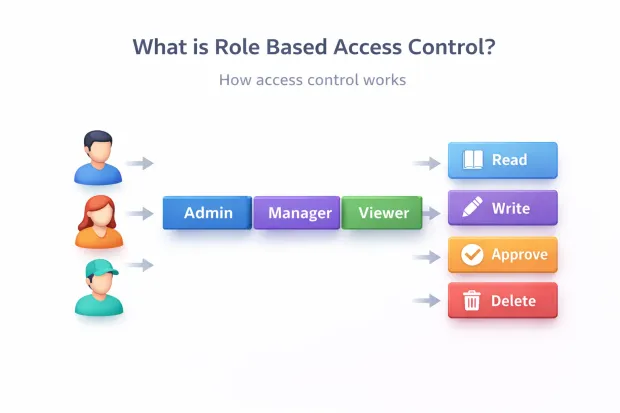
Role-Based Access Control (RBAC) is a security model where access permissions are assigned to roles, and roles are assigned to users.
Instead of deciding access user by user, you define roles based on responsibilities. Each role contains a specific set of permissions. When a user gets a role, they inherit everything that role is allowed to do.
In simple terms:
-
Users don’t get permissions directly
-
Roles get permissions
-
Users get roles
That’s the RBAC model in its most practical form.
This approach is used across operating systems, SaaS platforms, cloud infrastructure, enterprise applications, and identity platforms because it reduces chaos as systems grow.
Why role-based security exists in the first place
Here’s a pattern most teams experience.
Early on, permissions are simple.
A few users.
A few features.
Everything works.
Then the product grows.
-
New teams
-
New environments
-
New regions
-
New compliance requirements
Permissions start getting assigned manually. Exceptions pile up. Soon, no one is fully sure who has access to what anymore.
Role-based security solves this by creating consistency. Instead of managing hundreds or thousands of individual permission decisions, you manage a smaller, controlled set of roles.
That structure is what makes RBAC reliable at scale.
Core concepts behind role-based access control
Role-based access control looks simple on the surface, but it works because a few core concepts stay consistent across systems, industries, and scales. Once these are clear, RBAC stops feeling abstract and starts feeling practical.
The first concept is the role itself.
A role represents a responsibility, not a person. It defines what someone is allowed to do inside a system based on their function. “Admin,” “Support Agent,” “Finance Approver,” or “Read-only Auditor” are all roles because they map to clear expectations. When roles are designed around responsibilities instead of individuals or teams, RBAC stays manageable as organizations change.
Next come permissions.
Permissions are the smallest units of access. They describe specific actions such as viewing records, updating settings, approving requests, or deleting data. Roles don’t exist on their own; they are simply collections of permissions grouped together in a way that makes sense operationally.
This is where RBAC enforces consistency. Instead of assigning permissions repeatedly, teams define them once and reuse them through roles.
Then there are users.
Users are assigned one or more roles depending on what they need to do. The key idea here is indirection. Users don’t receive permissions directly. They inherit permissions through roles. That extra layer may seem small, but it’s what allows access control to scale without becoming chaotic.
Here’s where it gets interesting: role assignment isn’t always permanent.
In many systems, roles are activated during a session. A user might log in and operate under a specific role context depending on the task they’re performing. This helps limit exposure and supports better auditing, especially in sensitive environments.
Another core concept is role hierarchy.
Some roles naturally build on others. A Manager often needs everything an Employee has, plus additional privileges. Hierarchical RBAC allows roles to inherit permissions from other roles, reducing duplication. Used carefully, it simplifies administration. Used carelessly, it can hide excessive access. This is one area where teams need discipline.
RBAC also relies heavily on the separation of duties.
Certain actions should never be performed by the same role. Creating and approving payments, managing access and auditing logs, or modifying and publishing content are common examples. By enforcing these constraints at the role level, RBAC reduces the risk of fraud and misuse without relying on manual oversight.
Finally, there’s visibility and auditability.
RBAC only works when teams can see which roles exist, what permissions they contain, and who has them. Clear role definitions make access reviews faster and more meaningful. Instead of reviewing hundreds of individual permissions, reviewers assess whether a role still makes sense and whether a user should still have it.
A surprising pattern we’ve seen: most RBAC problems don’t come from bad tooling. They come from unclear roles. When roles drift away from real responsibilities, access control quietly breaks down.
Get the core concepts right, and RBAC becomes one of the most reliable foundations for secure systems.
Role-based access control models
Role-based access control isn’t a single, fixed design. Over time, different RBAC models have emerged to handle growing complexity as organizations scale, workflows mature, and security requirements increase.
Understanding these models helps teams choose the right level of control instead of either under-engineering access or overcomplicating it from day one.

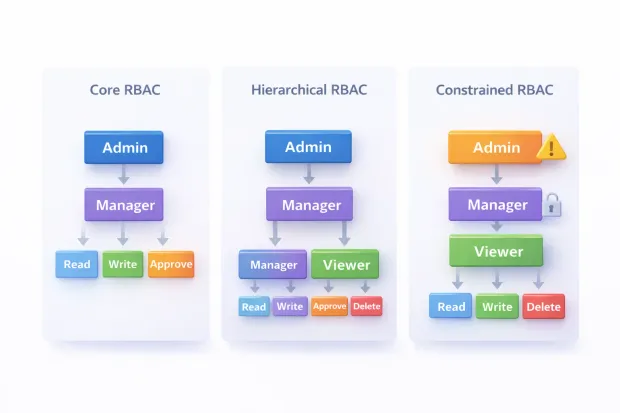
Core RBAC
Core RBAC is the foundation of every role-based access control system.
In this model, users are assigned roles, and roles contain permissions. Access decisions are made entirely based on whether a user holds the role required to perform an action. There’s no inheritance, no constraints, and no conditional logic.
This simplicity is its strength.
Core RBAC works well for systems with clear responsibilities and limited overlap between roles. Many internal tools, early-stage SaaS products, and administrative dashboards rely on this model successfully for years. When roles are stable and well-defined, Core RBAC is often all you need.
Hierarchical RBAC
As organizations grow, responsibilities start to overlap. Managers need everything their team members have, plus a little more. Senior administrators need broad access without redefining every permission from scratch.
Hierarchical RBAC addresses this by allowing roles to inherit permissions from other roles.
A higher-level role automatically includes the permissions of the roles beneath it. This reduces duplication and makes role management more efficient. Instead of assigning dozens of permissions repeatedly, teams build structured role trees.
However, hierarchy introduces risk if not handled carefully. Over time, inherited permissions can become invisible, leading to roles that carry more access than intended. This is why hierarchical RBAC works best when role definitions are documented and reviewed regularly.
Constrained RBAC
Some actions should never be performed by the same person, regardless of hierarchy.
Constrained RBAC introduces rules that restrict how roles can be combined or activated. This is commonly used to enforce separation of duties in sensitive workflows such as financial approvals, access administration, or compliance reporting.
For example, a role that creates payment requests may be explicitly prevented from approving them. A role responsible for granting access may be blocked from auditing access logs.
Constrained RBAC adds an extra layer of protection beyond basic role assignment. It’s especially valuable in regulated industries where internal misuse carries significant risk.
Choosing the right RBAC model
Most real-world systems don’t use just one model.
They start with Core RBAC, introduce hierarchy as teams expand, and apply constraints where risk demands it. The goal isn’t to adopt the most complex model—it’s to apply the minimum structure required to keep access predictable and secure.
RBAC works best when models evolve alongside the organization, not ahead of it.
Role-based access control examples from real systems
RBAC makes more sense when you see it in action.
Example 1: B2B SaaS platform
A multi-tenant SaaS application might define roles like:
-
Organization Owner
-
Admin
-
Billing Admin
-
Member
-
Auditor
Each role has clearly defined permissions. Billing Admins can manage invoices but cannot change authentication settings. Auditors can view logs but cannot modify data.
This is a classic example of role-based access control done right.
Example 2: Healthcare portal
A healthcare system might define roles such as Patient, Nurse, Physician, and Lab Technician.
Each role sees only what they need. Lab Technicians can upload test results but cannot modify prescriptions. Patients can view records but cannot change clinical data.
This kind of role based access control example directly protects sensitive data while keeping workflows efficient.
Example 3: Cloud and infrastructure systems
Modern infrastructure platforms rely heavily on RBAC to control access to clusters, services, and environments.
Roles define who can deploy, who can scale, who can view logs, and who can change configurations without handing out broad administrative access.
Benefits of RBAC for growing systems
The benefits of RBAC go beyond security checklists.
First, it enforces the principle of least privilege. Users get only what they need, nothing more.
Second, it simplifies onboarding and offboarding. Assigning or removing a role is faster and safer than hunting down individual permissions.
Third, it improves auditability. When permissions are role-based, access reviews become clearer and more defensible.
Finally, RBAC brings operational clarity. When something breaks, teams can trace access decisions back to roles instead of guessing which exception caused the issue.
RBAC implementation: how teams actually do it
RBAC implementation doesn’t start with roles. It starts with understanding actions.
Teams that succeed usually follow this path:
They list critical resources and actions first. APIs, admin features, sensitive workflows.
Then they group permissions into logical responsibilities. Not too many. Not too broad.
Only after that do they define roles and assign them to users.
Access enforcement happens at well-defined points APIs, middleware, or policy layers not scattered throughout the codebase.
And importantly, access decisions are logged. RBAC without visibility eventually fails.
This approach keeps rbac implementation manageable as systems evolve.
RBAC vs other access control approaches
RBAC isn’t the only option.
Some systems rely on attribute-based access control, where decisions depend on context like location, device, or time. Others use relationship-based models for highly dynamic permissions.
RBAC works best when roles are stable and responsibilities are clear. As complexity grows, RBAC is often combined with other models rather than replaced.
That’s not a limitation, it’s how real systems mature.
Conclusion
Role-based access control works because it matches how organizations actually operate. People take on responsibilities. Responsibilities require access. RBAC turns that reality into a system that scales without turning into chaos.
When implemented thoughtfully, RBAC reduces permission sprawl, simplifies audits, and makes access decisions easier to explain, review, and defend. It gives teams a solid foundation for role based security especially when systems grow, teams change, and compliance expectations increase.
But RBAC isn’t something you “set once and forget.” The difference between a clean access model and a brittle one comes down to governance, visibility, and how well access policies evolve with the business.
If you’re evaluating how to implement or modernize role-based access control across your applications, APIs, or customer platforms, it’s worth choosing an identity solution that makes RBAC practical not painful.
LoginRadius helps teams design, enforce, and scale RBAC with clarity from admin dashboards and delegated access to fine-grained authorization across SaaS and customer identity use cases.
Explore how LoginRadius simplifies role-based access control. Book a demo to see RBAC in action across real-world scenarios.
Access control shouldn’t slow teams down. Done right, RBAC becomes an enabler not a blocker.
FAQs
Q: What is role-based access control (RBAC)?
A: Role-based access control is a security model where permissions are assigned to roles instead of individual users. Users gain access by being assigned one or more roles, making access management simpler and more consistent.
Q: How does RBAC differ from other types of access control in security?
A: RBAC assigns access based on predefined roles, while other models may rely on user attributes or contextual rules. RBAC works best when responsibilities are clearly defined and remain stable over time.
Q: What are the main benefits of RBAC?
A: The benefits of RBAC include stronger role-based security, easier permission management, faster onboarding and offboarding, and clearer audit trails for compliance and reviews.
Q: Can RBAC work for modern SaaS and cloud applications?
A: Yes, RBAC is widely used in SaaS and cloud systems to control access across admin panels, APIs, and resources. Many platforms combine RBAC with other models as systems grow more dynamic.