Quick Summary
-
Social login is an authentication method that lets users sign in with existing accounts from providers like Google, Apple, Facebook, or LinkedIn instead of creating new credentials.
-
It works by using OAuth 2.0 and OpenID Connect, which securely verify the user with the social provider and return essential profile data back to your application.
-
The primary benefit of social login is reduced friction: faster sign-up, fewer abandoned forms, and a simpler mobile experience.
-
Businesses gain higher conversion rates, more repeat logins, and clean, permission-based customer data that improves personalization and marketing accuracy.
-
Social login is most effective for ecommerce, SaaS, subscription media, and mobile-first consumer apps; it should be paired with MFA or passkeys for high-security industries.
What is Social Login?
Social login, also called social sign-in or social authentication is an authentication method that lets users access your application using existing accounts from providers like Google, Apple, Facebook, LinkedIn, and GitHub. Instead of issuing a new username and password, your app delegates authentication to the provider, then uses the returned identity data to create or update the user’s profile.
At a technical level, social login is built on open standards: OAuth 2.0 for authorization and OpenID Connect (OIDC) for identity. When a user clicks “Continue with Google,” for example, your application redirects them to Google’s authorization endpoint, where they handle credential verification, consent prompts, etc. After the user authenticates, your app receives an authorization code or ID token that contains verified identity claims such as email, name, or profile attributes.
Social login is distinct from enterprise SSO or workforce federation. It is designed for consumer applications that need a low-friction, high-conversion entry point, especially on mobile devices where typing passwords or completing forms is slow.
For developers, it replaces the need to store, validate, and protect passwords, while giving applications access to permission-based, standardized user data. This combination of reduced complexity and improved user experience is why social login remains a foundational authentication pattern in modern CIAM implementations.
This blog breaks down how social login works, when it makes sense, and what to consider around security, privacy, and deployment so you can make an informed decision for your application.
How Social Login Works
Social login is fundamentally an identity delegation workflow. Instead of authenticating users directly, your application relies on a trusted external identity provider, like Google, Apple, Facebook, LinkedIn, GitHub, or any other social IdP to verify the user and return a signed assertion of identity.
At a protocol level, social login is implemented through OAuth 2.0 and, in most modern cases, OpenID Connect (OIDC). These standards provide a secure mechanism for your application to request identity and profile information without ever accessing the user’s credentials.
What the User Sees (The Frictionless Experience)
From the user’s perspective, the flow is intentionally simple:
-
They click a provider button (e.g., Google, Apple, Facebook).
-
They authenticate directly with the provider.
-
They grant permission for your application to access specific data.
-
They are returned to your application already signed in.
Traditional Login Creates Friction
Someone discovers your application, clicks Sign Up, and is immediately presented with a long registration form. They're asked to create a password with special characters, verify their email, answer security questions, and perhaps even confirm their phone number. What started as a quick task suddenly feels like a commitment. People rarely abandon registration because they're no longer interested. More often, they leave because the process asks for too much, too soon. As a business remember:
-
Password fatigue is real
-
Long registration forms reduce conversions
-
Mobile users expect speed
-
Forgotten passwords are the biggest source of friction and security vulnerabilities
-
Friction adds up over time
The Real Identity Flow in Social Logins
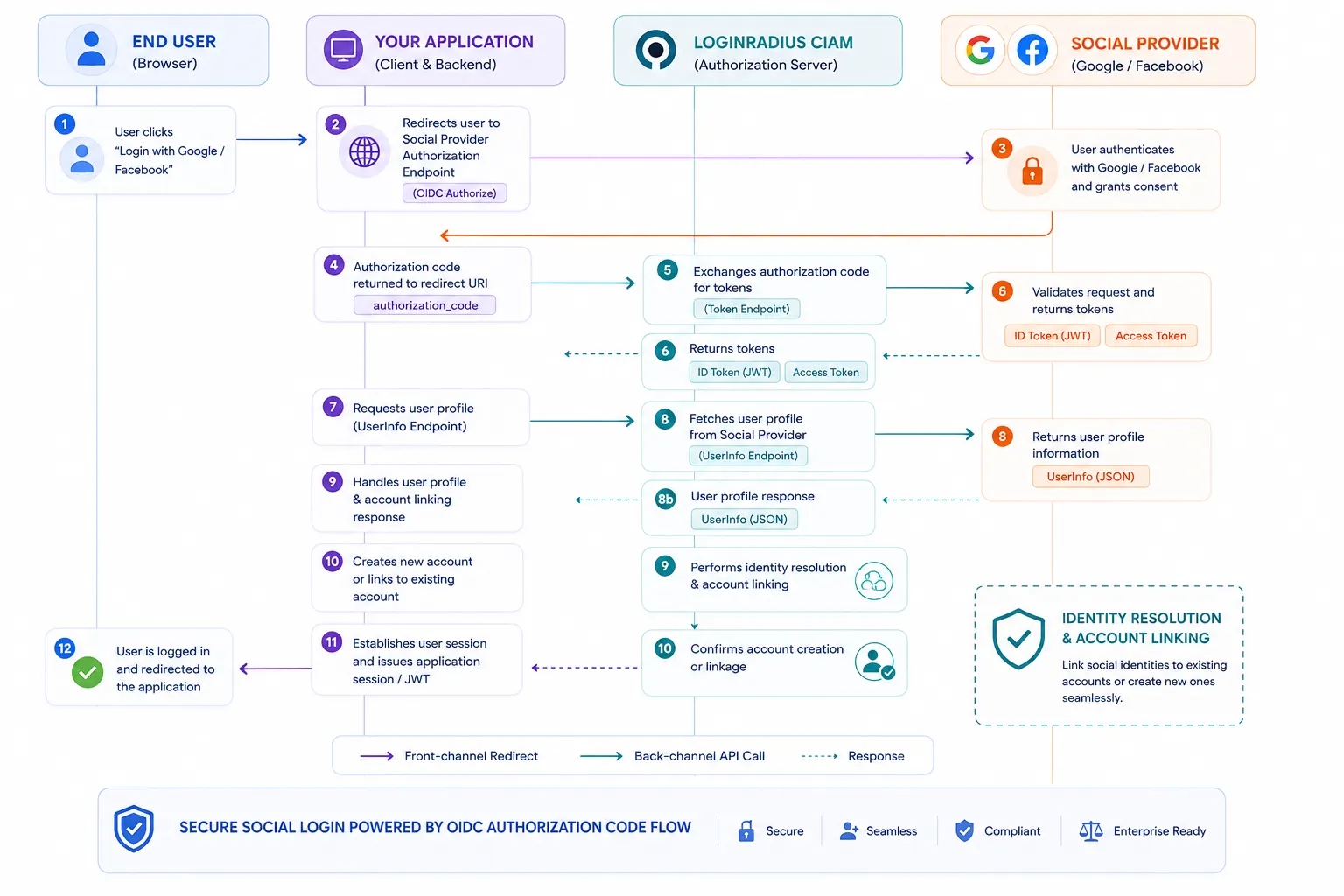
Under the hood, the workflow is precise and standards-driven:
1. Authorization Request
Your application initiates the process by redirecting the user to the provider’s authorization endpoint with parameters such as:
-
client_id
-
redirect_uri
-
requested scope (e.g., openid email profile)
-
state for CSRF protection
-
nonce to protect against token replay (OIDC)
2. Provider-Side Authentication and Consent
The provider handles the entire authentication ceremony:
-
Password entry
-
MFA
-
Risk scoring and device evaluation
-
Consent prompts for data access
This is critical: your application never sees any credentials. This is one of the core security benefits of social login.
3. Code Return
Authorization Code Grant
If the user approves, the provider redirects them back to your application with a short-lived authorization code.
4. Token Exchange
Your backend exchanges this code for:
-
ID Token — a signed JWT that asserts the user’s identity
-
Access Token — used to call the provider’s userinfo endpoint
-
optionally, a Refresh Token
Token validation is non-negotiable: signature, issuer, audience, expiry, and nonce must all be verified.
Example Decoded ID Token (OIDC JWT Payload):
When an identity provider authenticates a user via OpenID Connect, it returns a signed JWT. Below is an example payload received from an identity provider:
1{
2  "iss": "https://accounts.google.com",
3  "sub": "109238491029384019238",
4  "aud": "YOUR_CLIENT_ID.apps.googleusercontent.com",
5  "iat": 1772620800,
6  "exp": 1772624400,
7  "email": "user@example.com",
8  "email_verified": true,
9  "name": "Jane Doe"
10}
5. Profile Retrieval
Your application (or CIAM layer) retrieves user profile data:
-
Verified email
-
Name
-
Unique provider ID
-
Locale, picture, or additional authorized attributes
6. Identity Linking or Account Creation
Your system either:
-
Creates a new account with the social identity as the primary login method, or
-
Links the social identity to an existing user profile to preserve continuity across authentication methods.
7. Issue Your Own Session
Once identity is confirmed, your application establishes its own session or issues its own token. The social provider is no longer involved after this point.
What Data You Actually Get
The attributes available through social login depend on:
-
The provider
-
The scopes you request
-
What the user consents to
-
Provider policy (e.g., Apple’s private relay email)
Typical data returned:
-
Verified email address (Google, Apple, Microsoft, LinkedIn)
-
Name and profile metadata
-
Provider-specific unique user ID
-
Profile image
-
Locale / time zone
Because each provider structures attributes inconsistently, enterprise-grade implementations rely on a CIAM layer, like LoginRadius, to normalize fields, unify schema, and keep integrations updated as providers change APIs.
See how you can enable social login for your app using LoginRadius in minutes.
Social Login vs SSO vs Federated Identity
These terms are often used interchangeably, but they don't all describe the same thing. In fact, most businesses confuse them, which is one of the most common reasons they end up choosing the wrong authentication approach.
Social login, Single Sign-On (SSO), and federated identity all involve using an existing identity to access applications. The difference lies in who owns that identity, who the users are, and where they're trying to sign in.
Understanding these distinctions helps businesses design authentication experiences that match their users instead of forcing every scenario into the same model.
Social Login
Social login is designed primarily for customer-facing applications.
Instead of creating a new account, users authenticate with an existing identity from a consumer identity provider such as Google, Apple, Facebook, Microsoft, LinkedIn, GitHub, or Amazon.
It's commonly used for:
-
E-commerce websites
-
Consumer mobile apps
-
Streaming platforms
-
Gaming services
-
Online communities
-
B2C SaaS applications
The goal is simple: reduce registration friction and make sign-in faster.
Single Sign-On (SSO)
Single Sign-On allows users to authenticate once and access multiple connected applications without signing in repeatedly.
Unlike social login, SSO is typically built around an organization's own identity provider, such as Microsoft Entra ID, Okta, Ping Identity, or LoginRadius for customer scenarios.
You'll commonly see SSO in:
-
Enterprise workplaces
-
Employee portals
-
Partner portals
-
Customer portals
-
Multi-application business environments
The focus isn't reducing registration. It's improving access across multiple applications while centralizing authentication.
Federated Identity
Federated identity is the broader concept that enables different organizations or identity providers to trust one another during authentication.
Rather than maintaining separate identities everywhere, users can authenticate with one trusted identity provider and access services operated by another organization.
Federation is commonly used for:
-
Business-to-business (B2B) collaboration
-
Partner ecosystems
-
Government digital services
-
Higher education
-
Cross-organization customer access
-
Multi-tenant SaaS platforms
In many cases, both social login and enterprise SSO rely on federation behind the scenes.
Comparing the Three
| Feature | Social Login | Single Sign-On (SSO) | Federated Identity |
|---|---|---|---|
| Primary users | Customers | Employees, partners, or customers | Users across trusted organizations |
| Identity provider | Consumer identity provider | Enterprise identity provider | Trusted external identity provider |
| Typical goal | Simplify registration and login | Access multiple applications with one login | Enable trusted identity sharing |
| Common protocols | OAuth 2.0, OpenID Connect | SAML, OpenID Connect, OAuth | SAML, OpenID Connect, OAuth |
| Common examples | Continue with Google, Apple, Microsoft | Enterprise workforce login | Partner or cross-organization access |
Which Approach Should You Choose?
The answer depends on who your users are.
If your primary audience consists of consumers, social login can significantly reduce registration friction and improve sign-up completion rates.
If you're managing access across multiple business applications, SSO provides a centralized authentication experience.
If users belong to external organizations that already manage their own identities, federated identity allows those trusted identities to be reused securely.
Although these approaches serve different purposes, they aren't competing technologies. Modern CIAM platforms frequently support social login, enterprise SSO, and federated identity together, giving organizations the flexibility to deliver the right authentication experience for every type of customer.
Social Login Providers: Strengths, Limitations, and When to Use Each
Choosing the right social login providers is an architectural decision that impacts user acquisition, data quality, regulatory compliance, and global usability. Each provider has distinct strengths, constraints, and behavioral patterns that directly affect authentication success rates and downstream identity workflows.
Below is a breakdown of the major providers and how to evaluate them for your application.
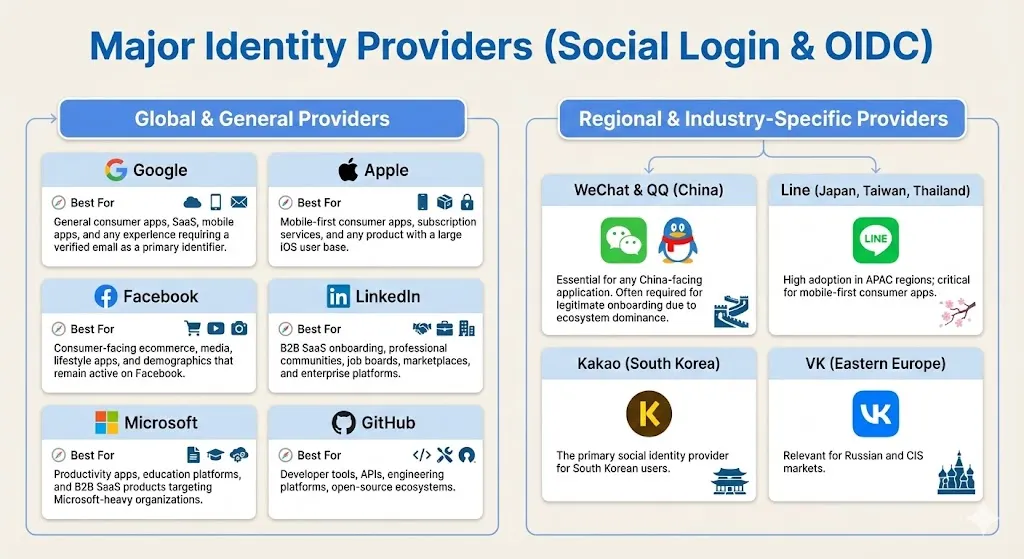
Major Identity Providers
These are the providers most commonly adopted across consumer, SaaS, and mobile-first applications.
| Provider | Strengths | Limitations | Best For |
|---|---|---|---|
| High trust and adoption across nearly all demographicsVerified email addresses in most casesStable, well-documented OIDC implementationStrong fraud detection and MFA adoption | Some restrictive data scopesStrict branding and UX complianceCorporate Google Workspace accounts may add conditional access policies | General consumer apps, SaaS, and mobile apps.Also suitable when you require verified Google email addresses from users. | |
| Apple | Mandatory on many iOS apps offering third-party loginStrong privacy posture, secure by designDevice-level authentication with extremely fast flowsHigh trust among privacy-conscious users | Private Relay email masks identity, requiring additional account-linking logicLimited profile attributes returnedRequires adherence to Apple's UX guidelines | Privacy-focused users and products with a large iOS user base.Note: You must offer Sign in with Apple as an equivalent option alongside other social logins, or your app may be rejected during App Store review. |
| Massive global footprintFamiliarity and trust among non-technical usersRich optional profile attributes | More restrictive user-data scopes than in previous yearsDeclining usage among younger audiencesOccasional API and permission policy changes | Consumer-facing e-commerce, media, lifestyle applications, and demographics that remain active on Facebook. | |
| Professional identity dataVerified corporate email addressesHigh adoption in B2B and SaaS sectors | Limited profile attributes without elevated permissionsStrict restrictions on data usage and storage | B2B SaaS onboarding, professional communities, job boards, marketplaces, and enterprise platforms. | |
| Microsoft | Unified identity ecosystem for consumers and enterprises (Outlook, Live, Microsoft 365)Verified email addressesStrong fit for hybrid B2C/B2B applications | Conditional access policies in enterprise tenants can impact login successSlightly more complex user identifiers across Microsoft ecosystems | Productivity applications, education platforms, and B2B SaaS products targeting Microsoft-centric organizations. |
| GitHub | Strong trust among developersMinimal friction with fast authenticationUseful profile data for technical communities | Limited relevance for general consumer applicationsSmaller set of profile data returned | Developer tools, APIs, engineering platforms, and open-source ecosystems. |
Regional and Industry-Specific Providers
Global applications cannot rely solely on US-centric providers. Regional identity networks dominate in specific markets.
-
WeChat & QQ (China): Essential for any China-facing application. Often required for legitimate onboarding due to ecosystem dominance.
-
Line (Japan, Taiwan, Thailand): High adoption in APAC regions; critical for mobile-first consumer apps.
-
Kakao (South Korea): The primary social identity provider for South Korean users.
-
VK (Eastern Europe): Relevant for Russian and CIS markets.
How to Choose Providers Strategically
Selecting social login providers should follow a structured evaluation based on four core factors:
1. Audience Demographics
-
Where do your users live?
-
What devices do they use?
-
What identity ecosystems dominate that region?
2. Industry Alignment
For example:
-
B2B SaaS → LinkedIn, Microsoft, Google
-
Consumer ecommerce → Google, Facebook, Apple
-
Developer platforms → GitHub, Google
-
APAC apps → WeChat, Line, Kakao
3. Data Requirements
If you need verified emails or professional attributes, prioritize providers that return them consistently.
4. Compliance and Risk
Some providers have strict data usage rules, and some regions have unique regulatory constraints. A mature CIAM layer helps mitigate these by normalizing and enforcing compliant data handling.
Key Benefits of Social Login
Below are the core benefits enterprises and product teams consistently realize.
1. Reduced Friction and Higher Conversion
Every additional field in a registration form increases abandonment. Social login collapses sign-up and sign-in into a single action by offloading:
-
Password creation
-
Email verification
-
Form fill
-
Identity confirmation
This reduction in friction translates directly into higher completion rates, particularly on mobile where typing and form navigation are exhausting. In most consumer and SaaS applications, adding social login measurably improves conversion at the top of the funnel.
2. Faster Repeat Logins and Fewer Barriers to Return
Users rarely remember which password they created for a service or whether they used email, phone, or a social account on the last visit. Social login eliminates this cognitive burden.
When users click “Continue with Google” or “Sign in with Apple,” they bypass traditional reauthentication friction, including forgotten password flows resulting in:
-
Higher return usage
-
More consistent session re-entry
-
Lower authentication dropout rates
3. Significantly Lower Password-Related Support Costs
Help desks consistently report that a large percentage of support tickets relate to password resets, account lockouts, or login issues. Social login minimizes these events by:
-
Reducing stored passwords
-
Eliminating many reset workflows
-
Moving MFA and account recovery to the provider
The result is a material reduction in support volume and operational overhead, especially in high-scale consumer environments.
4. Verified, Permission-Based Customer Data
Unlike traditional registration, where users may provide inaccurate or disposable email addresses, social login typically returns:
-
Verified email addresses
-
Real names (where allowed)
-
Stable unique identifiers
-
Locale, profile image, or professional data (varies by provider)
This data is consent-based, standardized by the provider, and often more trustworthy than self-entered form fields. It enables:
-
More accurate identity resolution
-
Better personalization
-
Stronger segmentation and lifecycle marketing
-
Reduction in duplicate or fraudulent accounts
5. Higher Quality Identity Graphs and Cross-Device Continuity
Because social providers offer stable, reusable identities, users can authenticate consistently across:
-
Browsers
-
Devices
-
App versions
This reduces fragmentation in customer profiles and improves your ability to unify user activity over time.
No more “three accounts for the same user” because they used email once, phone another time, and a social account later.
6. Marketing and Growth Advantages
Social login strengthens downstream monetization and marketing because identity data becomes more complete and reliable. Teams can:
-
Prefill onboarding fields
-
Apply more accurate audience segmentation
-
Trigger personalized messaging
-
Reduce friction for loyalty or referral programs
-
Build trust through social proof or network-driven recommendations
Even when not used for explicit sharing features, social login gives marketing and product teams a cleaner foundation for engagement.
7. A Smaller Security Attack Surface
Social login decreases exposure to common attack vectors, including:
-
Credential stuffing
-
Password brute forcing
-
Password reuse attacks
-
Weak or compromised credentials
Because authentication happens at the provider level, your application benefits from their built-in security stack: MFA enrollment, device intelligence, behavioral analytics, and threat detection that you do not have to build.
Learn more about Credential Stuffing: How To Detect And Prevent It
8. Faster Time-to-Market for Authentication
Social login removes most of that responsibility from your development team. When paired with a CIAM platform, providers can be enabled with minimal code and maintained centrally, without custom OAuth stacks, manual API updates, or rewriting flows across multiple apps.
This reduces engineering burden and accelerates time-to-market for new authentication experiences.
Social Login Use Cases Across Industries
Social login isn't limited to consumer websites or mobile apps. Today, organizations across industries use it to simplify registration, reduce password fatigue, and create more personalized digital experiences. The implementation may vary depending on the business, but the objective remains the same: make it easier for legitimate customers to access digital services while maintaining strong security and privacy.
Retail and E-commerce
Online shoppers expect to create accounts quickly, especially on mobile devices. Social login reduces registration friction, helping customers complete purchases faster and reducing cart abandonment. Returning shoppers can also access saved addresses, payment preferences, and order history without remembering another password.
Media and Streaming
Streaming platforms compete for immediate engagement. Every additional registration step increases the risk of losing a potential subscriber. Social login allows viewers to sign up and start watching content within seconds while enabling personalized recommendations across multiple devices.
Financial Services
Banks, fintech companies, and insurance providers often combine social login with additional identity verification to balance convenience and regulatory requirements. While social login can simplify initial registration, higher-risk activities typically require stronger authentication or step-up verification before customers access sensitive financial services.
Healthcare
Healthcare organizations use social login to simplify access to patient portals, wellness applications, and digital health services. Because healthcare data is highly sensitive, social authentication is often complemented by multi-factor authentication, identity verification, and strict privacy controls before granting access to protected information.
Travel and Hospitality
Travel companies manage customers across websites, mobile applications, loyalty programs, and partner ecosystems. Social login enables travelers to book trips, manage reservations, and access rewards programs through a consistent identity without repeatedly creating new accounts.
B2B SaaS
Here's where social login is often misunderstood. It isn't only for consumer applications.
Many B2B SaaS platforms support social login to reduce friction for individual users, startups, and trial customers while also offering enterprise Single Sign-On (SSO) for larger organizations. This hybrid approach allows businesses to serve both self-service users and enterprise customers without maintaining separate authentication systems.
Education and Online Learning
Learning platforms use social login to help students and professionals begin courses quickly without creating another set of credentials. Faster registration improves course enrollment, while a consistent identity makes it easier to track learning progress across devices.
No matter the industry, successful social login implementations focus on reducing unnecessary effort without compromising trust. The organizations that see the greatest benefits are those that combine convenient authentication with strong identity management, privacy controls, and adaptive security that scales with customer risk.
Best Practices for Implementing Social Login
Adding a Continue with Google button isn't enough to deliver a great authentication experience. The most successful implementations balance convenience, security, and privacy while giving customers the flexibility to choose how they want to sign in. Small design and implementation decisions can have a significant impact on registration completion, account security, and long-term customer satisfaction.
Offer Multiple Sign-In Options
Not every customer prefers the same identity provider. While Google may be the most popular option for many consumer applications, Apple Sign-In is often expected on iOS devices, Microsoft is common in business environments, and GitHub is widely used by developers.
Offering multiple trusted providers allows customers to choose the authentication method they're already comfortable with instead of forcing everyone down the same path.
Request Only the Permissions You Need
One of the quickest ways to lose customer trust is by requesting unnecessary access to their social account.
Ask only for the information required to create and manage the account, such as a verified email address and basic profile details. Following the principle of data minimization improves privacy, simplifies consent, and helps organizations comply with regulations such as GDPR and CCPA.
Always Validate Identity Tokens
Applications should never assume that a successful redirect means the user has been authenticated.
Every ID token and access token returned by the identity provider should be validated by checking the signature, issuer, audience, expiration time, and other required claims before establishing a user session. Proper token validation helps prevent unauthorized access and protects against token misuse.
Support Account Linking
Many customers use more than one identity provider over time. Someone might initially register with Google and later prefer Sign in with Apple or Microsoft.
Instead of creating duplicate customer accounts, support account linking so multiple social identities can be associated with a single customer profile. This creates a more consistent user experience while keeping customer data unified.
Plan for Account Recovery
Social login simplifies authentication, but customers may still lose access to their preferred provider, change email addresses, or switch authentication methods.
Provide secure recovery options that allow users to regain access and manage linked identities without creating duplicate accounts or requiring assistance from customer support.
Monitor Authentication Activity
Authentication shouldn't stop after the user signs in. Monitor login activity for unusual behavior, such as impossible travel, unfamiliar devices, repeated failed sign-in attempts, or suspicious account linking requests.
Combining social login with adaptive authentication allows additional verification to be requested only when the level of risk justifies it, helping organizations strengthen security without introducing unnecessary friction for legitimate users.
Here's the principle that ties these best practices together: social login should make authentication feel simpler for customers while giving businesses greater confidence in the identity behind every login. When convenience, privacy, and security work together, organizations can improve registration, reduce abandoned sign-ups, and build stronger customer trust from the very first interaction.
Common Social Login Mistakes to Avoid
Social login can significantly improve registration and authentication, but only when it's implemented thoughtfully. Many of the problems organizations experience don't come from the technology itself, they come from design decisions, configuration mistakes, or overlooking the customer experience.
Avoiding a few common pitfalls can make the difference between a seamless login journey and one that frustrates users or introduces unnecessary security risks.
Treating Social Login as the Only Sign-In Option
Social login should expand customer choice, not replace it entirely. Some users prefer creating an account with an email address, while others may not have access to the social provider they normally use. Offering alternative authentication methods ensures customers aren't prevented from accessing your application simply because one identity provider is unavailable.
Requesting Excessive Permissions
Here's where many teams go wrong. They request far more information than the application actually needs.
Asking for access to contacts, calendars, photos, or other unnecessary profile data increases consent fatigue and can discourage users from completing registration. Request only the minimum information required to create and manage the customer account.
Failing to Validate Tokens Properly
Accepting an authentication response without validating the returned tokens creates unnecessary security risk. Applications should always verify token signatures, expiration times, issuer information, audience claims, and other required attributes before establishing an authenticated session. Proper validation helps prevent unauthorized access and protects against token misuse.
Creating Duplicate Customer Accounts
Customers often authenticate using different providers over time. Someone who originally registered with Google may later choose Apple or Microsoft.
Without account linking, the application may create multiple accounts for the same person, leading to fragmented customer profiles, inconsistent preferences, and duplicate records. Supporting secure account linking helps maintain a single, unified customer identity.
Ignoring Privacy and Consent
Social login makes authentication easier, but it doesn't remove privacy responsibilities. Customers should clearly understand what information is being shared, why it's needed, and how it will be used. Transparent consent experiences and straightforward privacy controls build trust while helping organizations meet regulatory requirements.
Assuming Social Login Alone Provides Complete Security
Authenticating through a trusted identity provider is only one part of protecting customer accounts. Organizations should continue monitoring authentication activity, detect unusual behavior, secure user sessions, and apply adaptive authentication or additional verification when higher-risk situations are identified.
The strongest social login implementations don't focus solely on convenience or security—they balance both. By avoiding these common mistakes, organizations can deliver authentication experiences that are simple for legitimate users while remaining resilient against evolving security threats.
How Social Login Handles Security, Privacy, and Regulatory Compliance
Security is often the first concern raised when teams evaluate social login, but in practice, it reduces more risk than it introduces. By design, social login offloads the most sensitive part of authentication to providers that already operate hardened identity systems.
Google, Apple, Facebook, Microsoft, and LinkedIn maintain continuous threat detection, MFA enforcement, device intelligence, and credential protection at a scale individual applications cannot replicate. When your users authenticate through these providers, your application avoids storing passwords, eliminating the single largest attack surface in traditional login flows.
From a technical standpoint, the strength of social login comes from OAuth 2.0 and OpenID Connect, which provide predictable token flows, signed ID tokens, and well-defined validation requirements. The critical safeguards—verifying token signatures, checking issuer and audience claims, enforcing nonce/state validation, and applying strict redirect URI rules—prevent common OAuth abuses. When these controls are handled in a centralized CIAM layer, organizations gain consistent security across providers without custom code or one-off integrations.
Privacy is equally important. Social login only grants access to the attributes your application requests and the user consents to during the authorization step. Providers now enforce strict scope policies, and users are accustomed to reviewing consent screens, making social login inherently transparent. Best practice is to request only the minimum data necessary, typically an email and basic profile information and allow users to manage linked identities.
Compliance considerations, GDPR, CCPA, SOC2, and regional data residency rules also factor into social login architecture. Because providers may return different data in different regions or restrict certain scopes entirely, global applications need a layer that applies consistent governance, retention controls, and auditability over social identity data. This is where mature CIAM platforms deliver value: they manage provider-specific policies, maintain compliant integrations, and ensure identity data is stored, processed, and deleted according to regulatory requirements.
Social Providers with LoginRadius
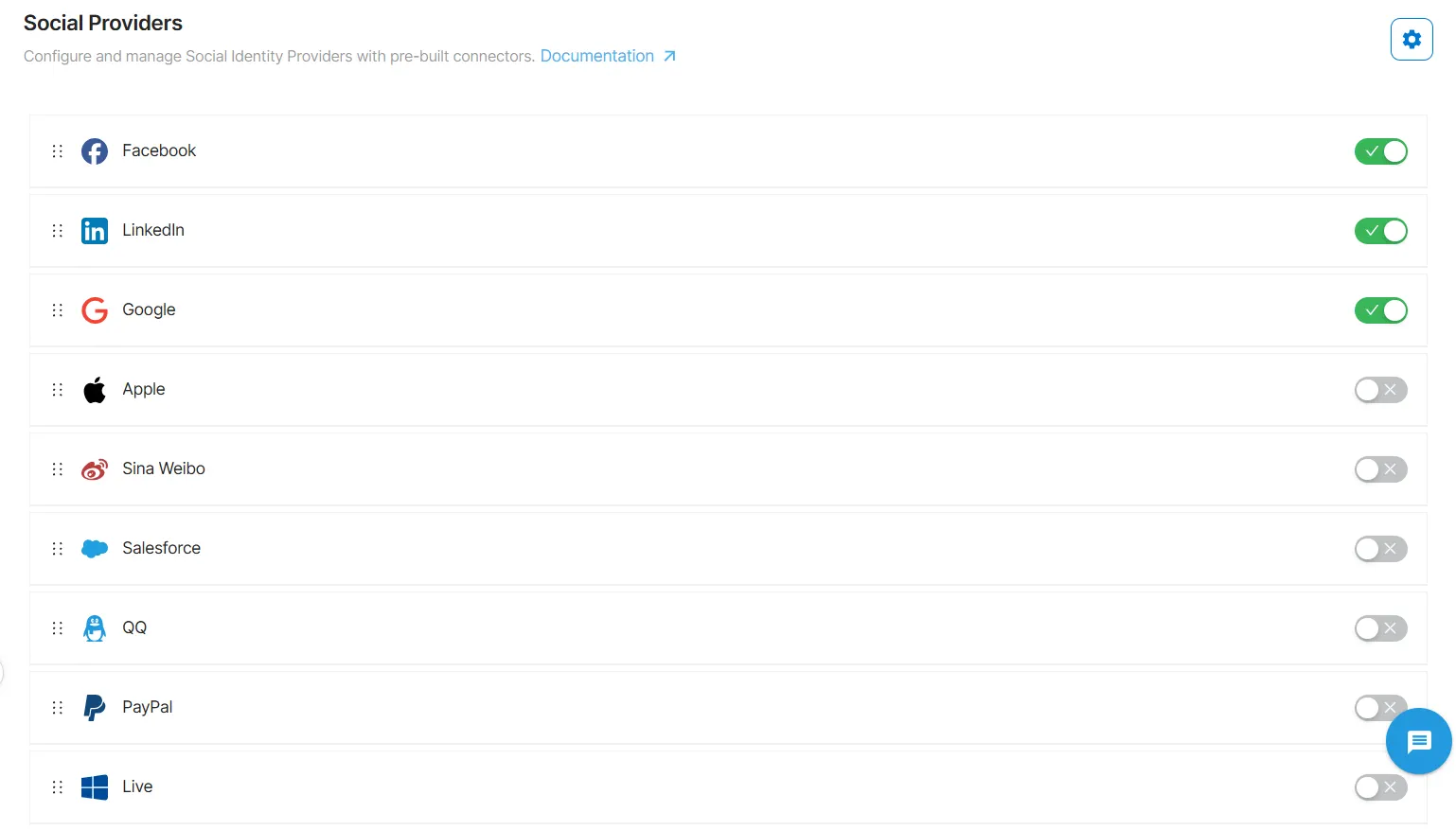
LoginRadius maintains a consistently updated catalogs of social identity providers. The platform supports all major and regional social providers out of the box, including Google, Apple, Facebook, LinkedIn, X/Twitter, GitHub, Microsoft, Amazon, Weibo, QQ, WeChat, Line, Kakao, Yahoo Japan, and many others.
What differentiates LoginRadius is also the depth and stability of those integrations. Every provider has its own authentication nuances, like different token formats, endpoint behaviors, scope requirements, profile schemas, and ongoing API changes. Some providers use strict OIDC implementations; others rely on OAuth 2.0 variations; and a few still maintain older OAuth 1.0a flows. Implementing these individually is error-prone and creates long-term maintenance risk for internal engineering teams.
LoginRadius abstracts this complexity entirely. All social providers are integrated through a unified, standardized social login API that normalizes profile attributes, enforces consistent token validation rules, and applies identity mapping across providers. No matter which provider a user selects, your application receives a clean, normalized identity profile with stable fields. This also ensures resilience: when a provider changes an endpoint, permission model, or data attribute, LoginRadius handles the update centrally without requiring code changes in your applications.
Beyond predefined providers, LoginRadius also supports custom OAuth 2.0 and OpenID Connect providers, enabling organizations to add niche or region-specific identity sources without building custom integrations. This is especially valuable for enterprises operating across APAC, LATAM, or markets where local identity networks dominate.
For engineering teams, the result is straightforward:
-
No per-provider OAuth logic
-
No custom token parsing
-
No inconsistent attribute mapping
-
No need to chase provider API changes
-
No fragmentation of identity data across systems
LoginRadius consolidates social login management into a single, coherent identity layer that can be enabled or updated centrally across all applications. This is the architectural approach required for teams running multiple apps, operating in several regions, or maintaining long-term identity governance at scale.
Learn more about LoginRadius Social Login.
How to Add Social Login with LoginRadius in a Few Steps
Enabling social login in LoginRadius is designed to be configuration-driven and consistent across all providers. Instead of managing OAuth flows individually, you activate providers through the LoginRadius Admin Console and let the platform handle token validation, profile normalization, and policy enforcement.
1. Open the LoginRadius Admin Console and navigate to “Authentication Providers.”
This is the central location for managing all social, enterprise, and custom identity sources. Every supported provider is listed with its configuration status and scope requirements.
2. Choose the social providers you want to enable.
Select from 35+ pre-integrated providers—Google, Apple, Facebook, LinkedIn, GitHub, WeChat, Kakao, and more. Each provider’s configuration dialog includes required credentials, available scopes, and any provider-specific guidelines.
3. Enter your provider credentials and define permissions.
Add your Client ID and Client Secret (or equivalent) obtained from the provider’s developer portal. LoginRadius provides direct links and step-by-step guidance for retrieving these keys, ensuring proper redirect URIs and access scopes are configured.
4. Configure the attributes your application needs.
LoginRadius lets you specify which user profile fields and scopes should be requested from each provider. The platform automatically normalizes attributes into a unified schema, eliminating the need for application-side mapping.
5. Assign providers to your applications or environments.
Enable or disable providers per application, environment, or region with a single configuration toggle useful for multi-app and multi-tenant deployments.
6. Save and deploy.
Once saved, the provider is immediately available across your login flows, whether you’re using hosted pages, JavaScript widgets, mobile SDKs, or custom API integrations. No code changes are required to add or remove providers.
Conclusion
Social login is worth adopting because it removes the weakest part of most authentication stacks: passwords. Delegating identity verification to providers with hardened security, enforced MFA, and real-time threat detection reduces your exposure dramatically. It also gives you verified identifiers and consistent return paths that simplify account creation, recovery, and lifecycle management.
But social login only works at scale when it operates inside a unified identity layer. Without centralized governance, you end up with different OAuth implementations scattered across services, inconsistent attribute handling, and brittle integrations that break when a provider silently changes an endpoint or deprecates a scope. This is why modern architectures place social identity behind a CIAM platform: it standardizes the flow, absorbs provider changes, and exposes a stable interface your applications can depend on.
FAQs
1. What is social login?
Social login is an authentication method that lets users sign in with existing accounts from providers like Google, Apple, Facebook, or LinkedIn instead of creating new credentials.
2. How does social login work?
Social login uses OAuth 2.0 and OpenID Connect to delegate authentication to a social provider, which returns a signed identity token your app can validate and use to create or update a user profile.
3. What data does a social login provider return?
Most providers return verified identifiers, typically email, name, unique user ID, and basic profile metadata based on the scopes your application requests and the user consents to.
4. Which social login providers should I support?
Choose providers based on your audience: Google and Apple for most consumer/mobile apps, LinkedIn and Microsoft for B2B, GitHub for developer platforms, and regional providers like WeChat, Line, or Kakao for APAC markets.
5. What are the main benefits of social login?
It reduces onboarding friction, improves conversion, lowers password-related support costs, delivers verified user data, and reduces your authentication attack surface.
6. When is social login worth implementing?
Social login is ideal when fast onboarding drives growth, especially in ecommerce, SaaS, media, and mobile apps. In high-assurance environments, it should be paired with MFA or passkeys.
7. Is social login secure?
Yes, Social login relies on secure standards like OAuth 2.0 and OpenID Connect (OIDC) and authentication is handled by hardened providers with MFA, device intelligence, and strong risk controls. The key is properly validating tokens and scopes on your side.
8. How does social login protect user privacy?
Users explicitly consent to the data shared, providers enforce strict scope rules, and CIAM platforms apply data minimization, normalization, and retention controls.
9. Is social login compliant with GDPR and CCPA?
Social login can be compliant when you request minimal scopes, store data lawfully, honor deletion/access rights, and use a CIAM layer that enforces governance and auditability.
10. How fast can I add social login to my application?
With a CIAM platform, like LoginRadius, social login can be enabled in hours using pre-built providers and unified APIs.
11. What is the difference between social login and Single Sign-On (SSO)?
A: Social login uses consumer identity providers like Google or Apple for customer authentication, while SSO allows employees or enterprise users to access multiple business applications with one set of organizational credentials.
12. Can users link multiple social accounts to one profile?
A: Yes. Many applications support account linking, allowing users to associate multiple identity providers such as Google, Apple, and Microsoft with a single customer account to avoid duplicate profiles.
13. Does social login eliminate the need for passwords?
A: It can for many users, since authentication happens through the identity provider. However, organizations often continue offering email and password sign-in or passwordless alternatives to give customers more flexibility.
14. How can LoginRadius help implement social login?
A: LoginRadius provides a CIAM platform that supports leading social identity providers, OAuth 2.0,
OpenID Connect (OIDC), adaptive authentication, consent management, account linking, and centralized customer identity management through a single, scalable solution.