Assuming that the reader of this blog has a fair idea of the docker ecosystem!
Docker has changed the world of software development! Since the last few years, docker has helped the developer community, enterprises, and startups to create solutions quickly and effectively. Also, deployment is relatively hassle-free with docker (conditions apply). And worth mentioning is, it resolves the “Works fine on my system” problem.
Well, just not docker, there are many container ecosystems available as an alternative to Docker. For example, Mesos by Apache and Vagrant by Hashicorp. Docker is more loved for what it is not, and that is Bulky! Docker is otherwise lightweight, works mostly with Linux and eventually was identified by Kubernetes in 2015. But, that story... some other time!!
Straight to the context, Docker Compose! Docker compose is a powerful utility that is bundled with Docker installation. Docker-Compose can be used for production and development, to make things virtually seamless.
Microservices and Docker
Docker is doing a great job when it comes to describing and developing microservices.
While working on microservices where quite a few ( being reasonably complicated, in our example 6 ) containers talk to each other to complete a task and since it is an end to end task, the whole thing looks very complicated. To rectify :
- the troubles of developing end to end feature
- how it works in integration
- containerizing the application
the developer has two choices, create a script in a scripting language of choice, or choose docker-compose. Well, docker-compose is an easier option.
Here in this kind of practical example, we are going to demonstrate a similar situation, where multiple containers talk to each other. We are going to use docker-compose as our primary tool to build and deploy images.
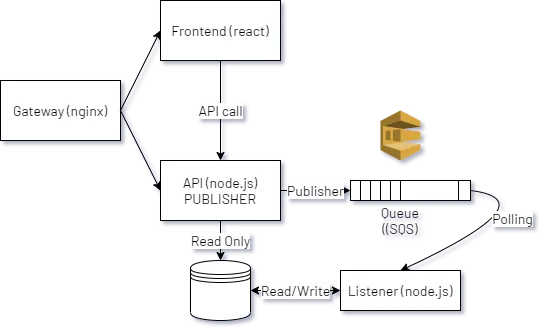
The picture above depicts the architecture of a hypothetical portal of flash sale.
Flash Sale is an e-commerce concept, where an item is made available for sale to the public on a portal at a specific time and in a limited quantity.
The components of the application are
- Gateway
- Frontend (react)
- API server ( node.js)
- SQS ( In this example SQS Emulator)
- Listener (node.js)
- DataStore (mongo-db)
The application is otherwise fairly simple. Go to the portal, hit the green button which calls an API, the API drops a message to the queue, the listener picks the messages, grabs the item from the database reduces the quantity and updates the datastore again.
So far so good!
Code
You may fork a copy from here.
git clone https://github.com/LoginRadius/engineering-blog-samples/tree/master/Docker/docker-compose-dev-sample

The use of docker-compose and why?
Exactly! What is the problem? As such, there is no problem, but it may arise if we do not program or develop it well in an integrated manner. Programming a component and managing it well reduces the time-to-production to a greater degree.
I am not a great programmer; I am just a good programmer with great habits.
- Martin Fowler
While designing and developing complicated systems where microservices are involved, integration and debugging become cumbersome.
To ease it up docker-compose acts a friend.
For the example above we are going to write a docker-compose. Docker-Compose has got powers to
- Build images
- Bring up the whole application ecosystem
- Wipe it up from the memory in one command
First things first, the Dockerfile.
Starting from the API. The API needs a docker image to build. The following is the Dockerfile for the same.
1FROM node:alpine
2WORKDIR '/app'
3COPY ./package.json ./
4RUN npm install
5COPY . .
6CMD ["npm", "run", "start"]
Since the other two components, listener and frontend are also written in JavaScript the Dockerfile does not change at all for them too, for this particular example.
The following is a two-liner Dockerfile for gateway. The conf file targets apiserver and frontend. Please have a look at the configuration file in the repository itself.
1FROM nginx
2COPY ./nginx.conf /etc/nginx/conf.d/default.conf
The other 2 components :
- Mongodb has its image. We will leverage that while writing the docker-compose.
- SQS is emulated using softwaremill/elasticmq image.
Action!
First things first, file version. Since it is all yaml out there, the file version tells docker-compose about the data structure. The data structure which is expected by docker "compose".
so we start the docker-compose as
1version: '3'All the components in the docker-compose are known as services. Next, we are going to write some services. Yes, the services we have written for our business.
Message Queue :
The message queue shall use softwaremill/elasticmq image out of the box and the applications will access that on port 9324. The service description in docker-compose shall look like this.
1mqserver:
2        image: softwaremill/elasticmq
3        ports:
4            - '9324:9324'
That is analogous to docker run -it -p '9324:9324' softwaremill/elasticmq.
A bit more complicated service next, mongodb.
1mongodbdb:
2        depends_on:
3            - mqserver
4        image: mongo
5        container_name: mongo
6        volumes:
7            - /data/db:/mongodata
8        ports:
9            - '27017:27017'
There are a couple of things one may notice more here.
depends_on shall wait for the container of mqserver service to come up, before mongodbdb service goes on air.
Docker is only liable to check the containers when we use depends_on, if you want to check whether your service (which you have embedded) is ready to use or not, use
healthcheckandlink.
Apart from this, we are mounting a volume and exposing ports for an image mongo which gets pulled directly from the docker container registry. container_name will give the service a name, so that it can be discovered *in the network. *Kind of a domain name in the internal docker-compose network.
Now the developer's proprietary API service:
1apiserver:
2        restart: always
3        depends_on:
4            - mqserver
5            - mongodbdb
6    build:
7        dockerfile: Dockerfile
8        context: ../fs-express-api/.
9    volumes:
10        - /app/node_modules
11    environment:
12        - NODE_ENV=production
13        - AWS_SQS_URL=http://mqserver:9324/
14        - AWS_SQS_FQ_URL=http://mqserver:9324/queue/fsqueue
15        - AWS_ACCESS_KEY=na
16        - AWS_SECRET_ACCESS_KEY=na
17        - AWS_REGION=REGION
18        - QUEUE_NAME=fsqueue
19        - MONGODB_CONNECTION=mongodb://mongo:27017/fsorder
20        - API_APP_PORT=5000
21    ports:
22        - '5000:5000'
The build tag will be used by the docker-compose build command to build an image. The build is defined as Dockerfile and the context is docker context, the directory which you want to use as context. Equivalent to: docker build -f filename.
The more you are seeing here is environment and restart options. Environment variables are used to set environment variables while running the image. This is another part where docker-compose comes handy. Think about setting all nine environment variables with docker run.
restart is a bit interesting. One may specify a restart policy if the application crashes, which leads to stopping the docker image itself. always specifies to restart the container if it exit.
In the environment section, one can see mqserver and mongo, instead of the regular localhost and loopback address. This is because when we run docker-compose, it creates a DNS recordset of all the services mentioned. The services can be referred to by their names. A slight deviation here may happen when the container is explicitly named. Here, container_name = mongo is used for service mongodbdb. Hence, the other containers in the environment shall refer to it by mongo and not mongodbdb.
The pollingmod and frontend services are quite the same.
1pollingmod:
2        restart: always
3        depends_on:
4            - mqserver
5            - mongodbdb
6        build:
7            dockerfile: Dockerfile
8            context: ../polling-mod/
9        volumes:
10            - /app/node_modules
11        environment:
12            - AWS_QUEUE_URL=http://mqserver:9324/queue/fsqueue
13            - AWS_ACCESS_KEY=na
14            - AWS_SECRET_ACCESS_KEY=na
15            - AWS_REGION=REGION
16            - MONGODB_CONNECTION=mongodb://mongo:27017/fsorder
17frontend:
18    build:
19        dockerfile: Dockerfile
20        context: ../fs-frontend
21    volumes:
22        - /app/node_modules
23        - ../fs-frontend:/app
24    stdin_open: true
25    ports:
26        - '3000:3000'
Finally, the gateway. So, a gateway is created on the front using Nginx to make the development production-grade. If you go through the gateway code you will find that the services are accessed by their name frontend and apiserver.
1upstream frontend{
2    server frontend:3000;
3}
4upstream apiserver{
5server apiserver:5000;
6}
The Nginx container opens port 80 to an external port 5500. The Nginx container keeps configuration where the user can see just one port 5500 from out of the system, everything else is gray.
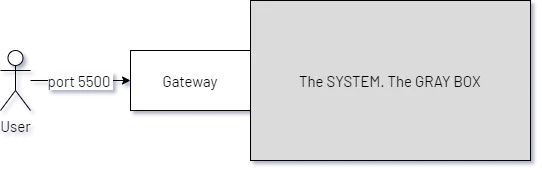
And this is, how it happens in the real world as well!
Finally, we have docker-compose.yml. And following are simple commands which make life even simpler when we need to build and run & stop the entire ecosystem.
To build
docker-compose build
To start
docker-compose up
To stop
docker-compose down
This scratches the surface of using docker-compose for a production-grade development environment.

Thanks for reading the blog. For detailed information and execution example of this blog, please refer to the video below: