
Biggest Challenge in React application is the management of state for frontend developers. In large applications, React alone is not sufficient to handle the complexity which is why some developers use React hooks and others use state management libraries such as Redux.
In this post, We are going to take a closer look at both React hooks and Redux to manage the state.
What is React State Management?
React components have a built-in state object. The state is encapsulated data where you store assets that are persistent between component renderings.
The state is just a fancy term for a JavaScript data structure. If a user changes state by interacting with your application, the UI may look completely different afterwards, because it's represented by this new state rather than the old state.
Make a state variable responsible for one concern to use efficiently.
Why do you need React state management?
React applications are built using components and they manage their state internally and it works well for applications with few components, but when the application grows bigger, the complexity of managing states shared across components becomes difficult.
Here is a simple example of an e-commerce application, in which the status of multiple components will change when purchasing a product.
- Add that product to the shopping list
- Add product to customer history
- trigger count of purchased products
If developers do not have scalability in mind then it is really hard to find out what is happening when something goes wrong. This is why you need state management in your application.
Let’s discuss how to use react state management using react hooks and redux
What is Redux?
Redux was created to resolve this particular issue. it provides a central store that holds all states of your application. Each component can access the stored state without sending it from one component to another. Here is a simple view of how Redux works.
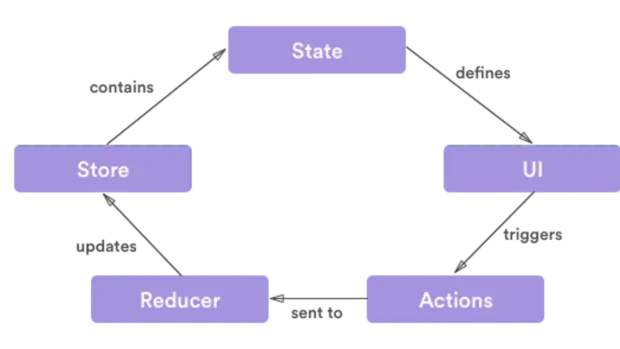
There are three building parts: actions, store, and reducers. Let’s briefly discuss what each of them does.
Actions in Redux
Actions are payloads of information that send data from your application to your store. Actions are sent using store.dispatch(). Actions are created via an action creator.
Here is an example action that represents adding a new todo item:
1{
2type: "ADD_TODO",
3payload: {text:"Hello Foo"}
4 }
Here is an example of its action creator:
1ocnst addTodo = (text) => {
2  return {
3     type: "ADD_TODO",
4     text
5  };
6}
Reducers in Redux
Reducers specify how the application's state changes in response to actions sent to the store. An example of how Reducer works in Redux is as follows:
1const TODOReducer= (state = {}, action) => {
2  switch (action.type) {
3    case "ADD_TODO":
4      return {
5        ...state,
6        ...action.payload
7      };
8    default:
9      return state;
10  }
11};
Store in Redux
The store holds the application state. You can access stored state, update the state, and register or unregister listeners via helper methods.
Let’s create a store for our TODO app:
1const store = createStore(TODOReducer);In other words, Redux gives you code organization and debugging superpowers. This makes it easier to build more maintainable code, and much easier to track down the root cause when something goes wrong.
What is React Hook?
These are functions that hook you into React state and features from function components. Hooks don't work inside classes and it allows you to use React features without writing a class.
Hooks are backwards-compatible, which means it doesn't keep any breaking changes. React provides some built-in Hooks like useState, UseEffect and useReducer etc. You can also make custom hooks.
React Hook Rules
- Call hook at the top level only means that you need to call inside a loop, nested function, or conditions.
- React function components are called hooks only.
Please see the following examples of some react hooks as follows:
What is useState and how to use it
useState is a Hook that Lets you add React state to function components.
Example:
Declaring a State Variable in class and initialize count state with 0 by setting this.state to {count:0}.
1class Example extends React.Component {
2  constructor(props) {
3    super(props);
4    this.state = {
5      count: 0
6    };
7  }
In a function component, we have no this, so we can’t assign or read this.state. Instead, we call the useState Hook directly inside our component:
1function Example() {
2    const [count, setCount] = useState(0);
3}
We declare a state variable called count and set it to 0. React will remember its current value between re-renders, and provide the most recent one to our function. If we want to update the current count, we can call setCount.
what is useReducer and how to use it
useReducer is a hook I use sometimes to manage the state of the application. It is very similar to the useState hook, just more complex. useReducer hook uses the same concept as the reducers in Redux. It is basically a pure function, with no side-effects.
Example of useReducer:
useReducer creates an independent component co-located state container within your component. Whereas Redux creates a global state container that hangs somewhere above your entire application.
1+----------------+              +----------------+
2          |  Component A   |              |                |
3          |                |              |                |
4          |                |              |      Redux     |
5          +----------------+              |                |
6          | connect Redux  |<-------------|                |
7          +--------+-------+              +--------+-------+
8                   |                               |
9         +---------+-----------+                   |
10         |                     |                   |
11         |                     |                   |
12+--------+-------+    +--------+-------+           |
13|  Component B   |    |  Component C   |           |
14|                |    |                |           |
15|                |    |                |           |
16+----------------+    +----------------+           |
17|    useReducer  |    | connect Redux  |<----------+
18+----------------+    +--------+-------+
19                               |
20                      +--------+-------+
21                      |  Component D   |
22                      |                |
23                      |                |
24                      +----------------+
Below an example of todo items is completed or not using the useReducer react hook.
See the following function which is a reducer function for managing state transitions for a list of items:
1const todoReducer = (state, action) => {
2      switch (action.type) {
3        case "ADD_TODO":
4          return state.map(todo => {
5            if (todo.id === action.id) {
6              return { ...todo, complete: true };
7            } else {
8              return todo;
9            }
10          });
11        case "REMOVE_TODO":
12          return state.map(todo => {
13            if (todo.id === action.id) {
14              return { ...todo, complete: false };
15            } else {
16              return todo;
17            }
18          });
19        default:
20          return state;
21      }
22    };
There are two types of actions which are equivalent to two states. they used to toggle the complete boolean field and additional payload to identify incoming action.
The state which is managed in this reducer is an array of items:
1const initialTodos = [
2      {
3        id: "t1",
4        task: "Add Task 1",
5        complete: false
6      },
7      {
8        id: "t2",
9        task: "Add Task 2",
10        complete: false
11      }
12    ];
In code, The useReducer hook is used for complex state and state transitions. It takes a reducer function and an initial state as input and returns the current state and a dispatch function as output
1const [todos, dispatch] = React.useReducer(
2    todoReducer,
3    initialTodos
4  );
Complete file:
1import React from "react";
2const initialTodos = [
3{
4id: "t1",
5task: "Add Task 1",
6complete: false
7},
8{
9id: "t2",
10task: "Add Task 2",
11complete: false
12}
13];
14const todoReducer = (state, action) => {
15switch (action.type) {
16case "ADD_TODO":
17return state.map(todo => {
18if (todo.id === action.id) {
19return { ...todo, complete: true };
20} else {
21return todo;
22}
23});
24case "REMOVE_TODO":
25return state.map(todo => {
26if (todo.id === action.id) {
27return { ...todo, complete: false };
28} else {
29return todo;
30}
31});
32default:
33return state;
34}
35};
36const App = () => {
37const [todos, dispatch] = React.useReducer(todoReducer, initialTodos);
38const handleChange = todo => {
39dispatch({
40type: todo.complete ? "REMOVE_TODO" : "ADD_TODO",
41id: todo.id
42});
43};
44return (
45<ul>
46{todos.map(todo => (
47<li key={todo.id}>
48<label>
49<input
50type="checkbox"
51checked={todo.complete}
52onChange={() => handleChange(todo)}
53/>
54{todo.task}
55</label>
56</li>
57))}
58</ul>
59);
60};
61export default App;
Let’s do a similar example with Redux.
Store in App.js.
1import React from "react";
2import { Provider } from "react-redux";
3import { createStore } from "redux";
4import rootReducer from "./reducers";
5import Todo from "./Components/TODO";
6const store = createStore(rootReducer);
7function App() {
8return (
9<div className="App">
10<Provider store={store}>
11<Todo />
12</Provider>
13</div>
14);
15}
16export default App;
Actions in actions/index.js.
1export const addTodo = id => ({
2  type: "ADD_TODO",
3  id
4});
5export const removeTodo = id => ({
6type: "REMOVE_TODO",
7id
8});
Reducers in reducers/index.js.
1const initialTodos = [
2  {
3    id: "t1",
4    task: "Add Task 1",
5    complete: false
6  },
7  {
8    id: "t2",
9    task: "Add Task 2",
10    complete: false
11  }
12];
13const todos = (state = initialTodos, action) => {
14  switch (action.type) {
15    case "ADD_TODO":
16      return state.map(todo => {
17        if (todo.id === action.id) {
18          return { ...todo, complete: true };
19        } else {
20          return todo;
21        }
22      });
23    case "REMOVE_TODO":
24      return state.map(todo => {
25        if (todo.id === action.id) {
26          return { ...todo, complete: false };
27        } else {
28          return todo;
29        }
30      });
31    default:
32      return state;
33  }
34};
35export default todos;
FIle components/Todo.js
1import React from "react";
2import { connect } from "react-redux";
3import { addTodo, removeTodo } from "../../redux/actions/authActions";
4const Todo = ({ todos, addTodo, removeTodo }) => {
5const handleChange = todo => {
6if (todo.complete) {
7removeTodo(todo.id);
8} else {
9addTodo(todo.id);
10}
11};
12return (
13<ul>
14{todos.map(todo => (
15<li key={todo.id}>
16<label>
17<input
18type="checkbox"
19checked={todo.complete}
20onChange={() => handleChange(todo)}
21/>
22{todo.task}
23</label>
24</li>
25))}
26</ul>
27);
28};
29const mapStateToProps = state => ({ todos: state.auth.todos });
30const mapDispatchToProps = dispatch => {
31return {
32addTodo: id => dispatch(addTodo(id)),
33removeTodo: id => dispatch(removeTodo(id))
34};
35};
36export default connect(
37mapStateToProps,
38mapDispatchToProps
39)(Todo);
React offers react hooks which can be used as an alternative for connect(). You can use built-in hooks mainly useState, UseReducer and useContext and because of these you often may not require Redux.
But for large applications, you can use both redux and react hooks. it works great! React Hook is a useful new feature, and the addition of React-Redux with Redux-specific hooks is a great step towards simplifying Redux development.


