
Introduction
Most systems don’t fail because someone bypassed security. They fail because access slowly becomes messy.
A new hire joins and needs “temporary” access. A support agent helps out with an admin task once. A contractor logs in for a short project. None of this feels risky in the moment. But over time, permissions pile up, ownership gets blurry, and suddenly no one is fully sure who can do what anymore.
This is the real problem role based access control implementation is meant to solve.
At its core, RBAC brings order to access. Instead of assigning permissions directly to users, which becomes unmanageable very quickly, RBAC introduces a layer in between. Users are assigned roles. Roles define permissions. Permissions control actions. That separation sounds simple, but it changes everything about how access scales.
When people ask what is role based access control, they often expect a definition. In practice, RBAC is more of a discipline. It forces teams to think in terms of responsibilities rather than individuals. A user isn’t special because of who they are; they’re trusted because of the role they hold right now. And that role can change, without rewriting access rules from scratch.
From a security perspective, what is RBAC in security really comes down to containment. RBAC limits how far mistakes can travel. If a role is too permissive, the blast radius is still smaller than a system where permissions are scattered user by user. That’s why RBAC shows up repeatedly in audits, compliance frameworks, and incident postmortems, not because it’s trendy, but because it’s predictable.
RBAC also sits at the center of how modern authorization works. Authentication answers who you are. RBAC answers what you’re allowed to do. This distinction matters more as systems grow more distributed, APIs multiply, and access decisions need to be enforced consistently across web apps, mobile apps, and backend services.
The challenge isn’t understanding RBAC in theory. Most teams do. The challenge is understanding how RBAC actually works in real systems, how users map to roles, how permissions are enforced during sessions, and where things tend to go wrong as organizations scale.
That’s what this guide focuses on. We’ll break down RBAC the way it’s used in practice, not as a policy document. Starting with the fundamentals, then walking through how users, roles, permissions, and sessions work together to keep access controlled without slowing teams down.
Once you see that flow clearly, the rest of RBAC starts to make sense.
What Is Role-Based Access Control?
If you strip away the diagrams and security language, role-based access control exists for one simple reason: managing access user by user does not scale.
In small systems, it’s tempting to assign permissions directly. Someone needs access, so you check a box. Another feature launches, so you add one more permission. At first, this feels fast. Over time, it becomes impossible to track. Permissions drift, access becomes inconsistent, and no one is confident enough to clean it up.
This is where what is role based access control becomes more than a definition.
RBAC changes how access is assigned by introducing roles as the primary control layer. Instead of asking, “What can this user do?”, the system asks, “What role does this user have?” Each role represents a responsibility or function in the system, and that role carries a predefined set of permissions. Users inherit access through roles, not through individual exceptions.
That structure is what makes RBAC durable. When someone joins a team, you assign a role. When they change responsibilities, you change the role. When they leave, you remove the role. Access updates automatically without chasing down every permission that was ever added manually.
From a security standpoint, what RBAC is in security is really about consistency. The same role always means the same access. That consistency is what allows security teams to review access, auditors to understand intent, and engineers to enforce rules without adding custom logic everywhere.
It’s also important to clear up a common misunderstanding around role-based authentication. RBAC does not decide who you are. Authentication handles that part. RBAC decides what happens after you’re authenticated. It controls which screens you can see, which APIs you can call, and which actions are blocked even though you’re already logged in.
The RBAC model works because it mirrors how organizations already think about responsibility. People change roles far more often than systems change permissions. By aligning access with roles instead of individuals, RBAC stays stable even as teams, products, and workflows evolve.
Understanding this mental shift is critical. Once roles become the primary unit of access, everything else, permissions, sessions, and enforcement, falls into place much more naturally.
How Access Control Works?
Before RBAC makes any decisions, something more basic has already happened: the system has decided who you are. That step is authentication. Everything that follows lives in a different world authorization.
This distinction matters more than most teams realize.
Authentication answers identity. Authorization answers access. RBAC operates entirely in the second layer.
When someone logs into an application, the system doesn’t immediately start checking roles or permissions. First, it verifies credentials. That might be a password, a passkey, a social login, or an API token. Once identity is established, the system creates a working context for that user. This is where access control actually begins.
At this point, the system has to answer a constant stream of questions:
Can this user view this page?
Can they approve this action?
Can they call this API endpoint?
This is how access control works in real systems. Every meaningful action is gated by a decision. Without structure, those decisions turn into scattered condition checks across the codebase. That’s how access logic becomes brittle and hard to reason about.
RBAC steps in as a way to centralize those decisions. Instead of embedding permission logic everywhere, the system relies on roles to define allowed actions. The application checks permissions, but the logic behind who has which permissions is handled separately.
This is also where confusion around role-based authentication often creeps in. RBAC does not participate in login. It doesn’t validate credentials or establish identity. RBAC only evaluates authorization once identity is already known. Mixing these concepts leads to designs where access logic leaks into authentication flows and those systems become difficult to secure and even harder to audit.
Another important piece here is timing. Access control is not a one-time decision made at login. It’s enforced continuously throughout a user’s session. Every request, every action, every sensitive operation passes through an authorization check. RBAC provides a predictable way to answer those checks without reinventing the logic each time.
Understanding this separation, authentication first, RBAC-driven authorization second, is foundational. Once that line is clear, it becomes much easier to see where RBAC fits, why roles matter, and how permissions are enforced without slowing systems down.
Users, Roles, Permissions, and Sessions: The Core of How RBAC Works
Once authentication is out of the way, RBAC comes down to four elements working together. None of them are complex on their own. The clarity comes from how they interact.
Users are the starting point. A user can be a person, a partner, or even a system account. RBAC doesn’t make assumptions about intent or trust. It treats every user as a subject that needs controlled access. What matters is not who the user is personally, but how they are classified inside the system at a given moment.
Roles are where structure enters. A role represents a responsibility, not an individual. “Support Agent,” “Finance Manager,” or “Viewer” are common examples because they describe what someone is expected to do. This is why roles scale better than direct permissions. People move between responsibilities. Roles absorb that change without forcing access logic to be rewritten.
Permissions define the actual actions that can be performed. They are usually expressed as operations on resources, viewing data, editing records, and approving actions. Permissions should be precise. When they become too broad, roles lose meaning, and access becomes harder to reason about. In a healthy RBAC system, permissions are stable, and roles are carefully composed from them.
Sessions are where all of this becomes real. When a user logs in, the system resolves their roles and associates the corresponding permissions with the active session. From that point forward, every request is evaluated against what the session allows. This is why RBAC isn’t just a configuration exercise. It’s an enforcement mechanism that operates continuously while a user is active.
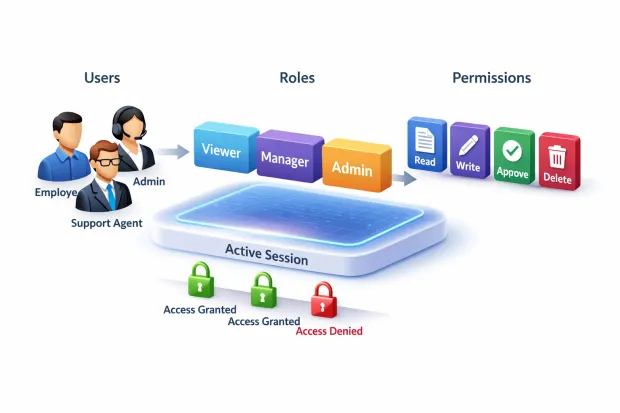
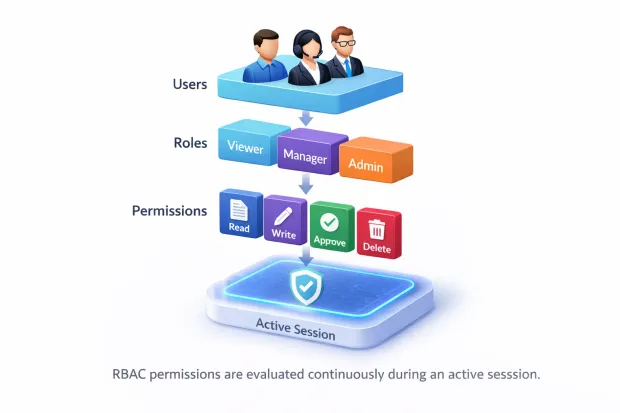
Seen together, this is the RBAC flow: users are assigned roles, roles carry permissions, and permissions are enforced during sessions. There’s no hidden magic. The power of RBAC comes from keeping these pieces clearly separated and letting each one do its job without overlap.
When teams understand this flow, RBAC stops feeling abstract. It becomes a practical way to manage access that stays predictable even as systems, teams, and responsibilities change.
How RBAC Works in Practice: From Login to Enforced Access
Once users, roles, permissions, and sessions are defined, the real question becomes how they work together when someone actually uses the system. This is where RBAC shifts from a model on paper to something that actively controls access.
The process starts at login. After authentication succeeds, the system looks up the user’s assigned roles. These roles may come directly from the application, from group memberships, or from an external identity system. The important part is that role resolution happens before the user begins interacting with protected resources.
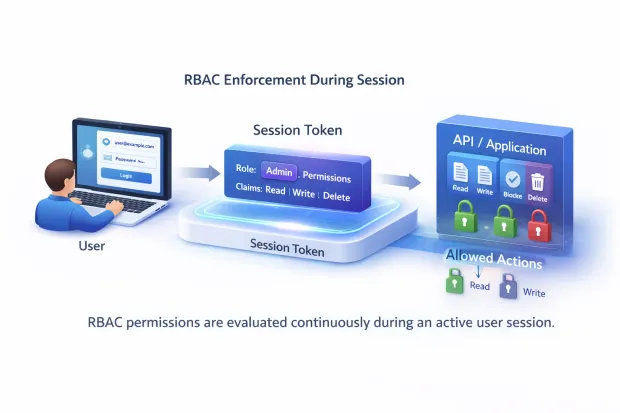
Next, the system builds an access context for the session. The roles assigned to the user are translated into a set of permissions, and those permissions are attached to the session. From this point forward, the application doesn’t need to “think” about roles again. It simply checks whether the session allows a given action.
As the user navigates the application, every sensitive operation triggers an authorization check. Viewing data, updating records, approving requests, or calling APIs all pass through this filter. If the required permission is present, the action proceeds. If not, it is blocked regardless of who the user is or how they authenticated.
This continuous enforcement is what makes RBAC reliable. Access isn’t decided once and forgotten. It’s evaluated repeatedly, in real time, throughout the session. If roles are changed or access is revoked, the system can reflect those changes immediately or on session refresh, preventing outdated permissions from lingering.
This flow also makes auditing possible. Because access decisions are tied to roles and sessions, it becomes clear who performed an action, under which role, and at what time. That clarity is difficult to achieve when permissions are scattered or hard-coded.
In practice, RBAC works best when it stays invisible to users and predictable for teams. When implemented well, it quietly enforces access rules without adding friction exactly what access control is supposed to do.
A Realistic Role-Based Access Control Example
RBAC becomes much easier to understand once you see how it shows up in everyday workflows. Not as a diagram but as decisions the system quietly makes while people do their jobs.
Imagine a SaaS platform with a support team and a finance team.
A support agent logs in. The system assigns the Support Agent role. That role allows viewing user profiles, responding to tickets, and checking account status. The agent can see what they need, act where they’re supposed to, and nothing more. They can’t issue refunds. They can’t unlock high-risk accounts. The system doesn’t trust or distrust the person it trusts the role.
Now consider a support manager. They log in and receive the Support Manager role. Instantly, they inherit everything a support agent can do, plus additional permissions like approving refunds or escalating cases. No custom logic. No manual permission stacking. The role carries the responsibility.
This is a simple role-based access control example, but it highlights the core strength of RBAC: changes in responsibility don’t require rebuilding access rules. Change the role, and access updates automatically.
The same pattern shows up in internal operations. Take a finance workflow. One role submits expenses. Another role approves them. A third role audits transactions. Even though all three users are authenticated and trusted employees, RBAC enforces separation of duties by design. No one accidentally approves their own request. No extra checks scattered across the application.
This is why RBAC scales so well. It encodes intent into roles instead of relying on people to “do the right thing.” Access decisions stay consistent whether the system has ten users or ten thousand.
When teams talk about an example of role-based access control working well, this is usually what they mean: access that feels obvious to users, but is deliberately constrained behind the scenes.
User and Role Management: Where RBAC Succeeds or Quietly Falls Apart
RBAC doesn’t break because the model is flawed. It breaks because user and role management gets neglected once the system is live.
At the beginning, everything was clean. Roles are thoughtfully defined. Permissions are reviewed. Access feels intentional. Then reality sets in. Teams grow. Responsibilities shift. People cover for each other. Temporary access becomes permanent by accident. Over time, roles drift away from what they were meant to represent.
This is why managing users and roles is not a one-time setup—it’s an ongoing operational process.
When a new user joins, RBAC works best when role assignment is predictable. That often means roles are tied to teams, groups, or identity attributes rather than manual decisions. The fewer judgment calls required during onboarding, the more consistent access remains.
When users move roles internally, RBAC should absorb that change cleanly. Removing one role and assigning another should immediately adjust what the user can access. If access changes require manual permission cleanup, the system is already under strain.
Offboarding is where RBAC proves its value most clearly. Removing a user’s roles should remove their access everywhere. If former users still have lingering permissions, the problem usually isn’t RBAC, it's weak role lifecycle discipline.
Access reviews are the final piece. Even well-designed roles need periodic validation. Reviewing who has which roles, and why, keeps RBAC aligned with reality instead of assumptions made months earlier.
Strong RBAC systems treat user and role management as part of daily operations, not as security paperwork. When that mindset is in place, RBAC stays accurate, auditable, and trustworthy as systems evolve
Role-Based Access Control Implementation: How Teams Usually Approach It
Once RBAC makes sense conceptually, implementation is where teams start making trade-offs. There is no single “correct” way to implement RBAC, but there are patterns that consistently work better as systems grow.
In early-stage products, RBAC is often implemented directly inside the application. Roles and permissions live in the database, and the app checks them at runtime. This approach feels straightforward and fast.
It keeps everything close to the code and avoids extra dependencies. The downside shows up later when multiple services need the same access logic, or when audits require a clear, centralized view of who has access to what.
As systems mature, RBAC usually moves closer to the identity layer. Roles are defined centrally, users are assigned roles through an identity system, and applications rely on role or permission claims during a session.
This reduces duplication and keeps access decisions consistent across web apps, mobile apps, and APIs. It also makes changes safer. Updating a role definition affects access everywhere, without redeploying every service.
Many real-world environments land somewhere in between. Core roles are managed centrally, while applications still enforce fine-grained permissions locally. This hybrid approach works well when responsibilities are shared across teams, but it only succeeds if ownership is clear. Unclear ownership is how RBAC logic becomes fragmented.
Regardless of architecture, successful role-based access control implementation shares one trait: access logic is explicit. Roles are documented. Permissions are named intentionally. Enforcement points are consistent. When access rules are hidden in conditionals or scattered across code paths, RBAC exists in name only.
Implementation isn’t just about wiring roles to permissions. It’s about choosing a structure that your team can maintain six months from now when no one remembers why a role was created, but everyone depends on it behaving correctly.
RBAC works best when implementation decisions are boring, repeatable, and easy to explain. If access rules require constant explanation, the system is already drifting away from control.
Role-Based Access Control Best Practices That Hold Up Over Time
Most RBAC systems don’t fail loudly. They slowly lose shape. Roles become vague, permissions grow wider than intended, and access decisions start depending on tribal knowledge instead of design. That’s why role-based access control best practices focus less on tooling and more on discipline.
The first principle is least privilege. Every role should start with the minimum access required to function. Extra permissions added “just in case” are almost never removed later. Over time, those small decisions are what turn RBAC into a risk surface instead of a safeguard.
Role clarity matters just as much. Roles should describe responsibilities, not people or temporary states. When roles are named after individuals, projects, or one-off needs, they become impossible to reason about. A good role answers a simple question: what is this user trusted to do?
Another pattern that holds up is separating business roles from administrative roles. Mixing the two makes audits harder and mistakes more damaging. Admin access should be deliberate, visible, and limited to users who truly need it. If everyone becomes an admin to “get things done,” RBAC has already lost its purpose.
Regular access reviews keep RBAC aligned with reality. Even well-designed roles can drift as organizations change. Periodically reviewing who has which roles and why catches over-privileged access before it becomes a problem. This is especially important for long-tenured users whose responsibilities have changed over time.
Finally, enforcement needs to be consistent. RBAC only works if every sensitive action actually checks permissions. When some paths enforce access, and others don’t, users learn where the gaps are. Good RBAC feels invisible because it behaves the same way everywhere.
These practices aren’t complex, but they require intention. Teams that treat RBAC as a living system not a one-time configuration are the ones that see it scale without friction.
RBAC vs ABAC: Where RBAC Fits and Where It Needs Help
RBAC works exceptionally well when access is tied to responsibility. That’s why it shows up in so many systems. But as products grow, teams often run into edge cases that RBAC alone wasn’t designed to handle. This is where comparisons with ABAC usually start.
RBAC answers access questions using roles. If you have the role, you have the access. That predictability is its strength. It’s easy to explain, easy to audit, and easy to reason about especially for teams managing large numbers of users. Most everyday access decisions fit this model comfortably.
ABAC, or attribute-based access control, approaches the problem differently. Instead of relying only on roles, it considers contextual things like location, device posture, time of access, or account state. Access decisions can change dynamically based on these attributes, even if the user’s role stays the same.
In practice, this isn’t an either-or decision. Many mature systems use RBAC as the foundation and layer contextual checks on top when needed. RBAC defines who should generally be allowed. Attributes refine when or under what conditions the access applies.
This layered approach keeps systems understandable while still handling real-world complexity. RBAC provides stability. ABAC adds flexibility where roles alone would become too rigid.
Understanding this boundary helps teams avoid overengineering early on while still leaving room to grow. RBAC doesn’t need to solve every access problem. It needs to solve the right ones reliably and let additional controls step in when the context demands it.
Conclusion
RBAC isn’t powerful because it’s complex. It’s powerful because it’s deliberate.
When role-based access control implementation is done well, access stops being a guessing game. Teams know why someone has access. Auditors can trace decisions back to intent. Engineers don’t have to rewrite authorization logic every time responsibilities change. Everything becomes easier to reason about.
What often gets missed is that RBAC is not just a technical control, it's an organizational one. It forces clarity. It asks teams to define responsibilities, agree on boundaries, and maintain discipline as systems evolve. That’s uncomfortable at times, but it’s also why RBAC keeps showing up in secure, well-run platforms.
Most access control failures aren’t caused by RBAC being outdated or insufficient. They happen because roles weren’t revisited, permissions quietly expanded, or enforcement became inconsistent. RBAC didn’t fail; ownership did.
When users map cleanly to roles, roles map cleanly to permissions, and permissions are enforced consistently during sessions, access stays predictable even under pressure. That predictability is what allows systems to scale without slowing teams down or opening unnecessary risk.
RBAC may not be flashy, but it remains one of the few access control models that can grow with both the product and the organization. When treated as a living system rather than a checkbox, it does exactly what it’s supposed to do: keep access under control while everything else moves fast.
FAQs
Q: What is role-based access control (RBAC)?
A: Role-based access control is an authorization model where users are assigned roles, and each role defines what actions they can perform. It simplifies access management by grouping permissions logically instead of assigning them individually.
Q: How does role-based access control implementation work in practice?
A: In a role-based access control implementation, users are assigned roles at login, roles map to permissions, and those permissions are enforced throughout the user session. Every action is checked against the role’s allowed access.
Q: What is the difference between RBAC and role-based authentication?
A: Role-based authentication is often used informally, but RBAC actually controls authorization, not authentication. Authentication verifies identity, while RBAC determines what an authenticated user is allowed to access.
Q: What are some role-based access control best practices?
A: Start with least privilege, keep roles small and meaningful, and avoid creating roles for individual users. Regular access reviews and clear role documentation help RBAC stay effective over time.


