
Introduction
The Secure Enclave is a hardware-based key manager that’s isolated from the main processor to provide an extra layer of security. Using a secure enclave, we can create the key, securely store the key, and perform operations with the key. Thus makes it difficult for the key to be compromised.
We usually save data persistently in the app using UserDefaults, Keychain, Core Data or SQLite. For example, To save the session of logged in user, we save username and password. But this process puts our data at high-security risk. So it's always recommended to store sensitive data in an encrypted format. But again, it's a challenge to secure keys used in encryption/decryption.
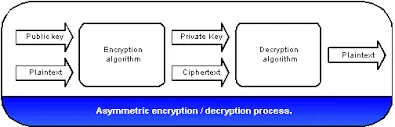
Now here Secure Enclave comes in the role.
In this blog, we will use Secure Enclave to generate key pair and use those in encryption/decryption of sensitive data further.
Here I will create a wrapper to generate key pair using Secure Enclave and use them to encrypt/decrypt sensitive data. And also a viewcontroller to show how to use a wrapper to get encrypted and decrypted data. You may implement wrapper's methods as common methods and use wherever needed in the project. But its recommended to use a separate wrapper for handling communication with Secure Enclave.
Wrapper
I have created .h and .m files named as SecEnclaveWrapper as a subclass of NSObject. In .h file I am declaring function for being accessible from other classes like:
1/**
2Return encrypted value of data using kSecKeyAlgorithmECIESEncryptionStandardX963SHA256AESGCM algo
3*/
4- (NSData *_Nonnull)encryptData:(NSData *_Nonnull)data ;
5/**
6Return decryrpted data of encrypted data  using kSecKeyAlgorithmECIESEncryptionStandardX963SHA256AESGCM algo
7*/
8
9(NSData *_Nonnull)decryptData:(NSData *_Nonnull)data ;
10
11/**
12Return an initialized instance of the wrapper
13*/
14
15(instancetype)init;
Then in .m file, define the following methods as :
The method init initializes and returns the object of this wrapper class. And 'encryptData' and 'decryptData' method return encrypted data and decrypted data of encrypted data, respectively.
1- (instancetype)init {
2    self = [super init];
3if(![self lookupPublicKeyRef] || ![self lookupPrivateKeyRef])
4    [self generatePasscodeKeyPair];
5
6return self;
7
8}
9
10
11(NSData *)encryptData:(NSData *)data {
12if (data && data.length) {
13  CFDataRef cipher = SecKeyCreateEncryptedData(publicKeyRef, kSecKeyAlgorithmECIESEncryptionStandardX963SHA256AESGCM, (CFDataRef)data, nil);
14
15  return (__bridge NSData *)cipher;
16
17} else {
18return nil;
19}
20}
21
22
23(NSData*)decryptData:(NSData *)data {
24if(data && data.length){
25  CFDataRef plainData = SecKeyCreateDecryptedData(privateKeyRef, kSecKeyAlgorithmECIESEncryptionStandardX963SHA256AESGCM, (CFDataRef)data, nil);
26  return  (__bridge NSData *)plainData;
27
28}
29else {
30return nil;
31}
32}
The 'lookupPublicKeyRef' method below will lookup keychain for public key & 'lookupPrivateKeyRef' method search for the private key and return key if found.
1- (SecKeyRef) lookupPublicKeyRef
2{
3    OSStatus sanityCheck = noErr;
4    NSData *tag;
5    id keyClass;
6if (publicKeyRef != NULL) {
7    // if already resides in memory, return
8    return publicKeyRef;
9}
10tag = [kPublicKeyName dataUsingEncoding:NSUTF8StringEncoding];
11keyClass = (__bridge id) kSecAttrKeyClassPublic;
12
13
14NSDictionary *queryDict = @{
15
16    (__bridge id) kSecClass : (__bridge id) kSecClassKey,
17    (__bridge id) kSecAttrKeyType : (__bridge id) kSecAttrKeyTypeEC,
18    (__bridge id) kSecAttrApplicationTag : tag,
19    (__bridge id) kSecAttrKeyClass : keyClass,
20    (__bridge id) kSecReturnRef : (__bridge id) kCFBooleanTrue
21};
22//else look key in keychain and return
23sanityCheck = SecItemCopyMatching((__bridge CFDictionaryRef) queryDict, (CFTypeRef *) &publicKeyRef);
24if (sanityCheck != errSecSuccess) {
25    NSLog(@"Error trying to retrieve key from server.  sanityCheck: %d", (int)sanityCheck);
26}
27
28return publicKeyRef;
29
30}
31
32
33(SecKeyRef) lookupPrivateKeyRef
34{
35CFMutableDictionaryRef getPrivateKeyRef = newCFDict;
36CFDictionarySetValue(getPrivateKeyRef, kSecClass, kSecClassKey);
37CFDictionarySetValue(getPrivateKeyRef, kSecAttrKeyClass, kSecAttrKeyClassPrivate);
38CFDictionarySetValue(getPrivateKeyRef, kSecAttrLabel, kPrivateKeyName);
39CFDictionarySetValue(getPrivateKeyRef, kSecReturnRef, kCFBooleanTrue);
40OSStatus status = SecItemCopyMatching(getPrivateKeyRef, (CFTypeRef *)&privateKeyRef);
41if (status == errSecItemNotFound)
42return nil;
43return (SecKeyRef)privateKeyRef;
44}
The following methods will actually deal with Secure Enclave to generate a private key and public key.
1- (bool) generatePasscodeKeyPair
2{
3    CFErrorRef error = NULL;
4    SecAccessControlRef sacObject = SecAccessControlCreateWithFlags(
5                                                                    kCFAllocatorDefault,
6                                                                    kSecAttrAccessibleAfterFirstUnlockThisDeviceOnly,
7                                                                    kSecAccessControlPrivateKeyUsage,
8                                                                    &error
9                                                                    );
10if (error != errSecSuccess) {
11    NSLog(@"Generating key pair, error: %@\n", error);
12}
13
14return [self generateKeyPairWithAccessControlObject:sacObject];
15
16}
17
18
19(bool) generateKeyPairWithAccessControlObject:(SecAccessControlRef)accessControlRef
20{
21// create dictionary of private key
22CFMutableDictionaryRef accessControlDict = newCFDict;;
23#if !TARGET_IPHONE_SIMULATOR
24CFDictionaryAddValue(accessControlDict, kSecAttrAccessControl, accessControlRef);
25#endif
26CFDictionaryAddValue(accessControlDict, kSecAttrIsPermanent, kCFBooleanTrue);
27CFDictionaryAddValue(accessControlDict, kSecAttrLabel, kPrivateKeyName);
28// create dictionary for saving key into keychain
29CFMutableDictionaryRef generatePairRef = newCFDict;
30#if !TARGET_IPHONE_SIMULATOR
31CFDictionaryAddValue(generatePairRef, kSecAttrTokenID, kSecAttrTokenIDSecureEnclave);
32#endif
33CFDictionaryAddValue(generatePairRef, kSecAttrKeyType, kSecAttrKeyTypeEC);
34CFDictionaryAddValue(generatePairRef, kSecAttrKeySizeInBits, (__bridge const void *)([NSNumber numberWithInt:256]));
35CFDictionaryAddValue(generatePairRef, kSecPrivateKeyAttrs, accessControlDict);
36OSStatus status = SecKeyGeneratePair(generatePairRef, &publicKeyRef, &privateKeyRef);
37if (status != errSecSuccess){
38NSLog(@"Error trying to retrieve key from server.  sanityCheck: %d", (int)status);
39  return NO;
40
41}
42[self savePublicKeyFromRef:publicKeyRef];
43return YES;
44}
The private key is generated and stored in Secure Enclave which cannot be directly used. Whereas public key have to be stored manually in keychain by following method.
1- (bool) savePublicKeyFromRef:(SecKeyRef)publicKeyRef
2{   OSStatus sanityCheck = noErr;
3    NSData *tag;
4    id keyClass;
5tag = [kPublicKeyName dataUsingEncoding:NSUTF8StringEncoding];
6keyClass = (__bridge id) kSecAttrKeyClassPublic;
7
8
9NSDictionary *saveDict = @{
10
11    (__bridge id) kSecClass : (__bridge id) kSecClassKey,
12    (__bridge id) kSecAttrKeyType : (__bridge id) kSecAttrKeyTypeEC,
13    (__bridge id) kSecAttrApplicationTag : tag,
14    (__bridge id) kSecAttrKeyClass : keyClass,
15    (__bridge id) kSecValueData : (__bridge NSData *)SecKeyCopyExternalRepresentation(publicKeyRef,nil),
16    (__bridge id) kSecAttrKeySizeInBits : [NSNumber numberWithUnsignedInteger:256],
17    (__bridge id) kSecAttrEffectiveKeySize : [NSNumber numberWithUnsignedInteger:256],
18    (__bridge id) kSecAttrCanDerive : (__bridge id) kCFBooleanFalse,
19    (__bridge id) kSecAttrCanEncrypt : (__bridge id) kCFBooleanTrue,
20    (__bridge id) kSecAttrCanDecrypt : (__bridge id) kCFBooleanFalse,
21    (__bridge id) kSecAttrCanVerify : (__bridge id) kCFBooleanTrue,
22    (__bridge id) kSecAttrCanSign : (__bridge id) kCFBooleanFalse,
23    (__bridge id) kSecAttrCanWrap : (__bridge id) kCFBooleanTrue,
24    (__bridge id) kSecAttrCanUnwrap : (__bridge id) kCFBooleanFalse
25};
26sanityCheck = SecItemAdd((__bridge CFDictionaryRef) saveDict, (CFTypeRef *)&publicKeyRef);
27if (sanityCheck != errSecSuccess) {
28    NSLog(@"Error trying to retrieve key from server.  sanityCheck: %d", (int)sanityCheck);
29
30}
31
32return publicKeyRef;
33
34}
Demo
Now I am creating ViewController.h and .m files. In viewDidLoad in .m file, having a string to be stored in UserDefaults. I will encrypt this string by a private key generated above and then store persistently encrypted data for later use.
1- (void)viewDidLoad {
2    [super viewDidLoad];
3    NSString *strDatatosave = @"example data to save";
4    NSString *bundleIdentifier = [[NSBundle mainBundle] bundleIdentifier];
5    NSString *strGroupID = [NSString stringWithFormat:@"group.%@",bundleIdentifier];
6    SecEnclaveWrapper *keychainItem = [[SecEnclaveWrapper alloc] init];
7NSData *encrypted = [keychainItem encryptData:[strDatatosave dataUsingEncoding:NSUTF8StringEncoding]];
8NSString *strEncrypted = [[NSString alloc] initWithData:encrypted encoding:NSUTF8StringEncoding];
9NSLog(@"encrypted string %@",strEncrypted);
10
11NSData *decrypted =[keychainItem decryptData:encrypted];
12NSString *strDecrypted = [[NSString alloc] initWithData:decrypted encoding:NSUTF8StringEncoding];
13
14NSLog(@"decrypted string as real string%@",strDecrypted);
15
16}
Conclusion
In this blog, we learned about the basics of key generation via Secure Enclave and encryption and decryption using keys. By default, key-pairs are generated in the Secure Enclave. The private key is available only at creation time and can not be obtained later as it is saved in Secure Enclave. Operations can be performed with it without exposing it to user code. Only Public Key will be stored and retrieved.
You can find the complete repository link here
Thanks for reading the blog. For detailed information and execution example of this blog, please refer to the video below:


