
Introduction
Ever tried logging into a website and felt instantly annoyed by the need to “create an account,” confirm your email, set a password (that meets six complex rules), and then finally... you're in? Now imagine your users going through that same frustrating ritual on your WordPress site, only to abandon it halfway.
Here’s the truth: users today expect simplicity. They want to get in, interact, and move on without the friction of traditional login forms. And that’s exactly where WordPress social login shines.
By enabling users to log in with their existing social media accounts like Google, Facebook, LinkedIn, or X, you offer them a familiar and seamless way to access your site. No extra passwords to remember. No forms to fill. Just one click, and they’re in. It’s fast, secure, and it dramatically improves user experience, especially on mobile, where typing passwords is even more painful.
From a site owner’s perspective, it’s a win-win. Social login can reduce drop-offs on your registration page, increase sign-ups, and even give you access to verified email addresses and user profile data. Whether you're running a blog, a membership site, or a full-fledged WooCommerce store, integrating a WordPress social plugin is one of the smartest ways to remove login barriers.
In this blog, we’ll break down exactly how to add social login in WordPress without any coding headaches. We’ll walk you through the best plugins available, how to set them up, and why it’s worth making the switch. You’ll also learn the benefits of social login from a user engagement and conversion perspective, so you’re not just adding a shiny feature you’re making your WordPress site smarter.
So if you’re ready to offer your users a frictionless way to log in with social media on WordPress, you’re in the right place. Let’s get started.
What is a Social Media Login?
Think about the last time you signed up for a new website. Chances are, you were relieved to see a “Continue with Google” or “Log in with Facebook” button. That’s social media login in action also called social login or social sign-in.
At its core, social login is a simple way for users to log into a website using their existing social media credentials like Google, Facebook, Apple, LinkedIn, GitHub, or others. Instead of creating a brand-new account with a username and password, users grant permission for the site to access basic profile information from their social media account (usually just name and email).

This is made possible through OAuth, the secure authorization protocol behind most WordPress social login systems. Don’t worry you don’t need to understand the inner workings of OAuth to use it. Most WordPress social plugins handle this behind the scenes for you.
From the user’s perspective, social login feels magical:
-
No passwords to remember
-
One-click login across devices
-
Less friction during checkout or sign-up
From your perspective as a WordPress site owner, it means:
-
More registrations with fewer abandoned forms
-
Better quality user data (real emails, real profiles)
-
A modern, mobile-friendly experience that improves trust and usability
Whether you're building a blog, a subscription site, or an eCommerce platform, login with social media WordPress functionality is no longer just a “nice-to-have.” It’s expected.
Which Plugins Can Be Used to Add Social Login to WordPress?
When it comes to adding social login to WordPress, there’s no shortage of plugins in the market. But not all are created equal. Some offer basic functionality, while others deliver enterprise-level scalability, better branding, and more control over the user experience.
Here’s a look at some of the most trusted and widely used WordPress social plugins, including their core features and who they’re best suited for.
1. LoginRadius WordPress Social Plugin
The LoginRadius WordPress Social Plugin is best for: Businesses that need secure, scalable, and branded social login.
-
Supports 40+ social platforms, including Google, Facebook, Apple, LinkedIn, and more.
-
Built-in privacy and compliance support (GDPR, CCPA).
-
Offers advanced identity features like progressive profiling and adaptive login.
-
Easily integrates with WooCommerce, membership sites, and marketing tools.
-
Developer-friendly, API-first architecture.
Why it's different: Unlike most plugins, LoginRadius is a full CIAM (Customer Identity and Access Management) platform. If you care about data security, seamless integration, and enterprise-grade identity, this is a future-proof choice.
Read the complete developer documents here.
2. Nextend Social Login
Best for: Bloggers and small sites looking for easy, free setup.
-
Supports Google, Facebook, and Twitter (free version).
-
Pro version adds LinkedIn, Amazon, and more.
-
Integrates with WooCommerce and BuddyPress.
-
Custom redirect URLs, login button customization.
3. Super Socializer
Best for: Sites that want social login + sharing in one.
-
Social login, social sharing, and comments bundled together.
-
100+ social network options.
-
WooCommerce and BuddyPress compatible.
-
GDPR compliance tools included.
4. WP Social Login (by miniOrange)
Best for: Mid-size businesses wanting feature-rich flexibility.
-
Multiple social providers + SSO support.
-
Role mapping, custom redirection, and email sync.
-
Integration with LearnDash, WooCommerce, and others.
-
Custom app setup support.
5. Heateor Social Login
Best for: Simplicity and clean design.
-
Google, Facebook, and Twitter login options.
-
Lightweight and responsive UI.
-
Button placement on login, register, and comment forms.
-
Includes basic GDPR compliance features.
Plugin Comparison Table: Top WordPress Social Login Plugins
| Plugin | ## of Providers | Custom Branding | GDPR Ready | Best For |
|---|---|---|---|---|
| LoginRadius | 40+ | ✅ Full Control | ✅ Yes | Scalable businesses and CIAM use cases |
| Nextend Social Login | 3 (Free), 8+ Pro | 🔶 Limited (Pro) | ❌ No | Blogs and small eCommerce sites |
| Super Socializer | 100+ | 🔶 Basic (CSS) | ✅ Manual | All-in-one login + sharing setup |
| WP Social Login | 10+ (Pro) | 🔶 Moderate | ✅ Partial | Education portals, WordPress multisites |
| Heateor Social Login | 3–5 | 🔶 Minimal | ✅ Basic | Lightweight login for simple sites |
Choosing the right WP social plugin really depends on your goals do you want a quick fix, or a robust, scalable login experience that grows with your business?
Pro Tip:
If your business is privacy-focused, requires enterprise-level identity security, or needs deep integration across products, LoginRadius stands out as a complete WordPress social plugin solution—not just a front-end utility.
How to Add Social Login Plugin to WordPress Website
Adding a WordPress social login to your site might sound technical—but with the right plugin, it's actually very beginner-friendly. Whether you're a blogger, store owner, or developer, you can set this up without writing a single line of code.
Here’s a step-by-step guide to help you add social login in WordPress using a plugin like LoginRadius or Nextend.
Step 1: Choose the Right Plugin
If you want a fully customizable, scalable, and secure solution, LoginRadius is a strong option. If you just need basic functionality for a small blog, others like Nextend work well.
Step 2: Install and Activate the Plugin
-
Go to your WordPress Admin Dashboard
-
Navigate to Plugins → Add New
-
Search for your chosen plugin (e.g., “LoginRadius”)
-
Click Install Now
-
Then click Activate
You’ll now see the plugin menu appear in your WordPress sidebar.
Step 3: Configure Social Providers
To enable login options like “Login with Google” or “Continue with Facebook,” you need to connect your site to each provider:
-
Google: Go to Google Cloud Console, create a project, and enable OAuth credentials
-
Facebook: Visit Meta for Developers, create an app, and generate an App ID + Secret
-
LinkedIn, Apple, or others follow similar steps
Don’t worry; most plugins provide detailed setup guides and callback URLs. Just copy-paste the client ID and secret into the plugin settings.
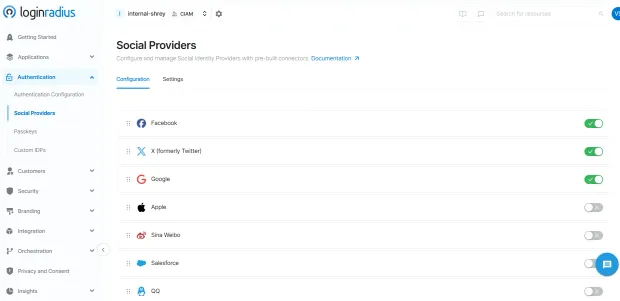
Here’s how easy it is to select the social provider in the LoginRadius Admin Console:
Step 4: Customize the UI and Placement
-
Choose where you want the social login buttons to appear:
- On the login page
- Registration form
- Checkout page (for WooCommerce)
- Blog comment forms
-
Customize button style, text (“Login with Google”), and alignment to match your brand.
With LoginRadius, you can go a step further and fully match the look and feel of your site—even on hosted login pages.
Step 5: Test the Social Login Flow
Once configured, open a new incognito browser and go to your login page. Try signing in using your connected social provider.
Check that:
-
The button redirects to the provider login screen
-
You’re prompted for permissions
-
You’re redirected back to your site and logged in
-
A user profile is created in WordPress
If everything flows smoothly, you’ve successfully added login with social media WordPress functionality to your site!
Step 6: Optional Advanced Settings
-
Enable role mapping (e.g., Facebook users = subscribers)
-
Add redirect URLs (e.g., after login, go to dashboard)
-
Enable email verification (especially useful for gated content)
-
Integrate with WooCommerce for frictionless checkout
Adding a WordPress social plugin isn't just a backend tweak; it’s a front-door upgrade to your user experience. By letting users sign in with accounts they already trust, you’re removing unnecessary steps, building trust, and setting yourself apart from sites still stuck in the old username-and-password world.
Why Add Social Media Login to WordPress?
If you’ve ever abandoned a website just because it asked you to “create an account,” you're not alone, and neither are your users. The average person has over 100 online accounts, and password fatigue is very real. When faced with yet another registration form, most users don’t think twice before bouncing.
Now imagine giving those same users a shortcut something familiar, frictionless, and secure. That’s exactly what WordPress social login delivers.
With login with social media WordPress functionality, you empower users to sign up or sign in using accounts they already trust—like Google, Facebook, LinkedIn, or even Apple. And that one simple change unlocks a host of benefits, both for your users and for you as a WordPress site owner.
Here’s why it matters:
1. Reduce Sign-Up Friction, Boost Conversions
Online attention spans are short. Every extra field in your registration form increases the chance of a user dropping off. But when visitors can log in with a single click using their social media credentials, you drastically reduce that barrier to entry.
For WordPress sites, especially ones focused on subscriptions, communities, or gated content, WordPress login with social media can improve registration rates by up to 30–50% (based on industry data). That’s a massive gain for such a lightweight change.
2. Create a Seamless Mobile Experience
Let’s be real, typing complex passwords on mobile devices is a UX nightmare. Autocorrect kicks in, typos happen, and people give up.
By enabling WordPress social login, you provide a tap-and-go experience that’s made for mobile. Google, Facebook, and Apple all offer native login flows that autofill credentials securely, making the process almost invisible to the user.
3. Collect Verified and Enriched User Data
When users sign up with social accounts, they’re more likely to use their real name, real email, and real profile information. Many WordPress social plugins even let you fetch additional data (with consent), like location, profile picture, or company name.
This gives you richer insights for personalization, segmentation, and email marketing without relying on guesswork or incomplete forms. See how LoginRadius Social Login helps collect rich customer data:
4. Minimize Forgotten Password Hassles
Password reset requests are one of the most common (and most annoying) admin tasks for WordPress site owners. They clog your inbox and frustrate your users.
With login with social media WordPress, there’s no password to reset. The user authenticates through their existing social account, meaning less support burden for you and a smoother journey for them.
5. Boost Trust Through Familiarity
Trust is a huge factor in whether someone chooses to register, buy, or engage. When your login page features recognizable social icons like “Continue with Google” or “Log in with Facebook,” users feel more comfortable. These logos act like micro-trust signals; they show your site plays well with platforms users already know and use.
In fact, many users are more likely to register if they see a social login option they recognize, especially first-time visitors or mobile users.
6. Speed Up WooCommerce Checkout
For online stores, time is money literally. Every second of delay during checkout increases the chances of cart abandonment.
With WordPress social plugin integration into WooCommerce, customers can breeze through the checkout process. No account creation. No lost passwords. Just a fast and familiar login experience that keeps sales moving.
7. Build a Modern, Brand-Aligned Experience
If your WordPress site looks sleek and professional but still uses a clunky default login form, there's a disconnect. Offering WordPress social login modernizes the entire authentication flow. It shows your brand is user-first, mobile-friendly, and aligned with how people expect to interact online.
Plugins like LoginRadius even let you fully customize your social login interface to match your brand colors, fonts, button styles, and even the login page itself.
Adding a WordPress social plugin isn't just about convenience; it's about building digital trust, improving usability, and creating an experience your users will want to come back to. Whether you're running a blog, community, store, or SaaS site, social login helps you stay competitive in a world that values speed, security, and simplicity.
And the best part? It only takes a few minutes to set up.
Conclusion
In today’s fast-moving digital world, your login experience is either a gateway or a barrier. If you're still relying on the default WordPress login form, you're asking users to jump through hoops they no longer want to deal with.
With WordPress social login, you remove those barriers. You give users what they actually prefer: the option to log in with their existing Google, Facebook, LinkedIn, or Apple accounts quickly, securely, and without yet another password to remember.
Whether you’re managing a blog, an eCommerce store, a learning portal, or a community, implementing social login isn’t just a technical upgrade it’s a strategic investment in user experience, trust, and growth.
And the best part? You can get started in minutes.
Ready to Modernize Your Login Experience?
If you’re looking for a solution that grows with your brand—complete with 40+ social providers, hosted login pages, GDPR-ready consent, and enterprise-grade security then LoginRadius is your next move.
Start your free trial of LoginRadius
FAQs
1. Do I need a plugin to install social media login to WordPress?
A: Yes, the easiest way to enable WordPress social login is by using a plugin. It handles all the OAuth configurations, redirects, and user session management without requiring any custom code. Plugins like LoginRadius or Nextend make the setup quick and hassle-free.
2. Why should I add social login to my WordPress site?
A: Adding social login to your WordPress site improves user experience, boosts registration rates, and reduces password fatigue. It allows visitors to log in with one click using their existing social media accounts, leading to faster sign-ups and better engagement.
3. How do I install a social login plugin on WordPress?
A: To add WordPress social login, go to your dashboard, navigate to Plugins → Add New, search for a plugin like “LoginRadius” or “Nextend Social Login,” install, and activate it. Then configure your social app credentials in the plugin settings and you’re good to go.


