
Introduction
A customer signs up in seconds. From the application’s point of view, that single action creates a much longer identity problem.
Who owns the account? How should that person authenticate the next time they return? What information can they update themselves? Which applications or services should they be able to access? What happens if they change devices, lose an authenticator, create a second account, request data deletion, or simply stop using the service?
That is where user management comes in. Modern user management is no longer just about creating accounts and assigning permissions. It covers the full user lifecycle from registration and authentication to profile management, access control, recovery, consent, account changes, and eventual deactivation or deletion.
For customer-facing applications, the challenge gets harder as the business grows. One identity may need to work across websites, mobile apps, APIs, multiple brands, and different digital services. If each application manages users independently, duplicate profiles, inconsistent permissions, fragmented customer data, and security gaps can appear quickly.
Here’s where teams usually go wrong: they treat user management as an admin function rather than part of the customer experience.
A good user management system should make it easier for legitimate customers to register, sign in, manage their profiles, and access the right services without unnecessary friction. At the same time, it needs to help businesses enforce authentication policies, control access, protect identity data, support privacy requirements, and respond when risk changes.
That is why user management increasingly sits inside a broader Customer Identity and Access Management (CIAM) strategy.
What Is User Management?
User management is the process of creating, organizing, authenticating, securing, updating, and managing user accounts throughout their lifecycle. It determines how users enter a digital service, how their identity information is maintained, what they can access, and what happens when their account changes or is no longer needed. That definition covers more than login.
A user account begins taking shape during registration, but managing it continues long after the first successful sign-in. The user may verify an email address, enroll a passkey or MFA factor, update profile information, connect another identity, change privacy preferences, receive new permissions, recover access, or eventually request account deletion.
Each of those actions changes something about the identity.
User management provides the processes and controls needed to keep those changes consistent. For customer-facing applications, that becomes especially important when the same person interacts through a website, mobile application, API-connected service, or multiple brands. Without centralized management, each application can end up maintaining a slightly different version of the same customer.
User management also keeps account state, authentication methods, permissions, and sensitive account changes connected to the correct identity throughout the lifecycle.
The term can apply to both employee and customer identities. Traditional workforce user management often focuses on employees, corporate applications, directories, and internal permissions. Customer user management has a different set of pressures: potentially millions of identities, unpredictable traffic, low-friction registration, multiple authentication choices, privacy preferences, self-service capabilities, and consistent experiences across digital channels.
That customer-facing context is where CIAM becomes particularly relevant.
What Is a User Management System?
A user management system is the technology used to centralize and automate identity processes. Instead of every application building its own account database, authentication logic, profile controls, permissions, and recovery workflows, a centralized system provides a common identity layer that applications can use.
A modern user management platform may coordinate several capabilities across the identity lifecycle.
| Capability | What It Manages |
|---|---|
| Registration | Account creation and initial user information |
| Identity Verification | Verification of email, phone, or other identity attributes |
| Authentication | How users prove they are allowed to access an account |
| Authorization | Which resources and actions authenticated users can access |
| Profile Management | User attributes, preferences, and profile updates |
| Account Linking | Multiple login identities belonging to the same user |
| Consent Management | Privacy choices and consent records |
| Provisioning | Creation or assignment of accounts and access |
| Deprovisioning | Disabling, deleting, or removing access |
| Audit Activity | Authentication, profile, security, and access-related events |
Centralization is particularly valuable when a business operates more than one application. A customer who changes their phone number shouldn't necessarily have to update it separately across every service. Security teams shouldn't need completely different authentication policies for each application either.
A centralized user management system gives those applications a shared source for identity while still allowing different experiences and access rules where needed.
This doesn't mean every user should have the same permissions or follow the same authentication journey. Quite the opposite. The system should provide enough context and flexibility to determine what each user can do and what level of verification a particular interaction requires.
So user management is best understood as an ongoing process, not an account-creation task. The account may be created once. The identity behind it keeps changing.
Why User Management Matters for Modern Applications
User management often becomes noticeable only when something goes wrong.
A customer creates duplicate accounts. Someone can't recover access after changing phones. A profile update appears in one application but not another. An old account still has permissions it no longer needs. Support teams start fixing identity problems manually because different applications maintain different versions of the same user.
At small scale, teams can sometimes work around these issues. As applications, customer numbers, authentication methods, and digital channels grow, those workarounds become harder to maintain.
Good user management brings those identity decisions into a consistent framework. That has a direct effect on security, customer experience, and the ability to scale.
Improves Identity Security
Security becomes difficult when nobody has a clear picture of the account being protected.
A centralized approach gives applications a consistent view of identity, authentication methods, account state, permissions, and important security events. That makes it easier to apply appropriate authentication, recovery, and access policies without leaving weaker paths across different applications.
Authentication can also adapt to context. A routine login from a familiar device may not require the same verification as account recovery or a sensitive action from an unfamiliar environment.
The objective isn't to put more security checks in front of every user. It's to make identity controls consistent enough that attackers can't simply search for the weakest part of the journey.
Creates a Better Customer Experience
Customers rarely think about “user management.” They notice the experience it creates.
They notice when registration takes too long. They notice when they have to create another account for a related application. They notice when changing an email address requires contacting support or when a forgotten password turns into a twenty-minute recovery process. Identity friction adds up quickly.
Modern user management can give customers more control over their own accounts. Profile updates, authentication preferences, password changes, connected accounts, privacy choices, and recovery options can increasingly be handled through self-service experiences rather than support tickets.
Authentication choice matters here too. Some customers may prefer social login. Others may use passwords and MFA, passwordless authentication, or passkeys. A user management system shouldn't force the business to rebuild account management every time authentication technology changes.
If the same customer interacts with a company through a website today and a mobile application tomorrow, they expect the business to recognize the same account. They don't care that different development teams built those experiences or that separate databases sit behind them. To the customer, it is one relationship.
Supports Scale, Privacy, and Compliance
Managing a few thousand accounts is different from managing millions of customer identities across applications, regions, brands, and devices.
Manual identity operations don't scale particularly well. Neither does duplicating user databases every time the business launches another application.
Centralized user management creates a more manageable identity foundation. Registration, profile changes, authentication policies, account status, and lifecycle events can be handled consistently while applications consume the identity capabilities they need. Privacy adds another layer.
Customers may need to review or change preferences, withdraw consent, update personal information, or request deletion where applicable. If identity data is scattered across disconnected systems, even a simple request can become difficult to execute consistently.
User management helps businesses maintain clearer control over where identity information belongs, how it changes, and what should happen when the customer relationship changes. Audit records can also provide visibility into authentication events, profile changes, administrative actions, and access decisions when teams need to investigate what happened.
That doesn't make a user management platform a compliance solution by itself. Policies, governance, application design, and organizational processes still matter.
But without reliable identity management, meeting those obligations becomes considerably harder.
Security, experience, privacy, and scale therefore aren't separate user management problems. They all depend on knowing which user you're dealing with, what state their identity is in, and what should be allowed to happen next.
User Management vs IAM vs User Access Management
User management, Identity and Access Management (IAM), and User Access Management (UAM) overlap, which is why the terms are sometimes used interchangeably. The difference becomes clearer when you look at the problem each one is trying to solve.
User management focuses on the account and its lifecycle. It covers how a user is created, authenticated, maintained, updated, recovered, and eventually deactivated or deleted.
User access management focuses more specifically on access. Once a user exists, what applications, resources, features, or actions should that person be allowed to use? Roles, permissions, access policies, and the principle of least privilege sit heavily in this part of the picture.
IAM is the broader discipline that brings identity and access controls together. It includes authentication, authorization, identity lifecycle processes, policies, and technologies used to make sure the right identities receive the right access under the right conditions.
For customer-facing applications, Customer Identity and Access Management (CIAM) applies many of these principles at consumer scale, with additional emphasis on registration, customer experience, privacy, consent, identity data, authentication choice, and the ability to handle large and unpredictable user populations.
| Concept | Primary Question | Typical Scope |
|---|---|---|
| User Management | How is the user's account managed throughout its lifecycle? | Registration, profiles, authentication state, recovery, account changes, deactivation |
| User Access Management | What can this user access or do? | Roles, permissions, access policies, least privilege |
| IAM | How should identities and access be managed across the organization? | Authentication, authorization, lifecycle, governance, access controls |
| CIAM | How should customer identities and access be managed at digital scale? | Registration, authentication, profiles, consent, privacy, customer UX, access |
The boundaries aren't always rigid. Authentication, authorization, provisioning, and lifecycle management can span several of these disciplines.
For example, user management may create and maintain a SaaS customer's account, while access management determines which features or data that customer can use. CIAM brings these capabilities together for large populations of external users, with additional emphasis on customer experience, privacy, authentication choice, and scale.
Modern identity systems ultimately need both sides of the equation: a reliable understanding of who the user is and consistent control over what that user can do.
Core Components of a User Management System
A user management system has to manage how identities are created, verified, authenticated, given access, updated, and monitored as users interact with an application.
The exact capabilities vary by platform and use case, but several components appear consistently in modern user management.
Registration and Account Creation
Registration is where the user lifecycle begins.
A customer may create an account using an email and password, phone number, social identity, passwordless method, or another supported identity provider. The system creates the initial identity record and collects the information required by the application.
Registration may also include email or phone verification and account linking when the same customer uses multiple login methods. These capabilities help establish a consistent identity without creating unnecessary duplicate accounts.
Authentication
Once an account exists, the system needs a reliable way to recognize the user when they return.
Authentication may involve passwords, social login, OTP, MFA, passwordless methods, passkeys, or combinations of these approaches. Modern systems can also adjust verification based on risk and context rather than applying the same authentication requirement to every interaction.
Authorization and Access Control
Authentication answers “Who is this user?” Authorization answers “What is this user allowed to do?”
Authorization determines which applications, resources, features, or actions an authenticated user can access. Depending on the application, access may be based on roles, permissions, attributes, organizational relationships, or other policies.
For example, a B2B SaaS application may distinguish between account owners, administrators, managers, billing users, and regular members, with different levels of access for each.
Profile and Preference Management
A user profile typically becomes richer after registration as customers add or change information such as names, addresses, contact details, language preferences, or other application-specific attributes.
Profile management provides a consistent way to maintain those attributes throughout the lifecycle. It can also include authentication preferences, connected identities, and other account information that changes as the customer continues using the service.
Consent and Privacy Management
Customer identities may contain personal information, communication preferences, consent records, and other attributes that need to be managed according to business policies and applicable privacy requirements.
Consent and privacy management connects these choices to the correct identity as they change. A customer may update communication preferences, withdraw consent, change personal information, or request account deletion where applicable.
Audit Logs and Identity Events
User accounts generate important identity events throughout their lifecycle.
Authentication attempts, password resets, MFA enrollment, role changes, profile updates, administrative actions, and other security or account events can be recorded through audit logs.
These records provide visibility into what changed, which identity was affected, when it happened, and how the action occurred. They can support security investigations, troubleshooting, governance, and other operational requirements.
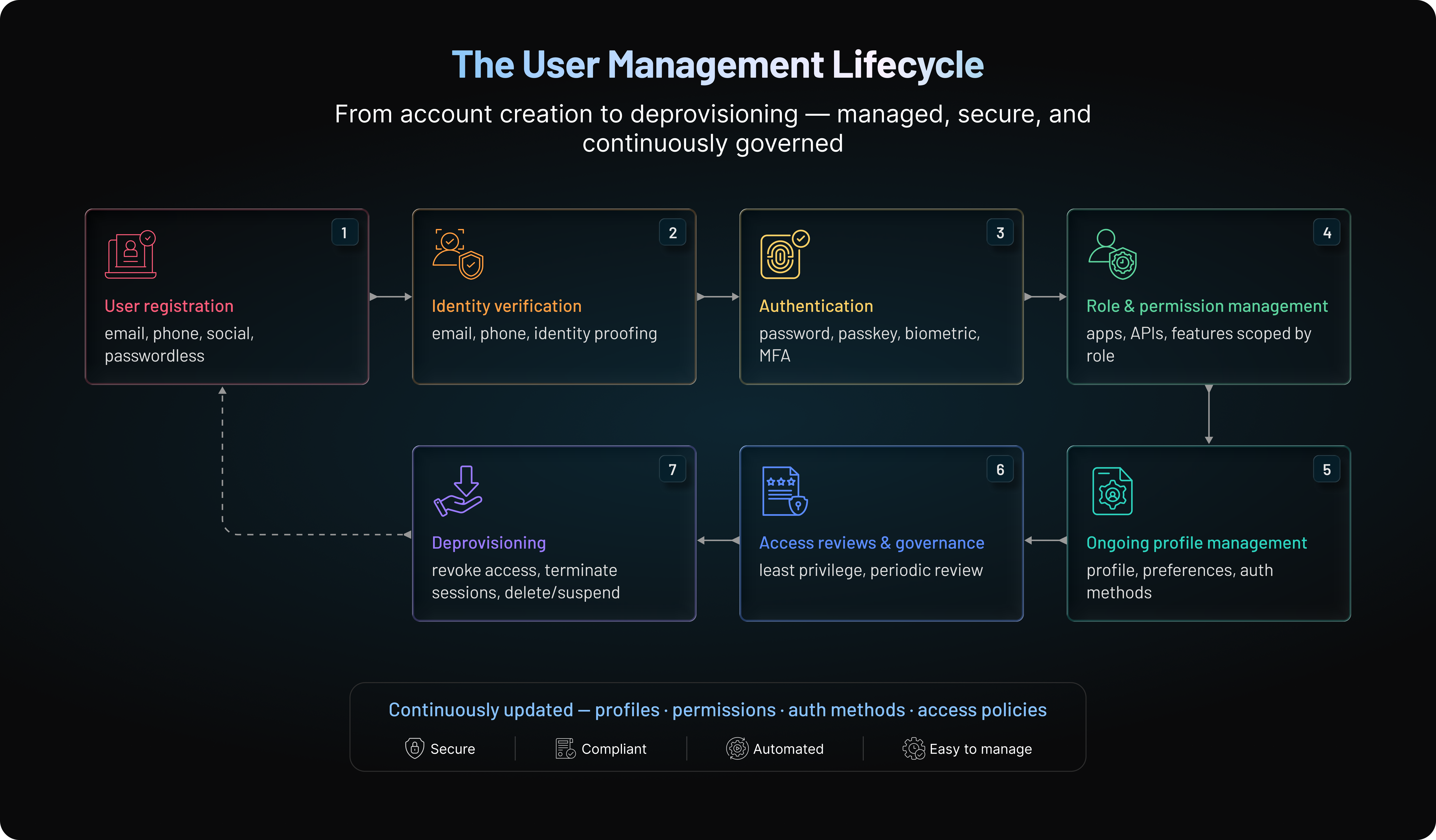
The User Lifecycle: From Registration to Account Deletion
A user account isn't static. From the moment someone registers, their identity can change repeatedly—along with their authentication methods, profile information, permissions, preferences, and account status.
Managing those changes is known as user lifecycle management.
For customer-facing applications, the goal is to keep the identity accurate and secure as the customer's relationship with the service evolves. Some users remain active for years. Others disappear and return months later, switch devices, change authentication methods, join organizations, recover accounts, or eventually leave.
The lifecycle typically looks like this:
Registration → Verification and Enrollment → Authentication and Active Use → Profile and Access Changes → Account Recovery → Deactivation or Deletion
Each stage introduces a different identity requirement.
| Lifecycle Stage | User Action | CIAM or User Management System Action |
|---|---|---|
| Registration | Enters information like email, password, and possibly other info needed by passwordless methods. | Creates the account and associates the attributes. Ensures duplicates are not created and linked to existing profiles. Don’t create unnecessary friction. |
| Verification and Enrollment | Answer verification questions or provide OTPs | Confirm/verify information like email address or phone number. Enrolls authentication factors such as MFA, passkeys, authenticators, or recovery methods. Applies an appropriate level of verification based on the risk associated with the enrollment. |
| Authentication and Active Use | Signs in, establishes sessions, uses applications, and accesses services across devices and channels. | Authenticates the user and maintains account access across sessions and channels. Recognizes changes in authentication methods throughout the lifecycle. Evaluates context and risk, allowing routine access to proceed normally while requiring additional verification like MFA or adaptive MFA for unusual devices or sensitive actions. |
| Profile and Access Changes | Updates contact information, preferences, authentication methods, organization memberships, subscriptions, roles, or permissions. | Keeps profile, account, and access changes associated with the correct identity. Updates permissions and access levels as the user's relationship with the service changes. Helps prevent outdated roles, permissions, or access rights from being retained indefinitely. |
| Account Recovery | Attempts to regain access after losing a password, device, authenticator, email address, or other credential. | Provides a secure path to restore account access. Applies sufficient assurance before restoring access or replacing authentication factors. Ensures recovery does not become an easier path around existing authentication controls. |
| Deactivation or Account Deletion | Requests account deletion, becomes inactive, or otherwise ends the relationship with the service. | Disables the account when access should end. Revokes active sessions and removes authentication credentials where appropriate. Notifies connected applications of lifecycle changes. Handles personal information according to retention, privacy, legal, and business requirements. |
That's the larger purpose of user lifecycle management: keeping the identity aligned with the customer's current relationship with the business—from the first registration to the final account action.
How Does User Management Work?
Modern user management works by placing a centralized identity layer between users and the applications they access. That layer maintains identity information and coordinates authentication, authorization, profile changes, and lifecycle events across connected applications.
A simplified user management architecture looks like this:
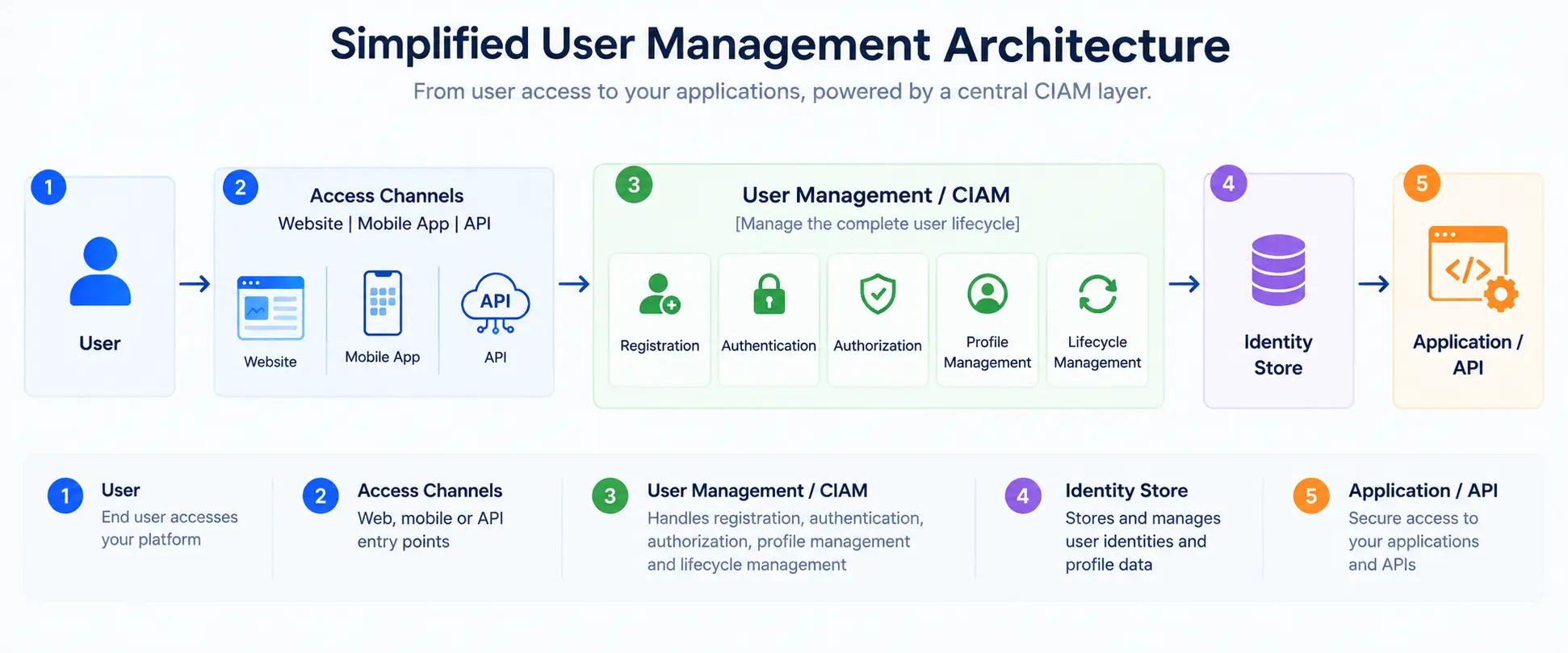
The application still controls its interface and business logic. The user management or CIAM layer provides the identity services that need to remain consistent across those experiences.
Centralized Identity Store
The identity store maintains the core record associated with each user.
Depending on the application, that record may include profile attributes, account status, authentication-related information, linked identities, preferences, consent records, roles, or organization relationships.
Connected applications can use this common identity source instead of maintaining independent versions of the same customer. Access to individual attributes can still be restricted according to the application's requirements and applicable policies.
This becomes particularly useful when the same identity needs to work across several applications, brands, or digital channels.
Authentication Layer
When a user attempts to sign in, the authentication layer verifies that they can prove control of the account.
The method might be a password, social login, OTP, MFA, passwordless authentication, a passkey, or another supported option. The result is associated with the underlying identity rather than requiring a separate customer profile for every authentication method.
This separation allows authentication to evolve while the customer identity remains consistent.
Authorization Layer
After authentication, the authorization layer determines what the verified user can access.
Applications can evaluate roles, permissions, organizational relationships, subscription levels, or other policies before allowing access to specific resources or actions.
For example, the same person might be an administrator in one organization and a regular member in another. The identity remains the same, while authorization changes according to context.
APIs and Application Integrations
APIs and SDKs connect the identity layer with websites, mobile applications, customer portals, APIs, and other digital services.
This allows different applications to use common identity capabilities without independently rebuilding registration, authentication, profile management, or account workflows.
It also helps the identity architecture outlive individual applications. A new mobile experience or customer portal can connect to the existing identity layer instead of creating another isolated user database.
Automated Lifecycle Events
User management systems also need to respond when identities change.
An email may be verified, a new authentication factor enrolled, a user provisioned into an organization, a role updated, or an account deprovisioned. These identity events can trigger corresponding actions across connected applications and systems without requiring every change to be handled manually.
Automation reduces one of the most common user management problems: the gap between an identity changing and every relevant system realizing that it changed. Routine lifecycle events can move automatically, while higher-risk actions can require stronger verification, approval, or human review.
The result is an architecture where applications can create their own customer experiences while relying on a shared identity foundation underneath them.
That becomes increasingly important as businesses add more applications, authentication methods, customer types, and digital channels without wanting identity management to fragment along the way.
User Management for B2C, B2B, and SaaS Applications
The fundamentals of user management stay fairly consistent: create an identity, authenticate it, maintain the profile, control access, and manage changes over time.
What changes is the scale and complexity around that identity.
A consumer application may need to handle millions of individual customers who expect registration to take seconds. A B2B platform has to understand not only the user but also the organization they belong to, and the role they play (called RBAC or role-based access control). SaaS applications can add another layer with tenants, invitations, administrators, subscriptions, and permissions.
The underlying identity is still the person. The relationship surrounding that person can look very different.
| Environment | Primary User Management Need | Typical Requirements |
|---|---|---|
| B2C | Manage large customer populations with low friction | Registration, social login, MFA, passkeys, profiles, consent, account recovery |
| B2B | Manage users within business organizations | Organization membership, roles, delegated administration, SSO, access policies |
| SaaS | Manage users, tenants, and application permissions | Invitations, roles, workspaces, provisioning, subscriptions, lifecycle changes |
| Multi-Brand/Multi-App | Maintain consistent identity across digital properties | Account linking, unified profiles, centralized authentication, shared identity services |
For B2C applications, customer experience tends to carry more weight. Registration needs to be quick, authentication choices need to work across a broad range of users and devices, and account recovery can't routinely send customers to support.
Scale changes the equation too. An ecommerce business, media platform, or consumer financial application may experience sudden authentication spikes involving large numbers of customers. User management infrastructure has to handle those moments without turning login into a bottleneck.
Privacy and profile management are also prominent. Customers may expect to manage their own personal information, communication preferences, consent choices, connected accounts, and authentication methods.
B2B user management introduces a different question: which organization does this person belong to, and what can they do inside it?
-
A single business customer might have an account owner, administrators, billing contacts, managers, and regular members. Those users can require different permissions even though they access the same product.
-
Delegated administration becomes useful here. Instead of the SaaS provider manually handling every user change, an authorized administrator at the customer organization may be able to invite members, assign roles, remove users, or manage certain access settings.
-
Enterprise customers may also expect federation or Single Sign-On (SSO), allowing users to authenticate through an existing identity provider rather than maintaining another independent credential.
-
Automated user provisioning and deprovisioning can also become important as organizations scale. Instead of manually creating, updating, or removing accounts across applications, enterprises often synchronize user lifecycle changes from their identity provider to connected systems. This helps ensure access is granted, updated, or revoked consistently as employees join, change roles, or leave the organization.
SaaS user management often combines elements of both B2C and B2B identity.
The application still needs a smooth registration and authentication experience, but identities may also belong to tenants, workspaces, projects, teams, or organizations. A person might even belong to several organizations under the same underlying account and hold a different role in each.
That makes authorization particularly important. Being authenticated as “Alex” isn't enough. The application also needs to know whether Alex is an administrator in Workspace A, a regular member in Workspace B, or has no access to Workspace C.
Multi-brand and multi-application environments introduce another challenge: recognition.
A business may operate several customer applications that should share identity without forcing users to create a separate account for each one. Centralized user management can provide a common identity foundation while still allowing individual brands or applications to maintain their own experiences, attributes, and access rules.
This is where a rigid user database starts showing its limits. Modern applications need an identity layer flexible enough to understand individual users, organizational relationships, application context, and changing permissions without fragmenting the customer into multiple disconnected identities.
Common User Management Challenges
User management tends to look straightforward when an application is new. There are fewer accounts, fewer authentication methods, and usually one main place where identity data lives.
Growth changes that quickly.
Another application launches. Social login gets added. Enterprise customers need SSO. Users start accessing the same service from several devices. Profile information gets copied into downstream systems. Support teams create manual workarounds for recovery and duplicate accounts.
The individual decisions may make sense at the time. Together, they can create an identity environment that becomes increasingly difficult to control.
Identity Silos and Duplicate Accounts
One of the most common problems is simply figuring out whether two accounts belong to the same person.
A customer might register on the website with an email and password, then later use Google to sign in to the mobile app. Another customer may change email addresses and create a new account because the original one is difficult to recover.
Without appropriate identity linking, those interactions can produce separate profiles.
Now the business has two versions of one customer. Preferences may differ. Consent records can become harder to interpret. Purchase or account history may be split. Security teams may not realize that suspicious activity across two profiles involves the same person.
Automatically merging identities isn't the answer either. Incorrect account linking can expose one user's information to another.
Identity resolution inside user management therefore needs careful verification rules. The goal is a consistent customer identity, not aggressive profile merging.
Excessive or Incorrect Permissions
Access tends to accumulate. A user receives a role because they need a feature. Their responsibilities change, but the role remains. They join another workspace, gain more permissions, and nobody revisits the access granted six months earlier.
Eventually, users can end up with considerably more access than they need.
The principle of least privilege helps reduce this problem by limiting access to what is required for the user's current role or task. Role-Based Access Control can make permissions easier to manage at scale, particularly in B2B and SaaS applications.
But roles aren't a set-and-forget solution. Poorly designed roles can simply package excessive permissions more efficiently.
User management needs a way to keep account state and access aligned as relationships change.
Weak Account Recovery
Strong authentication can be undermined by a weak recovery process. If an account protected by MFA can be recovered through a compromised email address or easily manipulated support process, attackers may simply target recovery instead.
Recovery therefore needs enough assurance to restore legitimate access without becoming an easier route around the authentication controls protecting the account.
Stale and Abandoned Accounts
Not every customer formally closes an account when they stop using a service. Some simply disappear.
Over time, applications can accumulate dormant accounts containing personal information, old authentication methods, active sessions, or permissions that may no longer be appropriate.
Not every inactive account should automatically be deleted. Businesses may have legitimate retention requirements, contractual obligations, or customer-experience reasons for preserving certain information. But ignoring inactive identities indefinitely creates its own problems.
Organizations need clear policies for identifying inactivity, protecting dormant accounts, revoking unnecessary sessions or access where appropriate, and eventually handling data according to retention and deletion requirements. An old account shouldn't quietly become an easier account to compromise.
Managing Identity Across Multiple Applications
A customer sees one company. The architecture behind that company may see six applications and four databases. That's where identity consistency gets difficult.
One application may have an updated phone number while another still uses the old one for recovery. A password reset may apply to one service but not another. A customer may be signed out of the website while an older mobile session remains active.
These inconsistencies create both security and experience problems.
Centralized identity management can reduce the number of independent identity decisions applications need to make. Applications can still maintain their own business data and experiences, but authentication state, core identity attributes, and lifecycle events can come from a shared foundation.
This becomes increasingly important as organizations add brands, acquire products, or modernize legacy applications.
Privacy and Data Consistency
Identity data changes constantly, and those changes don't always remain inside the identity platform.
Customer information may flow into CRM systems, marketing tools, support platforms, analytics environments, and other business applications. That makes consistency harder.
Suppose a customer changes a communication preference or requests an account-related privacy action. Updating the central identity record may be only one part of the work if copies of relevant data exist elsewhere.
User management can provide the authoritative identity context and lifecycle events needed to coordinate those changes, but downstream systems still need appropriate governance and integration.
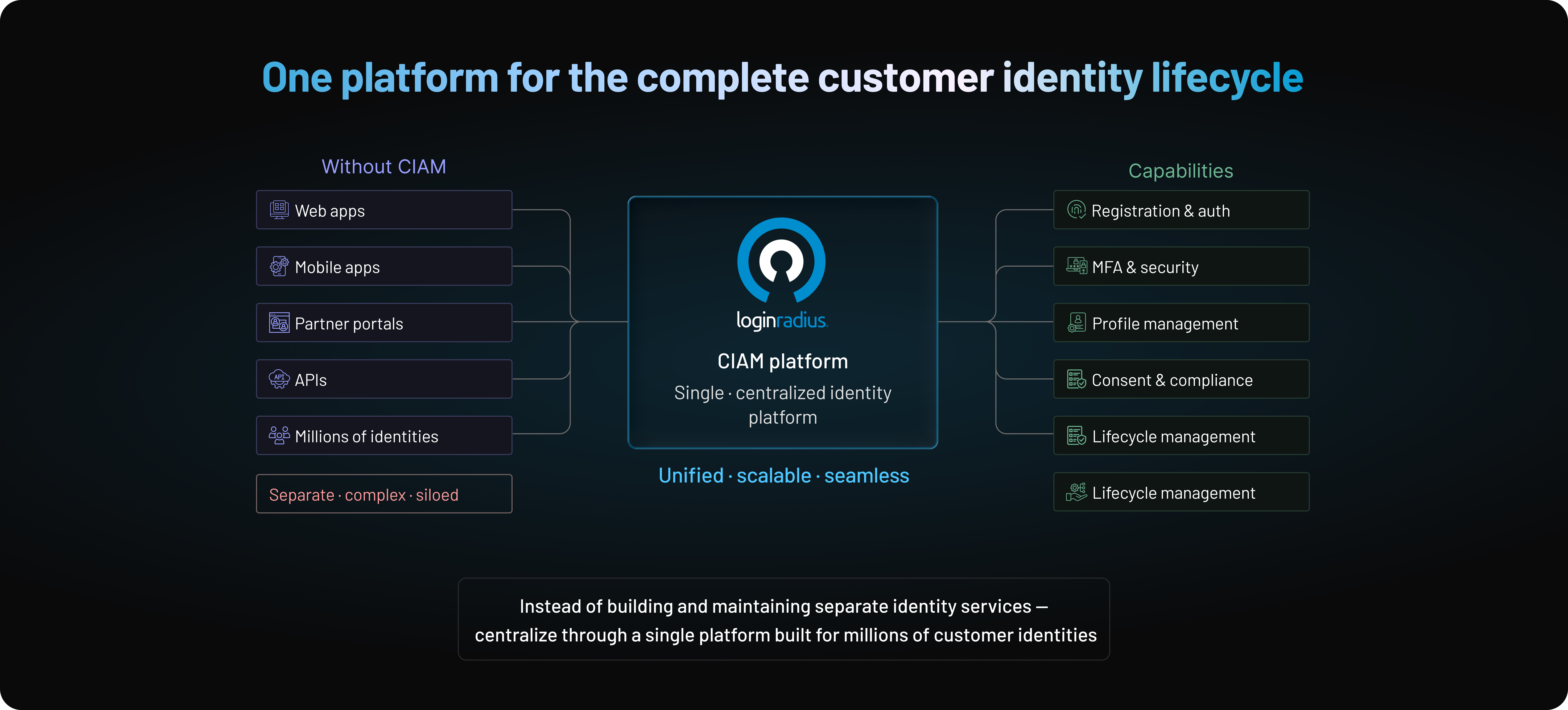
Here's where teams usually go wrong: they assume centralizing authentication automatically centralizes identity management.
It doesn't. A customer can use one login across every application while their profile data, permissions, recovery methods, and privacy state remain fragmented behind the scenes.
Solving user management means treating identity as a lifecycle shared across applications—not simply providing everyone with the same login screen.
User Management Best Practices
Good user management is less about adding more controls and more about making identity decisions consistent.
Registration shouldn't create one version of a customer while account recovery relies on another. Permissions shouldn't remain indefinitely because nobody revisited them. A profile update shouldn't require five applications to be corrected manually.
The practices below help keep identity manageable as applications and customer populations grow.
| Best Practice | Why It Matters |
|---|---|
| Centralize identity management | Reduces fragmented profiles and inconsistent policies |
| Automate lifecycle operations | Limits manual errors as accounts change |
| Apply least privilege | Reduces unnecessary access |
| Use roles and permissions carefully | Makes authorization easier to manage at scale |
| Use strong, adaptive authentication | Matches verification to account risk |
| Secure account recovery | Prevents attackers from bypassing authentication |
| Enable appropriate self-service | Reduces friction and support dependency |
| Monitor identity activity | Helps identify suspicious behavior |
| Maintain useful audit records | Improves investigation and accountability |
| Review identity policies regularly | Prevents access and security controls from drifting |
Centralize Identity Without Centralizing Everything
A centralized user management system should provide a reliable source for identity—not become a dumping ground for every piece of customer data the business owns.
Core profiles, authentication state, linked identities, relevant preferences, roles, and lifecycle status can be managed centrally while applications retain the business data they actually need.
This separation helps reduce identity silos without giving every connected application unrestricted access to the entire customer profile.
It also makes changes easier to manage. When a verified phone number, authentication factor, or important identity attribute changes, connected applications can respond to that event instead of independently maintaining conflicting versions.
The goal is a common identity foundation with controlled access to it.
Automate the Lifecycle, but Protect Sensitive Changes
Automation becomes increasingly valuable as the number of users grows.
Account creation, verification status, role assignment, profile synchronization, session revocation, and deactivation can all involve repeatable processes. Automating those events reduces manual work and the chance that an account remains in the wrong state because someone forgot to update it. But automation needs boundaries.
Changing a marketing preference and replacing an account recovery email shouldn't be treated as equivalent events. Sensitive identity changes may require reauthentication, step-up verification, risk evaluation, or another security check before an automated workflow continues.
Fast automation is useful. Automatically making the wrong identity decision is not.
Apply Least Privilege and Keep Permissions Understandable
Users should receive the access they need for their current relationship with the application—not every permission they might eventually need.
Role-Based Access Control (RBAC) can make this manageable by grouping permissions into meaningful roles. A B2B application might distinguish between an organization owner, administrator, billing user, and standard member instead of configuring every permission individually.
Keep the model understandable. If administrators can't explain what a role allows without opening a spreadsheet containing hundreds of permissions, maintaining access accurately becomes difficult.
Access shouldn't remain unchanged simply because it was appropriate when first granted. Review roles and permissions periodically and whenever a user's organization, responsibilities, subscription, or account relationship changes. Regular access reviews can uncover outdated or excessive permissions before they become permanent.
Privileged and administrative access deserves additional scrutiny. Users who can manage other accounts, change roles, modify security settings, or access sensitive customer information should receive only the administrative permissions they need, with stronger authentication and monitoring where the risk justifies it.
Match Authentication Strength to Risk
Not every interaction deserves the same authentication challenge.
Requiring MFA or another verification step every time a customer performs a low-risk action can create unnecessary friction. At the other extreme, relying on a password alone for sensitive account changes may provide too little protection.
Authentication should reflect context.
Device familiarity, location, IP reputation, behavior, account history, and the sensitivity of the requested action can help determine whether normal authentication is sufficient or whether additional verification is appropriate.
Businesses can also support multiple authentication methods as customer needs change, including passwords, social login, MFA, passwordless authentication, and passkeys.
The important part is avoiding a security model that assumes every user and every interaction carries identical risk.
Treat Recovery as Authentication
Account recovery shouldn't be the easy side door around the front entrance.
If a customer loses a password, phone, passkey, or MFA device, the recovery process needs enough assurance to justify restoring access or changing the authentication factors protecting the account.
The appropriate controls depend on risk. Recovery codes, previously trusted devices, verified communication channels, additional identity checks, or delayed high-risk changes may all have a role.
Factor replacement deserves similar protection. An attacker who can easily register their own authenticator doesn't need to defeat the customer's existing one.
Here's where teams usually go wrong: recovery is designed primarily to reduce support tickets. It needs to solve that problem without becoming the weakest authentication path.
Give Customers Appropriate Self-Service Control
Not every account change should require an administrator. Customers should generally be able to manage routine profile information, preferences, passwords, authentication methods, and privacy choices through secure self-service experiences where appropriate.
That reduces support workload and gives users more control over their identities. The word appropriate matters.
Changing a preferred language might happen immediately. Replacing a verified email address, disabling MFA, or changing recovery information may require reauthentication or additional verification.
Good self-service doesn't remove security checks. It places them where the consequences justify them.
Monitor Identity Activity, Not Just Login Failures
A failed login is useful security information, but it is only one identity event.
Repeated recovery attempts, rapid OTP requests, unexpected MFA enrollment, new-device activity, role changes, unusual profile updates, or several accounts being accessed from the same suspicious environment can all provide additional context.
Looking at these events together can reveal behavior that appears harmless when each event is evaluated independently.
Monitoring should also extend beyond authentication. A successful login followed immediately by changes to recovery information and payment details may deserve more attention than the login result alone suggests. The account has a history. Security decisions are stronger when they can use it.
Keep Audit Records Useful and Review Policies
Logging everything doesn't automatically create visibility.
Audit records should make important identity events understandable: what changed, which account was affected, when it happened, how the action occurred, and whether it was initiated by the user, an administrator, or an automated process.
Those records can support security investigations, troubleshooting, governance, and compliance-related activities.
Applications evolve. Authentication methods are introduced, roles change, products merge, and customer requirements shift. Periodically reviewing identity policies helps prevent controls from drifting away from how the application actually operates.
Periodic security and access reviews can also help verify that authentication policies, permissions, recovery processes, and administrative controls still operate as intended.
How to Choose the Right User Management System
A user management system can sit underneath an application for years. Replacing it later may mean migrating customer identities, authentication credentials, profiles, permissions, integrations, and active user journeys while keeping the service running.
So choosing one based only on how quickly it can add a login page is risky. The better question is whether the platform can support what your identity architecture needs to become as the business grows.
Start With Scale and Application Architecture
Scale isn't simply the number of users stored in a database.
A user management platform may need to handle registration campaigns, seasonal traffic, product launches, sudden login spikes, password resets, API requests, and authentication activity across several applications.
Consider where identities will need to work as well. A business with one web application today may eventually add mobile apps, APIs, customer portals, connected products, or additional brands. The platform should support multiple applications, APIs, and channels from a common identity foundation without forcing each one into a separate identity store.
Keep Authentication Options Flexible
Authentication requirements change. Some customers may still use passwords while others rely on social login, MFA, OTP, passwordless authentication, or passkeys. Enterprise-facing applications may also require federation or SSO.
Choose a system that allows new authentication methods to be introduced without creating new customer identities or rebuilding the account architecture. This is particularly important during gradual authentication modernization, where existing and newer methods may need to coexist.
Evaluate Authorization Beyond Basic Roles
Simple applications may need only a few roles. B2B and SaaS platforms can require organization-level permissions, delegated administration, tenant-specific access, or different roles across applications.
Evaluate whether the authorization model can support that complexity without becoming difficult to manage. The system should provide enough flexibility for expected access requirements while keeping roles and permissions understandable.
Look at Profile and Identity Flexibility
Customer profiles rarely remain limited to a name and email address.
Applications may need custom attributes, verified contact information, authentication preferences, consent records, linked identities, or organization relationships. The user management system should accommodate those requirements without forcing every customer into an inflexible profile structure.
Also consider account linking. Customers who use different authentication methods or applications should be securely associated with the same underlying identity where appropriate rather than generating unnecessary duplicate profiles.
Check the APIs, SDKs, and Developer Experience
User management eventually touches application code.
Developers need APIs and SDKs to integrate registration, authentication, profiles, recovery, authorization, identity events, and administrative operations into real products. Look beyond whether an API simply exists: documentation quality, supported technologies, testing capabilities, and integration with downstream workflows all affect long-term development effort.
Identity isn't a one-time integration. The developer experience needs to hold up as applications continue changing.
Examine Security, Privacy, and Auditability
A user management system handles some of the most sensitive interactions in an application.
Evaluate how the platform supports authentication policies, MFA, sessions, credential protection, account recovery, administrative access, sensitive profile changes, privacy requirements, and audit activity.
Teams should also be able to understand what happened when an important identity event occurs rather than reconstructing it across disconnected systems.
Plan for Integration and Migration
Most organizations don't start with an empty user database. Existing customer accounts may already include credentials, social identities, custom attributes, or profiles spread across legacy applications and identity systems. Before selecting a platform, understand how those identities can be migrated, how authentication continuity will be maintained, and whether migration can happen gradually.
Consider downstream integrations too. CRM, support, analytics, marketing, and other systems may consume identity information or respond to lifecycle events. The new identity layer needs to fit into that environment rather than becoming another silo.
Treat Reliability as an Identity Feature
When user management becomes unavailable, customers may be unable to register, sign in, recover accounts, or access applications.
Evaluate availability, redundancy, traffic handling, monitoring, and operational resilience according to the needs of the business. Identity infrastructure sits directly in the path between customers and the applications they want to use, so reliability is part of both security and customer experience.
Looking to choose the right approach? Focus on the capabilities that would be hardest to rebuild later.
The right user management system should solve today's requirements while giving the business room to support new applications, authentication methods, identity models, and larger user populations without rebuilding the identity foundation.
Build vs Buy User Management: Which Approach Makes Sense?
Building user management in-house can look manageable at first. Create a user table. Add registration and login. Secure passwords. Build account recovery. Connect sessions to the application.
For a small product with straightforward identity requirements, that approach may be reasonable. The calculation changes as the application adds MFA, social login, SSO, passkeys, roles, account linking, multiple applications, and more complex recovery or security requirements.
At that point, the team is no longer maintaining a login feature. It's maintaining identity infrastructure.
| Factor | Build In-House | Use a CIAM/User Management Platform |
|---|---|---|
| Initial control | High | Configurable within platform capabilities |
| Initial engineering effort | Can be manageable for basic flows | Lower for established identity capabilities |
| Time to launch | Depends on scope and team | Typically faster |
| Authentication methods | Must be built and maintained | Multiple methods can be supported by the platform |
| Security maintenance | Internal responsibility | Platform handles significant identity infrastructure |
| Scaling | Must be designed and operated internally | Core identity infrastructure is built for scale |
| Standards and protocol updates | Engineering team maintains them | Platform evolves its supported capabilities |
| Compliance support | Built into internal processes | Platform capabilities can support compliance efforts |
| Customization | Maximum architectural control | Depends on platform extensibility |
| Long-term maintenance | Ongoing internal ownership | Shared with the identity provider |
When Building In-House Can Make Sense
Building can make sense when an application has highly specialized identity requirements, the organization needs complete architectural control, or identity infrastructure itself provides strategic value.
It may also be practical for smaller, predictable environments with limited authentication and user management requirements.
The important part is evaluating the likely identity roadmap rather than version one alone. A custom system designed for one application and a few thousand users becomes a very different engineering responsibility when it needs to support multiple applications, authentication methods, enterprise requirements, and much larger identity volumes.
Where the Cost of Building Starts to Grow
Here's where teams usually underestimate the work: registration and login aren't the expensive part of user management over the long term.
Teams also need to maintain credentials, sessions, MFA enrollment and recovery, account linking, authentication standards, passkeys, permissions, audit events, and privacy workflows. Identity infrastructure must then withstand threats such as credential stuffing, brute-force attempts, recovery abuse, and session theft without creating excessive friction for legitimate customers.
That responsibility continues long after the initial authentication project ships.
When a User Management Platform Makes More Sense
A CIAM or user management platform becomes more attractive when identity isn't infrastructure the business wants to continuously build and operate itself.
Instead of implementing common identity capabilities independently, teams can use an established identity layer for authentication, profiles, recovery, MFA, social login, passwordless experiences, and other user management functions across applications.
That doesn't remove every identity decision. Applications still need business-specific journeys, authorization rules, security policies, integrations, and data governance.
What changes is how much foundational identity infrastructure the organization has to build, secure, scale, and maintain internally.
Look Beyond the Initial Cost
A build-versus-buy comparison shouldn't stop at the cost of creating the first login experience.
Consider ongoing engineering, security maintenance, infrastructure operations, new authentication standards, additional applications, enterprise requirements, incident response, and the opportunity cost of keeping internal teams focused on identity infrastructure.
Buying isn't automatically the right answer. Building isn't automatically cheaper.
The better choice depends on whether owning and continuously evolving user management infrastructure provides enough strategic value to justify the engineering, security, and operational responsibility that comes with it.
How User Management Is Evolving
User management used to revolve around a fairly predictable account model: create a username and password, assign access, update the account when necessary, and eventually disable it. That model is becoming much more fluid.
Customers move between devices and applications. Authentication methods change over the lifetime of an account. Risk can shift from one session to the next. At the same time, identity capabilities increasingly need to work across applications and APIs rather than remain tied to a single system. The account still exists. What surrounds it is changing.
Passwordless Authentication and Passkeys
Passwords are no longer the only practical starting point for customer authentication.
Passwordless methods can reduce reliance on reusable credentials, while passkeys use public-key cryptography rather than a shared secret that can be entered into a phishing page.
For user management, that introduces new lifecycle requirements around credential enrollment, device changes, multiple passkeys, recovery, and migration. Businesses may also need to support mixed authentication environments as existing customers continue using familiar methods while newer experiences adopt stronger options.
Risk-Based and Adaptive Authentication
Authentication is also becoming less dependent on fixed rules.
A recognized device with familiar behavior presents a different situation from a new device attempting sensitive account changes immediately after recovery. Risk-based and adaptive authentication can evaluate signals around the interaction and adjust verification accordingly.
For user management, that means trust isn't determined only by whether a user successfully entered a credential. Device context, authentication history, recent activity, and the sensitivity of the requested action can also influence what happens next.
Continuous Identity and Risk Signals
A successful login doesn't guarantee that every action within the resulting session should receive the same level of trust.
Risk can change after authentication. A session may begin behaving unusually, attempt a sensitive profile change, or show other signals that justify additional scrutiny.
Modern identity systems can use contextual and behavioral signals throughout the session to inform security decisions rather than relying entirely on the initial login event. The objective isn't to repeatedly interrupt legitimate customers, but to respond when the risk surrounding an identity meaningfully changes.
API-First User Management
Identity increasingly needs to work wherever the customer appears.
That might be a web application today, a native mobile app tomorrow, and another digital service later. Businesses may also need identity events to connect with support systems, CRM platforms, security tools, analytics environments, and other services.
An API-first identity layer makes user management less dependent on a single application's interface. Development teams can create different customer experiences while relying on common identity capabilities underneath them.
Here's where it gets interesting: the user account is becoming less tied to a single application even as customers expect every application to recognize them consistently.
User management is therefore moving beyond basic account administration toward a more adaptable identity layer—one that can support changing authentication methods, continuous risk signals, and an expanding ecosystem of applications and APIs.
How LoginRadius Simplifies User Management at Scale
User management becomes harder when identity is fragmented across applications.
One application maintains registration, another stores customer profiles, and a mobile app handles authentication differently from the website. Add more products, brands, and customer journeys, and keeping those identities consistent becomes increasingly difficult.
LoginRadius provides a Customer Identity and Access Management (CIAM) layer that helps businesses centralize customer identity instead of rebuilding user management for every application.
Through a common identity foundation, businesses can support capabilities such as registration, authentication, profile management, account recovery, access management, and identity lifecycle processes across customer-facing applications. Different applications can still create experiences that fit their users while relying on shared identity infrastructure underneath them.
Authentication flexibility is part of that model. Businesses can support different authentication experiences—including passwords, social login, MFA, passwordless authentication, and passkeys—without treating every authentication method as a separate customer identity.
For development teams, APIs and SDKs make identity capabilities available across websites, mobile applications, customer portals, and other digital services. That makes it easier to introduce new applications without creating another independent identity store or rebuilding common user management functionality from scratch.
LoginRadius gives businesses a unified identity layer while allowing individual applications to maintain their own customer experiences and business logic. As the digital ecosystem grows, the identity behind the customer can remain consistent across applications, authentication methods, and lifecycle changes.
That also means engineering teams can spend less time maintaining foundational identity infrastructure and more time building the products and experiences that differentiate the business.
For organizations managing growing customer populations across multiple digital properties, LoginRadius provides the CIAM foundation needed to keep user management centralized, flexible, and scalable.
Conclusion: Build User Management Around the Entire Customer Lifecycle
Creating a user account is easy. Managing that identity securely as the customer relationship changes is the harder problem.
Customers change devices, authentication methods, profile information, permissions, and privacy preferences. They move between applications, recover accounts, join organizations, and eventually leave. User management needs to keep the identity accurate through all of those changes without adding unnecessary friction.
That requires looking beyond registration and login. The stronger approach is to build around the entire customer lifecycle, with a consistent identity foundation that can adapt as applications, security requirements, and customer expectations evolve.
For businesses managing customer identities across multiple digital experiences, LoginRadius provides a unified CIAM platform designed to simplify that complexity and help teams deliver secure, scalable, and consistent customer journeys.
Because your next application shouldn't create another identity silo. And your customers shouldn't have to become new users every time your digital ecosystem grows.
Ready to modernize user management? Book a LoginRadius demo and see how a unified CIAM platform can help you manage customer identities securely across applications and at scale.
FAQs
Q: What is user management?
A: User management is the process of creating, authenticating, organizing, updating, securing, and managing user accounts throughout their lifecycle. It includes registration, profiles, permissions, recovery, and account deactivation or deletion.
Q: What is a user management system?
A: A user management system centralizes the technology and processes used to manage user identities across applications. It can handle registration, authentication, profiles, access controls, account changes, and other lifecycle activities.
Q: Why is user management important?
A: User management helps businesses maintain secure, accurate, and consistent identities as their applications and customer populations grow. It can reduce identity silos while improving authentication, access control, customer experience, and account security.
Q: What is the difference between user management and IAM?
A: User management focuses primarily on user accounts and their lifecycle, while Identity and Access Management (IAM) is the broader discipline covering identities, authentication, authorization, access policies, and governance.
Q: What is user access management?
A: User access management controls which applications, resources, data, or actions a user can access. It commonly uses roles, permissions, access policies, and least-privilege principles to limit unnecessary access.
Q: What is user lifecycle management?
A: User lifecycle management covers how an identity changes from initial registration through active use, profile and access changes, recovery, and eventual deactivation or deletion. The goal is to keep identity and access accurate at every stage.
Q: What is user provisioning?
A: User provisioning is the process of creating user accounts and assigning appropriate access, attributes, or permissions. Deprovisioning removes or disables that access when the user's relationship or account status changes.
Q: What is centralized user management?
A: Centralized user management uses a common identity layer to manage users across multiple applications or services. It helps reduce duplicate profiles, inconsistent authentication policies, fragmented identity data, and disconnected account states.
Q: What features should user management software include?
A: Modern user management software should support registration, authentication, authorization, profile management, account recovery, lifecycle management, audit activity, and APIs. Customer-facing platforms may also require MFA, SSO, social login, passwordless authentication, passkeys, and consent management.
Q: How does CIAM help with user management?
A: CIAM helps businesses manage customer identities across registration, authentication, profiles, privacy, access, and account lifecycle processes. It is designed for customer-facing applications where scale, security, low-friction experiences, and authentication flexibility are critical.



