Summary
-
An ID token proves who the user is and is used by the client after authentication in OpenID Connect.
-
An access token proves what the user can do and is used by APIs to authorize requests in OAuth 2.0.
-
ID tokens contain identity claims like name, email, and issuer; access tokens contain scopes and permissions.
-
ID tokens go to the client, access tokens go to the API; they are not interchangeable.
-
Use ID tokens for login, access tokens for API calls, and always validate signatures, issuer, audience, and expiration.
Introduction
When teams begin working with OAuth 2.0 and OpenID Connect (OIDC), one of the first points of confusion is the difference between an ID token and an access token. Both tokens are issued during the authentication process, both are usually encoded as JWTs, and both appear in the same response. But they exist for completely different reasons. Mixing them up leads to broken flows, insecure APIs, over-permissioned clients, and user data exposure.
In modern CIAM architectures, getting this distinction right is foundational. ID tokens represent identity. They tell the client who the user is and confirm that authentication has occurred. Access tokens represent authorization. They tell an API what the caller is allowed to do.
Understanding this separation of concerns is essential for designing secure login experiences and preventing the common mistakes developers often make when implementing OAuth and OIDC.
This guide breaks down how both token types work, where they fit in the authentication and authorization flows, and how to handle them correctly in web, mobile, and backend applications.
OAuth 2.0 vs OpenID Connect: Understanding the Basics
OAuth 2.0 and OpenID Connect (OIDC) are often mentioned together, but they solve different problems. OAuth 2.0 is an authorization framework: it issues an OAuth token—specifically an access token—that an API can validate to determine what the caller is allowed to do. By design, OAuth 2.0 does not define identity or user authentication.
OpenID Connect extends OAuth 2.0 with an identity layer. It adds the OIDC ID token, sometimes called an identity token, which a client uses to confirm who the user is. This is where authentication actually happens. Without OIDC, you cannot trust an authorization server to tell you the user’s identity.
In short:
-
OAuth 2.0 = authorization (issue access tokens for APIs)
-
OpenID Connect = authentication (issue ID tokens for user identity)
Understanding this foundation makes the ID token vs access token distinction much clearer. OIDC issues both tokens in the same flow, but they are designed for different audiences and different security guarantees. Mixing them up leads to the common implementation errors we’ll cover later.
What is an ID Token?
An ID token, also called an identity token, is the token OpenID Connect issues to confirm a user’s identity after successful authentication. It is consumed by the client application, not the API. The ID token answers a single question: Who is the user?
The OIDC ID token is almost always a JWT signed by the authorization server. It contains identity-related claims such as:
-
sub(unique user identifier) -
iss(issuer) -
aud(intended audience) -
iatandexp(issued-at and expiration times) -
Optional profile claims like
email,name, orpicture
Because it includes identity claims, the ID token is designed strictly for token identification and login state. It proves authentication occurred and provides trusted profile information to the application.
What it does not do is authorize API access. This is one of the biggest misconceptions in OAuth and the main source of identity token vs access token mistakes. APIs should never accept an ID token because they are not meant to carry scopes or permissions. Their audience is the client, not the API.
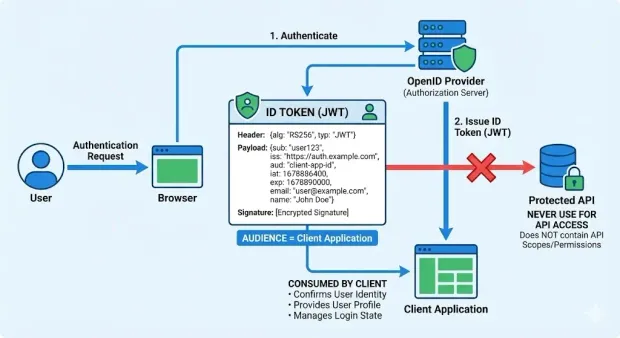
In short, the ID token:
-
Confirms the user’s identity
-
Is consumed by the client
-
Contains identity claims, not permissions
-
Should never be used to access protected APIs
What is an Access Token?
An access token is the OAuth token issued by an authorization server to let a client access protected APIs. When developers ask “what is an access token?” the simplest answer is this: it represents the user’s authorization, not their identity. APIs rely on access tokens to decide what the caller is allowed to do.
Access tokens can be JWTs or opaque strings. Regardless of format, they contain information the API needs to enforce permissions, such as:
-
Scopes that define permitted operations
-
Audience specifying the intended API
-
Issuer and expiration time
-
Client and user context (depending on token type)
Unlike ID tokens, access tokens rarely contain profile data. They are optimized for authorization, endpoint routing, and policy checks; not identity. This is a critical part of the access token vs ID token distinction.
APIs validate the access token’s signature, issuer, audience, and scopes before allowing the request. This is why the access token is the foundation of all modern token-based authentication patterns, including web apps, mobile apps, and service-to-service communication.
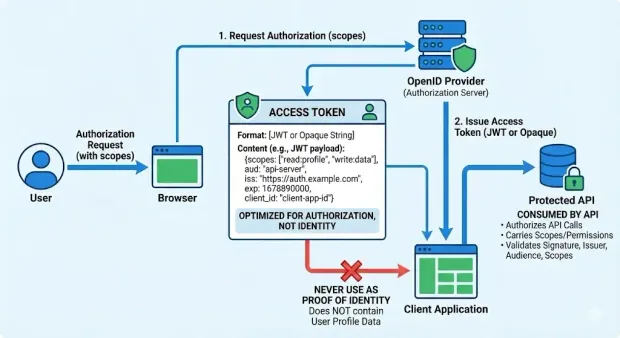
In short, access tokens:
-
Authorize API calls
-
Carry scopes and permissions
-
Are consumed by the resource server (API)
-
Should never be used as proof of identity
Because they are fundamentally different from identity tokens, using an access token for token identification or user profile access leads to broken security boundaries and unintended data exposure.
For deeper guidance on issuing and validating access tokens, refer to the LoginRadius Access Token API reference.
ID Token vs Access Token: Key Differences
Even though both tokens are returned in the same OAuth 2.0/OIDC flow, they serve entirely different roles. Misunderstanding the ID token vs access token boundary is one of the most common causes of incorrect login flows, misconfigured APIs, and insecure apps.
| Aspect | ID Token (Identity Token) | Access Token |
|---|---|---|
| Purpose | Proves who the user is | Proves what the user can do |
| Used By | Client application | API / Resource Server |
| Contains | Identity claims (email, name, sub) | Scopes, permissions, API audience |
| Standard | OIDC (oidc id token) | OAuth 2.0 (oauth token) |
| Format | Usually JWT | JWT or opaque |
| Audience | The client | The API |
| Appropriate Use | Authentication, profile retrieval | Authorization, API access |
| Not For | Access control | Identity or token identification |
When to Use Which Token
Use an ID Token when:
-
You need to confirm who the user is after authentication.
-
You want to display profile data (email, name, avatar).
-
The client must maintain login state.
-
You’re implementing an OIDC-compliant login flow.
Use an Access Token when:
-
A client must call a protected API.
-
The API needs scopes or permissions to enforce authorization.
-
You’re designing microservices or backend-to-backend calls.
-
You need a secure, validated credential representing what the caller can do.
Simply put:
-
ID Token = login
-
Access Token = API access
Browser vs Mobile vs Server: When the Tokens Go Where
Browser (SPA)
-
The client consumes the ID token for identity.
-
The SPA sends the access token to the API over HTTPS.
-
Strict storage rules apply (short-lived tokens, no localStorage for long-lived secrets, use PKCE).
Native Mobile
-
The mobile app uses the ID token after login.
-
It includes the access token in API calls.
-
OS-keystore-backed secure storage is strongly recommended.
Server-Side Web Apps
-
Server processes the ID token; user identity is stored in a session.
-
The server sends the access token to backend APIs.
-
Tokens don’t live in the browser, reducing exposure risk.
Across all client types, the principle stays the same:
-
Identity tokens identify the user.
-
Access tokens authorize what the user can access.
Frequent ID Token vs Access Token Errors (And How to Fix Them)
Even experienced teams run into problems when implementing OAuth 2.0 and OpenID Connect for the first time. Here are the mistakes we see most often and how to avoid them.
1. Sending an ID Token to an API
This is the number one ID token vs access token error. Developers sometimes assume the ID token contains everything the API needs, but it does not.
An API cannot rely on an ID token because:
-
Its audience (
aud) is the client, not the API -
It carries identity claims, not scopes
-
It is not designed for authorization checks
-
It may expose user profile information unnecessarily
Fix: APIs must only accept access tokens, never identity tokens.
2. Using an Access Token to Identify the User
The inverse mistake is also common: treating an access token as a profile object. Millions of logs show developers trying to call email, name, or profile fields from an access token payload.
An access token is not meant for token identification. It may contain minimal user context, or none at all.
Fix: Retrieve user identity using the ID token or the OIDC UserInfo endpoint.
3. Storing Tokens Incorrectly in the Browser
SPAs often store ID or access tokens in localStorage, making them easy targets for XSS.
Fix:
-
Use Authorization Code + PKCE
-
Keep tokens in memory
-
Use short-lived tokens and rotate them
-
Only store refresh tokens in secure, httpOnly cookies (if using them at all)
4. Overloading Scopes or Misunderstanding Permissions
Another frequent mistake is using broad scopes such as read:* or admin:* across multiple APIs. This creates authorization gaps and increases the blast radius if an access token is compromised.
Fix: Design scopes per-resource or per-operation, and issue short-lived access tokens with minimal privileges.
5. Confusing OAuth 2.0 With OIDC
Teams sometimes implement pure OAuth 2.0 and expect identity capabilities to “just work.”
OAuth 2.0 cannot issue an identity token. Only OIDC ID tokens provide trustworthy authentication details.
Fix: Enable OIDC if your application requires login or user profile data.
6. Long-Lived Tokens Without Rotation
Leaving access tokens valid for hours (or days) makes interception far more damaging.
Fix: Use short lifetimes, refresh tokens when necessary, and enforce rotation for both mobile and web clients.
7. Using JWT Access Tokens When You Actually Want Opaque Tokens
JWT access tokens expose claims to the client. Opaque tokens avoid this and centralize validation, but require introspection. Choosing incorrectly can complicate your API layer.
Fix: Pick the token format that fits your architecture and risk model.
Developer Checklist: How to Implement ID Tokens and Access Tokens
The following checklist covers the practical, high-impact steps every team should follow when working with these tokens in real applications.
1. Token Validation Basics
Every client and API should validate tokens rigorously. At minimum, ensure:
-
Signature validation using the provider’s JWKS keys
-
Issuer (iss) matches the authorization server
-
Audience (aud) matches the intended recipient
- The ID token audience must be the client
- The access token audience must be the API
-
Expiration (exp) is enforced strictly
-
Nonce is checked for ID tokens in browser-based flows
APIs must never rely on an ID token for authorization, and clients should not assume access tokens contain profile data.
2. Scope Design
Poor scope hygiene creates authorization gaps. Design scopes intentionally:
-
Use narrow, resource-specific scopes (
orders.read,payments.write) instead of global ones (admin:*). -
Avoid scopes that mix unrelated permissions.
-
Grant the minimum necessary permissions for each client type.
-
Treat scopes as contracts between apps and APIs; version them when needed.
Scopes determine what the access token represents, so they should reflect clear application boundaries.
3. Storage Best Practices
Where you store your ID and access tokens directly affects your risk exposure.
For browser-based apps (SPAs):
-
Use Authorization Code + PKCE
-
Store tokens in memory, not localStorage
-
Use secure, httpOnly cookies only for refresh tokens (if used at all)
For native mobile apps:
-
Use OS-backed secure storage (Keychain, Keystore)
-
Rotate refresh tokens on every use
For server-side apps:
-
Store ID token attributes in a session
-
Keep access tokens on the server side only
-
Never expose tokens to the browser unnecessarily
Across all clients, favor short-lived tokens and frequent rotation.
4. PKCE for Public Clients
PKCE (Proof Key for Code Exchange) is required for SPAs and mobile apps and strongly recommended for any public client. It prevents attackers from intercepting authorization codes.
Checklist for PKCE:
-
Generate a cryptographically strong
code_verifier -
Derive
code_challengeusing SHA-256 -
Send
code_challengeduring authorization -
Send
code_verifierduring token exchange -
Validate server-side every time
PKCE gives public clients a route to retrieve ID tokens and access tokens securely.
5. Link to LoginRadius Documentation
For deeper patterns, implementation specifics, and production-ready examples involving ID tokens, access tokens, scopes, and modern OAuth flows, refer to:
-
LoginRadius OAuth 2.0 and OIDC Documentation
-
LoginRadius SDK Guides and Code Samples
-
LoginRadius API Reference
These provide exact configuration details, token validation guidance, and end-to-end flow examples tailored to CIAM use cases.
A Quick Recap
The confusion around ID tokens and access tokens is common and completely understandable. Both appear in the same OAuth 2.0 and OIDC flow, both are often JWTs, and both feel similar at first glance. But once you understand the original intent behind each artifact, the distinction becomes unambiguous.
OAuth 2.0 was designed for authorization, so it issues the access token, a credential that tells an API what the caller is allowed to do. OpenID Connect was created to add authentication on top of OAuth, which is why it issues the ID token, a verifiable package of identity claims meant solely for the client.
When developers anchor their architecture to this separation, the entire model clicks into place:
-
ID token → client identity & login state
-
Access token → API access & scope enforcement
Everything else, token validation, scope design, storage strategy, PKCE, UserInfo lookup flows cleanly from that rule. And when teams respect this boundary, the most common pitfalls disappear automatically: no more passing ID tokens to APIs, no more mining access tokens for identity, no more mismatched audience errors or over-permissioned clients.
If there's one takeaway from this guide, it’s this:
Authentication and authorization are different problems, and your tokens should reflect that difference.
Design your flows around the purpose of each token, and OAuth/OIDC becomes far more predictable, secure, and scalable.
FAQs
1. What is an ID Token?
An ID token, also called an identity token, is issued by OpenID Connect to confirm who the user is after authentication. The ID token contains identity-related claims such as user identifiers, issuer, audience, timestamps, and optional profile attributes like email or name.
2. What is an Access Token?
An access token is the OAuth 2.0 authorization token used by APIs to determine what the caller is allowed to do. It contains scopes, permissions, API audience, issuer, expiration, and contextual metadata depending on the token format.
3. What is the difference between an ID token and an access token?
An ID token confirms who the user is and is meant for the client after authentication. An access token confirms what the user can do and is meant for APIs to authorize specific operations. They serve different audiences and cannot be used interchangeably.
4. What are the most common ID Token vs Access Token mistakes?
Sending ID tokens to APIs, using access tokens for identity, storing tokens insecurely, misusing scopes, confusing OAuth with OIDC, and using long-lived tokens.
5. How should developers implement ID Tokens and Access Tokens correctly?
To validate issuer, audience, signature, and expiration; design narrow scopes; use secure storage per client type; and apply PKCE for SPAs and mobile apps.
6. When should I use an ID token vs an access token?
Use an ID token for login, identity verification, and user profile retrieval.
Use an access token when calling a protected API or enforcing scopes and permissions.
7. What does an ID token contain?
ID tokens contain identity claims such as sub, email, name, iss, aud, iat, and exp. They prove authentication occurred and should only be consumed by the client.
8. How should tokens be stored in mobile applications?
Use OS-backed secure storage such as Keychain (iOS) or Keystore (Android), and rotate refresh tokens for additional protection.
9. What are the most common mistakes developers make with ID and access tokens?
The top mistakes include sending ID tokens to APIs, using access tokens for identity, misconfiguring scopes, storing tokens insecurely in the browser, confusing OAuth 2.0 with OIDC, using long-lived tokens, and choosing the wrong token format.
10. Why is PKCE important for SPAs and mobile clients?
PKCE prevents attackers from intercepting authorization codes in public clients. It adds a secure verifier and challenge exchange that protects ID token and access token retrieval.