Introduction
Passwords were never designed for the way people use digital products today. Users switch devices, forget credentials, reuse weak passwords, and abandon login flows when recovery takes too long. Security teams know these risks. Product teams feel the friction. However, the trade offs happen because the users, they just want to get in.
Passkeys authentication offers a cleaner path. Instead of asking users to remember a password, passkeys use cryptographic credentials stored on a device or synced through supported ecosystems. The user verifies with biometrics, PIN, or device unlock, and the application receives proof that the right user is present.
Simple for users and stronger for systems. However, you cannot just treat passkeys as a quick password replacement. Don’t make the mistake of adding a passkey button, removing the password field, and calling it modern authentication.
That sounds neat in an ideal world, but real world adoption is messier. Users need fallback options. Existing accounts need migration. Enterprises need rollout control. Developers need WebAuthn and FIDO2 implementation to fit into their current identity stack.
Passkey adoptions don’t fail because of the technology, more so because of the transition. If the experience feels confusing, then users will hesitate. If the recovery is unclear, support tickets rise. If rollout happens too fast, passwordless becomes a product risk instead of a product upgrade.
In this article, we will go beyond just “what are passkeys?” and see how passkeys work, how to implement passkey authentication properly, and how to move from passwords without breaking the login experience that users already understand.
Passkeys are not just the future of passwordless login. They are a chance to redesign authentication around security, speed, and usability. The teams that win will be the ones that make the shift feel natural.
What Are Passkeys and Why Are They Replacing Passwords
Passkeys are a different way to prove identity, no shared secret, no memorization. Instead of sending a password to a server, the user’s device holds a private key. The service keeps a matching public key. When the user logs in, the device signs a challenge. The server verifies it. No password travels. Nothing reusable gets exposed.
With passwords, the risk lies in something you know. With passkeys, trust shifts to something you have (the device) and something you are or can do (biometric or device unlock). That change removes entire classes of attacks such as phishing, credential stuffing, and password reuse (from breached passwords).
Users don’t need to understand or see the cryptography. They see a familiar prompt: Face ID, fingerprint or device PIN, and once they validate they’re in. In contrast, password flows still ask users to create, remember, and recover credentials they rarely want to manage.
Why are teams moving now? Because the cost of passwords keeps showing up:
-
support tickets for resets
-
drop-offs during signup and login
-
security incidents tied to reused credentials
Passkeys cut across all three. When passkeys are offered alongside existing methods, adoption climbs without forcing change. Users who want speed choose it. Others transition over time. That’s usually how this shift sticks.
Although both passwords and passkeys can technically authenticate a user, the experience and the risk profile are not the same. One relies on memory. The other relies on proven possession and local verification. And that’s why passkeys are steadily replacing passwords, not as a trend, but as a practical upgrade.
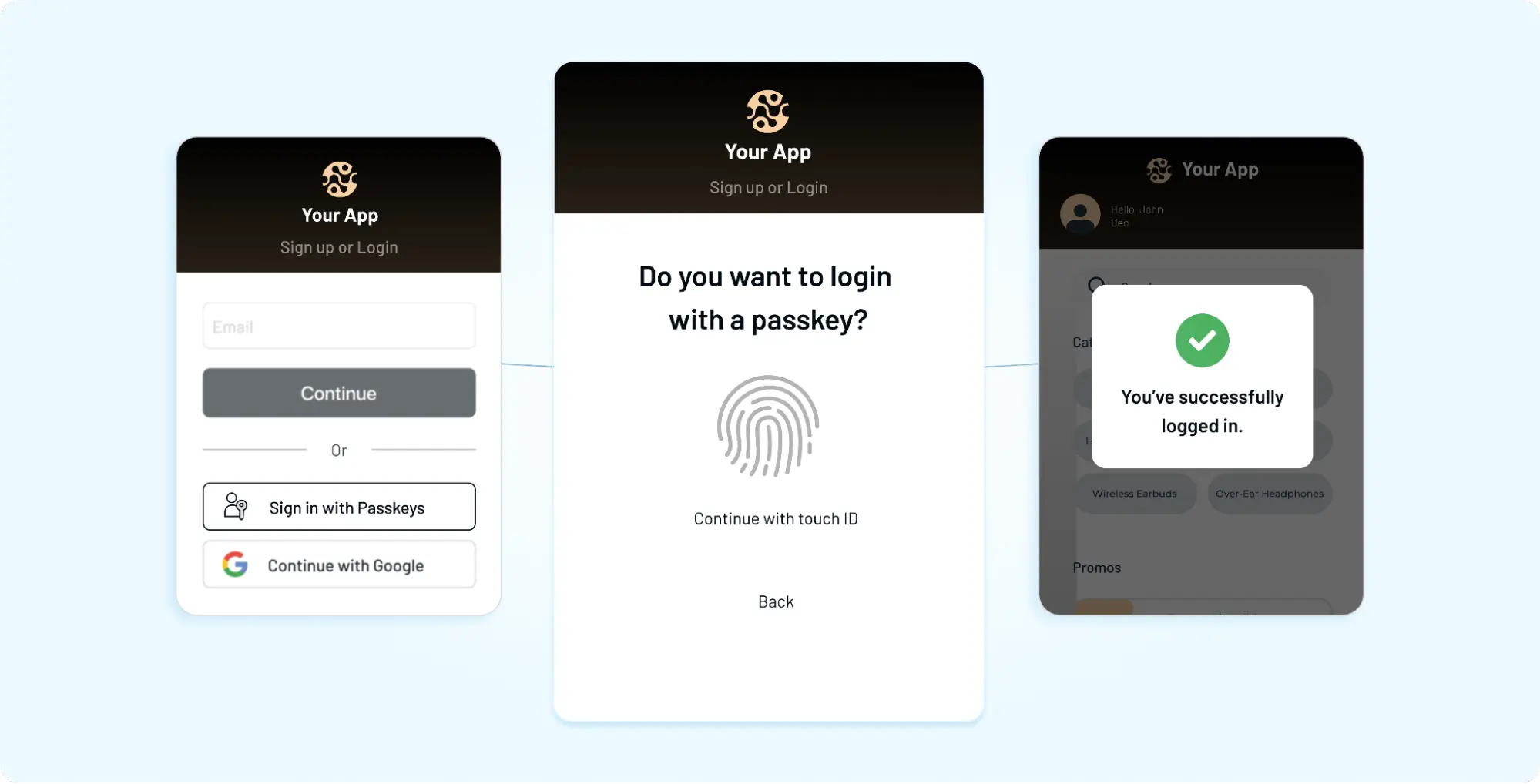
To fully understand passkeys, it is critical to distinguish between Synced Passkeys and Device-Bound Passkeys, as they serve different security and usability needs.
Synced Passkeys vs Device-Bound Passkeys
| Criteria | Synced Passkeys | Device-Bound Passkeys |
|---|---|---|
| Definition | Passkeys stored in a cloud-based credential manager and synced across devices | Passkeys tied to a specific hardware device and cannot be transferred |
| Storage Location | Cloud (e.g., iCloud Keychain, Google Password Manager, 1Password) | Local hardware (e.g., TPM chip, security key like YubiKey) |
| Device Accessibility | Available across multiple devices within the same ecosystem | Restricted to a single device or physical security key |
| User Experience | Seamless login across devices; reduces lockouts | Requires physical access to the same device or key |
| Portability | Highly automatically synced and backed up | None can be copied or moved |
| Security Level | Strong, but dependent on cloud account security | A very high credential never leaves the device |
| Phishing Resistance | Yes | Yes |
| Account Recovery | Easier due to cloud backup and sync | More complex; requires backup hardware or recovery flows |
| Enterprise Suitability | Suitable for general SaaS and consumer applications | Preferred for enterprise and regulated environments |
| Compliance Alignment | Typically meets standard security requirements | Meets high-assurance standards like NIST AAL3 |
| Risk Factors | A cloud account compromise could expose access | Loss of the device may result in access issues if no backup exists |
| Best Use Cases | Consumer apps, B2C SaaS, productivity tools | Government, finance, healthcare, high-security enterprise systems |
How do Passkeys Work?
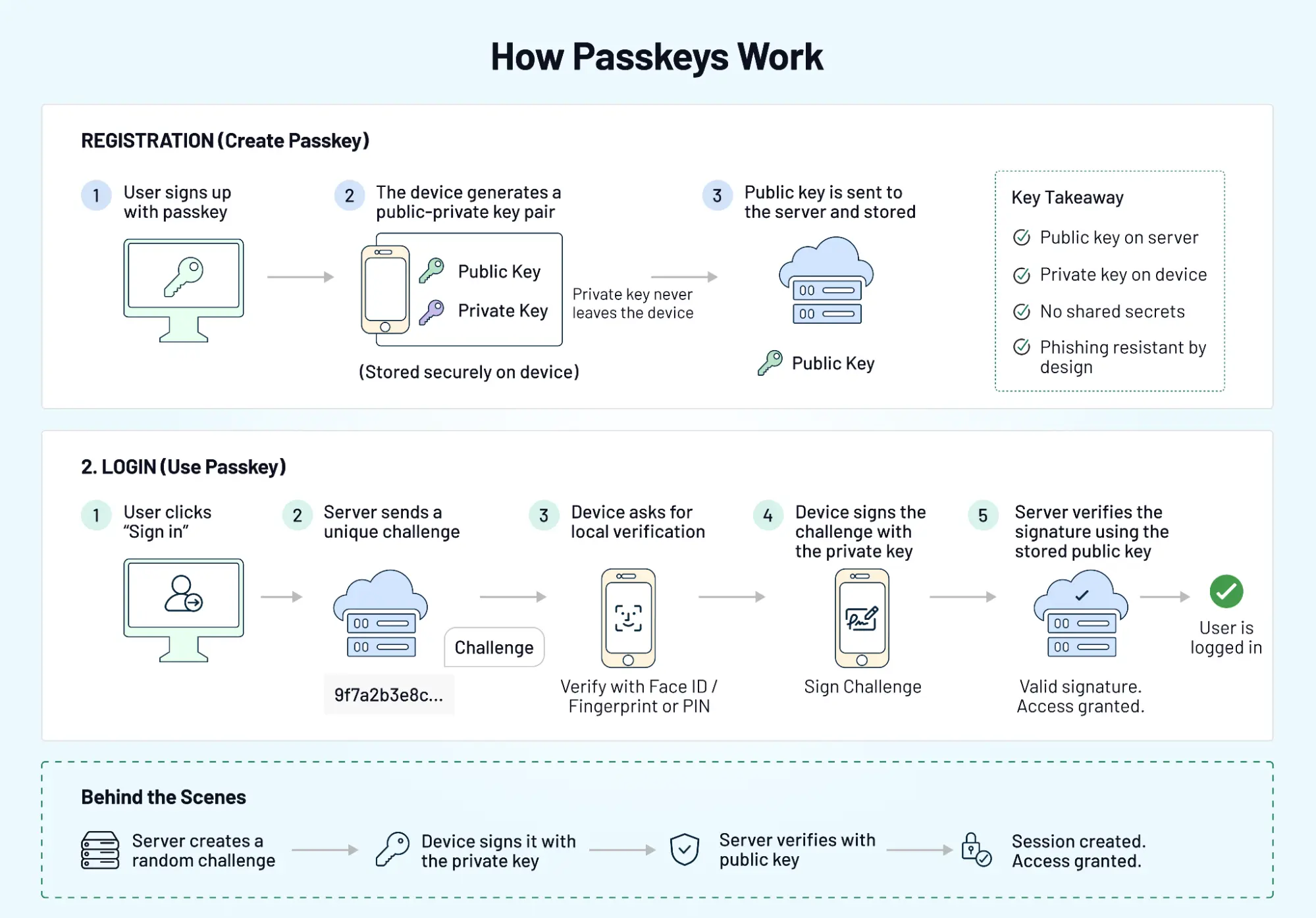
When a user signs up or logs in with a passkey, the device and the server create a secure relationship. Not a shared password. A pair of keys, one public, one private. The public key sits with your application. The private key never leaves the user’s device. That’s the foundation.
Public–Private Key Authentication Explained
During registration, the device generates a key pair. The public key is sent to your server and stored. The private key stays locked on the device, protected by the OS.
When the user logs in, the app server sends a challenge. The device signs it using the private key. The server verifies the signature using the stored public key. No password. No reusable secret. Nothing to steal in transit.
Even if someone intercepts the request, it’s useless without the private key. And that key never leaves the device.
Device Binding and Biometric Verification
Now comes the part users actually notice. Before the device signs anything, it asks for local verification: Face ID, fingerprint, or device PIN. This step ensures the person holding the device is the right user.
Although both biometrics and PINs can be used, the key detail is where verification happens. It’s local. Not sent to your servers. Not stored centrally. That changes the trust model. Authentication becomes tied to the device and the user’s presence, not a credential that can be reused elsewhere.
What Happens During a Passkey Login
From a user’s perspective, it feels almost instant.
They click “Sign in.” A prompt appears. They confirm with biometrics or device unlock. Access granted. Behind the scenes, the server sends a challenge, the device signs it with the private key, the server verifies the response, and a session is created. That’s it.
Once users experience this flow, going back to passwords feels unnecessarily slow. Not because passkeys are flashy, but because they remove steps that your users never liked in the first place.
Passkeys don’t just change how authentication works, they change how it feels.
Passkeys vs Passwords vs OTP vs Magic Links
Choosing an authentication method is no longer a binary decision. Most products today juggle multiple options, some for convenience, some for security, some as a fallback.
Although all four methods verify identity, they do it in very different ways. The difference shows up in user experience, risk exposure, and how well each method holds up under real-world conditions.
A Quick Comparison
| Method | User Experience | Security Level | Common Risks | Best Use Cases |
|---|---|---|---|---|
| Passkeys | Fast, seamless (biometric/device unlock) = Low friction | Very High | Device dependency, recovery complexity | Modern apps, long-term strategy |
| Passwords | Familiar but slow | Low | Phishing, reuse, leaks | Legacy systems |
| OTP (SMS/Email) | Moderate friction | Medium | SIM swap, interception, delays | Step-up auth, fallback |
| Magic Links | Low friction | Medium | Email delays, link forwarding | Onboarding, low-risk login |
Where Passkeys Stand Out
Passkeys remove the weakest link, shared secrets.
No passwords to reuse. No codes to intercept. Authentication is tied to a device and verified locally. That alone eliminates the phishing and credential-stuffing risks that still affect traditional methods. In contrast, passwords continue to rely on user behavior. Strong policies help, but they don’t fully solve the problem.
Where OTP and Magic Links Still Fit
Passkeys are powerful, but they don’t cover every scenario yet. Some users switch devices frequently. Some environments don’t fully support passkey syncing. Recovery flows can get complicated without fallback options.
That’s where OTPs and magic links still remain useful: OTPs add an extra verification layer, and Magic links simplify first-time access. From our experience, apps and products that combine methods tend to perform better than those that force a single path.
Why This Isn’t a “One Winner” Decision
Looking to choose the right approach? The goal is not to replace everything overnight.
Instead, think in layers:
-
passkeys for primary authentication
-
OTP or magic links as a fallback
-
additional checks for high-risk actions
Because authentication is not static. It evolves with user behavior, device ecosystems, and threat patterns. Passkeys may lead the shift, but the strongest systems are the ones that stay flexible.
Challenges of Passkey Adoption
The technology is solid. The friction shows up around users, devices, and edge cases that don’t fit the happy path.
Cross-Device Reality
Users don’t live on one device. They sign up on a laptop, open email on a phone, switch browsers mid-session. Passkeys are tied to devices or synced ecosystems. When that chain breaks, login can feel confusing.
A user expects to “just sign in.” Instead, they’re asked to pick a device, scan a QR code, or switch contexts. Small pauses like this add up.
Account Recovery Isn’t Obvious
With passwords, the recovery is familiar: reset link, new password, done. Passkeys change that flow. If a user loses access to their device or account sync, recovery needs a different path. Not every product is designed this well.
A surprising pattern we’ve seen teams invest in passkey login but overlook recovery. That’s where support tickets start.
User Understanding and Trust
Although both passwords and passkeys authenticate users, the mental model is different. Users understand passwords even if they don’t like them. Passkeys feel invisible. Where is my login saved? And what happens if I switch devices?
If the experience doesn’t guide them clearly, hesitation creeps in.
Enterprise Rollout Friction
Rolling out passkeys in a controlled environment is one thing. Rolling them out across enterprise tenants is another.
You have: different device policies, varying browser support, and IT-controlled environments. At the center of this is compatibility. Not every organization can move at the same pace.
Over-Reliance on a Single Method
A common mistake is switching everything to passkeys too quickly.
It works well for some users. Others get stuck without alternatives. No fallback means no access. That’s not a security issue. That’s a product issue.
Passkeys are a strong step forward. Adoption just needs to match real-world behavior.
The teams that succeed don’t rush the shift. They design for flexibility, clarity, and recovery from day one.
How to Implement Passkeys in Your Application
Implementation is where good intentions meet real constraints.
Adding a “Use passkey” button is easy. Making it work across devices, browsers, and existing accounts that’s where the effort goes.
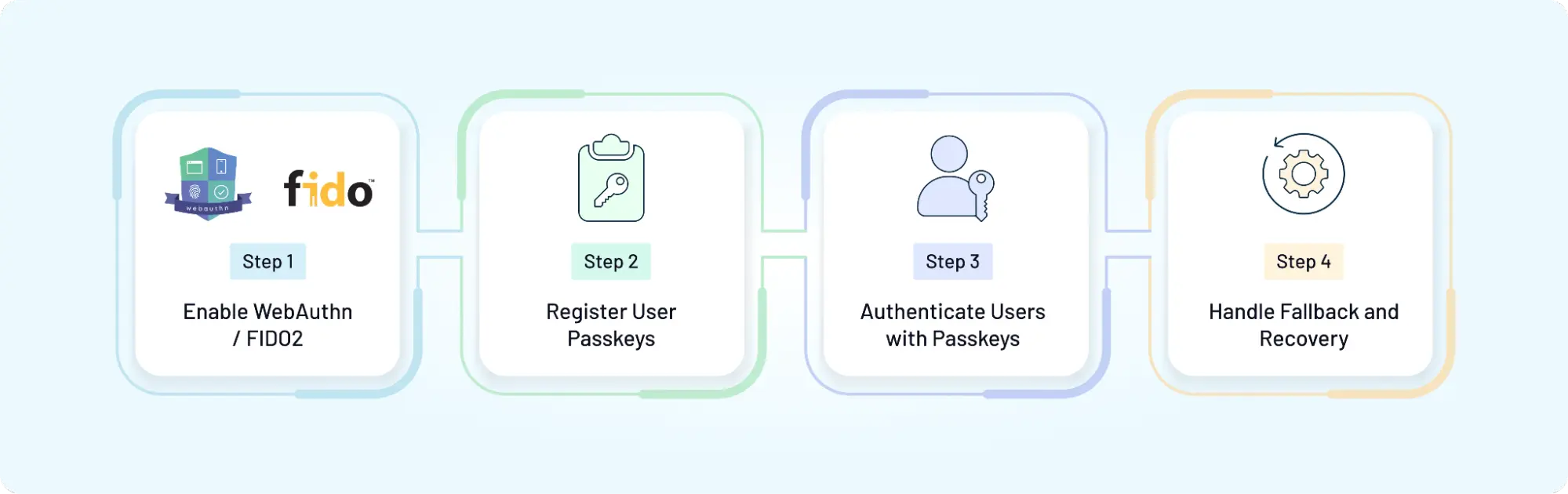
Step 1: Enable WebAuthn / FIDO2
Passkeys are built on standard WebAuthn on the web, backed by FIDO2. Your application needs to:
-
generate a cryptographic challenge
-
communicate with the browser’s WebAuthn API
-
Verify responses on the server
This is the foundation. Without it, there is no passkey flow. Although both front-end and backend changes are required, most modern platforms and SDKs simplify this step.
Step 2: Register User Passkeys
Registration is the first moment of trust.
When a user opts in, the device creates a key pair. The public key is stored on your server along with metadata like device type or authenticator info. The private key stays on the device.
Forcing passkey creation too early is often the single biggest source of adoption friction. Users are more likely to adopt it after a successful login, not during a rushed signup. Timing matters.
Step 3: Authenticate Users with Passkeys
Once registered, login becomes shorter.
Your system sends a challenge. The device signs it. The server verifies it. Access is granted.
From a user’s perspective, it feels instant. From a system perspective, it’s a secure cryptographic exchange.
A surprising pattern we’ve seen latency issues or misconfigured challenges can break this flow silently. Testing across browsers and devices is not optional here.
Step 4: Handle Fallback and Recovery
This is the part many implementations underestimate.
Not every user will always have access to their registered device. Some will switch phones. Others will clear data or lose sync.
Your system should support:
-
fallback authentication (OTP, magic link, etc.)
-
Account recovery flows
-
multiple registered passkeys per user
Without this, even a strong authentication system becomes fragile.
Passkey implementation is not just about enabling a new login method. It’s about fitting that method into everything your users already do: sign up, log in, recover access, switch devices.
That’s where implementation decisions start to shape the experience.
Designing a Modern Authentication UX with Passkeys
Passkeys can remove steps. They can also add confusion if the experience isn’t thought through. Don’t treat passkeys as a backend upgrade and leave the UI almost unchanged. Users will then face a new flow without clear cues. The result isn’t a faster login. It’s hesitation. Good UX bridges that gap.
When to Prompt Passkeys
Timing matters more than availability. Prompting for passkeys during a rushed signup often backfires. Users are still deciding whether they trust the product. Adding a new concept at that moment slows them down.
In contrast, prompting after a successful login works better. The user already trusts the product, understands the flow, and is more open to a faster option next time. A small shift. Big impact.
Reducing User Confusion
Passkeys feel invisible. That’s both their strength and their weakness.
Users don’t always know where their credentials are stored or how they work across devices. Without guidance, they start guessing.
Clear prompts help: explain what just happened (“You signed in with your device”), reassure users about security and show fallback options upfront
A surprising pattern we’ve seen tiny bits of copy can reduce drop-offs more than major UI changes.
Blending Passkeys with Other Methods
Although passkeys can become the primary method, they shouldn’t be the only path. Users forget devices. Browsers behave differently. Edge cases appear.
A flexible UX supports: passkeys as the default option, OTP or magic link as fallback, and adaptive prompts based on context.
This keeps the experience smooth without forcing users into a single path. Designing authentication UX is less about adding features and more about removing uncertainty.
Passkeys already reduce effort. The job of UX is to make that reduction feel natural, not surprising.
Transitioning from Passwords to Passkeys (Without Breaking UX)
Switching to passkeys isn’t a flip of a switch. It’s a shift in behavior.
Users are used to passwords, even if they don’t like them. Remove that familiarity too quickly, and the experience starts to feel unfamiliar rather than improved. That’s where adoption slows down. Looking to choose the right approach? Treat this as a transition, not a replacement.
Solving the Account Recovery Problem Before It Happens
The biggest fear in a passkey-first world is the "Permanent Lockout." If a user loses their physical device and has no synced cloud backup, the cryptographic link to their account is severed. To prevent a surge in helpdesk tickets and user churn, enterprises must solve for recovery during the enrollment phase, not after the loss occurs.
1. The Multi-Key Approach: Redundancy by Design
The most effective way to prevent lockout is to ensure the user never relies on a single "island" of trust.
-
Encourage users to register at least two passkeys—one on their primary mobile device (e.g., iCloud Keychain or Google Password Manager) and one "Anchor Key" like a physical FIDO2 security key or a secondary laptop.
-
The "Bootstrap" Key: During onboarding, prompt users to "Add a Backup Device." This ensures that if they switch from iOS to Android (where sync might break), they have a hardware-bound secondary key to regain access.
2. Modern Identity Proofing: Trust but Verify
When all physical keys are lost, you need a way to re-establish trust without falling back to a weak, phishable password.
-
Use high-assurance signals collected during onboarding, such as a verified government ID or a "Magic Link" sent to a pre-verified corporate email or phone number, to trigger a re-enrollment flow.
-
For high-privilege accounts, implement a "Social Recovery" or "Admin Vouching" model. A trusted peer or IT admin verifies the user's identity via a secure video call or in-person check before authorizing a new passkey registration.
-
Provide a one-time-use, high-entropy "Recovery Code" during the initial passkey setup, that can be used as a last resort. Instruct the user to store this in a secure vault (like a physical safe or a corporate password manager).
3. The "Warm Handover" Best Practice
Never delete the old authentication method the instant a passkey is created. Keep the legacy MFA or password-based path active but "deprioritized" for a 30-day transition period. This allows the user to "step back" if they realize their new device isn't syncing correctly across their entire workspace.
Gradual Rollout Strategy
Start small. Expand deliberately.
Introduce passkeys as an option alongside existing login methods. Let users try it without forcing the change. Over time, increase visibility based on adoption.
A surprising pattern we’ve seen when users choose passkeys themselves, usage sticks. When it’s forced too early, resistance shows up.
Rollout is less about speed and more about timing.
Supporting Existing Users
New users are easier. Existing users need a path.
They already have passwords, saved sessions, and expectations. Asking them to switch without context creates friction.
Instead:
-
Prompt passkey setup after login
-
allow multiple authentication methods during transition
-
guide users with clear messaging
This keeps continuity intact while introducing something new.
Enterprise Considerations
Enterprise environments add another layer.
Different organizations operate with different device policies, browser restrictions, and security requirements. A one-size rollout doesn’t fit here.
At the center of this is control. Teams need the ability to:
-
enable passkeys selectively
-
maintain fallback methods
-
align with internal security policies
Without that flexibility, adoption becomes uneven. Transitioning to passkeys is not just about stronger authentication. It’s about making that shift feel effortless for users who didn’t ask for it.
The smoother the transition, the faster it becomes the default.
How LoginRadius Supports Passkey Authentication
Implementation rarely lives in isolation. Passkeys need to fit into everything you already have: existing users, multiple login methods, different applications, and evolving security needs. That’s where platform support starts to matter.
Passkeys Alongside Your Existing Authentication Stack
Although passkeys can become the primary login method, most products don’t start there.
You still have passwords in place. OTP flows. Magic links. Enterprise SSO in some cases. Replacing everything at once isn’t practical.
LoginRadius allows you to layer passkeys into your current setup instead of forcing a rebuild. You can introduce them gradually, keep fallback options active, and adjust flows based on user behavior. This makes the transition feel controlled, not disruptive.
Developer-Friendly Implementation
A surprising pattern we’ve seen teams understand the value of passkeys but get slowed down during integration.
Working directly with WebAuthn can be time-consuming. Handling edge cases, browser behavior, and fallback logic adds complexity.
LoginRadius simplifies this with: ready-to-use APIs, SDKs across platforms and pre-built authentication flows
So instead of building everything from scratch, teams can focus on adapting the experience to their product.
Secure and Scalable Deployment
Passkeys rely on strong cryptography. That’s only one part of the system.
You also need:
-
secure challenge generation and validation
-
session handling across devices
-
protection against abuse and edge-case failures
LoginRadius provides these controls as part of the platform, allowing teams to scale authentication without rebuilding security layers repeatedly.
Designed for Real-World Use Cases
Passkeys work differently depending on the product.
A consumer app prioritizes speed. A B2B platform needs tenant-aware flows. A fintech product requires stricter verification.
LoginRadius supports these variations by allowing customization at different levels of user journeys, authentication methods, and security controls.
Because in practice, authentication is never one-size-fits-all.
Passkeys can simplify login. The platform behind them determines how well that simplicity holds up when complexity shows up.
The Future of Authentication: Beyond Passwordless
Passkeys feel like the end of the password story. They’re not. They’re the start of something broader.
Authentication is moving away from single methods toward systems that adapt in real time. One user signs in with a passkey on a trusted device. Another triggers a step-up check because the context looks different: a new location, unusual behavior, higher-risk action. Same product, different path. The “best” method isn’t fixed anymore. It’s chosen based on your users, their behaviors and several other factors.
From Methods to Signals
Passwords, OTPs, magic links, and passkeys are tools. The direction now is to combine them with signals: device familiarity, location patterns, session behavior, and risk scoring
When the signals are low-risk, login stays fast. When something looks off, the system asks for more proof. Quietly. Without making every user jump through extra steps.
Less Friction, More Context
Users don’t want to think about authentication. They want it to work.
Passkeys reduce effort at the entry point. What follows is just as important as session continuity, re-authentication for sensitive actions, seamless movement across apps and devices.
A surprising pattern we’ve seen systems that rely on one strong method still hit friction later. Systems that adapt based on context tend to feel smoother overall.
Interoperability Will Decide Adoption
Not every user lives inside one ecosystem.
Some use iOS, others Android, others a mix of devices and browsers. Passkey syncing is improving, but gaps still exist. Cross-platform consistency will shape how widely passkeys are adopted over time.
That’s why flexibility still remains important. Supporting multiple methods alongside passkeys ensures users aren’t blocked when ecosystems don’t align.
Authentication as an Experience Layer
In contrast to older models, authentication is no longer a checkpoint. It’s part of the product experience.
Done well, it disappears into the flow. Doing poorly becomes the reason users drop off.
Passkeys move things forward. The next step is making authentication adaptive, context-aware, and invisible when it should be. Because the future isn’t just passwordless. It’s friction-aware.
Choosing the Right Passkey Strategy for Your Product
Passkeys are a strong step forward. The real impact comes from how you introduce them.
It’s tempting to think of this as a switch to enable passkeys, remove passwords and we are done. That approach might look clean on a roadmap. It rarely holds up with real users.
Teams usually optimize for the technology and overlook the transition. Users don’t think in terms of WebAuthn or cryptographic keys. They think in terms of “Can I get in quickly?” and “What happens if this doesn’t work?”
Those two questions decide adoption.
Looking to choose the right approach? Start with flexibility. Offer passkeys as a primary option, but keep fallback methods available. Let users move at their own pace. Adoption grows faster when it feels optional, not forced.
Then focus on experience. When to prompt passkey setup, how to explain it, what happens during recovery these moments shape trust more than the login button itself.
A surprising pattern we’ve seen products that treat passkeys as part of a broader authentication strategy see smoother adoption than those that treat it as a replacement feature.
And finally, think beyond launch. Devices change. User behavior evolves. Security expectations increase. Your authentication system should be able to adapt without requiring a redesign every few months.
With LoginRadius, teams can introduce passkeys alongside existing methods, control rollout based on context, and maintain a balance between usability and security as the system grows.
Passkeys are not just about removing passwords.
They are about building an authentication experience that keeps working even when everything around it changes.
Final Thoughts: Make the Shift to Passkeys Without Breaking What Works
Passkeys are not a trend you “try.” They’re a shift you design. They remove the weakest part of authentication shared secrets and replace it with something users already trust: their device. Faster login, fewer resets, stronger protection. That part is clear.
What decides success is everything around it. If users can’t recover access, they churn. If cross-device login feels confusing, they hesitate. If rollout ignores existing flows, teams spend more time fixing than improving. The difference between “it works” and “it scales” sits in these details.
Looking to choose the right approach? Start with a layered strategy. Use passkeys as the default where they shine. Keep fallbacks for the moments they don’t. Guide users with clear prompts. Roll out in phases. Measure what changes conversion, drop-offs, support tickets and adjust.
With LoginRadius, you can implement passkeys without rebuilding your authentication stack, combine them with OTP or magic links, and control rollout across products and regions.
Explore passkeys with LoginRadius, or connect with our team to design an authentication flow that fits your users not just your roadmap.
Because the goal isn’t just to remove passwords. It’s to make login feel effortless, reliable, and ready for what comes next.
FAQs
Q: What are passkeys?
A: Passkeys are a passwordless authentication method that uses cryptographic key pairs instead of passwords. The private key stays on the user’s device, while the public key is stored on the server. Users verify identity with biometrics or device unlock, making login faster and more secure.
Q: How do passkeys work?
A: During registration, a key pair is created public key on the server, private key on the device. At login, the server sends a challenge, which the device signs using the private key. The server verifies it, granting access without sharing any secret.
Q: Are passkeys more secure than passwords?
A: Yes, passkeys are more secure because they eliminate password reuse and phishing risks. Since there’s no shared secret and authentication is tied to the device, attackers cannot easily intercept or reuse credentials.
Q: Can passkeys replace OTP and MFA?
A: Not entirely. Passkeys can replace passwords but may still need support from OTP or MFA in high-risk scenarios or recovery flows. Combining methods ensures stronger security and better flexibility.
Q: How do I implement passkeys?
A: You can implement passkeys using WebAuthn and FIDO2 standards. This involves enabling passkey registration, handling authentication challenges, and setting up fallback and recovery options. Most CIAM platforms provide APIs and SDKs to simplify this process.