Authentication is how systems confirm identity before allowing access. It ensures that users, devices, and applications are legitimate before interacting with protected resources.
At a basic level, authentication works by checking credentials such as passwords, tokens, or biometrics against a trusted identity source. Once verified, the system grants access through a secure session or token.
Key takeaways:
-
Authentication verifies identity before access is granted
-
It uses credentials like passwords, OTPs, biometrics, or tokens
-
Modern methods (MFA, passkeys, adaptive authentication) reduce security risks
-
It protects applications, APIs, and sensitive data from unauthorized access
-
It is a core component of Zero Trust and identity-first security models
In simple terms, authentication acts as a gatekeeper, ensuring that only trusted identities can enter and interact with your systems.
Defining Authentication
Authentication is the process of verifying that a user, device, service, or application is genuinely who it claims to be. It’s the first layer of digital security and the checkpoint every access request must pass through before any permissions or privileges are applied. Technically, authentication ensures that only legitimate users and trusted systems can interact with an organization’s applications, APIs, or data.
For users, authentication often shows up as a login screen where they enter a password, approve a push notification, or use a biometric, like a fingerprint. For services and applications, authentication often happens behind the scenes through tokens, certificates, API keys, or OAuth-based credentials.
Learn more : Authentication vs Authorization: Key Differences, Real Examples & Best Practices
What Does Authentication Do? Core Functions & Real Examples
Authentication proves identity. Everything else builds on it.
Authentication plays a direct role in protecting an organization’s systems, applications, and data by ensuring that only verified identities can gain access. It does so by establishing the trust required before any action, transaction, or data exchange takes place.
In cybersecurity, authentication blocks attackers from impersonating legitimate users, does not let them impersonate stolen credentials, or exploit open endpoints.
At its core, authentication does three critical things:
1. Confirms Identity Before Access Is Granted
Authentication verifies that the person or system requesting access is legitimate. This prevents unauthorized users, bots, or untrusted services from entering the environment with stolen or fabricated credentials.
2. Stops Credential-Based Attacks Early
Most modern breaches start with compromised usernames, passwords, or session tokens. But, if you put strong authentication in place, like MFA, passwordless methods, and risk-based checks, it prevents attackers from turning those stolen credentials into actual access.
3. Preserves the Integrity of Every Action That Follows
Once identity is verified, every subsequent decision like role-based access, permissions, workflow triggers, and API interactions depends on the authenticity of that initial identity. Authentication ensures that only trusted identities can take privileged actions, modify data, or access sensitive resources.
Let’s understand with a real-world example. Take, for instance, a payroll dashboard used by HR and IT staff. While authentication confirms who is signing in, authorization will determine what they can access.
Now, if an attacker attempts to log in with a stolen HR password, there is a strong possibility that authentication layers like MFA or risk-based checks will prevent the access attempt before any sensitive payroll or employee data is exposed.
In summary, authentication determines whether an identity can enter the system at all, which makes it one of the most important controls in modern cybersecurity.
Authentication vs Authorization: What’s the Difference?
| Feature | Authentication | Authorization |
|---|---|---|
| Purpose | Verifies identity | Grants permissions |
| Key Question | Who are you? | What can you do? |
| Order in Flow | First step | Happens after authentication |
| Technologies | Passwords, MFA, biometrics | RBAC, ABAC, policies |
| Example | Logging into an app | Accessing admin dashboard |
Authentication ensures that a user is who they claim to be, while authorization determines what that user is allowed to access.
For example, after logging into a banking app (authentication), a user may only be allowed to view their own account data but not modify system settings (authorization).
How the Authentication Process Works (Step-by-Step Breakdown)
Authentication can involve different methods, but the underlying process follows a predictable pattern. The steps below represent the core structure used across modern applications, APIs, and cloud services.
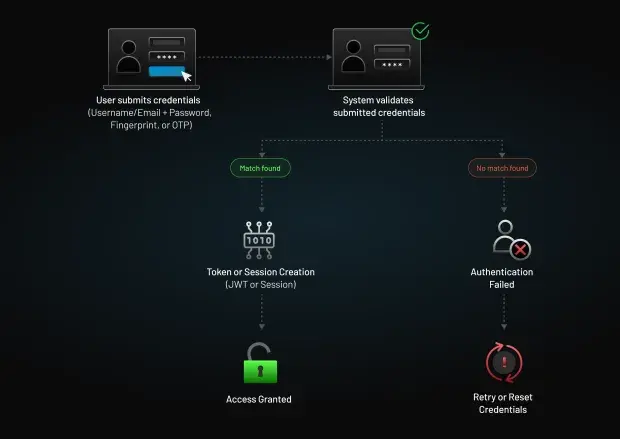
Step 1: The User or System Submits Credentials
The authentication process begins when a user or service presents an identifier (like a username, email, or client ID) with a form of authentication.
This might include:
-
A password
-
A one-time passcode (OTP)
-
A biometric factor
-
A cryptographic certificate
-
An OAuth client secret
On the login authentication page, it means a user is entering their credentials on a sign-in form. In machine-to-machine authentication, it often takes the form of tokens or API keys attached to an API request.
Step 2: The System Validates the Credentials
The authentication service checks if the provided credentials match the trusted record stored in the system.
Validation can involve:
-
Comparing passwords or hashes
-
Verifying OTP expiration and correctness
-
Validating device or browser fingerprints
-
Checking digital signatures or certificates
-
Matching biometric templates
Furthermore, if adaptive authentication is enabled, the system may also assess context to evaluate the risk of the request. These contexts may include location, IP address, device, and behavioral signals.
Step 3: A Token or Session Is Issued
Even if the validation is successful, the system doesn’t immediately give unlimited access. Instead, it generates a secure session or token that represents the authenticated identity. These tokens allow applications to verify requests without repeatedly asking for credentials, while still enforcing identity integrity.
Common examples include:
-
Session IDs (traditional web apps)
-
JSON Web Tokens (JWTs) (APIs, SPAs, mobile apps)
-
OAuth access tokens (modern identity-driven applications)
Also read : What is Token Authentication and How Does It Work?
Step 4: Access Is Granted or Denied
Once the authentication process is complete, the identity can access the applications, APIs, or services aligned with its permissions. But, if the credentials fail validation, or any contextual signal indicates a high-risk attempt, the system denies access and may also trigger additional verification or security controls.
Authentication Factors and Types: How Users Prove Their Identity
Before exploring modern authentication methods, it’s important to understand the factors that all authentication systems rely on. These factors form the basis of how an identity proves who they are, and they map back to one or more of these core categories.
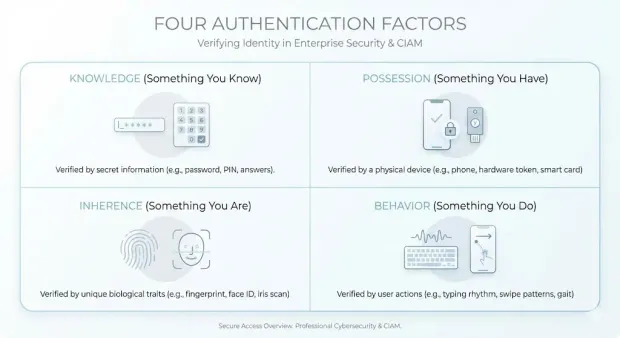
1. Knowledge Factors (Something You Know)
Knowledge factors require the user to provide information that only they should know. This includes passwords, PINs, and answers to security questions.
They are widely used but also the most vulnerable. This is because attackers frequently target them with phishing, credential stuffing, and brute-force campaigns. This is why knowledge factors alone are no longer enough to secure access.
2. Possession Factors (Something You Have)
Possession factors rely on a physical item or digital asset the user owns. Some common examples include:
-
One-time passcode (OTP) devices
-
Smartphone authenticator apps
-
Hardware security keys
So, even if a password is compromised, attackers will not be able to authenticate without access to the user’s device or token.
3. Inherence Factors (Something You Are)
Inherence factors use unique biological or biometric traits to verify identity. Some examples include fingerprint scans, facial recognition, and iris matching.
Biometric authentication offers a strong balance between security and convenience, but it requires careful handling of sensitive biometric templates and secure storage practices.
Also read : Biometric Authentication Methods: How They Work
4. Behavioral Factors (Something You Do)
Behavioral authentication evaluates the unique patterns in how a user interacts with devices or systems. This can include typing speed, mouse movement, swipe patterns, or other interaction-based signals.
These signals are especially valuable in risk-based and adaptive authentication flows because they operate passively and are difficult for attackers to replicate.
Together, these four categories define the core auth types that modern systems use to verify users. Most organizations combine multiple factors to reduce the risk of compromised credentials and strengthen identity assurance. This combination forms the foundation for multi-factor authentication and other advanced authentication mechanisms.
Modern Authentication Methods and Technologies
Below is a concise, security-focused overview of the major methods and technologies shaping today’s authentication landscape.
1. Single-Factor Authentication (SFA)
SFA relies on just one authentication factor, which is typically a password or PIN. While simple to deploy, it’s also the most vulnerable. A single compromised password is often enough for attackers to gain access, which is why SFA should only be used for low-risk scenarios or paired with additional controls.
2. Two-Factor Authentication (2FA)
2FA strengthens login authentication by combining two different factor categories. An example can be a password and an OTP sent to a mobile device. Even if attackers have the password, they can't complete the login without the second factor. This method substantially reduces the success of credential-based attacks.
Learn more: A Complete Guide to 2FA Authentication: Methods, Risks & Modern Best Practices
3. Multi-Factor Authentication (MFA)
MFA goes one step further by requiring two or more authentication factors. It provides significantly higher assurance that the person or system attempting to log in is legitimate. MFA can combine passwords, biometrics, device-based approvals, or cryptographic keys.
4. One-Time Password (OTP) Authentication
OTPs are short, time-limited codes sent via SMS, email, or generated within an authenticator app. They provide an additional layer of protection by ensuring that only the user with access to a registered device can complete authentication. While effective, SMS-based OTPs should be paired with additional controls due to SIM-swap risks.
5. Passwordless Authentication
Passwordless authentication removes passwords entirely and replaces them with stronger factors such as biometrics, FIDO2 security keys, email magic links, or push approvals. This method eliminates poor password hygiene and significantly improves user experience.
6. Adaptive or Risk-Based Authentication
Adaptive authentication analyzes contextual signals such as device, IP address, location, and behavioral patterns to determine the risk of each login attempt. If the system detects unusual activity, it automatically steps up verification.
7. Token-Based Authentication
Token-based authentication issues a cryptographically signed token (like a JSON Web Token) after the initial login. Instead of sending credentials with every request, the token acts as proof of identity. This method powers modern APIs, SPAs, mobile apps, and microservices architectures where stateless, scalable authentication is required.
8. Biometric Authentication
Biometric authentication uses unique biological characteristics, such as fingerprints, facial recognition, voice patterns, or iris scans, to confirm identity. It provides high security and convenience, but requires secure handling of biometric templates and compliance with privacy regulations.
9. Push Notification Authentication
With push authentication, users receive a secure prompt on a trusted device asking them to approve or deny a login attempt. It is fast, highly resistant to phishing, and provides strong protection when combined with device-binding.
10. Voice Authentication
Voice authentication uses vocal characteristics or passphrases as a biometric identifier.
It’s particularly useful in call centers, voice-driven interfaces, or environments where typing isn’t feasible.
Authentication Methods Compared: Which Is Right for Your Use Case?
| Method | Security Level | Phishing Resistance | User Friction | Best For | Limitation |
|---|---|---|---|---|---|
| Password (SFA) | Low | Low | Low | Legacy systems | Easily compromised |
| OTP (SMS/Email) | Medium | Low | Medium | Consumer apps | Vulnerable to interception |
| TOTP Apps | High | Medium | Medium | SaaS platforms | Requires manual input |
| Push Notifications | High | Medium | Low | Mobile-first apps | MFA fatigue attacks |
| Biometric Authentication | Very High | High | Low | Consumer & enterprise apps | Device dependency |
| Hardware Keys | Very High | Very High | Medium | Enterprises | Cost, hardware required |
| Token-Based Auth (JWT) | High | Medium | Low | APIs, microservices | Token management complexity |
| Certificate-Based Auth | Very High | High | Medium | Enterprise systems | Complex setup |
| Behavioral Authentication | High | High | Very Low | Adaptive security systems | Requires analytics |
| Passkeys | Very High | Very High | Very Low | Passwordless systems | Adoption still growing |
Authentication and Access Control: How They Work Together
Authentication and access control are closely connected, but they serve two distinct functions in a security architecture. Authentication verifies identity by confirming that the user or system attempting to access an environment is who they claim to be. Access control uses that verified identity to determine what the authenticated entity is allowed to see or do.
Authentication is always the first step. Without confirming the identity, an organization cannot reliably apply permissions, enforce roles, or protect sensitive systems. This makes authentication the foundation of access control.
How Access Control Uses Authentication
Once an identity is authenticated, the access control system evaluates factors such as:
-
User roles: HR, IT, finance, customer support
-
Attributes: department, location, device type, risk level
-
Policies: regulatory requirements, security baselines, or business rules
These elements determine what actions the user can perform, which resources they can access, and what data they are authorized to view.
Authentication Management: How Organizations Implement and Govern Authentication
Authentication management refers to the systems, policies, and workflows organizations use to control how users, devices, services, and applications authenticate across their environments.
At its core, authentication management ensures that every authentication event, regardless of the channel, device, or application, follows a consistent and secure process.
Effective authentication management typically involves:
-
Centralized Authentication Policies: Defining when MFA is required, which methods are allowed, and how risk signals influence authentication decisions.
-
Lifecycle Controls: Handling registration, credential updates, account recovery, and secure deprovisioning.
-
Session and Token Governance: Managing how long sessions last, where tokens can be used, and how they are revoked when risk or compromise is detected.
-
Compliance and Auditability: Logging every authentication event to meet regulatory requirements and support forensic investigations.
Modern identity-driven applications rely on authentication platforms or authentication services to manage all these responsibilities consistently. Moreso, a robust authentication platform typically provides:
-
Standards-based protocols such as OAuth 2.0, OpenID Connect, SAML, and JWT
-
Built-in MFA, passwordless authentication, and adaptive controls
-
Single Sign-On (SSO) and federated identity capabilities
-
Secure API and machine authentication workflows
-
Centralized configuration and policy orchestration
-
High-availability infrastructure for large-scale user bases
These platforms reduce the complexity of building and securing authentication in-house, especially across large, distributed applications. By consolidating authentication logic into a unified service, organizations can enforce stronger security controls without degrading user experience.
The Role of CIAM in Authentication Management
For customer-facing applications, Customer Identity and Access Management (CIAM) platforms expand traditional authentication services with capabilities such as:
-
Flexible registration and onboarding flows
-
Progressive profiling
-
Consent and privacy management
-
Identity orchestration
-
Developer-friendly APIs and SDKs
Authentication remains the core function, but CIAM layers on capabilities that help businesses maintain trust, comply with global privacy regulations, and deliver seamless user experiences.
Core Authentication Protocols: Major Standards Behind Modern Identity
Below is a streamlined overview of the protocols modern authentication platforms rely on to manage identity at scale and protect sensitive data.
1. OAuth 2.0
OAuth 2.0 is the industry-standard authorization framework used to delegate access without sharing credentials. Instead of exchanging passwords, applications receive scoped access tokens that represent the user or service.
2. OpenID Connect (OIDC)
Built on top of OAuth 2.0, OIDC adds an authentication layer that verifies user identity. It enables secure, standards-based login across web, mobile, and single-page applications. When users “Sign in with Google,” that process is powered by OIDC.
3. Security Assertion Markup Language (SAML)
SAML is an XML-based protocol used for Single Sign-On (SSO), primarily in enterprise environments. It allows identity providers (IdPs) to securely pass authentication assertions to service providers (SPs). Although older than OIDC, it remains widespread in corporate SaaS ecosystems.
Also read : How Does SAML Authentication Work?
4. JSON Web Tokens (JWTs)
JWTs are compact, cryptographically signed tokens used to transmit identity or authorization information. They enable stateless authentication, making them ideal for APIs, microservices, and modern cloud architectures. Because JWTs can be validated without server-side session storage, they support highly scalable systems.
5. Lightweight Directory Access Protocol (LDAP)
LDAP is used to access and manage directory services storing user identities and credentials. Common in enterprise networks, LDAP authenticates users against centralized directories such as Active Directory.
6. CHAP and PAP
-
PAP (Password Authentication Protocol) transmits passwords in plain text and is considered insecure.
-
CHAP (Challenge-Handshake Authentication Protocol) improves on PAP by verifying users through challenge–response exchanges without revealing the password. While mostly legacy today, they remain relevant in certain network authentication scenarios.
7. Extensible Authentication Protocol (EAP)
EAP is a flexible framework used in wireless networks and VPNs. It supports multiple authentication methods, like certificates, tokens, passwords, and more depending on organizational needs.
Authentication Protocols Comparison
| Protocol | Primary Use Case | Human / Machine | Modern / Legacy | Example |
|---|---|---|---|---|
| OAuth 2.0 | API authorization | Both | Modern | Google login |
| OIDC | Identity layer over OAuth | Human | Modern | SSO login |
| SAML | Enterprise SSO | Human | Legacy-modern | Corporate login |
| JWT | Token-based auth | Both | Modern | API access |
| LDAP | Directory authentication | Human | Legacy | Enterprise systems |
| EAP | Network authentication | Both | Modern | Wi-Fi login |
| CHAP/PAP | Legacy authentication | Human | Legacy | Older systems |
API and Machine Authentication: How Non-Human Identities Prove Trust
User Authentication vs. Machine Authentication
Authentication isn’t limited to human users. While this guide covers the broad principles of identity verification, the implementation often differs based on the entity. User Authentication focuses on the human experience (passwords, biometrics, social login), while Machine Authentication handles secure communication between servers and APIs (certificates, keys).
Read our deep dive on User Authentication for a focus on the customer login journey.
Modern applications rely heavily on APIs, microservices, automated scripts, and backend systems that must authenticate with each other without human intervention. These machine identities often have broad access and elevated privileges, making them a high-value target for attackers.
Why Machine Authentication Matters
APIs and services continuously exchange data, call backend functions, or trigger automated workflows. If attackers gain access to a machine identity, such as an exposed API key or a compromised service credential, they can impersonate trusted systems, exfiltrate data, or pivot deeper into the environment.
Machine authentication ensures that only verified and authorized services can communicate, preventing unauthorized or malicious API interactions.
Common Methods Used for API and Machine Authentication
1. API Keys
API keys are unique identifiers passed with API requests. They offer simple access control but must be stored securely and rotated frequently, since exposed keys can be used by attackers without additional verification.
2. OAuth 2.0 Client Credentials
The client credentials grant is widely used for machine-to-machine (M2M) authentication. A service presents its client ID and secret to the authorization server, receives a token, and uses that token for subsequent API calls. This approach eliminates password sharing and supports granular API scopes.
3. JWT-Based Authentication
Services can authenticate with signed JSON Web Tokens (JWTs) that prove identity without maintaining server-side session state. JWTs allow API ecosystems and microservices architectures to scale while applying consistent authentication checks across distributed systems.
4. Mutual TLS (mTLS)
mTLS uses digital certificates on both the client and server sides. Each party verifies the other's certificate before communication is allowed, providing a strong cryptographic guarantee that both sides are legitimate. This is often used in regulated industries or high-security environments.
How Authentication Platforms Support Machine Identities
Modern authentication platforms provide centralized control over:
-
Token issuance and expiration
-
Key and certificate rotation
-
Scopes and API-level permissions
-
Auditing of machine-to-machine authentication events
This ensures that machines follow the same security principles as human users. Turns out, they are strong authentication, least privilege access, and continuous verification.
Authentication Requirements by Industry
| Industry | Key Requirements |
|---|---|
| Healthcare (HIPAA) | MFA required for accessing patient data (ePHI) |
| Finance (PCI DSS) | Strong authentication for payment systems (SCA) |
| Government (NIST) | Identity assurance levels (IAL/AAL) |
| Enterprise SaaS | MFA + SSO + adaptive authentication |
| Consumer Apps | Balance between UX and security |
Authentication strategies vary by industry, making it important to align implementation with regulatory and business requirements.
Best Practices for Building a Strong Authentication Layer
Below are the 10 best practices every organization should follow to strengthen their authentication layer and reduce identity-driven risk.
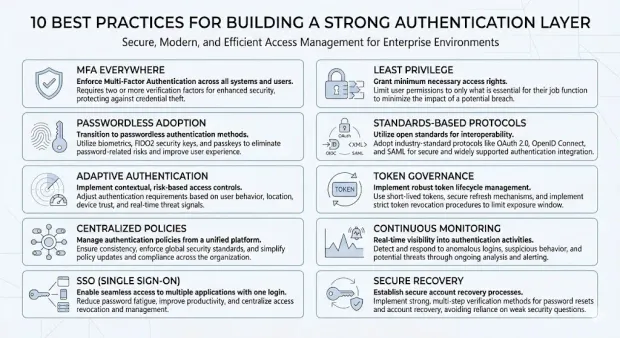
1. Enforce MFA Everywhere
Make MFA mandatory for all user types, not optional. Extend enforcement to admin accounts, remote workers, and applications with sensitive data. Use multiple factor options to support usability.
2. Prioritize Passwordless Adoption to Eliminate Credential Risks
Phase out passwords where possible. Implement biometrics, FIDO2/WebAuthn, magic links, or device-bound authenticators to reduce phishing, credential stuffing, and brute-force attacks.
3. Apply Adaptive Authentication Based on Real-Time Risk Signals
Assess contextual factors like device reputation, geo-velocity, IP risk, and behavioral patterns. Step up authentication when risk is high and keep legitimate low-risk sessions frictionless.
4. Centralize Authentication Policies Under One Identity Provider
Avoid fragmented authentication logic across applications. Use a unified identity platform so MFA rules, token lifetimes, passwordless settings, and recovery flows are consistent everywhere.
5. Implement Single Sign-On (SSO) to Reduce Password Sprawl
Use SSO to ensure users authenticate once through a trusted identity provider. This simplifies login, reduces help desk resets, and creates a single enforcement point for authentication policies.
6. Combine Authentication With Strict Least-Privilege Access Controls
Strong authentication is only effective when paired with role-based or attribute-based permissions. Review role assignments regularly and limit access to only what the authenticated user needs.
7. Use Modern Identity Protocols Instead of Custom Logic
Adopt OAuth 2.0, OpenID Connect, SAML, and JWT flows. These standards are mature, secure, and reduce implementation errors that often occur in custom-built authentication systems.
8. Enforce Strong Token and Session Governance
Limit token lifetimes, rotate secrets frequently, revoke suspicious sessions, and block long-lived or unmanaged tokens. Token security failures often mirror credential failures if not managed centrally.
9. Monitor Authentication Activity Continuously
Track patterns like repeated login failures, new device usage, unusual locations, or access at abnormal times. Integrate authentication logs with SIEM tools and automate blocking or step-up challenges.
10. Harden Account Recovery and Backup Authentication Paths
Most attacks target recovery channels. Require verified communication methods, enforce rate limits, add friction for high-risk accounts, and invalidate all active sessions immediately after recovery actions.
Real-World Examples of Authentication Failures
Weak authentication is still the #1 cause of modern breaches:
-
Colonial Pipeline Attack (2021): Attackers gained access through a compromised VPN account that did not have MFA enabled.
-
LinkedIn Data Breach (2012): Over 100 million password hashes were exposed due to weak password security practices.
-
Uber MFA Fatigue Attack (2022): Attackers repeatedly sent push requests until one was approved, bypassing authentication controls.
-
SolarWinds Attack (2020): Compromised service account credentials enabled attackers to access critical infrastructure.
These incidents show how weak or poorly implemented authentication can lead to large-scale breaches.
How LoginRadius Supports Modern Authentication Requirements
LoginRadius provides a cloud-based Customer Identity and Access Management (CIAM) platform designed to give organizations a secure, standards-based authentication foundation. Instead of building authentication logic across individual applications, development teams can centralize the entire process using LoginRadius’ authentication services and configuration tools.
Authentication Capabilities Provided by LoginRadius
LoginRadius supports the full spectrum of modern authentication methods and technologies, including:
-
Passwordless authentication (magic links, one-tap, biometrics)
-
Multi-Factor Authentication (SMS, email, TOTP apps, push notifications)
-
Adaptive authentication with risk-based policy controls
-
Single Sign-On via SAML, OAuth 2.0, and OpenID Connect
-
Token-based authentication using OAuth 2.0 and JWTs
-
Secure machine and API authentication via OAuth client credentials
-
Unified governance for sessions, tokens, password policies, and MFA rules
These capabilities allow organizations to enforce consistent identity assurance across all their applications, be it web, mobile, or API-driven, while keeping authentication workflows centralized and secure.
Developer-Friendly Implementation and Standards Support
LoginRadius provides SDKs, REST APIs, and pre-built authentication UIs that help teams integrate identity quickly without maintaining their own authentication framework. It also offers support for modern protocols like OAuth 2.0, OIDC, SAML, JWT, and WebAuthn while ensuring interoperability with existing systems and third-party providers.
For a complete overview of LoginRadius’ authentication capabilities, refer to the official documentation here.
Conclusion
Authentication is no longer a one-time checkpoint; it is an ongoing process that must continuously validate trust across users, devices, and systems.
As digital ecosystems expand across cloud platforms, APIs, and distributed environments, identity has become the new security perimeter. The identity that initiates a session is not always the same identity that persists throughout it. This makes continuous authentication powered by risk-based decisioning, device context, token validation, and session monitoring essential for maintaining security.
Modern authentication must evolve beyond static credentials. It needs to be adaptive, context-aware, and tightly integrated with broader identity and access management strategies. Organizations that treat authentication as a modular, policy-driven layer rather than a standalone feature are better positioned to secure access at scale.
This shift is especially critical as machine identities grow, APIs proliferate, and user expectations for seamless experiences increase. Authentication is where trust is established, enforced, and maintained across every interaction.
Build a Future-Ready Authentication System with LoginRadius
If you're looking to modernize your authentication layer, LoginRadius provides a secure and flexible platform designed for today’s identity challenges:
-
Support for modern authentication methods (passwordless, MFA, biometrics, passkeys)
-
Built-in OAuth 2.0, OpenID Connect, and token-based authentication flows
-
Adaptive, risk-based authentication for continuous identity verification
-
Scalable APIs and SDKs for seamless integration across applications
View developer documentation, or book a live demo
Strengthen your authentication strategy today and build a secure foundation for the future of digital identity.
Frequently Asked Questions
1. What is authentication?
Authentication is the process of verifying that a user, device, service, or application is who it claims to be before granting access. It forms the first and most critical authentication layer in cybersecurity. Modern authentication uses credentials, contextual signals, and secure protocols to establish identity trust across applications and APIs.
2. What does authentication do in cybersecurity?
Authentication prevents unauthorized access by validating identity before any permissions or actions are allowed. It blocks attackers from using stolen credentials, mitigates identity fraud, and ensures that only legitimate users or services enter protected systems. This reduces the risk of data exposure and credential-based breaches.
3. How does the authentication process work?
The authentication process typically involves four steps: submitting credentials, validating those credentials, issuing a session or token, and granting or denying access. These steps apply to human users as well as API and machine identities.
4. What are authentication factors?
Authentication factors are the categories of evidence used to verify identity: something you know, something you have, something you are, and something you do. These factors form the foundation of all authentication methods. Combining them increases identity assurance and reduces vulnerability to credential theft.
5. What are the main types of authentication methods?
Common authentication methods include single-factor authentication, two-factor authentication, multi-factor authentication, passwordless authentication, biometrics, adaptive authentication, token-based authentication, push authentication, and voice authentication. Organizations often combine methods to provide stronger security without sacrificing usability.
6. What is authentication management?
Authentication management refers to the centralized policies, workflows, and controls organizations use to enforce authentication across applications. It includes MFA enforcement, session governance, token management, recovery policies, and risk evaluation. A strong authentication management strategy ensures consistent identity assurance across all digital surfaces.
7. What is an authentication platform?
An authentication platform provides the services and infrastructure required to authenticate users and services securely. It supports methods like MFA, passwordless, SSO, adaptive authentication, and standards such as OAuth 2.0, OIDC, and SAML. Platforms like LoginRadius centralize authentication policies and identity enforcement across all applications.
8. What are authentication services?
Authentication services handle identity verification for applications, APIs, or devices. They manage credential validation, session issuance, token handling, MFA workflows, and risk-based checks. This offloads security complexity from application teams and ensures consistent identity trust across distributed systems.
9. What are the core authentication protocols?
The most widely used authentication protocols include OAuth 2.0, OpenID Connect (OIDC), SAML, LDAP, JWT, CHAP/PAP, and EAP. These protocols define how identity information is exchanged and verified between systems. They are essential for secure, standards-based authentication across cloud, mobile, and API-driven environments.
10. What is API or machine authentication?
API and machine authentication verify the identity of services, scripts, or microservices that communicate without human involvement. Methods include API keys, OAuth 2.0 client credentials, JWTs, and mTLS. Strong machine authentication is essential to prevent unauthorized API access and service impersonation.