Introduction
The more we rely on digital accounts, the more attractive those accounts become to attackers. Passwords alone can’t defend against today’s threat landscape. Phishing kits, real-time AitM attacks, credential stuffing, OTP interception, SIM-swap fraud, and session hijacking are happening at a scale we’ve never seen before. This is why secure 2FA methods are no longer an optional safety net but a critical part of modern identity protection.
But here’s the truth most users and even many teams miss: not all 2FA methods offer the same level of security. Some factors, like security keys and passkeys are nearly impossible to phish. Others, like SMS OTP are easy for attackers to bypass. As a result, choosing the most secure types of 2FA becomes a strategic decision, not a checkbox.
If you’re evaluating the types of 2fa for a product, this guide doubles as a practical map of “what to choose” and “what to avoid.” We’ll cover the full range of two factor authentication methods, walk through 2 factor authentication types, and include practical 2 factor authentication examples so teams can match security strength to real-world use cases.
For beginners, this guide breaks down each authentication method in clear, simple terms. For security professionals and SaaS architects, it offers deeper insights into phishing-resistant MFA, hardware-backed authentication, and the real-world attack vectors that separate strong 2FA from weak 2FA.
What Makes a 2FA Method Secure?
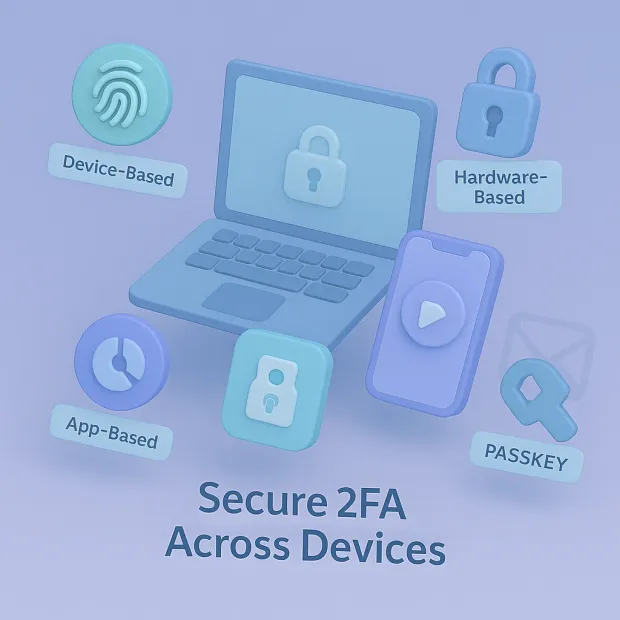
Not every 2FA method protects you the same way. Some factors rely on codes you type in, while others use cryptographic keys that attackers can’t steal or replay. To understand which options are truly the most secure types of 2FA, it helps to look at what actually makes a factor strong.
A useful way to think about 2fa identification is this: after a password (first factor) verifies a secret you know, 2FA verifies a second proof tied to something you have (device/key) or something you are (biometrics). The more that second proof is bound to a device and origin (cryptography + domain binding), the stronger your 2fa security becomes.
Phishing Resistance
A secure 2FA method should block attackers even if they trick users into clicking a fake login page. Only hardware keys and passkeys offer true phishing-proof authentication.
Man-in-the-Middle (AitM) Protection
Strong 2FA must prevent attackers from intercepting or replaying codes. TOTP and SMS fail here, while FIDO2/WebAuthn prevents it entirely.
Device Binding & Cryptographic Authentication
The strongest 2FA methods generate secrets tied to a specific device making it impossible to replicate or steal the factor.
Low Attack Surface
Secure 2FA minimizes risks like SIM swaps, OTP interception, and MFA fatigue. The fewer weak links, the safer the login flow.
Recovery & Backup Safety
Strong 2FA includes secure recovery (backup keys, hardware backups, passkey sync) without exposing new vulnerabilities.
So, how secure is 2fa? It depends entirely on which factor you pick. Hardware-backed, phishing-resistant factors (security keys/passkeys) provide very strong security. OTP-based factors (SMS/TOTP) raise the bar over passwords, but attackers can still bypass them using real-time phishing and interception techniques.
These criteria separate weak, moderately secure, and strongest 2FA methods setting the stage for a clear, ranked comparison.
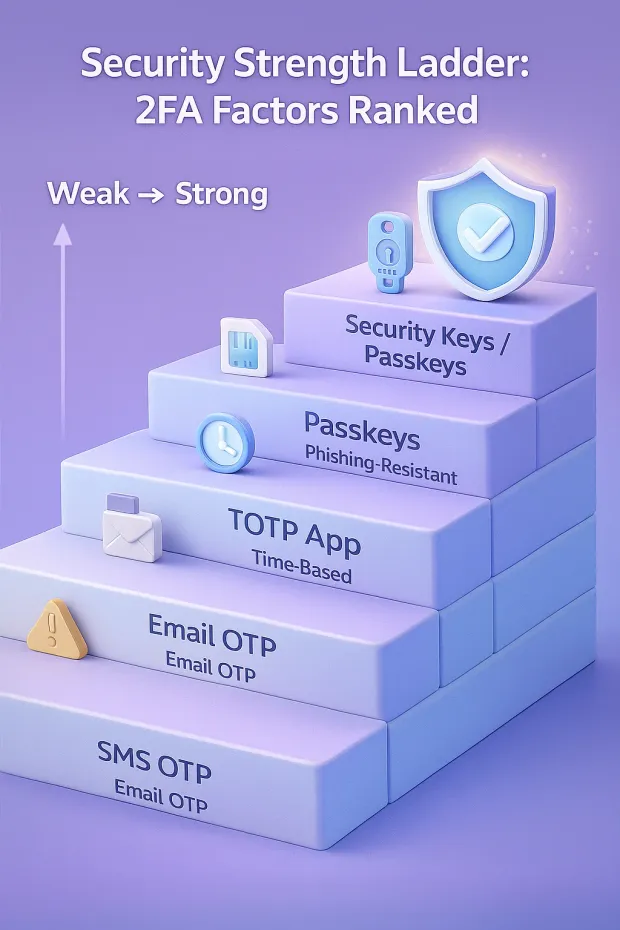
The Most Secure Types of 2FA (Ranked Strongest to Weakest)
Not all 2FA is created equal. Here’s how the strongest and weakest methods stack up.
Security Keys (FIDO2 / WebAuthn) The Strongest 2FA Method
Security keys are the gold standard of modern authentication.
They use hardware-bound cryptographic signing, making them:
-
Phishing-resistant (attackers cannot trick or proxy them)
-
Immune to man-in-the-middle (AitM) attacks
-
Resistant to SIM swaps and OTP theft
-
Nearly impossible to clone or intercept
Perfect for administrators, high-risk users, financial apps, and any SaaS needing the highest level of protection.
Passkeys & Biometric 2FA Strong, User-Friendly, Passwordless
Passkeys use WebAuthn behind the scenes but run on your phone or laptop with biometrics like FaceID, TouchID, or Windows Hello.
Strengths include:
-
Strong phishing resistance (same origin requirement)
-
Frictionless UX with biometric verification
-
Device-bound secrets that cannot be stolen
-
Ideal balance of security and usability
Passkeys are rapidly becoming the default authentication method for modern CIAM and SaaS platforms.
Also read : WebAuthn: A Guide To Authenticate Your Application
2 factor authentication examples here include Face ID passkey approval on iOS, Touch ID passkey on macOS, and Windows Hello passkey flows on Windows devices.
Push Authentication with Number Matching High Security and Great UX
Push MFA delivers a real-time approval request to a user’s device.
When combined with number matching, it becomes significantly more secure.
Benefits:
-
Harder to phish than OTP codes
-
Protects against MFA fatigue attacks
-
Provides a smooth login experience
-
Great for mobile-first SaaS apps
While not as strong as passkeys or security keys, it’s one of the best “everyday” 2FA methods.
Examples of 2fa for push: Microsoft Authenticator number matching, Okta Verify push approvals, and similar app-based push prompts.
TOTP Authenticator Apps Moderate Security, Widely Supported
Authenticator apps (Google Authenticator, Authy, Microsoft Authenticator) generate time-based OTP codes.
Strengths:
-
Better than SMS
-
Offline functionality
-
Works on almost all devices
Weaknesses:
-
Still phishable
-
Vulnerable to AitM and OTP-stealing malware
-
Manual entry increases user error
Good as a fallback factor, but not the most secure.
2 factor authentication types also include TOTP, which remains widely deployed because it’s easy to roll out and doesn’t require telecom networks.
SMS OTP Weak, High Risk & Should Be a Last Resort
SMS-based 2FA is the least secure method on this list.
Weaknesses:
-
Prone to SIM swap attacks
-
Vulnerable to SS7 protocol exploits
-
Easily intercepted by phone malware
-
Can be spoofed or redirected
It should only be used as a backup or recovery factor, not as a primary security layer.
This is the clearest example of why “2FA enabled” doesn’t always mean “secure.” SMS is a valid entry in the types of two factor authentication, but it’s the weakest one for most modern threat models.
Comparison Table: Security Keys vs Passkeys vs Push vs TOTP vs SMS
| 2FA Method | Security Strength | Phishing Resistance | AitM Attack Protection | SIM Swap Protection | User Friction | Ideal Use Case |
|---|---|---|---|---|---|---|
| Security Keys (FIDO2/WebAuthn) | Highest | Fully phishing-resistant | Immune | Immune | Low | Admin, high-risk users, fintech, enterprise apps |
| Passkeys / Biometric 2FA | Very High | Phishing-resistant | Strong | Strong | Very Low | Consumer apps, SaaS login, passwordless UX |
| Push MFA (with Number Matching) | High | Strong | Partial | Strong | Very Low | Mobile-first apps, everyday SaaS logins |
| TOTP Authenticator App | Moderate | Vulnerable to phishing | Not protected | Strong | Medium | General users, fallback method |
| SMS OTP | Low | Very weak | Easily bypassed | High risk | Medium | Only for recovery or low-security use cases |
Attack Vectors: Why Some 2FA Methods Fail
Understanding how attackers bypass weak 2FA is crucial to choosing the most secure authentication method. Modern attacks don’t rely on guessing; they rely on manipulating how OTP-based MFA works.
Real-Time Phishing Proxies (AitM Attacks)
Attackers sit between the user and the legitimate site, capturing passwords and OTP codes in real time. TOTP and SMS are vulnerable. Security keys and passkeys stop this completely.
SIM Swap & SS7 Exploits
Telecom-level attacks let criminals hijack a user’s phone number and receive all SMS codes. SMS OTP is extremely vulnerable.
OTP Interception Malware
Malicious apps can read copied TOTP codes from the clipboard or intercept SMS OTP automatically. Authenticator apps remain at risk.
MFA Fatigue Attacks
Attackers spam push notifications until the user accidentally approves one. Push with number matching reduces this risk significantly.
Session Hijacking
Even if MFA succeeds, attackers can steal active session tokens through malware or browser exploits. Phishing-resistant factors reduce but don’t fully eliminate this risk session security must still be strong.
Attackers exploit the weakest methods (SMS, basic TOTP). Modern 2FA must focus on phishing-resistant factors to stay ahead.
That’s the practical reality behind 2fa authentication solutions: your solution is only as strong as
-
the factor you choose,
-
your recovery flow, and
-
your session/token hardening.
Best 2FA Recommendations by Use Case
The “most secure” 2FA method isn’t the same for every situation. A bank, a B2C SaaS app, and an internal admin panel all have different risk profiles and user expectations. Here’s how to choose the strongest 2FA methods for each scenario.
For SaaS Customer Accounts (B2C & Self-Serve SaaS)
Goal: Strong security with minimal friction.
Recommended stack:
-
Passkeys / biometric 2FA → primary login for modern browsers and devices
-
Push MFA (with number matching) → mobile users and returning logins
-
TOTP authenticator → fallback for less tech-savvy or cross-device users
-
SMS OTP → recovery only, not primary
This gives you phishing-resistant security for most users while keeping the login journey smooth.
For Admin & Privileged Users (Any Environment)
Goal: Maximum protection, even at the cost of extra steps.
Recommended stack:
-
Security keys (FIDO2/WebAuthn) → mandatory for all admins
-
Passkeys → as backup / secondary device option
-
TOTP → emergency fallback (admin-only policies)
Admin accounts are prime ATO targets. For them, the most secure types of 2FA should always be hardware- or device-bound, never SMS or email.
For Fintech, Banks, and High-Risk Transactions
Goal: Strong customer authentication + fraud prevention.
Recommended stack:
-
Security keys or passkeys → for login and high-value users
-
Step-up 2FA (security key, passkey, or push with number matching) → for withdrawals, payments, PII access
-
Adaptive MFA → trigger extra checks based on device, IP, and transaction risk
Here, phishing-resistant MFA isn’t a nice-to-have; it’s a regulatory and reputational necessity.
For Developer & DevOps Access (Code, CI/CD, Cloud Consoles)
Goal: Protect source code, infrastructure, and credentials.
Recommended stack:
-
Security keys → for cloud consoles, CI/CD, and admin dashboards
-
Passkeys → for developer portals and management UIs
-
TOTP → as CLI/device fallback, never as the only factor
Most major breaches start with compromised developer or DevOps access. Treat this like financial-grade authentication.
For Internal Business Apps & Workforce Access
Goal: Strong but usable authentication for employees.
Recommended stack:
-
SSO (SAML/OIDC) + security keys or passkeys → primary
-
Push MFA with number matching → everyday workforce usage
-
TOTP → fallback for remote or low-connectivity scenarios
This setup keeps employees productive while still enforcing the strongest 2FA on critical roles and apps.
How to Implement Secure 2FA with LoginRadius
LoginRadius is designed to help you prioritize phishing-resistant factors first, while still supporting the broader mix of methods you need for real users in the real world.
Phishing-Resistant First: Security Keys, WebAuthn, and Passkeys
LoginRadius supports modern, standards-based strong authentication so you can make the strongest 2FA methods your default instead of an edge case:
-
FIDO2/WebAuthn security keys for admins, high-risk roles, and compliance-heavy use cases
-
Passkeys and biometric authentication for frictionless, passwordless customer logins
-
Origin-bound, device-bound authentication to stop real-time phishing and AitM attacks
This lets you align with the very top of the security spectrum without hand-building the plumbing yourself.
Layered MFA: Push, TOTP, and Fallback Factors Where They Make Sense
Not every user is ready for hardware keys on day one. LoginRadius lets you design layered MFA policies that match your audience and risk:
-
Push MFA (with options for low-friction user approval and risk-aware prompting)
-
TOTP via authenticator apps as a widely supported, moderate-security factor
-
SMS and email OTP available as backup or recovery not as your primary defense
You get the flexibility to support TOTP and push MFA at scale, while still nudging your ecosystem toward more secure methods over time.
Adaptive & Risk-Based: Step-Up the Strongest Factors Only When Needed
The LoginRadius CIAM platform is built to support adaptive MFA so you don’t have to choose between “always prompt” and “never prompt”:
-
Evaluate context like device, IP reputation, geo-location, and behavior
-
Trigger step-up 2FA only when risk is elevated
-
Route high-risk flows to stronger factors like security keys or passkeys
-
Leave low-risk, familiar sessions as frictionless as possible
This means the most secure types of 2FA are used exactly where they matter most admin access, financial actions, sensitive data, without overwhelming every user at every login.
Conclusion
In a world where attackers can spin up phishing pages, intercept OTPs, and automate credential attacks in seconds, choosing the most secure types of 2FA is no longer just a security upgrade; it’s a business requirement. Not all 2FA methods offer the same protection.
SMS codes are easy to bypass, TOTP codes can be phished, and push MFA can be abused by fatigue attacks. But security keys, passkeys, and WebAuthn-based methods offer true phishing-resistant authentication, giving your users ironclad protection without slowing them down.
Modern customer-facing platforms need security that adapts to user risk, fits into global login flows, and scales cleanly across millions of identities. When supported by adaptive MFA, risk scoring, and device intelligence, strong 2FA becomes a seamless, low-friction part of your customer experience, not an obstacle.
This is where LoginRadius stands out.
Ready to Upgrade to the Most Secure 2FA?
Book a personalized demo with our authentication experts. Give your users the security they deserve and give your product the trust it needs to grow.
FAQs
Q: What is the most secure type of 2FA?
The most secure type of 2FA today is FIDO2/WebAuthn security keys or passkeys, as they are phishing-resistant, device-bound, and use cryptographic authentication. They cannot be intercepted or reused by attackers.
Q: Are security keys more secure than TOTP?
A: Yes. Security keys are significantly more secure than TOTP because they eliminate OTP interception, phishing, malware-based OTP theft, and man-in-the-middle attacks. TOTP is safer than SMS but still vulnerable to real-time phishing.
Q: Is SMS the least secure type of 2FA?
A: Yes. SMS 2FA is considered the weakest due to SIM-swap attacks, SS7 vulnerabilities, number porting fraud, and OTP interception. It should only be used as a fallback method, not a primary factor.
Q: Is Push MFA secure enough for modern applications?
A: Push MFA is secure when enhanced with number matching or biometric confirmation, but still less resistant than passkeys or hardware keys. It offers a strong balance of security + usability for SaaS and consumer apps.
Q: Should businesses use passkeys instead of traditional 2FA?
A: Yes. Passkeys provide passwordless, phishing-resistant authentication with minimal friction. They are the recommended upgrade path for organizations moving toward zero trust and strong modern MFA.