
Security Keys vs TOTP vs Push: Which Authentication Method Is the Strongest?
We compare Security Keys, TOTP, and Push authentication MFA to help you pick the strongest authentication method for your security and user experience needs.

Table of Contents
- Introduction
- The Three MFA Methods Compared
- Understanding TOTP: How Time-Based One-Time Passwords Work
- Understanding Push Authentication: How Push MFA Works
- Understanding Security Keys: Why They’re the Strongest MFA Method
- Final Phishing-Resistance Ranking
- Performance, Cost, and User Experience Comparison
- Cost Comparison: Deployment, Maintenance, and Scaling
- Security Keys vs TOTP vs Push: Which Should You Use?
- Conclusion
- FAQs
Introduction

Learn How to Master Digital Trust

The State of Consumer Digital ID 2024

Top CIAM Platform 2024
Introduction
The MFA landscape has changed dramatically. Methods that once felt “secure enough” like TOTP apps or push notifications are now being pressured by increasingly sophisticated attacks such as real-time phishing (AITM), OTP interception, session hijacking, and push fatigue.
At the same time, user expectations have shifted. People want stronger security, but not at the expense of convenience, performance, or privacy.
Amid this evolution, one question has become impossible to ignore: Which MFA method is truly the strongest Security Keys, TOTP, or Push?
As teams evaluate MFA today, they’re also weighing newer passwordless options, which is why comparisons like passkey vs 2fa and passkey vs security key keep coming up. Push authentication often sits in the middle: smoother than OTP-based flows and easier to roll out than hardware-first deployments, but only as strong as the safeguards behind it.
Understanding the answer isn’t just a technical exercise. It directly impacts:
-
How safe your users are
-
How much friction they face during login
-
How effectively you can reduce account takeovers
-
How quickly you can scale authentication for millions of users
-
How well your product aligns with Zero Trust and phishing-resistant standards
Each method, whether it’s TOTP authentication, push authentication, or security key authentication, brings its own blend of usability, risk, cost, and real-world resilience. And while they all improve security compared to passwords alone, they’re not equally strong.
In this blog, we’ll break down the strengths and weaknesses of each MFA method, compare their resistance to phishing and AITM attacks, evaluate usability and friction levels, and help you understand why some methods are considered weak 2FA factors while others qualify as phishing-resistant MFA under the latest security standards.
The Three MFA Methods Compared
Before diving into strengths, weaknesses, and real-world attack resistance, it’s helpful to understand what each MFA method actually is and why they behave so differently under threat.
Here’s a simple, high-level breakdown of Security Keys, TOTP, and Push Authentication, along with how they stack up at first glance.
1. Security Keys (FIDO2 / WebAuthn)
Security keys are physical hardware devices like YubiKeys that use public-key cryptography to authenticate users. They bind authentication to the device and domain, making them extremely hard to phish or intercept.
Why they matter:
-
They are considered the strongest MFA method available today.
-
They are fully phishing-resistant and immune to AITM attacks.
-
They enable passwordless authentication and Zero Trust alignment.
Also read : The Role of Passwordless Authentication in Securing Digital Identity
2. TOTP Authentication (Authenticator Apps)
TOTP (Time-Based One-Time Password) MFA uses an authenticator app such as Google Authenticator or Authy that generates a 6-digit code every 30 seconds. It’s one of the most widely adopted 2FA methods.
If you’re wondering what is totp authentication, it’s a time-based OTP method where the server and authenticator app generate the same rotating code using a shared secret and the current time. Understanding how does totp work matters because attackers can still steal or relay the code in real-time phishing scenarios.
Why it matters:
-
Easy to deploy
-
Familiar to users
-
Better than SMS OTP
-
Not phishing-resistant (attackers can trick users into sharing OTPs)
3. Push Authentication
Push MFA sends an approval request to a user’s enrolled mobile device. Users tap “Approve” to sign in. Modern push MFA may also support number matching or device binding for added security.
Why it matters:
-
Very user-friendly
-
Great for mobile-first apps
-
Vulnerable to push fatigue attacks if not implemented carefully
-
Moderate phishing resistance, depending on the implementation
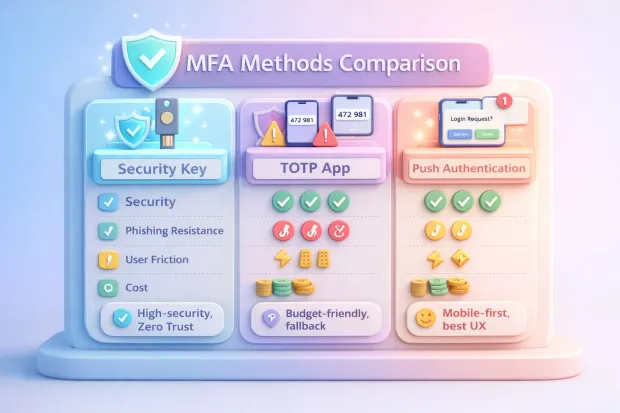
At-a-Glance Comparison Table
| MFA Method | Security Strength | Phishing Resistance | User Friction | Cost | Best Use Case |
|---|---|---|---|---|---|
| Security Keys | Very High | Very High | Low | Medium | High-security apps, Zero Trust, CIAM |
| Push MFA | High | Excellent | Very Low | Medium | Consumer apps, mobile-first onboarding |
| TOTP | Excellent | Moderate | Medium | Low | General-purpose MFA, fallback methods |
Understanding TOTP: How Time-Based One-Time Passwords Work
To restate it clearly for readers: what is totp authentication is essentially a rotating, time-synced code system, commonly called totp authentication, used as a second factor in many MFA deployments.
TOTP (Time-Based One-Time Password) is one of the most widely used MFA methods in modern applications. It’s simple, familiar, and easy for users to adopt, but its security strength is often misunderstood. To evaluate whether TOTP stands up against modern attacks, we need to understand how it works and where it falls short.
What TOTP Is & How It Works
TOTP authentication uses a mobile app like Google Authenticator, Authy, or Microsoft Authenticator to generate a 6-digit code that refreshes every 30 seconds.
How it works:
-
When a user enrolls, the app and server share a secret seed.
-
Both use the current timestamp to generate matching OTP codes.
-
The user enters the code during login to verify their identity.
This makes TOTP more secure than SMS OTP, because the code is generated locally on the device rather than sent over a network.
Strengths of TOTP MFA
Despite its weaknesses, TOTP offers several advantages:
1. Works Offline:
The app does not require Internet or cellular connectivity.
2. Easy to Deploy:
Most applications support TOTP out of the box through standard MFA APIs.
3. Cost-Effective:
No SMS delivery costs or push infrastructure.
4. Familiar to Users:
Many users already understand how TOTP codes work.
5. More Secure Than SMS OTP:
Not vulnerable to SS7 attacks or SIM swap in the same way SMS-based codes are.
Learn more: Advantages of Time-Based One-Time Passwords (TOTP)
Weaknesses & Attack Vectors
This is where TOTP becomes problematic, especially for CIAM, enterprise-grade security, or modern Zero Trust models.
1. Not Phishing-Resistant:
Users can be tricked into entering their code on a fake login page.
2. Real-time phishing tools (AITM kits):
intercept OTPs instantly and replay them to the real service.
3. Vulnerable to Man-in-the-Middle (MITM) Attacks:
Attackers can capture OTP codes during malicious redirects or spoofed login flows.
4. OTP Interception & Malware Risks:
Malicious apps or malware can read OTP codes from compromised devices.
5. Shared Secret Exposure:
If the secret seed is exposed or backed up insecurely, attackers can generate valid codes indefinitely.
6. Brute-Force Attempts:
The short OTP length and time window can still be exploited through rapid guessing.
In today’s threat landscape, TOTP is no longer considered a strong authentication factor but it remains widely used due to its convenience and low cost.
Understanding Push Authentication: How Push MFA Works
Push authentication has rapidly grown in popularity because it provides a nearly frictionless login experience. Instead of typing codes, users simply tap “Approve” on their mobile devices. But while Push MFA improves usability, its security strength depends heavily on how it’s implemented and whether it includes modern protections like number matching or device binding.
What Push MFA Is & How It Works
Push authentication sends a secure notification to a user’s enrolled mobile device after they enter their username and password. The user taps Approve to complete authentication.
A push MFA flow typically includes:
-
User enters credentials
-
Server sends a push request to the user’s trusted device
-
The device shows an approval prompt
-
User taps Approve or Deny
-
Authentication completes
Some modern implementations add:
-
Number matching
-
Device-bound cryptographic checks
-
Geolocation or IP context
These additional layers significantly influence how secure push authentication actually is.
This is the core of push authentication: instead of typing OTPs, the user confirms identity by approving a secure prompt ideally enhanced with number matching or device-bound verification to reduce social engineering risk.
Strengths of Push Authentication
Push MFA has several strong advantages, especially for consumer-facing applications:
1. Extremely Low Friction:
Users only need to tap a button no codes, no typing.
2. Ideal for Mobile-First Apps:
Most users already have smartphones, making push easy to adopt.
3. Reduces Login Drop-Offs:
Its simplicity improves conversion rates and overall user experience.
4. Can Be Strengthened With Modern Enhancements:
Features like number matching and device binding make push MFA harder to socially engineer.
5. Faster Than TOTP:
Push avoids the extra step of manually entering a 6-digit code.
Weaknesses & Attack Vectors
Despite its convenience, push MFA has unique vulnerabilities that attackers exploit.
1. Push Fatigue Attacks:
Also called “MFA bombing.” Attackers repeatedly send push requests until the user clicks Approve out of frustration or confusion.
2. Social Engineering:
Attackers trick users into approving a push by pretending to be IT support or security teams.
3. Device Compromise:
A rooted or infected phone can approve push requests without the user noticing.
4. Notification Spoofing:
Malicious apps can generate confusing notifications to trick users.
5. Phishing via Real-Time Proxies:
If push MFA does not use device binding or number matching, attackers can initiate approval prompts after capturing the victim’s password.
Push MFA offers the best user experience, but not the strongest security unless paired with advanced protections like device-bound credentials, biometrics, or number-matching challenges.
Understanding Security Keys: Why They’re the Strongest MFA Method
For readers asking what is a security key, it’s a hardware authenticator that uses public-key cryptography (FIDO2/WebAuthn) to prove user presence and origin binding. This is also why the debate around passkey vs security key exists: both are phishing-resistant, but passkeys are often synced across devices while security keys remain physically held and controlled.
Security keys (FIDO2/WebAuthn hardware authenticators) represent the highest standard of modern authentication. They use cryptographic operations instead of shared secrets or user-entered codes, making them immune to phishing, replay attacks, and real-time AITM interception.
In a world where attackers exploit human error and bypass traditional MFA methods, security keys are the only truly phishing-resistant authentication factor.
What Security Keys Are & How They Work
Security keys are small hardware devices like YubiKey, Google Titan Key, or Feitian keys that authenticate users using public-key cryptography.
How they work:
-
During enrollment, the device creates a unique public/private key pair.
-
The public key is stored on the server; the private key stays on the device.
-
When the user logs in, the device signs a cryptographic challenge.
-
The signature only works for the legitimate domain (origin binding).
There are no codes to steal, no secrets to intercept, and nothing users can be tricked into typing.
Strengths of Security Keys
Security keys outperform TOTP and Push MFA across every security dimension.
1. Completely Phishing-Resistant:
Because the private key never leaves the device and only signs challenges from the correct domain, attackers cannot intercept or replay anything, even with AITM kits.
2. Immune to OTP Theft & Interception:
There is no shared secret or one-time code.
3. Resistant to Real-Time Phishing (AITM):
Security keys reject authentication attempts that do not originate from the correct website URL.
4. Fast, Frictionless Authentication:
Just tap or insert the key; no typing, no codes, no fatigue.
5. Works with Passkeys:
Security keys form the foundation for passwordless authentication, combining strong MFA with frictionless UX.
6. Device-Bound Cryptographic Keys:
Credentials are stored on the key itself, not in the cloud, removing entire categories of attack.
7. Perfect for Zero Trust:
Security keys enforce the strongest form of identity verification for high-risk actions, privileged users, and sensitive resources.
Weaknesses & Limitations
Even the strongest MFA method has some tradeoffs, though none impact its security.
1. Hardware Cost:
Keys range from $20–$70 each, depending on brand and features.
2. Physical Loss:
If a user loses the key, they require backup keys or alternate recovery methods.
3. Slightly Higher Initial Learning Curve:
Users must understand how to enroll and use their key (though UX is extremely simple once understood).
Security keys combine usability, speed, phishing resistance, and cryptographic strength, making them the strongest authentication method available today, and the recommended standard for modern CIAM and enterprise identity systems.
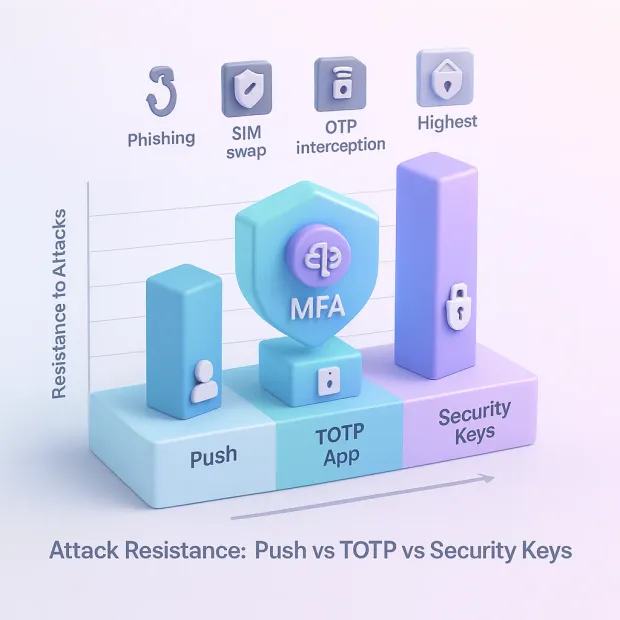
Final Phishing-Resistance Ranking
From weakest to strongest:
| MFA Method | Phishing Resistance | Real-World Security |
|---|---|---|
| SMS OTP | Very Low | Weak |
| TOTP App Codes | Low | Moderate |
| Push MFA | Medium | Strong with safeguards |
| Security Keys (FIDO2/WebAuthn) | Very High | Excellent |

Performance, Cost, and User Experience Comparison
Now that we’ve compared security strength, it’s equally important to understand how each MFA method impacts your application’s performance, operational cost, and UX, three areas that directly affect user adoption and conversion rates.
Cost Comparison: Deployment, Maintenance, and Scaling
Cost varies dramatically depending on delivery infrastructure and support complexity.
TOTP MFA
Cost: Low
-
No SMS costs
-
No push delivery infrastructure
-
Minimal backend complexity
Hidden Costs: Support tickets for lost devices or failed code syncs.
Push MFA
Cost: Medium
-
Requires push delivery infrastructure
-
OS restrictions may affect reliability (battery optimization, offline mode)
-
Support cost for push fatigue, device change, app reinstall
Hidden Costs: Higher support load compared to TOTP and hardware solutions.
Security Keys
Cost: Medium–High
-
Hardware keys cost $20–$70 per user
-
Organizations may need backup keys
-
Training and onboarding requirements
Hidden Costs: Key replacement; procurement at scale.
But long-term cost is significantly lower than recovering from phishing or ATO attacks — which is why financial institutions and enterprises choose FIDO2.
User Experience: Which MFA Method Do Users Prefer?
TOTP MFA
UX Level: Medium
-
Requires manual code entry
-
Easy to misunderstand or mistype
-
Leads to login fatigue over time
-
Higher abandonment rates on mobile apps
Push Authentication
UX Level: High
-
One-tap login
-
No codes or typing
-
Best for everyday consumer logins
-
Vulnerable to user confusion during MFA bombing
Security Keys
UX Level: Very High
-
Simple tap → login
-
No reading or typing
-
Works across mobile and desktop
-
Best UX once users are onboarded
Security keys consistently rank highest in UX surveys across Google, Microsoft, and NIST studies.
Comparison Table (Performance + Cost + UX)
| Factor | TOTP | Push Authentication | Security Keys (FIDO2/WebAuthn) |
|---|---|---|---|
| Performance | Medium | Fast | Very Fast |
| User Experience | Moderate | High | Very High |
| Phishing Resistance | Low | Medium | Very High |
| Cost to Deploy | Low | Medium | Medium–High |
| Maintenance Cost | Medium | Medium | Low |
| Scalability | High | Medium | Very High |
| Best For | Budget-conscious apps | Consumer apps | High-security, enterprise, CIAM |
Security Keys vs TOTP vs Push: Which Should You Use?
Choosing the strongest MFA method isn’t just about comparing security strengths — it’s about matching the right method to your users, your threat landscape, your compliance requirements, and your conversion goals.
There is no single “one-size-fits-all” solution. Instead, the best MFA strategy is tiered, combining usability with phishing-resistant authentication for the areas where it matters most.
Below is the definitive guidance used by modern SaaS companies, financial institutions, global enterprises, and consumer platforms.
1. When to Use TOTP MFA
TOTP is ideal for applications needing affordable MFA with moderate security needs.
Use TOTP if you are:
-
Running a cost-sensitive application
-
Securing low-risk user accounts
-
Supporting a global user base where SMS/push may not work reliably
-
Prioritizing ease of deployment over phishing resistance
Avoid relying solely on TOTP if:
-
Your app handles payments, transactions, healthcare data, or PII
-
Phishing is a major attack vector
-
Your user base is vulnerable to fraud or social engineering
TOTP is better than SMS but not strong enough for modern threats.
2. When to Use Push Authentication
Push is the sweet spot between security and usability. It’s ideal for consumer-facing apps where convenience is critical.
Use Push MFA if you are:
-
Running a mobile-first product
-
Trying to reduce login friction and improve session success rates
-
Supporting a young/general audience that prefers simple flows
-
Implementing adaptive MFA or contextual risk checks
-
Operating in sectors where experience matters (gaming, eCommerce, OTT, social apps)
Push is strong IF enhanced with:
-
Number matching
-
Biometric confirmation
-
Device binding
-
Contextual checks (IP, location, device fingerprint, user behavior)
Avoid relying solely on Push if:
-
Users are frequently targeted with MFA bombing
-
You do not support modern protections like number matching
-
Compliance mandates phishing-resistant MFA (government, healthcare, finance)
Push MFA is great for UX but vulnerable if users are easily tricked.
3. When to Use Security Keys (FIDO2/WebAuthn)
Security keys are the strongest authentication method and the only one immune to phishing, AITM, OTP theft, and fatigue attacks.
Use Security Keys if you are:
-
A financial services, fintech, or banking platform
-
A healthcare or government provider
-
A SaaS platform with enterprise and admin roles
-
Following Zero Trust or compliance frameworks (NIST, CISA, FedRAMP)
-
Handling high-risk actions: payouts, password changes, admin access, privilege elevation
-
Operating a large-scale CIAM environment where ATO and fraud are costly
Also ideal for:
-
Developer tools
-
B2B platforms
-
High-value corporate accounts
Security keys deliver the highest security + best UX of all factors.
The Ultimate Recommendation Based on Global Best Practices
For Consumer Applications
If your roadmap includes passwordless, evaluate passkey vs 2fa alongside push authentication. Many teams adopt passkeys for primary login, then keep push as a step-up factor for risky actions.
-
Push MFA (with number matching + biometrics)
-
Optional TOTP fallback
-
Avoid SMS as a primary factor
-
Add adaptive MFA for risky logins
For B2B SaaS & Workforce Access
-
Security Keys (mandatory for admins)
-
Push or Passkeys for general users
-
TOTP as an emergency fallback
-
Adaptive MFA for session re-checks
For High-Risk Industries (Finance, Healthcare, Government)
-
Security Keys as primary
-
Passkeys for frictionless strong authentication
-
Adaptive MFA is layered across all channels.
-
No SMS (too weak)
For Platforms Battling Fraud
-
Security keys + adaptive MFA
-
Device fingerprinting
-
Behavioral ML detection
-
Push fatigue protections
Which MFA Method Is the Strongest?
| Ranking | MFA Method | Strength Level |
|---|---|---|
| 1 | Security Keys (FIDO2/WebAuthn) | Strongest, phishing-resistant |
| 2 | Push MFA with Number Matching / Device Binding | Strong, high UX |
| 3 | TOTP App-Based Codes | Moderate security, good fallback |
Security keys are the strongest and the future of MFA. Push MFA offers the best balance of security and UX. TOTP is a good fallback, but not secure enough on its own.
Conclusion
The MFA landscape is changing faster than ever. Attackers now use real-time phishing kits, MFA fatigue attacks, session hijacking, and sophisticated MITM tools designed specifically to defeat outdated authentication methods. In this environment, your MFA strategy cannot rely on legacy OTPs or user-dependent security behaviors.
For any organization handling sensitive data, operating in regulated industries, or fighting credential attacks at scale, strong MFA is no longer optional; it is foundational.
This layered model balances security, usability, cost, and scalability and aligns perfectly with Zero Trust and modern CIAM standards.
Ready to Implement Strong, Phishing-Resistant MFA That Scales?
LoginRadius gives you everything you need in one CIAM platform. Whether you're securing millions of consumer accounts or protecting enterprise access, LoginRadius helps you deploy modern, phishing-resistant MFA at scale without compromising user experience. Explore Adaptive MFA. Book a Demo with Our Identity Experts
FAQs
Q: What is the most secure MFA method: Security Keys, TOTP, or Push?
A: Security keys (FIDO2/WebAuthn) are the most secure because they provide strong, phishing-resistant authentication and cannot be intercepted or replayed.
Q: Is TOTP authentication safe enough for modern applications?
A: TOTP is moderately secure, but still vulnerable to phishing, real-time AitM attacks, and malware. It works best as a fallback factor, not the primary one.
Q: Are push notifications more secure than TOTP codes?
A: Yes especially when combined with number matching. Push MFA reduces manual input and prevents most phishing attacks by confirming access within the device.
Q: Why are security keys considered the strongest MFA factor?
A: Security keys use hardware-bound cryptography and origin binding, making them immune to phishing, OTP theft, SIM swaps, and man-in-the-middle attacks.
Q: Which MFA method is best for SaaS platforms?
A: Security keys and passkeys are ideal for admin and high-risk users, push MFA is best for everyday customer logins, and TOTP serves as a secure fallback option.

Featured Posts
Adaptive MFA vs MFA: The Smarter Choice for Modern Security
Security Keys vs TOTP vs Push: Which Authentication Method Is the Strongest?
2FA Benefits & Risks: Real Tradeoffs Behind Modern Authentication
Beginner’s Guide to Authentication and Authorization in Digital Security
A Complete Guide to Adaptive MFA for Modern CIAM
What Is OTP?
The Rise of Agentic IAM: Securing Agents Before They Go Rogue
What Is Single Sign-On (SSO)?
Your Identity Security Playbook: Stop Fraud, Catch Threats, and Make Customers Love Your Security
Passwordless & MFA in 2026: Passkeys, Push MFA, Device Trust, and Continuous Authentication
What Is Biometric Security?
What Is Device ID?
What Is Dynamic Access Control?
What Is 2FA and How It Works: Guide to Modern Authentication
What Is SMART on FHIR?
2FA in 2025: How Leading Providers Keep Digital Identities Safe
What Is a YubiKey?
Biometric Authentication Methods: How They Work & When to Use Them
Compliance Management: Processes, Systems & Best Practices
RBAC and Access Management: The Foundation of Secure IAM
How Does SAML Authentication Work?
ID Token vs. Access Token: Understand the Difference
AI-Driven Fraud Detection: The Future of Digital Trust
OIDC Authentication: How Modern Apps Verify Identity
A Complete Guide to 2FA Authentication in 2025: Methods, Risks, and Modern Best Practices
Cybersecurity Awareness Month 2025: Why Businesses Can’t Afford to Look Away
Secure Customer Experiences with Phone Authentication: Why Mobile Matters
Best Descope CIAM Alternatives in 2025
Passwordless Login: Technical Workflows, Business ROI, and Regional Adoption
Top 10 Frontegg Alternatives to Consider in 2025
Identity and Access Management in Banking: Why It’s Crucial for Security and Customer Experience
Top 10 FusionAuth Alternatives in 2025
Unlocking Secure Digital Experiences with Authorization as a Service
CIAM Platform Integrations: The Key to a Strong Customer Identity Strategy
Email is Hacked! 7 Immediate Steps to Follow
Data Governance in Healthcare: Best Practices & Future Trends
Why Social Login is a Game-Changer for eCommerce Login
Top WordPress Social Plugin Picks for Seamless Logins
Why Privacy-First Companies Choose Canada for Data Storage
Top Auth0 Alternatives for 2025: Simpler, Faster, and More Flexible CIAM Options
What Are Digital Certificates and How Do They Secure the Web
Why Hosting Your CIAM Solution in a Canadian Data Center Gives You the Edge
B2B IAM vs Workforce IAM: What Enterprises Must Know
Access Control in Security: What It Is and Why It Matters
The Making of The Power of Digital Identity: A Candid Interview with Rakesh Soni
What is Certificate-Based Authentication and Why It’s Used
6 Key Ecommerce Challenges in 2025 (And How CIAM Solves Them)
B2B vs B2C Authentication- A Quick Guide
Password Best Practices for Stronger Security
Building Community Beyond Borders: Our Thailand Story
1FA vs 2FA vs MFA: Which Method Secures You Best?
B2B IAM Best Practices and Architecture Guide
Adding Partner IAM With LoginRadius: A Complete Guide to B2B Identity Management
What is User Authentication, and Why is it Important?
What is Partner IAM / B2B IAM - A Complete Guide
Still Bending Workforce IAM for Your B2B Networks? Introducing LoginRadius Partner IAM—Built from the Ground Up
What is Biometric Authentication and How It's Changing Login
Location-Based Data Residency Boosts Trust and Conversions
The Impact of AI on Cybersecurity
PINs vs Passwords: Which is More Secure?
Why Global Businesses Trust Canada for Data Hosting Services
Passkeys vs Passwords: The Upgrade Your Security Needs
What is the Best Way to Authenticate Users?
Canada as a Global Hub for Privacy-First CIAM Platforms
How to Choose a Strong Password- A Quick Guide
A Complete Guide to Device Authentication Methods
What is a One-Time Password (OTP) ? – A Complete Guide
A Quick Guide to Username and Password Authentication
Types of Authentication and Identity Verification
What is Strong Authentication in Cybersecurity?
Top 9 User Authentication Methods to Stay Secure in 2025
Authentication vs Authorization: Key Differences, Real Examples & Best Practices
Guide to Authentication Methods & Choosing the Right One
Identification and Authentication: A Quick Comparison
Understanding Authentication, Authorization, and Encryption
Introducing the LoginRadius Trust Center: Always Up-to-Date and at Your Fingertips
What is Token Authentication and How Does It Work?
What is OTP Authentication and How Does it Work?
What is Role-Based Access Control (RBAC)?
LoginRadius Launches Next-Generation CIAM Console: Self-Serve, No-Code, and Built for Speed
Quick Guide to Single-factor, Two-factor, and Multi-factor Authentication
Democratizing Authentication: Introducing LoginRadius' Free Forever Developer Plan
Mobile Authentication: Everything You Need to Know
What is Push Notification Authentication and How It Works?
Code Less, Build More: Unveiling LoginRadius' AI-Powered Developer Documentation
Types of Multi Factor Authentication & How to Pick the Best
Risk-Based Authentication vs. MFA: Key Differences Explained
Revamped & Ready: Introducing the New Developer-First LoginRadius Website
What is SCIM? A Developer's Guide to Understanding and Using SCIM
RBAC vs ABAC: A Developer’s Guide to Choosing the Right Fit
CISOs’ Top Cybersecurity Threats 2025: Scattered Spider, Deepfakes, and More
LoginRadius 2024: A Year of CIAM Innovations
What is Passkey Authentication - A Complete Guide
How AI-Enabled Cybersecurity Solutions Are Strengthening Our Online Security
What is Identity Orchestration
LoginRadius Releases 2024 Consumer Identity Report, Highlights the Shifting Trends in Consumer Preferences
Celebrating 8th Year Milestone: How Our Collaboration with a Leading Healthcare Company Transformed Millions of Lives
Unlock Your Digital Freedom: How Automating Passwordless Authentication Can Transform Your Security
How To Secure GenAI by Implementing RBAC In The Enterprise
The Hidden Pitfalls: Why Most CIAM Systems Fail Under Pressure
No More Login Hassles: Effortless Migration to LoginRadius Awaits
How Cookie Management Supports GDPR and CCPA Compliance
LoginRadius Launches Identity Orchestration for Seamless Identity Workflows
Passkeys: Unlocking Benefits for a Better Online Shopping Experience
AI and the Changing Face of Enterprise Security Threats
Leading the Charge in Customer IAM: LoginRadius Recognized as an Overall Leader by KuppingerCole
Gearing Up for Better Customer Experiences? Choose No-Code Identity Orchestration
Announcement - LoginRadius Launches PassKeys to Redefine Authentication Security and User Experience
Decoding the Rise of Zero-Trust Adoption in Government Sector
Say Goodbye to Passwords: How Passkeys Are Reinventing Online Security
Announcement - LoginRadius Unveils the Future of Authentication with Push Notification MFA
Is Your CIAM Adapting to Global Needs? 6 Key Areas to Win Privacy-Concerned Customers
The Growing Threat of Identity-Based Attacks and the Need for an Advanced Identity Security Approach
How AI Is Changing the Game in User Authentication
eIDAS 2.0: The Digital Revolution Is Here – Is Your Business Ready to Comply?
A Quick Guide To Choosing The Right Zero Trust Vendor
Cloud Security Governance: Protecting Assets in the Digital Frontier
What is Silver SAML Vulnerability and How Can We Protect Our Digital Identities?
Identity Security for Device Trust: Navigating 2024 & Beyond
Exciting Leadership Updates Amid Strategic Growth at LoginRadius
From Past to Present: User Authentication's Evolution and Challenges
How Does Multi-Tenancy in Customer IAM Solutions Boost Security?
How No/Low Code CIAM Balances Security and User Engagement?
Beyond Passwords: Navigating Tomorrow's Authentication Landscape
How does identity management address the top 5 security challenges in B2B SaaS?
Reinforcing Security with Advanced Risk-Based Authentication in 2024 & Beyond
2FA vs MFA: Understanding the Differences
Okta Token Theft Implicated in Cloudflare's Security Breach
Voice OTP by LoginRadius: Revolutionizing Secure and Seamless User Authentication
Which is Safer: Biometric or Password?
7 Reasons to Use Biometric Authentication for Multi-Factor Authentication
Exploring Digital Identity Verification with Effective Crucial Data Checks
5 Reasons Why LoginRadius Leads the Way in the CIAM Landscape in 2024 & Beyond
Above the Horizon: Exploring the Power of a Strong Cloud Identity Platform
Streamlining Authentication: Elevate User Experience with LoginRadius AutoLookup
A Journey Through Our Top 10 Blogs from 2023
Now and Beyond- Staying Ahead with the 10 Key Cybersecurity Trends of 2024
B2B SaaS SSO Login: Exploring Enterprise Considerations in 2024
Securing Corporate Applications: A Comprehensive Guide to Enterprise Application Security
Strengthening Security Measures: The Role of Two-Factor Authentication (2FA)
Securing the Throne: Privileged Access Management (PAM) Best Practices Unveiled
7 Common Authentication Vulnerabilities to Steer Clear of
What is Identity Lifecycle Management?
Strengthening Security and Compliance: The Role of Identity Governance
Understanding the Okta Hack: Breach in Customer Support and Lessons for Organizations
Managing Generative AI Security Risks in the Enterprise- A Quick Guide
Empowering Your Security: Exploring the Advantages of Time-Based One-Time Passwords (TOTP)
The Future of Personalization: Embracing Zero-Party Data
Comprehensive Guide to Flexible CIAM Deployment Options with LoginRadius
Small Steps, Big Shields: Navigating Cybersecurity Awareness Month 2023 Safely
Streamlining Access with Converged Identity Platforms
How Retailers Can Balance Privacy While Foiling Thieves
The Power of No-code Customer IAM in Reducing Churn
CIAM: Enhancing Security & Building Consumer Trust-All At Once
Maintaining Trust: Customer Identity Verification Challenges & Best Practices
Unlocking Smartphone Security: How to Hackproof Your Smartphone
Phishing-Resistant MFA Login for Mobile Applications: Strategies and Challenges
True Passwordless Authentication: Stronger Defense Against Cyberattacks
Identity Governance vs. Identity Management: Navigating the Differences
Navigating Identity Verification Challenges in Regulated Industries: 7 Effective Solutions
Enhancing Security: Leveraging 5 Real-Time Techniques to Detect Phishing Attacks
A Comprehensive Guide to the Five A's of Cloud Identity Management
Understanding the Difference Between Identity Access Management On-Premise and Cloud
Learn the Impact of Identity Theft on Businesses in 2023
LDAP Authentication: Meaning and How it Works?
7 Things Your Security Team Need To Know Before Creating A CIAM Strategy
Choosing Between Self-Managed and Service-Based SSO Solutions: A Comprehensive Comparison
What is Cloud Identity and its Benefits?
The Legal Implications of SSO: Privacy, Security, and Compliance
Data Privacy Laws for 2023: A Closer Look at 9 Key Regulations
4 Reasons Why SSO Integrations Are a Must-Have For Online Businesses
Consumer vs. Enterprise: Navigating the Dual Nature of Digital Identity
LoginRadius Releases Consumer Identity Trend Report 2023, Highlights The Future of Customer Identity
What is a Password Vault and How Does it Work?
How a Culture of Identity Governance Empowers Digital Transformation?
Securing the Digital Frontier: The Power of AI in Next-Gen CIAM
Replatforming 101: Everything You Need to Know
Best Practices for Username and Password Authentication
The Ultimate Guide to Choosing the Right CIAM Solution
How to Use Identity Management at Every Stage of the Customer Journey?
Protecting Your Cloud Data: The Power of SaaS Security and IAM Governance
The Rise of Account Creation Fraud: What You Need to Know
Why Direct-to-Consumer (D2C) Businesses Must Take A Strategic Approach To CIAM?
What are Self-Sovereign Identities?
7 Uncommon Cyber Attacks in 2023: Why Your Organization Needs To Be Ready For The Worst-Case Scenarios
Identity Modernization: What Is It & Why Should You Care?
A Lot Can Happen In The Cloud: Multi-Cloud Environment and its Optimization Challenges
Can Security and User Experience Co-Exist in the Authenticating and Authorizing Space?
Business On The Move: How Just-in-Time Migrations Are Making Smooth CIAM Transitions
3 Digital Onboarding Trends To Watch In 2023 (And What You Can Do About It Now)
6 Tips to Prevent Accidental Data Exposure Within Your Company
Top Priorities for Customer IAM Leaders in 2023 and How to Prepare
Electronic Theatre Controls: A LoginRadius Customer Success Story
Distributed Multi-Cloud Identity Management and Its Endless Business Benefits
How The Age Of Smart Credentials Is Rewriting The Rules For Physical Verification?
Incident Response Vs. Disaster Recovery: What’s The Difference and Which Do You Need?
The Customer Experience is About to Get Even Better With Passive Authentication
What is Dynamic Authorization & Why Does it Matter?
What’s the Difference Between Attack Surface and Attack Vector?
How Identity-Based Access Ensures Robust Infrastructure Security Amidst the Growing Identity Crisis?
2FA Bypass Attacks- Everything You Should Know
IAM vs. Customer IAM: Understanding the Role of CIAM in Accelerating Business Growth
Why MFA Fatigue Attacks May Soon Be Your Worst Nightmare?
InfoSec Director, Alok Patidar Answers Your Most Difficult Questions on Cybersecurity
Understanding MITRE ATT&CK Framework?
Identity Fabric vs. Zero Trust: Is One a Better Alternative Than The Other?
The Role of Customer Identity Management in IoT Security: How It's a Must!
Securing Centralized Access Without Compromising User Experience
User Authentication in the Metaverse: What’s Changing?
LoginRadius Pledges To Raise Awareness This Cybersecurity Month
Public Cloud Risks - Is Your Organization Prepared for Cloud Threats?
What Brands Need to Know for Building the Future of Data Compliance?
Okta Identity Credentials on the Radar of Oktapus Phishing Campaign
BC Municipality Digitizes its Citizen Services. LoginRadius Brings Identity to the Table.
The Role of Customer Authentication in Paving the Way for Digital Agility
What Brands Need to Know for Building the Future of Data Compliance?
6 Alternative Authentication Methods For Your Online Customers
Implementing Zero Trust? Make Sure You're Doing It Correctly
What is Federated SSO (Single Sign-On)?
MFA Prompt Bombing: Is it a New Threat Vector to Worry About?
Privacy-Centric Enhancements: CEO Rakesh Soni Shares His Thoughts on Shifting Data Strategies
The Role of Identity Management in Securing Your Citizen’s Data
Why is Data Privacy an Immediate Enterprise Priority?
What is Out-of-Band Authentication?
How Can Enterprises Use SSO to Boost Data Collection?
Why Your Business Needs A Simple Passwordless Experience (Minus the User Friction)
Will Apple’s ‘Lockdown Mode’ Reduce State-Sponsored Attacks?
Authentication, Identity Verification, and Identification: What's the Difference
IoT Botnet Attacks: Are They the Next Big Threat to Enterprises?
Skiperformance - a LoginRadius Customer Success Story
Cross-Device Authentication and Tracking: The Opportunities and Underlying Privacy Risks
How Identity Modernization Will Thrive Business Success in 2022 and Beyond
The Pros & Cons of Reusable Digital Identity: What You Need To Know
What is Cloud Security and How it Works?
Age of No-Code Technologies: Identification and Authentication
SSO vs. Social Login: What’s the Difference? [Infographic]
Planning a Digital Makeover For Your Business? LoginRadius CIAM Can Help!
What is Cloud Computing?
Authentication vs Login - What’s the Difference?
How a Simple Password Reset Can Ruin Your Customer's Experience
GovTech is On The Rise: How Can This Technology Improve Government Services?
5 Access Management Best Practices and Benefits For Businesses
LoginRadius Releases Consumer Identity Trend Report 2022, Key Login Methods Highlighted
BITB Attacks: The New Destructive Phishing Technique
5 Reasons Why You Need to Strengthen Your Identity Authentication
What is the Difference Between MFA vs. SSO?
What is Login Authentication?
5 Ways to Improve Your Customer Verification Process
5 Myths About Phishing You Should Know
4 Common Security Issues Found In Password-Based Login
Personal Information and PII - What’s the Difference?
OTT Platforms and CIAM: How Identity Management Ensures Millions of Viewers to Scale with Ease
Is the Rise of Machine Identity Posing a Threat to Enterprise Security?
LoginRadius Integrates Search in Navigation for Better Customer Experience
5 Privacy Threats in Social Media You Should Know in 2022
Importance of Multi-factor Authentication for SSO
How LoginRadius Creates a Perfect Harmony of UX and Security
Smart Cities and Cyber Security Trends to Watch Out in 2022
Harry Rosen, a LoginRadius Customer Success Story
Top 7 Security Tips from LoginRadius’ Cybersecurity Expert to Follow in 2023
This Is How Scammers Get Your Email Address & How to Stop Them
Will Decentralized Auth Change the Perception of Consumer Identities in 2022?
Emerging Threat of Deepfakes: How To Identify And Prepare Against It
Everything You Need to Know Before Buying Cyber Insurance in 2022
5 Challenges for Government Adoption of Citizens’ Access Control
Are You Thinking of Token Management for Your API Product? Think about JWT!
LoginRadius Launches M2M Authorization for Seamless Business Operations
LoginRadius Offers PerfectMind Integration for a Seamless UX
Take Control of Your CIAM Environment with LoginRadius' Private Cloud
10 Tips From CIAM Experts to Reduce the Attack Surface of User Authentication
How LoginRadius Webhook Allows You to Sync Your Data in Real-Time
Federated Identity Management vs. SSO: What's The Difference?
How to Evaluate the Quality of Your User Authentication System
How LoginRadius Offers Customer-Centric Capabilities that Drive ROI
3 Best Stages of IT Security for Implementing Gartner's CARTA
How to Choose the Right User Authentication Option for your Product
An Introduction to Financial-Grade API (FAPI) for Open Banking
Why is PKI The Future of Secure Communications
How to Find the Right SSO Strategy that Fits Your Business
Cybersecurity Best Practices for Businesses in 2023 & Beyond [Infographic]
SSO Integration: How to Secure the Customer Experience on Loyalty Platforms
The Top 5 Trends in CIAM We’ve Watched in 2021
The Major Challenges of Customer Identification in the Retail Industry
Cybersecurity Awareness Month: Predicting the Deadliest Cyber Attacks in 2022
LoginRadius Delivers a Seamless User Experience that Increases Conversions through Enhanced Progressive Profiling
Avoid these Common Mistakes When Dealing with Data Breaches
Tiroler Tageszeitung (TT), a LoginRadius Customer Success Story
What are Security Keys? What are its Advantages?
Everything You Need to Know About OAuth and How it Works
Decentralized Authentication: What Is It And How It Is Changing the Industry
Getting Started with OpenID Connect
Discover the Benefits of Re-Authentication for Enhanced Security
Stand Out from the Crowd: Improve Your Customer Support with CIAM
Why Should You be Customizing Your Identity System to Your Needs
SMS Authentication — Can it Really Protect Your Business?
How Poor Login Concurrency can Impact OTT Platforms' Business
A Comprehensive Guide to Privileged Access Management (PAM)
How Cities Can Improve Civilians’ Digital Experience with Unified Identity
Refresh Tokens: When to Use Them and How They Interact with JWTs
How Progressive Disclosure Makes Your User's Onboarding Easy
What is Digital Identity Verification and Why is it Necessary?
How OTT Services can Simplify Authentication on Various Devices
A Beginner's Guide to Zero Trust Security Model
What is Identity Security?
What is a Token? What are its Pros and Cons?
How to Scale Your Business Quickly with Identity Management
How to Manage Situation After a Data Breach
How to Strike the Right Balance Between Security and Consumer Experience
How NIST is Changing Password Creation in 2021
COVID-19 and Beyond: 5 Risk Management Essentials for Your Enterprise
How WebAuth Secures Your Users’ Login
Adaptive Authentication- Is it the Next Breakthrough in Customer Authentication?
The Rise of BYOI (Bring your own Identity)
Understanding PII Compliance: A Key to Enterprise Data Security
Cyber Security Round-Up: What Happened in June 2021
How Businesses are Experiencing Digital Transformation with Consumer IAM
What is SAML SSO?
LoginRadius Offers Additional Security Layer through Newly-Enhanced Step-up Authentication Feature
Why Big Merchants Need to Deliver a Unified Consumer Experience?
All About Google One Tap Login—Explained!
What to Do if Someone Steals Your JSON Web Token?
What is Web SSO
Working With Industry Authorization: A Beginner's Guide to OAuth 2.0
Password History, Expiration, and Complexity: Explained!
SAML vs OIDC: How to Choose the Right SSO Protocol for Your Business
10 Reasons For Businesses to Implement SASE with a Zero Trust Strategy
Move beyond Traditional Risk Management with Holistic APIs
Identity Providers Explained: How IdPs Power SSO, SAML, and OIDC
What is User Session Management?
How Entertainment Companies Use the LoginRadius CIAM platform
Consumer Data Protection: How to Handle Data Breaches in Your Business
Top 5 User Provisioning Mistakes Enterprises Should Avoid in 2021
How Secure is Two-Factor Authentication (2FA)?
The Changing Role of Identity Management in Enterprise Decision-Making
5 Reasons Why Cloud Governance Matters For Your Business
Implementing Effective Social Authentication Solution with LoginRadius
The Future of Authentication is Passwordless With Magic links
Handling Scalability and Enhancing Security with LoginRadius
Maintaining Quality Data Security Practices
Introduction to Mobile Biometric Authentication
Data Security in Hospitality: Best Practices for Operating In a Post-COVID Era
The Role of Identity management in the media industry
A Detailed Guide on How UX/UI Affects Registration
What Is a Salt and How Does It Boost Security?
Login Using Microsoft Account
A Detail Guide to Consent Management and Processing Data
Workflow Automation- What is it and Why Do You Need It?
How Companies can Enable Account security for their Consumers
What is Progressive Profiling and How it Works?
Password Spraying: What Is It And How To Prevent It?
5 Tips to Prevent OAuth Authentication Vulnerabilities
Calculating ROI, Build vs Buy (Part 1)
Identity Theft Frauds- Staying Ahead in 2021
What is privacy compliance and why is it so important?
Authentication Explained: What it is, How it Works, and Why it Matters in Cybersecurity
What are Federated Identity Providers?
Login with Google Apps
What is Passwordless Login?
What is Standard Login
IoT authentication in the airline industry
Announcement - Authentication API Analytics to Evaluate the Performance of LoginRadius APIs for Your Applications
Multi-Factor Authentication - A Beginner’s Guide
Single Sign-On- A Beginner’s Guide
Top 10 Cybersecurity Predictions for 2021 That SMBs Must Know
How to Put Yourself In Control of Your Data by Leveraging LoginRadius' SSO
What Is User Management?
How CIAM Will Address The 5 Most Popular Issues In The Utility Industry
CIAM Continues to Draw Attention as Okta acquires Auth0
Protecting a Unified Cloud Platform through Cloud Security Management
What is Continuous Authentication
What is Brute Force Attack
What is Identity Authentication: How It Works and What’s Ahead
What is the Power of PIN Authentication Security?
What is Risk-Based Authentication (RBA)?
SaaS IAM for B2B: The Key to Secure, Scalable Partner Access
Understanding the Difference Between Single-Tenant and Multi-Tenant Cloud [Infographic]
What is Phone Login
Why Organizations Must Use API-Driven CIAM for Digital Agility
Why Do Consumers Prefer Social Login [Infographic]
5 Best Practices of Implementing Business Resilience during a Data Breach
What is Broken Authentication Vulnerability and How to Prevent It?
Announcement - LoginRadius Introduces Convenient and Secure Biometric Authentication for Mobile Apps
6 Strategies to Secure Your Cloud Operations Against Today's Cyber Threats
Announcement - LoginRadius Introduces Password Policy to Ensure Best Practices for Businesses and Consumers
How Is New Age Ciam Revolutionizing Consumer Experience?
What is Federated Identity Management
7 Common Web Application Security Threats
Identity Management in Cloud Computing
What is Identity and Access Management (IAM)?
Announcement - LoginRadius Announces Identity Brokering To Establish Trust Between Identity and Service Providers
5 Ways User Onboarding Software Can Revamp Your Application
How to secure an email address on your website
What is Formjacking
DNS Cache Poisoning: Why Is It Dangerous for Your Business
How to Set Up Two-factor Authentication on All Your Online Accounts?
What is Digital Transformation
The Do's and Don'ts of Choosing a Secure Password
How To Secure Your Contact Form From Bot Attacks
What is Identity Proofing and Why is it Important?
Identity Governance in CIAM: Taking Control of Your Data
Announcement: LoginRadius Embraces Privacy Policy Management Amid Heightened Regulatory Updates
Login Security: 7 Best Practice to Keep Your Online Accounts Secure
9 Data Security Best Practices For your Business
How To Make Sure Your Phone Isn’t Hacked
Safe Data Act: A New Privacy Law in the Town
Email is Hacked!: 7 Immediate Steps To Follow
Announcement - LoginRadius Smart and IoT Authentication to Offer Hassle-Free Login for Input-Constrained Devices
Announcement - LoginRadius Announces Authentication and SSO for Native Mobile Apps
9 Identity and Access Management Best Practices for 2021
E-commerce Security: 5 Ways to Enhance Data Protection During the Shopping Season
Identity Management in Healthcare: Analyzing the Industry Needs
Identity Management for Developers: Why it's required more than ever
Announcement - LoginRadius Launches Passwordless Login with Magic Link or OTP, Keeps Barriers Low During Registration and Login
Announcement - LoginRadius Simplifies the Implementation of Federated SSO With Federated Identity Management
Best IDaaS Provider - Why Loginradius is Considered as the Best IDaaS Solution
Social Engineering Attacks: Prevention and Best Practices [Infographic]
Announcement – LoginRadius Announces the Availability of User Management
Consumer Identity Management for the CMO, CISO, and CIO
Announcement - LoginRadius Delivers Exceptional Authentication With The Launch Of Identity Experience Framework
Best SSO Provider: Why LoginRadius Is Considered As The Best SSO Solution
Single-Page Applications: Building A Secure Login Pathway with LoginRadius
LoginRadius Releases Consumer Digital Identity Trend Report 2020
Securing Enterprise Mobile Apps with LoginRadius
Data Governance Best Practices for Enterprises
Top 10 Benefits of Multi-Factor Authentication (MFA)
Build vs Buy: Securing Customer Identity with Loginradius
LoginRadius Identity Import Manager, An Automated Feature for Seamless Data Migration
Why Identity Management for Education Sector has Become Crucial
LoginRadius Approves Consumer Audit Trail for In-Depth Data Analysis and Risk Assessment
Online Casino and Gambling Industry Is Gaining Momentum, So Is the Cyber Threat
How LoginRadius Future-Proofs Consumer Data Privacy and Security
Authentication and Authorization Defined: What's the Difference? [Infographic]
LoginRadius Launches Consent Management to Support the EU's GDPR Compliance
Streaming Applications: How to Secure Your Customer Data
Protecting Organization From Cyber-Threats: Business at Risk During COVID-19
Announcement - LoginRadius China CIAM for Businesses to Benefit From Its Lucrative Market
Why Financial Industry Needs an Identity Management System Now More Than Ever
Announcement - LoginRadius Now Supports PIN Login with Enhanced Features
Corporate Account Takeover Attacks: Detecting and Preventing it
Marriott Data Breach 2020: 5.2 Million Guest Records Were Stolen
How LoginRadius Help Retail and E-commerce Industry to Manage Customer Identities
Announcing New Look of LoginRadius
LoginRadius Announces Its Business Continuity Plan to Fight COVID-19 Outbreak
Unlock the Future of Smart Cities
How LoginRadius Helps Enterprises Stay CCPA Compliant in 2020
Social Login Explained: How “Login with Social Media” Boosts Conversions
Identity as a Service (IDAAS): Managing Digital Identities (Updated)
The Worst Passwords of 2019
Digital Privacy: Securing Consumer Privacy with LoginRadius
One World Identity Report Names LoginRadius a Customer Identity and Access Management (CIAM) Industry Leader
Benefits of Single Sign-On: Advantages, Security, and ROI Explained
Cloud Security Challenges Today: Expert Advice on Keeping your Business Safe
The Role of Passwordless Authentication in Securing Digital Identity
LoginRadius presents at KuppingerCole Consumer Identity World
Digital Identity Management: 5 Ways to Win Customer Trust
CCPA vs GDPR: Global Compliance Guide [Infographic]
Credential Stuffing: How To Detect And Prevent It
A History of Human Identity in Pictures Part 3
A History of Human Identity in Pictures Part 2
A History of Human Identity in Pictures - Part 1
What is Multi Factor Authentication (MFA) and How does it Work?
Why LoginRadius is the Best Akamai Identity Cloud (Janrain) Alternative
5 Reasons To Know Why B2C Enterprises Should Use Single Sign-On
8 Key Components of a Perfect CIAM Platform
What is CIAM? A Complete Guide to Customer Identity and Access Management
What is Single Sign-On (SSO) and How it Works?
California's CCPA 2.0 Passed: Everything You Need to Know About the New CPRA
IAM vs. CIAM: Which Solution is Right For You?
Looking for a Gigya Alternative? Try LoginRadius, a Superior and Modern Identity Platform
Presenting: Progressive Profiling from LoginRadius
Best Practices for Choosing Good Security Questions
How Do I Know If My Email Has Been Leaked in a Data Breach?
The Death of Passwords [Infographic]
How to Use Multi-Factor Authentication When You Don’t Have Cell Phone Access
The Customer Identity Infrastructure that Cruise Line Passengers Don’t See
Why Your Enterprise Needs a Digital Business Transformation Strategy
Reconsidering Social Login from a Security and Privacy Angle
Improving Customer Experience in the Public Sector
Customer Spotlight - Hydro Ottawa
Digital Transformation: Safeguarding the Customer Experience
Rede Gazeta, a LoginRadius Customer Success Story
4 Barriers to Building a Digital Business and How to Overcome Them
LoginRadius Announces $17M Series A Funding from ForgePoint and Microsoft
BroadcastMed, a LoginRadius Customer Success Story
Why Municipalities Are Investing in Citizen Engagement
Customer Experience is Driving Digital Transformation
Identity Fraud Hits All-Time High in 2017
Phishing Attacks: How to Identify & Avoid Phishing Scams
IFMA, a LoginRadius Customer Success Story
Canada To Fine Companies For Not Reporting Data Breaches
Mapegy, a LoginRadius Customer Success Story
Aurora WDC, a LoginRadius Customer Success Story
IOM X, a LoginRadius Customer Success Story
Customer Identity Preference Trends Q2 2016
Customer Identity Preference Trends Q1 2016


