Introduction
Passwords, authenticator apps, SMS codes, passkeys—there are plenty of ways to prove you are really you. A YubiKey takes a more physical approach. Instead of relying on a code that can be copied or intercepted, you carry a small hardware security key that can participate directly in the authentication process.
So, what is a YubiKey? A YubiKey is a physical security key made by Yubico that can be used for multi-factor authentication (MFA), passwordless authentication, and other security functions. Depending on the model and configuration, it supports technologies such as FIDO2 and WebAuthn, allowing websites and applications to verify users through public-key cryptography rather than relying only on passwords or one-time codes.
Its biggest advantage becomes clear when you start considering phishing. An attacker may convince someone to type a password or OTP into a fake login page. With FIDO-based YubiKey authentication, the credential is cryptographically associated with the legitimate service, making the authentication process resistant to traditional credential phishing.
But does everyone need to carry a hardware security key? Probably not. Synced passkeys can offer a convenient, phishing-resistant option for many everyday customer accounts. YubiKeys become particularly interesting when organizations need hardware-bound credentials, stronger protection for privileged users, or tighter control over how authentication credentials are stored and used.
There are trade-offs, too. Keys can be lost. Different YubiKey models support different capabilities. Recovery needs to be planned before deployment, not after someone misplaces a key. In this blog we will explore: where does a YubiKey actually fit among passkeys, authenticator apps, and other MFA methods?
What Is a YubiKey and What Does It Do?
A YubiKey is a physical hardware security key manufactured by Yubico that helps verify a user's identity when signing in to an account, application, or device. Instead of depending entirely on something a user knows, such as a password, it introduces something the user physically possesses. Depending on the model and authentication setup, a YubiKey can be used for multi-factor authentication (MFA), passwordless authentication, and passkey-based sign-in.
Most people recognize a YubiKey as a small USB device that plugs into a computer, while compatible models can also communicate with mobile devices through NFC. It doesn't need a battery for normal authentication. When authentication is requested, the user may insert or tap the key and, depending on the setup, touch the device, enter a PIN, or provide biometric verification.
The security difference is underneath that simple interaction. With FIDO2/WebAuthn authentication, a YubiKey can generate and protect cryptographic credentials. The private key remains associated with the authenticator, while the corresponding public key is registered with the website or application. During sign-in, the YubiKey proves possession of the private key without sending that private key to the service.
That matters because there is no reusable password or one-time code involved in the FIDO authentication exchange for an attacker to simply capture and replay. It is one reason hardware security keys are commonly considered for privileged accounts, administrative access, developer environments, and other higher-risk authentication scenarios.
A YubiKey isn't limited to FIDO, either. Certain YubiKey models support additional capabilities and protocols such as one-time passwords (OTP), OpenPGP, OATH, and PIV smart-card authentication. The exact capabilities depend on the YubiKey family and model, so “YubiKey” shouldn't be treated as one device with an identical feature set.
YubiKey vs Security Key vs FIDO2 vs WebAuthn
These terms often appear together, but they don't mean the same thing. YubiKey is Yubico's product brand, while a security key is the broader category of physical hardware authenticators. A YubiKey can therefore be a security key, but not every security key is a YubiKey.
FIDO2, meanwhile, refers to authentication standards built around public-key cryptography. WebAuthn provides the standardized interface that websites and applications can use to perform public-key authentication with compatible authenticators. A passkey is a FIDO credential used for passwordless or password-replacing authentication, and some YubiKeys can store passkeys directly on the physical key.
That last distinction is easy to miss. A YubiKey and a passkey aren't necessarily competing choices. The YubiKey can be the hardware authenticator that protects the passkey itself.
How Does a YubiKey Work for Secure Authentication?
Using a YubiKey can feel almost too simple: plug it into a USB port or tap it against an NFC-enabled device, then complete the requested verification. Behind that short interaction, however, the key can perform a cryptographic exchange that is very different from entering a password or copying a six-digit OTP.
The exact process depends on the protocol being used. Since FIDO2 and WebAuthn are central to modern phishing-resistant and passwordless authentication, they provide the clearest way to understand how YubiKey authentication works.
Registering a YubiKey
Before a YubiKey can authenticate a user to a particular service, it first needs to be registered with that account. When the user chooses to add a security key or passkey, the website or application sends a registration request through WebAuthn to the browser or operating system.
The YubiKey then creates a cryptographic credential for that service. With FIDO authentication, this involves public-key cryptography: the service receives information it can later use to verify authentication, while the private key remains protected by the authenticator rather than being uploaded to the website.
The credential is also associated with the service for which it was created. This becomes important later. A credential registered for a legitimate domain isn't simply a reusable secret that a convincing phishing site can ask the user to type in.
Depending on the authentication policy and YubiKey configuration, registration may require the user to touch the key, enter a FIDO2 PIN, or use supported biometric verification. These actions help establish user presence or user verification; the cryptographic credential performs the actual authentication work.
Signing In With a YubiKey
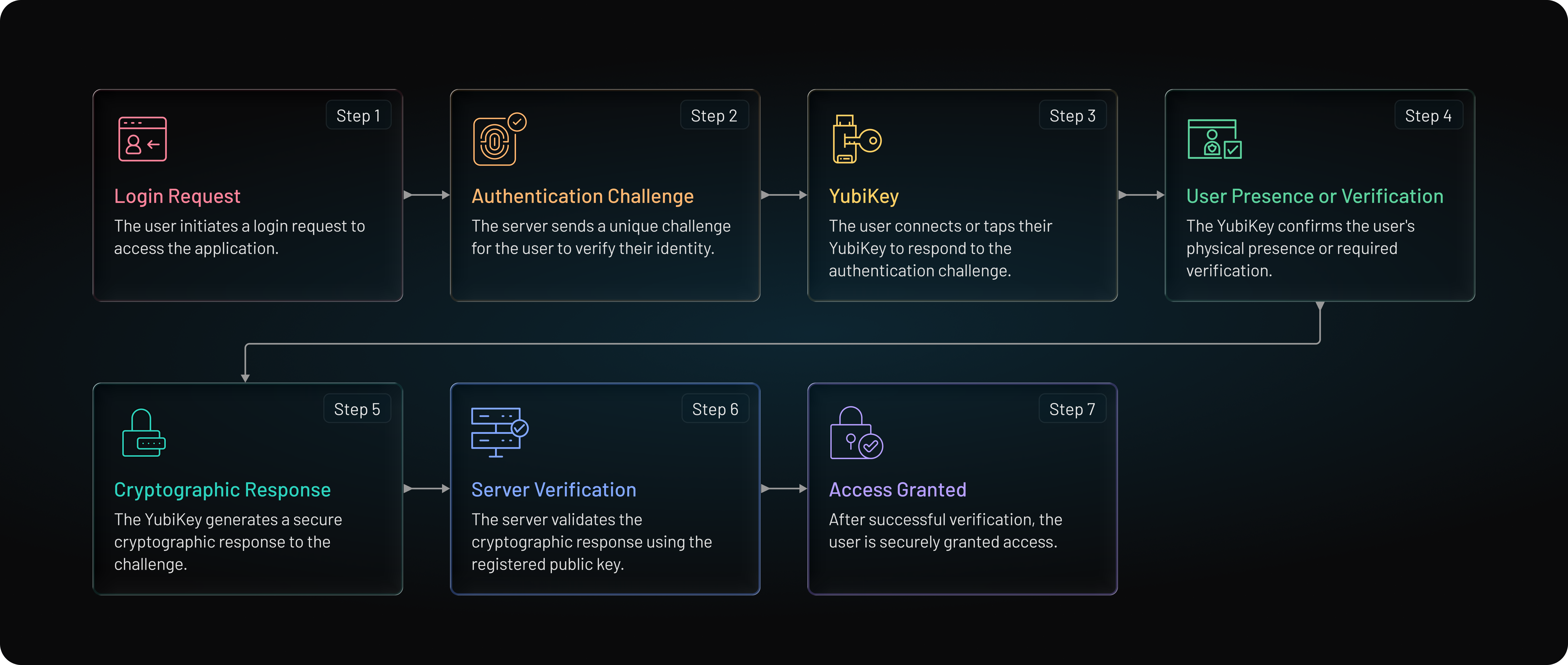
When the user returns, the service generates a fresh authentication challenge. The browser or operating system passes the request to the YubiKey, which identifies an appropriate credential for that service.
The user may then be asked to interact with the key. A touch can confirm that a person is physically present rather than allowing authentication to happen silently in the background. Where stronger user verification is required, a PIN or, on supported biometric models, a fingerprint may also be requested.
The YubiKey uses the relevant private credential to cryptographically sign data associated with the authentication request. The service verifies the response using the credential information registered earlier. If the response is valid and the required authentication conditions are satisfied, the user can sign in.
No private key needs to travel across the network. There is also no six-digit FIDO authentication code waiting to be copied from one screen and pasted into another. That difference is easy to underestimate.
With a traditional OTP flow, the user is responsible for deciding where to enter the code. A well-designed FIDO2/WebAuthn flow instead lets the authenticator and browser participate in verifying the service requesting authentication. This is a major reason YubiKeys used with FIDO authentication can provide stronger resistance to credential phishing.
A simplified YubiKey authentication flow looks like this:
Why Is YubiKey Authentication Resistant to Phishing Attacks?
Phishing usually works by getting users to hand over something an attacker can reuse. A password can be copied. An SMS or authenticator-app OTP can be entered into a fake login page and, in some attacks, relayed to the legitimate service before it expires. Even a convincing login screen doesn't need to break encryption if it can persuade the user to provide the credential voluntarily.
YubiKey authentication using FIDO2/WebAuthn changes that exchange. Instead of asking the user to type a shared secret or temporary authentication code, the YubiKey proves possession of a cryptographic credential associated with the legitimate service.
There Is No Shared FIDO Credential to Type
With FIDO authentication, the private key protected by the authenticator isn't typed into a form or sent to the service during login. The website stores information needed to verify the cryptographic response, while the private credential remains with the authenticator.
An attacker who compromises the service's credential database therefore doesn't obtain the equivalent of a reusable password from that FIDO credential. And a phishing page can't simply ask the user to copy the private key into a text box. The authentication model doesn't work that way.
This also removes the familiar “enter the six-digit code” moment from the FIDO exchange—the point attackers often target in OTP phishing.
Authentication Is Bound to the Legitimate Service
Here's where the phishing resistance becomes particularly useful. WebAuthn authentication takes the requesting website's origin and relying-party information into account. A credential created for a legitimate service cannot simply be used by an unrelated phishing domain pretending to be that service.
Suppose a user follows a link to a carefully designed fake login page. The page may look convincing. The logo can be copied. So can the fonts, colors, and wording.
The domain is harder to fake cryptographically. With properly implemented FIDO2/WebAuthn authentication, the phishing site cannot request a valid authentication response for a credential bound to a different relying party simply because the user was fooled by the page's appearance.
The Private Credential Remains Hardware-Bound
When a passkey or FIDO credential is stored on a YubiKey as a device-bound credential, the private key is designed to remain associated with that physical authenticator rather than being synchronized across the user's other devices.
This can be valuable for organizations that want tighter control over high-risk credentials. An administrator, developer, or other privileged user may be required to possess the registered hardware key before authentication can succeed.
Still, phishing-resistant doesn't mean invulnerable. A stolen YubiKey, weak account recovery process, compromised endpoint, poor enrollment controls, or incorrect authentication configuration can introduce other risks. And YubiKeys can support protocols besides FIDO2, which don't all provide the same phishing-resistant properties.
The distinction matters. The strongest security claims apply to the authentication method and configuration, not simply to the presence of a YubiKey.
Used with FIDO2/WebAuthn, though, a YubiKey removes one of phishing's biggest advantages: convincing a person to reveal a credential that an attacker can immediately reuse somewhere else.
What Is a YubiKey Used For? Common Authentication Use Cases
A YubiKey isn't tied to a single authentication scenario. The same physical device can serve different purposes depending on the YubiKey model, the protocols it supports, and how an organization or online service configures authentication.
For some users, it is simply a stronger second factor alongside a password. For others, it can replace the password altogether. Organizations may take a more targeted approach and reserve hardware-backed authentication for administrators, developers, or other accounts where compromise would carry a much higher cost.
| Use Case | Why YubiKey Works |
|---|---|
| MFA | Phishing-resistant sign-in without OTP entry |
| Passwordless | Can replace passwords altogether. Reduces risks of password reuse (breached passwords) and credential stuffing. |
| Privileged Access | Strong protection for admin and sensitive accounts |
| Developer Access | Supports SSH, OpenPGP, PIV, and signing workflows |
| Personal Accounts | Protects email, financial, and cloud accounts |
YubiKey vs Passkeys, Authenticator Apps, and SMS: Key Differences
A YubiKey, a passkey, an authenticator app, and an SMS code can all help users get into an account more securely than relying on a password alone. But they don't provide security in the same way. More importantly, YubiKey and passkey aren't necessarily competing technologies. A passkey can be stored on a compatible YubiKey.
That distinction gets lost surprisingly often.
The comparison becomes clearer when you look at where the credential lives, whether the user has to transfer a code manually, and how well the authentication method resists phishing.
| Authentication Method | How It Works | Phishing Resistant* | Phone Required | Passwordless Support | Where the Credential Lives |
|---|---|---|---|---|---|
| YubiKey with FIDO2 | Public-key authentication using a physical security key | Yes | No | Yes | Hardware security key |
| Synced Passkey | Public-key authentication with a credential available across supported devices | Yes | No, depending on ecosystem | Yes | Passkey provider/device ecosystem |
| Authenticator App (TOTP) | App generates a rotating one-time code | No | Usually | Generally no | Shared secret stored by authenticator |
| SMS OTP | Service sends a temporary code to a phone number | No | Yes | Generally no | Code delivered through mobile network |
Phishing resistance assumes a properly implemented FIDO/WebAuthn authentication flow.
SMS and TOTP remain useful in many environments, especially where compatibility and easy enrollment matter. Their weakness is that the user receives a value and then decides where to enter it. A convincing phishing site can exploit that behavior. SMS introduces additional risks around the phone number and delivery channel, while TOTP avoids some of those issues but still produces a code that can be phished in real time.
FIDO-based authentication works differently. The authentication ceremony itself incorporates information about the legitimate service, so users aren't responsible for deciding whether a site deserves the credential simply because its login page looks familiar.
YubiKey vs Passkey
The phrase “YubiKey vs passkey” makes the relationship sound simpler than it is. A YubiKey is a physical authenticator. A passkey is a FIDO credential. Compatible YubiKeys can store passkeys directly on the hardware key.
Where the comparison becomes useful is hardware-bound versus synced passkeys.
A synced passkey can be made available across compatible devices through a credential provider or platform ecosystem. Lose one phone or laptop, and the passkey may still be accessible from another authorized device. That convenience makes synced passkeys attractive for many consumer authentication experiences.
A passkey stored on a YubiKey follows a different model. The credential is bound to the physical security key rather than automatically synchronizing across the user's other devices. To use it, the user needs access to that authenticator.
Neither approach automatically wins every scenario. Synced passkeys can reduce friction for large customer populations. Hardware-bound credentials can make sense when an organization wants stronger control over where a credential resides—for example, for privileged administrators or other high-risk identities.
So the better question isn't always “YubiKey or passkey?” It may be “Where should this passkey live?”
YubiKey vs Authenticator App
Authenticator apps using TOTP improve on password-only authentication and don't depend on SMS delivery. They are also widely supported and familiar to users. But the six-digit code they generate can still be entered into a phishing site and relayed to the real service while it remains valid.
A YubiKey using FIDO2/WebAuthn removes that manual code transfer. Authentication happens through a public-key cryptographic exchange associated with the legitimate service, providing stronger resistance to credential phishing.
There is a usability trade-off. An authenticator app is often already on the user's phone, while a YubiKey is another physical item to carry, register, and recover if lost. For broad consumer authentication, that difference can matter. For a high-risk administrator account, the calculation may look very different.
Authentication methods shouldn't be chosen because one sounds newer or stronger in isolation. The right choice depends on the account, the threat being addressed, and how much friction the user can reasonably absorb.
Types of YubiKeys: How to Choose the Right Security Key
Not every YubiKey is built for the same job. Some models focus primarily on FIDO authentication, while others support additional protocols used in enterprise, developer, and regulated environments. The connector matters too. A key that works perfectly with one laptop may be inconvenient if most employees authenticate from NFC-enabled phones or USB-C devices.
So choosing a YubiKey should start with the authentication requirement—not with the assumption that the most feature-heavy model is automatically the best one.
| YubiKey Family | Best Suited For | Key Consideration |
|---|---|---|
| Security Key Series | Users primarily needing FIDO2/WebAuthn authentication | FIDO-focused and simpler than multiprotocol models |
| YubiKey 5 Series | Enterprises, developers, and users requiring multiple authentication protocols | Supports broader authentication and cryptographic use cases |
| YubiKey Bio Series | Users who want FIDO authentication with fingerprint-based user verification | Adds biometric verification directly on the authenticator |
| YubiKey 5 FIPS Series | Organizations with specific government, regulated, or assurance requirements | Designed for environments requiring validated cryptographic capabilities |
The Security Key Series makes sense when the requirement is relatively straightforward: use a physical authenticator for FIDO-based MFA or passwordless authentication. Organizations that don't need smart-card, OTP, OpenPGP, or other additional capabilities may not benefit from deploying a more complex multiprotocol key.
The YubiKey 5 Series is broader. Depending on the specific model and configuration, it can support FIDO2/WebAuthn alongside technologies such as OATH, OTP, PIV, and OpenPGP. That flexibility can be useful when the same physical key needs to work across modern web authentication and existing enterprise or developer systems.
The YubiKey Bio Series adds fingerprint verification to supported FIDO authentication. The fingerprint is used locally to verify the person interacting with the authenticator rather than being sent to the website as a reusable biometric credential. This can provide an alternative to entering a FIDO2 PIN while keeping authentication tied to the physical key.
For organizations operating under particular regulatory or government requirements, the YubiKey 5 FIPS Series addresses a different need. FIPS-oriented hardware may be relevant when an authentication architecture must satisfy specific cryptographic validation requirements. A FIPS-labelled key alone, however, doesn't make an entire identity system compliant; the broader implementation still matters.
What to Consider Before Choosing a YubiKey
Start with the devices people actually use. USB-A, USB-C, and NFC compatibility can quickly determine which models are practical. Someone moving between a USB-C laptop and an NFC-enabled phone has different requirements from an employee working exclusively on a fixed desktop.
Next comes protocol support. If the goal is simply phishing-resistant FIDO2/WebAuthn authentication, a FIDO-focused security key may be enough. If the same users also need PIV smart-card authentication, OpenPGP, OTP, or other supported capabilities, a multiprotocol YubiKey may make more sense.
Biometrics are another decision, not an automatic upgrade. Fingerprint verification can be useful when organizations want local user verification on the key, but plenty of FIDO deployments work effectively with touch and PIN-based verification.
For enterprise rollouts, there is one more practical question: standardization. Supporting too many key models can complicate procurement, enrollment instructions, replacement inventory, help-desk troubleshooting, and recovery. A smaller approved set matched to real user requirements is often easier to manage.
The best YubiKey, then, isn't necessarily the one with the longest feature list. It is the one that supports the required authentication protocols, works with users' devices, and fits the way the organization plans to deploy and recover credentials.
How to Set Up and Use a YubiKey for Secure Sign-In
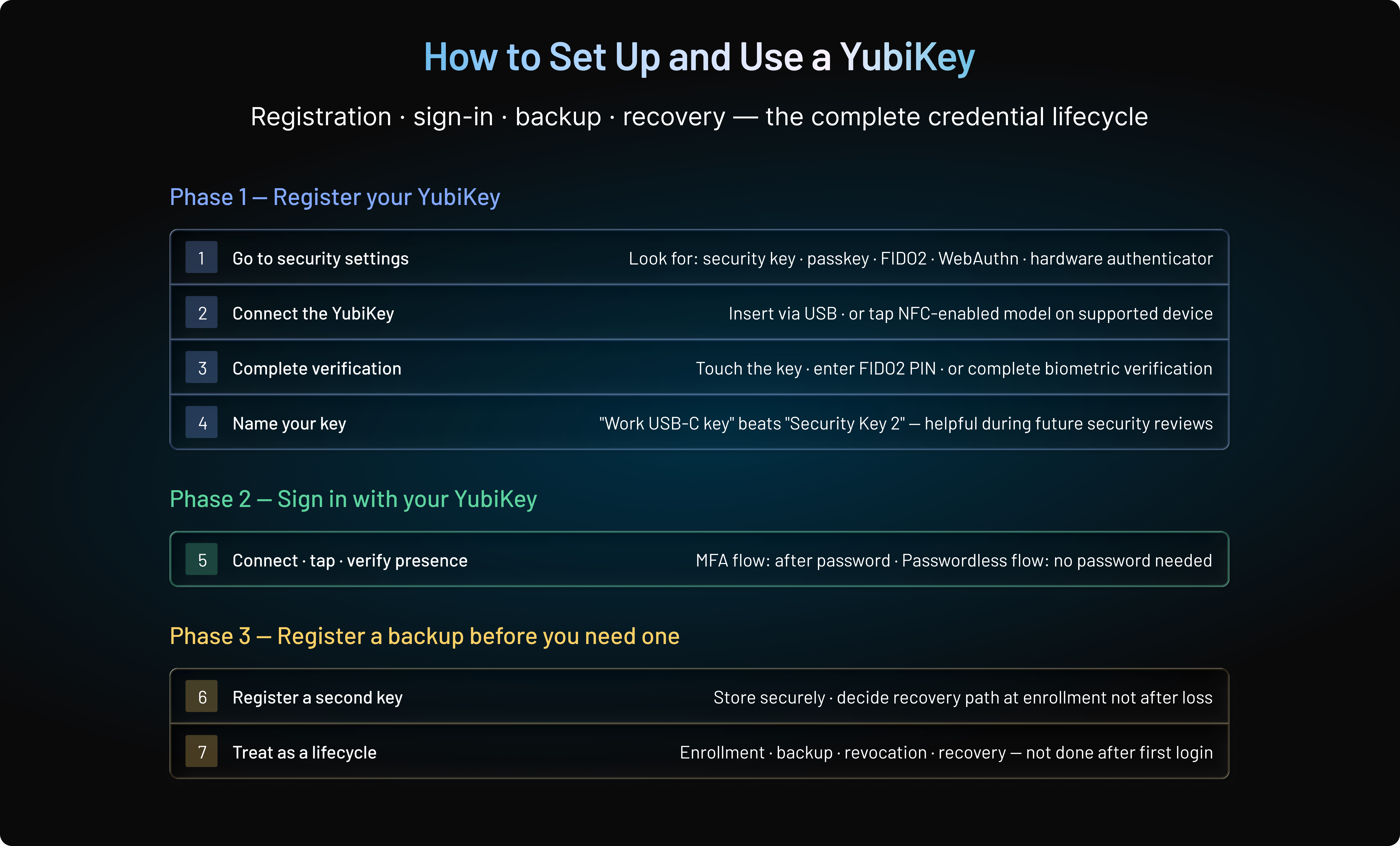
A YubiKey usually doesn't require installing a special application just to use it for FIDO2/WebAuthn authentication. The important step is registration: the website, application, or identity provider needs to associate the YubiKey's credential with the correct user account before the key can be used to sign in.
The exact menus vary from one service to another, but the underlying process is fairly consistent.
Register Your YubiKey With an Account
Start from the account's security or authentication settings and look for an option such as security key, passkey, FIDO2, WebAuthn, or hardware authenticator. The service will then prompt the user to connect the YubiKey, either by inserting it into a compatible USB port or tapping an NFC-enabled model against a supported device.
From there, the user may need to touch the key and, depending on the authentication policy, enter a FIDO2 PIN or complete biometric verification on a supported model. During registration, the authenticator creates or uses the appropriate credential and the service stores the information required to recognize it during future authentication.
Giving registered keys recognizable names can also help. “Work USB-C key” is considerably more useful during a future security review than “Security Key 2,” especially when several authenticators are attached to the same account.
Sign In With Your YubiKey
Once registration is complete, using the YubiKey should require very little effort. When the service requests authentication, the user connects or taps the key and completes whatever user-presence or user-verification step the policy requires.
For a password-plus-YubiKey MFA flow, the key is used after the first authentication factor. In a passwordless FIDO2 flow, the YubiKey can participate in authentication without requiring the traditional account password.
That difference depends on how the service has configured authentication. Simply owning a YubiKey doesn't automatically make every account passwordless.
Register a Backup Before You Need One
Here's where teams usually go wrong: recovery gets discussed after somebody loses the key.
A better approach is to decide how users will regain access during enrollment. Where the service and security policy allow it, users may register a second security key and store it somewhere secure. Organizations can also establish approved recovery mechanisms appropriate to the risk of the account.
This matters even more for administrators and other privileged users. If a single YubiKey is the only available authenticator and it is lost, damaged, or simply left at home, an otherwise secure authentication deployment can turn into an urgent help-desk problem.
The opposite extreme isn't much better. Adding a strong hardware authenticator while leaving an easily bypassed recovery method in place gives attackers another route to target.
Setup, therefore, isn't finished when the first authentication succeeds. Enrollment, backup, revocation, and recovery should be treated as parts of the same credential lifecycle.
What are the Benefits and Limitations of Using A YubiKey?
YubiKeys can provide a substantial security improvement over password-only authentication and, when used with FIDO2/WebAuthn, stronger phishing resistance than methods built around manually entered OTPs. But hardware authentication introduces its own operational questions. There is a physical device to distribute, carry, replace, and recover.
That trade-off matters. The strongest authentication method on paper isn't necessarily the right choice for every account or every customer journey.
| Benefits | Limitations |
|---|---|
| Phishing-resistant authentication with FIDO2/WebAuthn | Physical keys can be lost, damaged, or forgotten |
| Hardware-bound FIDO credentials | Requires purchasing and, for organizations, distributing hardware |
| No battery required for normal authentication | Not every application or legacy system supports FIDO2/WebAuthn |
| Supports MFA and passwordless authentication | Users need access to a compatible key when authentication is required |
| Useful for privileged and high-risk accounts | Different models support different connectors and protocols |
| Can reduce reliance on passwords and OTPs | Backup, revocation, and recovery must be planned |
One of the clearest advantages is phishing resistance. When a YubiKey is used for FIDO authentication, users aren't asked to transfer a reusable secret or temporary code from one interface to another. The cryptographic credential is associated with the legitimate service, making familiar credential-phishing techniques considerably less effective.
Hardware-bound credential storage offers another benefit. A FIDO credential stored on a YubiKey remains associated with that physical authenticator rather than automatically appearing across a user's other devices through cloud synchronization. For organizations protecting privileged or otherwise high-risk identities, that tighter control over credential portability may be intentional.
YubiKeys can also support both MFA and passwordless strategies. An organization might initially deploy them alongside passwords for sensitive accounts, then use FIDO credentials or passkeys to remove passwords from selected authentication flows. Multiprotocol YubiKey models can extend the same physical device into additional enterprise or developer use cases.
There is a catch: physical control creates physical dependency.
People lose things. Keys get left at home, damaged, or plugged into a device that isn't nearby when access is needed. For individual users, a backup key or another secure recovery option can reduce the disruption. At enterprise scale, the same issue becomes an operational process involving inventory, distribution, replacement, revocation, and help-desk procedures.
Compatibility deserves attention as well. Modern browsers and platforms broadly support WebAuthn, but organizations often have older applications, specialized systems, or device environments where hardware-key authentication isn't equally straightforward. Connector choice can create another small but very real friction point.
Cost also changes with scale. Buying one or two keys for personal accounts is very different from supplying hardware authenticators to thousands of employees, contractors, or customers. Organizations need to consider the security benefit alongside procurement, shipping, replacements, support, and lifecycle management.
This is why YubiKeys tend to make particularly strong sense where the risk of account compromise justifies tighter control over the authenticator. Administrators, developers, executives, finance teams, and other high-value identities are obvious examples.
For a broad consumer population, the answer may be different. Synced passkeys can deliver phishing-resistant authentication without asking every customer to purchase and carry a separate physical key.
Neither approach needs to win everywhere. Authentication works better when the strength and usability of the method match the actual risk of the account being protected.
What Happens If You Lose Your YubiKey? Backup and Recovery Options
Losing a YubiKey doesn't automatically mean someone else can sign in to your accounts, nor does it necessarily mean you're permanently locked out. What happens next depends on how the account was configured, whether additional verification is required, and—most importantly—whether a recovery option was prepared beforehand.
A lost key should still be treated as a lost authentication credential. If you can access the account through another registered authenticator or an approved recovery method, remove or revoke the missing YubiKey as soon as possible. That prevents it from continuing to function as a registered authenticator for the account.
This is one reason registering a backup security key can be useful. The primary key can stay with the user, while the backup is stored securely in a separate location. If the first key is lost or damaged, the backup provides a way to authenticate without immediately falling back to a weaker recovery path.
Recovery codes can serve a similar purpose when a service provides them. They should be generated in advance and stored somewhere protected—not alongside the YubiKey they are meant to back up. Depending on the account and security policy, another strong registered authenticator may also be available for recovery.
For organizations, the process needs tighter controls. A user reporting “I lost my key” shouldn't automatically be enough for a help desk to disable strong authentication and issue an easily phished temporary credential. The organization should verify the user's identity, revoke the missing authenticator, provision a replacement, and review relevant account activity where the circumstances warrant it.
There is another question users often have: Can someone who finds the YubiKey use it?
Possession of the key can be an important authentication factor, so a lost device shouldn't be dismissed. But access may also depend on how the credential was configured. FIDO authentication can require user verification, such as a PIN or supported biometric verification, and the person finding the key would still need to know which accounts it belongs to and satisfy any other factors required by those accounts.
The safest response is still revocation. Don't rely on the assumption that a lost key will never be connected to the right account.
Recovery also exposes a broader security problem. An organization can deploy phishing-resistant FIDO authentication and then undermine much of that protection by allowing users to bypass it through a weak password reset or poorly verified help-desk process. Attackers tend to look for the easier route.
A strong authenticator needs an equally deliberate recovery process.
Planning backup keys, alternative authenticators, identity verification, revocation, and replacement before deployment makes losing a YubiKey an inconvenience that can be managed not an authentication crisis.
How Can Organizations Deploy YubiKeys Securely at Scale?
Rolling out YubiKeys across an organization involves more than handing employees a security key and asking them to register it. The authentication policy around the device matters just as much: who needs hardware-backed authentication, where it should be required, how keys are enrolled, and what happens when one is lost or an employee leaves.
A blanket rollout may not even be the best starting point. For many organizations, a risk-based deployment is more practical.
Start With High-Risk Accounts
Privileged administrators are an obvious priority, but they aren't the only ones. Developers with production access, finance teams, executives, support staff who can modify customer accounts, and employees with access to particularly sensitive information may all present higher-value targets.
Starting with these groups lets organizations apply phishing-resistant authentication where account compromise could have the greatest impact. Broader deployment can follow when the security requirement and user experience justify it.
The decision should come from risk, not job titles alone. A contractor with temporary production access may warrant stronger authentication than a permanent employee using only low-risk internal tools.
Decide Where Hardware Authentication Is Required
Requiring a YubiKey for every authentication event can create unnecessary friction. Instead, organizations can identify the applications, actions, and access levels where a hardware-backed credential is appropriate.
A user might have one authentication experience for an ordinary application and face stronger requirements when accessing an administrative console, changing sensitive account settings, or performing a privileged operation.
This is where authentication policy becomes more important than the device itself. The YubiKey provides the authenticator; the identity and access architecture determines when and how it must be used.
Plan Enrollment and Distribution Carefully
For a small team, enrolling security keys may be straightforward. For thousands of employees spread across offices, homes, and countries, logistics become part of the security program.
Organizations need a reliable way to associate each registered credential with the correct user, provide clear enrollment instructions, track approved key models, and handle keys that never arrive or fail during registration. Remote onboarding deserves particular attention because the user and IT team may never be in the same room.
Enrollment is also a sensitive moment. If an attacker can register their own authenticator to somebody else's account, strong authentication later won't solve the original problem.
Build Backup and Recovery Into the Rollout
A primary key without a recovery strategy creates avoidable support pressure. Depending on the organization's security model, higher-risk users may be issued or allowed to register a second security key that is stored separately from the primary device.
Recovery methods should provide comparable assurance wherever practical. Falling back from phishing-resistant authentication to a weak help-desk verification question can create exactly the bypass attackers are looking for.
The policy should answer practical questions before deployment begins: Who verifies the user? How is the lost key revoked? Can temporary access be issued? How long does replacement take? What happens if both primary and backup authenticators are unavailable?
Those aren't edge cases once the rollout reaches scale.
Revoke and Replace Keys Quickly
YubiKeys should be managed as part of the user's broader credential lifecycle. When a key is reported lost, its registered credential should be revoked where appropriate and a replacement securely enrolled.
The same principle applies when employees leave, change roles, or no longer require privileged access. Authentication credentials shouldn't remain active simply because the physical key was never returned.
For high-risk accounts, organizations may also want visibility into authentication events surrounding a reported loss. An unusual sign-in immediately before a key is reported missing deserves more attention than a key discovered at the bottom of someone's desk drawer.
Measure Adoption and Authentication Failures
Deployment isn't complete when keys have been distributed. Organizations should monitor whether users successfully enroll them, how often authentication fails, how frequently keys need replacement, and how much recovery activity reaches the support team.
Patterns can reveal problems that policy documents miss. A spike in failed authentication may point to compatibility or training issues. Frequent recovery requests could indicate that the backup strategy isn't practical. Low enrollment among a particular user group may signal friction in the onboarding process.
The goal isn't to make every user authenticate in exactly the same way. It is to put stronger authentication where the risk warrants it—and make sure the surrounding enrollment, recovery, and credential lifecycle processes are strong enough to support it.
How Does YubiKey Authentication Work With LoginRadius?
YubiKey and LoginRadius play different roles in authentication. YubiKey is a hardware security key made by Yubico; LoginRadius is a Customer Identity and Access Management (CIAM) platform. The YubiKey acts as the user's physical authenticator, while the identity platform manages the broader authentication and customer identity experience.
The connection comes through open authentication standards. LoginRadius supports FIDO2/WebAuthn-based authentication, which allows compatible hardware security keys to participate in secure authentication flows. Instead of LoginRadius providing or manufacturing the physical key, a compatible YubiKey can serve as the authenticator within a standards-based authentication experience.
That separation is useful. Organizations don't have to treat the security key as their entire authentication system. The hardware authenticator proves possession of a cryptographic credential, while the CIAM layer can manage the surrounding identity journey—such as user authentication, account access, and the policies that determine how customers sign in.
This also gives organizations room to support different authentication needs. A hardware security key may make sense for a higher-risk user or use case, while other customers may be better served by passkeys or different authentication methods. Forcing the same experience on every user isn't always the best security strategy, particularly in customer-facing environments where usability and account recovery matter alongside protection.
For organizations exploring phishing-resistant or passwordless authentication, the important point is interoperability. Standards such as FIDO2 and WebAuthn make it possible for compatible authenticators and identity platforms to work together without making the hardware key itself the identity platform.
So the relationship is straightforward: Yubico provides the YubiKey; the YubiKey provides the hardware-backed authenticator; and LoginRadius can provide the CIAM layer around the authentication experience.
For businesses looking to reduce dependence on passwords while supporting stronger authentication options, LoginRadius provides a standards-based foundation for building secure customer authentication journeys without treating every customer or every login as the same risk.
Conclusion: Is a YubiKey Worth Using for Secure Authentication?
A YubiKey can be a strong choice when protecting an account requires more than another password or a code users can accidentally hand to a phishing site. Used with FIDO2/WebAuthn, it brings authentication back to something tangible: possession of a registered hardware authenticator combined with a cryptographic credential that isn't simply typed, copied, or sent across the network.
That doesn't make YubiKeys the answer for every user. For many customer-facing applications, synced passkeys can provide phishing-resistant authentication with less friction and no separate hardware to carry. Hardware security keys become especially valuable when organizations want credentials bound to a physical authenticator or need stronger protection around administrators, developers, privileged users, and other high-risk accounts.
The bigger decision, then, isn't simply whether to use a YubiKey. It's where hardware-backed authentication belongs in the wider identity journey and how enrollment, recovery, revocation, and alternative authentication methods will work around it.
LoginRadius helps businesses build that broader customer authentication layer. With support for modern authentication standards and flexible identity experiences, organizations can move beyond one-size-fits-all login flows and introduce stronger authentication where the risk calls for it.
Ready to strengthen authentication without adding unnecessary friction for every customer? Talk to the LoginRadius identity experts to explore how passwordless and phishing-resistant authentication can fit into your CIAM strategy.
FAQs
Q: What is a YubiKey?
A: A YubiKey is a physical hardware security key made by Yubico. It can support MFA, passwordless authentication, and passkeys using standards such as FIDO2 and WebAuthn.
Q: How does a YubiKey work?
A: With FIDO2/WebAuthn, a YubiKey uses public-key cryptography to verify the user without transmitting the private key. The user connects or taps the key and completes the required verification.
Q: What is a YubiKey used for?
A: YubiKeys can protect online accounts, privileged access, developer environments, and enterprise applications. Depending on the model, they can support MFA, passwordless login, passkeys, PIV, OTP, and other authentication methods.
Q: Is a YubiKey the same as a passkey?
A: No. A YubiKey is a physical authenticator, while a passkey is a FIDO credential. A compatible YubiKey can store device-bound passkeys directly on the hardware key.
Q: Can a YubiKey store passkeys?
A: Yes. Compatible YubiKeys can store passkeys as hardware-bound credentials. Unlike synced passkeys, these credentials remain associated with the physical security key rather than automatically syncing across devices.
Q: Is YubiKey better than an authenticator app?
A: It depends on the use case. YubiKeys using FIDO2/WebAuthn provide phishing resistance, while TOTP codes from authenticator apps can still be phished or relayed in real time.
Q: Can a YubiKey be hacked?
A: No authentication method is completely immune to attack. YubiKeys used with FIDO2/WebAuthn are designed to provide strong phishing resistance, but secure enrollment, recovery, device protection, and configuration still matter.
Q: What happens if I lose my YubiKey?
A: If you lose a YubiKey, use a registered backup key or approved recovery method to regain access, then revoke the missing key. Planning recovery before a key is lost is especially important for privileged accounts.
Q: Should I have two YubiKeys?
A: Having a backup YubiKey can prevent lockouts if your primary key is lost, damaged, or unavailable. Whether you need two depends on the account's importance and the recovery options provided by the service.
Q: Can I use a YubiKey without a password?
A: Yes. Services supporting FIDO2/WebAuthn can use a YubiKey for passwordless authentication when configured appropriately. Simply registering a YubiKey, however, doesn't automatically make every account passwordless.
Q: Does a YubiKey need a battery or internet connection?
A: A YubiKey doesn't require its own battery or direct internet connection for normal authentication. It communicates with a compatible device through interfaces such as USB or NFC.
Q: Can someone use my YubiKey if they steal it?
A: Possession alone may not be enough when authentication also requires a PIN, biometric verification, or another factor. Still, a lost or stolen YubiKey should be revoked from registered accounts as soon as possible.