Introduction
We live in a time when trust online is fragile and increasingly under attack. From phishing emails that look eerily real to credential leaks showing up on the dark web, it’s clear that password-based authentication is no longer enough, especially if you’re not following the best password practices.
So what’s the alternative? For organizations looking to go beyond passwords and implement a stronger identity-first security model, certificate-based authentication is emerging as a clear solution.
But what is certificate-based authentication, really? At a high level, it’s a method of verifying identity using digital certificates—unique electronic documents that confirm who (or what) you are.
Instead of asking users to remember yet another password, a system checks whether the connecting device or user presents a valid, trusted certificate. Think of it as showing a government-issued ID, but in digital form—and with far more cryptographic muscle behind it.
This method is already the backbone of modern enterprise security, powering everything from device certificate authentication in Zero Trust architectures to digital certificate authentication in banking, healthcare, and cloud-native applications. It’s also an essential piece in environments that rely on certificate-based encryption, ensuring both identity and data integrity.
In this blog, we’ll explore how certificate-based authentication works, what makes it secure, its advantages and limitations, and how your organization can implement it successfully. Whether you're a security architect, developer, or IT decision-maker, this guide will help you understand the value and practicality of adopting authentication certification based on digital trust.
Let’s decode the future of secure access, starting with certificates.

How Certificate-Based Authentication Works?
At first glance, certificate-based authentication might sound complex, but under the hood, it’s built on a clear, logical process that replaces the vulnerabilities of passwords with the precision of cryptographic trust.
Let’s unpack it.
Instead of relying on something the user knows (like a password), certificate authentication relies on something the system can verify—a digital certificate. This certificate is a small data file that proves the identity of a user, device, or application. It’s issued by a trusted authority known as a Certificate Authority (CA), and it contains key pieces of information: a public key, identity details (like a username, domain, or device ID), and the digital signature of the issuing CA.
When a user or system attempts to access a protected resource, it presents this auth certificate as a form of digital ID. Here’s how the process typically plays out:
1. Certificate Request and Issuance
The user or device first generates a public-private key pair. The public key, along with identity information, is sent to a CA to request a certificate. Once verified, the CA issues the certificate and signs it with its own private key.
2. Authentication Attempt
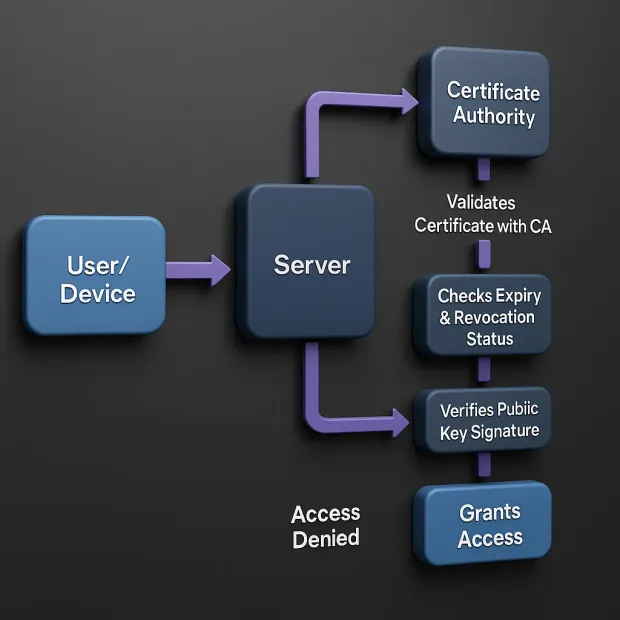
When accessing a system, the client (user or device) presents its certificate. This could be part of a mutual TLS handshake or another certificate validation flow.
3. Validation by the Server
The server checks the certificate’s authenticity. It verifies the CA signature, checks the expiration date, ensures the certificate hasn’t been revoked (via CRL or OCSP), and confirms that the certificate maps to a trusted identity.
4. Private Key Proof
To complete the process, the client uses its private key to sign a piece of data (usually a server-generated challenge). The server validates this signature using the public key embedded in the certificate, proving that the client indeed holds the matching private key.
5. Access Granted
Once validated, the client is authenticated without typing a single password.
This process is what makes digital certificate authentication not just secure, but resilient. The authentication is based on asymmetric encryption and certificate-based encryption, which ensures that even if the certificate is intercepted during transit, it’s useless without the private key stored on the user’s or device’s system.
And it's not limited to users. Device certificate authentication enables systems to validate servers, machines, IoT endpoints, and services, making it a perfect fit for modern, decentralized architectures.
So, if you're wondering how certificate-based authentication works, remember this: It's like showing a tamper-proof passport that can’t be duplicated, paired with a digital signature that mathematically proves it belongs to you.
Secure. Scalable. And increasingly essential.
Why Use Certificate-Based Authentication?
In an age where cyberattacks are growing more targeted and sophisticated, relying on passwords alone is like locking your front door but leaving the key under the mat. From phishing to credential stuffing, password-based attacks are low-cost, high-reward tactics for threat actors.
It’s no wonder that security leaders are seeking stronger, more foolproof alternatives—and certificate-based authentication is rapidly rising to the top of that list. But why? What makes certificate authentication so valuable?
Let’s break down the key reasons.
1. Phishing-Resistant by Design
Unlike passwords or one-time codes, digital certificate authentication doesn’t rely on human memory or behavior. It leverages public key cryptography, meaning there’s no shared secret that can be phished, guessed, or reused. Even if a user clicks a malicious link, there’s nothing to steal—because the auth certificate’s private key never leaves the device.
This makes certificate-based authentication one of the most effective defenses against phishing, man-in-the-middle attacks, and credential replay.
2. Built for Device-First, Passwordless Access
With hybrid work, BYOD policies, and IoT systems everywhere, authenticating devices securely is just as important as authenticating users. Device certificate authentication allows organizations to verify the identity of laptops, phones, servers, and even containers—automatically, silently, and securely.
No pop-ups, no user friction. Just seamless, secure access from verified devices.
3. Eliminates Password Fatigue
Let’s face it, users hate passwords. They forget them, reuse them, and create weak ones. For IT teams, password resets are a constant drain on support resources. With certificate authentication, there’s no password to remember, reset, or rotate. Once a certificate is installed, it can be used for transparent, frictionless login.
This makes certificate-based authentication a key enabler of passwordless strategies that improve both user experience and security.
4. Ideal for Automated Systems and APIs
Certificates aren’t just for human users. In fact, they’re even more valuable for systems and services that need to authenticate to one another, like APIs, backend jobs, or DevOps pipelines. Certificate authenticity ensures that only trusted machines can access your services, enabling secure M2M (machine-to-machine) communication at scale.
5. Aligns with Zero Trust Principles
In Zero Trust models, no device or user is trusted by default—not even inside the network. With certificate-based authentication, every access attempt must prove identity cryptographically. Paired with context-aware access policies, this creates a highly secure, dynamic trust environment.
6. Compliance-Friendly and Future-Proof
Many compliance frameworks, including PCI-DSS, HIPAA, and NIST, recommend or require strong authentication methods. Because authentication certification through digital certificates is cryptographically strong and auditable, it checks a lot of boxes for regulators and auditors alike.
In summary, certificate-based authentication is not just a security upgrade it’s a complete shift in how trust is established in the digital world. It removes the human error factor, strengthens your perimeter, and supports passwordless, scalable login experiences for both users and machines.
If you’re building for the future, it’s not just a good option, it’s the smart one.
7. Immune to Phishing and Credential Theft
Since there’s no password or secret that users need to enter, there’s nothing for attackers to steal through phishing emails, malicious forms, or social engineering. Even if someone intercepts the auth certificate, it’s useless without the private key.
8. No Human Error in Authentication
With certificate authenticity validated automatically by systems, there's less room for user mistakes—no password reuse, weak credentials, or poorly chosen security questions. Authentication becomes consistent, predictable, and controlled.
9. Strong Against Replay and MITM Attacks
Because each authentication event uses a unique cryptographic signature, it can’t be replayed or spoofed. This makes digital certificate authentication particularly resistant to man-in-the-middle (MITM) attacks and session hijacking.
10. Tied to Devices and Context
Unlike OTPs or passwords that can be used from anywhere, device certificate authentication restricts access to verified devices with installed private keys. You can further enhance security by enforcing geofencing, device posture checks, and certificate pinning.
11. Not Without Risks—But Risks You Can Manage
Of course, no system is bulletproof. The primary risk in certificate-based authentication lies in poor key management. If a private key is exposed due to malware, insecure storage, or device loss it could lead to unauthorized access.
But these risks are addressable:
-
Use Trusted Platform Modules (TPMs) or Hardware Security Modules (HSMs) to secure keys.
-
Rotate certificates regularly and automate revocation.
-
Monitor for anomalies in certificate usage.
In short, if implemented correctly, certificate-based authentication provides one of the most robust and phishing-resistant security models available. It eliminates many of the vulnerabilities associated with passwords, enforces identity through cryptography, and integrates well with modern security strategies like Zero Trust and passwordless login.
So when you ask, "How secure is certificate authentication?"—the answer is: very secure, as long as you secure the implementation itself.
Certificate-Based Authentication: Pros and Cons
Like any security solution, certificate-based authentication isn’t a silver bullet. It's powerful, yes, but it's important to understand both the upsides and the trade-offs before you adopt it.
Let’s start with the positives.
Pros of Certificate-Based Authentication
If you’ve ever dealt with password fatigue, credential leaks, or device sprawl, you’ll appreciate just how refreshing certificate-based authentication can be. Beyond just securing access, it introduces a whole new level of trust, automation, and scale to authentication workflows. Here are the standout benefits of using certificate authentication:
1. Phishing Resistance
Since there's no password to steal or OTP to intercept, phishing attacks fall flat. This makes digital certificate authentication a front-runner in any Zero Trust model. To learn more about Zero Trust security architecture, download the insightful resource:
2. Strong Identity Assurance
Each certificate is cryptographically tied to a user, system, or device. That’s next-level authentication certification, offering stronger trust than passwords or tokens.
3. Seamless User Experience
Once configured, certificate authentication can be completely transparent to end users, with no more typing, resetting, or rotating credentials.
4. Machine-Scale Automation
Device certificate authentication works without human intervention. It's ideal for securing machine-to-machine (M2M) APIs, IoT networks, and service-level auth.
5. Secure Communication
Paired with certificate-based encryption, your sessions are not just authenticated, they’re also encrypted end-to-end.
6. Phishing-Resistant Login
Since there’s no password involved, there’s nothing for attackers to phish. A certificate’s authenticity is verified through cryptography, not human memory or behavior, removing one of the biggest weak points in traditional authentication.
7. Seamless User and Device Experience
Once a certificate is installed, authentication becomes invisible. Whether it’s device certificate authentication for laptops or digital certs for applications, users no longer need to jump through hoops like entering OTPs or remembering complex passwords.
8. Scales Across Systems and Machines
Certificates aren’t just for humans. They authenticate everything from servers and containers to microservices and IoT devices. That means you get certificate-based encryption and access control across your entire architecture, not just login screens.
9. Supports Passwordless and Zero Trust Models
Want to move beyond passwords? Certificates are a core enabler. They work perfectly in Zero Trust environments, integrating with conditional access policies and endpoint verification tools for stronger security postures.
10. Improves Operational Efficiency
No more frequent password resets, account lockouts, or user frustration. With auth certificates, you reduce helpdesk overhead and streamline identity workflows, especially when integrated into a robust CIAM or IAM system.
11. Compliance and Auditing
Many compliance standards (like PCI-DSS, HIPAA, and NIST) recommend or require strong authentication mechanisms. Authentication certification via digital certs makes it easier to meet these requirements—and prove it through logs and auditing tools.
In short, if you're looking for authentication that’s secure, scalable, and smart, certificate-based authentication checks all the boxes and then some.
Cons of Certificate-Based Authentication
1. Implementation Complexity
Setting up a Public Key Infrastructure (PKI) or integrating with a CA can be technical and time-consuming, especially at enterprise scale.
2. Certificate Lifecycle Management
Certificates expire, get revoked, or need to be rotated. Without automation, this can lead to downtime or access issues.
3. Device Lock-In
Since the private key is often bound to a specific device, using another device may require certificate re-issuance or additional provisioning steps.
4. Risk of Key Compromise
If a private key is exposed through poor device security or malware, the auth certificate is compromised. Protection mechanisms like HSMs and secure enclaves help mitigate this risk.
No authentication method is flawless, but certificate-based authentication delivers high-assurance access with fewer human vulnerabilities. It trades password-related risks for infrastructure complexity—but with the right setup, the security payoff is well worth it.
Best Practices for How to Implement Certificate-Based Authentication
Rolling out certificate-based authentication can transform your security model but like any powerful tool, it needs to be implemented with care. Whether you're enabling digital certificate authentication for users, devices, or workloads, following best practices ensures both resilience and long-term scalability.
Here’s how to do it right:
1. Choose the Right Certificate Authority (CA)
Whether it’s a public CA or a private/internal one, make sure the issuing authority is trusted and well-integrated into your infrastructure. Your CA will sign every auth certificate, so reliability is non-negotiable.
Tip: For large enterprises, a hybrid model (public CA for external apps, internal CA for internal systems) often works best.
2. Protect Private Keys Like Crown Jewels
Your public key lives inside the certificate, but it’s the private key that needs guarding. Store it in secure hardware like TPMs, HSMs, or mobile secure enclaves.
A leaked key equals a compromised identity, no matter how strong your certificate-based encryption might be.
3. Automate Certificate Issuance and Renewal
Manually managing certificate lifecycles is a recipe for downtime. Use tools like ACME (Automated Certificate Management Environment) or enterprise-grade PKI platforms to auto-issue, auto-renew, and auto-revoke certificates.
4. Apply Least Privilege with Scoped Certificates
Not all certificate authentication needs system-wide access. Issue certs with scoped permissions (e.g., API read-only, dev-only) and expiry limits. This minimizes the blast radius if a cert is misused.
5. Enable Logging, Monitoring, and Revocation Checks
Visibility is key. Log every authentication event tied to a certificate. Set up alerts for unusual activity. Enable CRL (Certificate Revocation List) and OCSP (Online Certificate Status Protocol) checks to ensure expired or compromised certs can’t sneak through.
6. Plan for Recovery and Contingency
What happens if a certificate is accidentally deleted or a device is wiped? Build in a recovery process, ideally with a secure self-service or helpdesk flow for re-issuing authentication certification.
7. Integrate with IAM and Policy Engines
Don’t treat certificate auth as a silo. Integrate it with your broader identity ecosystem—whether that’s a CIAM platform, a federated SSO provider, or a Zero Trust access layer. This ensures consistent policies, auditing, and access controls.
Implementing certificate-based authentication the right way isn’t just about generating keys—it’s about designing for trust, lifecycle visibility, and seamless experience at scale. With the right foundation, you get secure, user-transparent logins that scale across devices and systems.
Conclusion
Tired of password headaches and phishing risks? Certificate-based authentication offers a secure, scalable alternative—proving identity with cryptographic certificates instead of guessable credentials. It minimizes human error, resists attacks, and streamlines access across users, devices, and APIs. With the right tools and lifecycle management, it’s a powerful pillar of modern identity strategies like Zero Trust.
Ready to upgrade your authentication? See how LoginRadius can help you secure users, devices, and cloud systems with certificate-based authentication. Contact us today.
FAQs
1. What is a digital certificate?
A: A digital certificate is an electronic credential that verifies the identity of a user, device, or system. Issued by a Certificate Authority (CA), it contains a public key and identity metadata. It’s used in certificate-based authentication to securely validate access without passwords.
2. Is Certificate-Based Authentication better than password-based login?
A: Yes, certificate-based authentication is significantly more secure than traditional passwords. It resists phishing, eliminates weak credentials, and uses cryptographic keys instead of shared secrets—making it ideal for modern security frameworks like Zero Trust.
3. Can Certificate-Based Authentication be used for multi-factor authentication (MFA)?
A: Absolutely. Certificate-based authentication can serve as one factor in an MFA setup, often paired with biometrics, PINs, or smart cards. This layered approach enhances security without compromising user experience.
4. How can organizations implement Certificate-Based Authentication?
A: Organizations can start by deploying a trusted Certificate Authority (internal or external), issuing digital certificates to users and devices, and integrating validation with IAM or authentication systems. Automating certificate lifecycle management is key to scaling securely.