Introduction
One-time passwords show up everywhere: signing in to a banking app, verifying a new device, resetting an account, confirming a payment, or completing multi-factor authentication. The six-digit code you receive by text, email, or an authenticator app is a familiar example. It has a short lifespan which is its main security advantage.
If a reusable password is stolen, an attacker may continue using it until the credential is changed or another control stops them. A properly implemented OTP however, becomes useless after it is used, expires, or is invalidated. Even though OTPs are temporary, it doesn't mean they are phishing-resistant. Attackers can still capture and relay valid OTPs in real time. SMS codes face additional risks such as SIM swapping, while email OTP security depends heavily on the security of the customer's mailbox.
So, OTP security depends on more than the code itself. How the OTP is generated, delivered, validated, protected, and recovered all matter. This guide explains what OTP means, how OTP authentication works, the different types of one-time passwords, HOTP vs TOTP, security risks, implementation best practices, and where OTP fits alongside MFA, passkeys, and risk-based authentication.
What Is an OTP (One-Time Password)?
An OTP or One-Time Password, is a temporary credential designed to be valid for a single use, a limited period, or a specific authentication event. Alternative use cases include: account recovery, transaction approval, and other security-sensitive actions.
Instead of asking a user to rely only on a reusable password, OTPs are automatically generated by apps or devices when additional authentication or verification is required. However, the word “password” in OTP can be slightly misleading, as an OTP usually isn't created or memorized by the user.
Common user-facing terms:
-
One-Time Passcode / PIN: Interchangeable user terms for short authentication codes.
-
Verification Code: Broader term used to confirm ownership of an email address or phone number.
-
Security Code: General consumer-facing label for step-up verification.
Common OTP methods include SMS OTPs, email OTPs, authenticator app OTPs generated by apps such as Google Authenticator or Authy, and hardware token OTPs generated by dedicated security devices.
Most people recognize OTPs as four, six, or eight digit codes received through SMS or email. But an OTP doesn't always have to be delivered to the user. Authenticator apps and hardware tokens can generate one-time codes locally using cryptographic algorithms such as TOTP or HOTP.
What is OTP Authentication and OTP Verification
OTP authentication and OTP verification use similar technology, but they don't accomplish the same thing.
OTP authentication uses a one-time credential as part of establishing whether a user should be granted access to an account or application.
OTP verification usually has a narrower purpose. During registration, an application might send a code to an email address or phone number to confirm that the customer currently controls that communication channel. The same approach can be used before changing account information or during certain recovery flows.
The distinction matters because successfully receiving an OTP doesn't automatically prove a person's complete identity. An SMS code can demonstrate access to a particular phone number at that moment. An email OTP can demonstrate access to a mailbox. Neither alone establishes who is actually controlling that channel or whether it has been compromised.
So, OTP should be treated as a security mechanism within a broader identity and authentication flow. What the OTP actually proves depends on where it appears in that flow, how it is delivered or generated, and which other security controls surround it. In summary:
| OTP Authentication | OTP Verification |
|---|---|
| Grants access | Validates contact channel |
| Login use case | Registration use case |
| MFA support | Email/phone confirmation |
How Does OTP Authentication Work?
OTP authentication works by requiring a temporary code that the authentication system can validate before allowing a login, verification request, transaction, or other protected action to continue.
From the customer's perspective, the flow is usually simple:
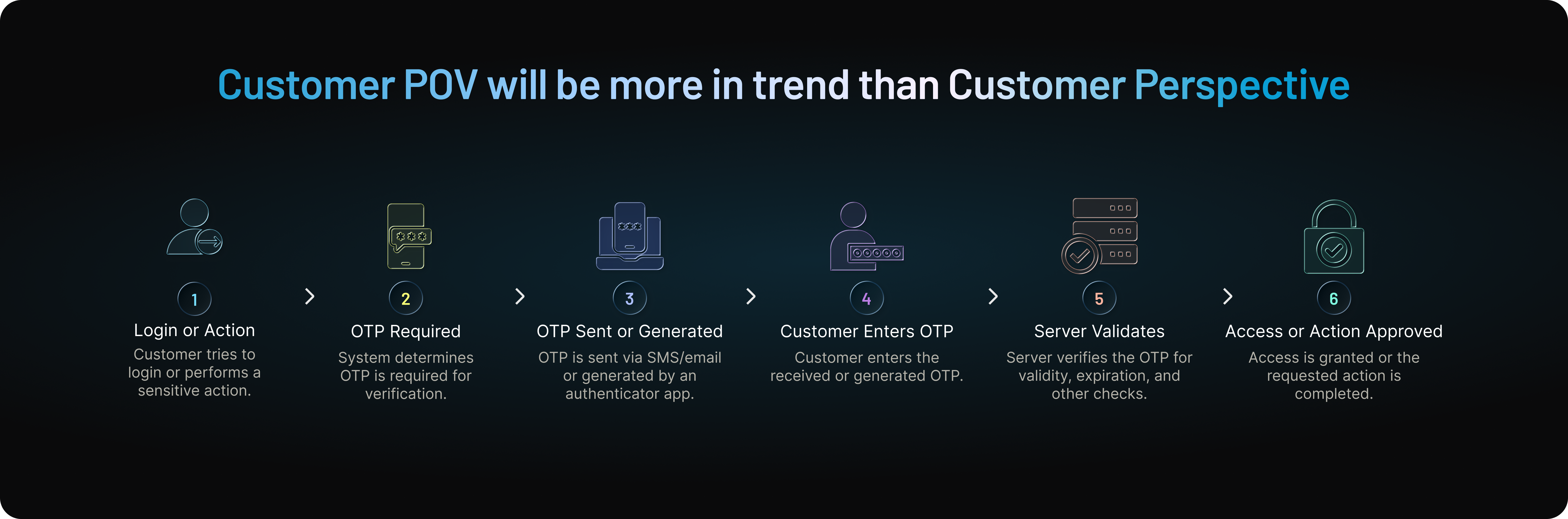
What happens behind that flow depends on the type of OTP being used. With SMS and email OTP, the authentication system typically generates the code and sends it to a registered communication channel. With authenticator apps and many hardware tokens, the code is generated on the user's device from cryptographic information established during enrollment.
In either case, receiving the correct digits isn't the only check that matters. The authentication system may also need to confirm that the OTP hasn't expired or already been used, that the number of failed attempts remains within policy, and that the request belongs to the expected authentication flow.
That creates two useful OTP models: server-generated OTPs and device-generated OTPs.
Server-Generated OTPs
Server-generated OTPs are commonly used for SMS and email authentication or verification. When a customer reaches a point where an OTP is required, the authentication system generates a temporary code and sends it through the configured delivery channel.
For example, a customer signing in with SMS OTP might enter their phone number or complete the first stage of authentication. The system generates a random code, associates it with that verification attempt, and sends it to the customer's registered phone number. The customer enters the code, and the server checks it against the value expected for that request.
A secure implementation needs to validate more than whether the numbers match. It should also determine whether the OTP is still valid, whether it has already been used, and whether the customer has exceeded the permitted number of attempts. After successful verification, the OTP should no longer be accepted.
Resend behavior matters too. If a customer requests another OTP because the first message hasn't arrived, leaving several codes valid simultaneously increases the number of credentials that could pass verification and can confuse customers when delayed messages arrive out of order. Where the authentication design allows it, generating a replacement OTP should invalidate the previous code.
Request limits are equally important. Without appropriate throttling, an attacker may repeatedly trigger SMS or email OTPs, creating opportunities for automated abuse, messaging costs, and social engineering.
The delivery channel therefore becomes part of the security model. SMS OTP depends on control of the phone number and the mobile network, while email OTP depends on the security of the customer's mailbox.
Device-Generated OTPs
Device-generated OTPs work differently. Instead of the authentication server creating a new code and delivering it through SMS or email, an authenticator app or hardware token generates the OTP locally.
During enrollment, the authenticator and authentication server are provisioned with cryptographic information that allows both sides to independently calculate corresponding OTP values.
A common example is TOTP (Time-Based One-Time Password). The authenticator combines a shared secret with the current time interval to calculate a temporary code. The authentication server performs the corresponding calculation using its copy of the secret. When the customer enters the displayed code, the server compares it with the value it expects for the permitted time window.
HOTP (HMAC-Based One-Time Password) follows a similar principle but uses a moving counter instead of time as the changing input.
Because the code is calculated locally, the authenticator doesn't need to receive an SMS or email each time authentication occurs. This allows authenticator apps and hardware OTP tokens to generate codes even without cellular service or an active internet connection.
The trade-off shifts rather than disappears. Server-generated OTPs depend heavily on secure code generation, delivery, expiration, and request controls. Device-generated OTPs depend heavily on secure enrollment, shared-secret protection, synchronization, and factor recovery or replacement.
If a TOTP shared secret is stolen, for example, changing the displayed code every few seconds doesn't solve the underlying problem the attacker may be able to calculate future codes too.
So, the security of OTP authentication isn't determined simply by whether the code changes. How the OTP is generated, where its security dependencies sit, and how the surrounding authentication lifecycle is protected matter just as much.
What Are the Different Types of OTP?
One-time passwords can be delivered or generated in several ways. The underlying idea stays the same—a temporary credential is used for authentication or verification—but the security, accessibility, cost, and customer experience can differ significantly depending on the method.
For customer-facing applications, four OTP methods are particularly common: SMS OTP, email OTP, authenticator app OTP, and hardware token OTP. Choosing between them isn't simply a matter of picking the method with the shortest-lived code. The delivery channel, enrollment model, recovery process, and risk of the action being protected all matter.
SMS OTP
SMS OTP sends a temporary code to a customer's registered mobile number. The customer receives the text message, enters the code into the application, and the authentication system validates it before allowing the journey to continue.
Its biggest advantage is accessibility. Customers don't need to install an authenticator app or carry a separate security device, making SMS OTP practical for phone verification, customer login, account recovery, and step-up authentication.
That convenience comes with trade-offs. Phone numbers can be targeted through SIM-swapping attacks, while SMS delivery relies on telecommunications infrastructure outside the application's direct control. Phishing remains a problem too. A fraudulent login page can trick a customer into entering a legitimate SMS OTP and relay it to the real service before the code expires.
SMS OTP can therefore be useful where broad customer reach and low enrollment friction matter, but it shouldn't automatically be treated as the strongest authentication option for high-risk access.
Email OTP
Email OTP sends a temporary code to a customer's registered email address. Because email is already used as an identifier in many digital services, this approach usually requires very little additional enrollment.
That makes email OTP particularly convenient for email verification, passwordless login, account recovery, and certain step-up authentication journeys. Customers can receive a code without installing another application or enrolling a separate authentication device.
The security dependency is straightforward: the customer's mailbox becomes part of the authentication chain.
If an attacker already controls that email account, they may also be able to request and retrieve OTPs sent to it. The risk becomes greater when the same mailbox serves as the account identifier, OTP destination, password-reset channel, and recovery mechanism.
Delivery delays can create another challenge. If an email arrives after an OTP has expired, customers may repeatedly request new codes and create unnecessary authentication friction.
Email OTP is therefore useful for low-friction verification and authentication, but the level of trust placed in it should reflect the sensitivity of the action being protected.
Authenticator App OTP
Authenticator apps generate one-time codes locally on a user's enrolled device rather than waiting for a new code to arrive through SMS or email.
Most authenticator apps use TOTP (Time-Based One-Time Password). The authenticator and authentication server use a shared secret and the current time interval to independently calculate corresponding codes. This allows OTP generation to work offline and removes reliance on mobile carriers or email delivery.
That eliminates some important risks. A TOTP isn't exposed to SIM swapping simply because the customer's phone number is compromised, and authentication isn't dependent on an SMS or email arriving on time. But TOTP should not be described as phishing-resistant.
A convincing phishing site can ask the customer for the current authenticator code and relay it to the legitimate application while it is still valid. Security also depends heavily on protecting the shared secret established during enrollment. If that secret is compromised, an attacker may be able to generate valid future codes.
Authenticator-based OTP can provide stronger protection than delivery-channel-dependent methods in many scenarios, particularly as part of MFA, but secure enrollment, secret storage, recovery, and factor replacement remain essential.
Hardware Token OTP
Hardware OTP tokens generate one-time passwords using a dedicated physical device. Depending on the implementation, a token may generate codes using a time-based mechanism such as TOTP or an event-based mechanism such as HOTP.
The main advantage is separation from common communication channels. The OTP doesn't need to arrive through SMS or email, and users may not need a smartphone to generate it. This can make hardware OTP useful in controlled enterprise environments, specialized deployments, or situations where organizations want dedicated authentication devices. The trade-off is operational rather than purely technical.
Physical tokens need to be provisioned, distributed, tracked, replaced when damaged or lost, and eventually decommissioned. Organizations also need secure processes for enrolling replacement tokens and recovering accounts when the original device is unavailable.
Those lifecycle requirements can become expensive and difficult to manage at large consumer scale. Hardware OTP therefore tends to make more sense when the additional operational control justifies the cost and administrative overhead.
SMS vs Email vs Authenticator App vs Hardware OTP
The right OTP method depends on what the organization is protecting and the level of friction its customers can reasonably accept.
| OTP Method | Generated/Delivered Through | Main Strength | Main Limitation | Typical Use |
|---|---|---|---|---|
| SMS OTP | SMS | Broad accessibility | SIM-swap, telecom, and phishing risks | Verification, login, recovery |
| Email OTP | Low enrollment friction | Mailbox compromise | Verification, passwordless login, recovery | |
| Authenticator App OTP (TOTP) | Enrolled authenticator | No SMS/email delivery dependency | Phishable; shared secret must be protected | MFA, higher-assurance login |
| Hardware Token OTP | Physical token | Independent of phone/email channels | Cost and device lifecycle management | Controlled or specialized environments |
Other delivery and verification approaches may also appear in OTP-related journeys. For example, a code may be delivered through a voice call when SMS isn't available or appropriate. Some applications also use push notifications, although an approve/deny push authentication flow should not automatically be described as OTP simply because it serves a similar verification purpose.
These alternatives can improve accessibility or customer experience in particular situations, but they don't change the underlying decision businesses need to make: choose the authentication method according to the risk of the journey, not simply according to which channel is easiest to deploy.
HOTP vs TOTP: How One-Time Passwords Are Generated
SMS and email OTPs are typically generated by an authentication system and delivered to the customer. Authenticator apps and many hardware tokens work differently. They can calculate one-time passwords locally using a cryptographic secret shared with the authentication server.
Two standards are particularly important here: HOTP (HMAC-Based One-Time Password) and TOTP (Time-Based One-Time Password).
Both generate one-time codes from shared secret material. The main difference is what causes the code to change. HOTP uses a counter. TOTP uses time.
That distinction affects code validity, synchronization, and how each method is implemented.
What Is HOTP?
HOTP (HMAC-Based One-Time Password) is an event-based OTP algorithm standardized in RFC 4226. It generates a one-time code using a cryptographic secret shared between the authenticator and authentication server, together with a counter value.
In simplified form: HOTP = HMAC(shared secret, counter) → one-time code
Each side independently performs the calculation using the shared secret and an expected counter value. When the customer submits an HOTP, the server calculates the corresponding value and checks whether the submitted code matches an acceptable counter position. The important part is synchronization.
Suppose a hardware token generates several HOTP codes without the customer submitting them. The token's counter may advance while the server's counter remains behind. A strict one-to-one comparison could then reject the next legitimate code.
Implementations can address this with a limited look-ahead or resynchronization window, allowing the server to check a small number of counter values ahead of its current state. That window should remain controlled; accepting too broad a range increases the number of potentially valid codes.
HOTP also differs from TOTP in how code lifetime is determined. Because HOTP isn't driven by a clock, generating a code doesn't inherently mean it will expire 30 or 60 seconds later. Whether an HOTP remains acceptable depends on the counter state and the implementation's validation and reuse rules.
This makes HOTP useful for some event-driven hardware tokens and environments where clock synchronization isn't desirable, although TOTP has become more familiar for authenticator-app authentication.
What Is TOTP?
TOTP (Time-Based One-Time Password) is standardized in RFC 6238 and builds on HOTP. Instead of using an event counter as the moving input, TOTP derives that value from the current time.
In simplified form: TOTP = HMAC(shared secret, current time interval) → one-time code
The authenticator and authentication server share secret material and independently calculate the expected OTP for the current time interval. Implementations commonly use short intervals such as 30 seconds, after which the displayed code changes automatically.
That's why an authenticator app can keep generating new codes without receiving anything from the authentication server. Time moves the calculation forward.
TOTP introduces a different synchronization requirement from HOTP: the authenticator's clock and the server's clock need to remain reasonably aligned. Implementations may accept codes from a small adjacent time window to accommodate ordinary clock drift, but accepting too many windows increases the number of codes that could pass validation.
The short validity period provides an important security benefit. If a TOTP is captured, the attacker has a limited amount of time in which that particular code may remain useful.
But short-lived does not mean phishing-resistant.
A phishing site can capture a customer's current TOTP and immediately relay it to the legitimate service before the code expires. Adversary-in-the-middle attacks are specifically designed to exploit this real-time window.
TOTP therefore reduces the useful lifetime of a captured code, but it doesn't prevent the customer from being tricked into providing that code to an attacker.
HOTP vs TOTP: What's the Difference?
The fundamental difference is event versus time. HOTP changes when its counter advances, while TOTP changes automatically as time progresses.
| Factor | HOTP | TOTP |
|---|---|---|
| Full name | HMAC-Based One-Time Password | Time-Based One-Time Password |
| Standard | RFC 4226 | RFC 6238 |
| Changing input | Counter | Time interval |
| Shared secret | Yes | Yes |
| Code expiration | Counter and implementation dependent | Typically a short time window |
| Clock synchronization | Not required | Required |
| Counter synchronization | Required | Not required |
| Offline code generation | Yes | Yes |
| Common use | Event-based/hardware OTP tokens | Authenticator apps |
| Phishing-resistant | No | No |
TOTP is commonly preferred for authenticator-app MFA because codes expire automatically and the server doesn't need to maintain an event counter in lockstep with the authenticator. HOTP can still make sense where event-based generation or independence from clock synchronization is useful.
Neither method, however, should be evaluated only by how frequently the code changes.
Both depend on protecting the shared secret, securing enrollment and factor replacement, limiting verification attempts, preventing replay where applicable, and designing strong account recovery. If the underlying secret is compromised, an attacker may be able to generate valid OTPs rather than waiting to intercept one.
And if phishing resistance is the requirement, simply choosing TOTP over HOTP doesn't solve the problem. Both rely on codes that customers can enter into a fraudulent interface. Authentication methods based on FIDO2/WebAuthn, such as passkeys and appropriately implemented security keys, address that attack path differently by binding authentication to the legitimate service.
Where Is OTP Used? Common Authentication and Verification Examples
OTP isn't limited to one point in the customer journey. The same basic mechanism—a temporary, single-use credential can support login, MFA, passwordless authentication, account verification, recovery, and sensitive transactions.
What the OTP actually proves changes with the context.
A code used after a password may act as an additional authentication step. A code sent during registration may simply confirm access to an email address or phone number. During a payment or account change, an OTP may provide step-up verification before the action is approved.
Here are some of the most common ways OTP is used.
Login and MFA
One of the most familiar OTP examples is a login that combines a password with an additional one-time code.
A typical flow looks like this:
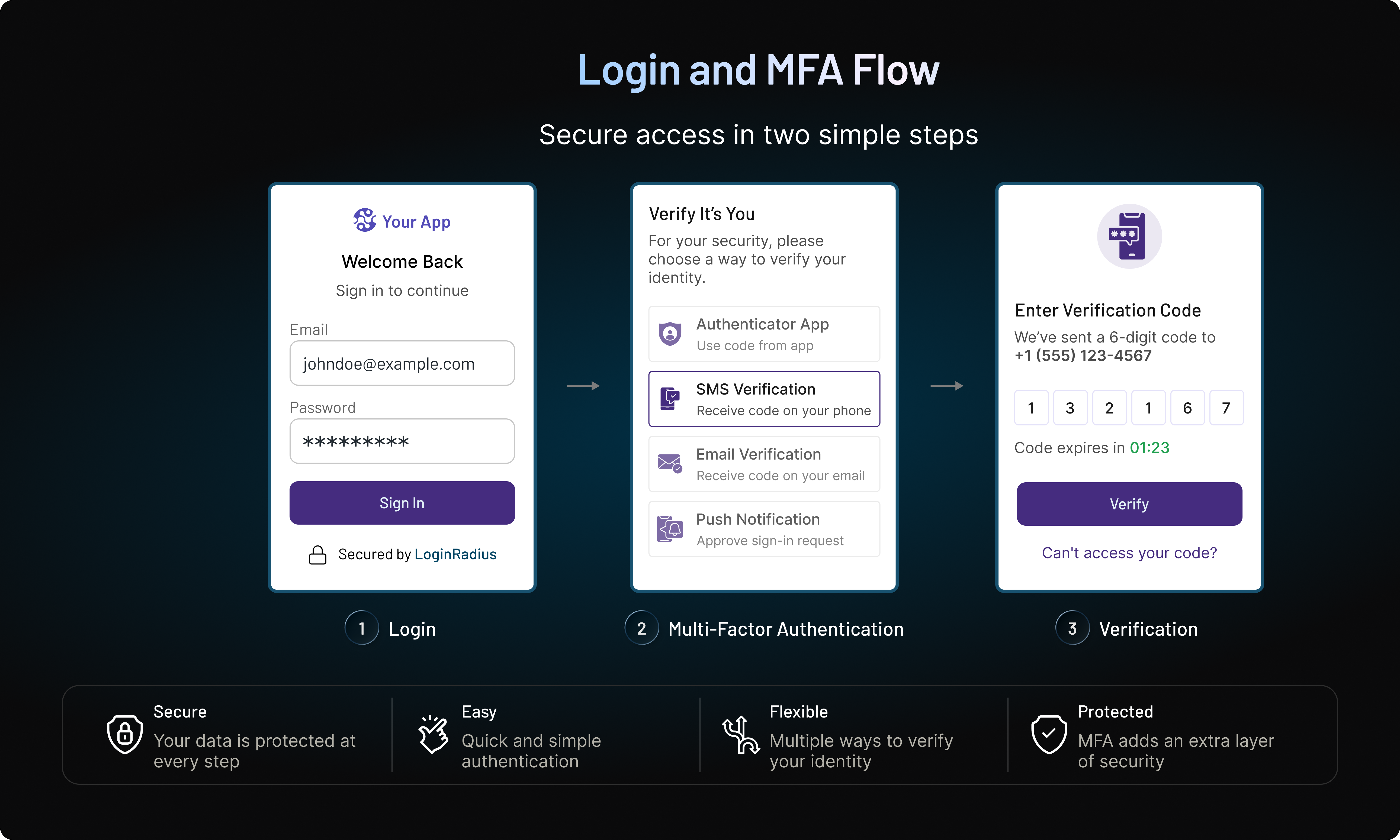
The customer first provides their regular credentials. The application then requests another authentication step, such as a TOTP from an enrolled authenticator app or an OTP delivered through an approved channel.
When the password and OTP represent independent authentication factors, the overall flow can form part of two-factor authentication (2FA) or multi-factor authentication (MFA).
This approach is common in consumer applications, financial services, healthcare portals, SaaS products, and other environments where relying on a password alone may not provide sufficient protection.
The distinction between OTP and MFA matters, though. Adding an OTP screen does not automatically make a login multi-factor. Whether it qualifies as MFA depends on what the OTP represents and whether the authentication factors are genuinely independent.
Passwordless Login
OTP can also be used without a traditional password.
Instead of entering a password, the customer provides an established identifier such as an email address or phone number. The application sends a temporary code to that channel, and successful verification allows an authenticated session to be created.
The flow may look like this:
Email or Phone Number → OTP Sent → Customer Enters OTP → OTP Validated → Session Created
This removes several problems associated with reusable passwords. Customers don't need to create or remember another credential, and businesses can reduce password-reset and password-reuse friction.
But passwordless OTP should not be confused with phishing-resistant passwordless authentication.
If the login depends on a code sent by SMS or email, an attacker who compromises that channel may be able to receive the OTP. A phishing site can also capture a valid code from the customer and relay it to the legitimate application before it expires.
Passkeys work differently. They use public-key cryptography and can provide phishing resistance by binding authentication to the legitimate service. OTP-based passwordless login removes the password, but it doesn't automatically remove phishing risk.
Account Registration and Contact Verification
Businesses frequently use OTP during registration to verify that a customer has access to the email address or phone number they provided.
For example:
Customer Enters Phone Number → SMS OTP Sent → Customer Enters Code → Phone Number Verified
The same pattern works with email.
This can help reduce registration errors and make it more difficult to create accounts using contact information the registrant doesn't currently control. It also gives the application a verified communication channel for later customer interactions.
There is an important limitation: contact verification isn't necessarily identity verification.
Successfully entering an SMS OTP demonstrates access to that phone number at that moment. An email OTP demonstrates access to the corresponding mailbox. Neither, by itself, proves the customer's legal or real-world identity.
That distinction matters in industries such as financial services and healthcare, where higher-assurance identity verification may be required for particular journeys.
Account Recovery
OTP is also widely used when customers forget passwords, lose access to an authentication factor, or need to recover an account.
A common password-reset journey might be:
Password Reset Requested → OTP Sent to Registered Channel → OTP Verified → New Password Created
This provides an additional check before allowing a security-sensitive account change.
Recovery, however, can become one of the weakest parts of an otherwise strong authentication system.
Suppose normal login requires a password plus authenticator-based TOTP, but losing the authenticator allows the customer to bypass that protection using a weakly secured email OTP. An attacker may target the easier recovery route instead of defeating the stronger authentication method directly.
Recovery controls should therefore reflect the value and risk of the account. Depending on the application, businesses may use trusted devices, recovery codes, additional verification, risk signals, waiting periods, or stronger checks before allowing authentication factors to be replaced.
The recovery process is part of the authentication boundary—not simply a convenience feature.
Transaction and Step-Up Authentication
OTP can be requested after a customer has already signed in.
This is known as step-up authentication: the application requires additional verification because the customer is attempting a more sensitive action or because the surrounding risk has changed.
Consider a banking customer who is already authenticated but attempts to transfer a large amount to a new recipient. The application may request an additional OTP before approving the transaction:
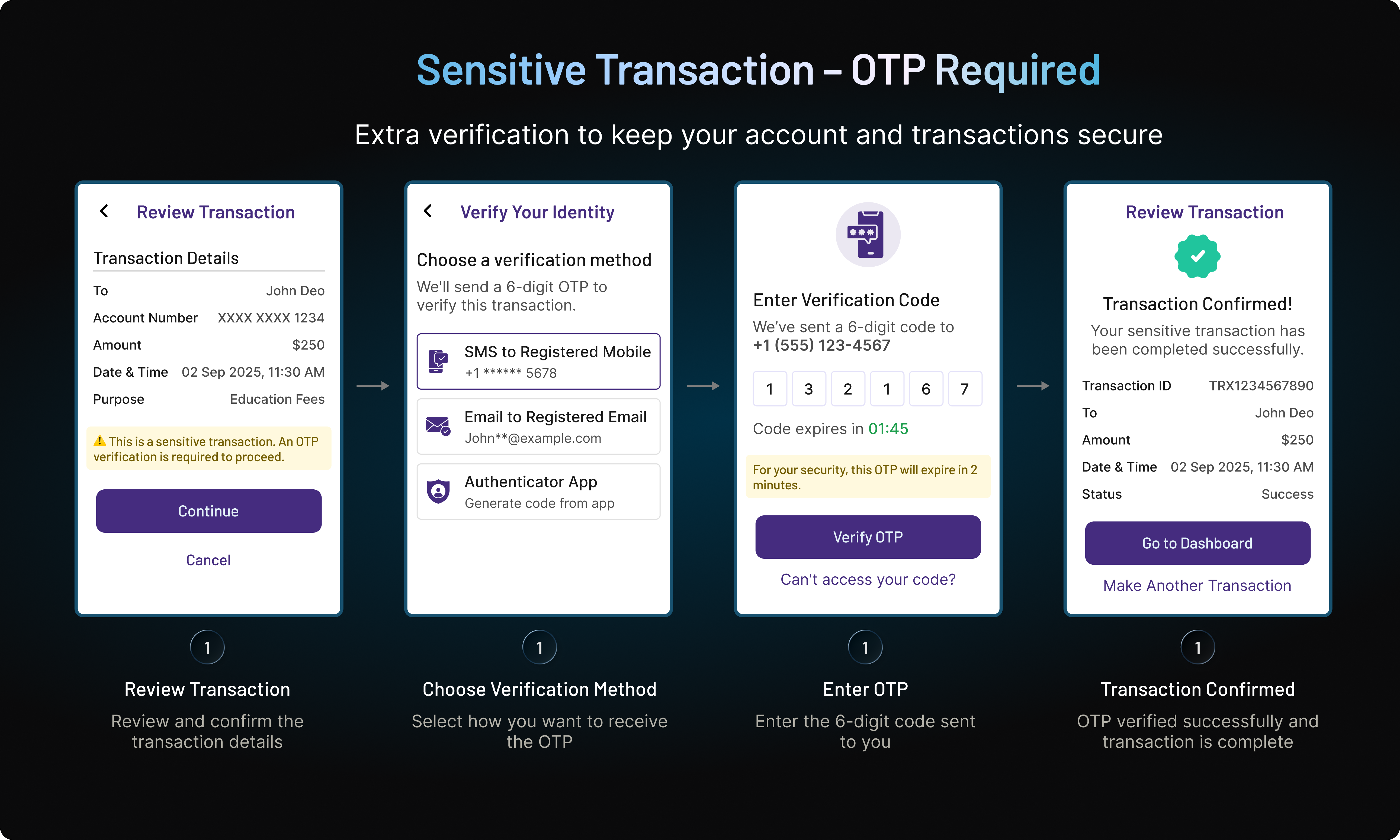
Similar step-up checks can be used when a customer:
-
changes a password, email address, or phone number;
-
adds or modifies payment information;
-
signs in from a new or unfamiliar device;
-
changes recovery settings;
-
accesses sensitive records;
-
initiates a high-value transaction.
The same pattern appears across industries for different reasons. Banking and fintech applications may use OTP around payments and account changes. Ecommerce platforms may introduce verification around suspicious logins or sensitive checkout activity. Healthcare applications may use additional authentication before access to protected account functions, while SaaS and enterprise applications may step up authentication for sensitive administrative actions.
This is more deliberate than requiring an OTP during every interaction.
A routine customer action may not justify additional friction. A high-value transaction, unusual device, recovery attempt, or security-sensitive profile change might.
That makes OTP particularly useful as a contextual authentication and verification mechanism: businesses can introduce another check when the customer journey or level of risk warrants it rather than treating every interaction exactly the same.
How OTP is Different From Other Similar Technologies
Is OTP the Same as 2FA or MFA?
OTP, two-factor authentication (2FA), and multi-factor authentication (MFA) are closely related, but they don't mean the same thing.
An OTP is a temporary credential or authentication mechanism. It describes the one-time code being used. 2FA and MFA describe authentication processes that require multiple independent authentication factors before access is granted.
Authentication factors are generally grouped into categories such as:
-
Something you know: password or PIN
-
Something you have: enrolled authenticator, phone, or security device
-
Something you are: biometric characteristic
Consider a customer who enters a password and then provides a TOTP generated by an enrolled authenticator app. The password represents a knowledge factor, while possession of the enrolled authenticator can provide a separate factor. In that implementation, the overall authentication flow can qualify as 2FA.
Now consider a passwordless login where a customer provides an email address and receives a one-time code in that inbox. The OTP may be sufficient to authenticate the customer under that application's policy, but the presence of a one-time code alone doesn't automatically make the flow MFA.
So the distinction is straightforward:
OTP = a temporary credential or mechanism
2FA = authentication using two independent factors
MFA = authentication using two or more independent factors
An OTP can therefore participate in 2FA or MFA without being synonymous with either one.
OTP vs TOTP vs HOTP vs 2FA vs MFA
| Term | What It Means | Example |
|---|---|---|
| OTP | A credential intended for one-time or short-lived use | Six-digit code sent or generated for authentication |
| TOTP | An OTP generated from a shared secret and time interval | Code generated by an authenticator app |
| HOTP | An OTP generated from a shared secret and counter | Event-based hardware token code |
| 2FA | Authentication requiring two independent factors | Password + OTP from an enrolled authenticator |
| MFA | Authentication requiring two or more independent factors | Password + possession-based authenticator, depending on implementation |
There is another security distinction worth making: MFA doesn't automatically mean phishing-resistant authentication.
A password combined with a manually entered TOTP can provide substantially more protection than a password alone. But a real-time phishing or adversary-in-the-middle attack may capture both the password and the current OTP and relay them to the legitimate application while the code is still valid.
This is why businesses should evaluate not only how many authentication factors they require, but also how resistant those factors are to the attacks relevant to the application.
OTP remains useful for MFA, step-up authentication, verification, and recovery. But where phishing resistance is required, businesses may need authentication methods designed specifically for that threat, such as appropriately implemented passkeys or FIDO2/WebAuthn security credentials.
OTP vs Traditional Passwords
The fundamental difference between a traditional password and an OTP comes down to credential lifetime and reuse.
A traditional password is a reusable credential. Unless the user or organization changes it, the same password may continue working for months or even years. If an attacker obtains that credential through phishing, malware, credential stuffing, or a data breach, it can remain useful until the password is reset or another security control intervenes.
An OTP is designed differently. It works once, for a limited time, or for a specific authentication event. After successful use, expiration, or invalidation, the same code should no longer be accepted.
That limited lifespan reduces replay and credential-reuse exposure. An old OTP retrieved from a previous message or captured from an earlier authentication attempt should provide no value to an attacker.
But this doesn't mean OTP is simply “more secure than passwords.”
A valid OTP can still be stolen. Real-time phishing and adversary-in-the-middle attacks can capture a customer's password, request the legitimate OTP, and relay that code to the real application before it expires. In this situation, short validity limits how long the OTP remains useful but doesn't prevent the initial compromise.
The security improvement therefore comes from reducing how long a captured credential can be reused—not from making credential theft impossible.
| Feature | Traditional Password | OTP |
|---|---|---|
| Credential lifetime | Usually long-lived | Short-lived, single-use, or event-bound |
| Reusable | Yes | No, when properly implemented |
| User memorization | Usually required | Usually not required |
| Useful after successful use | Yes | No |
| Credential stuffing exposure | Higher when passwords are reused | Much lower for expired/used codes |
| Can be phished | Yes | Yes |
| Can support passwordless login | No | Yes |
| Common role in MFA | Often a first factor | Can provide an additional factor, depending on implementation |
OTP can also reduce password-related friction. Customers don't need to create or remember the temporary code, and OTP can support passwordless login or additional authentication when risk increases.
The trade-off is dependency on another mechanism. The customer needs access to an SMS or email channel, an enrolled authenticator, or a hardware token to receive or generate the OTP.
So the practical advantage of OTP is specific: it limits the useful lifetime and reusability of a credential. How much additional security that provides depends on the OTP method, the surrounding authentication flow, and the threats the application needs to address.
OTP vs Passkeys: Which Should You Use?
OTP and passkeys can both reduce reliance on traditional passwords, but they approach authentication very differently.
An OTP is a temporary credential that a customer receives or generates and then enters during authentication. Its limited lifetime reduces credential reuse and replay exposure, but the code itself remains transferable. A customer can still be tricked into entering a valid OTP on a phishing site, and an attacker may relay it to the legitimate application before it expires.
A passkey works differently. Passkeys use public-key cryptography and WebAuthn-based authentication rather than requiring customers to enter a shared or temporary secret. The private key remains associated with the customer's authenticator, while the application stores the corresponding public key.
Because passkey authentication is bound to the legitimate service, properly implemented passkeys provide phishing resistance that manually entered OTPs do not.
| Feature | OTP | Passkey |
|---|---|---|
| Authentication model | Temporary code | Public-key cryptography |
| Reusable credential | No | No shared secret is entered |
| Customer enters a code | Usually | No |
| Phishing-resistant | No | Yes, when properly implemented |
| Depends on SMS/email delivery | Some OTP methods | No |
| Useful for contact verification | Yes | No |
| Useful for passwordless authentication | Yes | Yes |
| Useful for recovery/fallback | Yes, depending on risk | Can be part of a broader recovery strategy |
| Enrollment required | Low for SMS/email; required for TOTP | Yes |
| Best suited for | Verification, recovery, fallback, selected authentication and step-up journeys | Phishing-resistant authentication and higher-assurance access |
This doesn't mean businesses need to replace every OTP flow with a passkey.
Contact verification is a good example. If the objective is to confirm that a customer currently controls a particular email address or phone number, sending an OTP to that channel directly serves that purpose. A passkey doesn't replace the need to verify the contact point itself.
OTP can also remain practical for account recovery, justified fallback scenarios, selected step-up journeys, and customer populations where passkey enrollment isn't yet available or appropriate.
Passkeys become the stronger choice when the primary objective is phishing-resistant authentication. That can be particularly important for privileged accounts, administrative access, sensitive applications, and environments where credential phishing and real-time relay attacks represent significant risks.
So the choice isn't necessarily OTP or passkeys.
A mature authentication strategy can use both: OTP where temporary verification and broad accessibility are useful, and passkeys or other FIDO2/WebAuthn credentials where stronger phishing-resistant authentication is required.
Benefits and Limitations of OTP Authentication
OTP remains widely used because it solves a practical authentication problem: businesses often need a temporary verification mechanism that customers can use without adopting an entirely new authentication experience.
Its value, however, shouldn't be overstated. OTP can reduce some of the risks associated with reusable credentials, but its effectiveness depends heavily on how the code is generated, delivered, validated, and recovered.
Benefits of OTP
One of the clearest benefits of OTP is reduced exposure from reusable credentials. Once a properly implemented OTP has been used or expired, the same value should no longer authenticate another session. That limits the usefulness of codes obtained from old messages, previous authentication attempts, or historical data.
OTP is also familiar. Most customers already understand prompts such as “Enter the six-digit code we sent you,” which can make adoption easier than authentication methods requiring additional explanation or enrollment.
SMS and email OTP can provide particularly low enrollment friction. Customers generally don't need to install an application, configure an authenticator, or carry another device. This makes OTP practical for customer-facing applications serving large and diverse user populations.
Businesses also have several ways to deliver or generate OTPs. SMS and email provide broad reach, while authenticator apps and hardware tokens remove dependence on those communication channels.
That flexibility allows OTP to support different identity journeys, including login, contact verification, passwordless authentication, account recovery, transaction approval, and step-up authentication.
OTP can also contribute to 2FA or MFA when it provides an authentication factor independent of the other factor or factors being used. A password followed by a TOTP from an enrolled authenticator is a common example.
Where OTP Falls Short
The biggest limitation is that OTP is not inherently phishing-resistant. A customer can still be tricked into entering a valid SMS, email, HOTP, or TOTP code into a fraudulent interface, allowing an attacker to relay it while it remains valid.
Some OTP methods also inherit risks from their delivery channels. SMS depends on control of the phone number and telecommunications infrastructure. Email OTP depends on the security of the customer's mailbox. Authenticator-based TOTP avoids those delivery dependencies but introduces the need to protect shared secrets and enrollment.
There is a customer-experience cost too. Waiting for codes, switching between applications, dealing with delayed messages, or repeatedly completing OTP challenges can add friction—especially when every login receives the same challenge regardless of risk.
Recovery can create another weak point. A strong authenticator provides limited value if an attacker can bypass it through a much weaker OTP-based recovery or factor-replacement process.
For higher-risk scenarios, these limitations become more significant. Privileged access, sensitive administrative actions, high-value transactions, or applications requiring phishing-resistant authentication may warrant stronger authenticators such as passkeys or FIDO2/WebAuthn security credentials.
OTP is therefore best treated as one authentication tool rather than a universal security solution. Its effectiveness comes from using the right OTP method for the right journey—and designing the surrounding controls carefully.
That surrounding implementation is where many of the most important OTP security risks appear.
OTP Security Risks and How to Implement OTP Safely
OTP reduces the useful lifetime of a credential, but attackers don't necessarily need that credential to remain valid for long. They can steal a current code, compromise the channel receiving it, trick a customer into revealing it, obtain the secret used to generate future codes, or bypass OTP through a weaker recovery process.
This is why OTP security depends on more than generating random codes. Delivery, expiration, retries, enrollment, secret storage, recovery, risk signals, and monitoring all influence how difficult an OTP implementation is to abuse.
Phishing and AiTM Attacks
A short-lived OTP can still be valuable to an attacker if it is captured and used immediately.
In a real-time phishing attack, a fraudulent login page collects the customer's username and password and forwards them to the legitimate application. When the real application requests an OTP, the phishing page asks the customer for that code too.
The attacker then relays the valid OTP to the legitimate service before it expires.
This type of adversary-in-the-middle (AiTM) attack demonstrates why SMS, email, HOTP, and manually entered TOTP codes shouldn't be considered inherently phishing-resistant. A 30-second validity window reduces the time available to abuse a stolen code, but an automated attack can operate within that window.
Where phishing resistance is a requirement, businesses should consider authentication methods designed to bind authentication to the legitimate service, such as appropriately implemented passkeys or FIDO2/WebAuthn security credentials.
SIM Swapping and SMS Risks
SMS OTP introduces a dependency on control of the customer's phone number and the telecommunications systems carrying the message.
In a SIM-swap attack, an attacker attempts to move a victim's phone number to a SIM or device under the attacker's control. If successful, OTPs sent to that number may reach the attacker instead of the legitimate customer.
SMS also relies on infrastructure outside the application's direct control and can be affected by risks such as message forwarding, account takeover at the mobile carrier, and other telecom-related attacks.
Phishing remains relevant as well. Even when an SMS reaches the correct customer, the customer can still be tricked into entering the code into a fraudulent page.
That doesn't make SMS OTP unusable. Its reach and low enrollment requirements can make it practical for many customer journeys. But control of a phone number shouldn't be treated as equivalent to possession of a phishing-resistant authenticator, particularly for high-risk access.
Email Account Compromise
Email OTP shifts the delivery dependency from the mobile network to the customer's mailbox.
If an attacker already controls the email account, they may be able to request an OTP and retrieve it themselves. In that situation, sending another security credential to the compromised inbox may add little protection.
The risk becomes greater when one mailbox performs several security roles at once—for example, serving as the account identifier, OTP destination, password-reset channel, and recovery mechanism.
Email OTP can still work well for contact verification, lower-risk authentication, and selected recovery journeys. But businesses should evaluate what access to that mailbox actually proves before relying on it for sensitive actions.
Higher-risk events may require another authenticator, additional risk checks, or a recovery process that doesn't depend entirely on the same email account.
OTP Guessing, Abuse and Social Engineering
OTP codes are intentionally short enough for customers to enter easily. That usability creates a finite number of possible combinations.
A six-digit OTP, for example, has one million possible values. Short expiration reduces the time available for guessing, but expiration alone isn't a sufficient defense if the verification endpoint allows unlimited attempts.
Businesses should restrict failed verification attempts and throttle suspicious activity. OTP generation needs similar controls. An attacker shouldn't be able to request large numbers of codes for the same account, phone number, or email address in a short period.
Repeated requests can lead to OTP bombing, where a customer is flooded with authentication messages. Besides creating frustration and messaging costs, this activity can make social-engineering attacks more convincing.
Attackers may also use automated messages, calls, or OTP bots to impersonate a bank, support representative, delivery company, or another trusted party and persuade customers to disclose valid codes.
Warnings such as “Never share this code” are useful, but they shouldn't be the only defense. Request velocity, failed attempts, device signals, IP reputation, unusual locations, and activity immediately following OTP verification can provide additional context.
Protect TOTP Secrets and Enrollment
TOTP removes the SMS or email delivery channel, but it introduces another security dependency: the shared secret used to generate the codes.
During enrollment, the authenticator and authentication server establish secret material that allows both sides to independently calculate matching TOTP values. That secret needs stronger protection than any individual six-digit output.
Why? Because intercepting one TOTP may give an attacker a short opportunity to authenticate. Stealing the underlying shared secret may allow the attacker to generate future TOTP codes themselves.
Enrollment QR codes and secret keys should therefore be protected from exposure through logs, analytics, screenshots, support systems, or insecure storage. Appropriate protections are also needed when secrets are stored by the authentication system.
Factor replacement deserves the same attention. If an attacker can easily enroll a new authenticator, they may not need to compromise the existing one.
Secure TOTP authentication starts during enrollment—not when the customer enters the first code.
Secure OTP Recovery and Factor Replacement
Customers lose phones, change email addresses, replace devices, and lose hardware tokens. Recovery is unavoidable.
The problem appears when recovery becomes significantly weaker than normal authentication.
Suppose an account normally requires a password plus TOTP from an enrolled authenticator, but a customer who claims to have lost the authenticator can remove it through a weak email-based recovery process. An attacker may simply target that easier path instead of attempting to defeat TOTP directly.
Recovery shouldn't become a bypass around the authentication controls it is supposed to restore.
Depending on the risk of the application, recovery may use mechanisms such as previously issued recovery codes, trusted devices, additional identity verification, risk signals, waiting periods before sensitive changes take effect, or stronger review for unusual recovery attempts.
Replacing an authentication factor should receive similar scrutiny. Adding a new phone number, changing an OTP destination, or enrolling a new authenticator can effectively change who is able to authenticate.
Recovery and factor replacement are therefore part of the authentication security model—not separate support workflows.
| Risk | SMS | Authenticator | |
|---|---|---|---|
| Phishing | High | High | High |
| SIM Swap | High | None | None |
| Mailbox Compromise | None | High | None |
OTP Authentication Best Practices
A strong OTP implementation combines controls around the code itself with protections around enrollment, delivery, verification, recovery, and customer behavior.
| Best Practice | Why It Matters |
|---|---|
| Keep OTP validity short but practical | Limits the useful lifetime of an intercepted code without causing unnecessary failures from delivery delays |
| Enforce single use | Prevents a successfully verified OTP from being replayed |
| Limit verification attempts | Reduces brute-force and automated OTP guessing |
| Rate-limit OTP requests | Helps control automated abuse, OTP bombing, messaging costs, and repeated requests |
| Invalidate superseded OTPs | Prevents several newly requested server-generated codes from remaining valid simultaneously |
| Protect TOTP shared secrets | Prevents attackers from generating future authenticator codes |
| Secure enrollment and factor replacement | Makes it harder for attackers to register an authenticator or destination they control |
| Design recovery securely | Prevents weaker recovery paths from bypassing stronger authentication |
| Use contextual risk signals | Helps identify unusual devices, locations, request velocity, or behavior around OTP activity |
| Monitor OTP events | Makes suspicious request, verification, recovery, and post-authentication patterns easier to detect |
| Use stronger authenticators when required | OTP isn't inherently phishing-resistant and may not provide sufficient assurance for high-risk access |
There is no single OTP configuration that fits every customer journey. An expiration period appropriate for an authenticator-generated TOTP may not make sense for an SMS or email code affected by delivery latency. The same applies to retry limits, recovery requirements, and step-up policies.
The better principle is risk-appropriate implementation. Keep the credential exposure window small, control how often codes can be requested and attempted, protect the secrets and channels behind them, and watch what happens before and after successful verification.
For higher-risk interactions, the right security decision may not be to add another OTP control at all. It may be to require a stronger, phishing-resistant authenticator.
When Should Businesses Use OTP and When Is It Not Enough?
OTP works best when businesses need a temporary, familiar verification mechanism without introducing significant enrollment friction. That makes it useful across many customer identity journeys, but it doesn't mean every login or sensitive action should rely on a one-time code.
The right question is whether the OTP method provides enough assurance for the specific action being protected.
For registration and contact verification, SMS and email OTP can confirm that a customer currently has access to the phone number or email address they provided. This can help reduce registration errors and unauthorized use of contact information, although it shouldn't be confused with full identity verification.
OTP can also support consumer authentication and passwordless login. Instead of creating another reusable password, customers can receive a temporary code through an established channel. This reduces password-related friction, but security remains dependent on the channel receiving the OTP.
Another useful scenario is step-up authentication. Rather than requiring an OTP during every routine login, an application can request additional verification when risk increases—for example, when a customer uses a new device, changes account details, updates recovery information, or initiates a sensitive transaction.
OTP can also participate in MFA when it represents an authentication factor independent of the other factors in the flow. An authenticator-generated TOTP following a password is a common example.
Account recovery and fallback are additional use cases, but they need particular care. A fallback mechanism should not be so weak that attackers deliberately use it to bypass a stronger primary authenticator. Recovery and fallback policies should reflect the sensitivity of the account and the strength of the authentication being replaced.
When OTP May Not Provide Enough Protection
There are situations where the limitations of manually entered one-time codes become more important than their convenience.
Privileged accounts, high-risk administrative access, high-value financial activity, and other sensitive actions may require stronger protection—particularly when phishing and credential relay are realistic threats.
In these environments, businesses should consider phishing-resistant authentication based on technologies such as FIDO2/WebAuthn.
Passkeys, for example, use public-key cryptography rather than asking customers to transfer a temporary secret from one interface to another. WebAuthn credentials are associated with the legitimate service, which makes them substantially harder to capture and replay through a lookalike phishing site.
Hardware security keys can provide similar phishing-resistant authentication for scenarios where dedicated physical authenticators are appropriate.
The decision doesn't have to be OTP or stronger authentication across the entire customer base.
A business might use:
Contact Verification → SMS or Email OTP
Routine Customer Authentication → OTP or Passkey, depending on the journey
Elevated-Risk Action → Stronger Step-Up Authentication
Privileged or Phishing-Sensitive Access → Passkey or FIDO2/WebAuthn Security Credential
That layered approach is often more practical than applying the same authentication method everywhere. A consumer application may still benefit from the accessibility of OTP for registration or recovery while requiring stronger authentication for actions where account compromise would have greater consequences.
So OTP is most useful when its level of assurance matches the risk of the journey. Where temporary codes provide enough protection, they remain a practical authentication and verification mechanism. Where phishing resistance or higher assurance is required, businesses should move beyond OTP rather than trying to make a transferable code solve a problem it wasn't designed to solve.
How Risk-Based Authentication Makes OTP More Effective
Requiring an OTP at every login can improve assurance in some scenarios, but it can also create unnecessary friction. A customer signing in from a familiar device and location may not need the same authentication challenge as someone attempting access from an unknown device in an unusual location.
Risk-based authentication (RBA) provides a more contextual approach. Instead of applying the same authentication requirement to every attempt, the system evaluates available signals and adjusts the authentication response based on risk.
A simplified flow looks like this:
Authentication Attempt → Evaluate Risk → Low Risk: Continue → Elevated Risk: OTP or Step-Up → High Risk: Stronger Authenticator or Block
The risk assessment may consider signals such as the device being used, IP address, location, login velocity, previous customer behavior, failed authentication attempts, and other indicators available to the application.
For a low-risk attempt, the customer may continue without an additional OTP challenge if the existing authentication satisfies the application's policy.
When risk is elevated, OTP can provide step-up authentication. For example, an application might request additional verification when a customer signs in from a new device, changes recovery information, updates account details, or initiates a sensitive transaction.
At higher risk levels, an OTP may not provide enough assurance. The application could instead require a stronger authenticator, such as a passkey or FIDO2/WebAuthn security credential, or block the attempt when the available signals indicate unacceptable risk.
This approach also helps reduce one of OTP's practical drawbacks: repeated authentication friction. Customers aren't forced to retrieve and enter a code simply because OTP is enabled. The challenge appears when the context justifies it.
The important point is that RBA doesn't make OTP itself phishing-resistant or eliminate its underlying security limitations. Instead, it helps businesses decide when OTP is an appropriate challenge and when a different response is needed.
Used this way, OTP becomes one component within a broader adaptive authentication strategy—applied according to risk rather than uniformly across every customer and every login.
How LoginRadius Supports OTP Authentication
LoginRadius supports OTP across several customer authentication and verification journeys, allowing businesses to use one-time codes where they fit the required user experience and level of assurance.
For customer authentication, LoginRadius supports phone authentication using SMS OTP as well as passwordless experiences where registered customers can receive an OTP through email or SMS instead of entering a traditional password. Email verification can also be configured to use a verification code, while phone-based registration and verification can use SMS OTP.
OTP can also be incorporated into multi-factor authentication. LoginRadius documentation lists SMS OTP, email OTP, and authenticator-app TOTP among its supported MFA methods. This allows businesses to use OTP as an additional authentication factor when the surrounding implementation meets the requirements for MFA.
For sensitive actions, LoginRadius supports step-up authentication, including SMS OTP, email OTP, authenticator-app TOTP, and other configured MFA methods. This allows additional authentication to be requested after a customer already has an active session rather than requiring the same challenge for every interaction.
LoginRadius also supports risk-based or adaptive authentication. Login attempts can be evaluated using contextual factors such as device, browser, IP address, city, and country, with configured responses such as triggering MFA, sending alerts, or blocking access when risk is detected.
OTP doesn't have to be the strongest authentication method available in every journey. LoginRadius also supports passkey authentication, allowing businesses to combine accessible OTP-based experiences with phishing-resistant authentication where stronger assurance is required.
This flexibility helps businesses apply authentication according to the journey: OTP for appropriate verification, passwordless, MFA, and step-up scenarios, with adaptive controls and stronger authentication methods available when the risk calls for them.
Conclusion: Use OTP Where It Fits the Risk
OTP remains useful because it solves several practical identity challenges well. It's familiar to customers, accessible across common channels, and flexible enough to support login, verification, recovery, MFA, and step-up authentication.
But a temporary credential isn't automatically a phishing-resistant one.
SMS and email OTPs depend on the security of their delivery channels. HOTP and TOTP remove some of those dependencies but can still be captured and relayed through real-time phishing attacks. The strength of OTP therefore depends on where it's used, how it's implemented, and what threats the application needs to address.
The goal shouldn't be to use OTP everywhere or eliminate it everywhere.
Use OTP when it provides appropriate assurance for the customer journey. When the risk is higher, particularly for privileged access, sensitive actions, or environments requiring phishing resistance, use stronger authentication methods such as passkeys or FIDO2/WebAuthn security credentials.
LoginRadius helps businesses build customer authentication journeys that combine OTP, MFA, passwordless authentication, adaptive security, and stronger authentication methods based on their requirements.
Ready to build authentication around your customers and your risk model? Book a LoginRadius demo to explore the right approach for your application.
FAQs
Q: What does OTP mean?
A: OTP stands for One-Time Password. It is a temporary credential designed for one-time or short-lived use during authentication, verification, recovery, or other security-sensitive actions.
Q: What is an OTP code?
A: An OTP code is a temporary numeric or alphanumeric credential sent to a customer or generated by an authenticator. Once used or expired, a properly implemented OTP should no longer be accepted.
Q: How does OTP authentication work?
A: The application requests an OTP, which is sent through a channel such as SMS or email or generated by an authenticator. The customer enters the code, and the server validates its value, validity, and other applicable controls before granting access.
Q: What is the difference between OTP and TOTP?
A: OTP is the broader category of one-time credentials. TOTP (Time-Based One-Time Password) is a specific type of OTP generated from a shared secret and the current time interval.
Q: What is the difference between HOTP and TOTP?
A: HOTP generates codes using a shared secret and an incrementing counter, while TOTP uses a shared secret and time interval. TOTP codes commonly expire after a short period, whereas HOTP validity is counter-dependent.
Q: Is OTP the same as 2FA or MFA?
A: No. OTP is a credential or authentication mechanism, while 2FA and MFA describe authentication using multiple independent factors. An OTP can contribute to 2FA or MFA depending on how the authentication flow is implemented.
Q: Can OTPs be hacked or phished?
A: Yes. Attackers can capture OTPs through phishing, real-time relay attacks, compromised email accounts, SIM-swapping attacks, social engineering, or other methods. Short expiration reduces exposure but doesn't make OTP inherently phishing-resistant.
Q: Are passkeys more secure than OTPs?
A: For phishing-resistant authentication, properly implemented passkeys provide stronger protection because they use public-key cryptography and are bound to the legitimate service. OTPs remain useful for verification, recovery, fallback, and other appropriate customer journeys.