
Introduction
Access control in SaaS rarely fails because teams don’t understand roles or permissions. It fails because the product grows.
The moment your SaaS moves from “single account” to organizations, things change quietly and then all at once. Now you’re not just deciding who can log in. You’re deciding who can manage users, who can invite others, who can see sensitive data, who can export it, and who can do all of that inside one organization but not another.
That’s where access control SaaS problems start showing teeth.
At first, RBAC looks simple enough. Define a few roles. Assign permissions. Ship. But as soon as customers ask for org admins, billing admins, or delegated admins who can help without having full power, the cracks show up. Someone needs to reset MFA but shouldn’t see customer data. Someone else needs invoices but nothing else. Support teams need visibility without becoming accidental super-admins.
This is also where SaaS access management stops being a backend detail and starts becoming a product decision.
Most B2B platforms don’t struggle because they chose the wrong access model. They struggle because roles weren’t designed with tenant boundaries, real admin behavior, and growth in mind. Overpowered defaults creep in. Permissions drift. APIs enforce fewer of the UI promises. And suddenly, “Admin” means different things to different people.
Here’s where it gets interesting: RBAC is still the right foundation. But in SaaS, especially multi-tenant B2B SaaS it has to be applied differently.
This blog breaks down how to design and implement role-based access control for SaaS platforms that support organizations, delegated admins, and customer-managed users without turning your permission model into something nobody trusts or understands.
Why Access Control Breaks First in B2B SaaS
Access control tends to fail early in B2B SaaS, not because teams underestimate security, but because they underestimate growth. The first version of most SaaS products is built around a simple assumption: one account, one owner, maybe a few collaborators. That assumption quietly collapses the moment organizations enter the picture.
Once customers start managing their own users, access control becomes part of the product surface, not just infrastructure. Every new feature introduces new actions. Every new customer type introduces new expectations. And every “temporary” permission added for convenience has a way of sticking around longer than intended.
What makes this worse is that access control issues don’t always break things loudly. They often degrade trust silently. A user sees something they shouldn’t. An admin can’t do something they clearly should.
A support agent has more access than they’re comfortable admitting. These aren’t edge cases, they’re signals that the access model wasn’t designed to scale with real-world usage.
In B2B SaaS, access control breaks first because it’s forced to answer hard questions early: who owns what, who is allowed to delegate, and where authority must stop. If those answers aren’t clear from the start, the cracks appear fast.
Why SaaS Access Management Is Different From Internal IAM
Internal IAM is designed around employees who belong to a single organization, follow predictable lifecycle patterns, and operate under centralized control. SaaS access management works under very different constraints. Your users don’t work for you. Their admins aren’t trained on your system. And their definition of “admin” rarely matches yours.
In a SaaS product, identity exists inside context. The same person can belong to multiple organizations, hold different levels of authority in each, and switch contexts several times a day. Permissions that make sense in one organization can be completely inappropriate in another. That’s not an edge case, it's normal behavior.
Another difference is ownership. In internal IAM, IT owns access decisions. In SaaS, customers expect to own them. They want to invite users, assign roles, revoke access, and delegate responsibility without involving your support team. That shifts access management from an internal policy problem to a customer-facing capability.
Because of this, SaaS access management has to balance two things at once: strong isolation between tenants and enough flexibility for customers to manage themselves. Internal IAM optimizes for control. SaaS access management has to optimize for control and usability at the same time.
What Is Role-Based Access Control (RBAC) in SaaS Really?
In SaaS, RBAC is less about enforcing hierarchy and more about defining responsibility. A role isn’t a job title, it's a contract that says, “These are the actions this user can perform inside this organization.” When RBAC works well, users rarely think about it. When it doesn’t, everyone notices.
RBAC provides the structure SaaS platforms need to stay understandable as they grow. Without it, permissions become ad hoc. Every new feature introduces one-off checks. Over time, no one is quite sure who can do what or why. RBAC gives teams a shared language to reason about access decisions consistently.
What RBAC does not do well on its own is handle nuance. It doesn’t automatically understand context, risk, or relationships between resources. But that doesn’t make it obsolete. In practice, RBAC remains the anchor that keeps access control legible, auditable, and explainable especially for org admins who need to manage users without reading documentation.
In SaaS, RBAC is still widely used because it solves a very human problem: people need to understand their authority without guessing. Roles provide that clarity when they’re designed intentionally.
Example of Role-Based Access Control in a Multi-Tenant SaaS
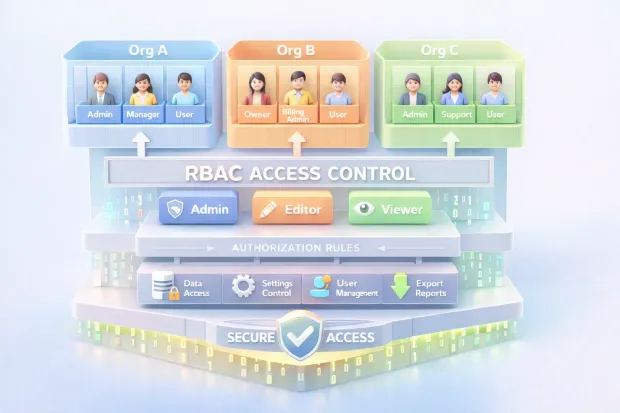
In a multi-tenant SaaS platform, RBAC operates within organizational boundaries rather than globally. Roles are evaluated in the context of the organization the user is currently operating in, not the platform as a whole. That distinction is critical.
An organization might define roles such as owner, admin, billing admin, support admin, and member. Each role carries authority over a specific set of actions inviting users, managing subscriptions, accessing data, or providing support. The same user might be an owner in one organization and a read-only member in another, without any conflict between the two.
What makes this model work is strict tenant scoping. Permissions are always evaluated alongside organizational context. A role never grants access outside its assigned tenant, even if the role name is the same elsewhere. This ensures isolation while still allowing flexibility.
When RBAC is implemented this way, it becomes predictable for customers. Admins understand what power they’re granting. Users know what’s expected of them. And the platform can scale without constantly redefining who gets access to what.
The RBAC Model That Actually Scales in SaaS
RBAC only scales in SaaS when it mirrors how authority actually works in the product. The mistake many teams make is treating roles as static labels instead of contextual containers. In a growing SaaS platform, authority exists at multiple levels at once, and RBAC has to respect that structure rather than flatten it.
At the platform level, there are roles that exist purely to operate and support the product itself. These roles are internal, tightly controlled, and should never leak into customer organizations. Mixing internal authority with customer-facing roles creates confusion fast and makes audits painful.
Inside each organization, RBAC needs to operate independently. Roles here define what a user can manage within that specific tenant user, settings, billing, integrations, or data. These roles should feel intuitive to customers, because they are the ones assigning them. If org admins need documentation to understand the difference between two roles, the model is already under strain.
Where scalability really comes from is separating roles from resource-level permissions. Roles should define broad responsibility, not encode every possible action on every object. When access to specific workspaces, projects, or records is needed, that decision belongs at the resource level. This separation prevents role explosion and keeps RBAC understandable even as the product surface grows.
A scalable RBAC model doesn’t try to answer every question up front. It creates a clear structure that can absorb complexity without becoming brittle.
Delegated Admin Without “Accidental God Mode”
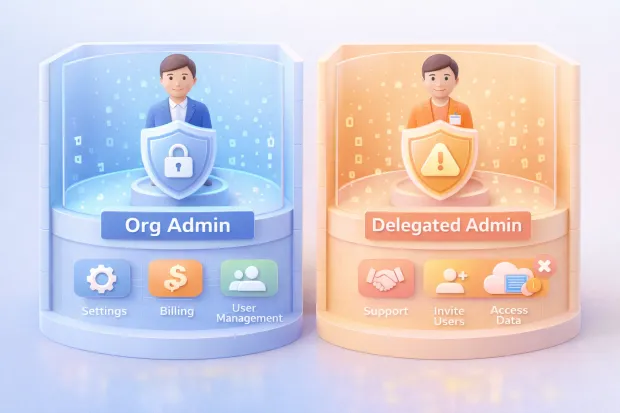
Delegated admin is one of the most requested features in B2B SaaS—and one of the easiest to get wrong. The intent is simple: allow customers to share administrative responsibility without handing over full control. The challenge is that many platforms implement this by cloning the admin role and removing a few permissions, hoping nothing important slips through.
The risk isn’t theoretical. Delegated admins often operate in sensitive areas: user management, security settings, billing workflows, or support tooling. If those powers aren’t clearly separated from data access, it becomes easy for someone to see or export information they were never meant to touch.
The core principle is restraint. Delegated admin roles should be designed around tasks, not authority. Managing users doesn’t automatically mean viewing all user data. Helping with support doesn’t require the ability to change security settings. Each administrative capability should be evaluated independently, especially when it affects data visibility or irreversible actions.
Another subtle but important control is friction. High-impact admin actions shouldn’t feel casual. Requiring additional verification, confirmations, or elevated authentication signals that the action matters. It also protects both the platform and the customer from mistakes that can’t be undone.
Delegated admin works best when it empowers customers without forcing them to trust every admin role equally. That balance is what prevents “god mode” from spreading quietly.
Where Teams Usually Go Wrong With SaaS Access Control
Most SaaS access control problems aren’t caused by missing features. They come from shortcuts taken early and never revisited. The most common one is overpowered defaults. When every new organization starts with a single all-powerful admin role, it feels efficient—until customers grow and need separation of duties that the system wasn’t designed to support.
Another recurring issue is assuming the UI is enough. Buttons get hidden. Menus disappear. But if backend enforcement doesn’t match what the interface suggests, permissions become suggestions rather than rules. This gap often goes unnoticed until an API is used directly or an integration behaves in unexpected ways.
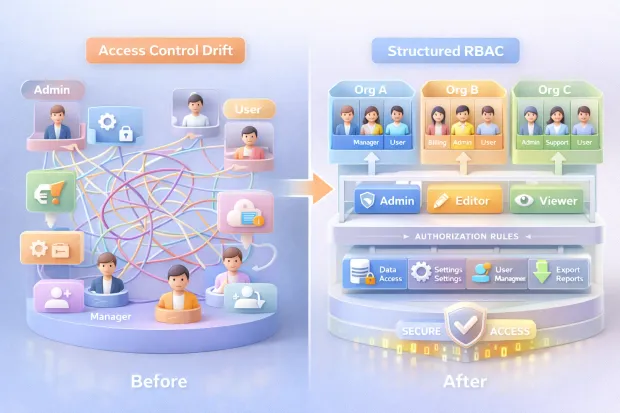
Teams also underestimate how permissions change over time. Users switch roles. Responsibilities shift. Temporary access becomes permanent. Without regular review or clear ownership, permission drift sets in. Over time, no one is confident that access reflects intent anymore.
Perhaps the most damaging mistake is inconsistent tenant scoping. All it takes is one missed check for organizational context, and isolation breaks down. These bugs are rarely dramatic, but when they surface, they erode trust quickly.
SaaS access control doesn’t fail because teams don’t care. It fails because it’s treated as something to set up once instead of something that needs to evolve deliberately as the product and its customers mature.
How to Implement Role-Based Access Control in a SaaS Platform
Implementing RBAC in a SaaS platform is less about choosing the “right” model and more about choosing the right order. Teams that struggle usually start by inventing roles before they understand what those roles are meant to protect. That approach works briefly, then collapses as features multiply.
A more durable approach starts with clarity around actions and boundaries. Every meaningful capability in your product inviting users, exporting data, changing security settings, accessing billing needs to be treated as something that must be explicitly allowed. Once those actions are clear, roles become a way to group responsibility, not a dumping ground for permissions.
In SaaS, RBAC also has to be tenant-aware by default. A role should never exist without organizational context. The same label can mean different things in different organizations, but the scope must always be explicit. This is what prevents authority from leaking across tenants as users move between accounts.
Enforcement matters just as much as design. RBAC that lives only in UI logic is fragile. Real enforcement happens at the API and service layer, where permissions are evaluated consistently regardless of how the request is made. When RBAC is implemented this way, it becomes predictable, testable, and far easier to reason about as the platform grows.
SaaS User Management: Onboarding, Offboarding, and Ownership
User management in SaaS isn’t just about creating and deleting accounts. It’s about establishing trust boundaries from the moment someone joins an organization—and making sure those boundaries hold as people come and go.
Onboarding sets the tone. The first user in an organization often becomes the owner by default, which makes that initial decision more consequential than it appears. Invitations, role assignments, and verification flows all shape how authority spreads inside the tenant. If these early steps are loose, the access model inherits that looseness permanently.
Offboarding is where many systems quietly fail. Removing a user isn’t enough if ownership isn’t transferred, sessions aren’t revoked, or resource-level access remains intact. In multi-tenant SaaS, users often leave one organization while remaining active in another, which makes context-aware cleanup essential.
Ownership is the thread that ties everything together. There must always be clarity about who ultimately controls an organization and who is allowed to delegate that control. When ownership is explicit and transitions are handled deliberately, user management becomes a stabilizing force rather than a recurring source of risk.
Access Control Best Practices for Multi-Tenant SaaS
Strong access control in multi-tenant SaaS is built on consistency, not complexity. The goal isn’t to anticipate every edge case, but to ensure that the system behaves the same way every time a decision is made.
Least privilege is the foundation. Default roles should grant only what’s necessary to get started, not everything that might be useful later. It’s far easier to add permissions intentionally than to unwind broad access once it’s been granted.
Visibility is equally important. Role changes, permission updates, and admin actions should be observable and auditable. When something goes wrong, teams should be able to trace who changed what and when—without guessing.
Another quiet best practice is treating tenant isolation as something to test continuously, not something you assume is working. Every new feature, query, or integration introduces another chance to miss context. Teams that build isolation checks into their development and review process catch problems long before customers do.
The best access control systems don’t rely on heroics. They rely on defaults, patterns, and repetition.
When RBAC Isn’t Enough
RBAC starts to feel limited when access decisions depend on more than role alone. That doesn’t mean RBAC has failed, it means the product has matured. At this stage, the mistake teams make is throwing RBAC away instead of extending it.
In most SaaS platforms, RBAC remains the baseline. It defines who a user is within an organization. What gets added on top are additional signals that influence how and when that authority can be exercised. Context such as risk level, device trust, or sensitivity of the action can all shape the final decision.
For more complex sharing scenarios, especially where access depends on relationships between users and resources, finer-grained models can complement RBAC without replacing it. These layers should be introduced carefully and locally, only where RBAC becomes genuinely awkward.
The key is restraint. Each new layer should solve a specific problem, not introduce a new mental model everywhere. When RBAC remains the anchor and additional controls are layered intentionally, the system gains precision without losing clarity.
Conclusion
Clean access control doesn’t announce itself. It just works.
Users onboard faster. Admins understand what they’re allowed to do. Support tickets don’t start with “Why can’t I access this?” or worse, “Why can I access this?” And security teams stop worrying about permissions being silently over-granted six months ago.
That’s the real outcome of doing RBAC right in SaaS.
In multi-tenant B2B platforms, access control is no longer a static ruleset. It’s a living system that evolves as customers add organizations, invite teammates, delegate responsibility, and integrate your product deeper into their workflows.
If roles aren’t scoped correctly, if tenant boundaries aren’t enforced everywhere, or if delegated admin power isn’t intentionally limited, the system doesn’t just become confusing, it becomes risky.
The teams that get this right don’t start with “roles.”
They start with protected actions, clear ownership, and explicit tenant context. RBAC becomes the backbone, not the bottleneck. And when finer control is needed, it’s layered thoughtfully without ripping everything apart.
If you’re building or scaling a B2B SaaS platform, your access model will eventually show up in customer trust, enterprise readiness, and security posture. The question isn’t whether you need to revisit it. It’s whether you do it deliberately or after something breaks.
Looking to choose the right approach?
Start by auditing who can do what, inside which organization, and why. That clarity alone puts you ahead of most SaaS platforms still treating access control as an afterthought.
FAQs
Q: What is role-based access control in SaaS?
A: Role-based access control in SaaS assigns permissions based on a user’s role within an organization. The role is always evaluated in tenant context, not globally across the platform.
Q: How is SaaS access management different from internal IAM?
A: Internal IAM assumes one organization and centralized control. SaaS access management must handle multiple tenants, customer-managed admins, and users with different roles across organizations.
Q: Why do SaaS platforms need delegated admin roles?
A: Delegated admins allow customers to share administrative tasks without granting full control. This reduces operational load while limiting exposure to sensitive data and actions.
Q: When does RBAC stop being enough in a SaaS platform?
A: RBAC alone becomes limiting when access depends on context, risk, or resource relationships. Most platforms keep RBAC as the base and layer additional controls where precision is needed.


