
Introduction
If you build or operate a modern access control SaaS, chances are you already rely on Role-Based Access Control. And for good reason. RBAC gives structure to chaos. It helps teams answer a basic but critical question: who can do what inside a system. For early-stage products and even many mature platforms, it feels sufficient until it quietly stops being so.
Here’s the uncomfortable truth most teams discover too late: RBAC is excellent at assigning access, but not at controlling how long that access should exist or how narrowly it should be scoped.
As SaaS platforms scale more tenants, more integrations, more support workflows, more data roles start to accumulate power. Permissions get added “just for now.” Temporary access turns permanent. Admin roles become catch-all solutions. This is where SaaS access management begins to crack, even though RBAC is technically “implemented.”
This is why conversations around Just-in-Time (JIT) access and Just-Enough Access (JEA) are no longer reserved for large enterprises or privileged access teams. They’re becoming essential layers on top of RBAC for any serious SaaS identity and access management strategy.
JIT focuses on when access should exist. JEA focuses on how much access is actually required. Together, they address the two biggest blind spots in traditional SaaS user access management: standing privileges and over-permissioning.
If you’re new to this space, think of RBAC as the foundation defining roles and responsibilities across your product. JIT and JEA don’t replace that foundation; they refine it.
For experienced teams, these models are often the missing piece that turns a “configured” access system into one that can actually withstand audits, incidents, and real-world usage.
This guide brings both perspectives together, showing how RBAC, JIT, and JEA work as a single, practical access control model for modern SaaS platforms.
RBAC Works… Until Your SaaS Starts Scaling in Real Life
RBAC usually feels rock-solid at the beginning. You define a few roles, attach permissions, and suddenly SaaS user management feels organized. Admins administer, users use, support supports. Clean. Logical. Everyone’s happy.
Then the product grows.
New tenants come in with different expectations. Support teams need deeper access to debug edge cases. Customers ask for custom admin roles. Integrations start requesting service-level permissions.
Suddenly, roles that were once clear start absorbing exceptions. A permission gets added because it’s “urgent.” Another because “support needs it for now.” And almost no one circles back to remove them.
This is where access control SaaS systems quietly become risky, not because RBAC failed, but because it was asked to solve problems it wasn’t designed for. RBAC is static by nature. SaaS environments aren’t. The more dynamic your platform becomes, the more RBAC alone struggles to answer two uncomfortable questions: Does this person really need this much access? And do they need it right now?
At scale, SaaS access management isn’t just about defining roles, it’s about controlling privilege sprawl. Without additional guardrails, RBAC roles tend to drift toward maximum access over time. That drift is subtle, but it’s exactly how standing privileges become normalized and how incidents slip through “properly configured” systems.
What Role-Based Access Control Actually Means in SaaS
At its core, what is role-based access control in a SaaS environment is deceptively simple: users are assigned roles, and roles define what actions they can perform. But SaaS RBAC isn’t the same as internal IT RBAC. You’re not managing employees on a single network, you're managing customers, partners, admins, and support staff across multiple tenants and contexts.
In practice, RBAC in SaaS identity and access management serves as a baseline authorization layer. It defines who someone is supposed to be in the system. Tenant Admin. Billing Manager. Support Agent. Analyst. Viewer. These roles establish expectations and provide consistency across onboarding, audits, and operations.
The problem begins when RBAC is stretched beyond that baseline. Teams often try to use roles to encode time-bound needs, emergency access, or one-off operational tasks. That’s how you end up with dozens of near-duplicate roles or overly powerful admin roles that nobody wants to touch but everyone relies on.
When teams implement role-based access control successfully in SaaS, they treat roles as stable identity anchors, not flexible problem-solvers. RBAC defines the starting point. It should never be the only control standing between sensitive actions and unintended access.
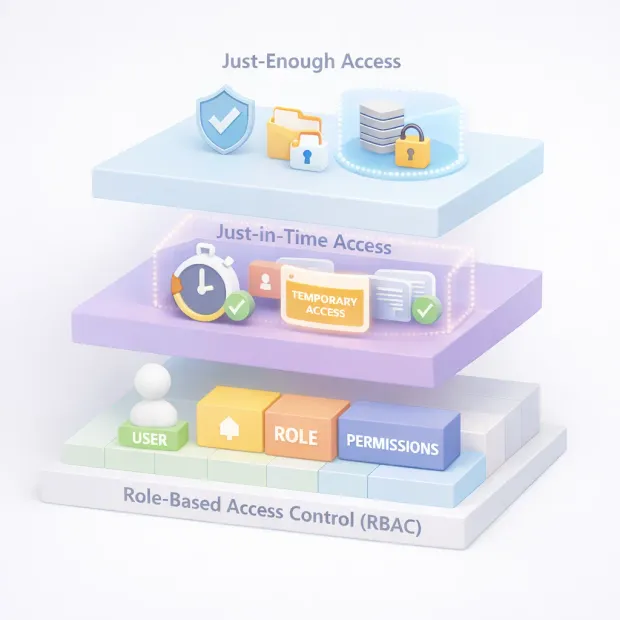
JEA vs JIT: Similar Goals, Very Different Fixes
Just-Enough Access and Just-in-Time access are often mentioned together, but they solve different failure modes in SaaS user access management and confusing them usually leads to half-baked implementations.
Just-Enough Access (JEA) focuses on scope. It asks a simple question: what is the minimum set of permissions required to complete this task? JEA is about removing unnecessary capability. Even when access is valid, JEA ensures it’s narrow. You might allow a support engineer to reset MFA, but not export user data. You might allow log access for one tenant, not all tenants.
Just-in-Time access (JIT) focuses on duration. It addresses the problem of standing privileges by ensuring elevated access exists only when needed and disappears automatically when it’s no longer justified. JIT access typically involves a request, an approval or policy check, and a hard expiration.
Here’s where it gets interesting. JIT without JEA still allows overpowered access just temporarily. JEA without JIT still leaves sensitive permissions hanging around forever. In modern SaaS access control, the two are complementary. One limits how much access exists. The other limits how long it exists.
Together, they transform RBAC from a static permission model into a dynamic control system that reflects how SaaS platforms are actually used.
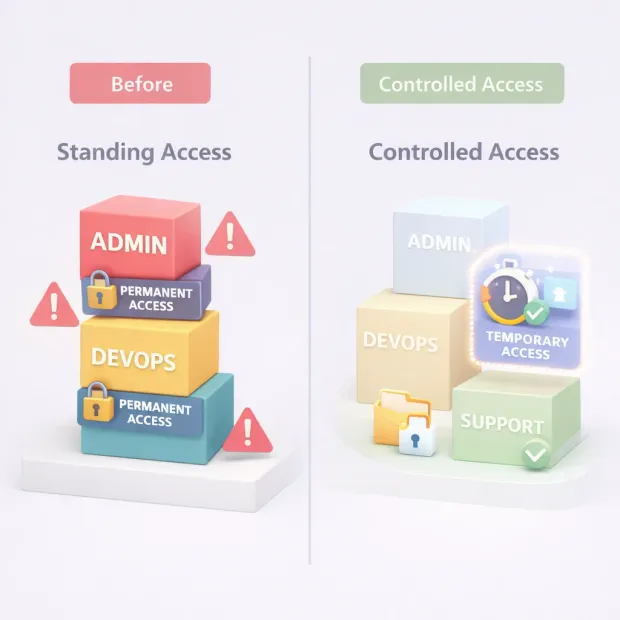
A Realistic SaaS Pattern: “RBAC Baseline + JIT Elevation + JEA Task Scopes”
The most effective SaaS teams don’t rip out RBAC to adopt JIT or JEA. They layer them intentionally and selectively.
It usually starts with a clean RBAC baseline. Roles remain simple, understandable, and stable across tenants. They define default capabilities, not edge cases. This baseline supports onboarding, reporting, and audits without confusion.
On top of that baseline sits JIT elevation. When a user needs to perform a sensitive action production troubleshooting, cross-tenant support, data recovery they request temporary elevation. That request is evaluated against policies, approved if appropriate, and granted for a limited time. No silent promotions. No forgotten access.
Finally, JEA task scopes tighten the last mile. Even during elevation, permissions remain constrained to the task at hand. Access might be limited to a specific tenant, resource, or operation. Elevated doesn’t mean unrestricted, it means precisely controlled.
This pattern scales because it respects how people work. It doesn’t block productivity, but it removes accidental trust. It also aligns naturally with access control best practices: least privilege, auditability, and clear accountability. More importantly, it prevents RBAC from becoming the silent source of risk as your SaaS grows.
If you’re designing for long-term SaaS user management, this layered model isn’t overengineering its realism.
How to Implement JIT/JEA on Top of RBAC
This is where many teams freeze. JIT and JEA sound powerful, but the assumption is that adopting them means rewriting the entire authorization layer. In reality, the cleanest implementations build around RBAC, not instead of it.
Start by accepting one thing: RBAC already answers who someone is supposed to be in your system. Don’t fight that. Use roles as your baseline identity contract. Every user still has a role. That role still defines their default permissions. Nothing breaks here.
The shift happens when you stop encoding edge cases into roles.
Instead of creating a “Temporary Super Admin” role or a “Support-With-Export” role, you introduce elevation as a workflow, not a role. When a user needs more power than their RBAC role allows, they request it. That request triggers policy checks on who they are, what they’re trying to do, which tenant or resource is involved, and whether approval is required.
JIT handles when elevated permissions exist. The system grants access for a fixed window and then removes it automatically. No reminders. No cleanup tickets. No guessing who still has access six months later.
JEA handles how much access is granted during that window. Even while elevated, permissions remain tightly scoped. The user doesn’t become “admin of everything.” They gain the minimum capabilities needed for that specific task, against that specific resource, for that specific time.
The important part is this: RBAC remains your authorization backbone. JIT and JEA sit as decision layers on top of it. Tokens, sessions, or permission checks simply evaluate additional constraints before allowing sensitive actions. You’re not rebuilding authorization, you’re enforcing it more honestly.
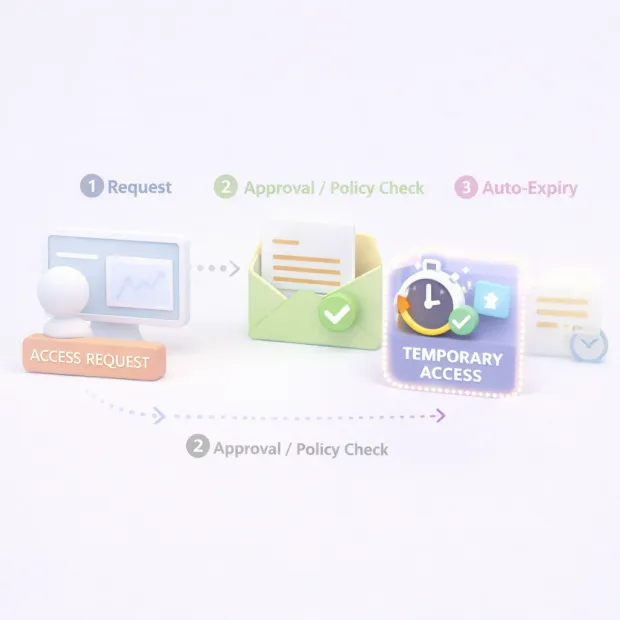
Access Control Best Practices for SaaS Teams Using JIT and JEA
Once JIT and JEA enter the picture, access control best practices stop being theoretical and start becoming operational habits.
The first is discipline around baseline roles. The cleaner your RBAC model is, the easier everything else becomes. Fewer roles. Clear intent. No “just-in-case” permissions baked in. If a role feels too powerful, it probably is.
The second is deciding explicitly which actions should never be standing access. High-impact operations like exports, deletions, impersonation, security changes, or cross-tenant access should always require elevation. When teams leave this ambiguous, JIT becomes optional, and optional security controls rarely survive real pressure.
Another best practice is visibility. JIT and JEA only work when access events are observable. Who requested access? Why? Who approved it? What was actually done? If your SaaS access management system can’t answer those questions quickly, the model loses credibility during audits and incidents.
Finally, expiration is non-negotiable. JIT access without hard expiry is just delayed permanent access. The entire point is that the system doesn’t trust humans to remember to give access back and that’s okay.
Where Teams Usually Go Wrong
This is the part nobody likes to admit, but it’s where most SaaS access control failures actually come from.
The most common mistake is treating JIT as a manual courtesy instead of a system-enforced rule. Someone requests access to Slack. An admin adds them to a role. Everyone promises to remove it later. Later never comes. The system looks compliant on paper, but standing privilege quietly returns.
Another pattern is approvals without policy. If every request needs human approval but no guardrails, approvers become the security model. Under pressure, approvals turn into rubber stamps. JIT exists but it’s cosmetic.
Teams also underestimate JEA. They grant temporary admin access but forget to scope it. The access expires eventually, sure but during that window, the blast radius is still massive. Incidents don’t care that access was temporary.
And then there’s logging. Many systems technically log everything, but no one reviews it. Access reviews become ceremonial. Alerts are noisy or ignored. This is where “we have RBAC, JIT, and JEA” collapses into “we thought we did.”
A Simple Decision Guide: What to JIT, What to JEA, What to Leave as RBAC
Not everything needs JIT. Not everything needs JEA. Overusing either creates friction without improving security.
Leave RBAC alone for predictable, low-risk actions. Read-only access. Standard workflows. Everyday tenant administration that customers expect to be always available. This is your foundation.
Use JIT for anything that shouldn’t exist all the time. Production troubleshooting. Cross-tenant support. Elevated configuration changes. If you’d be uncomfortable discovering that someone still has this access months later, it belongs behind JIT.
Use JEA wherever the impact of misuse is high. Data exports. Deletes. Security settings. Bulk actions. Even when access is valid and approved, scope it tightly so mistakes or abuse can’t spread.
When teams get this balance right, something interesting happens. Access stops being a liability you hope no one questions. It becomes a controlled system you can explain, defend, and evolve. That’s when access control SaaS moves from “configured” to genuinely secure.
Conclusion
RBAC still plays a central role in SaaS access control. It remains the most understandable way to align permissions with business roles and responsibilities.
But on its own, it assumes a level of static behavior that modern SaaS systems simply don’t have. People change tasks daily. Support teams jump between tenants. Engineers troubleshoot production issues at odd hours. These realities expose the limits of role-only thinking.
This is where layering Just-in-Time access and Just-Enough Access on top of RBAC fundamentally changes outcomes. JIT removes the risk of long-lived elevated access by making privilege temporary and intentional.
JEA reduces the damage radius by ensuring that even elevated access stays narrowly scoped. Together, they turn RBAC from a permission assignment model into a true enforcement mechanism, one that adapts to time, task, and risk.
For teams designing or improving SaaS user account management, this approach offers clarity. You don’t need endless roles. You don’t need to grant admin access “just in case.” You need a clean RBAC baseline, a clear idea of which actions are truly sensitive, and the discipline to require elevation only when it’s justified. That’s what modern access control best practices look like in SaaS today.
In the end, strong access control SaaS isn’t about trusting roles forever. It’s about trusting them just enough and only for as long as necessary. When RBAC defines who someone is, JIT and JEA ensure the system never forgets what they should actually be allowed to do, right now. Book a Demo today.
FAQs
Q: Is RBAC alone enough for modern SaaS access control?
A: RBAC is essential, but on its own it struggles with standing privileges and over-permissioning. JIT and JEA add time-based and scope-based controls that RBAC can’t handle by itself.
Q: Do JIT and JEA replace role-based access control?
A: No. RBAC remains the foundation. JIT and JEA sit on top of it to control when elevated access exists and how much access is actually granted.
Q: Does implementing JIT and JEA add friction for users?
A: If designed well, it reduces long-term friction. Users get access when they truly need it, without carrying risky permissions forever.
Q: What types of SaaS actions should always use JIT or JEA?
A: High-impact actions like data exports, deletions, security changes, impersonation, and cross-tenant access are best protected with JIT, JEA, or both.



