Introduction
Securing digital identities has become more complex than ever, and organizations are now rethinking the traditional ways users log in. For years, Two-Factor Authentication (2FA) has been the standard for improving protection by adding an extra layer beyond passwords.
But with rising user expectations, stronger security threats, and the industry shift toward frictionless access, a new contender is gaining momentum in passwordless authentication.
This shift is often framed as passwordless vs 2fa, but the real decision is usually broader: passwordless vs mfa. Many modern teams are moving toward authentication without password not because 2FA is “bad,” but because passwords are the most attacked link in the chain.
When implemented with standards like passkeys and WebAuthn, passwordless authentication reduces phishing exposure, improves completion rates, and strengthens overall passwordless security without adding extra steps that users often hate.
Both approaches aim to solve the same problem: protecting user accounts from unauthorized access. Yet, they do it in very different ways. 2FA strengthens passwords by adding a second factor, while passwordless authentication removes passwords entirely. Understanding this distinction is crucial for security architects, product teams, and developers deciding what’s best for their platform.
This blog clearly and practically breaks down the differences. You’ll learn how each method works, where it excels, where it struggles, and which one offers the right mix of security and user experience for your use case. Whether you’re new to authentication or designing enterprise-scale CIAM systems, this guide will help you understand the real tradeoffs behind choosing 2FA or going passwordless.
What Is 2FA and Passwordless Authentication?
Before comparing the two, it’s important to understand what each method actually is and how it fits into modern authentication workflows. Both approaches aim to protect user accounts but they do so in fundamentally different ways.
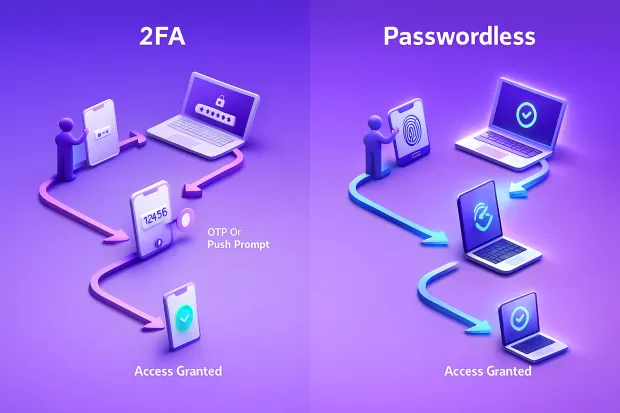
What Is (2FA) ?
Two-Factor Authentication (2FA) is a security method that requires users to verify their identity using two different factors:
-
Something they know typically a password
-
Something they have or are like an OTP, a TOTP app, biometrics, or a hardware key
2FA strengthens traditional passwords by adding a second checkpoint. Even if a password is stolen, the attacker still needs the additional factor making unauthorized access significantly more difficult.
However, not all 2FA methods offer the same level of protection.
-
SMS OTPs are widely used but vulnerable to SIM-swap attacks and phishing.
-
Authenticator apps (TOTP) are more secure but still susceptible to real-time MITM attacks.
-
Hardware keys (FIDO2/WebAuthn) offer phishing-resistant 2FA but require compatible devices.
In short, 2FA enhances security but relies heavily on the strength of the second factor and can introduce extra steps that affect usability.
Also read: How Secure is Two-Factor Authentication (2FA)?
What Is Passwordless Authentication?
Passwordless authentication removes the password entirely.
If you’re asking how does passwordless authentication work, the short answer is: the user proves device possession and/or biometric presence, and the server verifies it using cryptographic keys—so there’s no reusable secret (like a password) to steal.
Instead of relying on “something you know,” it validates identity using device-bound credentials and strong cryptography, such as:
-
Biometrics (Face ID, fingerprint)
-
Passkeys
-
Security keys
-
WebAuthn-based device authentication
-
Magic links or email-based one-tap login
With passwordless, users authenticate by proving possession of a trusted device or confirming their identity through a biometric match. Because passwords are no longer part of the flow, attackers can’t steal or reuse them and users don’t have to remember anything.
Passwordless is inherently phishing-resistant when implemented with standards like passkeys or WebAuthn. It also reduces helpdesk load, eliminates password resets, and drastically improves login success rates.
However, passwordless requires compatible devices, user education, and careful migration planning especially for global or mixed-tech environments.
Comparing Security: 2FA vs Passwordless
Security is usually the first and most important factor when choosing between 2FA and passwordless authentication. Both approaches improve account protection compared to passwords alone, but how they defend against modern threats is very different.
Understanding these differences helps you choose the method that best aligns with your risk profile, user journey, and threat landscape.
A common question is: is passwordless more secure? In most real-world deployments, modern passkey-based passwordless auth is more phishing-resistant than OTP-style 2FA because attackers can’t trick users into sharing a code or reuse stolen credentials.
That said, passwordless mfa can also exist as a layered approach where passwordless becomes the primary login, and step-up MFA is used only for high-risk actions. This is where teams start thinking in terms of mfa passwordless strategies rather than treating them as mutually exclusive.
Security With 2FA
2FA dramatically improves security by adding a second step beyond the password. If attackers steal or guess a password, they still need the additional factor to break in. This alone prevents most common account takeover attempts.
But the actual strength of 2FA depends on the type of second factor used:
-
SMS OTPs are vulnerable to SIM-swap attacks, SS7 exploits, OTP interception, and real-time phishing.
-
TOTP apps improve security but can still be captured via advanced man-in-the-middle (AitM) attacks.
-
Push notifications can be manipulated through MFA fatigue attacks.
-
Hardware keys (FIDO2/WebAuthn) are phishing-resistant but require compatible devices and user familiarity.
2FA is effective, but attackers have become more sophisticated. Many traditional 2FA methods can be tricked, intercepted, or socially engineered if users or systems are not trained or hardened.
Security With Passwordless Authentication
Passwordless authentication strengthens security by removing the password entirely, the most common target of cyberattacks.
Most passwordless methods rely on public-key cryptography, meaning:
-
The private key stays securely on the user’s device.
-
Only the public key is shared with the server.
-
Even if the server is compromised, the attacker cannot derive the private key.
This makes passwordless inherently more resistant to modern threats like:
-
Password reuse
-
Phishing (when using passkeys or WebAuthn)
-
Brute-force password attacks
-
Database breaches leaking password hashes
Methods such as passkeys, WebAuthn, and biometric device authentication offer phishing-resistant protection because authentication only works for the legitimate domain and cannot be tricked into revealing secrets.
However, passwordless security relies on:
-
Device possession
-
Secure biometric storage
-
Proper fallback flows
-
Safe account recovery paths
If these aren’t implemented carefully, even passwordless setups can become vulnerable.
Which Is More Secure?
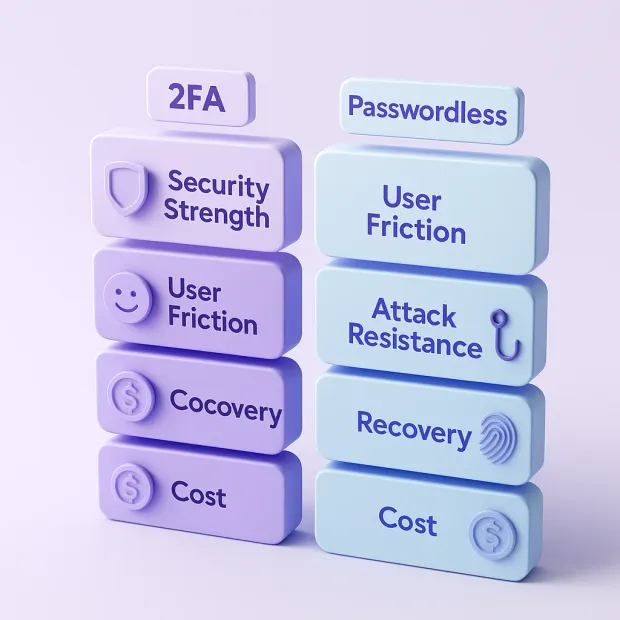
If both are implemented correctly:
- Basic OTP-based 2FA < Advanced 2FA with hardware keys < Passwordless (passkeys/WebAuthn)
Passwordless generally offers stronger, more phishing-resistant security because it removes the password entirely, closing the door on many common attacks. But strong 2FA (like security keys) can match or exceed passwordless security in specific environments.
The real decision depends on your users, devices, and threat model.
Comparing Usability & User Experience
While security is critical, user experience often determines whether people actually adopt and continue using an authentication method. If the login process feels slow, confusing, or inconvenient, users abandon sessions, drop out of onboarding, or disable security features altogether. This is where the difference between 2FA and passwordless authentication becomes immediately visible.
Usability With 2FA
2FA improves security, but it almost always introduces extra steps. Users must:
-
Enter their password
-
Wait for a second factor
-
Switch apps or devices
-
Approve a prompt or type a code
For many users, especially those in fast-paced consumer environments, this feels repetitive and disruptive. Common challenges include:
-
Slow SMS delivery
-
TOTP codes expiring
-
App-switching friction
-
Push fatigue (accidentally approving requests)
-
Lockouts due to lost devices or deleted authenticator apps
Even when users understand the security benefits, 2FA can still feel like a barrier. That’s why adoption and retention depend heavily on how smooth the second-step experience is.
Usability With Passwordless Authentication
Passwordless authentication almost always reduces user effort. Instead of juggling codes or switching screens, users authenticate with:
-
A fingerprint
-
Face ID
-
A passkey stored on their device
-
A simple device confirmation
-
A secure one-tap or magic link
There is no password to remember, no code to enter, and no chance of mistyping anything. This leads to:
-
Faster logins
-
Higher completion rates
-
Fewer abandoned sessions
-
Dramatically fewer helpdesk requests
-
A smoother experience across all devices
From a UI/UX perspective, passwordless feels more intuitive and modern. For users, it “just works” and that simplicity is a major driver behind its growing adoption.
Learn about how to Go Passwordless with Synchronizable Passkeys
Which Has Better UX?
If your goal is to reduce friction and boost login success rates, passwordless wins almost every time.
2FA can be made smoother with push notifications or hardware keys, but it will always require more user effort than a well-designed passwordless flow.
However, usability also depends on:
-
Device compatibility
-
User familiarity
-
How do you design fallback options
-
How your global audience interacts with technology
For example, if many users rely on older devices or limited connectivity, a hybrid 2FA + passwordless approach might offer the best balance.
Cost, Complexity & Implementation Considerations
Choosing between 2FA and passwordless authentication isn’t only about security or usability it’s also a strategic investment decision. Both approaches introduce different levels of cost, technical effort, operational overhead, and long-term maintenance requirements.
Understanding these factors helps organizations plan realistic deployment timelines and ensure the authentication method aligns with their budget, infrastructure, and user base.
Cost & Complexity of Implementing 2FA
2FA is often considered easier to deploy because most users already understand the concept and most systems support it without major architectural changes. Adding SMS OTPs, authenticator apps, or push notifications can be implemented relatively quickly. However, this ease of adoption comes with hidden long-term expenses.
The biggest recurring cost is SMS OTP delivery. For global platforms, SMS fees can quickly scale into significant monthly expenses. Even non-SMS methods create support complexity — lost phones, broken authenticator apps, expired codes, and user lockouts all generate helpdesk tickets that require careful handling. For many organizations, support load becomes one of the largest ongoing operational costs of 2FA.
On the technical side, maintaining secure integrations with OTP providers, mobile push services, or authenticator app workflows requires continuous monitoring. As threat vectors evolve, organizations must update their 2FA flows, enforce risk checks, and manage device migration processes.
While initial implementation is straightforward, scaling 2FA securely can become both resource- and cost-intensive over time.
Cost & Complexity of Implementing Passwordless Authentication
Passwordless authentication generally involves more planning and a higher upfront investment, especially if adopting modern standards like WebAuthn, FIDO2, or passkeys. It requires evaluating device compatibility, browser support, and user readiness.
Engineering teams must integrate strong cryptography, device-bound credentials, biometric flows, and secure recovery paths all of which add technical complexity.
If your roadmap includes how to implement passwordless authentication, treat rollout as a product + security project, not just a feature toggle. Start with passkey enrollment for high-value journeys (login, checkout, account changes), keep carefully designed recovery, and ensure device coverage across web + mobile.
Most importantly, follow passwordless authentication best practices: prefer WebAuthn/passkeys over email links for primary login, harden recovery flows, require step-up for sensitive changes, and instrument adoption so you can gradually reduce password reliance over time.
However, the long-term benefits are substantial. Eliminating passwords removes one of the biggest sources of support tickets: password resets. It improves login success rates, reduces friction, and decreases the overall cost of authentication maintenance. With fewer credentials to store, hash, or manage, infrastructure becomes simpler and more secure.
From a financial perspective, passwordless often delivers better ROI over time. Without password resets, SMS fees, or OTP delivery issues, the ongoing authentication costs decrease significantly. But achieving this efficiency requires an upfront investment in design, development, and user onboarding.
Which Approach Is More Cost-Effective?
The short answer: 2FA is cheaper to launch; passwordless is cheaper to maintain.
Organizations looking for a fast uplift in security often begin with 2FA because the barrier to entry is low. But as systems scale and users multiply, the cost of supporting 2FA, especially SMS OTPs steadily increases.
Passwordless, while more complex during initial rollout, tends to reduce operational costs in the long run thanks to smoother logins and fewer support interactions.
Choosing the better option depends on your timeline, security posture, and ability to evolve your authentication strategy. For companies planning long-term modernization, passwordless usually provides a more sustainable path with higher user satisfaction and lower overhead.
When 2FA Makes Sense and When Passwordless Is Better
Choosing between 2FA and passwordless isn’t about picking a universally superior method. It’s about selecting the approach that aligns best with your users, your risk environment, and your product’s long-term direction.
Both methods offer meaningful advantages, but they excel under different conditions. Understanding these contexts helps you avoid over-engineering security or creating friction that doesn’t add meaningful protection.
When 2FA Is the Better Choice
2FA remains a practical, reliable, and widely compatible way to strengthen security especially when your users or systems aren’t fully ready for the jump to passwordless. Many organizations choose 2FA because it works with nearly any device, requires minimal user education, and can be deployed quickly without major architectural changes.
For platforms with large legacy user bases, diverse device types, or regions where modern authentication standards are still emerging, 2FA provides a dependable layer of protection without forcing a dramatic shift in user behavior.
It’s also the preferred option when organizational readiness is limited. If your infrastructure, identity workflows, or development timeline can’t immediately support WebAuthn, biometric authentication, or device-bound passkeys, strong 2FA with app-based codes, push verification, or hardware keys offers a secure and manageable interim solution.
In short, 2FA is ideal for rapid security improvement, broad compatibility, and environments where stability and predictability matter more than cutting-edge authentication.
When Passwordless Becomes the Better Option
Passwordless authentication shines when user experience, conversion, and long-term security matter most. If your platform prioritizes frictionless login flows, fast onboarding, and high login success rates, passwordless offers an experience that traditional 2FA cannot match.
By eliminating passwords entirely, you remove password resets, forgotten credentials, OTP delays, and many of the usability challenges that frustrate users. This leads to smoother authentication and fewer support touchpoints.
Passwordless also becomes the preferred choice in high-security environments, especially those exposed to phishing, credential stuffing, or large-scale account takeover attempts. Standards like WebAuthn, FIDO2, and passkeys offer phishing-resistant authentication, something most 2FA methods cannot provide unless paired with hardware keys.
For organizations building long-term identity strategies or planning a shift toward modern CIAM capabilities, passwordless aligns naturally with future-proof security models and zero-trust authentication principles.
How to Decide Between the Two
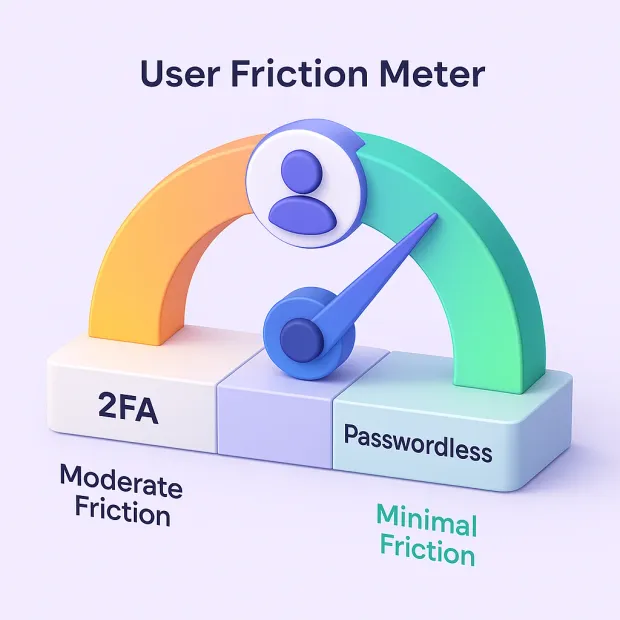
The decision ultimately depends on your balance of security needs, user readiness, and technical capability. If your priority is quick deployment and broad accessibility, 2FA provides a straightforward path. If your goal is minimizing friction, improving trust, and strengthening your defenses against modern attacks, passwordless is the more strategic choice.
Many organizations start with 2FA to cover immediate risks, then transition to passwordless as their users and systems mature creating a hybrid path that evolves in pace with their authentication strategy.
Transitioning: Hybrid Approaches and Future Trends
Modern authentication doesn’t have to be an either–or decision. For many organizations, the path from traditional logins to a fully passwordless future is gradual, intentional, and hybrid. This transition involves introducing stronger factors, improving user familiarity, and evolving the authentication infrastructure without overwhelming users or destabilizing systems.
In practice, many teams land on a hybrid model: passwordless for everyday sign-in, and adaptive step-up MFA for risky events. This “best of both worlds” approach is increasingly described as passwordless mfa because the strongest systems don’t just replace 2FA, they redesign authentication to be phishing-resistant by default while still supporting extra verification when context demands it.
Understanding how hybrid models work—and where authentication is headed helps teams adopt the right strategies at the right time.
Why Hybrid Authentication Makes Sense
Most organizations cannot jump directly from passwords to passwordless. Users still rely on older devices, regional environments vary in support for modern standards, and teams need time to redesign workflows and update security controls.
Hybrid authentication allows businesses to run both systems in parallel: users can still log in using familiar methods (password + 2FA) while gradually adopting passwordless options when they’re ready.
This approach reduces friction, avoids user confusion, and ensures compatibility across diverse audiences. It also gives businesses time to phase out weaker factors like SMS OTPs and promote more secure alternatives such as passkeys or WebAuthn.
Over time, passwordless adoption grows organically as users recognize the convenience and speed it offers.
Introducing Stronger Factors Before Going Passwordless
A strategic transition often begins by strengthening existing 2FA methods. App-based TOTP, push authentication, and hardware-backed keys prepare users for modern, device-centric authentication. These methods build user confidence, reduce reliance on passwords, and ensure that the login experience starts shifting toward phish-resistant, device-bound security.
As users become more comfortable with secure device-based interactions, introducing passkeys or biometric-based authentication becomes far easier. Instead of forcing a sudden change, organizations evolve at the pace of user readiness and technical capability.
The Move Toward Passwordless Standards
Industry momentum is moving decisively toward passwordless authentication, driven by standards like WebAuthn, FIDO2, and passkeys. Major platforms Apple, Google, Microsoft now natively support passkeys across ecosystems, enabling seamless authentication across devices and browsers.
This unified adoption accelerates passwordless adoption because users no longer need specialized hardware or complex setups; their everyday devices become secure authenticators.
As these standards mature, passwordless authentication becomes not only feasible but highly recommended for organizations aiming to reduce account takeovers, improve login success rates, and modernize their CIAM strategy.
The Future of Authentication
The future of authentication is defined by three core principles:
-
Phishing-resistant security: Credentials that cannot be intercepted or reused will replace passwords and OTPs.
-
Frictionless user journeys: Authentication will feel invisible, biometric, seamless, and device-bound.
-
Adaptive intelligence: AI- and behavior-driven signals will dynamically assess risk, prompting additional verification only when necessary.
In this future, passwordless authentication becomes the default, and 2FA serves either as backup or transitional support for legacy systems.
Conclusion
When comparing 2FA vs passwordless, the decision isn’t about declaring one universally superior, it's about selecting the method that aligns with your users, your risk tolerance, and how quickly your organization can evolve.
2FA remains a vital layer of security, especially for teams that need rapid improvement, wide compatibility, and minimal disruption. It’s familiar, reliable, and far more secure than passwords alone, making it a practical choice for many environments.
But as digital experiences mature and threats become more sophisticated, passwordless authentication offers a clear path forward. Removing passwords entirely reduces friction, improves login success rates, and delivers phishing-resistant security that OTP-based methods struggle to match.
The growing adoption of passkeys, WebAuthn, and biometric authentication across all major device ecosystems signals that passwordless is no longer experimental—it’s the modern standard.
When done right, authentication stops feeling like a barrier and becomes a meaningful part of your product experience.
LoginRadius helps you build the ideal balance between strong security and great user experience, whether you’re enhancing 2FA, introducing passwordless, or transitioning your entire platform to a modern authentication model.
If you’re ready to explore what future-proof authentication looks like:
Book a quick LoginRadius demo and see how easy it is to upgrade your security without the friction.
FAQs
Q: Is passwordless more secure than 2FA?
A: Yes passwordless authentication (passkeys/WebAuthn) removes passwords entirely, eliminating phishing, credential stuffing, and password theft. Strong 2FA improves security, but many OTP-based methods can still be intercepted or manipulated.
Q: Should I replace 2FA with passwordless?
A: Not always. Many organizations adopt a hybrid approach keeping 2FA for compatibility while introducing passwordless for modern devices. Over time, most shift toward passwordless as the primary method.
Q: Does passwordless reduce user friction?
A: Absolutely. Passwordless login removes passwords and OTP steps, making authentication faster and more intuitive. Users typically experience higher login success rates and fewer support issues compared to 2FA.
Q: Which method is better for enterprise apps?
A: Passwordless is more future-proof and provides stronger phishing resistance, but 2FA is easier to deploy and works on older devices. The right choice depends on user readiness, device support, and security requirements.