
Introduction
Passwords alone are a weak point in account security. A stolen password, reused credential, or successful credential-stuffing attempt can give an attacker exactly what they need to access an account. Multi-factor authentication (MFA) adds another verification step, and TOTP authentication is one of the most widely used ways to provide that additional factor.
TOTP, or Time-Based One-Time Password, generates a temporary numeric code using a shared secret and the current time. Instead of sending the code through SMS or email, an authenticator app generates it locally on the customer’s device. The code is valid only for a short time—commonly 30 seconds—before a new one replaces it. TOTP is standardized in RFC 6238 and works even when the device has no cellular connection or internet access.
That combination makes TOTP practical for customer logins, step-up authentication, administrative access, and other MFA scenarios. But there is an important security distinction: TOTP is not phishing-resistant. An attacker who captures a valid code through a real-time phishing attack may be able to relay it before it expires.
So, where does TOTP fit in a modern authentication strategy? This guide explains how TOTP authentication works, its security benefits and limitations, how it compares with OTP, HOTP, SMS OTP, and passkeys, and the practices that matter when implementing it for real-world applications.
What Is TOTP Authentication and Why Is It Used for MFA?
TOTP authentication is an authentication method that generates a temporary one-time password from two inputs: a shared secret key and the current time. TOTP stands for Time-Based One-Time Password and is defined by RFC 6238 as a time-based extension of the HMAC-Based One-Time Password (HOTP) algorithm.
Unlike a static password, a TOTP code changes automatically after a fixed time interval, commonly every 30 seconds. The authenticator and the authentication server independently calculate the code using the same secret and time step. If the code entered by the customer matches the value expected by the server within the accepted time window, the TOTP verification succeeds.
TOTP is commonly used as an additional factor in multi-factor authentication (MFA). A customer might first enter a password and then provide a TOTP generated by an authenticator app. Knowing the password alone would therefore not be enough to complete that authentication flow.
Another useful characteristic is that the TOTP itself does not need to be delivered to the customer. Once enrollment is complete, the authenticator can generate codes locally. That means TOTP can continue working when a device has no cellular service or internet connection.
What Is a TOTP Code?
A TOTP code is the short-lived numeric value generated by the TOTP algorithm. Six-digit codes are common, although the underlying standard supports other configured digit lengths. Each code corresponds to a specific time interval and is replaced when the next interval begins.
A short validity period limits how long a captured code can potentially be used, but expiration should not be mistaken for phishing resistance. If an attacker captures a current TOTP through a real-time phishing attempt, they may still be able to relay it before the code expires.
What Is a TOTP Authenticator?
A TOTP authenticator is the software or device that stores the shared secret and uses it to generate time-based codes. Authenticator apps are a common example. During enrollment, the secret is typically provisioned through a QR code or another secure setup method.
After enrollment, both the authenticator and server possess the information needed to calculate the expected TOTP independently. The secret itself is not sent with every login attempt. This is why protecting the enrollment process and stored TOTP secret is critical: if an attacker obtains that secret, they may be able to generate valid future codes.
With those pieces in place, the next question is what happens mathematically between the stored secret, the current time, and the six-digit code a customer sees. That is where the TOTP algorithm comes in.
How Does TOTP Authentication Work?
TOTP authentication works by having the authenticator and authentication server independently generate the same one-time code from a shared secret and the current time. The customer’s device does not need to contact the server each time a code is generated. Both sides already have what they need.
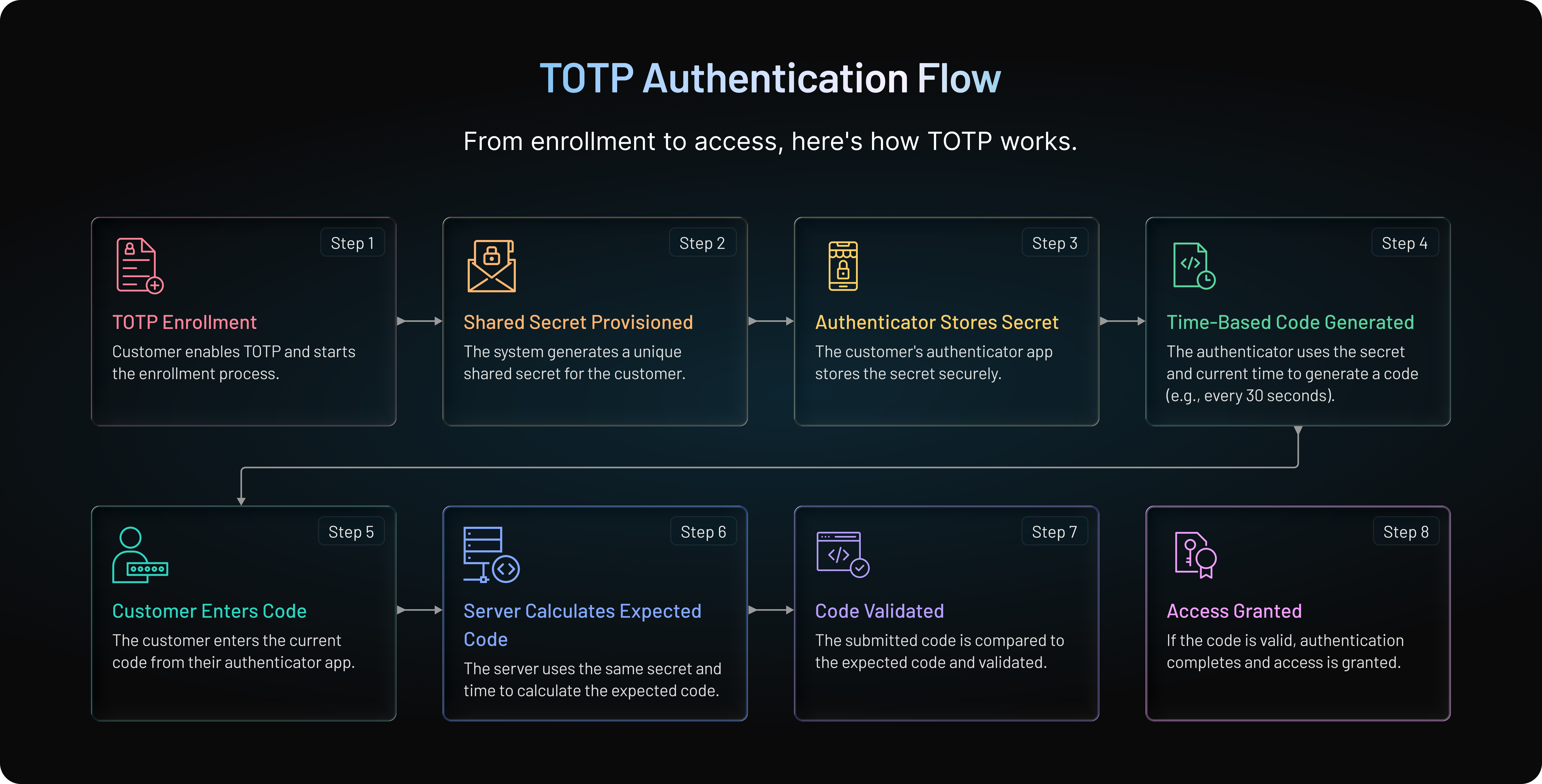
The process begins before the first TOTP code is ever entered.
1. TOTP Enrollment and Secret Key Provisioning
When a customer enables TOTP, the authentication system generates a unique secret key for that enrollment. The secret is commonly provisioned to an authenticator app through a QR code, although manual entry can also be supported.
Once enrolled, both the authenticator and the server have access to the secret needed for future TOTP calculations. The secret should remain protected. It is not the temporary six-digit code the customer sees, and it should never be treated as disposable authentication data.
This enrollment stage deserves particular attention. Anyone who obtains the TOTP secret may be able to reproduce future codes, which is why QR codes, provisioning data, and stored secrets need appropriate protection.
2. The Current Time Is Converted Into a Time Step
TOTP does not use the exact current timestamp directly. Instead, time is divided into fixed intervals. RFC 6238 uses 30 seconds as the default time step.
The time counter can be represented as: T = floor((Current Unix Time − T0) / X)
Here, T0 is the starting Unix time and X is the configured time-step size. With a 30-second interval, everyone within the same interval gets the same time-counter value.
Once that interval ends, the counter changes. A different TOTP can then be generated even though the shared secret remains unchanged.
3. The Authenticator Calculates an HMAC Value
TOTP builds on the HOTP algorithm defined in RFC 4226. Instead of using an event counter as HOTP does, TOTP uses the time-derived counter.
The authenticator combines the shared secret with that counter using an HMAC algorithm. RFC 6238 supports HMAC-SHA-1, HMAC-SHA-256, and HMAC-SHA-512.
The result is a cryptographic value much larger than the short code a customer could reasonably type. So another operation is needed.
4. The HMAC Result Becomes a TOTP Code
The generated HMAC value is processed using the dynamic truncation mechanism inherited from HOTP. The resulting value is reduced to the configured number of digits.
In many implementations, the customer sees a six-digit code such as: 482913
That code represents the combination of the enrolled secret and the current time interval. When the next interval begins, the calculation changes and a new code appears.
The important point is that the server did not send 482913 to the authenticator. Both sides can calculate it independently.
5. The Customer Submits the TOTP
During an MFA flow, the application asks the customer for the current code displayed by their authenticator. The customer enters that value, and it is sent to the authentication system for verification.
For example: Password Verified → TOTP Required → Customer Enters Current TOTP → TOTP Verified → Authentication Completed
TOTP can also be introduced during step-up authentication when an application requires additional verification before a sensitive action.
6. The Server Independently Verifies the Code
The server calculates the expected TOTP using its copy of the shared secret and the current time step. It then compares the expected result with the code submitted by the customer.
In practice, device and server clocks are not always perfectly synchronized. Implementations may therefore accept codes from a limited neighboring time step to account for reasonable clock drift. That window should remain narrow. Accepting too many adjacent time steps makes codes usable for longer than necessary.
If the submitted TOTP falls within the permitted validation window and satisfies the system’s other verification controls, the factor is accepted. Otherwise, authentication fails.
This explains an important property of TOTP: the temporary code changes, but the underlying shared secret does not. Secure TOTP therefore depends on more than a 30-second expiration timer. Secret protection, accurate clocks, limited validation windows, rate limiting, secure enrollment, and recovery controls all matter.
What Are the Key Advantages of TOTP Authentication?
TOTP has remained a common MFA option because it combines a standardized authentication mechanism with relatively straightforward deployment and broad authenticator support. It also avoids one dependency found in SMS and email OTP flows: the one-time code does not have to travel across a delivery channel before the customer can use it.
Those characteristics make TOTP useful for customer-facing applications, partner portals, administrative access, and step-up authentication. Its advantages, however, are best understood in practical terms rather than treating TOTP as universally stronger than every other authentication method.
Short-Lived Codes Reduce Replay Opportunities
A static password may remain valid for weeks, months, or longer. A TOTP has a much shorter usable lifetime. With the commonly used 30-second time step, the displayed code changes quickly as the authenticator moves into the next interval.
That limits the period during which a captured code may be useful. It does not eliminate replay or real-time phishing attacks, though. If an attacker obtains a valid TOTP and submits it while it is still accepted, the short expiration period alone will not stop the attack.
Codes Are Generated Locally
With SMS or email OTP, the authentication system generates a code and sends it through an external delivery channel. TOTP works differently.
After enrollment, the authenticator generates the TOTP directly on the customer's device using the previously provisioned secret and current time. The server independently calculates the expected value when verification is required.
There is no need to transmit each newly generated TOTP to the authenticator. This removes code-delivery dependencies such as SMS routing or email delivery from the TOTP generation process.
TOTP Works Without Cellular Service or Internet Access
Because code generation happens locally, an authenticator does not need an active mobile network or internet connection simply to calculate the current TOTP.
That can be useful when customers have poor connectivity, are traveling, or cannot reliably receive SMS messages. As long as the authenticator has the required secret and an accurate clock, it can continue generating codes.
The application itself may still require network connectivity to complete authentication. The offline benefit applies specifically to generating the TOTP.
TOTP Is Based on an Open Standard
TOTP is defined by RFC 6238, which extends the HOTP standard in RFC 4226 by using time rather than an event counter as the moving factor.
Using a standardized algorithm makes TOTP interoperable across a broad range of compatible authenticator applications and authentication systems. Organizations are not dependent on a proprietary algorithm simply to generate and verify the codes.
That portability is one reason TOTP has become familiar to both users and engineering teams.
TOTP Avoids SMS-Specific Delivery Risks
TOTP does not rely on the mobile carrier network to deliver each authentication code. As a result, it avoids risks tied specifically to SMS delivery, including SIM-swapping scenarios in which an attacker gains control of a victim's phone number.
It also removes practical problems such as delayed SMS delivery, limited cellular coverage, and per-message delivery dependencies.
This does not make TOTP immune to account takeover. Phishing, compromised TOTP secrets, insecure recovery flows, malware, and other attack paths still need to be considered.
TOTP Can Be a Practical Additional Factor for MFA
TOTP is commonly paired with another authentication factor rather than used as a standalone replacement for every authentication method. A familiar example is a password followed by a code from an authenticator app.
For organizations that need to introduce MFA across existing authentication journeys, TOTP offers a well-established option without requiring customers to receive a code through SMS or email each time they authenticate.
It can also be used more selectively. Instead of prompting for a TOTP during every interaction, an application may require additional verification when a customer signs in, changes security settings, accesses sensitive information, or performs another protected action.
Still, convenience and short-lived codes tell only part of the story. TOTP has security limitations that matter when deciding where it belongs in an authentication strategy particularly around phishing, shared-secret protection, device loss, and account recovery.
How Secure Is TOTP Authentication and What Are Its Limitations?
TOTP can provide stronger account protection than password-only authentication when it is used as an additional factor and implemented correctly. A compromised password alone may no longer be enough to complete authentication because the attacker also needs a currently valid TOTP.
But TOTP should not be treated as phishing-resistant or immune to account takeover. Its security depends on how secrets are stored, how codes are validated, how enrollment and recovery are handled, and what happens when an attacker can intercept a code in real time.
What Does TOTP Protect Against?
TOTP helps reduce the risk that a stolen password can immediately be used to access an MFA-protected account. This matters in attacks involving credential stuffing, password reuse, or exposed credentials because possession of the password does not automatically provide the second factor.
The short validity of TOTP codes also limits their useful lifetime compared with static credentials. And because the codes are generated locally rather than delivered through SMS, TOTP avoids authentication-code interception risks that depend specifically on the mobile carrier network, including SIM-swapping attacks.
These are meaningful advantages. They should not be confused with protection against every way an attacker can obtain or relay a valid TOTP.
TOTP Is Not Phishing-Resistant
This is where teams need to be careful with terminology. TOTP codes can still be phished.
Consider a real-time phishing site that imitates a legitimate login page. A customer enters a password and then the current TOTP. The attacker can immediately relay both credentials to the legitimate service while the code remains valid. An adversary-in-the-middle phishing proxy can automate a similar process.
The fact that the code expires quickly reduces the time available for misuse, but it does not prevent this type of relay attack. NIST therefore does not classify manually entered OTP authenticators as phishing-resistant.
Authentication methods based on cryptographic verifier binding, such as properly implemented WebAuthn/FIDO authentication, address phishing differently because authentication is bound to the legitimate relying party rather than relying on a customer to manually transfer a code.
Shared Secret Compromise Can Undermine TOTP
The six-digit code is temporary. The TOTP secret behind it is not.
During enrollment, the authenticator and authentication system establish a shared secret that is used to generate future codes. If an attacker obtains that secret, they may be able to configure another authenticator and calculate the same TOTPs without needing to intercept each code individually.
Protecting the secret is therefore one of the most important parts of a TOTP implementation. Provisioning data should be handled securely, secrets should be protected against unauthorized access, and enrollment QR codes should not remain unnecessarily exposed after setup.
A short-lived TOTP cannot compensate for a compromised long-lived secret.
Device Loss Requires a Secure Recovery Process
What happens when a customer loses the phone containing their authenticator?
A well-designed TOTP deployment needs a way to regain access or enroll a replacement authenticator. But recovery introduces another attack surface. If an attacker can bypass TOTP simply by convincing the application to reset it through a weaker process, the strength of the original MFA flow matters much less.
Recovery may involve mechanisms such as backup factors, recovery codes, or additional identity verification, depending on the application's security requirements. Re-enrollment should also invalidate or appropriately handle the previous TOTP enrollment when necessary.
The goal is simple: recovery should restore legitimate access without becoming an easy route around MFA.
TOTP Is Vulnerable to Online Guessing Without Verification Controls
A six-digit TOTP has a limited number of possible values. Short validity helps, but an authentication system should not allow unlimited guesses during that window.
Rate limiting, failed-attempt controls, monitoring, and appropriately narrow validation windows can make repeated guessing more difficult. The verification endpoint itself needs protection; security cannot rely only on the mathematical properties of the TOTP algorithm.
Implementations should also avoid accepting the same successfully verified OTP repeatedly within its validity period where replay prevention is required.
Clock Drift Can Affect Security and Reliability
The authenticator and server calculate their codes independently, so their clocks need to remain sufficiently synchronized. A device that is too far ahead or behind can generate a code the server does not consider valid.
Servers commonly account for small differences by accepting a limited neighboring time step. There is a trade-off, though. A wider validation window can reduce legitimate failures caused by clock drift, but it also increases the period over which codes may be accepted.
That is why accurate time synchronization and a narrowly configured validation window belong together.
TOTP Security Depends on the Entire Authentication Flow
There is no single property 30-second expiration, local generation, or the use of HMAC that makes a TOTP deployment secure on its own.
Secure enrollment matters. Secret storage matters. Verification controls matter. Recovery matters. So does choosing the right authentication method for the risk involved.
For many applications, TOTP can be a practical MFA factor that significantly improves on password-only authentication. For environments that specifically require phishing-resistant authentication, however, organizations should evaluate authentication methods designed to provide that property rather than assuming TOTP does.
Understanding that boundary makes the comparisons with OTP, HOTP, SMS OTP, and passkeys much clearer.
TOTP vs OTP vs HOTP: What Are the Key Differences?
TOTP, OTP, and HOTP are closely related, which is why the terms are sometimes used interchangeably. Technically, they do not mean the same thing.
OTP (One-Time Password) is the broader concept: a password or code intended for one-time use or a limited authentication context. HOTP (HMAC-Based One-Time Password) and TOTP (Time-Based One-Time Password) are standardized algorithms for generating one-time passwords. The main difference between HOTP and TOTP is the value that causes the code to change. TOTP uses time. HOTP uses a counter.
| Feature | OTP | HOTP | TOTP |
|---|---|---|---|
| Meaning | One-Time Password | HMAC-Based One-Time Password | Time-Based One-Time Password |
| Type | Broad category | OTP algorithm | OTP algorithm |
| Standard | Depends on implementation | RFC 4226 | RFC 6238 |
| Moving factor | Varies | Event counter | Time |
| Code changes | Depends on method | When the counter advances | At each configured time step |
| Clock synchronization | Depends on method | Not required | Required |
| Typical use | SMS, email, hardware or app-based codes | Event-based tokens | Authenticator apps and MFA |
| Offline generation | Depends on method | Yes | Yes |
TOTP vs OTP
The simplest distinction is that every TOTP is an OTP, but not every OTP is a TOTP.
An OTP might be generated by a server and delivered through SMS or email, created by a hardware token, or produced using HOTP or TOTP. Calling something an "OTP" tells you that the credential is temporary or intended for limited use; it does not tell you how that credential was generated.
TOTP is more specific. It defines how a one-time password is derived from a shared secret and a time-based moving factor. Once the configured time step changes, the authenticator generates a different value.
This distinction matters when evaluating security. For example, saying "OTP authentication" does not reveal whether the code depends on SMS delivery, a counter, an authenticator app, or another mechanism. Those implementation details affect the risks involved.
TOTP vs HOTP
TOTP is derived from HOTP, but the two algorithms use different moving factors.
HOTP combines a shared secret with a counter. Each time the counter advances, a new code can be generated. The authentication server needs to keep its counter state sufficiently synchronized with the authenticator to verify the submitted value.
TOTP replaces that event counter with a value derived from the current time. With the commonly used 30-second interval, the moving factor changes as each time step passes, causing a new TOTP to be generated automatically.
That creates an important behavioral difference. An HOTP does not become invalid simply because 30 seconds have passed; its acceptance depends on counter state and the verifier's implementation. A TOTP, by design, is associated with a particular time step and has a much narrower time-based acceptance period.
Both approaches still rely on a shared secret, and both ultimately build on HMAC. TOTP simply introduces time as the changing input.
For authenticator-app MFA, that time-based model is particularly practical because the customer does not need to trigger an event to generate the next code. The authenticator continuously calculates the value for the current time interval.
The comparison becomes more consequential when TOTP is placed against another widely used OTP method: SMS OTP. Unlike TOTP, SMS authentication depends on generating and delivering the code through the mobile network, introducing a different set of security, reliability, and usability trade-offs.
TOTP vs SMS OTP: How Do They Compare for Security and MFA?
TOTP and SMS OTP both use short-lived codes to verify a customer, but the way those codes reach the customer is fundamentally different.
With SMS OTP, the authentication system generates a code and sends it to a registered phone number through the mobile network. TOTP does not deliver each code at all. An enrolled authenticator generates it locally from a shared secret and the current time.
That difference affects security, reliability, cost, and the customer experience.
| Feature | TOTP | SMS OTP |
|---|---|---|
| Code generation | Generated locally by an authenticator | Typically generated by the authentication system |
| Code delivery | No delivery required | Sent through SMS |
| Cellular service required to obtain code | No | Yes |
| Works without internet for code generation | Yes | No network needed for generation itself, but SMS delivery requires cellular connectivity |
| SIM-swapping exposure | Not dependent on phone number/SMS delivery | Yes |
| Delivery delays | No code-delivery delay | Possible |
| Phishing-resistant | No | No |
| Primary dependency | Enrolled device and TOTP secret | Registered phone number and mobile network |
| Typical use | MFA through authenticator apps | OTP verification and MFA |
TOTP Avoids SMS Delivery Risks
SMS introduces a delivery channel between the authentication system and the customer. That channel creates risks that TOTP does not share.
SIM swapping is a common example. If an attacker succeeds in transferring a victim's phone number to a SIM under the attacker's control, SMS messages sent to that number—including authentication codes—may be redirected to the attacker.
TOTP does not depend on control of a phone number. Taking over the customer's mobile number therefore does not, by itself, give an attacker access to the TOTP codes generated by an enrolled authenticator.
There is an important distinction here: TOTP avoids SMS-specific risks. It does not eliminate phishing, device compromise, secret theft, or weak account recovery.
TOTP Can Be More Reliable When Connectivity Is Limited
SMS authentication depends on successful message delivery. Network availability, roaming conditions, carrier delays, and other delivery issues can affect how quickly—or whether—a customer receives a code.
TOTP generation has no equivalent delivery step. Once the authenticator has been enrolled, it can calculate the current code locally without cellular service or internet access.
This can make TOTP useful for customers who travel frequently or operate in areas with unreliable mobile coverage. The customer still needs connectivity where required to communicate with the application, but generating the authentication code itself does not depend on the network.
TOTP Removes Per-Authentication SMS Delivery
Every SMS OTP challenge generally requires another message to be generated and delivered. At scale, that can introduce messaging costs and dependencies on SMS providers, carriers, and delivery infrastructure.
TOTP enrollment works differently. Once the shared secret has been securely provisioned, the authenticator can continue generating codes without an SMS being sent for every authentication attempt.
That does not make TOTP operationally free. Teams still need secure enrollment, secret storage, recovery, support for lost devices, verification controls, and lifecycle management.
Neither TOTP Nor SMS OTP Is Phishing-Resistant
This distinction is easy to miss. A phishing site can ask a customer to enter an SMS OTP. It can also ask for a TOTP. If the attacker captures the code and relays it to the legitimate application while it is still valid, either method can be defeated in a real-time phishing attack.
TOTP's short lifetime does not change that fundamental limitation.
So, while TOTP avoids several vulnerabilities associated specifically with SMS delivery, it should not be described as phishing-resistant. Applications requiring phishing-resistant authentication should consider methods designed around cryptographic verifier binding, such as appropriately implemented WebAuthn/FIDO authentication.
TOTP and SMS OTP Have Different Recovery Trade-Offs
SMS OTP can be convenient because customers already understand phone-number verification and do not need to enroll a separate authenticator app. But that convenience ties authentication to continued control of the registered phone number.
TOTP creates a different problem. If a customer loses or replaces the device containing the authenticator, they need a secure way to recover access or enroll a new authenticator.
Neither recovery model should be treated as an afterthought. An otherwise strong MFA implementation can be weakened if an attacker can simply bypass the factor through a less secure reset process.
So, Is TOTP Better Than SMS OTP?
For applications looking to avoid dependence on SMS delivery, TOTP offers several advantages. Codes are generated locally, there is no per-login SMS to intercept or delay, cellular connectivity is not required for code generation, and SIM swapping does not directly compromise the TOTP factor.
That does not make TOTP the strongest authentication method for every scenario. Both TOTP and SMS OTP rely on customers manually transferring a temporary code into an application, which leaves them vulnerable to real-time phishing.
The right choice therefore depends on the threat model, customer population, recovery requirements, supported devices, and authentication experience. And where phishing resistance is a priority, comparing TOTP only with SMS OTP misses an increasingly important alternative: passkeys.
TOTP vs Passkeys: How Do They Differ for Modern Authentication?
TOTP and passkeys can both strengthen authentication, but they work very differently. TOTP relies on a shared secret to generate temporary codes that customers manually enter. Passkeys use public-key cryptography and authenticate the customer without requiring them to copy a one-time code.
The security difference matters most when phishing enters the picture.
| Feature | TOTP | Passkeys |
|---|---|---|
| Authentication mechanism | Shared-secret OTP | Public-key cryptography |
| Customer enters a code | Yes | No |
| Shared secret stored by server | Yes | No |
| Phishing-resistant | No | Yes, when properly implemented with WebAuthn/FIDO |
| Typical customer action | Enter code from authenticator | Use device PIN, fingerprint, face recognition, or another device-supported verification method |
| Common role | Additional MFA factor | Passwordless/primary authentication or MFA-capable authentication |
| Authenticator compatibility | Broad TOTP authenticator support | Requires WebAuthn/passkey support |
TOTP Relies on a Shared Secret; Passkeys Use a Key Pair
TOTP requires the authenticator and authentication system to share a secret. That secret, combined with the current time, allows both sides to calculate the same temporary code.
Passkeys use an asymmetric cryptographic key pair instead. The private key remains with the customer's authenticator, while the service stores the corresponding public key. During authentication, the authenticator proves possession of the private key without sending that private key to the service.
This removes the need for a server-side shared authentication secret that could be used to reproduce future TOTP codes if compromised.
Passkeys Address Phishing Differently
A customer can be tricked into typing a valid TOTP into a convincing phishing page. The attacker may then relay that code to the legitimate application before it expires.
Passkeys based on WebAuthn/FIDO are designed to prevent that kind of credential relay by binding authentication to the legitimate relying party. The customer is not given a reusable password or temporary code that they can accidentally hand to a phishing site.
This is why TOTP should not be described as equivalent to passkeys when phishing resistance is the requirement. They solve different authentication problems with different security properties.
TOTP Still Has Practical Use in MFA
The rise of passkeys does not mean every existing TOTP deployment needs to disappear. TOTP is standardized, broadly supported by authenticator applications, familiar to many customers, and relatively straightforward to introduce as an additional authentication factor.
It can make sense when an organization needs an authenticator-based MFA option across an existing customer base or when passkey adoption is not yet universal across the application's supported environments and users.
TOTP can also exist alongside other authentication methods. A platform may support passwords, TOTP, passkeys, and additional MFA options rather than forcing every customer and authentication scenario into one method.
Choosing Between TOTP and Passkeys Depends on the Authentication Goal
If the immediate goal is to add a widely supported second factor without depending on SMS delivery, TOTP can be a practical choice. If phishing resistance and a passwordless experience are primary requirements, passkeys offer security properties that manually entered TOTP codes cannot provide.
For some organizations, the decision will not be TOTP or passkeys. It may be a gradual move toward stronger authentication while continuing to support TOTP for customers, devices, or workflows where it remains appropriate.
That makes context important. TOTP can serve different purposes across customer login, step-up authentication, partner access, and administrative workflows and those use cases determine how and where it should be deployed.
When Should You Use TOTP Authentication? Common Use Cases
TOTP is most useful when an application needs an additional authentication factor without relying on SMS or email to deliver a code. The same mechanism can support several authentication scenarios, but it does not need to be applied to every interaction.
For lower-risk activity, repeatedly asking for a TOTP can add unnecessary friction. For higher-risk events, an additional verification step may be justified. The right placement depends on what the customer is trying to access or change and the level of assurance the application requires.
Account Login With MFA
One of the most common TOTP use cases is adding a second factor after primary authentication.
A typical journey might be: Username and Password → Primary Authentication Successful → TOTP Required → Customer Enters Current Code → TOTP Verified → Access Granted
If an attacker obtains the customer's password through credential reuse or another compromise, they would still need a valid TOTP to complete this authentication flow.
This approach is common when organizations want to strengthen existing password-based authentication without making SMS delivery part of every login.
Step-Up Authentication for Sensitive Actions
TOTP does not always need to appear during the initial login. An application can request additional authentication when a customer attempts an action that requires greater assurance.
For example, a customer may already have an authenticated session but then try to change account security settings, access sensitive information, or perform another protected operation. The application can require TOTP verification before allowing that action to continue.
The flow changes accordingly: Authenticated Session → Sensitive Action Requested → TOTP Challenge → TOTP Verified → Action Allowed
This approach can reduce unnecessary MFA prompts while still introducing another verification step where the application determines it is needed.
Customer and Partner Portals
Customer-facing applications and B2B portals often contain account information, organization data, administrative settings, or other resources that should not depend on a password alone.
TOTP can provide an additional factor for customers or members of partner and business organizations. Depending on the application's access model, it may be required during login or triggered only for particular users and higher-risk actions.
For multi-tenant SaaS environments, authentication and authorization should still remain separate concerns. Successfully completing TOTP verifies an authentication factor; it does not determine which organization, role, or resource the authenticated user is authorized to access.
Administrative and Privileged Access
Accounts with elevated permissions can have a larger impact if compromised. TOTP may therefore be used as an additional factor for administrators or other privileged users where it meets the organization's authentication requirements.
The same principle applies to sensitive administrative actions. An application might require additional verification before allowing changes to security configuration, user access, or other protected settings.
For environments that specifically require phishing-resistant authentication, however, TOTP should not be treated as equivalent to a phishing-resistant authenticator simply because it is being used as MFA.
TOTP Across Different Applications and Industries
The underlying TOTP mechanism does not change by industry. A financial application might use it before access to sensitive account functions, a healthcare application may use it as part of protected account access, an e-commerce platform might introduce it for account security, and a SaaS product may use it for customer or administrative authentication.
What changes is the surrounding policy: when TOTP is required, which users need it, how enrollment and recovery work, and what happens after successful verification.
That is more important than simply enabling TOTP everywhere. A strong implementation also needs secure secret management, sensible validation windows, protected recovery, rate limiting, and careful enrollment the practices that determine whether TOTP works securely beyond the basic algorithm.
What Are the Best Practices for Secure TOTP Authentication
The TOTP algorithm itself is standardized, but a secure implementation depends heavily on everything around it. Weak enrollment, exposed secrets, overly generous validation windows, or an easy-to-bypass recovery process can undermine the protection TOTP is supposed to add.
Here are the practices that deserve the most attention.
Generate a Unique TOTP Secret for Each Enrollment
Each TOTP enrollment should use a securely generated secret rather than reusing the same secret across customers or authenticators. RFC 6238 requires a unique secret key for each prover.
Why does this matter? The secret is what allows an authenticator to generate valid codes. Reusing it increases the potential impact if that secret is exposed.
The secret should also have sufficient cryptographic strength and be generated using an appropriate secure random source.
Protect TOTP Secrets at Rest
TOTP uses symmetric cryptography, which means the verification system needs access to the secret required to reproduce the expected code. That makes secret storage particularly sensitive.
Secrets should be protected against unauthorized access and exposed only to the components that need them for TOTP verification. Logging secrets, placing them in insecure application storage, or otherwise making them unnecessarily accessible creates risk well beyond a single 30-second code.
Rotating a password will not fix a compromised TOTP secret. The affected authenticator needs to be securely re-enrolled with a new secret.
Secure the Enrollment and QR Code Process
Enrollment is one of the easiest places to accidentally weaken TOTP.
A provisioning QR code typically contains the information the authenticator needs to establish the TOTP secret. If an attacker captures that provisioning information, they may be able to enroll their own authenticator and generate the same future codes.
Applications should therefore protect enrollment behind appropriate authentication, use secure transport, limit unnecessary exposure of provisioning information, and avoid retaining or displaying enrollment QR codes longer than required.
Re-enrollment deserves similar protection. An attacker should not be able to replace an existing authenticator simply because they already have access to a weakly protected session.
Keep Server and Authenticator Clocks Synchronized
TOTP depends on time. If the server and authenticator disagree significantly about the current time, a legitimate customer can enter a correctly generated code and still fail verification.
Servers should use reliable time synchronization. Applications can tolerate limited clock drift by checking a small number of neighboring time steps, but synchronization problems should not be solved by continually expanding the acceptance window.
That trades reliability for security.
Keep the TOTP Validation Window Narrow
A server may need to accept a code from an adjacent time step to account for network latency, typing time, or modest clock differences. The window should be no wider than the application reasonably needs.
Every additional accepted time step increases the period during which a code can potentially succeed.
RFC 6238 recommends a 30-second default time step and discusses allowing limited transmission delay. The exact validation policy should reflect the application's risk model rather than assuming that accepting more codes is harmless.
Prevent Reuse of Successfully Validated Codes
A valid TOTP should not become a reusable credential simply because its time interval has not ended.
RFC 6238 states that a verifier must not accept a second attempt of an OTP after successful validation has already occurred for that time step. Implementations should therefore consider replay prevention as part of verification rather than relying only on expiration.
This becomes particularly relevant when the same verification endpoint can be called repeatedly during the code's validity period.
Rate-Limit Failed Verification Attempts
A six-digit TOTP has a finite number of possible combinations. Attackers should not be given unlimited attempts to guess one.
Verification endpoints need appropriate throttling or rate limiting, failed-attempt controls, and monitoring. The system may also consider account, device, IP, session, and other relevant signals when detecting unusual verification behavior.
The exact thresholds depend on the application, but the principle is straightforward: short code lifetime is not a substitute for controlling repeated guesses.
Design Recovery Before Customers Lose Their Authenticators
Recovery is part of the TOTP security model, not a separate support problem.
Customers lose phones, replace devices, uninstall authenticator apps, and sometimes lose access to their enrolled factor. The application needs a secure path for those situations.
Depending on the authentication architecture, recovery might involve recovery codes, another enrolled factor, or additional identity verification. Whatever method is used should provide sufficient assurance before TOTP is reset or a new authenticator is enrolled.
Here’s where teams usually go wrong: they protect normal login with MFA but make the factor reset much easier to complete. Attackers will naturally target the weaker path.
Protect TOTP Changes With Additional Verification
Disabling TOTP, replacing an authenticator, changing recovery methods, or modifying other MFA settings can materially affect account security.
An already authenticated session should not automatically make every security change safe. Applications should consider requiring recent or additional authentication before allowing sensitive MFA configuration changes, particularly when the session is old or risk signals have changed.
Customers should also be informed of important authentication-factor changes through appropriate account-security notifications.
Use TOTP Where Its Security Properties Fit
TOTP should not be deployed simply because every account needs "some MFA."
For many customer authentication scenarios, it can provide a practical additional factor and remove dependence on SMS delivery. For sensitive environments requiring phishing-resistant authentication, TOTP has an important limitation: customers still manually enter a transferable code.
Authentication policy should reflect that difference. TOTP can coexist with passkeys, other MFA methods, adaptive authentication, and step-up controls so that the factor required matches the risk of the authentication event.
Strong TOTP authentication is therefore less about changing the underlying algorithm and more about implementing its lifecycle correctly from enrollment and secret storage to verification, recovery, replacement, and eventual removal.
How to Set Up and Implement TOTP Authentication With LoginRadius
LoginRadius supports TOTP as part of its multi-factor authentication capabilities, allowing businesses to add authenticator-based verification to customer authentication flows without building the underlying MFA infrastructure from scratch.
The implementation still needs more than simply turning on a second factor. Teams need to decide when TOTP should be required, how customers enroll their authenticator, what happens during verification, and how recovery or factor replacement should work.
1. Enable TOTP for Your Authentication Experience
Start by configuring TOTP as an available MFA method for the relevant authentication experience in LoginRadius.
Before enabling it broadly, define where the additional factor belongs. Some applications may require MFA during login, while others may introduce additional verification based on their authentication policy or particular customer journeys.
This decision should come before the UI work. Asking every customer for TOTP at every opportunity can add friction without necessarily improving security in proportion to the risk.
2. Enroll the Customer's Authenticator
The customer needs to enroll a compatible authenticator before TOTP can be used for verification.
During enrollment, the authentication system provisions the information required by the authenticator to generate future codes. The customer can then use their authenticator to produce the TOTP needed during subsequent challenges.
Enrollment should be treated as a sensitive account-security operation. If an attacker can enroll their own authenticator against someone else's account, the strength of the later TOTP verification does not solve the problem.
3. Verify the Customer's TOTP During Authentication
When the authentication flow requires TOTP, the customer enters the current code from their enrolled authenticator.
LoginRadius handles the verification as part of the MFA flow. If the submitted TOTP is successfully validated, the authentication journey can continue according to the application's configured flow.
From the customer's perspective, the journey can remain straightforward: Login → Primary Authentication → TOTP Challenge → Customer Enters Code → TOTP Verified → Authentication Completed
The application should also handle failed or expired codes clearly. A customer who takes too long to enter a TOTP may simply be looking at a code from the previous time step rather than experiencing an account-security problem.
4. Use TOTP Where Additional Verification Is Needed
TOTP does not have to be treated as an isolated login feature. Depending on the application's authentication design and supported LoginRadius capabilities, MFA can be incorporated into authentication journeys where additional verification is appropriate.
That might include customer login or authentication surrounding higher-risk access scenarios. The exact policy should reflect the application's risk requirements rather than applying the same challenge indiscriminately to every customer interaction.
For applications using multiple authentication methods, TOTP can also sit alongside other supported MFA and passwordless options instead of becoming the only available path.
5. Plan for Recovery and Authenticator Changes
Customers will eventually lose devices, replace phones, or need to change an enrolled authentication factor. That lifecycle needs to be designed before TOTP is rolled out at scale.
Recovery should provide legitimate customers with a practical way back into their accounts without creating an easy bypass for attackers. The same principle applies when a customer needs to replace or re-enroll an authenticator.
Applications should also consider how changes to MFA configuration are verified and communicated to the customer. A new authenticator enrollment or factor reset can be as security-sensitive as the login itself.
6. Test the Complete TOTP Journey
A successful enrollment test is not enough. Test the full authentication lifecycle with representative users and supported environments: TOTP Enrollment → Authenticator Setup → Login → TOTP Challenge → Successful Verification → Invalid Code → Expired Code → Recovery or Re-Enrollment
Also test what happens around timing boundaries. A code entered just as the current time step changes should be handled according to the configured verification behavior without creating confusing or unnecessarily permissive authentication.
Production testing should cover enrollment, normal authentication, failure states, recovery, device replacement, and MFA configuration changes. Those edge cases are often where authentication implementations become difficult for customers and support teams.
With LoginRadius handling the underlying identity and MFA capabilities, development teams can focus on integrating TOTP into the appropriate customer journeys and applying the authentication policies their applications require. The remaining challenge is avoiding implementation choices that weaken an otherwise sound TOTP deployment.
What TOTP Implementation Mistakes Should You Avoid?
Most TOTP failures do not come from the RFC 6238 algorithm itself. Problems usually appear around enrollment, secret management, verification, recovery, or the assumptions teams make about what TOTP protects against.
A quick review of these areas can catch weaknesses before they become part of the production authentication flow.
| Common Mistake | Why It Matters |
|---|---|
| Storing TOTP secrets insecurely | A compromised secret may allow an attacker to generate future valid codes. |
| Exposing enrollment QR codes | Provisioning information can reveal the secret needed to reproduce TOTPs. |
| Using overly wide validation windows | Accepting too many adjacent time steps increases how long codes may remain usable. |
| Ignoring clock synchronization | Time differences between the authenticator and server can cause legitimate codes to fail. |
| Allowing unlimited verification attempts | Short numeric codes need rate limiting and other controls against repeated guessing. |
| Accepting the same verified TOTP repeatedly | A successfully used code should not become reusable simply because its time step is still active. |
| Building weak MFA recovery | Attackers may target factor reset or recovery if it is easier than completing TOTP verification. |
| Treating TOTP as phishing-resistant | A real-time phishing attack can capture and relay a valid code before it expires. |
| Weakly protecting re-enrollment | An attacker who can replace the legitimate authenticator may gain control of the MFA factor. |
| Applying TOTP to every interaction | Excessive challenges can add friction without matching authentication requirements or risk. |
One mistake deserves particular attention: focusing only on the six-digit code. The code is the part customers see, but much of the actual security sits elsewhere—in the long-lived secret, enrollment process, verification endpoint, recovery flow, and rules for changing an authentication factor.
The same applies to user experience. A strict implementation that produces frequent failures because of clock drift, confusing enrollment, or poorly designed recovery may push customers toward support-assisted resets or weaker alternatives.
A production-ready TOTP deployment therefore needs to be tested as a complete lifecycle, not just as a successful code-verification demo. When those surrounding controls are designed correctly, TOTP can serve as a practical additional authentication factor without being asked to provide security properties it was never designed to offer.
Conclusion: Strengthen Authentication With TOTP and LoginRadius
TOTP remains a practical way to add another layer of verification to customer authentication. Codes are generated locally, expire quickly, work without SMS delivery, and are supported across a broad authenticator ecosystem. For businesses moving beyond password-only authentication, that makes TOTP a useful MFA option.
But enabling TOTP is only part of the job. Secure enrollment, protected secrets, controlled verification attempts, narrow validation windows, and strong recovery processes all determine how well it works in production. And where phishing resistance is a requirement, TOTP should be used with a clear understanding of its limitations and alongside stronger authentication options where appropriate.
LoginRadius helps businesses build these choices into customer authentication without developing MFA infrastructure from scratch. Support TOTP alongside passwordless authentication, passkeys, and other MFA methods, then apply the right verification experience based on how your customers access your applications.
Ready to strengthen customer authentication? Explore LoginRadius MFA implementation documentation to start integrating TOTP, or book a demo to see how LoginRadius can help you build secure, flexible authentication journeys at scale.
FAQs
Q: What Is TOTP Authentication?
A: TOTP authentication uses a shared secret and the current time to generate a temporary one-time password. It is commonly used as an additional factor in multi-factor authentication (MFA).
Q: What Does TOTP Stand For?
A: TOTP stands for Time-Based One-Time Password. It is an open standard defined in RFC 6238 and extends HOTP by using time as the moving factor for generating codes.
Q: How Does TOTP Authentication Work?
A: An authenticator and authentication server independently generate a code using the same shared secret and time step. The server compares the customer’s submitted code with the expected value to verify the authentication factor.
Q: How Long Is a TOTP Code Valid?
A: TOTP commonly uses a 30-second time step, although implementations can be configured differently. Once the time step changes, the authenticator generates a new code.
Q: Is TOTP Secure?
A: TOTP can strengthen account security when used as an additional factor and implemented correctly. Its security depends on protecting shared secrets, controlling verification attempts, securing enrollment, and providing strong recovery.
Q: Is TOTP Phishing-Resistant?
A: No. An attacker can capture a valid TOTP through a real-time phishing attack and relay it before it expires. Authentication methods such as properly implemented WebAuthn/FIDO passkeys provide phishing-resistant authentication.
Q: What Is the Difference Between TOTP and OTP?
A: OTP is the broader category of one-time passwords, while TOTP is a specific OTP algorithm that generates codes using a shared secret and time. Every TOTP is an OTP, but not every OTP is a TOTP.
Q: What Is the Difference Between TOTP and HOTP?
A: TOTP generates codes using time as its moving factor, while HOTP uses an event counter. TOTP codes therefore change automatically with each time step, commonly every 30 seconds.
Q: Can TOTP Work Without Internet Access?
A: Yes. An enrolled authenticator can generate TOTP codes locally without internet access or cellular service. Connectivity may still be required for the application to submit and verify the code with its authentication server.
Q: What Happens If I Lose My TOTP Authenticator Device?
A: The recovery process depends on the application and may use recovery codes, another enrolled factor, or additional identity verification. Recovery and re-enrollment should be protected carefully so they do not become an MFA bypass.


