Biometric authentication for multi-factor authentication is the best line of defense that stands between protecting your organization's sensitive information, your customers’ digital identity and potential cyber-attacks. As technology evolves, it is time to move past the traditional usernames and passwords because it increases the risk of cyber-attacks and creates friction in the customer journey.
Nowadays, multi-factor authentication is garnering significant attention as businesses are future-proofing their IT infrastructure. Multi-factor authentication provides an additional layer of security over traditional usernames and passwords, where the user proves the identity through multiple methods. There are different ways to implement multi-factor authentication, and biometric authentication is one of the methods. Let’s learn why biometric authentication is the best way to implement MFA in your systems and applications.
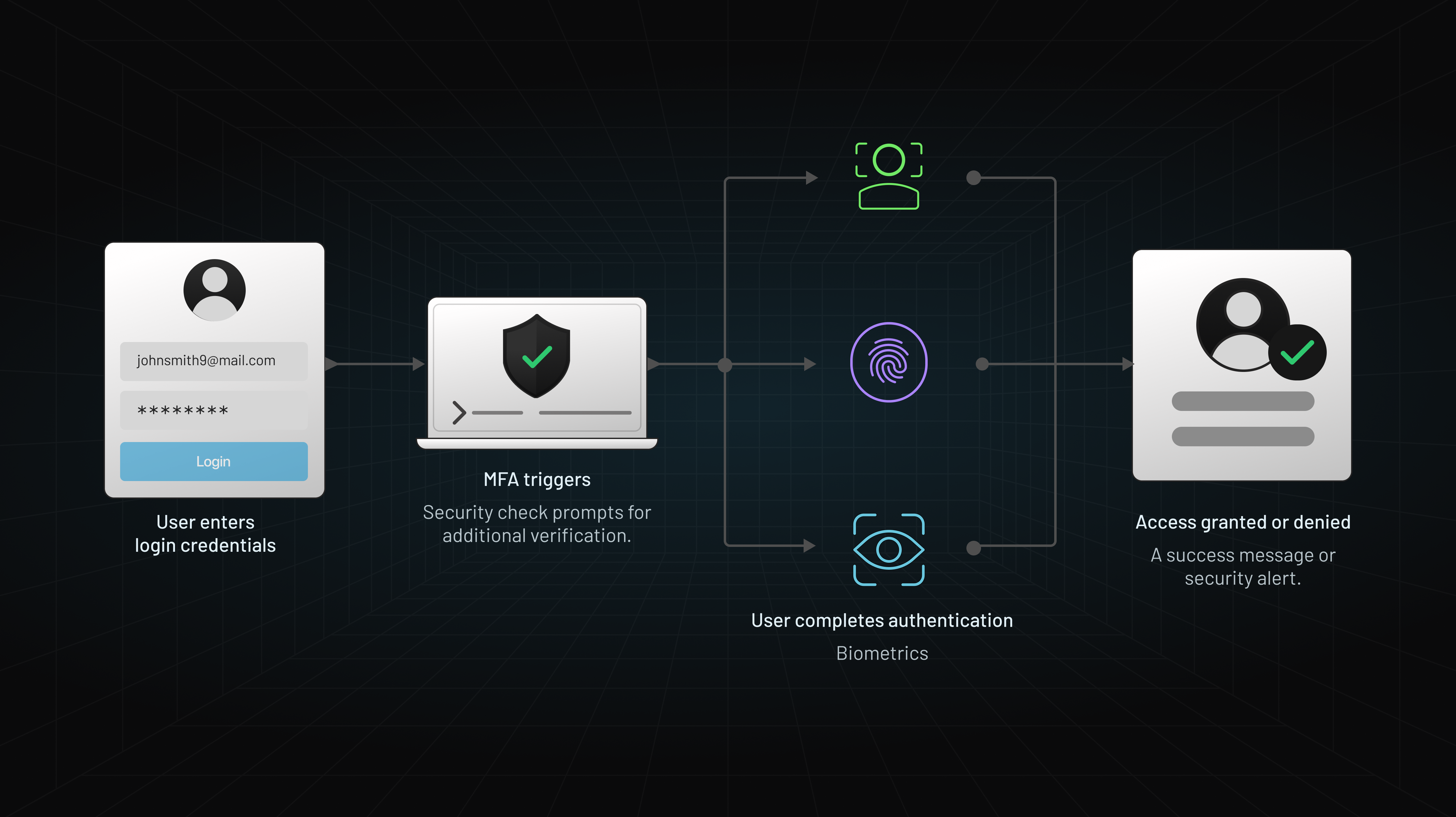
Overview of Multi-Factor Authentication (MFA)
Multi-factor authentication is an authentication process where the customers or users have to provide two or more than two factors to gain access to sensitive information or complete a transaction. Usernames and passwords are vulnerable to brute-force attacks, besides third-party apps can easily steal them. It is where multi-factor authentication comes in, where users are required to provide additional verification information.
The main aim behind MFA is to verify that you are who you say you are. The multi-factor authentication factors can be broadly classified into four categories:
| Factor Type | Core Concept | Enterprise Examples | Vulnerability / Drawback |
|---|---|---|---|
| Knowledge | Something you know | Passwords, PINs, security questions | Phishing, credential stuffing, human memory limits |
| Possession | Something you have | SMS OTPs, authenticator apps, security keys | SIM swapping, device theft, push bombing |
| Inherence | Something you are | Fingerprints, Face ID, iris scans | Spoofing (prevented by liveness detection) |
| Behavioral | Something you do | Keystroke dynamics, touchscreen habits | Requires continuous data collection & baselining |
The first two factors, knowledge and possession-based authentication, can create friction in the customer journey, negatively impacting the user experience. High security doesn’t come at the price of losing a sale, and that’s why multi-factor authentication using biometrics is the most secure and usable method to protect your customers and enhance the user experience. As this blog focuses exclusively on biometric authentication, refer to our comprehensive guide to multi-factor authentication to learn more about the other authentication factors and MFA in detail.
What is Biometric Authentication?
Biometrics authentication uses the user’s unique biological attributes, like fingerprint patterns, facial features, and iris structure, to identify and verify the user’s identity. During the first interaction with the application, the information is recorded, and a biometric profile is created against the customer’s name to represent their digital identity.
Biometric authentication provides a better sense of security to the users and makes customer identification for businesses easier, a win-win situation for both parties. Facial recognition biometric authentication method ensures businesses that they are dealing with the right person because if the device is stolen, no one can get access to it because they cannot replicate the user’s face.
If you are wondering if a photo of the user can unlock the device, then it is not possible because liveness detection is a part of biometric verification. This feature ensures that an online person is a real person by detecting if the face presented on the camera screen is a real person. If anyone uses a photo or a mask, it won’t pass the liveness assessment, hence denying access. However, not all liveness assessments are the same, and it is essential to choose the right multi-factor authentication vendor.
Biometric Authentication for Mobile Devices
Native vs. In-App Biometrics
-
Native Biometrics:
-
Utilizes built-in hardware sensors on the device such as fingerprint readers, facial recognition cameras, and voice recognition microphones.
-
Offers seamless integration with the device's operating system for quick and secure authentication.
-
-
In-App Biometrics:
-
Requires developers to implement biometric authentication within the app using software development kits (SDKs).
-
Provides more flexibility in customization and additional security layers specific to the app's requirements.
-
Mobile Biometric Authentication SDK guides for Android and iOS.
Multimodal Biometric Authentication
-
Combining Biometric Modalities:
-
Enhances security by using multiple biometric identifiers such as voice and facial recognition together.
-
Provides increased accuracy and reduces the risk of false positives or negatives.
-
How Biometric MFA Protects Privacy:
Raw biometric data (fingerprints, facial scans) never leaves the user's local device. Modern operating systems isolate biometric templates within hardware enclaves (Apple Secure Enclave / Android TEE). The server only receives an encrypted cryptographic signature via WebAuthn, ensuring zero risk of biometric leakage in a server database breach.
Seven Reasons Why to Choose Biometrics in Multi-Factor Authentication
1. Convenient
Biometric authentication methods are convenient as there is no need to reset the passwords. If the multi-factor authentication process isn’t simple, users are most likely to abandon the process. However, in the biometric authentication process, once the test is activated, all the fingerprints, iris, and facial recognition are done, and your employees or customers are good to go. You can even log the data and audit it conveniently.
2. Security
The key factor differentiating biometrics authentication from other multi-factor authentication methods is its security. It ensures and verifies that each person is the right and real person, eliminating the fraudsters and imposters from spoofing the system.
3. Profitable
Implementing other authentication methods requires specialized software, and integrating it with other systems can be expensive. By adopting WebAuthn/FIDO2 standards, businesses leverage the biometric hardware users already own (smartphones, laptops with Windows Hello/Touch ID), eliminating the capital expense of buying dedicated hardware authenticators. It significantly reduces upfront investment costs and prevents the risks of loss due to fraud and illegal entries. From our interactions with customers in specific industries like E-Commerce and Fintech implementing biometrics have given them a significant boost in cutting cart abandonment & preventing fraudulent attacks from happening.
Evolution of MFA and What’s Changing Next
4. Scalable
Your business will grow, and you’ll require heightened security measures to accommodate its growing needs without compromising security. The highly scalable system can easily incorporate additional employee and user data without compromise.
5. User-friendly
Managing, fitting, and analyzing biometric verification is user-friendly as it offers technical and accurate results with minimal time required for intervention. Businesses can enter new data quickly and analyze the logs swiftly. Besides, when used for employees, it simplifies key functions, like attendance tracking for payroll. The employees do not have to carry the cards everywhere with biometric verification installed in the office premises.
6. Accurate
Multi-factor authentication using biometrics provides accurate authentication as it might be easy to gain access using passwords or OTPs; however, an individual's identity cannot be forged. Besides, with liveness detection, the imposter will not get access because this technique comprises an algorithm that analyzes data collected from biometric sources to determine whether the source is live or reproduced. And businesses that implement multimodal biometric authentication by combining FaceID and voice recognition see significant drops in support tickets.
7. Mitigate cybercrimes
When fraudsters or hackers get their hands on the user’s identity, they can commit crimes like money laundering, opening fake accounts, financing terror, and creating fake identities to issue credit cards. Biometric verification utilizes unique characteristics to identify and verify the person, reducing the risk of committing such fraud. As an example, New York-based Northwell Health is using iris scanning and face recognition technology to identify patients in emergency situations – thus preventing any patient fraud or wrong prescriptions.
Comparative Analysis of Biometric Authentication Methods
In the realm of biometric authentication, various methods exist to verify users' identities, each with its unique strengths and limitations. Let's delve into a comparative analysis of these methods:
Fingerprint Recognition
Strengths:
-
Widely adopted and accepted.
-
High accuracy in most scenarios.
-
Convenient for users, especially on mobile devices.
Weaknesses:
-
Can be impacted by dirt, moisture, or physical damage to fingers.
-
Concerns about privacy if fingerprint data is compromised.
Facial Recognition
Strengths:
-
Contactless, making it hygienic.
-
Natural and intuitive for users.
-
Can work in various lighting conditions.
Weaknesses:
-
Vulnerable to spoofing with photos or videos.
-
Accuracy may decrease in poor lighting or when faces are partially obscured.
Voice Recognition
Strengths:
-
Contactless and convenient.
-
Difficult to replicate or spoof.
-
Can be combined with other biometric methods for multi-factor authentication.
Weaknesses:
-
Vulnerable to background noise or changes in voice due to illness.
-
Users may find it less natural or comfortable.
Iris Recognition
Strengths:
-
Highly accurate and difficult to spoof.
-
Contactless and hygienic.
-
Less impacted by external factors like lighting or facial changes.
Weaknesses:
-
Requires specialized hardware.
-
Can be slower and less convenient for everyday use.
Enterprise Implementation Best Practices
Rolling out biometric multi-factor authentication across an enterprise requires balancing strict zero-trust security with seamless end-user adoption. Below are six essential practices identity architects and security leaders must follow during deployment:
1. Enforce On-Device Matching (Privacy-by-Design)
-
Keep Biometrics Local: Never collect, transmit, or store raw biometric images or templates on centralized servers.
-
Leverage Secure Enclaves: Utilize platform-level standards (Apple Touch ID/Face ID, Windows Hello, Android BiometricPrompt). These modules store mathematical vectors inside isolated hardware enclaves (Apple Secure Enclave or Android Trusted Execution Environment).
-
Cryptographic Verification: Configure your CIAM provider to handle authentication strictly via WebAuthn/FIDO2 APIs. The server only verifies asymmetric cryptographic signatures, eliminating breach liabilities and simplifying compliance with BIPA, GDPR, and CCPA.
2. Provide Phishing-Resistant Fallback Options
Biometric hardware can fail due to physical sensor damage, camera obstructions, environmental conditions, or temporary OS glitches.
-
Avoid Weak Fallbacks: Never allow a failed biometric scan to default to insecure channels like SMS OTPs or security questions, which are vulnerable to SIM swapping and phishing attacks.
-
Phishing-Resistant Alternatives: Provide secure secondary mechanisms such as FIDO2 Hardware Security Keys (e.g., YubiKeys), encrypted authenticator apps (TOTP with number matching), or push notifications with device binding.
3. Implement Adaptive, Risk-Based Step-Up Authentication
Not every user session carries equal risk. Forcing a biometric prompt for every low-risk action increases user friction and leads to authentication fatigue.
-
Contextual Signals: Combine biometrics with continuous risk evaluation—checking factors such as device posture, IP reputation, geo-velocity anomalies (impossible travel), and network origin.
-
Dynamic Step-Up: Maintain a frictionless experience during recognized, low-risk sessions. Escalate to a biometric check only during high-risk events, such as password resets, funds transfers, or access from an unrecognized device.
See this LoginRadius Adaptive Authentication documentation to find out how easy it is to implement it for your business.
4. Require Explicit Consent & Transparency
Regulatory frameworks (such as GDPR Article 9 and Illinois' BIPA) strictly regulate the processing of biological identification data.
-
Clear Opt-In Workflows: Present explicit, transparent consent prompts before initializing biometric features. Inform users clearly that raw biometric data remains on their local hardware and is never sent to company servers.
-
Clear Privacy Policies: Provide self-service options where users can manage, revoke, or delete their biometric registration tokens at any time without locking themselves out of their accounts.
5. Require Active Liveness Detection & Anti-Spoofing
For workflows involving digital onboarding or remote identity proofing (such as submitting a facial scan via a mobile browser/SDK):
-
Liveness Checks: Ensure your vendor uses advanced liveness detection algorithms (3D depth mapping, micro-movement tracking, or randomized challenge-responses) to block presentation attacks using high-resolution photos, 3D masks, or AI-generated deepfakes.
-
Multimodal Options: For high-value enterprise transactions, consider multimodal biometrics (e.g., combining facial recognition with voice pattern matching) to bring False Acceptance Rates (FAR) down to near zero.
6. Establish Account Recovery & Self-Service Lifecycle Flows
-
Self-Service Re-enrollment: Enable secure self-service portals where employees or customers can register new biometric devices (e.g., upgrading to a new phone) using a secondary trusted factor or ID verification workflow.
-
Helpdesk Protocol Security: Train support teams to handle biometric reset requests rigorously. Verify identity out-of-band to prevent social engineering attacks aimed at bypassing biometric MFA.
-
Enterprise Rule of Thumb: The ideal biometric MFA deployment is zero-knowledge on the server side, phishing-resistant in transit, and adaptive on the client side.
Conclusion
Implementing multi-factor authentication through biometrics is an emerging trend to create a secure work environment for your end-users. Biometrics verification protects the data and keeps the information secure through encryption, secure storage, data minimization, secure data transmission, and Anonymization and Pseudonymization. Customer Identity Access and Management solutions, like LoginRadius, can help businesses implement robust MFA authentication methods easily.