Introduction
Role-based access control feels straightforward. Define roles, attach permissions, assign users. Most access management platforms claim to support it, and most teams assume that’s enough.
It usually is at first.
RBAC doesn’t break during setup. It breaks later, when roles multiply, permissions overlap, and no one remembers why certain access still exists. A temporary exception becomes permanent. Inherited roles pull in access no one intended. Then an audit or incident forces uncomfortable questions: who approved this, and why wasn’t it removed?
Evaluating RBAC solutions isn’t about checking whether roles exist. It’s about understanding how access behaves once your organization starts changing. Can roles stay meaningful? Can access changes be governed without slowing teams down? And what does all of this cost after the first year?
RBAC now sits at the center of security, operations, and compliance. A weak implementation creates a silent risk. A strong one brings clarity, control, and scale. This guide focuses on how to tell the difference before you commit.
Whether you’re trying to understand what role-based access control is for the first time, or comparing enterprise-grade RBAC solutions for a growing organization, the goal here is simple: help you evaluate RBAC the way it behaves in the real world, not the way it looks in a demo.
What Is Role-Based Access Control (RBAC)
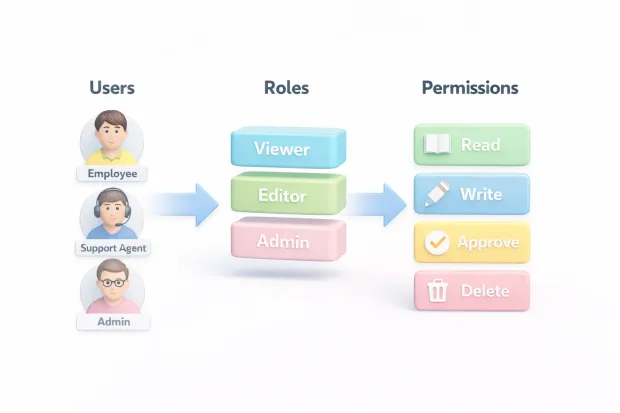
At its simplest, role-based access control assigns permissions through roles instead of directly to individuals. Users receive access based on what role they hold, and that role represents a job function or responsibility inside the organization.
That simplicity is exactly why RBAC still remains widely used.
A new employee joins the support team. You assign the “Support Agent” role. Instantly, they get the access needed to do their job no more, no less. When they move to another team, you change the role. Access updates automatically.
A practical role-based access control example often looks like this in real systems:
Support agents can view customer profiles and tickets.
Finance users can approve refunds.
Administrators can manage system settings but cannot approve payments.
Each role exists for a reason, and each permission maps back to a responsibility.
Where teams get into trouble is when RBAC no longer reflects how work actually happens. Temporary access becomes permanent. Exceptions pile up. Roles turn into vague containers instead of clear definitions. RBAC doesn’t break loudly; it erodes quietly.
Role-Based Access Control Models: What You’re Really Choosing
When vendors talk about role-based access control models, they’re not just describing structure. They’re describing how much control you’ll have when complexity shows up.
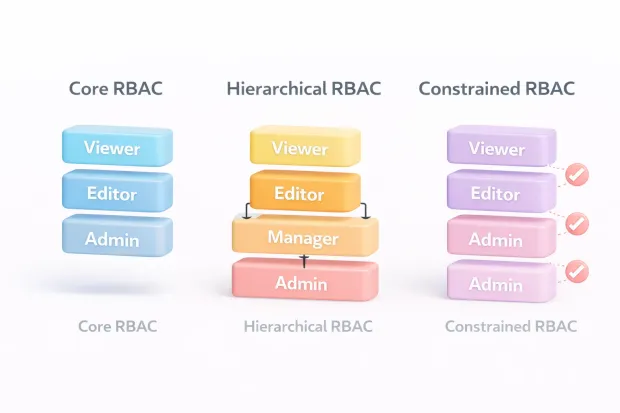
Most platforms start with core RBAC, where roles map directly to permissions. This works well early on and is easy to understand. But as organizations grow, core RBAC alone can become rigid or repetitive.
To handle scale, many RBAC solutions introduce hierarchical RBAC. Roles inherit permissions from other roles. A senior role includes everything a junior role has, plus additional access. Done carefully, this reduces duplication. Done poorly, it introduces accidental privilege escalation that’s hard to detect.
More mature environments rely on constrained RBAC, where rules prevent dangerous combinations of access. This is where the separation of duties comes into play, ensuring that no single role can both create and approve sensitive actions.
When evaluating RBAC solutions, the important question isn’t whether these models exist on paper. It’s whether they are enforced consistently and remain understandable months later.
RBAC Security: How Access Is Actually Enforced
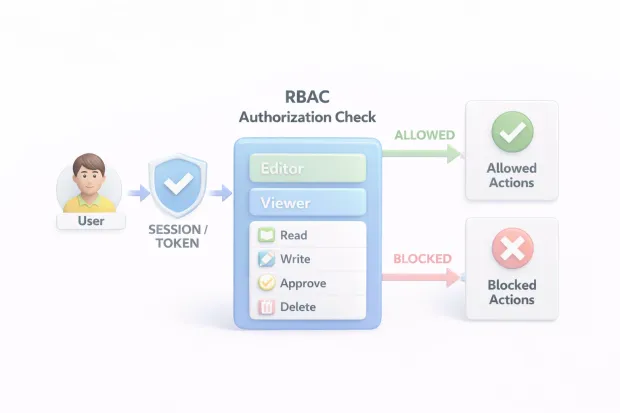
Most people talk about RBAC security like it’s a settings page: define roles, attach permissions, done. Real RBAC security is much less “setup” and much more “runtime.” The platform has to make an authorization decision every time a user tries to do something sensitive, view a profile, export data, approve a payment, delete a record, rotate keys, trigger a workflow.
And it has to do that consistently across every app, API, admin console, and environment.
Here’s where teams usually go wrong: they treat RBAC as a design exercise and forget that enforcement is an engineering reality. If your app checks permissions on the frontend but not on the backend, RBAC becomes a UI hint rather than a security control.
If one microservice uses a different interpretation of “Admin” than another, you end up with “soft gaps” that don’t show up until someone stumbles into them or exploits them. Strong RBAC solutions reduce this risk by centralizing authorization logic or making enforcement patterns hard to mess up.
Another point teams underestimate is how RBAC behaves under pressure. Authorization sits directly in the request path. If the enforcement layer is slow or flaky, you don’t just have a security risk; you have outages, timeouts, and angry users.
That’s why evaluating RBAC security includes questions about reliability, caching behavior, auditability, and failure modes.
Finally, great RBAC security is observable. You should be able to answer “who has access to this action” and “why was this request denied” without trawling logs for hours. If your platform can’t explain access decisions clearly, it’s not enforceable in practice even if it’s technically correct.
Role-Based Access Control Best Practices That Survive Scale
RBAC doesn’t fall apart because teams don’t understand roles. It falls apart because organizations change faster than access models do. New teams appear, products split, regions get added, partners are onboarded, and compliance needs evolve. If your RBAC model can’t adapt without endlessly multiplying roles, it becomes a maintenance tax.
The most durable role-based access control best practices start with role design discipline. Roles should represent stable responsibilities, not temporary tasks.
Another best practice that actually survives scale: don’t let roles become permission junk drawers. When roles are too broad, you create over-permissioning. When roles are too granular, you create role explosions.
The balance is usually found by identifying a small set of core roles that cover 80% of users, then handling exceptions with controlled mechanisms, such as temporary access, scoped elevation, or an approval workflow. If your RBAC solution forces you to create a new role for every exception, you don’t have RBAC you have role inflation.
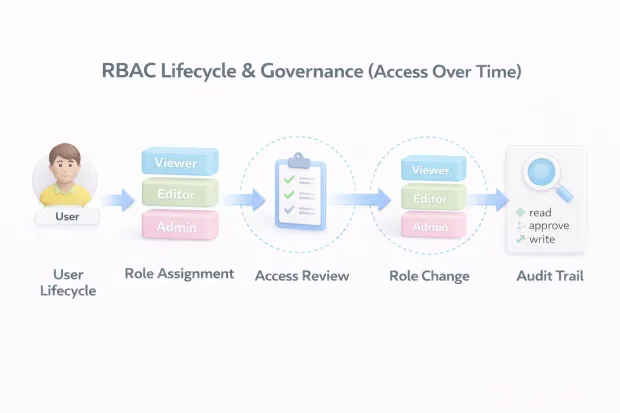
Review cycles matter, even when the model is clean. People switch teams. Contractors stay longer than planned. “Temporary” access becomes permanent by accident.
A good RBAC practice is building a predictable cadence: quarterly access reviews for sensitive roles, and more frequent reviews for privileged admin access. It’s not glamorous, but it prevents the silent killer of RBAC.
Governance: Where RBAC Is Won or Lost
Governance is what keeps RBAC usable after the initial rollout. Without it, roles slowly turn into historical artifacts created for past needs, kept around out of caution, and reused without clarity. That’s how access drift begins.
Strong governance starts with ownership. Every role should have someone accountable for why it exists and what access it includes. When roles lack owners, no one feels confident changing or retiring them, and the system quietly bloats.
Change control matters just as much. Roles will change over time. That's normal. What matters is whether those changes are reviewed, approved, and traceable. If you can’t quickly explain who added a permission and why, RBAC becomes hard to defend during audits or investigations.
Separation of duties is another governance signal. Certain access combinations should never coexist, especially around financial or administrative actions. RBAC solutions that help surface or prevent these conflicts reduce both fraud risk and compliance headaches.
In the end, governance isn’t about slowing teams down. It’s what allows RBAC to scale without turning into a fragile, high-risk system.
Benefits of RBAC When Implemented Correctly
The benefits of RBAC aren’t limited to “security improved.” When RBAC is implemented correctly, it changes how teams operate.
Onboarding becomes fast and predictable. Instead of hunting down access requests across tools, new hires get a role aligned to their function, and access lands immediately. That reduces delays and eliminates the usual first-week friction. Offboarding becomes safer too.
When a user leaves, removing roles should remove access everywhere those roles apply. That closes a common gap in real-world systems where accounts get disabled in one place but remain active in another.
RBAC also improves incident response. When something suspicious happens, responders need to quickly understand what a user could do. RBAC makes that scannable: you check roles, you check permissions, you know the blast radius. Without RBAC, investigations turn into “search every system and hope nothing is missed.”
Compliance becomes easier to manage because RBAC provides a clean story: access is granted based on role, roles map to job function, and changes are controlled. That narrative matters during audits because it shows intent and repeatability. Auditors don’t just want controls. They want confidence that controls will still exist after your org changes again next quarter.
And there’s a business benefit people don’t say out loud: RBAC reduces internal debates. When access is standardized, you spend less time negotiating permissions and more time shipping work.
Evaluating Total Cost of Ownership (TCO) for RBAC Solutions
TCO is where many RBAC purchases go sideways. Teams compare subscription costs and assume that’s the budget. Then implementation starts, integrations expand, admin overhead grows, and suddenly RBAC is expensive in ways nobody forecasted.
The true cost of RBAC solutions includes the cost to design roles well, integrate across apps, migrate legacy permissions, train admins, and support users who get blocked by mis-scoped access. It also includes ongoing work: access reviews, role cleanup, audit reporting, exception handling, and incident investigations. If a platform pushes most of that work onto humans instead of systems, your “cheap” RBAC solution becomes a staffing plan.
A practical way to evaluate TCO is to think in phases. Year one costs are usually integration and migration heavy: connecting directories, aligning apps, designing initial roles, and rolling out change management. Year two and beyond is where operational costs dominate: how much time admins spend maintaining roles, how often access reviews happen, how quickly audit evidence can be produced, and how painful it is to onboard new apps or business units.
Also watch how pricing aligns with your growth model. If you’re a SaaS business scaling tenants or customers, your RBAC solution should handle that without turning every new tenant into a manual role rebuild exercise. If you’re an enterprise scaling internal apps, your RBAC solution should make app onboarding repeatable, not bespoke.
The simplest TCO test is blunt: if your RBAC solution needs constant babysitting to stay accurate, you will pay for it either in headcount, professional services, or risk.
Conclusion
RBAC tools aren’t tested during setup. They’re tested over time.
As teams grow, responsibilities shift, and audits arrive, access control either holds its shape or quietly unravels. The difference comes down to how well a solution balances features, governance, and long-term cost.
Strong rbac solutions make access easy to grant, easier to review, and safest to remove. They help teams explain access decisions, prevent drift, and scale without constant cleanup. RBAC isn’t about locking systems down. It’s about keeping access understandable as everything else changes.
Choose the solution that does that well.
RBAC works because it mirrors how organizations think about responsibility. But that only holds if roles remain intentional, permissions remain controlled, and change remains visible. Without governance, RBAC becomes a liability instead of a safeguard. Without cost awareness, it becomes expensive in ways that don’t show up on pricing pages.
If an RBAC solution helps you remove access as easily as it grants it, explain access as easily as it enforces it, and scale without turning into a maintenance burden, that’s a system worth committing to.
RBAC isn’t about controlling people. It’s about controlling drift. And the right solution makes that control feel natural, not fragile.
FAQs
Q: What are RBAC solutions used for?
A: RBAC solutions control who can access what in a system by assigning permissions through roles. They help reduce over-permissioning, simplify audits, and enforce least-privilege access.
Q: What is role-based access control, and how does it improve security?
A: Role-based access control assigns access based on job function instead of individual users. This limits unnecessary privileges and strengthens RBAC security across applications and systems.
Q: What are the main role-based access control models?
A: The main role-based access control models include core RBAC, hierarchical RBAC, and constrained RBAC. Each model adds more structure to manage access and prevent risky permission combinations.
Q: What are the key benefits of RBAC for organizations?
A: The benefits of RBAC include faster onboarding, consistent access enforcement, simpler compliance audits, and reduced administrative overhead as teams scale.