Introduction
Access control rarely gets the attention it deserves until something breaks.
A partner suddenly sees internal data. An admin can’t access a critical system during an outage.
An auditor asks a simple question: “Who has access to this, and why?” And nobody can answer confidently.
At that point, teams realize something uncomfortable. The problem isn’t authentication. It isn't an MFA. It isn’t even tooling. It’s the access control model sitting quietly underneath everything.
Most organizations don’t actively choose between RBAC vs ABAC or debate policy-based access control upfront. They inherit a model early, build on top of it, and hope it scales. Sometimes it does. Often, it doesn’t.
This blog is meant to slow that moment down.
Not to push one model as “best,” but to help you understand how RBAC, ABAC, PBAC, ACL, and DAC actually behave in real systems, where they shine, where they crack, and how teams end up combining them, whether they planned to or not.
Why access control models matter more than teams expect
Every secure system asks the same question: Should this user be allowed to do this action on this resource right now?
What changes is how that decision is made. Some models depend on roles. Some evaluate attributes. Some rely on centrally defined policies. Some use explicit allow-lists. Some let resource owners decide.
These differences shape everything, from security posture, audit readiness, operational overhead, and even developer velocity. When access control is poorly chosen, teams feel it later through manual reviews, brittle logic, and mounting technical debt.
That’s why comparisons like rbac vs abac vs pbac aren’t academic debates anymore. They’re architectural decisions with long-term consequences.
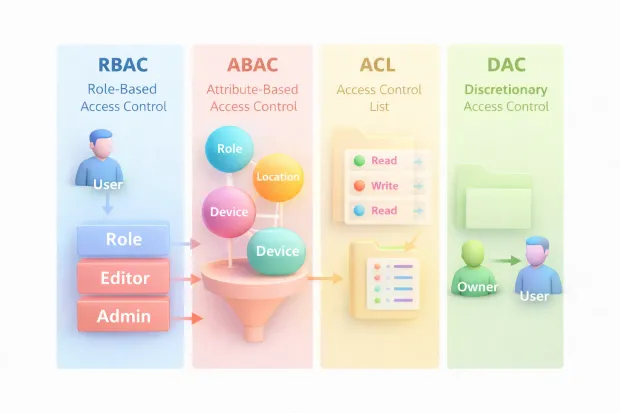
RBAC: Role-Based Access Control
RBAC works because it feels intuitive.
People have roles. Roles have responsibilities. Responsibilities translate into permissions. Instead of assigning permissions to individuals, you assign them to roles and let users inherit access based on their role.
This model brings structure. Governance teams like it. Auditors understand it. Reviews are straightforward. When organizations talk about implementing role-based access control, they’re usually chasing this clarity.
RBAC fits naturally in environments where job functions are stable and well-defined, internal tools, enterprise admin panels, and B2B platforms with predictable user groups.
But RBAC has a breaking point.
As soon as access depends on conditions, region, tenant, device, customer tier roles start multiplying. Teams add “temporary” roles, edge-case roles, and hybrid roles. Over time, the role list grows faster than anyone can manage.
This is often when teams start searching for role-based access control vs attribute-based access control, not because RBAC failed, but because it was stretched beyond what it was designed to express.
ABAC: Attribute-Based Access Control
ABAC approaches access decisions differently.
Instead of asking what role does this user have?, ABAC evaluates attributes associated with the user, the resource, and the context of the request. Things like department, tenant ID, location, device posture, or data classification suddenly matter.
This makes ABAC feel more flexible. More dynamic. Better aligned with modern SaaS and cloud architectures.
That’s why rbac vs abac comparisons are so common in multi-tenant systems, partner ecosystems, and regulated environments. ABAC handles conditional access naturally without forcing teams to invent new roles for every scenario.
But ABAC introduces its own challenges.
Policies become logical. Logic becomes complex. Without guardrails, ABAC rules can turn into something only one engineer understands. Debugging access decisions becomes harder. Audits require better tooling and visibility.
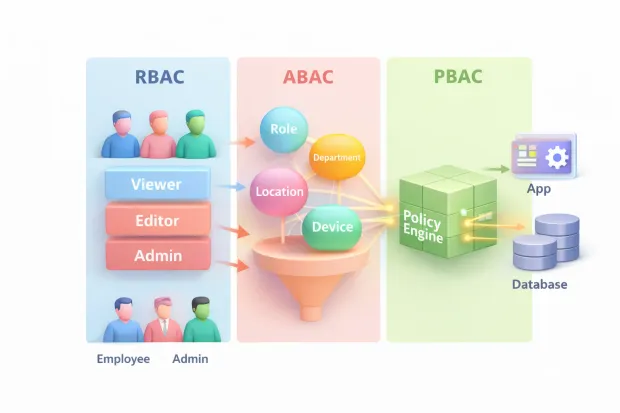
In practice, ABAC isn’t a replacement for RBAC. It’s a supplement. Many mature systems use RBAC for baseline access and ABAC to enforce boundaries.
That’s why you’ll often hear teams talk about RBAC and ABAC together, not as competitors.
Learn more about RBAC vs ABAC.
PBAC: Policy-Based Access Control
Policy-based access control shifts the conversation away from who has what and toward how decisions are governed.
In policy-based access control, access logic is centralized into policies that can be evaluated consistently across applications and services. These policies may rely on roles, attributes, or both but the defining feature is that rules live outside individual applications.
PBAC becomes attractive when organizations need consistency at scale. Multiple teams. Multiple apps. Frequent rule changes. Strong compliance requirements.
This is why rbac vs abac vs pbac comparisons often surface in large enterprises. PBAC gives teams a way to manage authorization like configuration instead of code.
That said, PBAC isn’t lightweight. It requires discipline, testing, and visibility. Without that, policy sprawl can be just as dangerous as role sprawl.
Still, for organizations evaluating abac vs rbac vs pbac, PBAC often emerges once governance becomes a first-class concern.
ACL: Access Control Lists
ACLs are one of the oldest and most direct ways to control access. The idea is literal: a resource keeps a list of who can access it and what they’re allowed to do. Think files, folders, shared drives, storage buckets, or even a specific record in an app. The resource is the “source of truth,” and the ACL is basically its access ledger.
The reason ACLs feel so approachable is because they’re easy to explain to anyone, security teams, developers, even non-technical stakeholders. “This thing has a list of users/groups and permissions.” No abstraction needed.
But that same literalness becomes a weakness once your system grows. When you have thousands of resources, ACLs start creating operational friction. Every new resource needs correct permissions. Every permission change can require updating multiple lists. Reviews become slow because access isn’t centralized—it’s distributed across countless objects.
Here’s where ACLs still work beautifully: small scopes and high precision. For example, document sharing, object-level exceptions, or a limited set of resources where manual curation is acceptable.
But as a primary access control model for modern apps with lots of resources and frequent changes, ACLs often turn into a maintenance sink. This is why comparisons like access control list vs role-based access control and role-based access control vs. ACL keep showing up. Teams hit the scaling wall and start looking for a more structured approach.
DAC: Discretionary Access Control
DAC is the access model behind “sharing.” If you own a resource, you can decide who else gets access to it. That’s the core idea. It’s simple and aligns with how humans behave. People naturally want to share files, grant access temporarily, and collaborate without going through a central admin workflow.
That flexibility is the advantage. DAC enables collaboration at speed, especially in user-driven environments. It shows up in file systems, collaborative tools, and many consumer or prosumer apps. When someone asks about dac access control, they’re usually asking why ownership-based sharing feels fast, but also why it can feel risky.
The risk comes from governance. DAC can easily bypass centralized intent. If every user can share anything they own, you need guardrails or you’ll end up with accidental exposure. In regulated environments, DAC alone is rarely enough, because the organization must prove control over access not just rely on individual discretion.
In modern systems, DAC works best when it’s bounded: users can share within a controlled set of rules. Without those constraints, DAC becomes the model that creates “shadow access” permissions that exist, but no one remembers why.
What is Dynamic Access Control?
This term trips people up because it sounds like a model (like RBAC or DAC), but it’s better understood as a runtime behavior: access decisions can change based on context.
When someone searches what is dynamic access control, they usually mean: “Why does the same user sometimes get access and sometimes get blocked?”
Dynamic access control happens when decisions consider signals that can change per request device posture, location, time, risk score, data classification, network trust, session age, and so on. That’s why dynamic access control often shows up in conversations about modern security, Zero Trust, and fraud prevention. It’s also why ABAC and PBAC systems are frequently called “dynamic” in practice.
A good mental model:
-
RBAC can be static (role doesn’t change every minute)
-
ABAC is often dynamic (attributes and context can change per request)
-
PBAC becomes dynamic when policies evaluate context continuously
So dynamic access control isn’t “a sixth model.” It’s what your authorization system does when it evaluates access at decision time, not just at assignment time. That distinction matters, especially when teams confuse DAC (discretionary access control) with dynamic access control. They’re different things.
RBAC, ABAC, and PBAC in real implementations
Most teams start with RBAC. It’s easier to design, easier to explain, and easier to audit. You create roles that reflect job functions, attach permissions, and move on. That’s often the right move early on.
Then reality arrives.
Partners need limited access. Tenants need strict boundaries. Certain actions should depend on region, device trust, or data sensitivity. Suddenly, your role model starts stretching.
This is where ABAC enters not as a replacement, but as a correction.
RBAC defines broad capability.
ABAC defines boundary conditions.
ABAC helps prevent RBAC from turning into a role explosion.
PBAC tends to arrive later, when organizations realize the problem isn’t just expressing access, it's governing change.
Policies give teams a way to centralize authorization logic so every app doesn’t implement it differently. PBAC becomes the layer that controls how access rules are authored, reviewed, tested, versioned, and audited. It’s not glamorous, but it’s the part that keeps large systems from falling into inconsistent enforcement.
It’s not about purity. It’s about survivability.
Choosing the right access control model
If you’re choosing a model, you’re not choosing “security.” You’re choosing what kind of operational complexity you want to live with.
RBAC is the cleanest starting point when roles map well to reality and permissions don’t need constant conditional logic. It stays manageable when the organization has stable job functions and clear governance.
ABAC is the better fit when the business demands conditional access: multi-tenant SaaS, partner ecosystems, regulated data zones, device-aware access, geo-based restrictions, or anything where the same action may be allowed in one context and denied in another.

PBAC matters when your problem is less about expressing access and more about controlling change across teams and systems. If policies are constantly evolving, or multiple applications must enforce the same rules reliably, PBAC becomes the stabilizer.
ACLs shine when you need object-level precision and the scope is limited enough to manage. DAC shines when users need to share and collaborate, but it needs guardrails if governance matters.
A useful question that forces clarity: What will be harder for us six months from now explaining access decisions, or changing them safely?
If you can’t explain decisions, ABAC/PBAC needs visibility.
If you can’t change decisions safely, RBAC-only systems often become brittle.
Conclusion
Access control models aren’t just technical choices. They decide how your organization behaves under pressure.
When an incident hits, can you confidently answer why access was allowed?
When compliance shows up, can you prove control?
When the product grows, can you adapt without rewriting half your services?
This is why RBAC vs ABAC debates keep coming back. Teams are really trying to balance two competing needs: stable governance and real-world flexibility. PBAC enters when governance becomes a product requirement. ACL and DAC persist because exceptions and collaboration never disappear.
The best access control model isn’t the fanciest one. It’s the one your team can operate without fear because the rules are understandable, enforceable, and changeable without chaos.
Choose an approach that scales with your product, adapts to real-world conditions, and stays auditable as complexity grows.
And if you want to design access control that’s secure, flexible, and ready for modern identity use cases, start with an identity platform that lets you combine these models—without overengineering.
Explore how modern CIAM and IAM platforms help you get access control right from day one. Book a demo today.
FAQs
Q: What is the difference between RBAC and ABAC?
A: RBAC grants access based on predefined roles, while ABAC evaluates attributes like user properties, resource tags, and context. RBAC is simpler to manage, whereas ABAC offers finer control for dynamic environments.
Q: When should you choose ABAC over RBAC?
A: ABAC works better when access depends on conditions such as location, device, tenant, or data sensitivity. Teams often move beyond RBAC when role definitions no longer reflect real-world access needs.
Q: Is policy-based access control better than RBAC and ABAC?
A: Policy-based access control focuses on centrally managed rules rather than how permissions are assigned. It often complements RBAC and ABAC in large systems that need consistent governance across multiple applications.
Q: Can RBAC, ABAC, and ACL be used together?
A: Yes. Many real-world systems combine RBAC for baseline access, ABAC for contextual restrictions, and ACLs for specific exceptions. This hybrid approach balances simplicity with flexibility.