Introduction
In a world where our digital footprints are larger than ever before, your password is often your first line of defense.
Think of it as the key to your home—only now, that home contains your personal information, bank details, work credentials, your kids’ school login, and maybe even those awkward photos from your college party days. So, how do you protect that home? The answer lies in knowing how to choose a strong password.
Let’s be honest—we’ve all been guilty of using passwords like "123456" or "password" at some point. They're easy to remember, sure, but they also make life ridiculously easy for cybercriminals.
In fact, according to a 2025 Cybernews analysis, more than 19 billion passwords have been leaked through breaches, and shockingly, “123456” alone has been used over 338 million times. That’s a whopping number and the equivalent is if two percent of the entire world’s population locked their front door with a sticky note that says “key under mat.”
With data breaches becoming so common they're practically part of the weekly news cycle, understanding what makes a password secure isn’t just IT advice anymore—it’s self-defense. And the good news? You don’t need to be a cybersecurity expert or a tech wizard to get it right.
In this blog, we’ll dive deep into what passwords are, what makes a password truly strong, and how to choose a strong password that stands up to modern threats. We’ll share examples of strong passwords, relatable scenarios, and technical tips that make this crucial habit not only practical but doable.
Moreover, we’ll also show you how LoginRadius is helping businesses and individuals step up their password game through smarter identity and access management tools. Let’s get started.
What is a Password?
A password is a confidential string of characters used to verify a user's identity during the authentication process. Typically combined with a username, passwords grant access to systems, applications, or data.
Passwords serve as the first line of defense against unauthorized access, making their strength and uniqueness crucial for security.
History of Passwords
Passwords might seem like a product of the digital age, but their origins go back much further - long before computers even existed.
The concept of passwords can be traced back to ancient Rome. Roman soldiers would use a “watchword” to authenticate themselves during night watches. This password was shared by the guards on duty and changed regularly to prevent infiltration. It was a simple yet effective method of verifying identity—a principle that remains at the core of today’s digital password systems.
Fast-forward to the 1960s, when computer scientist Fernando Corbató implemented the first computer password system at MIT. His goal was to provide different users with separate file access on a shared computer—what was then a revolutionary concept. Little did he know, this idea would evolve into a cornerstone of cybersecurity.
By the 1990s, as personal computers entered homes and businesses, passwords became more commonplace. With the rise of the internet in the early 2000s, users were suddenly juggling dozens of online accounts—from email to e-commerce to social media.
And that’s when the problems started. Users began creating weak passwords, reusing passwords, or keeping guessable passwords, which opened the floodgates for cybercriminals.
In response, organizations implemented rules to force users into creating more complex passwords, leading to the infamous mix of capital letters, symbols, and numbers. Ironically, this often made passwords harder to remember, resulting in workarounds like sticky notes on monitors or browser auto-fills—neither of which is ideal.
As the complexity of threats increased, so did the evolution of password policies. Today, there’s growing awareness that password strength isn't just about complexity—it's about unpredictability, length, and behavior. Experts now recommend combining passwords with Multi-Factor Authentication (MFA), and many organizations are exploring passwordless technologies entirely.
It's a fascinating look at how something as simple as a word or phrase has played a crucial role in securing our digital and physical lives.
From watchwords in ancient Rome to AI-resistant security measures today, the password has had quite a journey. And while it may eventually be replaced by biometrics or cryptographic keys, one thing’s certain—its story is far from over.
What is a Strong Password?
A strong password is designed to be difficult for both humans and automated programs to guess. It typically includes a mix of uppercase and lowercase letters, numbers, and special characters, and avoids using predictable elements like names, birthdays, or simple patterns.
The power of a strong password lies in its randomness and length—two factors that make it significantly harder to crack using brute-force or dictionary attacks. But in the ever-evolving threat landscape, a strong password alone is no longer sufficient. This is where strong authentication enters the equation, layering identity verification to better withstand modern threats.
Strong authentication refers to verifying identity through multiple layers—something you know (like a password), something you have (like a phone or hardware token), or something you are (like a fingerprint or face scan). A strong password forms the essential first layer in this process, but it gains real strength when combined with other verification methods.
By integrating strong passwords into a broader authentication strategy—such as multi-factor authentication (MFA), organizations can drastically improve their security posture.
If you're wondering why the passwords alone still leave gaps in security, it’s worth exploring the common vulnerabilities of password-based login systems. Understanding these pitfalls is the first step toward building a more resilient authentication strategy.
Attributes of a Strong Password
To ensure your password is robust and secure, consider the following attributes:
-
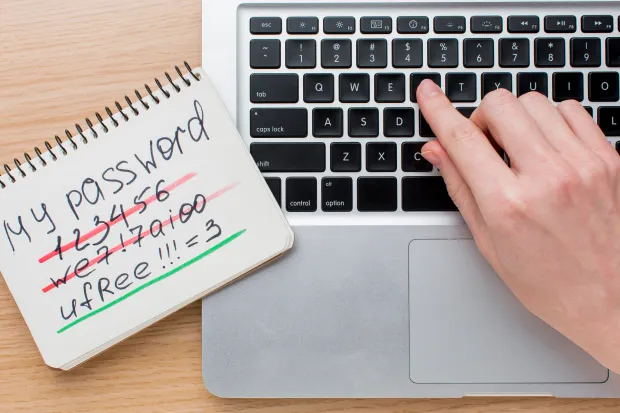
Length: Aim for at least 12 to 16 characters. Longer passwords are generally more secure.
-
Complexity: Use a combination of uppercase letters, lowercase letters, numbers, and special characters.
-
Unpredictability: Avoid common words, phrases, or easily guessable information like birthdays or names.
-
Uniqueness: Use different passwords for different accounts to prevent a single breach from compromising multiple services.
-
Avoid Personal Information: Do not include personal details such as your name, address, or phone number.
How Do I Create a Strong Password?
Creating a strong password involves combining complexity with memorability. Here are some tips:
-
Use a Passphrase: Combine unrelated words into a phrase, such as "BlueSky!River#Mountain9". This approach creates a long and complex password that's easier to remember.
-
Incorporate Complexity: Mix uppercase and lowercase letters, numbers, and special characters. For example, "T!m3T0Sh1n3!" combines letters, numbers, and symbols and can be easily remembered as it is closer to the phrase “Time to shine”.
-
Avoid Common Substitutions: While replacing 'a' with '@' or 's' with '$' is common, these patterns are well-known to attackers. Instead, use more unpredictable combinations.
-
Use a Password Manager: Tools like LastPass or Bitwarden can generate and store complex passwords, reducing the burden of memorization.
-
Regularly Update Passwords: Change your passwords periodically, especially if you suspect any account compromise.
What is a Password Policy?
A password policy is a critical component of any organization’s security framework. It’s a defined set of rules that dictate how passwords should be created, managed, and maintained to prevent unauthorized access. These rules typically cover aspects such as:
-
Minimum length requirements
-
Use of uppercase and lowercase letters, numbers, and special characters
-
Password expiration intervals
-
Restrictions on reusing previously used passwords
Think of it like issuing keys to every employee in your company—but without a solid password policy, it’s like never updating the locks. That’s an open invitation for trouble.
Strong password policies reduce vulnerabilities, enforce consistency, and guide users toward better password hygiene. However, the gap between theory and implementation is where most organizations struggle.
That’s where LoginRadius steps in.
Our platform helps businesses enforce password rules with precision and simplicity. Whether you need users to reset their passwords every 90 days or prevent them from recycling their last five credentials—it’s all configurable in just a few clicks. The LoginRadius admin console gives you full control over Password Expiration, Password History, and complexity enforcement, all without overwhelming your IT team or confusing your end users.
Want to build or refine your password policy but not sure where to begin?
Download our Password Policy Datasheet to outline a comprehensive and scalable framework tailored for modern security needs:
These rules are essential to reduce the risk of unauthorized access and to ensure users follow best practices—without having to think too hard about it.
But here’s where theory meets execution.
LoginRadius takes password policies to the next level with an intuitive, security-first console that makes managing user credentials a breeze.
Want your customers to reset their passwords every three months? Done. Need to stop users from reusing their last three passwords? Just a toggle and a number!
The LoginRadius dashboard offers fine-grained control over Password Expiration and Password History, allowing you to enforce strong authentication standards without compromising user experience. Here’s a quick look:
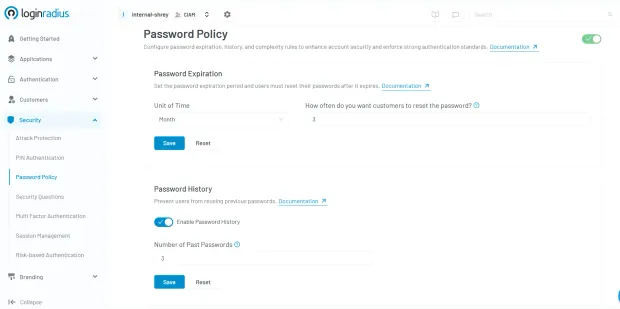
Think of it as your command center for password hygiene—simple, scalable, and smart. Want to see how it works? Explore the LoginRadius console now.
Strong Passwords for Enhanced Cybersecurity
In the current digital landscape, strong passwords are vital for safeguarding personal and organizational data. Weak passwords can lead to unauthorized access, data breaches, and identity theft.
By creating complex, unique passwords and adhering to best practices, users can significantly reduce the risk of cyber threats. Additionally, combining strong passwords with multi-factor authentication (MFA) adds an extra layer of security, making it more challenging for attackers to gain unauthorized access.
Need help implementing enterprise-grade password policies or integrating MFA with ease? Contact the LoginRadius team to learn how our CIAM platform can strengthen your authentication strategy and protect your digital assets.
Frequently Asked Questions
1. How often should you change your passwords?
A. Change your passwords every 3–6 months, or immediately if you suspect a breach. Regular updates help reduce the risk of unauthorized access.
2. What is the recommended minimum length for a strong password?
A. Aim for at least 12 characters. Longer passwords are harder to crack and offer better protection against brute-force attacks.
3. Why are strong passwords important, and how do I create one?
A. Strong passwords protect your data from unauthorized access. Use a mix of characters, avoid common words, and consider a passphrase or password manager.
4. Can hackers see my saved passwords?
A. Yes—if your device is infected with malware, stored passwords can be stolen. Protect yourself with MFA, strong antivirus tools, and avoid saving passwords on shared devices.