
Introduction
Every digital business depends on one essential capability: knowing who its users are and what they're allowed to do. Managing digital identities becomes increasingly complex as users register, sign in across multiple devices, update personal information, request account recovery, or access new services. At the same time, organizations must protect sensitive data, prevent unauthorized access, and meet evolving privacy and security requirements.
This is where user management plays a critical role.
User management is the process of creating, maintaining, securing, and removing user identities throughout their entire lifecycle. It goes far beyond account creation, bringing together authentication, authorization, profile management, permissions, and identity lifecycle management to ensure every user has the appropriate level of access at every stage of their journey.
For customer-facing applications, user management is a core capability of Customer Identity and Access Management (CIAM). A modern CIAM platform helps organizations manage customer identities at scale while delivering secure, seamless experiences across websites, mobile applications, APIs, and other digital channels.
Effective user management isn't just about improving security. It also reduces operational complexity, simplifies compliance, supports self-service account management, and creates the foundation for modern authentication methods such as passkeys, Multi-Factor Authentication (MFA), and adaptive authentication.
Whether you're evaluating a user management platform, modernizing an existing identity infrastructure, or building a new application, understanding how user management works is essential.
In this guide, we'll walk you through what user management is, how modern user management systems work, the complete user lifecycle, user management best practices, and the key capabilities to consider when choosing a scalable solution for your business.
What Is User Management?
User management is the process of creating, maintaining, securing, and removing user identities throughout their entire lifecycle. It ensures every user can securely register, authenticate, access the appropriate resources, update their information, and have their permissions adjusted or revoked as their relationship with an application changes.
For customer-facing applications, user management is typically delivered through a Customer Identity and Access Management (CIAM) platform. It combines identity management, authentication, authorization, profile management, and lifecycle automation into a centralized system that helps organizations manage customer identities securely and consistently across websites, mobile apps, APIs, and other digital services.
What Does a User Management System Do?
A user management system provides the tools needed to manage customer identities from account creation to account deletion while maintaining security, compliance, and a seamless user experience.
| Capability | Purpose |
|---|---|
| User registration | Create new customer accounts using email, phone, social login, or passwordless methods |
| Authentication | Verify user identity during sign-in using passwords, passkeys, MFA, or other authentication methods |
| Authorization | Determine which applications, features, APIs, or resources a user can access |
| Role and permission management | Assign and manage access based on predefined roles or custom permissions |
| Profile management | Allow users to update personal information, preferences, and account settings |
| User provisioning | Automatically create user accounts and assign appropriate roles or permissions |
| User deprovisioning | Suspend, disable, or permanently remove accounts when access is no longer required |
| Consent and privacy management | Capture, update, and manage customer consent while supporting privacy regulations |
| Audit logging and monitoring | Record identity-related activities for security investigations and compliance reporting |
User management doesn't end after registration or the first successful login. Customer identities evolve over time as users update profiles, change authentication methods, gain new permissions, or close their accounts. A modern user management system manages these changes throughout the entire identity lifecycle while maintaining security, consistency, and a seamless customer experience.
Why Is User Management Important?
User management does much more than organize customer accounts. It helps organizations protect digital identities, control access to applications, simplify administration, and deliver consistent experiences across every customer interaction.
As organizations introduce new applications, digital services, and customer touchpoints, managing identities manually becomes increasingly difficult. A modern user management system centralizes identity operations, automates routine processes, and applies consistent security policies throughout the user lifecycle.
Improves Security
Every customer account represents a potential entry point into your application. Without effective user management, inactive accounts may remain accessible, permissions can become outdated, and unauthorized users may gain access to sensitive resources.
A modern user management system strengthens security by verifying identities, enforcing role-based permissions, supporting modern authentication methods such as Multi-Factor Authentication (MFA) and passkeys, automating account provisioning and deprovisioning, and maintaining audit logs for security monitoring and compliance.
Enhances Customer Experience
Security and convenience no longer have to compete.
Customers expect fast registration, seamless authentication, self-service account management, and consistent access across websites, mobile applications, and connected services. Features such as Single Sign-On (SSO), passwordless authentication, profile management, and account recovery reduce friction while making it easier for legitimate users to access their accounts securely.
A better identity experience often leads to higher customer satisfaction and fewer support requests.
Supports Business Growth and Compliance
As customer bases expand, identity management becomes increasingly complex. New accounts must be created automatically, permissions need to remain consistent across applications, and customer information must stay accurate throughout the identity lifecycle.
At the same time, organizations must comply with regulations such as GDPR, HIPAA, and CCPA by protecting personal data, managing customer consent, and maintaining comprehensive audit trails.
A centralized user management system helps organizations scale efficiently while supporting security, regulatory compliance, and long-term operational growth.
User Management vs. User Access Management: What's the Difference?
User management and user access management are closely related, but they aren't the same.
User management focuses on who the user is. It covers creating, maintaining, securing, and removing user identities throughout their lifecycle.
User access management focuses on what that user is allowed to do. It determines which applications, resources, APIs, or features an authenticated user can access based on roles, permissions, or organizational policies.
Both capabilities are essential. User management establishes trusted identities, while user access management ensures those identities receive the appropriate level of access.
User Management vs. User Access Management
| User Management | User Access Management |
|---|---|
| Creates and manages user identities | Controls what authenticated users can access |
| Handles registration and account creation | Enforces permissions after authentication |
| Maintains user profiles and identity information | Determines access to applications, APIs, and resources |
| Manages the user lifecycle from onboarding to deletion | Continuously evaluates whether access should be allowed |
| Supports profile updates, password resets, and account recovery | Supports role-based, attribute-based, or policy-based authorization |
| Focuses on identity administration | Focuses on access control and security enforcement |
Authentication confirms a user's identity. User access management then evaluates roles, permissions, subscription levels, or business policies before granting access to applications or resources. Here's where teams usually go wrong.
Organizations often focus on creating and authenticating user accounts but pay less attention to how permissions evolve over time. Without regular access reviews and lifecycle management, users can accumulate unnecessary privileges that increase security risks.
Modern CIAM platforms combine user management and user access management into a unified system, allowing organizations to manage customer identities and enforce consistent access policies from a single platform.
How User Management and User Access Management Work Together
User management and user access management aren't separate processes. They work together throughout the customer lifecycle to ensure every identity is both legitimate and appropriately authorized.
User management creates and maintains customer identities, while user access management continuously evaluates what those authenticated users can access based on roles, permissions, subscriptions, or business policies.
The relationship becomes clearer when you look at a typical customer journey.
| Stage | User Management | User Access Management |
|---|---|---|
| Customer registers | Creates the customer identity | — |
| Identity is verified | Activates the account | — |
| Customer signs in | Authenticates the identity | Evaluates access policies |
| Customer uses the application | Maintains the user session | Controls access to features, APIs, and resources |
| Customer upgrades or changes roles | Updates account attributes | Grants or modifies permissions |
| Customer closes the account | Suspends or deletes the identity | Revokes all access and permissions |
Neither capability is complete on its own. User management ensures identities remain accurate and secure throughout their lifecycle, while user access management continuously enforces the appropriate level of access as users interact with applications and services.
Modern CIAM platforms bring both capabilities together, enabling organizations to manage customer identities and apply consistent access policies from a centralized platform.
Core Components of a User Management System
A user management system is made up of several capabilities that work together to manage customer identities securely throughout their lifecycle. While the exact implementation varies, most modern platforms provide the following core components.
User Registration and Identity Creation
Every user journey begins with registration. During this stage, the system creates a customer identity using information such as an email address, phone number, social login, or passwordless authentication method. Many organizations also verify contact details to reduce fraudulent or duplicate accounts. Establishing a trusted identity from the beginning improves both security and the overall customer experience.
Authentication
Authentication verifies that the person attempting to access an account is the legitimate user. Modern user management systems support multiple authentication methods, including passwords, passkeys, biometrics, social login, and Multi-Factor Authentication (MFA). The appropriate authentication method depends on the application's security requirements and the level of risk associated with each login attempt.
Authorization and Access Control
After a user is authenticated, authorization determines what they can access. Permissions may be assigned using Role-Based Access Control (RBAC), Attribute-Based Access Control (ABAC), or policy-based authorization. Applying consistent access policies helps organizations protect sensitive resources while ensuring users only receive the permissions they need.
User Roles and Permission Management
Roles simplify access management by grouping permissions according to business requirements. Instead of assigning permissions individually, administrators can apply predefined roles that automatically provide the appropriate level of access. This approach reduces administrative effort and makes permission management more consistent as applications grow.
User Profile Management
User profiles store information such as contact details, preferences, linked identities, and account settings. Keeping profile data accurate across applications helps improve customer experience, supports personalization, and reduces inconsistencies between connected systems.
User Provisioning and Deprovisioning
Provisioning automatically creates user accounts, assigns initial roles, and applies appropriate permissions. Deprovisioning removes or revokes access when an account is no longer required. Automating both processes improves operational efficiency while reducing the security risks associated with inactive or forgotten accounts.
Self-Service Account Management
Self-service capabilities allow users to update profile information, reset passwords, manage passkeys, review active sessions, and recover accounts without contacting support. Giving customers greater control over their accounts improves convenience while reducing administrative workload.
Consent and Privacy Management
Organizations are responsible for managing how customer information is collected, processed, and retained. Consent management enables users to control communication preferences and data-sharing choices while helping organizations comply with privacy regulations such as GDPR and CCPA.
Audit Logging and Monitoring
Identity-related activities such as logins, password changes, permission updates, and administrative actions should be recorded in audit logs. These records support security investigations, compliance reporting, and ongoing monitoring of user activity across the identity lifecycle.
Key Protocols Underlying Modern User Management
Modern user management systems rely on standardized open protocols to handle identity exchange across distributed systems safely:
-
OpenID Connect (OIDC) & OAuth 2.0: Standard frameworks for federated authentication and authorized API access.
-
SCIM 2.0 (System for Cross-domain Identity Management): An open standard protocol that automates user provisioning and deprovisioning across different applications.
-
SAML 2.0: Enterprise protocol enabling Single Sign-On (SSO) across B2B partner portals and corporate identity providers.
The User Management Lifecycle
User management isn't a one-time activity. Every customer identity evolves over time—from the moment an account is created until it's eventually suspended or deleted.
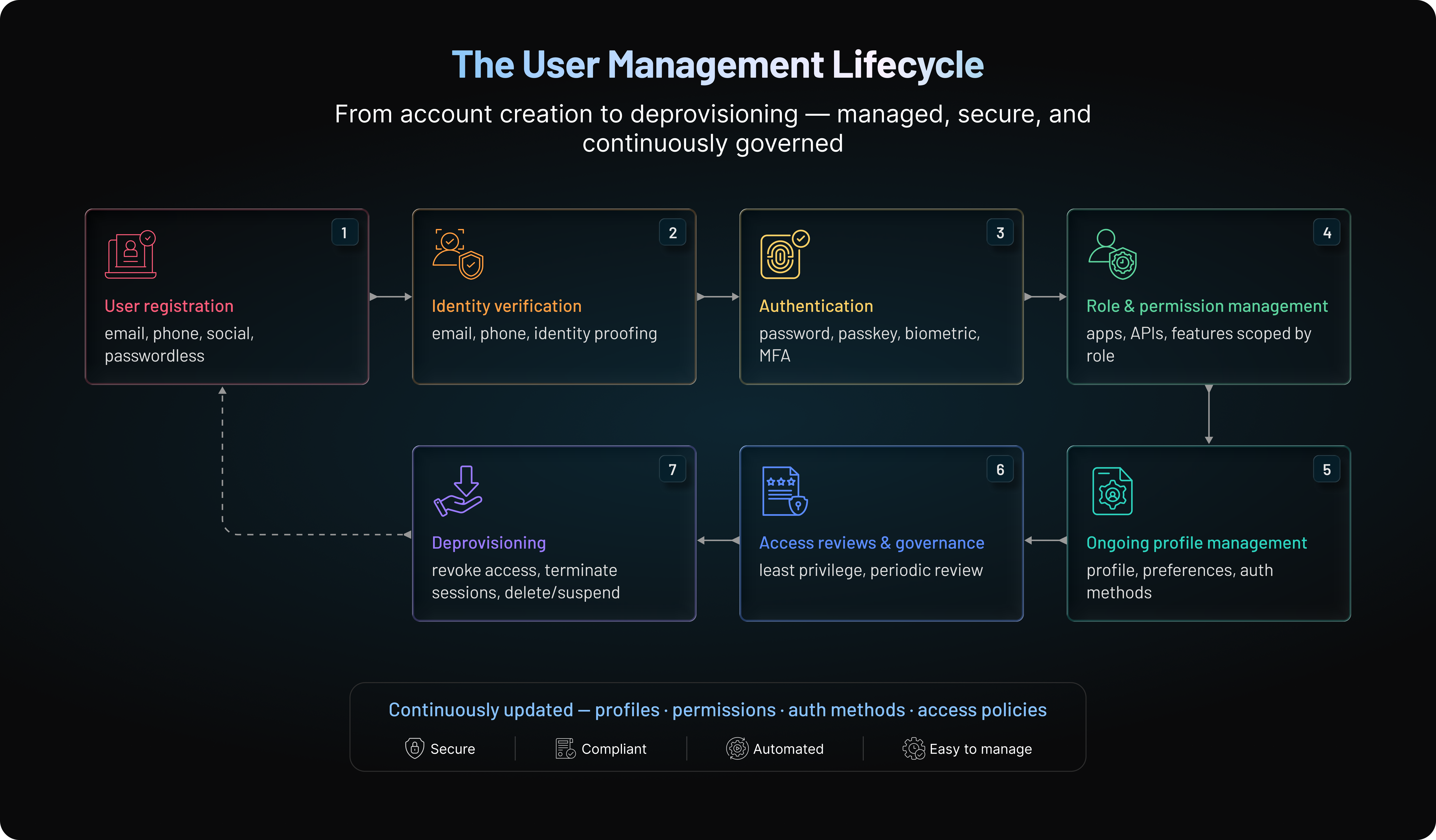
A modern user management system manages this entire lifecycle, ensuring identities remain secure, accurate, and appropriately governed as customer relationships change.
Stage 1: User Registration
The lifecycle begins when a customer creates an account using an email address, phone number, social login, or passwordless authentication method. During registration, the system creates a trusted digital identity and may verify contact information to reduce fraudulent or duplicate accounts.
Stage 2: Identity Verification
Before granting access, many organizations verify that users control the identity they're claiming. Verification may involve confirming an email address, validating a phone number, or performing stronger identity proofing for higher-risk applications. The level of verification should match the level of business risk.
Stage 3: Authentication
Authentication confirms that a returning user is the legitimate account owner. Modern user management systems support passwords, passkeys, biometrics, social login, and Multi-Factor Authentication (MFA), allowing organizations to balance security with a seamless sign-in experience.
Stage 4: Role Assignment and Permission Management
After authentication, the system assigns or evaluates roles and permissions to determine which applications, APIs, or features the user can access. As customer relationships change, permissions should be updated to ensure access remains appropriate.
Stage 5: Ongoing Profile Management
Customer identities change throughout their lifecycle. Users update profile information, manage authentication methods, modify communication preferences, and connect additional identities. Keeping this information accurate ensures a consistent experience across every application and service.
Stage 6: Access Reviews and Identity Governance
Permissions shouldn't remain static. Regular access reviews help organizations ensure users still have the appropriate level of access while supporting the principle of least privilege. This reduces unnecessary privileges and strengthens overall security.
Stage 7: Account Suspension and Deprovisioning
The lifecycle ends when access is no longer required. A user management system should automatically revoke permissions, terminate active sessions, and suspend or delete accounts based on business policies or regulatory requirements. Proper deprovisioning reduces security risks and supports compliance obligations.
Every customer interaction becomes part of this lifecycle. As identities evolve, a modern user management system continuously updates profiles, permissions, authentication methods, and access policies to keep customer accounts secure, compliant, and easy to manage.
How Does a User Management System Work?
User management may appear simple from the user's perspective, but every registration, login, profile update, and permission change triggers a series of coordinated identity services behind the scenes.
A modern user management system verifies identities, retrieves user information, applies access policies, maintains active sessions, and records important identity events—all within seconds.
Although implementations vary, the overall workflow remains similar across most applications.
A Typical User Management Workflow
-
A user registers or signs in to the application.
-
The system verifies the user's identity.
-
User profiles, roles, and permissions are retrieved.
-
Access policies determine what the user can view or perform.
-
A secure session is established for approved requests.
-
Identity events are logged for monitoring, auditing, and compliance.
Each step helps ensure users receive secure, consistent access while protecting sensitive applications and data.
| Component | Responsibility |
|---|---|
| Identity Store | Maintains customer identities, profile attributes, and account status |
| Authentication Service | Verifies user identities during registration and login |
| Authorization Engine | Evaluates roles, permissions, and access policies |
| User Profile Service | Manages customer information and preferences |
| Session Management | Maintains authenticated user sessions securely |
| Audit and Monitoring | Records identity events for security and compliance |
| Administration Console | Allows administrators to manage users, roles, and policies |
Each component performs a specific role while working together to deliver a secure and seamless user experience.
Automation Makes User Management Scalable
As organizations grow, manually managing customer identities quickly becomes impractical.
Modern user management systems automate repetitive tasks such as creating user accounts, assigning roles, updating permissions, sending verification emails, revoking access, and recording identity events. Automation reduces administrative effort, minimizes human error, and helps ensure identity policies are applied consistently across applications.
User Management Best Practices
A user management system should do more than create accounts and control access. It should help organizations manage identities consistently, reduce administrative effort, and strengthen security throughout the user lifecycle.
The following best practices can help you build a user management strategy that remains secure, scalable, and easier to maintain over time.
| Best Practice | Why It Matters |
|---|---|
| Centralize customer identities | Maintains a consistent source of truth across applications |
| Apply the Principle of least privilege | Limits unnecessary access and reduces security risks |
| Automate provisioning and deprovisioning | Improves scalability while reducing manual errors |
| Use modern authentication methods | Strengthens security without increasing friction |
| Review roles and permissions regularly | Prevents privilege accumulation over time |
| Enable self-service account management | Improves customer experience and reduces support costs |
| Monitor identity activity | Helps detect suspicious behavior early |
| Build privacy into user management | Supports compliance and customer trust |
| Choose a scalable platform | Supports future growth and changing business needs |
| Continuously optimize your onboarding and identity flows | Keeps identity management aligned with evolving requirements |
Building vs. Buying a User Management System
| Decision Factors | Custom In-House Build | Off-the-Shelf CIAM Platform |
|---|---|---|
| Initial Engineering Time | High (3–6 months core development time) | Low (Integrate via SDKs in days) |
| Ongoing Maintenance | High (Updating security patches and protocols) | Zero infrastructure overhead |
| Compliance Upkeep | Manual policy updates for GDPR/CCPA | Built-in compliance and consent management |
| Scalability Risk | Requires custom database tuning | Elastic auto-scaling infrastructure |
How to Choose the Right User Management System
Choosing a user management system isn't simply about replacing login forms or managing customer accounts. It's an infrastructure decision that influences security, customer experience, developer productivity, and future scalability.
Many platforms offer similar feature lists, making it difficult to compare solutions. Here's where teams often make the wrong decision—they evaluate today's requirements without considering how identity needs will evolve over time.
The right platform should support your business as applications grow, customer expectations change, and security requirements become more sophisticated.
When evaluating a user management solution, focus on the capabilities that will have the greatest long-term impact.
Scalability
Identity traffic grows alongside your business. More users mean more registrations, authentication requests, profile updates, and permission changes.
Choose a platform that can scale from thousands to millions of customer identities while maintaining consistent performance across web applications, mobile apps, APIs, and digital services.
Flexible Authentication and Authorization
Authentication methods continue to evolve. While passwords are still common, many organizations now support passkeys, passwordless authentication, social login, and Multi-Factor Authentication (MFA).
The platform should also provide flexible authorization through role-based or fine-grained access controls, ensuring users receive the appropriate level of access without creating unnecessary administrative complexity.
Developer Experience and Integrations
Identity should integrate into your applications—not slow development.
Look for well-documented APIs, SDKs, webhooks, and pre-built integrations that simplify implementation across websites, mobile applications, APIs, CRMs, identity providers, and other business systems. Strong developer tooling also makes user provisioning and lifecycle automation much easier.
Self-Service User Management
Customers increasingly expect to manage their own accounts without contacting support.
Capabilities such as profile management, password or passkey updates, account recovery, privacy preferences, and session management improve customer experience while reducing operational overhead for support teams.
Security and Compliance
Security should be built into the platform rather than added later.
A modern user management solution should support capabilities such as:
-
Multi-Factor Authentication (MFA)
-
Passkeys and passwordless authentication
-
Adaptive authentication
-
Role-based access control
-
Audit logging
-
Session management
-
Consent management
-
Privacy controls
If your organization operates in regulated industries, compliance support for frameworks such as GDPR, HIPAA, CCPA, and SOC 2 should also be part of the evaluation process.
Administration and Visibility
Managing customer identities requires more than user creation and authentication.
Administrators need clear visibility into user activity, permission changes, authentication events, lifecycle operations, and security incidents. Comprehensive dashboards, reporting, and audit logs simplify identity governance while improving operational oversight.
Questions to Ask Before Choosing a Platform
Rather than comparing feature lists, ask practical questions:
-
Can the platform support future growth?
-
Does it integrate easily with existing applications and APIs?
-
Does it support modern authentication methods like passkeys and MFA?
-
Can roles and permissions be managed efficiently?
-
Does it automate user provisioning and deprovisioning?
-
How does it support privacy, consent, and compliance?
-
Are audit logs and reporting comprehensive enough for security and governance?
The answers to these questions often reveal whether a platform will continue meeting your needs as your identity ecosystem evolves.
Choosing the right user management platform is about preparing for the future, not just solving today's identity challenges. A scalable, secure, and developer-friendly solution gives organizations the flexibility to deliver better customer experiences while adapting to changing business and security requirements.
How LoginRadius Simplifies User Management at Scale
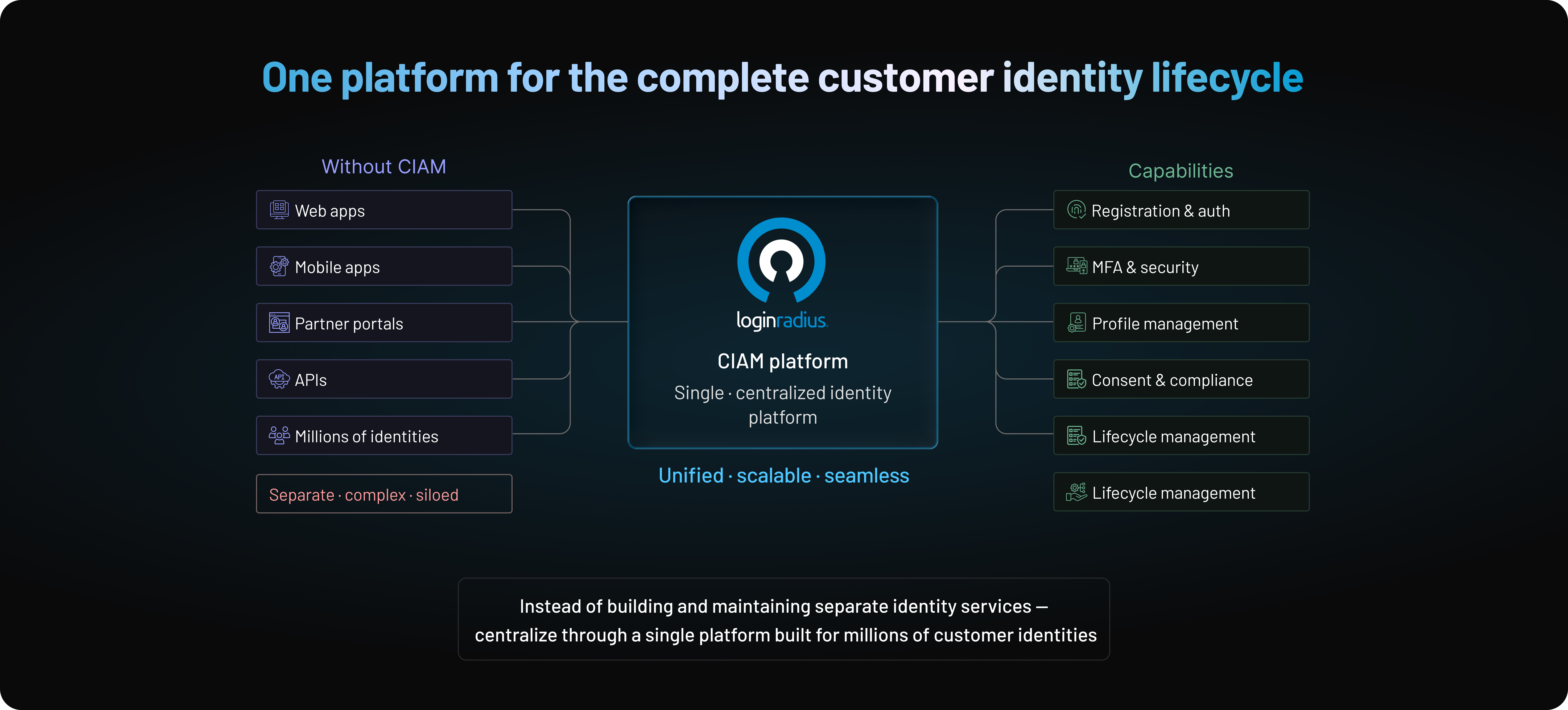
Managing customer identities becomes significantly more challenging as applications grow. Supporting a few thousand users is one thing.
Supporting millions of customer identities across web applications, mobile apps, partner portals, and APIs is something else entirely.
The complexity rarely comes from one feature. It comes from bringing everything together: registration, authentication, authorization, profile management, consent, security, and lifecycle management while delivering a seamless customer experience.
This is where a Customer Identity and Access Management (CIAM) platform can make a meaningful difference.
Instead of building and maintaining separate identity services, organizations can centralize user management through a single platform designed to support the complete customer identity lifecycle.
A Unified Platform for Customer Identity Management
LoginRadius provides a centralized platform for managing customer identities from registration through account deactivation.
Rather than stitching together multiple identity solutions, development teams can manage authentication, authorization, user profiles, permissions, and customer lifecycle operations from one place.
Some of the core user management capabilities include:
-
Secure customer registration and onboarding
-
Centralized user profile management
-
Role and permission management
-
Self-service account management
-
User provisioning and lifecycle management
-
Consent and privacy preference management
-
Comprehensive audit logs and identity reporting
Managing identities through a unified platform helps reduce operational complexity while keeping customer data consistent across applications.
Flexible Authentication for Modern Applications
Customer expectations continue to evolve. Some users prefer passwords. Others expect passkeys, social login, passwordless authentication, or Multi-Factor Authentication (MFA).
LoginRadius supports multiple authentication methods, allowing organizations to deliver secure login experiences without forcing every customer through the same authentication journey.
This flexibility makes it easier to strengthen security while maintaining a smooth customer experience across different applications and devices.
Fine-Grained Access Control
Authentication establishes who a customer is.
Authorization determines what they're allowed to access.
LoginRadius enables organizations to manage roles and permissions centrally, helping ensure customers receive access that's appropriate for their account type, subscription level, or business relationship.
As applications grow, centralized authorization policies simplify permission management and reduce the administrative overhead of managing access across multiple systems.
Built for Security, Privacy, and Compliance
Identity security doesn't stop after login.
Modern applications need continuous visibility into customer identities, authentication events, administrative activities, and consent records.
LoginRadius helps organizations strengthen their identity posture with capabilities such as:
-
Multi-Factor Authentication (MFA)
-
Passwordless authentication
-
Passkey support
-
Adaptive authentication
-
Session management
-
Audit logging
-
Consent management
-
Privacy controls aligned with regulatory requirements
These capabilities help organizations protect customer identities while supporting evolving compliance obligations and security best practices.
Developer-Friendly Integration
Identity should accelerate development, not slow it down. LoginRadius provides APIs, SDKs, and integration options that simplify user management across websites, mobile applications, APIs, and cloud services.
Whether teams are building a new customer-facing application or modernizing an existing identity infrastructure, centralized identity services reduce the need to build and maintain complex authentication and user management functionality from scratch.
That allows engineering teams to spend more time building customer experiences instead of maintaining identity infrastructure.
As customer expectations continue to evolve, user management becomes much more than an administrative function. It becomes the foundation for secure digital experiences.
Organizations that invest in centralized identity management, modern authentication, lifecycle automation, and scalable authorization are better equipped to support long-term growth without increasing operational complexity.
A CIAM platform such as LoginRadius brings these capabilities together, helping businesses manage customer identities securely while delivering the seamless experiences users expect.
Conclusion
User management has evolved far beyond creating user accounts and resetting passwords.
Today, it sits at the center of every secure digital experience. Every customer registration, login, profile update, permission change, and account recovery request depends on a user management system that can verify identities, protect sensitive data, and deliver the right level of access at the right time.
As organizations grow, so does the complexity of managing customer identities. More applications, more users, stricter privacy regulations, and increasingly sophisticated cyber threats all place greater demands on identity infrastructure. Manual processes and disconnected identity systems may work for a while, but they rarely scale without introducing security gaps, operational inefficiencies, and inconsistent customer experiences.
The good news is that modern user management doesn't have to be complicated.
By centralizing customer identities, automating the user lifecycle, applying fine-grained access controls, and adopting modern authentication methods such as passkeys and Multi-Factor Authentication (MFA), organizations can strengthen security while making every interaction simpler for legitimate users.
Whether you're building a new customer-facing application, modernizing a legacy identity system, or preparing your platform to support millions of users, investing in the right user management strategy today will continue to pay dividends as your business grows.
Simplify User Management with LoginRadius
Managing customer identities shouldn't require maintaining dozens of disconnected authentication, authorization, and lifecycle services.
LoginRadius provides a complete Customer Identity and Access Management (CIAM) platform that helps organizations securely manage customer registration, authentication, user profiles, permissions, consent, and the entire identity lifecycle from a single platform.
If you're ready to deliver secure, scalable, and frictionless customer experiences, schedule a personalized demo with LoginRadius to see how modern user management can support your business today and continue to scale with you tomorrow.
FAQs
Q: What is user management?
A: User management is the process of creating, maintaining, securing, and removing user identities throughout their lifecycle. It includes user registration, authentication, authorization, profile management, permissions, and account deprovisioning.
Q: Why is user management important?
A: User management helps organizations protect customer accounts, control access to applications, improve operational efficiency, and deliver seamless digital experiences. It also supports compliance with privacy and security regulations.
Q: What is the difference between user management and user access management?
A: User management focuses on creating and managing user identities, while user access management controls what authenticated users are allowed to access. Together, they ensure secure identity and access control.
Q: What are the core components of a user management system?
A: A modern user management system typically includes user registration, authentication, authorization, role and permission management, profile management, user provisioning, consent management, audit logging, and account lifecycle management.
Q: What is the user management lifecycle?
A: The user management lifecycle covers every stage of a user's journey, from registration and identity verification to authentication, permission management, profile updates, access reviews, and secure account deprovisioning.
Q: What is user provisioning and deprovisioning?
A: User provisioning automatically creates user accounts and assigns appropriate roles or permissions. Deprovisioning removes or revokes access when a user leaves, closes an account, or no longer requires access.
Q: What is role-based access control (RBAC)?
A: Role-Based Access Control (RBAC) is an authorization model that grants permissions based on predefined roles rather than assigning permissions to individual users. This simplifies access management and improves security.
Q: How does user management improve security?
A: User management strengthens security by verifying identities, enforcing access controls, supporting MFA and passkeys, removing inactive accounts, and maintaining audit logs to detect suspicious activity.
Q: How does user management support compliance?
A: User management helps organizations meet compliance requirements by protecting personal data, managing customer consent, controlling access, maintaining audit trails, and supporting secure data retention and deletion policies.
Q: What should you look for in a user management system?
A: Look for features such as scalable identity management, flexible authentication, role-based authorization, lifecycle automation, APIs and SDKs, self-service account management, audit logging, and compliance support.
Q: What is the difference between user management and identity management?
A: User management focuses on managing user accounts, profiles, roles, and permissions. Identity management is broader, covering authentication, authorization, identity governance, federation, and lifecycle management across multiple systems.
Q: How does a CIAM platform simplify user management?
A: A CIAM platform centralizes customer registration, authentication, authorization, profile management, consent, and lifecycle management. This reduces operational complexity while improving security and customer experience across digital channels.
Q: Can user management scale to millions of users?
A: Yes. Modern cloud-based user management platforms are designed to support millions of customer identities using automated provisioning, centralized identity services, scalable authentication, and high-performance APIs.
Q: What are the best practices for user management?
A: Some best practices include centralizing identities, applying the principle of least privilege, automating provisioning and deprovisioning, using MFA or passkeys, reviewing permissions regularly, and continuously monitoring user activity.
Q: What is a user management system?
A: A user management system is software that enables organizations to create, authenticate, authorize, and manage user identities throughout their lifecycle. It helps secure customer accounts while simplifying identity administration and access control.



