Introduction
Securing a SaaS platform today is radically different from securing a traditional application. Your users can log in from anywhere, on any device, at any time, and attackers can too. As SaaS adoption accelerates across every industry, the login page has quietly become the single most targeted entry point for cybercriminals.
Credential stuffing, brute-force attempts, bot-driven abuse, MFA fatigue attacks, and phishing kits designed to bypass OTPs now operate at a massive scale.
This is why Multi-Factor Authentication (MFA) is no longer a “nice to have” for SaaS platforms; it's the baseline for survival. But not all MFA is equal, and not every method works for every SaaS model.
For B2B product teams, this conversation becomes even more specific. The reality is that best practices for b2b saas require stronger controls for admins, tenant isolation, auditability, and reliable enforcement across SSO and partner access flows without breaking onboarding or daily login velocity.
According to Microsoft, multi-factor authentication can block more than 99% of automated account compromise attacks, making it one of the most effective security controls available for protecting online accounts.
What Makes MFA for SaaS Different?
Multi-factor authentication isn’t one-size-fits-all and SaaS platforms experience a completely different set of pressures compared to traditional software. Unlike internal workforce systems, SaaS applications deal with unpredictable user behavior, diverse device ecosystems, and massive global traffic patterns. This makes MFA choices far more strategic than simply “adding an extra step.”
Multi-Tenant Architecture Changes Everything
SaaS platforms must secure multiple tenants, each with unique roles, permissions, and risk levels. A single MFA approach cannot protect:
-
admin accounts
-
standard users
-
external collaborators
-
API/service accounts
This requires flexible MFA policies that adapt to each tenant, each user group, and each sensitive action.
SaaS Platforms Can’t Afford Friction
Every additional login step increases drop-offs. Unlike corporate systems, SaaS platforms must preserve conversion funnels, meaning MFA must:
-
add minimal friction
-
work across all devices
-
support fast onboarding
-
avoid breaking login flows
This is especially true in B2C SaaS, where user patience is extremely low.
Your Users Log In From Everywhere
A global SaaS platform must support authentication across:
-
unstable networks
-
older devices
-
shared devices
-
different operating systems
-
unfamiliar locations
This requires MFA methods that remain reliable under inconsistent conditions, something SMS, email OTP, and even TOTP often struggle with.
SaaS Platforms Face Higher Attack Volumes
Because SaaS serves broad user bases, it attracts:
-
large-scale credential stuffing
-
bot-driven login attempts
-
phishing campaigns
-
brute force automation
This makes basic MFA insufficient. SaaS needs strong MFA factors like WebAuthn, FIDO2 security keys, and adaptive policies that can detect suspicious behavior automatically.
Credential abuse continues to be one of the most common attack vectors against SaaS applications. Recent Verizon Data Breach Investigations Reports consistently show that stolen credentials remain a leading cause of security incidents and unauthorized access.
🚨 Deep Dive: Credential Stuffing Defense
Credential stuffing remains one of the most common attack vectors against SaaS applications. Learn how bot detection, breached-password screening, adaptive MFA, and device intelligence help stop automated login attacks.
Read: How to Prevent Credential Stuffing Attacks
Developer-Friendly MFA Matters for SaaS Growth
SaaS products thrive on integrations, APIs, SDKs, partner tools, and developer ecosystems. MFA must be:
-
easy to embed
-
API-first
-
compatible with automation
-
simple to configure
-
support CLI & service account flows
The B2B Enterprise Dilemma: Native MFA vs. SSO Delegation
In enterprise B2B SaaS, tenants often demand Single Sign-On (SSO) via SAML/OIDC. You must design your system to handle two paths:
-
Federated Tenants: Delegate MFA to the customer's enterprise IdP (e.g., Okta, Entra ID) and inspect
amr(Authentication Methods References) claims in the incoming OIDC token. -
Native Tenants: Enforce your own adaptive MFA policies for direct database users.
Core MFA Methods Every SaaS Platform Should Consider
Not all MFA methods deliver the same balance of security, usability, and reliability, especially in SaaS environments. Below is a clear, modern breakdown of the most relevant MFA factors, how they work, and where they fit into a SaaS authentication strategy.
In modern mfa saas deployments, organizations often combine factors depending on risk level and tenant needs, especially in enterprise plans where sso mfa enforcement becomes essential for secure access across federated identity providers.
| MFA Method | Best Suited for | Pros | Cons |
|---|---|---|---|
| TOTP (Time-Based One-Time Passwords) | General-purpose SaaS applications needing simple, affordable MFA. | - Works offline- Low cost- Easy to deploy- Familiar to users | - Not phishing-resistant- Vulnerable to real-time MITM attacks- Manual entry introduces friction- Code drift and device mismatch issues |
| Push Notifications | Consumer SaaS platforms where smooth UX is critical. | - Extremely low friction- Fast and convenient- Ideal for mobile-first apps- Can be combined with biometrics | - Vulnerable to MFA fatigue (push bombing)- Dependent on device availability- Requires stable Internet on the device |
| SMS & Email OTPs | Backup factors, recovery flows, or very low-risk SaaS use cases. | - Universal device support- No app installation needed | - Prone to SIM-swap, SS7, and phishing attacks- High cost for global SMS delivery- Not acceptable for high-risk industries |
| Security Keys (FIDO2 / WebAuthn) | B2B SaaS, enterprise tiers, admin accounts, and high-value actions. | - Highest security- Fully phishing-resistant- Passwordless compatible- Fast and frictionless | - Requires hardware keys- Requires user education/training |
| Passkeys / Passwordless MFA | High-growth SaaS platforms prioritizing UX + strong security. | - Frictionless authentication- Biometric login- Strong phishing resistance- No passwords at all | - Requires modern device ecosystem- Account recovery design must be robust |
| Biometrics (Device-Driven) | Mobile-first SaaS apps and passwordless SaaS experiences. | - Very fast- No typing- Extremely low user effort- Secure if paired with FIDO2/WebAuthn | - Device-dependent- Privacy concerns in some regions |
Also read: Securing B2B SaaS: How Identity Management Leads the Charge Against Top 5 Security Challenge
Comparing MFA Methods for SaaS Platforms
Every MFA method involves trade-offs between security, user experience, implementation complexity, and operational cost. The best choice depends on your SaaS application's risk profile, user base, compliance requirements, and growth stage.
The table below compares the most common MFA methods used in modern SaaS platforms.
| MFA Method | Security Strength | User Experience | Phishing Resistant | Implementation Complexity | Cost | Best For |
|---|---|---|---|---|---|---|
| SMS OTP | Low | Medium | No | Low | Medium | Recovery flows, low-risk applications |
| Email OTP | Low | Medium | No | Low | Low | Basic account verification |
| TOTP Apps | Medium | Medium | No | Low | Low | General-purpose SaaS authentication |
| Push Authentication | High | High | Partial | Medium | Medium | Mobile-first SaaS applications |
| Biometrics | High | Very High | Partial | Medium | Low | Mobile and desktop device authentication |
| Passkeys | Very High | Very High | Yes | Medium | Low | Modern passwordless SaaS platforms |
| Security Keys (FIDO2/WebAuthn) | Highest | High | Yes | Medium | High | Enterprise SaaS and privileged accounts |
Choosing the Right MFA Method for Your SaaS Platform
There is no single MFA method that works best for every SaaS application.
The right choice depends on your users, risk profile, compliance requirements, and growth model. A B2C application focused on onboarding speed will have very different authentication needs than a healthcare platform protecting sensitive patient data.
The table below provides a practical starting point for selecting the right MFA strategy.
| If Your SaaS Is... | Recommended MFA Strategy | Why It Works |
|---|---|---|
| PLG SaaS | Passkeys + Adaptive MFA | Minimizes onboarding friction while maintaining strong security. |
| B2C SaaS | Push Authentication + Passkeys | Fast login experience with high user adoption. |
| Enterprise SaaS | FIDO2 Security Keys + Adaptive MFA | Strong protection for privileged users and enterprise compliance requirements. |
| Fintech SaaS | Security Keys + Passkeys | Provides phishing-resistant authentication for high-risk financial environments. |
| Healthcare SaaS | Passkeys + Security Keys | Balances usability with strict security and compliance requirements. |
| Developer Platforms | Passkeys + WebAuthn | Supports strong authentication without disrupting developer workflows. |
For most modern SaaS platforms, passkeys combined with adaptive MFA provide the strongest balance of security and user experience.
Organizations with elevated security requirements should consider phishing-resistant methods such as:
-
FIDO2 security keys
-
WebAuthn authenticators
-
Passkeys
-
Device-bound biometrics
Meanwhile, SMS and email OTPs should generally be reserved for recovery scenarios rather than primary authentication. The goal isn't choosing the strongest MFA factor possible.
It's choosing the strongest authentication experience your users will actually adopt.
Adaptive MFA: The Winning Strategy for Modern SaaS
Traditional MFA treats every login the same. Whether a user is signing in from their usual device at home or a suspicious new location in another country, the same static MFA challenge appears. This creates friction for legitimate users and leaves dangerous gaps for attackers who learn to bypass predictable patterns.
Adaptive MFA solves this by making authentication dynamic. Instead of forcing additional challenges every time, it analyzes real-time risk signals and decides whether the login should be:
-
frictionless,
-
silently verified,
-
stepped up with stronger MFA, or
-
blocked entirely.
This is why top SaaS companies are replacing static MFA with adaptive, context-aware authentication.
How Adaptive MFA Works
Adaptive MFA continuously evaluates login context using signals such as:
-
Device fingerprint (new, jailbroken, untrusted?)
-
Geo-location (unexpected country?)
-
IP risk reputation (proxy, TOR, botnet?)
-
Behavioral patterns (typing speed, mouse movement, login times)
-
Network attributes (public Wi-Fi, suspicious routing)
-
User history (is this normal for this user?)
Each signal contributes to a real-time risk score. Based on that score, the system automatically decides the outcome.
Why Adaptive MFA Is Essential for SaaS
Reduces Friction Without Weakening Security
Most SaaS users log in from the same devices and IP ranges. Adaptive MFA avoids unnecessary MFA prompts for these “safe” patterns, dramatically improving login success rates.
Authentication vendors report that a significant percentage of MFA prompts are triggered by legitimate users on trusted devices. Adaptive MFA reduces these unnecessary challenges by evaluating risk before requesting additional verification, improving both security and user experience.
Detects Anomalies Static MFA Misses
Attackers often pass username/password verification using credential dumps. Adaptive MFA identifies unusual activity in real time before the session is completed.
Perfect for High-Traffic Global SaaS
Adaptive MFA ensures:
-
fewer MFA prompts
-
less stress on backend authentication
-
faster login times
-
reduced operational burden on support teams
Ideal for Zero Trust Security Models
Zero Trust requires continuous verification. Adaptive MFA aligns perfectly by enforcing context-based checks on every session.
Best Strategy for Preventing MFA Fatigue Attacks
Since the system only triggers MFA when risk is high, users avoid excessive push prompts reducing chances of mistakenly approving fraudulent requests.
Adaptive MFA is not just “better MFA” it is the foundation of modern SaaS security.
Example: MFA Rollout for a Growing SaaS Platform
Implementing MFA successfully is rarely about enforcing it everywhere on day one.
High-growth SaaS companies often introduce authentication controls gradually, aligning security requirements with account value, user trust, and risk.
Consider the following example.
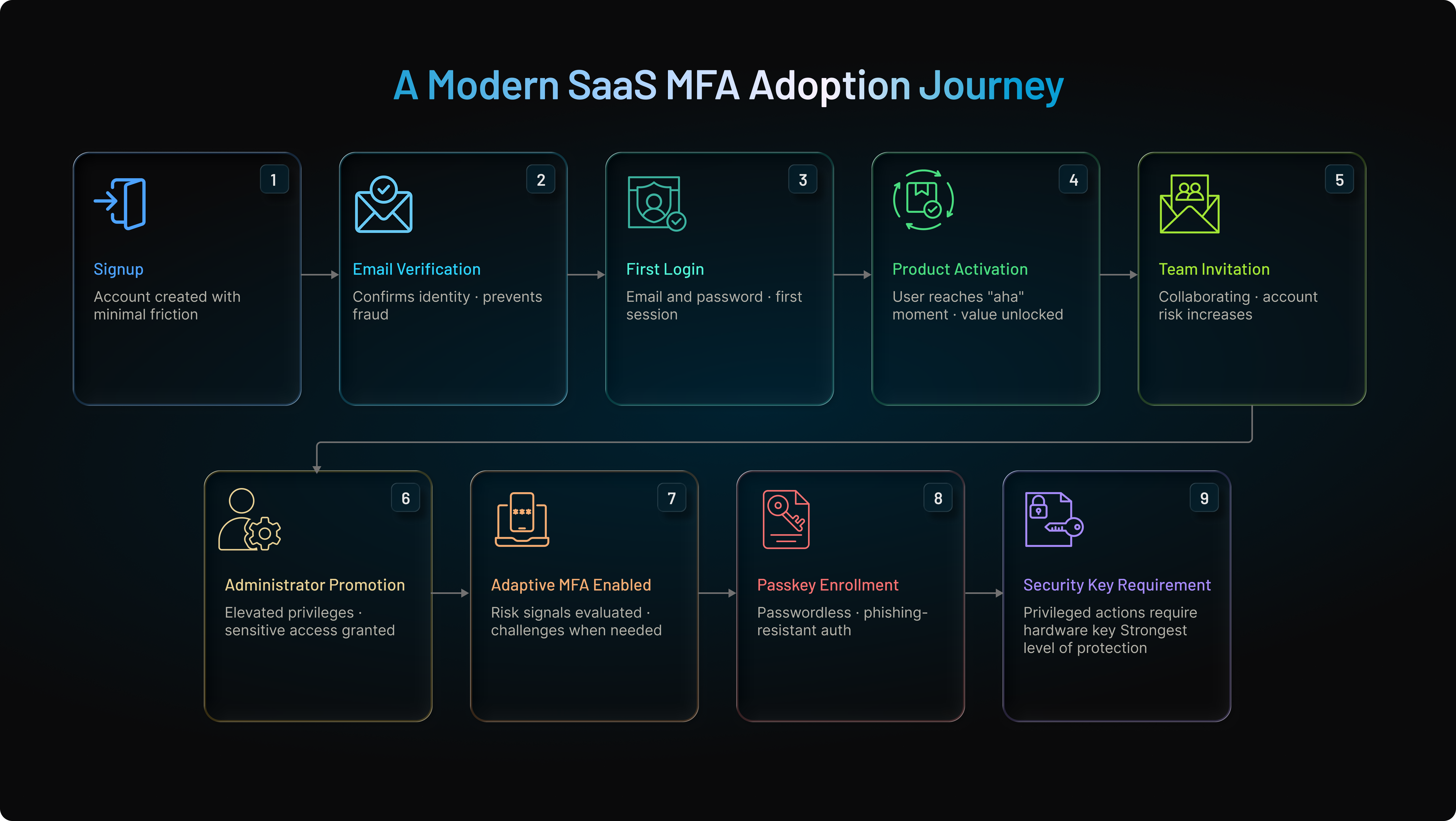
At signup, the platform focuses on reducing friction and helping users reach value quickly. Email verification and basic account validation provide initial protection without slowing onboarding.
As users begin collaborating with teammates, storing business data, and configuring workflows, the platform introduces stronger authentication methods such as passkeys.
When users receive elevated privileges, authentication requirements become more stringent. Adaptive MFA evaluates risk signals such as device trust, location, and login behavior, while security keys protect highly sensitive administrative actions.
Why This Approach Works
This model balances security and usability by introducing stronger controls only when they become necessary.
Instead of treating every user as high risk from the first login, the platform gradually increases authentication assurance as account value and business impact grow.
The result is:
-
Higher MFA adoption rates
-
Faster onboarding and activation
-
Fewer support tickets
-
Better protection for privileged accounts
-
Reduced exposure to account takeover attacks
This is why many modern SaaS platforms have moved away from blanket MFA enforcement and toward progressive, risk-based authentication strategies.
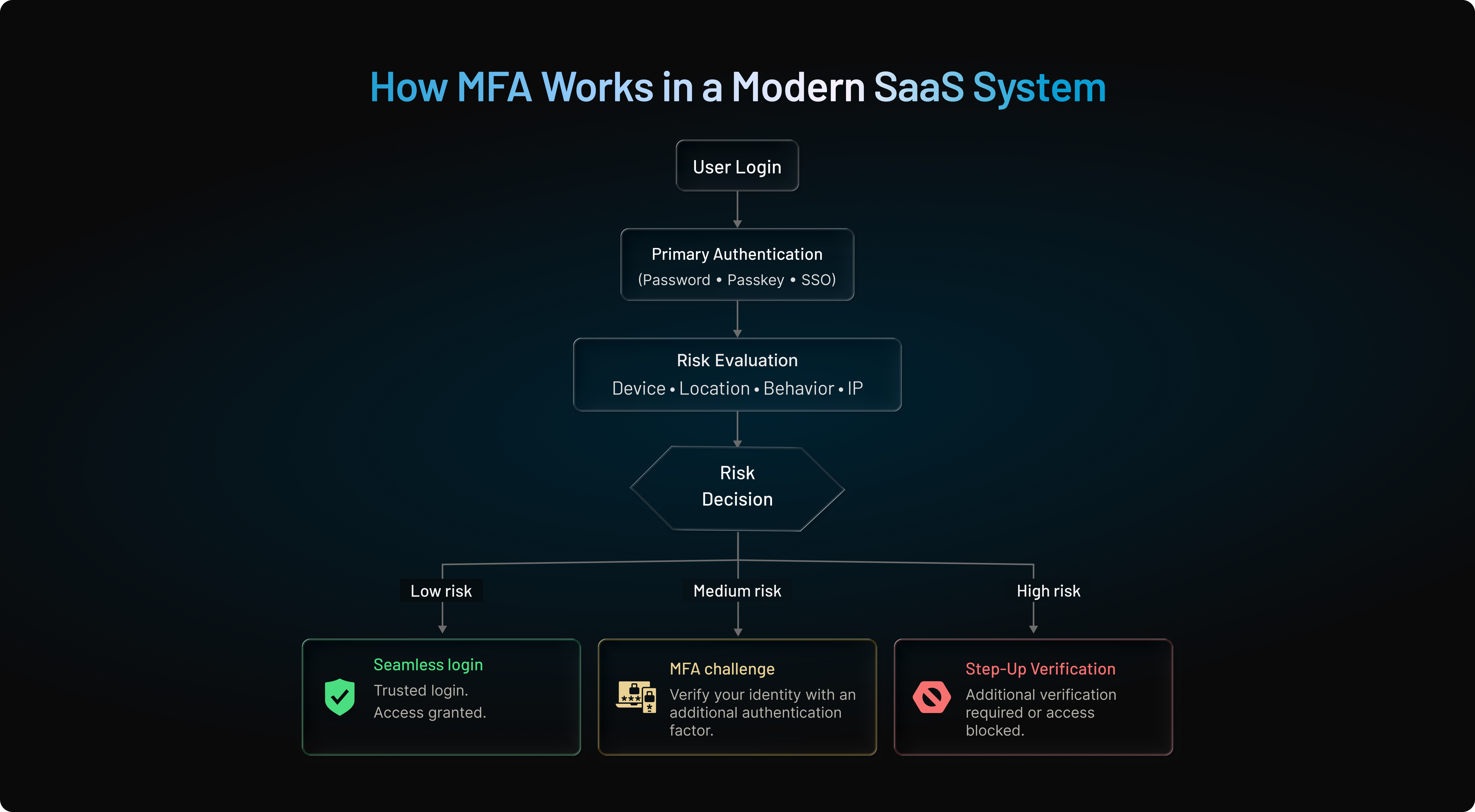
How MFA Works in Modern SaaS Authentication Systems
Many MFA discussions focus on authentication factors such as OTPs, push notifications, passkeys, or security keys. However, modern SaaS platforms rarely implement MFA as a standalone checkpoint. Instead, MFA operates as part of a broader authentication pipeline that evaluates user identity, device trust, behavioral signals, and session risk before granting access.
Understanding this workflow helps explain why adaptive MFA is becoming the standard approach for SaaS authentication.
The Modern SaaS MFA Authentication Flow
When a user attempts to sign in, the authentication system performs far more than password verification.
The login request typically passes through several security layers before a session is established.
Step 1: Primary Authentication
The user enters their credentials or uses a passwordless method such as a passkey, biometric authentication, or a security key.
At this stage, the system confirms the user's claimed identity but does not yet assume the login is trustworthy.
Step 2: Risk Evaluation Engine
Before access is granted, the platform evaluates contextual risk signals, including:
-
Device fingerprint
-
IP reputation
-
Geo-location
-
Impossible travel indicators
-
Browser characteristics
-
Behavioral patterns
-
Known compromised credentials
-
Historical login activity
These signals generate a real-time risk score.
Step 3: Dynamic Authentication Decision
Based on the calculated risk level, the platform determines the appropriate response.
-
Low Risk: Seamless access with no additional challenge
-
Medium Risk: Step-up authentication using MFA
-
High Risk: Access blocked or additional verification required
This adaptive approach prevents unnecessary MFA prompts while strengthening protection against suspicious activity.
Step 4: MFA Challenge (When Required)
If additional verification is needed, the platform may trigger:
-
Push authentication
-
TOTP verification
-
Security key authentication
-
Passkey verification
-
Biometric approval
The challenge presented depends on the organization's security policy and the user's enrolled factors.
Step 5: Token Issuance and Session Creation
Once authentication succeeds, the identity provider issues authentication tokens that establish the user session.
In modern SaaS architectures, this typically includes:
-
ID tokens containing identity claims
-
Access tokens for application authorization
-
Refresh tokens for session continuity
These tokens allow users to access applications without repeatedly authenticating during the session lifecycle.
Step 6: Continuous Session Monitoring
Authentication does not end after login.
Modern SaaS platforms continuously monitor:
-
Device changes
-
IP changes
-
Privilege escalation attempts
-
Sensitive administrative actions
-
Unusual session behavior
If risk increases during an active session, the platform can require step-up MFA, revoke tokens, or terminate access entirely.
⚙️ Deep Dive: Adaptive MFA Explained
Adaptive MFA uses device intelligence, behavioral analytics, location signals, and risk scoring to determine when additional verification is necessary. Learn how modern identity platforms reduce friction while improving security through context-aware authentication.
Read: What Is Adaptive Authentication and How Does It Work?
1// Step-up MFA trigger request when an admin exports customer data
2POST /api/v2/auth/step-up
3{
4  "session_id": "sess_9938201a",
5  "action": "tenant_data_export",
6  "required_assurance_level": "aal2", // Requires WebAuthn / Passkey
7  "context": {
8    "ip": "192.0.2.1",
9    "risk_score": 0.82
10  }
11}
Why This Architecture Matters
Traditional MFA treats authentication as a single event. Modern SaaS security treats authentication as a continuous process.
By combining risk evaluation, adaptive MFA, token-based access control, and ongoing session monitoring, SaaS platforms can reduce user friction while protecting against credential theft, session hijacking, account takeover attempts, and modern phishing attacks.
This architecture is increasingly becoming the foundation of Zero Trust security models, where every request is continuously evaluated rather than trusted solely because a user authenticated successfully.
Why MFA Fails in B2B SaaS (And How to Fix It)
Many SaaS teams assume that enabling MFA automatically makes their platform secure. In reality, most MFA failures occur not because MFA is missing, but because it is implemented incorrectly.
This challenge becomes more visible in B2B SaaS environments where organizations manage administrators, partner users, contractors, vendors, and customer employees across multiple tenants. A security policy that works for a consumer application often creates friction, support tickets, and adoption problems when applied to enterprise customers.
The goal is not simply to deploy MFA. The goal is to deploy MFA that users adopt, administrators can enforce, and attackers cannot easily bypass.
Mistake 1: Treating Every Login as High Risk
One of the most common MFA failures is forcing every user through the same authentication process regardless of context.
A user signing in from a trusted device at their normal location should not experience the same security workflow as a user logging in from an unfamiliar country using a new device.
When MFA prompts appear on every login attempt, users eventually stop paying attention. This behavior contributes to MFA fatigue and increases the likelihood of accidental approvals during push-based attacks. Modern SaaS platforms should evaluate contextual signals such as device reputation, IP intelligence, geolocation, login behavior, and impossible-travel events before triggering additional verification. Adaptive MFA significantly reduces friction while maintaining stronger protection.
Mistake 2: Relying on SMS as the Primary MFA Method
SMS remains widely used because it is easy to deploy and familiar to users. However, it should not be considered the primary security factor for protecting sensitive SaaS applications.
SMS-based authentication is vulnerable to SIM-swapping attacks, number porting abuse, message interception, and social engineering. While it can still serve as a recovery or fallback mechanism, enterprise SaaS platforms should prioritize stronger methods such as authenticator applications, push-based authentication, passkeys, security keys, or WebAuthn-based authentication.
Mistake 3: Ignoring Privileged Accounts
Not every user carries the same level of risk.
Tenant administrators, billing owners, support personnel, and super-admins often have access to customer data, security settings, user provisioning controls, and API credentials. Compromising a single privileged account can expose an entire organization.
Leading SaaS security programs increasingly require stronger authentication controls for privileged users, including phishing-resistant MFA methods such as FIDO2 security keys, passkeys, and WebAuthn-based authenticators. These methods are designed to prevent credential interception, replay attacks, and real-time phishing campaigns that can bypass traditional MFA approaches.
Mistake 4: Creating Friction During User Onboarding
Security teams often focus on protecting accounts after activation while overlooking the onboarding experience itself.
If users are required to configure multiple authentication factors before they understand the value of the product, onboarding completion rates can suffer. This is particularly problematic in product-led growth (PLG) environments where activation speed directly impacts conversion.
A better approach is progressive enrollment. Allow users to complete initial account setup, then encourage MFA enrollment at logical trust milestones such as accessing sensitive data, inviting team members, changing billing information, or performing administrative actions. This balances security and adoption without sacrificing either.
Mistake 5: Assuming MFA Alone Stops Modern Attacks
MFA remains one of the most effective security controls available, but attackers increasingly target authenticated sessions rather than passwords.
Modern phishing campaigns can trick users into approving legitimate authentication requests or steal session tokens after authentication has already succeeded. In these scenarios, the attacker bypasses the login process entirely by hijacking an authenticated session. Recent attacks targeting enterprise productivity platforms demonstrate how adversaries increasingly focus on session theft rather than credential theft.
This is why modern SaaS security strategies combine MFA with:
-
Risk-based authentication
-
Session monitoring
-
Device trust evaluation
-
Continuous verification
-
Zero Trust access controls
-
Phishing-resistant authentication methods
The strongest SaaS security architectures no longer treat MFA as a standalone feature. They treat it as one layer within a broader identity security framework.
🛡️ Deep Dive: Phishing-Resistant Authentication
Traditional MFA can still be vulnerable to real-time phishing attacks, session hijacking, and adversary-in-the-middle techniques. Learn how passkeys, FIDO2 security keys, and WebAuthn-based authentication eliminate these risks.
Read: What Is Phishing-Resistant Authentication & How Does It Work?
Key Takeaway
The biggest MFA mistake in B2B SaaS is believing that deployment equals protection. Effective MFA requires adaptive policies, phishing-resistant authentication, tenant-aware controls, privileged account protection, and a friction-conscious onboarding strategy. Organizations that focus on these areas are far more likely to improve both security outcomes and user adoption than those that simply add another login prompt.
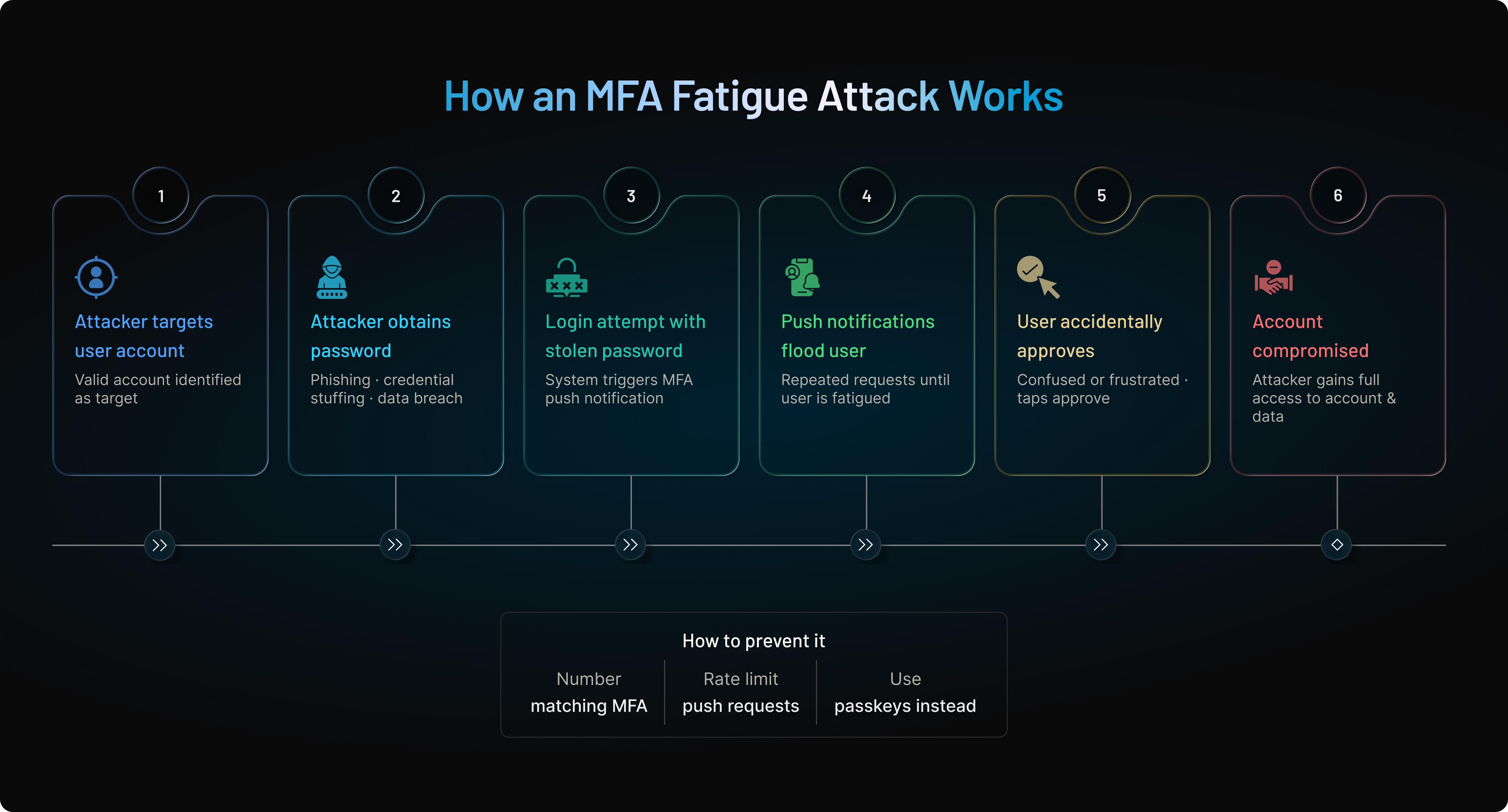
Example: How MFA Fatigue Attacks Work
One of the biggest weaknesses of traditional push-based MFA is that it relies on user judgment. Attackers exploit this by overwhelming users with repeated authentication requests until they accidentally approve one.
This attack, often called push bombing or MFA fatigue, has become increasingly common against SaaS platforms, enterprise applications, and cloud environments.
Typical MFA Fatigue Attack Flow
-
The attacker obtains a valid username and password through phishing, credential stuffing, or data breaches.
-
The attacker attempts to sign in.
-
The MFA system sends a push notification to the legitimate user.
-
The attacker repeatedly triggers login attempts.
-
The user receives dozens of MFA prompts.
-
Out of confusion or frustration, the user accidentally approves one request.
-
The attacker gains access to the account.
Why Traditional MFA Fails
The authentication factor itself is not compromised.
The human decision-making process is.
This is why modern SaaS platforms increasingly use:
-
Number matching
-
Device trust validation
-
Adaptive MFA
-
Risk scoring
-
Phishing-resistant authentication
to prevent approval fatigue.
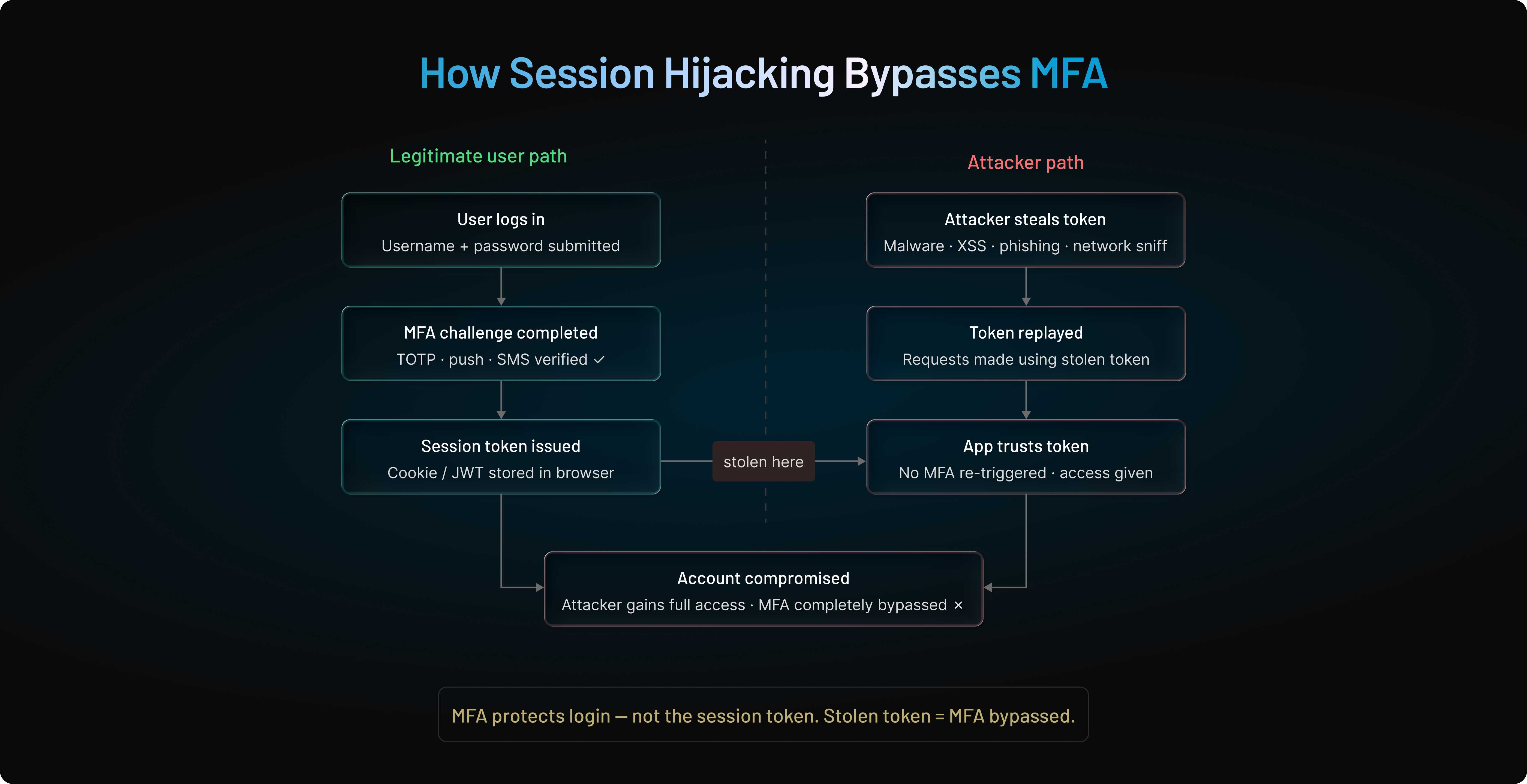
Example: How Session Hijacking Bypasses MFA
Many teams assume that MFA completely prevents account compromise.
However, modern attackers increasingly target authenticated sessions instead of login credentials.
In a session hijacking attack, the attacker does not need to bypass MFA. They simply steal the authenticated session after MFA has already succeeded.
Typical Session Hijacking Flow
-
User successfully completes MFA.
-
The application issues session cookies or access tokens.
-
Malware, browser extensions, or adversary-in-the-middle attacks steal the session token.
-
The attacker reuses the stolen token.
-
The application trusts the token because MFA was already completed.
-
The attacker gains access without seeing the password or MFA challenge.
Why This Matters
This is one of the main reasons modern identity systems increasingly adopt:
-
Continuous authentication
-
Device binding
-
Token protection
-
Session monitoring
-
Step-up authentication
-
Zero Trust access controls
Authentication is no longer enough. The session itself must be protected.
🍪 Deep Dive: Session Management & Token Security
Authentication is only the beginning. Learn how access tokens, refresh tokens, session expiration policies, and token revocation help protect SaaS applications from session hijacking and unauthorized access.
Read: Management Best Practices for Modern Applications
Passwordless for SaaS: The Future of MFA
The SaaS industry is rapidly moving beyond traditional MFA toward passwordless authentication, driven by the need for stronger security, smoother user experience, and reduced support overhead. Passwords have become the weakest link in the identity chain. Users reuse them, attackers steal them, and SaaS platforms end up dealing with continuous account takeover attempts.
Passwordless authentication removes passwords entirely, replacing them with cryptographic credentials, biometrics, or hardware-backed methods like passkeys and security keys. For SaaS platforms focused on growth, global reach, and security, passwordless isn’t just the future it’s becoming the new default.
🔑 Deep Dive: Passkeys Explained
Passkeys are rapidly becoming the preferred authentication method for SaaS platforms because they combine phishing resistance, strong cryptography, and a frictionless user experience. Learn how passkeys work behind the scenes and why major technology providers are adopting them.
Read: What Is Passkey Authentication and How Does It Work?
Why Passkeys Are Becoming the Standard
Passkeys (Apple, Google, Microsoft ecosystem) offer the best combination of:
-
phishing resistance
-
frictionless UX
-
cross-device syncing
-
biometric convenience
-
device-bound cryptography
For SaaS platforms, passkeys allow:
-
instant onboarding
-
high login success rates
-
consistent authentication across devices
This is why major SaaS brands are actively transitioning to passkey-first login.
Major platform providers including Apple, Google, and Microsoft have adopted passkeys because phishing-resistant authentication dramatically reduces the risk of credential theft while improving login success rates compared to password-based systems.
Combining MFA + Zero Trust for SaaS Security
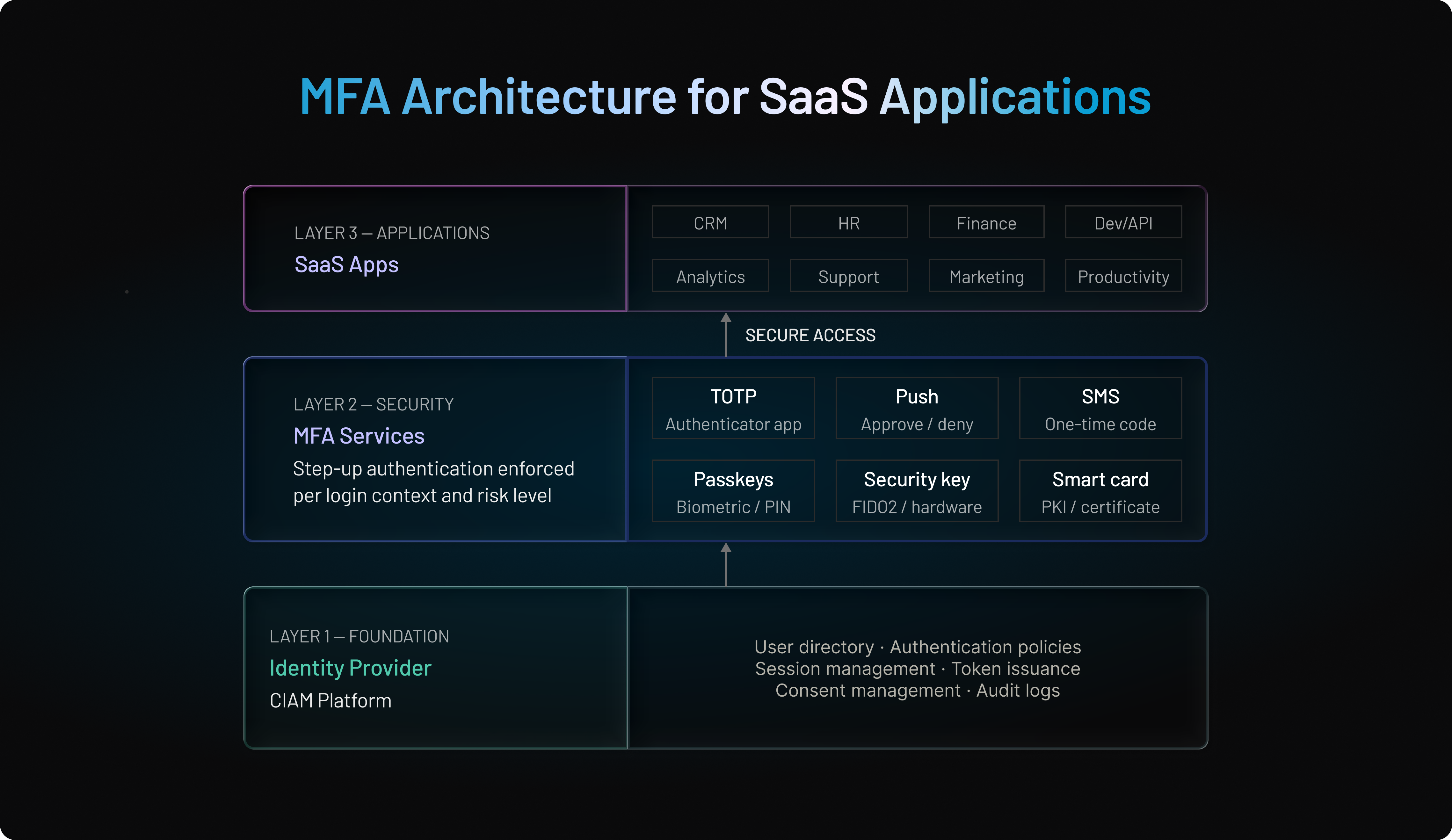
Zero Trust has become the guiding framework for modern SaaS security — and MFA plays a central role within it. In a Zero Trust environment, no user, device, network, or session is trusted by default, even if they have already authenticated. Every action must be verified continuously, and every request must be evaluated against real-time context and risk.
For SaaS companies, combining MFA with Zero Trust principles transforms authentication from a one-time checkpoint into a dynamic, ongoing protection layer across the entire user session.
Why Zero Trust Matters for SaaS Platforms
SaaS platforms face threats that traditional access models were never designed for:
-
Global, unpredictable user behavior
-
Session hijacking and cookie theft
-
Credential stuffing at massive scale
-
Compromised devices accessing business-critical data
-
Insider threats in multi-tenant environments
-
Real-time phishing and AITM attacks
Zero Trust ensures that access is never assumed — it is continuously validated.
🛡️ Deep Dive: Zero Trust Security
Zero Trust assumes no user, device, or session should be trusted automatically. Explore how continuous verification, adaptive authentication, and risk-based access controls strengthen SaaS security.
Read: A Beginner's Guide to Zero Trust Security
How MFA Fits Into Zero Trust
MFA strengthens identity verification, but Zero Trust extends it by enforcing continuous and contextual checks throughout the session.
Zero Trust Enhances MFA By Adding:
Continuous Session Monitoring
User behavior, location, device posture, and network changes are constantly analyzed.
Contextual Access Controls
Access decisions adapt based on:
-
device health
-
IP risk
-
geo-velocity
-
resource sensitivity
-
user privileges
Just-in-Time & Just-Enough Access
MFA can be required dynamically for:
-
privilege elevation
-
sensitive data exports
-
financial transactions
-
admin panel entries
High-Risk Events Trigger Step-Up MFA
Security keys, biometrics, or passkeys are prompted only when needed.
Why MFA Alone Is Not Zero Trust
Many SaaS companies mistakenly believe adding MFA = Zero Trust.
But MFA alone only verifies identity at login.
| Security Metric | Traditional MFA | MFA + Zero Trust Architecture |
|---|---|---|
| Evaluation Point | One-time check at initial login | Continuous evaluation throughout active session |
| Contextual Awareness | Static rules (Password + OTP) | Real-time risk engine (IP, device health, geo-velocity) |
| Session Protection | Vulnerable to post-login cookie/token theft | Active session re-evaluations and step-up prompts |
| Failure Response | Prompts identical challenge | Dynamically adapts challenge, limits access, or revokes token |
UX & Conversion: How MFA Impacts SaaS Growth
For SaaS platforms, MFA is more than a security decision it's a growth decision.
Poorly implemented MFA can increase onboarding friction, reduce activation rates, and create login abandonment. The challenge is strengthening security without disrupting the user journey.
MFA Directly Impacts Onboarding & Activation
The onboarding experience is often a user's first impression of your product. Requiring complex MFA setup too early can slow activation and increase drop-offs.
A better approach is to introduce stronger authentication gradually, using methods like adaptive MFA, passkeys, or progressive enrollment that align with user trust and account value.
Friction Is the #1 Reason Users Abandon MFA
Users rarely abandon MFA because they dislike security. They abandon it because the process feels cumbersome.
Common friction points include:
-
Authenticator app installation
-
Manual OTP entry
-
Repeated MFA challenges
-
Complex enrollment workflows
Adaptive MFA helps reduce this friction by challenging users only when risk is elevated rather than during every login attempt.
Push, Biometrics & Passkeys Improve Conversion
Modern authentication methods significantly improve both security and user experience.
-
Push authentication reduces approval to a single tap.
-
Biometrics eliminate manual code entry.
-
Passkeys provide phishing-resistant, passwordless authentication with minimal user effort.
By reducing login friction while maintaining strong protection, these methods help SaaS platforms improve onboarding completion, login success rates, and long-term user adoption.
The most successful SaaS companies no longer treat security and conversion as competing goals. They use modern authentication to improve both.
MFA Implementation Best Practices for SaaS Platforms
Implementing MFA successfully is about more than adding a second authentication factor. Modern SaaS platforms need an approach that balances security, usability, and scalability.
Here are five best practices every SaaS team should prioritize.
Build on a Strong Identity Platform
MFA is most effective when built on a centralized identity layer that supports user management, session control, token management, and modern standards such as OAuth 2.0, OpenID Connect, SAML, and WebAuthn.
Use Adaptive MFA Instead of Static Policies
Not every login carries the same level of risk. Adaptive MFA evaluates signals such as device trust, IP reputation, location, and user behavior to determine when additional verification is actually needed.
Prioritize Passkeys and Phishing-Resistant Authentication
Passkeys, WebAuthn, and FIDO2 security keys provide stronger protection against phishing, credential theft, and account takeover attacks while reducing login friction for users.
Design Recovery Before Enforcement
A strong MFA strategy includes secure account recovery. Backup codes, device re-enrollment, and risk-based recovery workflows help legitimate users regain access without creating support challenges.
Use Risk Scoring for Sensitive Actions
Rather than challenging every user during every login, apply stronger verification when risk increases. Administrative changes, billing updates, API credential creation, and sensitive data exports are ideal candidates for step-up authentication.
The most successful SaaS platforms treat MFA as part of a broader identity strategy. By combining adaptive policies, phishing-resistant authentication, secure recovery, and risk-based verification, organizations can strengthen security without sacrificing user experience.
Checklist: Best MFA Strategy for SaaS Platforms
Use this checklist as a blueprint to evaluate whether your MFA approach is modern, scalable, and SaaS-ready. Each item aligns with industry best practices used by leading CIAM and IAM vendors.
Security Requirements Checklist
-
MFA supports strong phishing-resistant methods (WebAuthn, FIDO2, passkeys).
-
Sensitive actions (admin, exports, payments) require step-up MFA.
-
Risk-based, adaptive policies evaluate IP, device, geo-velocity, behavior.
-
System defends against MFA fatigue, SIM swap, and OTP interception.
-
MFA logs include device history, anomalies, ATO attempts, and admin changes.
User Experience Checklist
-
Onboarding uses low-friction options like passwordless or push.
-
“Trusted device” and device binding reduce repeated challenges.
-
MFA enrollment is visual, mobile-friendly, and takes under 30 seconds.
-
Multiple MFA choices available (push, biometrics, passkeys, TOTP, fallback OTP).
-
Adaptive MFA ensures low-risk users glide through the login process.
Scalability Checklist
-
Multi-region MFA deployment ensures low latency for global tenants.
-
The risk engine can evaluate millions of events with minimal delay.
-
MFA is API-first and ready for integration across web, mobile, CLI, and partner apps.
-
Supports multi-tenant SaaS with per-tenant MFA policies.
-
High availability and failover protect login flows during outages.
Operational & Developer Checklist
-
Clear SDKs and APIs (JavaScript, iOS, Android, Node, Python, etc.).
-
Sandbox environment enables easy testing of MFA logic.
-
Centralized orchestration layer defines MFA flows without code rewrites.
-
Strong admin tooling for enrollment, resets, auditing, and compliance.
-
Monitoring + alerting catches abnormal patterns in real time.
Compliance & Governance Checklist
-
MFA methods align with PCI-DSS, SOC2, HIPAA, PSD2, GDPR standards.
-
Audit logs stored securely and retained per region-specific rules.
-
Fallback methods (email OTP, backup codes) are secure & compliant.
-
Roles and permissions are separated for admins, auditors, and operators.
Future-Proofing Checklist
-
Passwordless readiness: passkeys, WebAuthn device-bound credentials.
-
Continuous authentication models replace static sessions.
-
AI/ML-enhanced risk assessments detect subtle behavioral anomalies.
-
Support for emerging standards (FIDO2, CTAP, OIDC extensions).
-
Modular architecture allows adding new factors without re-engineering.
Like any security control, MFA has tradeoffs. The pros and cons of multi factor authentication depend on the factor type, recovery flows, and how aggressively challenges are enforced. When designed correctly, multi factor authentication benefits outweigh friction by reducing takeover risk, and the multi factor authentication advantages become even clearer in B2B SaaS where admin access and tenant data demand higher assurance.
Conclusion
Modern SaaS platforms live in an environment where security threats scale as quickly as user adoption. Passwords alone are no longer enough, and simple MFA while helpful cannot keep up with credential stuffing, phishing, session hijacking, and MFA fatigue attempts targeting large user bases.
That’s why the most successful SaaS companies are shifting toward a multi-layered MFA strategy that blends strong authentication (security keys, passkeys, biometrics), user-centric experiences (push, passwordless, device binding), and intelligent decisioning (adaptive MFA powered by risk signals and behavioral analytics).
This is where the value becomes measurable. It’s not hard to see how MFA improves security over single-factor authentication: even if an attacker steals a password, MFA blocks access by requiring an additional factor they don’t control. This is the foundational reason why multi factor authentication is important for SaaS platforms with customer data, tenant resources, billing access, and admin consoles.
The result? A login system that is secure by design, frictionless by default, and capable of supporting millions of global customers without slowing them down.
This is the architecture that keeps users safe and keeps your product experience competitive.
Ready to Modernize MFA for Your SaaS Platform?
If you want stronger security, higher conversion rates, and a future-proof authentication experience, LoginRadius can help.
Book a personalized demo with our identity experts. Learn how global SaaS companies scale MFA with LoginRadius. Your users deserve secure, effortless access and your platform deserves an MFA foundation that can grow with you.
FAQs
Q: What is the best MFA strategy for SaaS platforms?
A: A layered approach works best: phishing-resistant factors (security keys, passkeys), push MFA with number matching, and adaptive MFA that triggers challenges only when risk is high.
Q: Which MFA methods should SaaS platforms avoid?
A: Avoid relying on SMS OTP as the primary factor—it's vulnerable to SIM swaps, SS7 attacks, and OTP interception. Use it only as a fallback recovery method.
Q: Why is adaptive MFA important for SaaS platforms?
A: Adaptive MFA evaluates risk signals like device, IP, behavior, and location to show MFA only when needed reducing friction while strengthening security for global SaaS users.
Q: How can SaaS platforms reduce MFA friction without weakening security?
A: Use passwordless options (passkeys/biometrics), push MFA, device binding, and risk-based policies to minimize prompts while still blocking high-risk attempts.
Q: What’s the strongest MFA factor for SaaS admin and privileged accounts?
A: Security keys (FIDO2/WebAuthn) offer the strongest protection with phishing-resistant, hardware-rooted authentication that cannot be intercepted or replayed.
Q: Is MFA Required for SaaS Compliance?
A: Many compliance frameworks, including SOC 2, PCI DSS, HIPAA, and PSD2, either require or strongly recommend MFA for protecting sensitive systems and user accounts. The exact requirements depend on the industry, data sensitivity, and regulatory obligations.
Q: MFA vs Passkeys: Which Is Better?
A: Passkeys are generally more secure and user-friendly because they use phishing-resistant cryptographic authentication instead of one-time codes. Many organizations now use passkeys as part of their MFA or passwordless authentication strategy.
Q: Does MFA Stop Credential Stuffing?
A: MFA significantly reduces the effectiveness of credential stuffing attacks because stolen passwords alone are not enough to gain access. However, stronger factors such as passkeys, security keys, and adaptive MFA provide better protection against advanced attacks.
Q: Can MFA Prevent Account Takeover?
A: MFA is one of the most effective defenses against account takeover attacks because it requires additional verification beyond a password. For maximum protection, MFA should be combined with device trust, session monitoring, and risk-based authentication.
Q: What Is Phishing-Resistant MFA?
A: Phishing-resistant MFA uses cryptographic authentication methods such as passkeys, FIDO2 security keys, and WebAuthn authenticators. Unlike SMS OTPs or traditional MFA codes, these methods cannot be intercepted or replayed through phishing attacks.