Introduction
Passwords are still everywhere. In admin panels. Banking apps. Enterprise SaaS logins. Consumer apps that added a quick OTP screen and now call it “modern security.” Yet the threat landscape moved faster than the login box.
Credential stuffing is still painfully effective. Phishing kits are smarter. MFA bypass attacks are no longer edge-case stories security teams swap on LinkedIn. They are part of the day-to-day reality.
That is exactly why this debate has become sharper in 2026. Passwords are familiar, but fragile. MFA improved the situation, yes, but not every MFA method offers the same level of protection. And now passkeys have entered the conversation as the cleaner, stronger alternative, promising phishing-resistant authentication without the usual login friction.
Sounds ideal. But buyers, product teams, and security leaders keep running into the same question: is passkey authentication actually more secure than passwords and MFA, or is the market just getting better at packaging old claims in new language? Teams sometimes compare authentication methods like a feature list.
Passwords. MFA. Passkeys. Three boxes. Three options. Pick one. But real systems do not work like that. Security depends on what can be stolen, what can be replayed, what can be phished, what breaks during recovery, and what users actually complete without dropping off.
A login method can look strong on paper and still create weak points the moment a user changes devices, ignores a prompt, reuses a password, or gets tricked by a fake sign-in page.
Dont’ treat MFA as the finish line. Some forms of multi-factor authentication still rely on passwords. Some still expose users to phishing. Some reduce risk meaningfully.
Others mostly add friction and give teams a false sense of security. In contrast, passkeys change the model itself. Instead of asking users to remember a secret, they rely on cryptographic proof tied to a device and often unlocked with biometrics or a local PIN. That shift matters.
So this is not just another passwords vs passkeys comparison. It is a more useful question than that: which authentication method is truly secure in 2026 when you factor in phishing resistance, credential-based attacks, user behavior, recovery flows, and real-world implementation? That is the question worth answering. And that is where it gets interesting.
The Evolution of Authentication: From Passwords to Passkeys
Passwords were never designed for what we use them for today. They came from a simpler time, smaller systems, fewer users, limited exposure. Back then, a shared secret was enough. You knew it, the system knew it, and that was the end of the story. Then the internet scaled. And passwords didn’t.
People reused them. Attackers automated guessing them. Entire databases got leaked. Suddenly, a “secret” wasn’t so secret anymore. That’s when multi-factor authentication started gaining ground. Add a second step. A code. A push notification. Something beyond just a password. It helped. No doubt.
But here’s the catch: MFA didn’t replace passwords. It sat on top of them. So the foundation stayed the same. If the password gets phished, attackers don’t stop. They adapt. Fake login pages now capture both password and OTP. Push fatigue attacks trick users into approving access. SIM swaps intercept codes. Security improved, but so did the attack methods. Now comes the shift that feels different.
Passkeys don’t try to “fix” passwords. They remove them from the flow entirely. No shared secret. No reusable credential. Instead, authentication is tied to a device and backed by cryptography. The user doesn’t type anything. They confirm identity locally biometric or PIN, and the system verifies it without exposing anything that can be reused elsewhere.
Here’s how it actually plays out in real systems:
-
Passwords rely on memory → weakest link
-
MFA adds friction → reduces risk, but not completely
-
Passkeys change the model → nothing to steal, nothing to replay
That progression matters more than it seems. Because this isn’t just about stronger login methods. It’s about how authentication is evolving to match modern threats. And for the first time in a long while, the industry is not just adding layers, it’s rethinking the base itself.
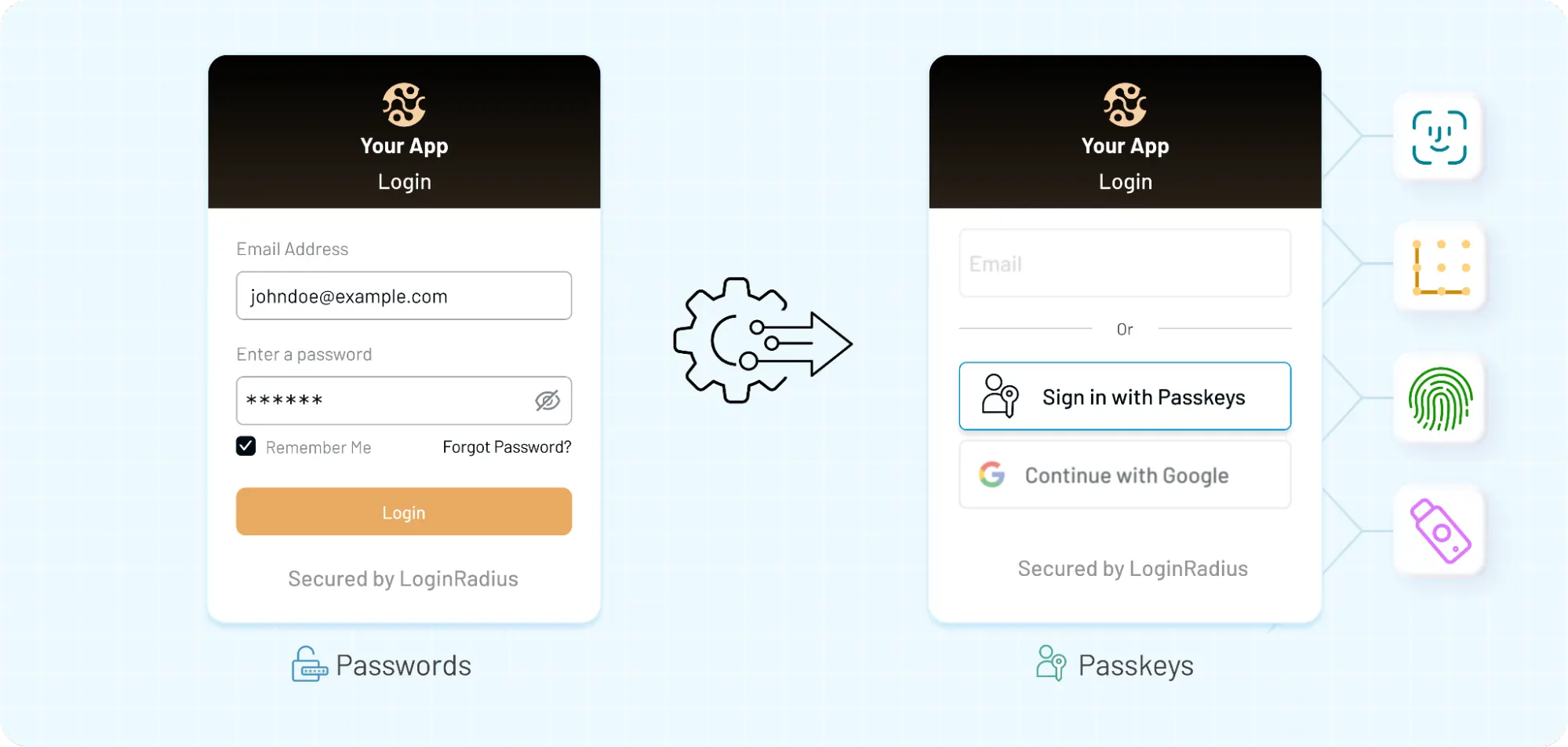
What Are Passwords, MFA, and Passkeys?
Before comparing anything, it helps to get one thing straight: these three don’t solve the problem in the same way. They look similar from the outside (a login screen is still a login screen), but under the hood, they operate very differently.
Passwords are shared secrets. You create one, the system stores a version of it, and every time you log in, you send that same secret back. If someone else gets it, they can use it. No expiration. No context. Just possession equals access. That’s the core weakness. Once exposed, a password can be reused anywhere until it’s changed.
Multi-factor authentication (MFA) adds another step. Something you know (password) + something you have (OTP, device) or something you are (biometric). Sounds solid and it is, to a point. But most MFA methods still depend on the password as the first step. Which means if the password is compromised, attackers shift focus to bypassing the second factor instead of breaking the whole system. And they’ve gotten pretty good at that.
Passkeys, on the other hand, take a different route entirely. No shared secret. Nothing to type. Nothing to remember. Instead, when you log in, your device proves who you are using a cryptographic key pair. One part stays on your device. The other sits with the server. The two match but the private key never leaves the device. So even if someone builds a perfect phishing page, there’s nothing useful to steal.
No password. No OTP. No reusable credential.
Although all three methods aim to authenticate users, they operate on completely different assumptions:
-
Passwords trust secrecy
-
MFA adds verification layers
-
Passkeys rely on cryptographic proof tied to a device
That difference is what drives everything else security, usability, and how each method behaves when things go wrong.
Passwords: Why They’re Still Everywhere (and Still Failing)
Everyone agrees passwords are a problem. And yet… they’re still the default in most systems.
Why? Because they’re easy to implement. Easy to understand. No hardware dependency. No ecosystem requirements. You can spin up a login system with passwords in a day. That convenience has kept them alive far longer than they should be.
But convenience comes with a cost. Users don’t create strong passwords consistently. Even when they do, they reuse them. Across apps. Across devices. Across years. One breach somewhere else, and suddenly your system is exposed without being directly attacked.
Attackers don’t guess passwords manually anymore. They automate it. Credential stuffing takes leaked username-password pairs and runs them across thousands of platforms. It works because people repeat patterns. And systems still accept them.
Phishing makes it worse. A login page that looks real is often enough. Users enter credentials. Attackers capture them. And since passwords are reusable, access is immediate. No need to break encryption. No need to exploit the system. Just trick the user.
And then there’s the internal side.
-
Password resets
-
Forgotten credentials
-
Lockouts
-
Support tickets
These aren’t edge cases. They’re the daily operational friction. What’s surprising is not that passwords are weak. That’s well known. What’s surprising is how much modern security still depends on them.
Even in systems with multi-factor authentication, the password is often the starting point. Which means the entire flow is only as strong as the weakest step. And that weakest step is still widely used. That’s the reality that passwords operate in today.
MFA: Stronger Security, But Not Bulletproof
Multi-factor authentication was supposed to fix the password problem. And for a while, it did raise the bar. Add a second step. Even if someone steals the password, they still need a code or a device. That extra layer blocks a lot of basic attacks. But attackers didn’t stop at passwords. They adapted to MFA.
Take OTPs for instance: they feel secure because they expire quickly. But if a user is tricked into entering that code on a fake login page, the attacker can use it immediately. No need to store it. Just relay it in real time.
Push notifications introduced a different kind of weakness. Users get a login prompt and tap “approve.” Simple. Fast. Convenient.
Now imagine getting five of those prompts in a row. Ten. Fifteen. Some users approve just to make it stop. That’s MFA fatigue. And it works more often than teams expect.
SIM swapping is another angle. If authentication relies on SMS, attackers can redirect messages to a new device. From the system’s perspective, everything looks normal. The code was entered correctly. So yes, MFA improves security. But not all MFA methods are equal.
-
SMS OTP → easy to intercept
-
App-based TOTP → stronger, but still phishable
-
Push authentication → convenient, but exploitable under pressure
And here’s the subtle part. Most MFA setups still start with a password. Which means if the first step is compromised, the second step becomes the target. Instead of eliminating risk, MFA shifts where the attack happens. That doesn’t make MFA ineffective. It just means it’s not the end of the story.
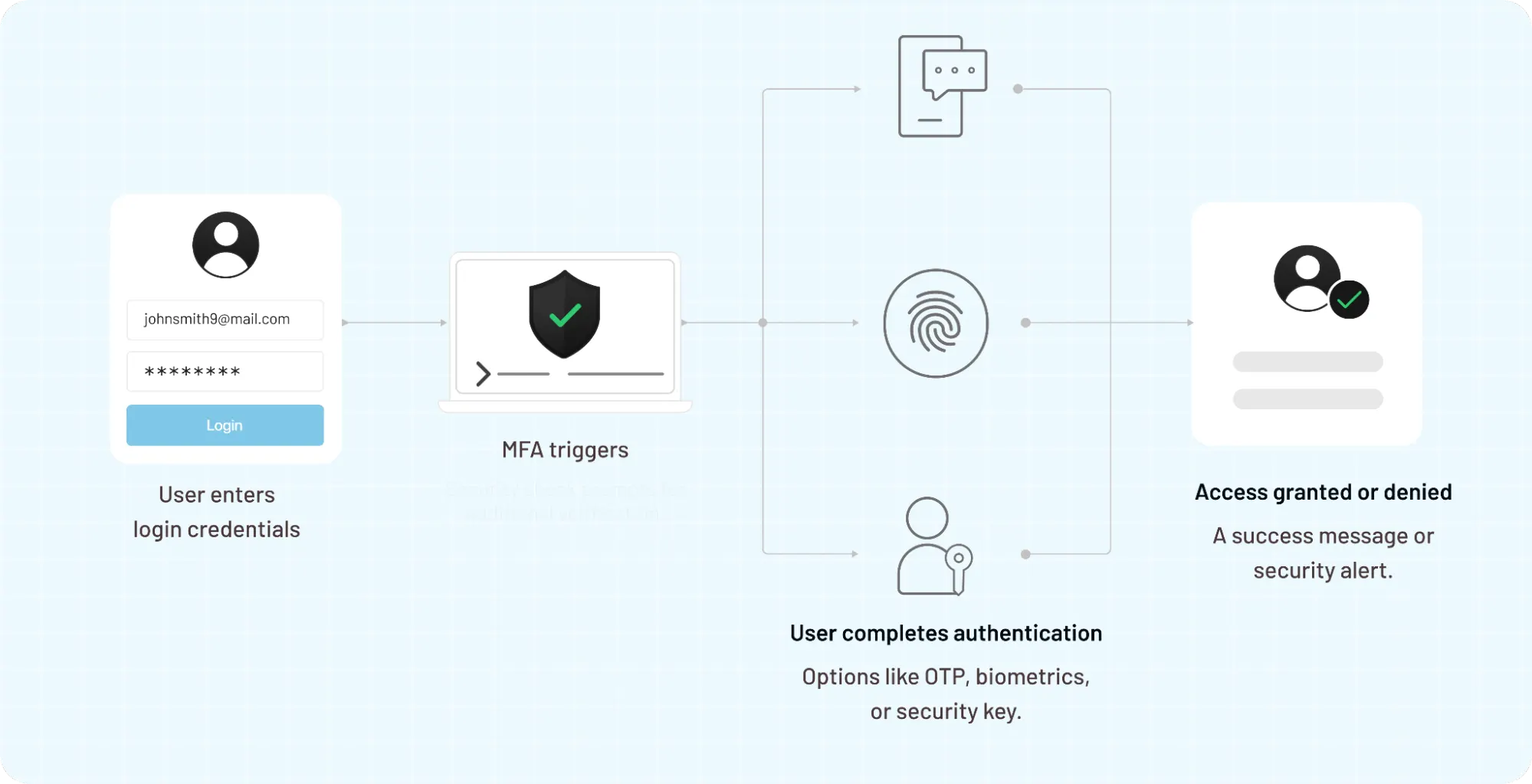
In many systems, it’s still a transition layer stronger than passwords alone, but not designed to handle the kind of phishing-resistant authentication modern threats demand.
Passkeys: The New Standard for Authentication in 2026
Passkeys didn’t show up to “improve” passwords. They sidestep them.
No shared secret. No code to type. No credentials that can be copied and reused somewhere else. The login still feels simple, but what’s happening underneath is very different.
Here’s how it actually works. When a user registers, their device creates a pair of cryptographic keys.
-
One stays on the device (private key)
-
One is stored with the server (public key)
During login, the server sends a challenge. The device signs it using the private key. The server verifies it using the public key. Match confirmed → access granted.
Nothing reusable is transmitted. Nothing useful is exposed. That changes the attack surface completely.
A phishing page can look identical to the real thing, but it can’t trick the device into signing a challenge for the wrong domain. There’s no password to steal. No OTP to relay. The interaction simply fails. Passkeys are often unlocked using a local biometric or device PIN. So in practice, you’re combining:
-
something you have (the device)
-
something you are or know (biometric/PIN)
That’s multi-factor authentication. Just without the extra steps. No waiting for codes. No approval fatigue. No typing errors. But it’s not perfect.
Recovery becomes the new challenge. If a user loses access to their device, how do they get back in securely without reintroducing weak fallback methods? That’s where many implementations struggle.
There’s also ecosystem dependency. Passkeys work best when devices sync credentials across platforms (like Apple, Google). In mixed environments or enterprise setups, that can get complicated. Still, the shift is hard to ignore.
Instead of protecting a secret, passkeys prove identity without exposing anything reusable. That’s a fundamental upgrade not just in security, but in how authentication is designed.
Passkeys vs Passwords vs MFA
Put them side by side and the differences stop being subtle. Passwords rely on secrecy. MFA adds friction to reduce risk. Passkeys remove the need for a shared secret altogether. Same goal verify identity. Very different ways of getting there.
Here’s a clean view of how they stack up:
| Feature | Passwords | Traditional MFA | Passkeys (FIDO2) |
|---|---|---|---|
| Trust Model | Shared Secret | Layered Secrets | Cryptographic Proof |
| Phishing Resistance | None | Vulnerable (AiTM) | Strong (Origin Bound) |
| NIS2 Compliance | Non-Compliant | Conditional | Compliant (State-of-the-art) |
| UX Friction | High (Memorization) | Moderate (Extra Steps) | Lowest (One-Touch) |
| Credential Reuse | High Risk | High Risk (Password-based) | Zero Risk |
| Implementation | Low Complexity | Medium Complexity | High (Simplified via CIAM) |
| Recovery Process | Simple but Weak | Moderate | Secure / Identity-Proofed |
Passwords fail quietly. They don’t break the system; they just make it easier to access. That’s why breaches tied to passwords often go unnoticed until damage is done.
MFA improves security, but unevenly. An app-based authenticator is very different from SMS OTP. A push notification behaves differently under pressure. Lumping all MFA together hides those differences.
Passkeys shift the model. There’s no reusable credential to steal. Even if everything else looks compromised, the core authentication step remains intact because it’s tied to the device and the domain.
Although all three methods can technically coexist, they don’t offer equal protection.
-
Passwords rely on users doing the right thing
-
MFA assumes attackers will try to add resistance
-
Passkeys assume attackers will succeed and remove what they need to succeed
That last shift is what makes the comparison less about features and more about how each method holds up when something goes wrong.
Compliance Spotlight: The NIS2 Reality
For organizations operating in or with the EU, the NIS2 Directive now mandates "state-of-the-art" authentication. While traditional passwords and SMS MFA are increasingly flagged as high-risk, moving to a phishing-resistant passkey strategy allows you to satisfy mandatory security requirements without sacrificing user growth or checkout conversion.
Which Authentication Method Is Most Secure in 2026?
Let’s not dance around it. If the question is purely about security: what resists phishing, credential theft, and replay attacks the best there’s a clear order.
-
Passwords sit at the bottom
-
MFA improves things, but it depends heavily on how it’s implemented
-
Passkeys lead, because they remove what attackers usually steal
That’s the straightforward answer. Security is not just about the login moment. It’s about everything around it: recovery flows, device changes, user behavior, and how systems handle edge cases.
Passwords fail early. Once exposed, they can be reused instantly. No additional barrier unless MFA is added. That makes them the easiest target in credential-based attacks.
MFA holds up better. Especially app-based authenticators or hardware tokens. But it still leaves room for:
-
phishing proxies capturing OTPs
-
push fatigue tricks
-
users approving the wrong request
So while MFA reduces risk, it doesn’t eliminate it. Passkeys are different because they change the assumption.
Instead of asking, “Can someone steal this credential?” They ask, “What if there’s nothing reusable to steal in the first place?”
That’s why passkeys are considered phishing-resistant authentication. Even if a user lands on a fake site, the authentication attempt doesn’t complete. The domain doesn’t match. The device won’t sign it. No credential leakage. No replay.
So the verdict is clear:
-
Passwords → weakest (high exposure, low resistance)
-
MFA → stronger, but still bypassable in some scenarios
-
Passkeys → most secure in modern environments
That said, “most secure” doesn’t mean “perfect everywhere.”
Passkeys depend on:
-
device availability
-
recovery design
-
ecosystem support
Get those wrong, and you introduce new friction or fallback weaknesses.
Still, when the goal is to reduce phishing, eliminate credential reuse, and align with how modern attacks work, passkeys are leading the shift.
And for the first time in a long time, the industry has an option that doesn’t just patch the problem it removes a big part of it.
Where Each Method Breaks in Real-World Systems
This is the part comparison charts usually skip.
On paper, every authentication method looks cleaner than it feels in production. The real test starts when users forget devices, click the wrong link, switch phones, ignore prompts, or try to log in from a setup your product team did not fully think through.
That is where the cracks show.
Passwords break in predictable ways. People reuse them. Store them badly. Share them when they should not. Reset them constantly. A strong password policy may look good in a security review, but users usually respond the same way they create something barely acceptable, forget it later, and trigger another reset flow. The weakness is not theoretical. It is operational.
Then comes MFA. MFA usually fails at the human layer. A user enters the right password on a fake site. An OTP gets relayed in real time. A push request shows up during a busy workday and gets approved without enough thought. Security teams may call that user error. In practice, it is a design issue too. If the system depends on users spotting every attack perfectly, the system is asking for too much.
Passkeys do fix the biggest weakness in passwords and a major weakness in traditional MFA. But they introduce a different kind of pressure: recovery and device continuity. If a user loses a phone, changes laptops, switches ecosystems, or works across personal and company-managed devices, the experience can get messy fast.
And when that happens, teams often fall back to email recovery links or weaker backup methods. That is where a strong passkey flow can quietly become less strong.
So the failure patterns look different:
-
Passwords fail because secrets get reused or stolen
-
MFA fails because attackers adapt around the second step
-
Passkeys fail when recovery and fallback are poorly designed
That last point matters more than most people admit.
Companies that adopt passkeys for the login screen, then undo part of the security advantage with weak account recovery. The front door gets stronger. The side door stays open.
That is why the best authentication strategy is not just about choosing the strongest method. It is about asking a harder question: what breaks when normal user behavior collides with real-world friction? Because that is usually where the actual risk lives.
When Should You Use Passwords, MFA, or Passkeys?
There’s no single setup that works everywhere. Context matters more than preference. Still, patterns are emerging.
Passwords are hanging on in places where change is slow. Legacy systems. Internal tools that haven’t been touched in years. Environments where replacing the auth layer means rewriting half the stack. In those cases, passwords are still widely used often paired with MFA to reduce risk. Not ideal, but sometimes unavoidable. MFA sits in the middle.
It’s the most common upgrade path. Add an extra step, improve security, move on. And for many systems, that’s still a reasonable approach especially when paired with stronger factors like authenticator apps or hardware tokens.
Some common use cases include:
-
Enterprise apps with strict access policies
-
Workforce IAM where device control is limited
-
Systems that need quick security improvements without full redesign
MFA works best when it’s implemented thoughtfully. Not just “add OTP everywhere,” but choosing the right factor based on risk and user behavior. Passkeys are where newer systems are heading.
They make the most sense when:
-
You’re building modern apps from scratch
-
User experience directly impacts conversion
-
Phishing resistance is a priority
-
You want to reduce support load from password resets
In B2C and CIAM environments, passkeys can remove a lot of friction during login. No passwords to remember. No codes to wait for. The flow becomes faster and usually more secure.
In contrast, enterprise environments can be more complex. Multiple devices. Managed vs unmanaged endpoints. Cross-platform usage. That doesn’t make passkeys unsuitable but it does mean rollout needs more planning.
So the decision isn’t just “which method is better.”
It’s closer to:
-
What constraints does your system have?
-
How much friction can your users tolerate?
-
Where does your current risk actually come from?
Passwords, MFA, and passkeys can all exist in the same system. The difference is how they’re used and which one you rely on as the primary layer. That choice shapes everything that follows.
Why Companies Are Moving Beyond MFA to Passkeys
For a long time, MFA felt like the finish line. Add a second factor, reduce risk, check the compliance box, move on. That assumption doesn’t hold up as well anymore.
Attackers aren’t trying to break MFA, they're working around it. Phishing kits now proxy entire login sessions. OTP codes get captured and replayed in real time. Push prompts get spammed until someone taps “approve” just to get back to work. None of this is theoretical. It shows up in incident reports more often than teams expect.
So the conversation has shifted.
Instead of asking, “Do we have MFA?” Teams are asking, “Is our authentication actually resistant to phishing?” That’s where passkeys change the equation.
There’s no code to intercept. No password to reuse. No prompt that can be approved on the wrong screen. The authentication step is tied to the domain and the device. If those don’t match, the login doesn’t go through. It’s a different kind of defense. Less about adding steps. More about removing what attackers rely on.
There’s also the usability side, which tends to get underestimated.
MFA often adds friction:
-
waiting for a code
-
switching apps
-
dealing with expired OTPs
-
repeated approvals
Users tolerate it, but it slows things down. And over time, friction leads to shortcuts like approving prompts without checking. Passkeys flip that experience.
A quick biometric check or device PIN. That’s it. No typing. No waiting. The login feels lighter, even though the underlying security is stronger. Companies aren’t just adopting passkeys because they’re more secure. They’re adopting them because they reduce both risk and friction at the same time. That combination is rare.
This doesn’t mean MFA disappears overnight. It still plays a role, especially in:
-
legacy systems
-
high-risk scenarios requiring step-up authentication
-
environments where passkey adoption is still in progress
But the direction is clear. MFA is no longer the end state. Passkeys are becoming the new baseline for modern authentication.
The Future of Authentication: Passkey-First and Passwordless
The direction is getting clearer. Not overnight. Not everywhere at once. But the shift is happening.
Passwords are slowly moving out of the critical path. MFA is becoming more contextually triggered when risk is high, not forced into every login. And passkeys are starting to take the lead as the default way users authenticate.
That combination changes how authentication is designed.
Instead of:
-
username + password
-
followed by a second step
We’re seeing:
-
passkey as the primary login
-
adaptive checks layered only when needed
Less friction for normal behavior. More security when something looks off.
Here’s what that looks like in practice. A returning user logs in using a passkey. Quick biometric confirmation. Done.
A login attempt from a new device or unusual location? Now the system steps up. Additional verification kicks in. Not for everyone. Only where it matters.
That’s the shift toward adaptive authentication. Security becomes dynamic instead of static. There’s also a broader alignment happening with Zero Trust models.
At the center of modern security thinking is the idea that no request should be trusted by default. Every access attempt needs verification, context, and validation. Passkeys fit naturally into that model because they:
-
tie authentication to a specific device
-
rely on cryptographic proof
-
reduce reliance on shared secrets
It’s a cleaner foundation. But user expectations can change quickly once friction is removed.
When users experience passwordless login done right, going back to passwords feels outdated. Slower. More error-prone. Less secure even if they can’t explain why. That shift in expectation matters.
So the future is not just “passwordless.”
It’s passkey-first authentication, supported by:
-
adaptive MFA when needed
-
strong recovery flows
-
device-aware security policies
The goal isn’t to add more layers. It’s to build a system where the most common path is both the easiest and the safest.
Final Verdict: What Should You Choose?
If you strip everything down to one question what actually holds up when attacks get real the answer is not evenly split.
Passwords are still widely used, but they’re the weakest option in modern systems. They rely too much on user behavior and too little on actual security design. Reuse, phishing, and credential-based attacks make them unreliable as a primary method. They still exist, mostly because replacing them takes effort.
MFA improves the situation, but it’s not a clean fix. It adds resistance, not immunity. Some forms of MFA are strong. Others create friction without fully closing gaps. And in most cases, it still depends on the password as the starting point, which keeps the attack surface open.
Passkeys take a different position. They remove the reusable credential entirely. No password to leak. No code to intercept. Authentication is tied to the device and validated through cryptographic proof. That’s why they hold up better against phishing and replay attacks.
But choosing passkeys doesn’t mean ignoring everything else. The real decision is about how you design the system around them.
A strong setup today looks less like picking one method and more like defining a clear direction:
-
Move away from passwords wherever possible
-
Use MFA where additional verification is needed
-
Make passkeys the primary method for modern authentication
That balance matters. Because security doesn’t fail at the login screen alone. It fails in recovery, in edge cases, in how users actually interact with the system.
So the answer is not just “passkeys are better.” It’s closer to this: Passkeys are the most secure foundation available today. MFA still plays a supporting role. Passwords are becoming a fallback, not a strategy.
That shift is already underway. The only real question left is how quickly systems adapt to it.
What to Do Next: Moving Toward a More Secure Authentication Setup
Knowing what’s more secure is one thing. Changing a live system is another.
Most teams don’t switch authentication methods in one go. There are dependencies, legacy flows, existing users, support processes, compliance requirements. Trying to rip everything out and replace it overnight usually creates more problems than it solves. A better approach is gradual.
Start by looking at where your current risk actually sits. Is it password reuse? Phishing attempts? Too many reset requests? Push fatigue complaints? The answer is usually not “everything equally.” There’s always a pattern. That’s where the shift should begin.
For many teams, the first step is reducing reliance on passwords without breaking existing flows. That could mean introducing passkeys alongside current login methods, letting users opt in, and watching how behavior changes. Adoption tends to grow faster than expected when the experience improves. Then comes tightening the gaps.
If MFA is in place, review which factors are being used. SMS-based methods might need to be phased out. Push approvals might need better context. Not every second factor provides the same level of protection, and treating them equally creates blind spots.
Passkeys can take over the primary login path over time. But the surrounding pieces matter just as much:
-
account recovery
-
device transitions
-
fallback methods
This is where many implementations quietly weaken themselves. A strong login paired with a weak recovery flow brings the overall security level down.
So the goal isn’t just adoption. It’s consistency.
A system where:
-
The main login is secure and low friction
-
fallback options don’t introduce new risks
-
Additional verification appears only when needed
That balance is what modern authentication is moving toward. And it doesn’t require a complete rebuild to get there. Just a clear direction and a willingness to move beyond what used to be “good enough.”
For years, authentication has been about layering more on top. Stronger passwords. More rules. Extra steps. Then MFA. Then more controls around MFA. And still, breaches happen. That’s the part worth paying attention to.
The problem was never just “not enough security.” It was relying on things that can be copied, shared, or tricked out of users. Passwords fall into that category. Many MFA methods do too. They slow attackers down but they don’t always stop them. Passkeys change that direction.
Instead of protecting a secret, they remove it. Instead of asking users to do more, they make the secure path the easier one. That shift matters more than adding another layer ever did. But this isn’t about chasing the latest trend.
It’s about being honest with how authentication behaves in the real world under pressure, across devices, during recovery, and in moments when users don’t make perfect decisions.
If your current setup still depends heavily on passwords, you already know where the risk is. If MFA is your main defense, it’s worth asking how it holds up against modern phishing tactics. And if passkeys are on your roadmap, the real question is how quickly you can move from experimenting to making them the default.
Because this transition is not theoretical anymore. It’s already happening. Take a step back and look at your authentication flow as a system, not just a login screen. Identify where credentials can be stolen, where users struggle, and where recovery introduces risk. That’s where the opportunity is.
If you’re ready to move toward a passkey-first, passwordless approach without breaking your existing user experience, it’s worth seeing how it works in a real environment. Book a demo and evaluate a passkey-first approach for your product. The goal isn’t to add more steps. It’s to make the secure path the default one.
FAQs
Q: Are passkeys more secure than passwords?
A: Yes, passkeys are significantly more secure than passwords. They don’t rely on shared secrets, which means there’s nothing to steal, reuse, or phish. Authentication happens using device-bound cryptographic keys, making phishing attacks ineffective. Even if a user visits a fake site, the login simply won’t complete. That’s a fundamental upgrade over passwords.
Q: Is MFA still needed if you use passkeys?
A: In many cases, passkeys already act as built-in MFA because they combine device ownership and biometric or PIN verification. However, MFA can still be useful in high-risk scenarios, like new device logins or sensitive actions. Instead of replacing MFA completely, passkeys often reduce the need for constant step-up authentication.
Q: What is the biggest weakness of passwords?
A: Passwords fail because they can be reused, stolen, and shared. Users often create weak passwords or repeat them across multiple platforms, which increases risk. Once exposed in a breach or phishing attack, they can be used instantly without additional protection. That’s why passwords are considered the weakest link in modern authentication.
Q: Can MFA be hacked or bypassed?
A: Yes, certain MFA methods can be bypassed. Attackers use techniques like phishing proxies, SIM swapping, and push notification fatigue to trick users or intercept codes. While MFA still improves security, it doesn’t eliminate risk completely especially when it depends on passwords as the first step.
Q: What happens if a user loses a device with passkeys?
A: If a device is lost, recovery depends on how the passkey system is implemented. Some ecosystems allow secure syncing across devices, while others rely on backup authentication methods. This is where strong recovery design becomes critical. A weak fallback can reduce the overall security of the system.
Q: Which authentication method is best for SaaS applications?
A: For modern SaaS platforms, passkeys are becoming the preferred option due to their strong security and low friction. MFA can still support specific use cases like admin access or step-up authentication. Passwords are usually kept as a fallback for legacy users, but they’re no longer ideal as a primary method.
Q: Are passkeys difficult to implement?
A: Passkeys require more upfront integration compared to basic password systems, especially when handling cross-device and recovery flows. However, modern CIAM platforms and SDKs are making implementation easier. The long-term benefits of reduced risk and better user experience usually outweigh the initial effort.
Q: What is phishing-resistant authentication?
A: Phishing-resistant authentication is designed to prevent attackers from stealing credentials through fake login pages. Methods like passkeys use domain-bound cryptographic verification, so even if users land on a phishing site, authentication won’t succeed. This makes them far more secure than passwords or OTP-based MFA.