Introduction
Passwords have become the weakest part of many login experiences. Users forget them, reuse them, reset them, and abandon signups when the flow feels too heavy. For security and product teams, that creates a familiar problem: how do you make authentication safer without making users work harder?
That’s where magic link-based login becomes one of the most practical options. It gives users a Slack- or Notion-style experience: enter an email, get a secure link, click it, and continue. No password to remember. No code to copy. No extra friction when the user just wants to access the product. For businesses, this is a great way to ensure that the user email is genuine and valid.
But magic links are not just a UX shortcut. They sit inside a much bigger passwordless strategy alongside OTPs, biometrics, and passkeys. Looking to choose the right approach? The answer depends on your users, your risk level, your product flow, and how much control your team needs over security, session handling, and fallback options.
Some teams treat magic links login as a simple feature update. It affects onboarding, returning-user login, email delivery, token security, session creation, and account recovery. A well-built magic link flow can improve conversion and reduce password-related support tickets. A poorly designed one can create delays, expired-link frustration, and security gaps.
This article shows how passwordless authentication magic link login works, how it compares with OTPs and passkeys, where it fits in B2B product login journeys, and what to check when evaluating a passwordless authentication provider.
We’ll also cover how LoginRadius supports magic link and OTP-based passwordless login for teams that want feature availability without building every authentication layer from scratch.
What Is A Magic Link?
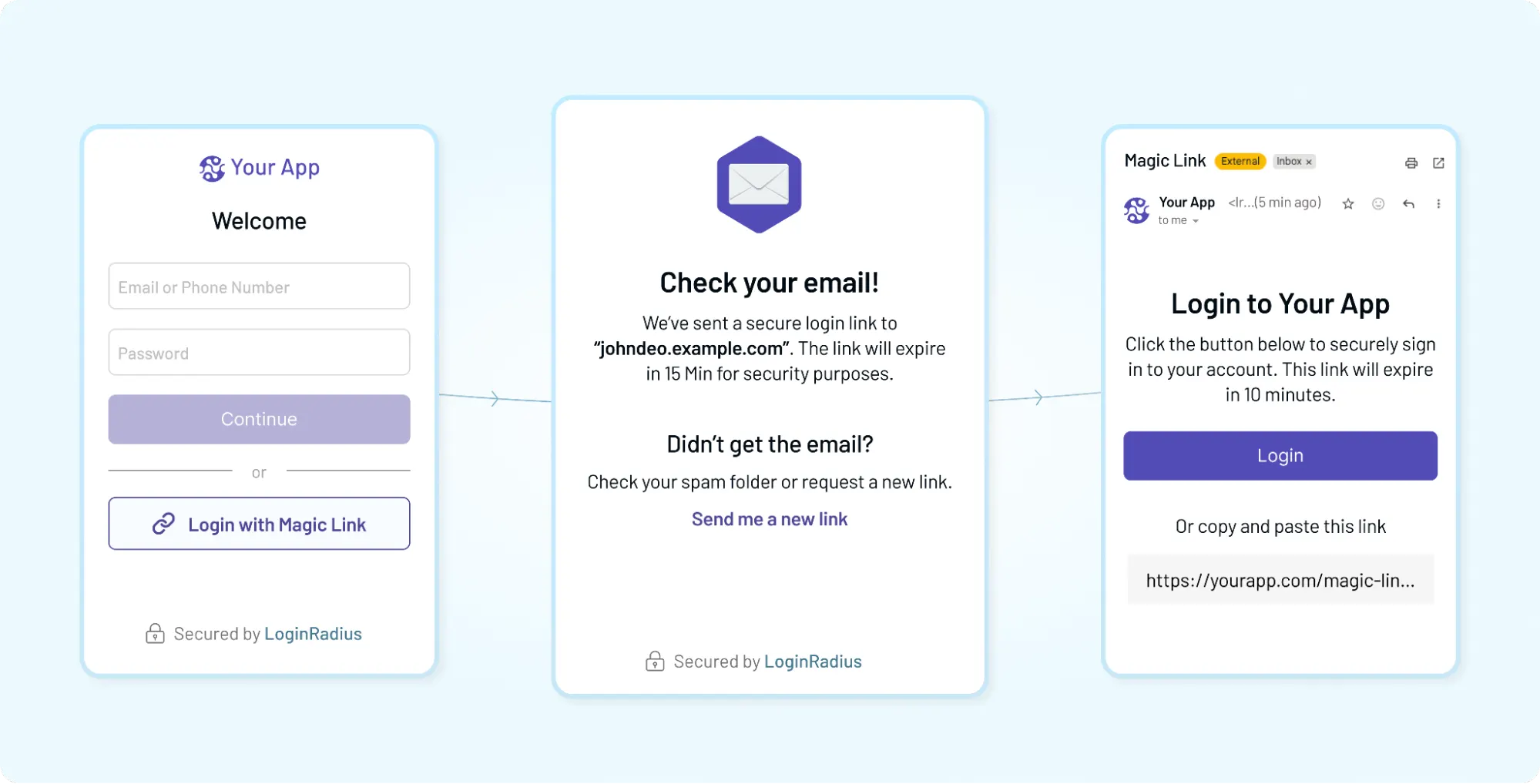
Passwordless magic link authentication is a secure login method that verifies identity via a cryptographically unique, time-bound token delivered through a URL (or a secure link) to a user's verified email or phone, eliminating the need for reusable passwords.
In simpler terms: when a user logs in using a secure link sent to their devices instead of logging in using a password. The user enters their email or phone number, receives a time-bound link, clicks it, and gets access. No credentials to remember. No codes to type. Just a single action that completes the login. Simple on the surface. Underneath, there’s more going on.
Each link carries a unique, short-lived token tied to that specific login request. Once clicked, the system validates the token, checks its expiry, confirms it hasn’t been used before, and then creates a session. If everything checks out, the user is authenticated instantly. If not, the link is rejected. That’s the guardrail that keeps the flow both smooth and secure.
The experience feels effortless because it removes steps, but no compromise on security. The strength of a magic link depends on how the token is generated, how long it lives, and how tightly it’s bound to a session or device. Get those pieces right, and you have a login flow that feels invisible but still holds up under real-world conditions.
Think about how new-age B2B businesses handle login on a new device. You don’t pause to think about authentication. You just continue where you left off. That’s the expectation magic links are built around.
And yet, they’re not a one-size-fits-all solution. They work best when email is reliable, users are not switching devices mid-flow, and speed matters more than layered verification. In contrast, environments with higher risk or stricter compliance often combine magic links with OTPs or additional checks.
So while the concept is straightforward, the real value comes from how and where you use it.
How Passwordless Authentication Magic Link Works
While the user experience is a simple click, the backend execution follows a strict cryptographic handshake to ensure that convenience doesn't create a vulnerability.
The process follows a four-step lifecycle:
-
Request & Token Generation: When a user enters their email, the server generates a cryptographically secure token. This token is mapped in a database to the user’s ID and metadata (like IP address and timestamp).
-
Send the token: The token is embedded into a unique URL. To prevent URL injection, the link should be signed and use HTTPS to protect the token in transit.
-
Validation: Upon clicking, the backend performs a "Triple Check":
- Does this token exist in our active pool?
- Is the token within its TTL (Time-to-Live) window (typically 5–15 minutes)?
- Has this token been used before? (Enforcing Single-Use status)
-
Session Transition: Once validated, the server issues a standard session cookie or JWT (JSON Web Token), and the temporary login token is immediately purged from the system.
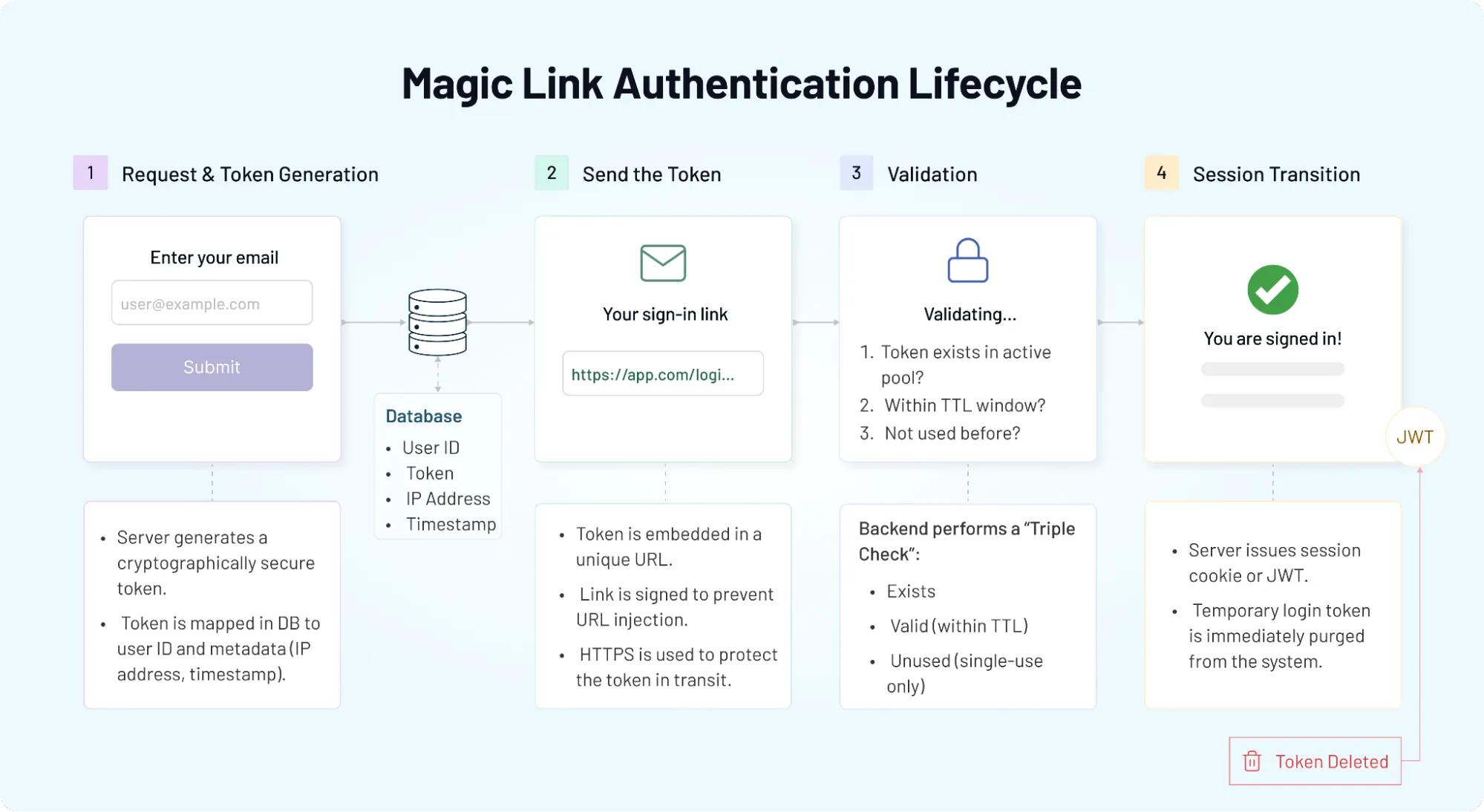
The magic link itself is not the authentication. The token inside it is. Delays in email delivery can quietly break this flow. If a link arrives late, it may have already expired. If users open it on a different device, session handling can get tricky. Timing, token expiry, and fallback logic matter more than most teams expect.
There’s also a decision happening in the background on how strict validation should be. Some systems allow limited reuse within a short window. Others enforce single-use tokens with immediate invalidation. Some bind the token to the originating device. Others prioritize flexibility for cross-device login. That choice shapes the user experience more than the UI ever will.
So while the flow looks minimal, it’s not lightweight. It’s a sequence of tightly controlled steps designed to keep authentication fast without opening gaps that attackers can exploit.
Magic Link vs OTP vs Passkeys: Which Passwordless Method Should You Choose?
All three remove passwords and that’s where their similarity ends. Magic links might feel the smoothest. It keeps momentum intact, especially for returning users who just want to get back in.
OTPs take a slightly different path. The system sends a code usually via email or SMS and the user has to copy and paste it or type them into the system manually. It adds a step. Small, but noticeable. However, it gives teams more control. Codes can be rate-limited, tracked, and used as an extra verification layer when needed.
Passkeys push things further. No email, no codes. Authentication happens through device-level credentials, biometrics, or secure hardware. It’s faster once set up, and stronger from a security standpoint. But adoption still depends on user readiness, browser support, and device compatibility. Not every user journey fits that model yet.
The choice isn’t just about security or UX in isolation; it’s about where friction shows up.
Magic links reduce friction at login but depend on email reliability. OTPs add friction but offer flexibility across channels. Passkeys remove both password and email dependency, but introduce setup complexity and ecosystem constraints.
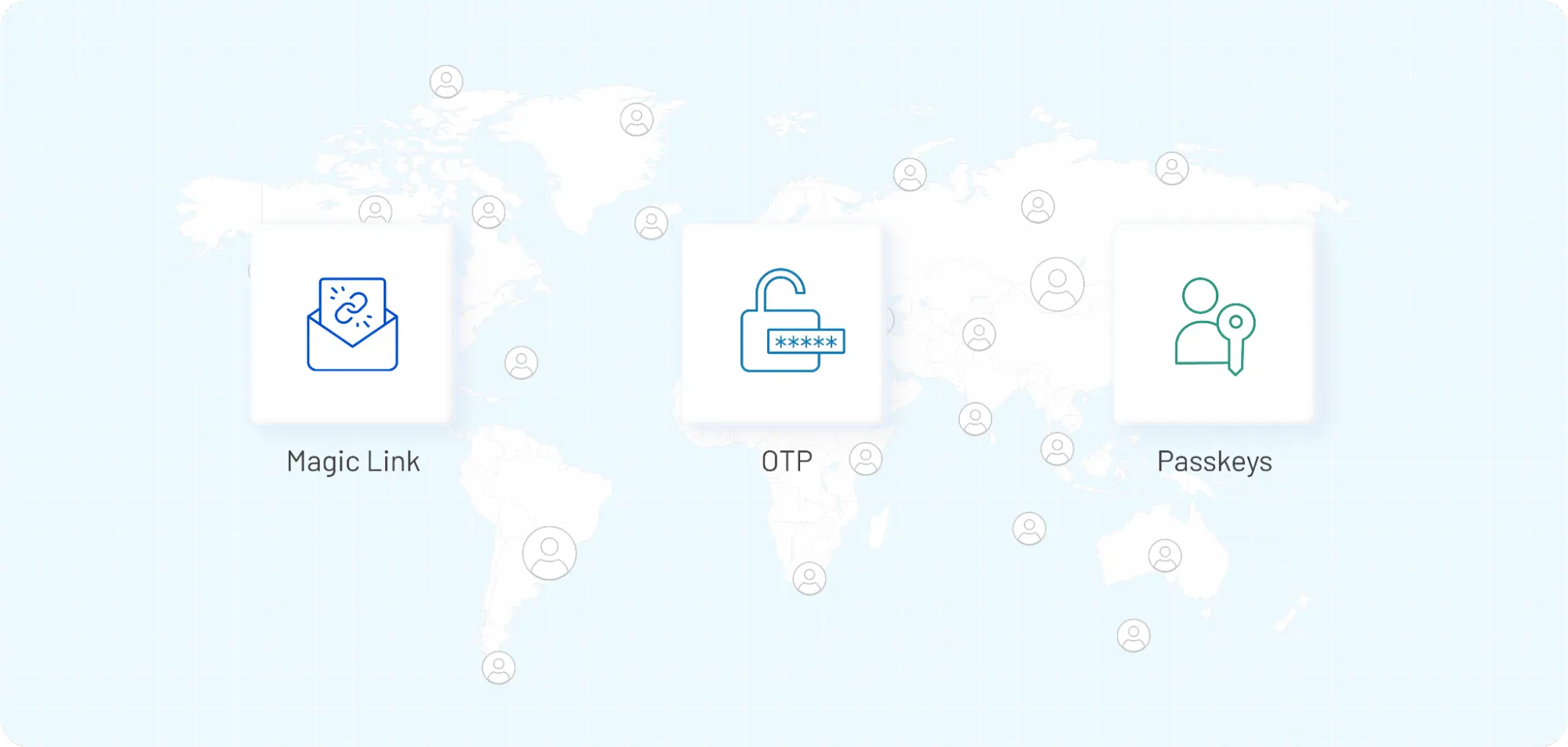
Most teams don’t pick just one; instead, they combine them. Magic links for when users need a quick login. OTPs are often used as fallbacks or recovery mechanisms. Passkeys for high-trust or repeat users. It’s less about choosing a winner and more about designing a system that adapts to different situations.
So the real question isn’t “which method is best?” It’s where each method fits in your product.
If your goal is fast onboarding and low friction, magic links do the job well. If you need layered verification, OTPs step in. If you’re optimizing for long-term security and device-based trust, passkeys start to make more sense. The trade-offs are subtle, but they shape how users experience your product from the very first login. For a detailed comparison, read this article.
| Method | UX Friction | Security Level | Best For |
|---|---|---|---|
| Magic Link (UX Winner) | Lowest | Medium | SaaS Onboarding, Newsletters |
| OTP | Medium | Medium | Mobile Apps, 2FA Fallback |
| Passkeys (Security Winner) | Low (post-setup) | Highest | High-Trust Users, FinTech |
How to Choose the Right Passwordless Authentication Solution
At some point, the question shifts. Not “should we use magic links?” but “should we build this ourselves or rely on a platform?”
On the surface, many solutions look similar. They all support passwordless login. They all mention security, flexibility, scalability. But the differences show up in the details, usually when things don’t go as planned.
Start with control. Can you define how tokens behave? Expiry, one-time usage, session binding, these aren’t edge settings. They shape both security and user experience. If those controls are rigid, you’ll feel it quickly.
Then comes flexibility. Magic links rarely live alone. You’ll need fallback options like OTPs, maybe stronger methods later. Some platforms support this layering naturally. Others treat each method as a separate flow, which complicates things. Integration is often underestimated.
It’s not just about calling an API, it’s about how well the authentication flow fits into your product. Can you customize the login experience? Control redirects? Handle edge cases without rewriting logic?
Security, of course, sits underneath all of it. Look for features like: rate limiting, anomaly detection, and session controls. These are the quiet safeguards that prevent small issues from becoming bigger ones. Teams focus heavily on features and overlook operational reliability. Email delivery performance, uptime, latency these affect real users every day. If links arrive late or fail intermittently, even the best-designed flow breaks down.
And then there’s scale. What works for a few thousand users may not hold at a few million. Multi-tenant support, global infrastructure, and consistent performance across regions start to matter more than expected.
So the evaluation isn’t about finding the most feature-rich solution. It’s about finding one that fits your product, your users, and the way your team works.
Because once authentication is in place, changing it isn’t quick. Getting the decision right early saves far more effort than fixing it later.
When to Use Magic Link Authentication (And When Not To)
Magic links work best when speed matters most. Think onboarding flows where every extra step risks drop-off, or returning users who just want to pick up where they left off. In these moments, removing passwords and even removing codes keeps momentum intact. That’s why many SaaS products quietly default to magic links for login while keeping other methods in reserve.
They’re especially effective in B2B environments where users already trust the product and check their email regularly. A link arrives, they click it, and they’re back in their workspace. No friction, no hesitation. It feels natural because it mirrors how people already interact with tools like Slack.
But that same simplicity can become a limitation. If your users frequently switch devices mid-flow, the experience breaks. If email delivery is delayed even by a few seconds the login feels unreliable. And if the environment demands stronger identity verification, a single link may not be enough.
There’s also the question of context. Magic links are great for low- to medium-risk actions logging in, resuming a session, and accessing a dashboard. In contrast, high-risk actions like changing account settings, accessing sensitive data, or performing financial transactions often require an additional layer, something like an OTP or device-based verification.
We have observed that teams that succeed with magic links, usually don’t rely on them alone. They use them as part of a broader authentication strategy. Magic links for convenience. OTPs for fallback. Stronger methods when risk increases. So the decision isn’t binary. It’s situational.
Use magic links when you want to reduce friction and keep users moving. Avoid relying on them alone when security requirements are higher, email reliability is uncertain, or user behavior introduces too many variables. That balance between ease and control is what makes or breaks the experience.
Magic Link Security: Risks, Limitations, and Best Practices
Magic links feel effortless. Security can’t. The link itself is just a carrier. What matters is how the system treats the token inside it, how it’s generated, how long it lives, and what happens after it’s used. Get those pieces right, and the flow holds up. Miss them, and small gaps start to show.
Risks:
-
The most common risk is tied to email. If a user’s inbox is compromised, the attacker can just click the link. There’s also the issue of link forwarding. A user might share an email without thinking, and suddenly, access moves with it. Not malicious, just messy.
-
Timing introduces another layer of risk. Links that stay valid for too long increase exposure. Links that expire too quickly frustrate users, especially when email delivery isn’t instant. That balance is harder than it looks.
-
Many issues don’t come from attackers, they come from edge cases. A user opens the link on a different device. The session doesn’t transfer cleanly. Or the link is clicked twice, triggering inconsistent states. These aren’t headline vulnerabilities, but they shape how secure the system actually feels. So what does “secure enough” look like?
Short-lived tokens are a start. One-time use should become non-negotiable. Once a link is clicked, it should be invalidated immediately. Some systems go further as to bind the token to a device or session context to reduce misuse. Others add rate limits to prevent repeated requests from the same source.
There’s also a quiet layer most users never see: monitoring. Tracking unusual login patterns, detecting repeated failures, flagging suspicious activity. Magic links don’t replace these controls, they rely on them.
In 2026, magic links face a new breed of sophisticated threats. While magic links effectively eliminate traditional credential theft, they are still vulnerable to Adversary-in-the-Middle (AiTM) attacks where AI-driven proxy bots intercept the link or the resulting session token in real-time. To maintain trust, magic link implementations must move beyond simple email delivery by incorporating behavioral biometrics and device-bound telemetry.
By analyzing a user's unique interaction patterns such as typing rhythm or mouse movement, and verifying that the link is being opened on the specific device that initiated the request, organizations can ensure that a "successful" login was actually performed by a human and not an AI agent or an automated session-hijacking script.
**Remember: **Security isn’t in the URL. It’s in how the system handles everything around it before the link is sent and after it’s clicked. That’s the difference between a flow that looks secure and one that actually is.
How to Implement Passwordless Authentication Magic Link
On paper, the flow looks minimal. In practice, the details decide whether it feels seamless or slightly off. It begins with a simple input: the user enters an email. Behind that, your system creates a secure, time-bound token and stores just enough context to validate it later: user ID, timestamp, maybe a hint of device or IP. That token is then wrapped inside a URL and sent via email.
When the link is clicked, your backend takes over again. It checks whether the token exists, whether it’s still valid, and whether it has already been used. If everything lines up, a session is created and the user is logged in. If not, the flow resets. The implementation isn’t complex but the edge cases are.
Email delivery is one of them. If your emails lag, the entire experience feels broken. That’s why teams often integrate reliable email providers, track delivery times, and adjust token expiry accordingly. A link that expires in 2 minutes works in theory. In reality, it might frustrate users.
Then comes session handling. What happens if the user opens the link on a different device? Do you allow it? Do you prompt for confirmation? Some products prioritize flexibility, others enforce stricter validation. There’s no universal rule, only trade-offs.
UX decisions matter just as much. A resend link option, clear expiry messaging, and fallback methods like OTP can quietly fix most friction points. Without them, users hit dead ends.
Teams often build the core flow and stop there. But real-world usage rarely follows a clean path. Users click links twice. They switch devices. They return after a delay. The system needs to handle all of it without confusion.
For teams that don’t want to build and maintain every piece from token logic to email infrastructure platforms like LoginRadius provide ready-made passwordless authentication flows, including magic links and OTP fallbacks. That shifts the focus from building authentication to shaping the user experience around it.
So while the steps are straightforward, implementation is less about writing code and more about designing a flow that holds up under real user behavior.
How LoginRadius Enables Passwordless Magic Link Authentication
Building a clean magic link flow is one thing. Keeping it reliable at scale is another. Most teams start with the basics: token generation, email delivery, and session creation. It works. Then edge cases show up. Delayed emails. Expired links. Users switching devices mid-login. Suddenly, a “simple” flow needs retries, fallbacks, monitoring, and security controls layered on top.
This is where a platform approach starts to make sense. LoginRadius handles the underlying complexity so teams don’t have to stitch everything together manually.
Magic link authentication is built in, along with OTP fallback when email-based login isn’t enough or fails. That fallback matters more than it seems because real users don’t always follow ideal flows as it’s not just about sending links.
Token handling is configurable. Expiry windows, one-time usage, and validation rules can be adjusted based on how strict or flexible the experience needs to be. Session management is handled in a way that supports both speed and control, whether the user logs in from the same device or switches context.
For B2B SaaS, things get more layered. Multiple organizations, different user roles, varied login behaviors. The platform supports multi-tenant environments without forcing teams to rebuild authentication logic for each use case. That’s a practical advantage when scaling beyond a single product flow.
There’s also the developer side. APIs are exposed for triggering magic link flows, validating tokens, and managing sessions. So teams can integrate authentication into their product without losing control over the experience.
Teams don’t switch to platforms because they can’t build authentication. They switch because maintaining it becomes a distraction. Security updates, edge cases, infrastructure it all adds up.
So instead of treating magic links as a one-time feature, platforms like LoginRadius treat them as part of a broader authentication system. One that evolves with the product, rather than slowing it down.
Conclusion: Should You Use Passwordless Authentication Magic Link?
Magic links do something most authentication methods struggle with: they get out of the way. For onboarding, quick access, and reducing login friction, they work. Users don’t pause. They don’t second-guess. They just continue. That alone can improve conversion, reduce drop-offs, and cut down password-related support issues. But they’re not a complete strategy.
As products grow, so do expectations. Security needs to change. User behavior becomes less predictable. That’s where relying only on magic links starts to feel limiting. The real advantage comes from how you combine them with OTPs, with device-based methods, with controls that adapt to different situations.
Here’s the shift most teams eventually make: from choosing a method to designing a system.
If you’re still deciding where to start, magic links are a strong entry point. If you’re already using them, the next step is making sure they’re backed by the right controls, fallbacks, and scalability. And if building and maintaining all of that feels like a distraction, that’s a signal.
LoginRadius helps you move faster without cutting corners, offering passwordless authentication with magic links, OTP fallback, and the flexibility to evolve toward stronger methods when needed. So instead of managing authentication as a separate problem, you can focus on shaping the experience around it.
Ready to move beyond passwords without adding friction?
Start with passwordless authentication and magic links, and build from there. LoginRadius gives you magic links, OTP fallback, and the flexibility to scale your authentication strategy without rebuilding it every time your product evolves.
FAQs
Q: What is a passwordless authentication magic link?
A: Passwordless authentication magic link is a login method where users access their account by clicking a secure, time-limited link sent to their email. It removes the need for passwords or codes. The link contains a unique token that verifies the user instantly upon clicking.
Q: How does Magic Link login work?
A: When a user enters their email, the system generates a secure token and sends it as part of a login link. Once clicked, the backend validates the token, checks expiry and usage, and creates a session. If valid, the user is authenticated without entering a password.
Q: Is magic link authentication secure?
A: Magic link authentication can be secure when implemented correctly. It relies on short-lived, one-time-use tokens and secure email delivery. However, its security depends on email account protection, token expiry, and additional safeguards like device or session binding.
Q: Magic link vs OTP: which is better?
A: Magic links offer a smoother experience since users only click a link, while OTPs require manual code entry. OTPs provide more control and flexibility across channels. Most systems combine both magic links for convenience and OTPs as a fallback or for higher-risk actions.
Q: Magic link vs passkeys: what’s the difference?
A: Magic links rely on email-based authentication, while passkeys use device-level credentials like biometrics. Passkeys are more secure and faster after setup, but adoption is still evolving. Magic links remain easier to implement and widely accessible for most users.
Q: When should you use magic link authentication?
A: Magic links work best for low-friction login flows like onboarding and returning users. They are ideal when email access is reliable and speed matters. For high-risk actions or stricter security needs, combining them with OTPs or stronger methods is recommended.
Q: What are the risks of magic link authentication?
A: The main risks include email account compromise, link forwarding, and delayed email delivery. If a link is intercepted or misused before expiry, unauthorized access may occur. These risks can be reduced with short expiry times and strict token validation.
Q: How do you implement magic link authentication?
A: Implementation involves generating a secure token, sending it via email as a login link, and validating it when clicked. The system must handle expiry, one-time use, and session creation. Adding fallback options and handling edge cases improves reliability.
Q: What is the best passwordless authentication solution?
A: The best solution depends on your product needs, security requirements, and scalability. Look for platforms that support multiple methods (magic links, OTPs, passkeys), strong security controls, and flexible APIs. Solutions like LoginRadius offer ready-to-use passwordless flows with enterprise-grade features.