Introduction
Passwordless authentication might sound simple on the surface. No passwords, less friction, better security. That is it! Right?
Not quite.
Once you move past the headline, the real questions show up fast: which passwordless method actually makes sense for you? Will your users prefer the same tradeoffs that you choose for them? There are different methods to implement passwordless, and each offers a unique advantage and a tradeoff.
Most articles talk about passwordless authentication like it is one clean category. It is not. It is a group of login methods with different strengths, different weaknesses, and very different consequences for security, onboarding, recovery, and long-term user experience.
A method that feels smooth in a consumer app may create friction in a B2B SaaS product. A method that looks secure in a product demo may fall apart when users switch devices, lose access to email, or hit a broken recovery flow.
So if you are choosing between passkeys, magic links, OTP, and social login, you are not just picking a passwordless login method. You are making decisions about phishing resistance, sign-up speed, dependency on email or SMS, implementation complexity, and how much friction users will tolerate before they leave.
Some teams need the strongest security posture (as part of regulations or compliance). Others care more about conversion, device flexibility, or rollout speed. So this guide compares the most common passwordless authentication methods in a way that is actually useful.
We’ll help you understand how each method works, where it breaks, and which one fits best depending on your users, product model, and risk level. Because the best passwordless experience is not always the newest one. It is the one that works when your users show up.
Passwordless Authentication Tradeoffs
When teams say they want passwordless authentication, they are usually thinking about outcomes like faster logins, fewer resets, and better security. But the implementation? That’s where things start to diverge.
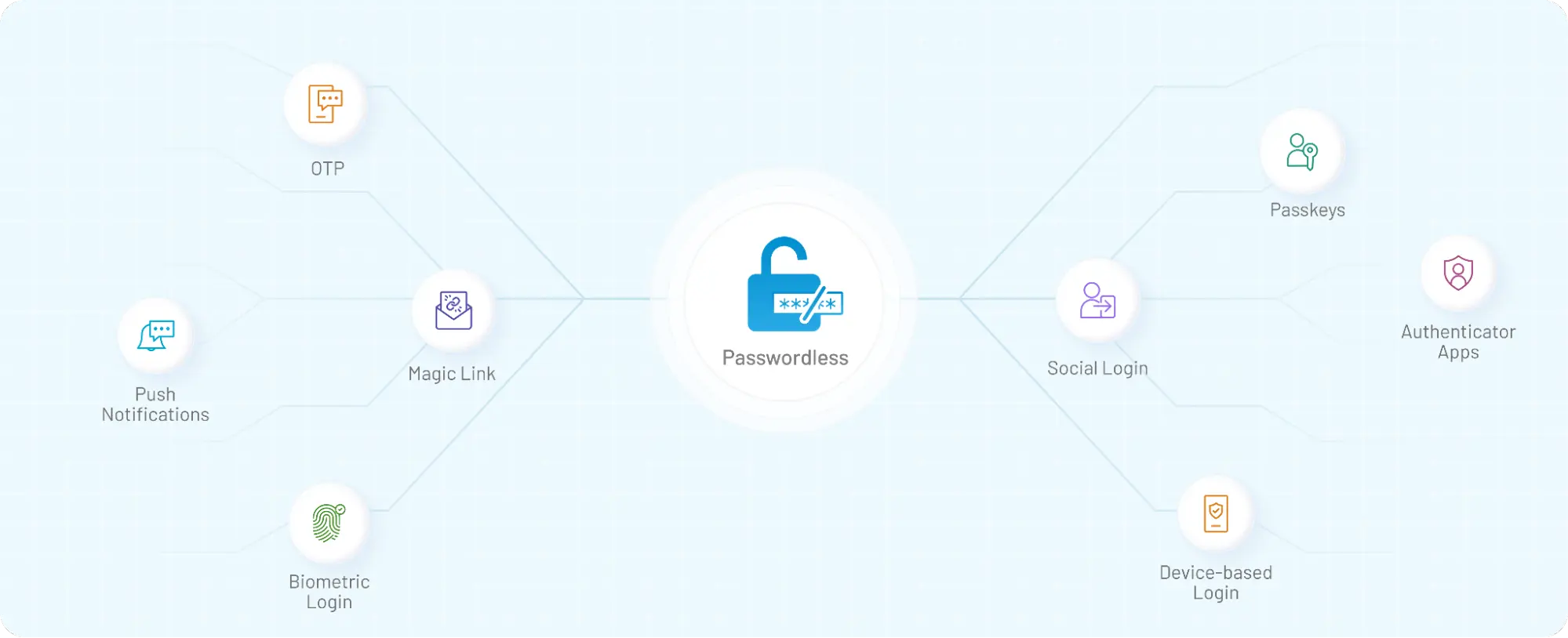
Passwordless authentication is not a single method; it is a collection of approaches that remove passwords in completely different ways. Quick definitions of different methods available and their benefits:
-
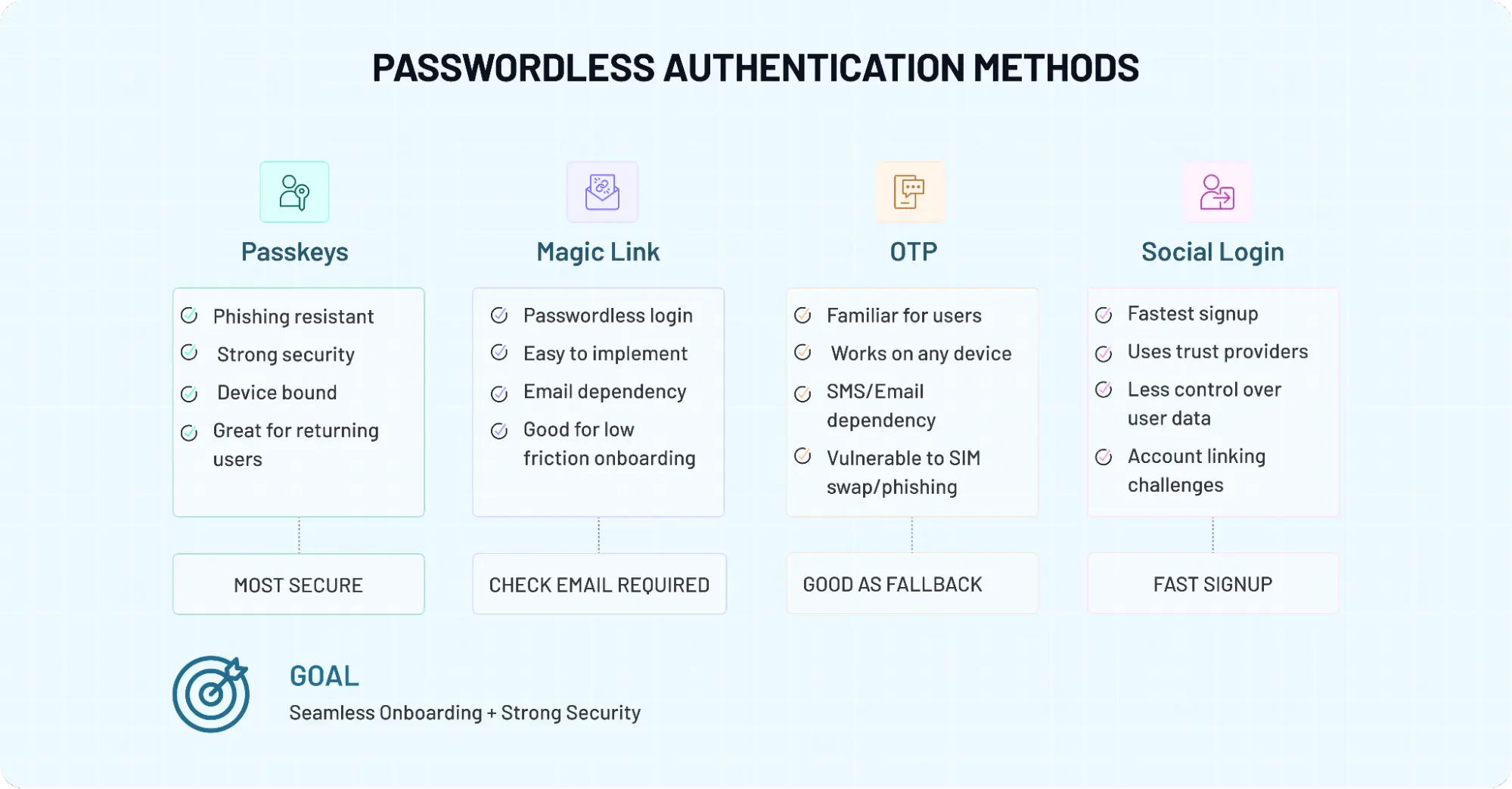
A passkey replaces passwords with cryptographic keys tied to a device (you are trading off 100% phishing resistant method vs device dependency).
-
A magic link is where you send a one-time login URL to the user’s email (zero friction vs channel risks).
-
An OTP (one-time password) is a short-lived code that the user enters manually (Ubiquity vs phishing-prone).
-
Social login delegates authentication to an external identity provider like Google or Apple (instant onboarding vs lack of data sovereignty).
Teams assume that removing passwords automatically improves both security and user experience. It doesn’t. Some methods are highly secure but introduce friction during setup or recovery.
Others feel effortless during login but depend heavily on external systems like email or SMS, which can fail at the worst moment. In contrast, some methods optimize for speed and conversion but give you less control over authentication and identity data.
A surprising pattern we’ve seen is this: the choice of method often has less to do with technology and more to do with user behavior. Are your users logging in daily or once a month? Are they on mobile or switching between devices? Do they expect instant access, or can they tolerate a step or two for added security? These questions shape the right approach far more than feature lists ever will.
So, before comparing passkeys, magic links, OTP, and social login side by side, it helps to reset the frame. You’re not choosing a feature. You’re choosing a set of tradeoffs between security and convenience, control and flexibility, speed and reliability. And once you see it that way, the comparison starts to make a lot more sense.
Although both OTP and magic links are convenient, OTP usually adds a bit more friction because users need to retrieve and manually enter a code. It is also weaker against phishing and interception than passkey-based authentication.
This quick comparison table highlights how passkeys, magic links, OTP, and social login differ across security, UX, and implementation.
Passwordless Authentication Methods Comparison Table
| Factor | Passkeys | Magic Links | OTP (One-Time Password) | Social Login |
|---|---|---|---|---|
| Standards/Protocols | FIDO2 / WebAuthn | Proprietary / JWT | RFC 6238 (TOTP) / RFC 4226 (HOTP) | OAuth 2.0 / OpenID Connect |
| Security Level | Very High | Medium | Medium | Medium |
| Phishing Resistance | Strong (phishing-resistant) | Weak | Weak | Depends on the provider |
| User Experience (UX) | Very smooth after setup | Simple but email-dependent | Slight friction (code entry) | Fastest onboarding |
| Login Speed | Instant (biometric/device) | Depends on email delivery | Moderate | Fast |
| Device Dependency | High (device-bound or synced) | Medium | Low | Medium |
| Email/SMS Dependency | None | Email required | SMS/Email required | External provider |
| Cross-Device Support | Limited without sync | Can break across devices | Works across devices | Depends on provider |
| Recovery Complexity | High | Low | Low | Medium |
| Implementation Complexity | Medium–High | Low | Low | Medium |
| Best Use Case | High-security apps, B2B SaaS | Low-frequency logins | Mobile-first apps | Consumer onboarding |
| Scalability | High | Medium | High | High |
| User Familiarity | Growing | High | Very High | Very High |
If security is your priority, passkeys stand out. If simplicity matters more, magic links and social login may feel easier to adopt.
Passkeys — The Most Secure Option, But Not Always the Easiest
Among all passwordless authentication methods, passkeys are the closest thing to a long-term replacement for passwords. They don’t rely on shared secrets. They don’t ask users to remember anything. And when implemented well, they quietly eliminate entire classes of attacks, especially phishing.
Under the hood, passkeys are built on public-key cryptography standards defined by organizations like FIDO Alliance and adopted widely by platforms like Google. Instead of sending something across the network that can be intercepted, the authentication happens using a private key stored securely on the user’s device. The server never sees it. That alone changes the risk model dramatically.
The Cryptographic Handshake (WebAuthn Logic)
The "magic" of passwordless authentication lies in the Challenge-Response mechanism of the WebAuthn protocol. The server sends a unique cryptographic challenge to the user’s device; the device then uses its private key to sign that challenge locally and sends a "signature" back.
Because the server only holds the public key, it can verify the signature without ever seeing the private data, making the system inherently immune to server-side credential leaks and replay attacks.
Here’s how it actually works from a user’s perspective. You sign up once, typically using biometrics or a device unlock. After that, logging in feels almost invisible. No codes. No emails. No passwords. Just a quick confirmation on your device, and you’re in. That’s why passkeys are often positioned as both more secure and more convenient.
But this is also where it gets a bit messy. That smooth experience depends on a few assumptions holding true. The user has access to their device at all times. The passkey is synced across devices if needed. The platform ecosystem supports it properly. Break any ONE of these, and things start to feel less seamless.
Engineering teams often design the primary login flow beautifully, then underestimate recovery. What happens when a user loses their phone? What if they switch from Android to iOS? What if they never completed passkey enrollment on a second device? Without a well-thought-out fallback, the most secure system now locks the very user out (the person it was supposed to protect).
In contrast to OTP or magic links, passkeys shift complexity away from the login moment and into setup and recovery. That trade-off is worth it in high-security environments, for admin access, or for apps where phishing resistance matters. But for products with unpredictable user behavior or shared-device usage, it needs careful planning.
So yes, passkeys lead in security. That part is clear. The real question is whether your product and your users are ready for everything that comes with them.
The Account Recovery Paradox
Passkeys create a unique challenge: because the credential is tied to a specific physical device, losing that device can result in a permanent account lockout. This is the "Recovery Paradox": the more you harden the login, the more fragile the recovery becomes.
To solve this, engineering teams must design a "Step-Down" recovery flow where identity is re-verified through a less secure but ubiquitous channel (like an OTP sent to a verified email or phone number, or even use a pre-generated recovery code). This allows the user to register a new secure device without compromising the overall security posture of the application.
Magic Links — Simple, Familiar, and Yet Surprisingly Fragile
Magic links are easy to like. They feel clean, modern, and low-effort. A user enters an email address, receives a one-time login link, clicks it, and gets access. No password to remember. No reset flow to deal with. On paper, it looks like one of the simplest ways to implement passwordless authentication. And for brands, it verifies the user’s email address too. Two birds with one stone.
And sometimes, it really is that simple. For low-frequency logins, community portals, early-stage SaaS products, or apps where users already live in their inbox, magic link authentication can work well. There is very little to explain. The flow feels familiar. Conversion can improve because the sign-in step looks lighter than a traditional password form.
Here’s where it gets tricky, though. Magic links borrow their convenience from email, and that dependency is also the weak spot. If the email arrives late, the experience breaks.
If the link lands in spam, the user gets annoyed. If they open the link on a different device from where they started, things can get awkward fast. What looked frictionless a few seconds ago suddenly feels clumsy.
That is the part many comparisons gloss over. Magic links remove password friction, yes, but they do not remove delivery friction. They simply move trust to the inbox. So the quality of the login experience depends heavily on email reliability, session continuity, and how carefully the flow is designed across devices.
Security is another place where teams need to stay realistic. Magic links are better than weak passwords in many situations, but they are not in the same league as passkeys when it comes to phishing resistance. If an attacker gains access to the email account or tricks a user into clicking a malicious flow that imitates the real one, the protection starts to thin out.
Still, writing them off would be a mistake. Magic links remain useful because they reduce cognitive load. Users do not have to remember credentials, and they do not have to type codes. For some products, that simplicity matters more than anything else. Especially when the goal is to get users in quickly, not to enforce the strongest possible authentication posture.
So where do magic links fit best? Usually, in lower-risk flows, occasional logins, and user journeys, email is already central to the experience. They can feel delightfully easy. Just do not confuse easy with durable. That distinction matters more than most teams expect.
OTP (One-Time Passwords) — Flexible, Familiar, and Still a Bit Risky
If there’s one method that shows up everywhere, it’s OTP. Banking apps use it. SaaS platforms use it. Even products experimenting with newer passwordless approaches still fall back to it. There’s a reason for that: OTP just works across almost every device, user type, and environment.
Here’s how it actually works. A short-lived code is generated and sent to the user via SMS, email, or an authenticator app. The user enters that code, and access is granted. No password required.
From a product perspective, it’s relatively straightforward to implement. From a user perspective, it’s familiar enough that no explanation is needed. That familiarity is doing a lot of heavy lifting.
Although both OTP and magic links remove passwords, OTP gives you a bit more control over the flow. The user stays within the same device or session, instead of jumping to email and back. That can reduce friction in mobile-first apps, where switching contexts can break the experience. But here’s the tradeoff. OTP is convenient, not inherently secure.
If the code is sent over SMS, it becomes vulnerable to phishing and/or SIM swap attacks. If it’s sent over email, it inherits the same risks as magic links. That’s why organizations like OWASP have consistently highlighted OTP as a weaker factor compared to phishing-resistant methods. It’s better than passwords in many cases, but it’s not designed to handle more advanced threat models.
Engineering heads that treat OTP as a long-term solution instead of a transitional one are risking a lot. It’s easy to implement, scales quickly, and works across channels, so it becomes the default. But over time, as security expectations rise, its limitations become harder to ignore.
Still, OTP isn’t going away anytime soon. It remains useful in flows where
-
Users are primarily on mobile
-
Device-based authentication isn’t practical
-
Fallback and recovery need to stay simple
So while OTP may not lead in security, it still holds its place because of one thing: flexibility. The real question is whether that flexibility is enough for the level of risk your application carries.
Social Login — Fastest Way to Get Users In, But Not Always in Control
Social login feels like a shortcut. And in many cases, it is. One tap on a familiar button, Google, Apple, maybe LinkedIn, and the user is inside your app without creating a new account. No password. No code. No waiting. For onboarding, it’s hard to beat that kind of speed.
Some common use cases include consumer apps, marketplaces, and platforms where reducing signup friction directly impacts growth. When users already trust providers like Google or Apple, asking them to reuse that identity feels natural. That’s why social login is often one of the highest-converting entry points in modern applications.
Here’s where it gets interesting. Social login solves a different problem than most passwordless methods. It is less about authentication strength and more about identity delegation. Instead of verifying the user yourself, you rely on an external provider to do it for you. That changes the dynamics of control.
Although both social login and passkeys remove passwords, the level of ownership is not the same. With passkeys, the authentication flow is tightly bound to your application and the user’s device. With social login, a third-party provider sits in the middle. If that provider changes policies, limits access, or faces an outage, your login flow is affected whether you like it or not.
There are also edge cases that don’t show up in product demos. A user signs up with Google using one email, then later tries to log in with another. Accounts get duplicated. Identity mapping becomes messy.
In enterprise environments, this can create friction instead of reducing it, especially when strict identity control and auditability are required.
That said, ignoring social login would be a mistake. It still remains one of the most effective ways to reduce friction at the very first touchpoint. Users are more likely to complete signup when they don’t have to think. And that matters, especially in competitive consumer spaces.
So, where does social login fit? Best as an onboarding accelerator, not as a complete authentication strategy. It gets users through the door quickly. What happens after that, how you manage sessions, enforce security, and handle identity, is where the real design decisions begin.
What Most CIAM Platform Vendors Don’t Tell You: The Failure Scenarios
Everything looks clean in a product demo. Login works. Authentication succeeds. Users get in. That’s the easy part. The real pressure shows up when something breaks, and it always does. Each passwordless authentication method fails in its own way. Not loudly. Not obviously. But just enough to frustrate users or open small security gaps that grow over time.
Start with passkeys. They are strong during authentication, but recovery is where things get tricky. A user loses their device. Or switches ecosystems. Or they never set up a second device. Now what? If your fallback relies on something weaker, like OTP or email, you’ve just reduced the overall security posture without realizing it.
Magic links fail differently. They depend on email, and email is unpredictable. Sometimes it’s instant. Sometimes it’s delayed. Sometimes it lands in spam. A user requests a link, waits, refreshes, requests again, and suddenly, there are multiple links floating around. Which one works? Which one expired? That confusion adds friction fast.
OTP has its own set of problems. SMS delivery fails in certain regions. Codes arrive late. Users enter the wrong code. Or worse, they enter the right code on the wrong screen because they were tricked into it. From the system’s perspective, everything looks valid. From a security perspective, it isn’t.
Social login? Different story. It works beautifully until the provider doesn’t. An outage, a revoked permission, or even a simple account mismatch can block access. A user signs in with one identity, then tries again with another, and suddenly you have duplicate accounts or broken sessions to deal with.
If you are an engineering team, don’t make the common mistake that everyone does: they design the “happy path” and assume the rest will sort itself out. It doesn’t. Failure scenarios define the real user experience.
Not the first login, but the fifth. Not the ideal flow, but the edge case. So when you evaluate whether passwordless authentication is safe, don’t just look at how each method works when everything is perfect. Look at how it behaves when things fall apart. That’s where the real differences show up and where better decisions are made.
Which Passwordless Method Should You Use? It Depends on What You’re Optimizing For
This is the question most teams ask. They spend time comparing features, reading vendor pages, and debating what feels modern, then realize they never defined what success actually looks like. Faster signup? Stronger security? Fewer recovery issues? Better mobile UX? Those are not the same goal, and they do not point to the same method.
If your application handles sensitive data, admin access, or high-risk actions, passkeys usually make the most sense as the primary method. They raise the bar on security and reduce exposure to phishing in a way that email-based or code-based flows simply cannot.
But they work best when your users are likely to stay in supported ecosystems and when you are ready to invest in thoughtful recovery design. Without that, the security story looks strong on paper and messy in practice.
If your product is used occasionally rather than daily, magic links can feel more natural. A community portal, partner dashboard, event platform, or low-frequency SaaS tool often benefits from a login flow that asks almost nothing from the user.
If you care about wide compatibility and low implementation friction, OTP is still widely used for a reason. It is flexible. Users understand it. It works across devices and regions more easily than some newer approaches.
That said, it tends to make more sense as a practical option than a strategic destination. It helps teams ship faster, but it rarely feels like the strongest long-term answer when security expectations rise.
If your biggest goal is reducing signup friction, social login is often the fastest route. Consumer products, marketplaces, content platforms, and apps fighting for conversion usually benefit from giving users familiar sign-in options upfront.
But social login should not be mistaken for complete authentication strategy. It gets people in quickly. It does not automatically solve identity consistency, account linking, or higher-assurance access.
In many products, the best answer is not choosing one method and rejecting the others. It is choosing the right primary method for the job, then deciding what should support it. A B2B SaaS app may lean on passkeys for stronger authentication, while keeping OTP as a recovery option.
A consumer app may use social login for fast signup, then introduce stronger controls later for sensitive actions. A low-risk portal may stay with magic links because that is genuinely enough.
So the better question is not just "Which passwordless method is best?" It is. Best for what? Once you answer that honestly, the decision becomes much clearer.
The Smart Approach — Combine Methods Instead of Betting on One
A lot of teams start by asking, “Which passwordless method should we use?” and end up realizing the better question is, “How do these methods work together?”
Don’t treat passwordless like a replacement decision: remove passwords, pick one method, and move on. That approach might look clean in architecture diagrams, but it rarely survives real user behavior.
People switch devices. They forget how they signed up. They lose access to email or phone numbers. And suddenly, a single-method strategy starts to show cracks. A more durable approach looks different.
Some common patterns we’ve seen work well:
-
Passkeys as the primary login, with OTP or magic links as recovery
-
Social login for onboarding, followed by stronger authentication for sensitive actions
-
OTP as a fallback layer, not the main authentication strategy
-
Magic links for low-frequency access, where simplicity matters more than strict control
This layered design is closer to how modern authentication systems actually behave. It balances security, usability, and reliability instead of forcing one method to do everything.
There is also a practical benefit here. You don’t have to get everything right on day one. Teams can start with a simpler method, such as OTP or magic links then introduce passkeys gradually as users become familiar and platform support improves. That kind of phased rollout tends to work better than a sudden shift that users are not ready for.
Implementing Passwordless Authentication Without Breaking the User Experience
This is the part that sounds easier in planning meetings than it feels after launch.
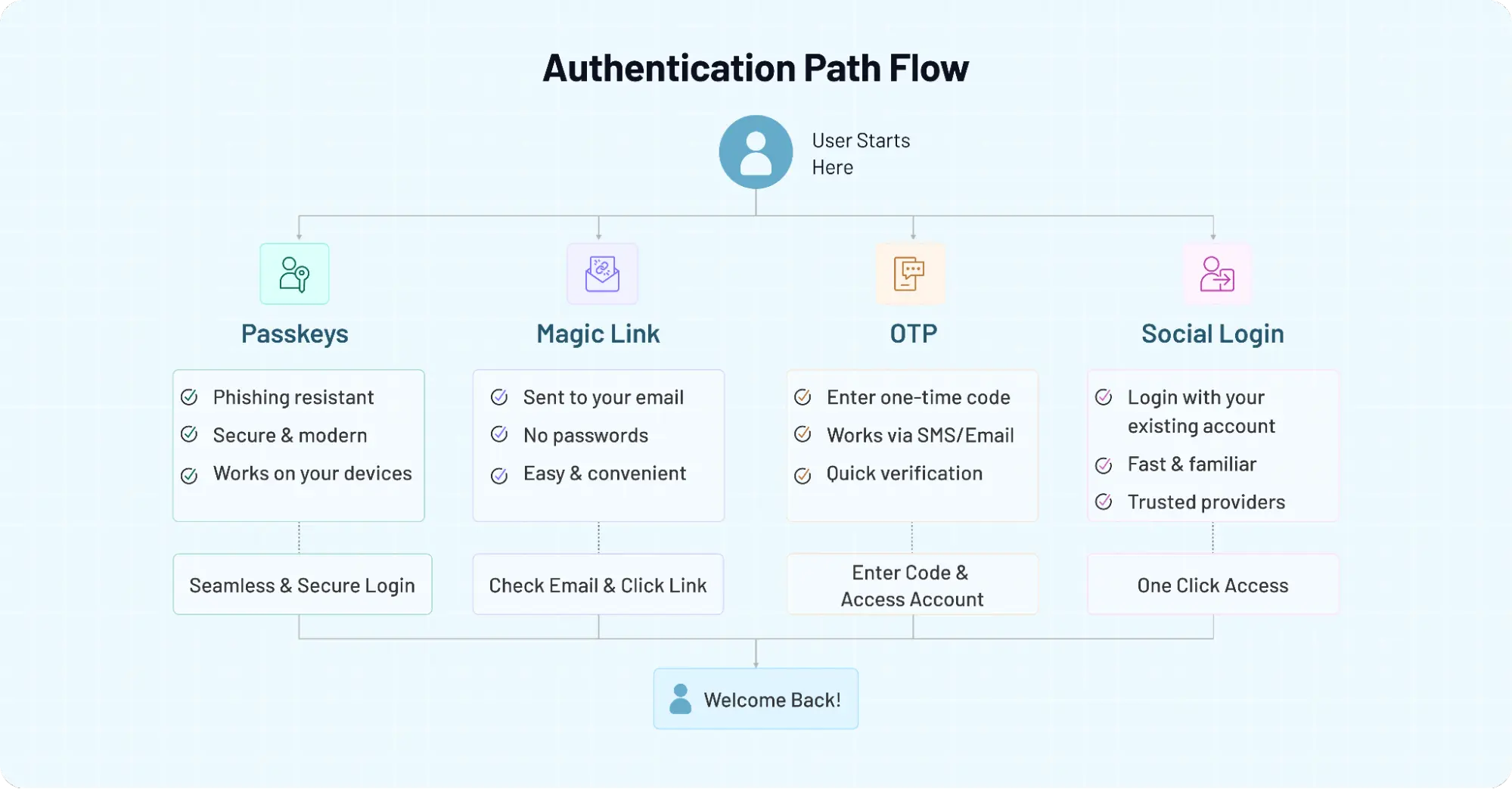
On paper, implementing passwordless authentication looks like a straightforward upgrade. Remove passwords. Add passkeys, magic links, OTP, or social login. Improve security. Reduce friction. But users do not experience authentication as a feature list.
They experience it as a sequence of moments. A signup screen. A device switch. A delayed email. A failed recovery attempt. That is where the real judgment happens.
Here’s where teams usually go wrong. They focus heavily on the first login and barely enough on everything that comes after it. The primary flow gets polished. The fallback flow gets rushed. Recovery becomes an afterthought. And then support tickets start showing up from users who cannot get back in, cannot remember how they signed up, or keep bouncing between devices and channels.
A better implementation mindset is to design around behavior, not just method. If you are rolling out passkeys, think beyond enrollment. Ask what happens when users lose a device or try to log in from a browser they do not usually use.
If you are using magic links, make email timing and cross-device continuity part of the experience design, not just the backend logic. If you are relying on OTP, be realistic about delivery reliability and phishing exposure. If you offer social login, make account linking and identity consistency feel intentional instead of patched together later.
This also affects how you introduce passwordless to existing users. Going all in, all at once, sounds bold. It can also be disruptive. In many cases, a phased rollout works better. Start with one audience segment. Measure login completion, abandonment, recovery success, and support friction. Then expand. What looks efficient in theory often needs tuning in production.
The bigger point is simple: how to implement passwordless authentication is not just a technical question. It is a product question, a UX question, and in some cases, a trust question. Users do not care that your authentication architecture is modern if the access experience feels brittle.
So if you want passwordless to work, don’t just ask whether the method is secure. Ask whether the journey is survivable. Can users recover? Can they switch devices? Can they understand what is happening when something goes wrong? Those answers matter just as much as the login itself.
And that is usually the difference between a passwordless flow that looks impressive in a demo and one that actually holds up in the real world.
Choosing the Right Passwordless Strategy Isn’t About Trends, It’s About Fit
By now, one thing should be clear. There isn’t a single “best” passwordless authentication method. There’s only what fits your product, your users, and the level of risk you’re dealing with.
Passkeys are pushing the industry forward, especially with backing from groups like the FIDO Alliance and platforms like Google. They bring stronger protection against phishing and a cleaner long-term direction. But they also ask for better planning around setup, recovery, and device behavior.
Magic links keep things simple. OTP stays flexible. Social login keeps onboarding fast. And each of them still remains relevant because real-world applications rarely operate under perfect conditions.
Here’s where it all comes together. The decision is not about removing passwords and picking the newest method available. It’s about designing an authentication experience that holds up when users forget things, lose access, switch devices, or simply expect things to “just work.” That is where most systems are tested.
A surprising pattern we’ve seen is that teams who treat authentication as a one-time decision often end up revisiting it. Teams who treat it as a system something that evolves with user behavior tend to get better outcomes over time. They combine methods thoughtfully. They plan for edge cases early. And they measure what actually happens after users log in, not just whether they can.
So if you’re looking to choose the right approach, focus less on what’s trending and more on what your users will realistically go through. That shift alone changes how you evaluate every method in this guide.
Build Passwordless Authentication That Actually Works in the Real World
Whether you're exploring passkeys, implementing magic links, supporting OTP as a fallback, or enabling social login for faster onboarding, the goal isn’t just to remove passwords. It’s to build a system that balances security, flexibility, and user experience without breaking under real conditions.
That’s exactly where LoginRadius helps. From implementing modern passwordless flows to combining multiple authentication methods into a cohesive experience, you can design login journeys that fit your users instead of forcing them into one rigid approach.
Book a demo with LoginRadius to see how you can build secure, scalable, and user-friendly passwordless authentication for your application.
FAQs
Q: What are passwordless authentication methods?
A: Passwordless authentication methods allow users to log in without using a password. Instead, they rely on alternatives like passkeys, OTPs, magic links, or social login. These methods aim to reduce friction and improve security by removing password-related risks.
Q: Which passwordless authentication method is the most secure?
A: Passkeys are currently considered the most secure because they use cryptographic keys and are resistant to phishing. Unlike OTP or magic links, they do not rely on shared secrets that can be intercepted or reused.
Q: Are OTP and magic links safe for authentication?
A: OTP and magic links are safer than traditional passwords but not fully phishing-resistant. Their security depends on the reliability of email or SMS channels, which can be vulnerable to interception or delays.
Q: Can I use multiple passwordless authentication methods together?
A: Yes, combining methods is often the best approach. Many applications use passkeys for primary login, with OTP or magic links as fallback options, and social login for faster onboarding.