Introduction
Access problems rarely start as security incidents.
They begin quietly. Someone needs access urgently, so a role is reused. A permission is added “temporarily.” A new system launches and copies roles from an older one because it’s faster than designing from scratch. None of these decisions feels dangerous in the moment. But over time, they stack up.
That’s how most organizations end up with access they can’t fully explain.
This is where RBAC solutions continue to prove their value. Not because they are new or exciting, but because they impose structure where growth naturally creates a mess. RBAC gives teams a way to say, This is what someone is allowed to do and nothing more.
What has changed is the environment in which RBAC operates.
Identity today spans employees, customers, partners, contractors, APIs, and now AI tools. Access isn’t limited to internal apps. It flows across cloud platforms, SaaS tools, microservices, and external integrations. In this reality, RBAC can either become a stabilizing force or a brittle system that teams avoid touching.
That’s why comparing access management platforms matters. When teams evaluate platforms like Okta, Auth0, Microsoft Azure, Amazon Web Services, or LoginRadius, they’re not just comparing RBAC checkboxes. They’re deciding how access will be governed as their systems scale.
This blog breaks down that comparison in a way that reflects how RBAC is actually used in modern environments without oversimplifying it or turning it into theory.
What RBAC solutions actually do in real systems
At a basic level, role-based access control software assigns permissions to roles and roles to users. But that explanation only scratches the surface.
RBAC works because it separates identity from authority. A user’s identity answers who they are. Their role answers what they’re trusted to do. That separation allows access rules to remain consistent even as people move teams, systems change, or applications evolve.
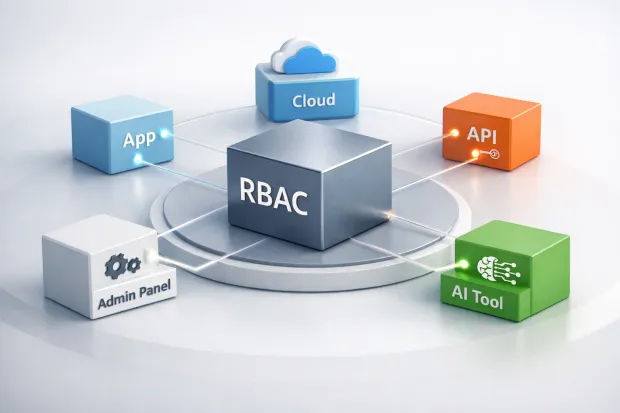
In practice, rbac software acts as a coordination layer. It ensures that the same access rules apply across different parts of the system—whether that’s a dashboard, an API endpoint, or an administrative workflow.
For beginners, RBAC reduces confusion. You don’t need to understand every permission; you just need to know your role.
For experienced teams, RBAC reduces operational risk. It prevents permission logic from being duplicated and drifting across systems.
But RBAC only works when roles reflect reality. When they don’t, RBAC becomes something teams work around instead of relying on.
Where RBAC works well and where it starts to fray
RBAC is strongest in environments where responsibilities repeat. Support teams, finance workflows, content operations, partner portals these are all natural fits. Roles map cleanly to job functions, and access expectations are predictable.
The problems appear when roles stop being intentional.
As organizations grow, roles tend to accumulate permissions rather than lose them. Temporary access becomes permanent. New use cases get patched onto existing roles. Over time, the original meaning of a role erodes.
This is why many teams say RBAC “doesn’t scale,” when what they really mean is that unmanaged RBAC doesn’t scale.
Modern rbac solutions address this by introducing governance into the access model. Visibility into who created a role, what it was designed for, and how it’s actually used becomes just as important as the role itself. Without that context, RBAC quietly turns into a liability.
How RBAC solutions integrate with IAM platforms
One of the most important and least discussed topics is how rbac solutions integrate with iam.
IAM systems establish identity. They authenticate users, issue tokens, and manage credentials. RBAC systems define authorization. They determine what those authenticated identities can actually do.
In many platforms, RBAC data is embedded into identity tokens as role or permission claims. In others, applications query a central authorization layer at runtime. Some architectures mix both approaches.
Each model has trade-offs. Token-based approaches are fast and simple but less dynamic. Centralized authorization offers flexibility but adds complexity and latency.
There’s no universally correct answer. What matters is understanding where access decisions are made and how changes propagate through the system. Teams that skip this conversation often discover too late that their RBAC model is tightly coupled to choices they can’t easily reverse.
How RBAC solutions support compliance requirements
Compliance teams care less about technology names and more about evidence.
They want to know who had access, when they had it, and why it was appropriate. This is where how rbac solutions support compliance requirements becomes tangible.
RBAC provides a framework for least-privilege access. It ties permissions to roles, roles to responsibilities, and responsibilities to business intent. That structure makes access reviews possible without relying on institutional memory.
In regulated environments, RBAC also supports segregation of duties, controlled elevation of access, and consistent audit trails. It doesn’t replace governance processes, but it makes them enforceable.
Without RBAC, compliance becomes reactive. With it, compliance becomes repeatable.
Comparing RBAC approaches across major access management platforms
RBAC exists across nearly every access management platform today but the way it’s implemented varies widely, based on what the platform was originally built to protect.
That origin story matters more than most teams expect.
Okta
Okta’s RBAC model grew out of workforce identity. Roles are typically implemented using groups and policy assignments, making it well-suited for controlling employee access to SaaS tools and internal applications. Where teams sometimes struggle is application-level authorization.
Fine-grained permissions inside custom apps often require additional layers, custom logic, or external authorization services. Okta works best when access patterns are relatively stable and centrally managed.
Auth0
Auth0 approaches RBAC from a developer-first perspective. Roles and permissions are flexible and often embedded into tokens as claims, which makes them easy to enforce at the application or API level.
This flexibility is powerful, but it also places responsibility on developers to design clean role models. Without discipline, RBAC logic can sprawl across services, increasing long-term maintenance cost.
Microsoft Azure (Entra ID)
Azure’s RBAC shines in enterprise and infrastructure-heavy environments. It offers deep integration with Microsoft services and strong governance controls.
However, when Azure RBAC is extended into custom SaaS authorization models, teams may find it rigid. It excels at controlling resources, not always business-level actions inside applications.
Amazon Web Services
AWS IAM provides one of the most granular RBAC systems available for infrastructure. Policies can be incredibly precise, but that power comes with complexity. For application-level RBAC, teams often layer additional authorization services on top.
AWS works best when access decisions are tightly tied to cloud resources rather than end-user workflows.
LoginRadius
LoginRadius approaches RBAC through the lens of customer and partner identity. Its role models are designed for multi-tenant SaaS platforms, delegated administration, and externally facing users. This makes it particularly effective for B2C and B2B scenarios where roles must be intuitive, scalable, and safe to expose beyond internal teams.
The takeaway is simple: all these platforms support RBAC, but each one optimizes for a different reality. Choosing the right fit depends less on features and more on who your users are and where enforcement happens.
Top 10 access control systems teams commonly evaluate
When teams search for the top 10 access control systems, they’re rarely looking for a single winner. They’re trying to orient themselves in a crowded landscape.
In practice, most shortlists include a combination of:
-
workforce IAM platforms
-
cloud-native IAM systems
-
customer identity platforms
-
dedicated authorization engines
Systems commonly evaluated include Okta, Auth0, Azure Entra ID, AWS IAM, LoginRadius, Ping Identity, Keycloak, Open Policy Agent (OPA), AWS Cedar, and newer authorization-as-a-service tools.
What these systems share is support for RBAC as a baseline. What differentiates them is how well they handle governance, scale, extensibility, and developer experience.
Teams that rush to pick “the most popular” option often end up layering multiple systems later. Teams that evaluate based on use cases, employees vs. customers, and infrastructure vs. applications tend to make cleaner architectural decisions.
RBAC software in the AI era: managing AI coding assistants
AI coding assistants introduce a new access challenge that traditional RBAC models weren’t designed for, but can still handle if applied thoughtfully.
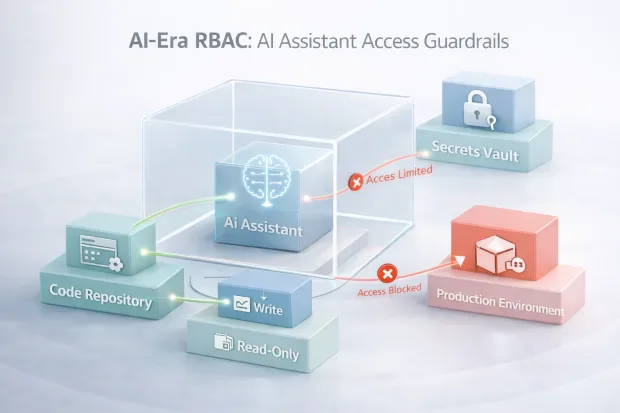
AI tools don’t behave like humans. They operate continuously, at scale, and can touch far more systems in a day than a developer ever could. Without ai coding assistant role-based access controls, these tools often inherit overly broad permissions simply because it’s convenient.
That convenience is risky.
Modern teams are beginning to treat AI assistants as non-human identities with narrowly defined roles. Instead of giving an assistant “developer” access, they assign scoped roles that limit:
-
Which repositories can be read or modified
-
Whether the code can be merged or only suggested
-
Access to secrets and environment variables
-
Interaction with production systems
RBAC becomes the guardrail that keeps AI helpful without letting it overreach. As AI adoption accelerates, this pattern will move from experimental to expected.
How to implement role-based access control without overengineering
The fastest way to fail at RBAC is trying to design the perfect model on day one.
To implement role-based access control successfully, teams should start with reality, not theory. Begin by identifying resources and actions that actually matter what users do most often, and what actions carry the highest risk.
From there, define a small number of roles that map to real responsibilities. Avoid edge cases early. Let usage patterns reveal where refinement is needed.
RBAC improves through iteration. Roles should evolve as workflows change, not freeze in time. The goal isn’t perfection, it’s clarity. When roles are clear, RBAC becomes something teams trust rather than fear.
Comparison table: RBAC across major platforms
| Platform | RBAC Strength | Best Fit | Key Limitation |
|---|---|---|---|
| Okta | Strong workforce RBAC | Employee & SaaS access | Limited fine-grained app authorization |
| Auth0 | Flexible, developer-friendly | Modern apps & APIs | Can sprawl without discipline |
| Azure (Entra ID) | Enterprise-grade control | Microsoft-centric environments | Rigid for custom app workflows |
| AWS IAM | Extremely granular | Cloud infrastructure | Complex for end-user apps |
| LoginRadius | Clean, scalable RBAC | B2C & B2B SaaS | Not infrastructure-focused |
This table isn’t about ranking platforms. It’s about alignment. The right RBAC solution depends on where access decisions live and who they affect.
Conclusion
RBAC has survived every major shift in security architecture for one simple reason: it solves a problem that never goes away. Organizations grow. Systems multiply. Access expands faster than anyone plans for. And sooner or later, someone has permissions they shouldn’t.
What RBAC offers is not sophistication for its own sake, but restraint.
Well-designed RBAC solutions give teams a way to slow things down just enough to think clearly about trust. They force conversations around responsibility, ownership, and boundaries, conversations that are easy to postpone when access is granted ad hoc, but painful to avoid when something goes wrong.
What has changed is the environment RBAC operates in.
Access is no longer limited to employees logging into internal tools. It now spans customers, partners, contractors, APIs, automated workflows, and AI-driven systems that act continuously and at scale. In that reality, RBAC cannot exist in isolation. It must integrate cleanly with IAM, support governance and auditing, and remain flexible enough to adapt as systems evolve.
This is why comparing RBAC across platforms matters. Not all RBAC implementations are built for the same job. Some are optimized for workforce access, others for infrastructure, and others for customer and partner ecosystems. Treating them as interchangeable often leads to brittle architectures and unnecessary complexity down the line.
The most successful teams don’t chase the “most powerful” RBAC model. They choose the one that aligns with how access actually works in their organization and then commit to maintaining it. They accept that RBAC is not a one-time setup, but an ongoing discipline. Roles are reviewed. Permissions are questioned. Assumptions are challenged.
And that’s the real value of RBAC when it’s done right.
It doesn’t just control access.
It creates accountability.
It makes trust visible.
And it gives growing systems a chance to stay understandable instead of collapsing under their own weight.
In a world where identity is everywhere, and access decisions happen constantly, RBAC still remains one of the clearest ways to keep control human, explainable, and intentional. Book a Demo today.
FAQs
Q: What are RBAC solutions and why are they important?
A: RBAC solutions control access by assigning permissions to roles instead of individuals. This keeps access consistent, easier to manage, and safer as teams and systems scale.
Q: How do RBAC solutions support compliance requirements?
A: They enforce least-privilege access and create clear audit trails showing who had access, when, and why. This makes access reviews and regulatory audits far easier to manage.
Q: How do RBAC solutions integrate with IAM platforms?
A: RBAC typically works alongside IAM by using identity tokens, groups, or policies to enforce permissions across apps and APIs. IAM verifies identity; RBAC decides what actions are allowed.
Q: Are RBAC solutions enough for modern applications and AI tools?
A: RBAC handles baseline access well, but many teams extend it with context or policy rules for high-risk actions. For AI tools, RBAC provides essential guardrails to prevent over-privileged access.