Introduction
Your login page might be secure but that’s not where most attacks happen.
Modern applications invest heavily in authentication: strong password hashing, MFA, rate limiting, bot protection. And rightly so. But once a user is authenticated, a new layer quietly takes over user session management. This is what keeps users logged in, maintains trust across requests, and effectively acts as the system’s ongoing proof of identity.
Here’s the problem: sessions are where real-world breaches often begin.
Because HTTP is stateless, applications rely on cookies or tokens to maintain sessions. If authentication is the front door, session management is the master key that keeps access open. And unlike login failures, session vulnerabilities don’t usually trigger alarms. They’re subtle. Silent. Easy to overlook.
Attacks like session hijacking, CSRF (Cross-Site Request Forgery), session fixation, and token replay don’t break your authentication; they bypass it. They exploit weak session handling, misconfigured cookies, or incomplete logout flows. In many cases, attackers aren’t logging in; they're reusing trust that was never properly secured.
And the reality is, most issues aren’t caused by missing features. They come down to small but critical misconfigurations:
-
Cookies without HttpOnly or Secure flags
-
Sessions that never expire
-
Logout flows that don’t invalidate server-side sessions
-
Default SameSite settings that don’t match real-world usage
This is why secure session management isn’t optional; it’s foundational to application security.
In this guide, we’ll break down what session management really means, how cookies and SameSite work in modern browsers, why CSRF protection still matters, what proper logout should look like, and how to design session timeouts that actually protect your users.
Because authentication is just the start. Your session lifecycle is where security either holds or quietly fails.
What Is Session Management and Why It’s the Real Gatekeeper
At its core, session management is the process of creating, maintaining, validating, and destroying a user’s authenticated state in a web application.
When a user logs in, the system generates a session in the server’s memory of who the user is and what they’re allowed to do. Because HTTP is stateless, this session (usually a session ID stored in a cookie or a token) is sent with every request to preserve identity.
This is the foundation of user session management. That session ID acts like a temporary passport. If an attacker steals it, they don’t need the password or MFA. They simply replay the session ID, and the server treats them as the authenticated user.
This is why secure session management is critical. It separates a secure login system from a secure application.
There are two main models:
Stateful sessions store session data on the server, with the cookie holding only a reference.
Stateless sessions encode session data in signed tokens (e.g., JWTs) that are validated on each request.
Both require strict lifecycle control. Stateless does not mean risk-free, it just shifts where validation happens.
The real question is not whether you have sessions. It’s how well you manage them.
Do you rotate session IDs after login? Are they unpredictable and high-entropy? Do they expire properly? Are they invalidated on logout? Authentication answers the question, “Who are you?”
Session management answers the more important question: “Should you still be trusted right now?”
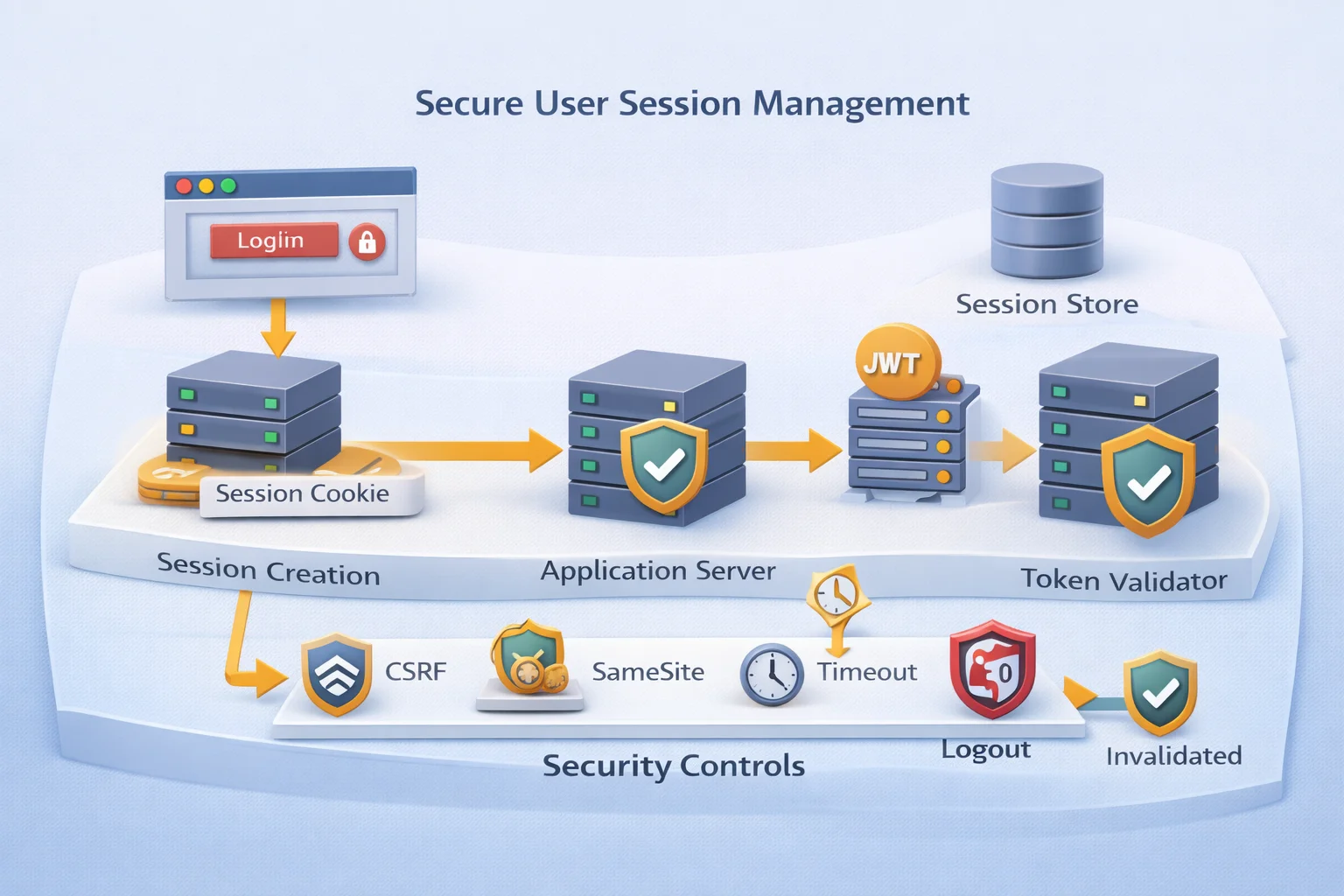
Cookies: The Backbone of Browser User Session Management
Once a session is created, it needs a way to travel between the browser and the server. That carrier is usually a cookie.
Cookies are not inherently insecure. They are simply small pieces of data stored in the browser and automatically sent with every matching request. In the context of user session management, the cookie typically contains a session identifier, a random, high-entropy value that maps to server-side session data.
The cookie itself is not the session. It is the reference to the session. This distinction matters. If your application stores sensitive data directly inside cookies without protection, you are increasing the risk. A properly designed secure session management system stores only a session ID in the cookie, while the actual state remains on the server.
Each attribute plays a critical role in browser session security.
The HttpOnly flag prevents JavaScript from accessing the cookie. Without it, a single XSS vulnerability can expose session IDs to attackers. A cookie without HttpOnly is essentially telling the browser, “If a malicious script runs, feel free to share the keys.”
The Secure flag ensures the cookie is only transmitted over HTTPS. Without it, the session ID could be intercepted over unsecured connections. In 2026, transmitting session cookies over HTTP is not a configuration mistake. It is negligence.
The Path and Domain attributes control scope. If a session cookie is unnecessarily scoped to broad domains or subdomains, you increase exposure. Cookie scope should be as restrictive as possible.
And then there is SameSite, arguably the most misunderstood attribute in session management best practices.
Before we get to SameSite, understand this: every time a browser makes a request to your domain, it automatically attaches cookies that match the request scope. The browser does this silently. It does not ask the user. It does not evaluate intent. It simply includes them.
That automation is convenient. It is also the root of several attack classes. A simplified browser session flow looks like this:
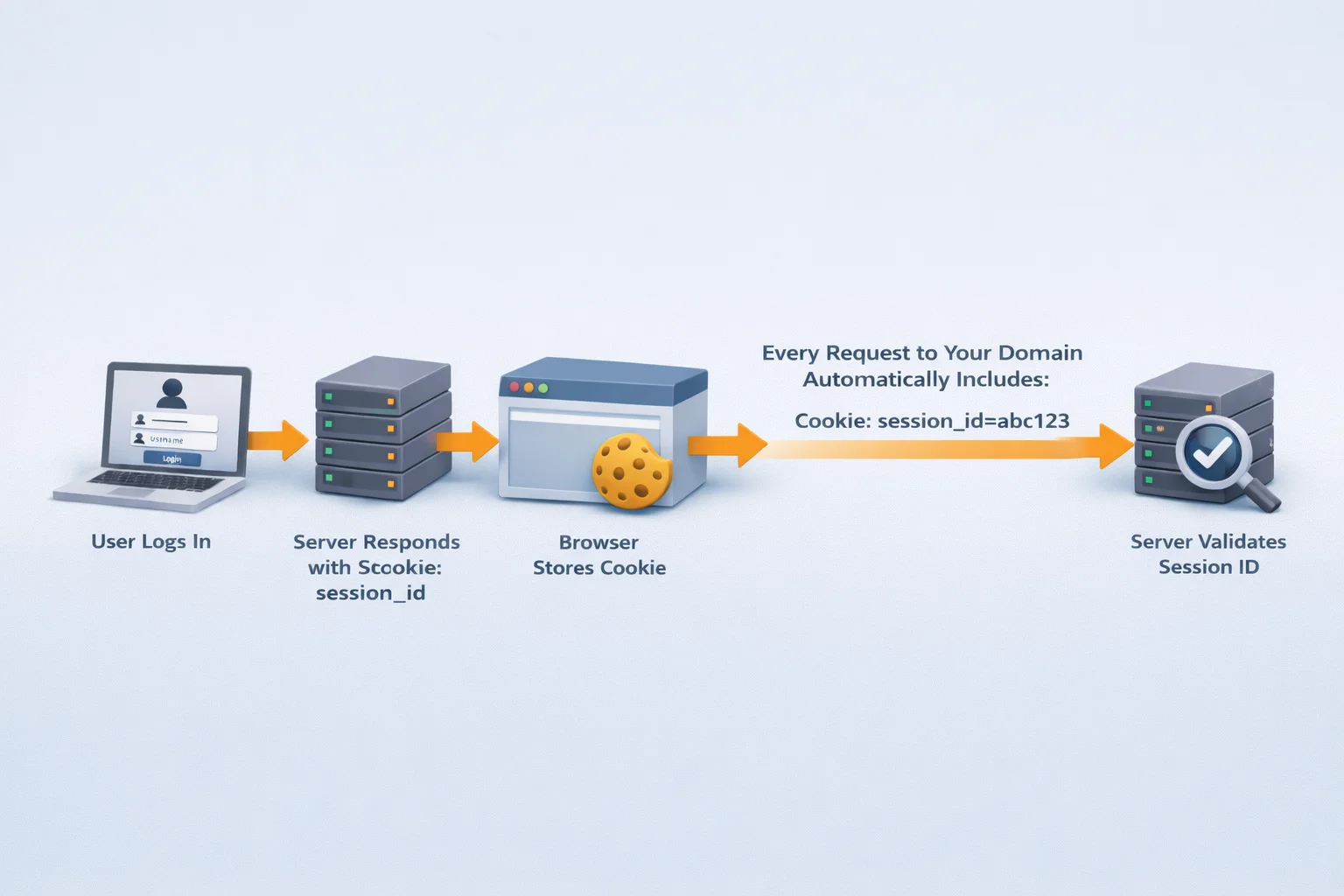
This automatic inclusion is what makes sessions usable. It is also why misconfigured cookies can undermine the entire security model.
When teams ask, “How secure is session handling in browsers?” the real answer depends heavily on how cookies are configured. The authentication mechanism might be flawless, but if the session cookie lacks proper attributes, the system remains vulnerable.
Secure cookies are not optional enhancements. They are fundamental controls for protecting the user session lifecycle.
SameSite Cookies: Your First Line of Defense Against CSRF
Browsers are helpful, sometimes too helpful. By default, they automatically attach cookies to requests, regardless of whether the request was triggered by your app or a malicious site. That convenience enables seamless sessions and Cross-Site Request Forgery (CSRF).
Without protection, an attacker can trick a logged-in user into sending a request to your application. The browser includes the session cookie, and the server assumes the request is legitimate.
That’s where the SameSite attribute comes in. SameSite tells the browser when it’s allowed to send cookies in cross-site requests. It’s browser-enforced, not server-side and it’s now a baseline control in secure session management.
There are three modes:
SameSite=Strict
Cookies are sent only for same-site requests. Strong CSRF protection, but may break cross-site flows like OAuth.
SameSite=Lax
Cookies are sent for top-level navigation (like link clicks) but blocked for most cross-site POST requests. Balanced protection and now the default in many browsers.
SameSite=None
Cookies are sent in all contexts, but must include the Secure flag. Common in federated authentication scenarios.
With SameSite properly configured, many CSRF attacks fail before they reach your server.
But SameSite is not a silver bullet. It does not replace CSRF tokens. It does not stop XSS. It does not protect stolen session IDs. SameSite limits when cookies are sent it doesn’t validate user intent.
If you’re asking, “How secure is session handling today?” The answer must include whether SameSite is explicitly configured. Relying on browser defaults isn’t a strategy. It’s luck.
CSRF Protection: Because SameSite Isn’t a Force Field
SameSite is helpful but it’s not complete protection. If your session cookie must be sent cross-site (federated login, embedded apps, multi-domain setups), you’ll likely use SameSite=None; Secure. That reopens CSRF exposure. And even with Lax or Strict, attackers will target any endpoint you forgot to protect.
In simple terms, CSRF happens when a logged-in user visits a malicious site, and the browser automatically includes their session cookie in an unintended request. The server sees a valid session and assumes the action is authorized.
It’s not hacking. It's a browser-assisted impersonation. That’s why secure session management requires server-side intent validation not just cookie rules.
The standard solution is a CSRF token: a random value tied to the user’s session and required on state-changing requests (POST, PUT, DELETE). Attackers can trigger requests, but they can’t guess or read the token.
There are two common approaches:
-
Synchronizer token pattern: store a token in the server session and validate it on submission.
-
Double-submit cookie: send the token in both a cookie and request parameter, then compare.
And here’s the important part: CSRF protection isn’t optional just because you “use an API.” If your API relies on cookie-based authentication in the browser, you still have CSRF risk.
So when evaluating how secure your session handling is, the answer depends on both:
-
Browser-side controls (SameSite, Secure, HttpOnly)
-
Server-side validation (CSRF tokens on state-changing requests)
You need both.
Session Timeout Best Practices Because “Forever” Isn’t a Security Strategy
Sessions shouldn’t outlive your confidence in the user’s context and that confidence fades fast. A session that never expires is an open invitation for abuse. One stolen cookie, one shared device, one forgotten logout, and your user session management becomes “hope nothing happens.”
A strong timeout strategy uses two controls:
1. Idle timeout
Expires the session after inactivity (e.g., 15–30 minutes). This protects against walk-away scenarios and is critical for admin panels, payments, and security settings.
2. Absolute timeout
Ends the session after a fixed lifetime (e.g., 8–24 hours), even if the user is active. This prevents long-lived sessions from becoming permanent access.
Idle timeout reduces casual exposure. Absolute timeout limits persistent risk.
Be careful with sliding expiration. If every background API call extends the session, you may accidentally create immortal sessions. Sliding timeouts should respond to meaningful user actions not passive network noise.
A healthy lifecycle looks like this:
User logs in ↓ Session active ↓ No activity → idle timeout → session expires OR Continued activity → absolute timeout → force re-authentication
For sensitive actions (password changes, MFA updates, data exports), require step-up authentication. Sessions aren’t binary; trust should be contextual.
And most importantly, enforce timeouts on the server. Redirecting to /login while the session remains valid isn’t security. Attackers don’t care what your UI says. They care what your API accepts.
Logout That Actually Works, Not Just “Delete Cookie and Pray”
Logout looks simple. Click the button, redirect to login, done. Except in many apps, the session is still valid on the server.
Proper user session management requires two things:
-
Client-side cleanup
-
Server-side invalidation
Deleting the browser cookie without invalidating the server session doesn’t end access. It just hides it.
A secure logout flow:
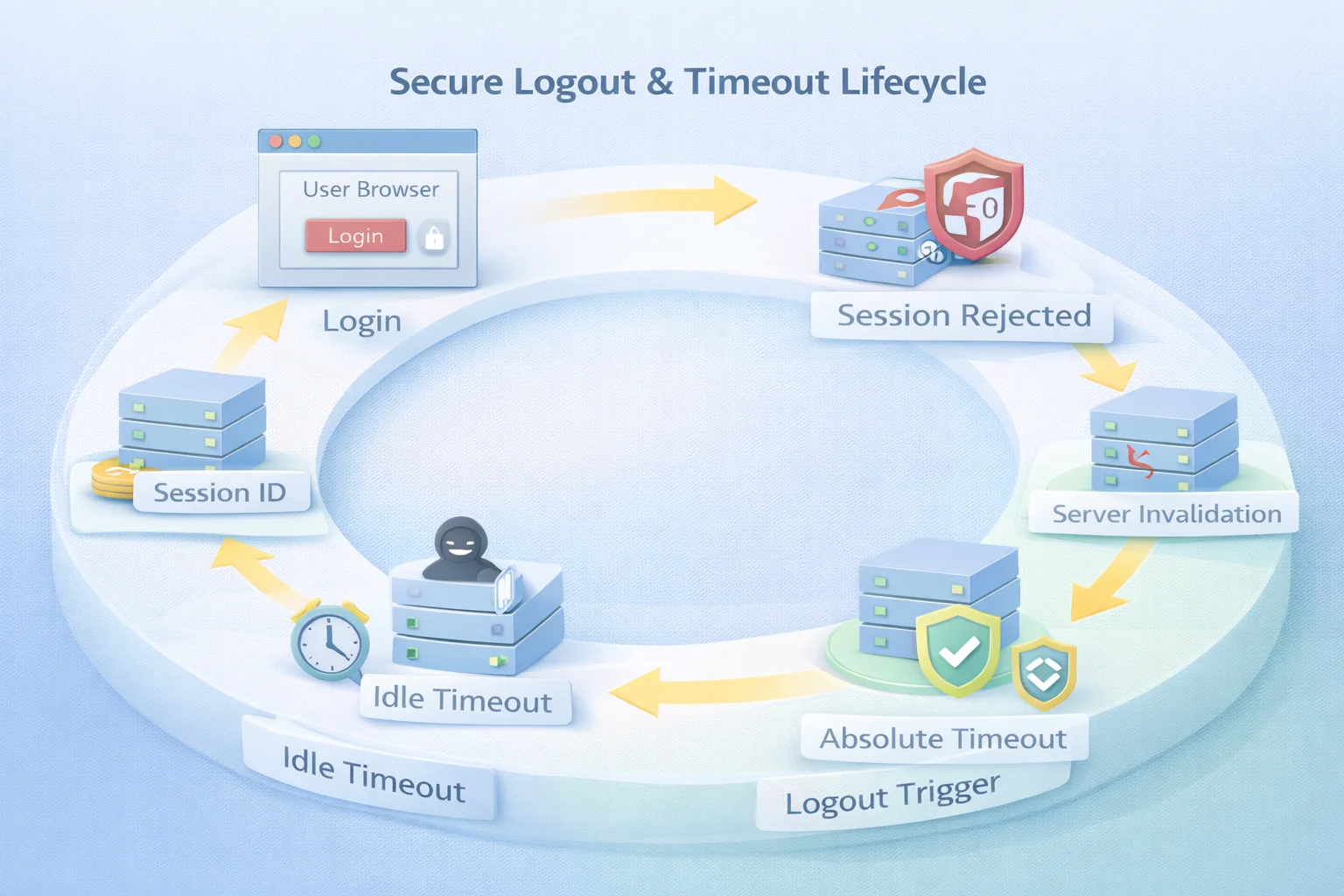
That server-side invalidation step is mandatory. In stateful systems, delete the session record. In stateless systems, revoke or rotate tokens. Without it, logout is cosmetic.
Now add reality: users log in across multiple tabs and devices. If logout only affects one browser instance, other sessions may remain active. Strong session lifecycle design should support device-specific or global logout, with visibility into active sessions.
Federated authentication complicates this further. Logging out of your app may not log the user out of the identity provider unless Single Logout (SLO) is properly implemented.
And don’t forget the back button. If cached pages still render sensitive data, your logout isn’t complete. Server-side validation and proper cache headers matter.
If an old session ID still works after logout, your system isn’t secure. It’s pretending.
And remember: attackers don’t click “Logout.” That’s why sessions must also end through idle timeout, absolute timeout, administrative revocation, or risk-based invalidation.
How Secure Is Session Management Really?
On paper, everything looks secure. Cookies are hardened. SameSite is configured. CSRF tokens are validated. Timeouts exist. Logout is implemented. But real session security isn’t defined by features, it’s defined by lifecycle control.
Most breaches involving authenticated users don’t begin with cracked passwords. They begin with valid sessions that were never rotated, expired, revoked, or re-evaluated. Session security typically breaks in predictable ways.
Session hijacking happens when an attacker obtains a valid session ID through XSS, insecure transport, exposed logs, or compromised devices. With that ID, they inherit the user’s access without touching credentials.
Session fixation occurs when session IDs aren’t rotated after login. An attacker can pre-seed a session and wait for the victim to authenticate. Excessive session lifetimes increase exposure. Long-lived sessions don’t need to be attacked immediately; they simply need to exist long enough.
Incomplete revocation leaves gaps. A logout that clears one tab but not the server, or fails to propagate across services, keeps trust alive longer than intended. Then there’s a more subtle issue: static trust.
Traditional user session management assumes that authentication grants ongoing legitimacy until timeout. Modern threat models reject that assumption. Context changes IP shifts, device fingerprints evolve, geolocation jumps, behavior patterns deviate.
A mature architecture detects those signals and responds. That’s where adaptive validation, device binding, anomaly detection, and risk-based re-authentication come in. This is also where secure session management aligns with Zero Trust thinking.
Authentication establishes identity. Authorization defines access. Session management determines how long and under what conditions access remains valid. That’s where real security either holds or quietly fails.
Secure Session Management Checklist: The Controls That Actually Matter
User session management isn’t a single feature. It’s a set of coordinated controls that protect trust over time. Strong authentication means little if the session lifecycle is weak.
Here’s what modern secure session management should include.
Session identifiers must be high-entropy and generated using a cryptographically secure source. If they’re predictable, everything else is irrelevant.
Rotate session IDs at critical moments after login, privilege elevation, or step-up authentication. This blocks session fixation and limits exposure from pre-authenticated states.
Harden cookies properly. Mark them HttpOnly to reduce XSS risk, Secure to enforce HTTPS transmission, and explicitly configure SameSite. Scope domain and path as narrowly as possible.
Protect state-changing operations with server-side CSRF validation. SameSite helps, but CSRF tokens validate intent. If you rely on cookies for authentication, this layer is mandatory.
Apply meaningful timeout controls. Use idle timeouts to reduce walk-away risk and absolute timeouts to prevent endless access. Implement sliding expiration carefully so background API traffic doesn’t create immortal sessions.
Invalidate sessions on the server during logout. Clearing a browser cookie is insufficient. The session record or token must be revoked to prevent reuse.
Monitor for anomalies. IP drift, device changes, geolocation shifts, or unusual request patterns should trigger re-authentication or termination. This is where session control overlaps with continuous authentication.
Provide visibility and revocation controls. Users and administrators should be able to view and terminate active sessions. In distributed systems, revocation must propagate consistently.
In stateless architectures, avoid storing sensitive data in client-side tokens unless properly signed and validated. Short lifetimes and token rotation are essential to maintain control.
Ultimately, sessions should be treated as governed objects. Track their lifecycle, audit their creation and destruction, and align policies with compliance requirements such as PCI DSS, HIPAA, SOC 2, or GDPR.
Authentication proves identity. Authorization defines permissions. Session management determines how long that trust remains justified.
Stateful vs Stateless Sessions: Architecture Shapes the Controls
Session architecture directly affects how you implement user session management.
There are two primary models: stateful and stateless.
In a stateful model, the server stores session data in memory, a database, or a distributed cache. The browser holds only a session ID (usually in a cookie), which the server uses to retrieve session state on each request.
This makes revocation straightforward. Deleting the session record immediately ends access. Logout is deterministic, and idle timeouts are enforced server-side. However, this model requires scalable storage and consistent synchronization across servers in distributed systems.
In a stateless model, session data is embedded inside a signed token, commonly a JWT. The server validates the token signature instead of performing a lookup.
This improves horizontal scalability and works well in microservices environments. But revocation becomes more complex. If a token is valid and unexpired, the server accepts it. Ending access requires short-lived tokens, token rotation, blacklists, or additional revocation mechanisms.
In stateless systems, secure session management shifts from centralized invalidation to reducing exposure windows through strict expiration and rotation policies. Neither approach is inherently superior. The trade-offs are different.
Stateful sessions simplify revocation but require infrastructure management. Stateless sessions scale efficiently but demand disciplined expiration strategies. Regardless of the model, the fundamentals remain:
Session identifiers must be unpredictable. Cookies must be hardened. Timeouts must be enforced. Logout must invalidate access. Active sessions must be monitored.
The real question isn’t whether you use JWTs or session IDs. It’s whether your architecture supports strong lifecycle control. Because every session stateful or stateless, represents trust. And trust must be tightly governed.
Beyond Traditional Sessions Toward Continuous Validation
For years, session management followed a simple pattern: authenticate once, create a session, and trust it until timeout. That model assumed static trust. Modern threat landscapes don’t.
Today, sessions are treated as evolving risk states. Instead of asking only, “Was the user authenticated?” systems ask, “Does this session still look legitimate right now?”
Continuous validation evaluates contextual signals such as: IP changes, Device fingerprint shifts, Unusual request patterns, and unexpected privilege use
When behavior deviates, the system can trigger step-up authentication, suspend access, or revoke the session entirely. This doesn’t replace traditional secure session management controls it builds on them. Strong cookie settings, timeout enforcement, CSRF protection, and server-side invalidation remain essential.
The difference is timing. Rather than waiting for a fixed timeout, continuous models reassess trust dynamically. Risk-based evaluation also improves user experience. Routine activity from a known device may proceed smoothly, while sensitive actions from unfamiliar environments require additional verification.
Session management is no longer just about maintaining state. It’s about governing trust over time. In modern web security, it’s not enough to know who logged in. You must continuously validate that the trust you granted still makes sense.
Conclusion
Authentication starts trust. It does not preserve it. You can enforce MFA, strong passwords, and modern login flows, yet still weaken your security posture if user session management is poorly controlled. Once authentication succeeds, the session becomes the active embodiment of identity.
The real question isn’t whether login is secure. It’s whether trust is governed after login. Effective secure session management means hardening cookies with HttpOnly, Secure, and SameSite. It means enforcing CSRF validation, rotating session identifiers at key transitions, applying meaningful idle and absolute timeouts, and ensuring logout invalidates sessions on the server.
It also requires moving beyond static trust. Sessions should be monitored, evaluated, and revoked when context changes, not treated as indefinite permission slips.
When assessing session security, the answer lies in lifecycle control. Strong systems don’t just create sessions; they manage them deliberately.
Authentication verifies identity. Authorization defines access. Session management determines how long the access remains valid and whether it remains safe.
Get that right, and security holds. Get it wrong, and everything else becomes surface-level protection.
FAQs
Q: What is user session management?
A: User session management is the process of creating, maintaining, validating, and terminating authenticated user sessions in a web application. It ensures that a logged-in user remains securely identified across multiple requests.
Q: What is session management in web application security?
A: Session management in web applications controls how authentication state is stored (usually via cookies or tokens) and how long it remains valid. It includes timeout policies, cookie security, CSRF protection, and logout handling.
Q: How secure is session handling in browsers?
A: Session security depends on proper cookie configuration (HttpOnly, Secure, SameSite), strong session ID generation, timeout enforcement, and server-side invalidation. Misconfigured sessions can lead to hijacking or CSRF attacks.
Q: What are session timeout best practices?
A: Best practices include implementing both idle and absolute timeouts, rotating session IDs after login or privilege changes, and enforcing server-side expiration. Timeouts should balance user experience with risk exposure.
Q: What is the difference between authentication and session management?
A: Authentication verifies a user’s identity at login. Session management maintains and governs that authenticated state over time, ensuring trust remains valid throughout the user’s interaction.